


Remote management of industrial communication equipment refers to the methods used to monitor, configure, update, diagnose, and maintain field communication devices without requiring engineers to visit the site every time. These devices may include industrial phones, emergency call stations, SIP intercoms, gateways, IP speakers, dispatch terminals, paging equipment, wireless communication nodes, and network-connected control room devices.
In industrial environments, communication equipment is often deployed in remote, noisy, hazardous, outdoor, high-temperature, dusty, humid, or hard-to-access locations. A well-designed remote management method helps reduce downtime, shorten fault response time, standardize configuration, improve security, and support long-term maintenance across many sites.
Why Remote Operation Is More Than Convenience
For ordinary office equipment, remote access may mainly improve efficiency. For industrial communication systems, it can directly affect safety, production continuity, and emergency response. A failed emergency phone in a tunnel, a misconfigured gateway in a plant, or an offline intercom at a gate may create operational risk if the fault is discovered too late.
Remote management gives administrators visibility into device status before users report problems. They can check registration state, network connectivity, call logs, firmware version, configuration changes, power status, alarm records, and service availability from a central location.
This is especially important for organizations that operate multiple factories, substations, mines, ports, tunnels, warehouses, campuses, transportation facilities, or distributed outdoor sites. Manual site-by-site maintenance is slow, costly, and inconsistent.
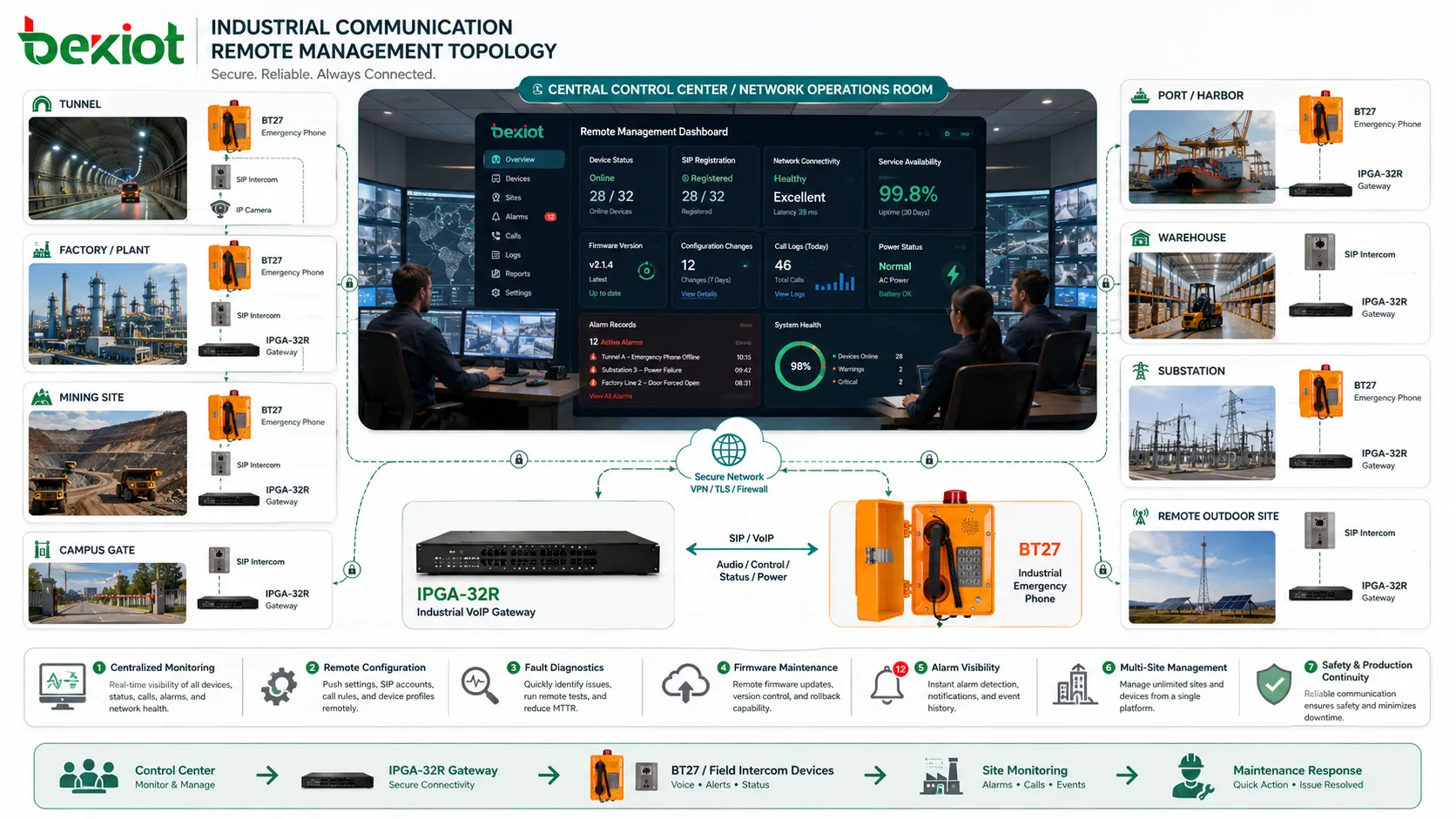
Management Architecture from Field Device to Platform
Device Layer
The device layer includes the communication endpoints installed in the field. These may be wall-mounted phones, explosion-proof phones, help points, gateways, paging terminals, IP speakers, control room panels, or industrial SIP devices. Each device should have a unique identity, network address, configuration profile, and maintenance record.
In harsh locations, the device must also provide stable hardware performance. For example, Becke Telcom’s BT27 industrial phone and EX-BH621 explosion-proof phone can be considered in projects where rugged voice communication devices need to be integrated into a remotely managed industrial communication environment.
Network Access Layer
The access layer connects field equipment to the management side. It may use Ethernet, fiber, Wi-Fi, private LTE, 4G/5G routers, VPN links, industrial switches, or dedicated communication networks. The quality of remote management depends heavily on this layer.
If the access network is unstable, device status may appear unreliable, firmware upgrades may fail, and remote diagnostics may be incomplete. Therefore, link monitoring and redundancy should be considered for critical points.
Service and Control Layer
The service layer includes IP PBX, SIP server, dispatch platform, alarm platform, device management system, configuration server, logging system, or monitoring dashboard. It provides the tools needed to view device health, push settings, collect alarms, and control maintenance workflows.
A mature architecture separates daily voice service from maintenance access where possible. This reduces the risk that management activity interferes with real-time communication.
Secure Access Is the First Requirement
Remote management should never mean exposing field devices directly to the public internet with weak passwords or open ports. Industrial communication equipment may sit in critical environments, so unauthorized access could disrupt communication, change call routing, disable alarms, or leak operational information.
Common secure access methods include VPN, private APN, site-to-site encrypted tunnels, jump servers, zero-trust access, firewall whitelisting, role-based accounts, certificate authentication, and secure management protocols. The right method depends on network topology and risk level.
Default passwords should be changed before deployment. Administrative accounts should be separated by role, and all remote operations should be logged. If multiple contractors or departments manage the same system, account ownership and access approval should be clearly defined.
Centralized Monitoring and Health Visibility
Online and Offline Status
The most basic monitoring function is whether the device is online. For SIP devices, registration status is often important. For gateways and controllers, heartbeat status, network reachability, or SNMP polling may be used.
Offline alarms should include location and device role. A message such as “Device offline” is not enough. Operators need to know whether the affected unit is a gate phone, tunnel help point, plant intercom, paging amplifier, or backup gateway.
Call and Service Status
For voice equipment, remote management should track call success, failed registration, call attempts, abnormal hangup, busy routes, codec mismatch, one-way audio reports, and trunk availability.
These records help administrators distinguish between device failure, network failure, SIP server issue, routing problem, and user operation problem.
Power and Environmental Indicators
Industrial sites may face unstable power, high temperature, moisture, lightning, vibration, or dust. If supported, the system can monitor PoE status, power input, battery backup, enclosure alarm, temperature, port status, or external sensors.
Environmental visibility helps predict faults before they become communication outages.
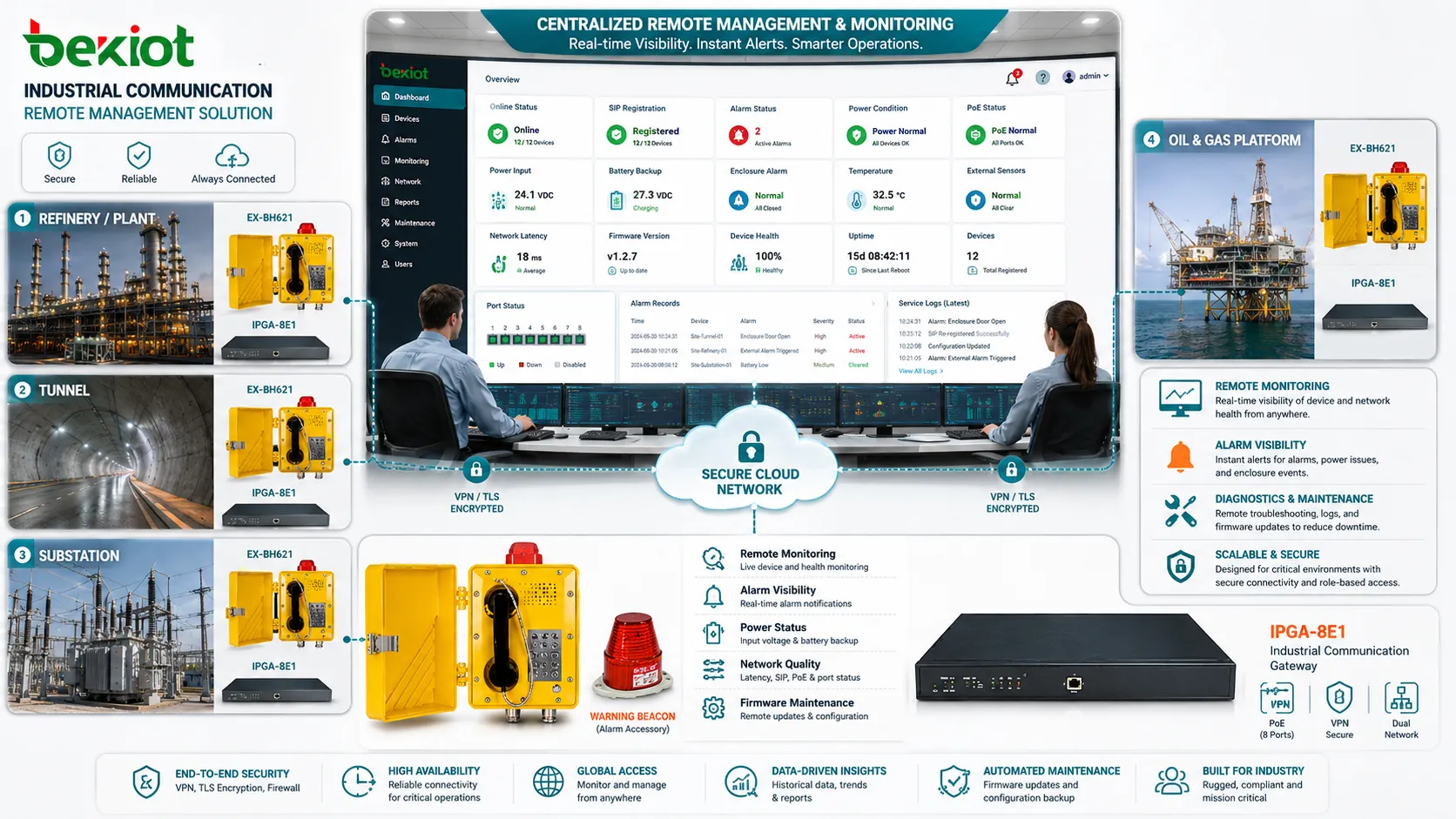
Configuration Control and Template Management
Configuration is one of the most important parts of remote management. Industrial communication devices often include SIP accounts, server addresses, emergency numbers, speed dial keys, volume levels, codec settings, VLAN parameters, NTP servers, access passwords, relay actions, alarm contacts, and maintenance permissions.
Manual configuration becomes risky when many devices are deployed. A wrong extension, wrong server address, wrong emergency destination, or inconsistent codec setting can create hidden faults. Template-based configuration reduces these errors.
Administrators can create different templates for different roles, such as emergency phones, gate intercoms, office industrial phones, tunnel help points, warehouse devices, or explosion-proof area phones. Each template should define only the settings needed for that role.
Backup and Restore Strategy
Before making any remote change, the current configuration should be backed up. This allows administrators to restore a known working state if a new setting causes problems.
Backup files should be versioned, encrypted, labeled by device identity, and stored in a secure repository. A useful backup record should include device model, location, firmware version, backup time, responsible engineer, and change reason.
Restore testing is also necessary. A backup that cannot be restored to the correct hardware or firmware version provides false confidence. For critical sites, spare devices should be prepared with tested configuration restore procedures.
Firmware Upgrade and Patch Management
Controlled Upgrade Window
Firmware upgrades can improve stability, security, codec compatibility, protocol support, and device functions. However, remote upgrade also carries risk. A failed upgrade may leave the device unreachable, especially when the device is installed far from technical staff.
Critical equipment should be upgraded during planned maintenance windows. The site team should know the upgrade schedule, and rollback plans should be prepared before starting.
Batch Upgrade with Pilot Testing
For large deployments, do not upgrade every device at once. A pilot group should be selected first. The pilot should include different device types, network segments, and real operating conditions.
After confirming registration, audio quality, alarm behavior, remote access, and configuration compatibility, the upgrade can be expanded gradually.
Version Consistency
Mixed firmware versions may cause inconsistent behavior. Central records should show which devices are running which versions, which versions are approved, and which devices are waiting for upgrade.
This helps troubleshooting because engineers can quickly see whether a problem is related to a specific firmware branch.
Remote Diagnostics and Fault Isolation
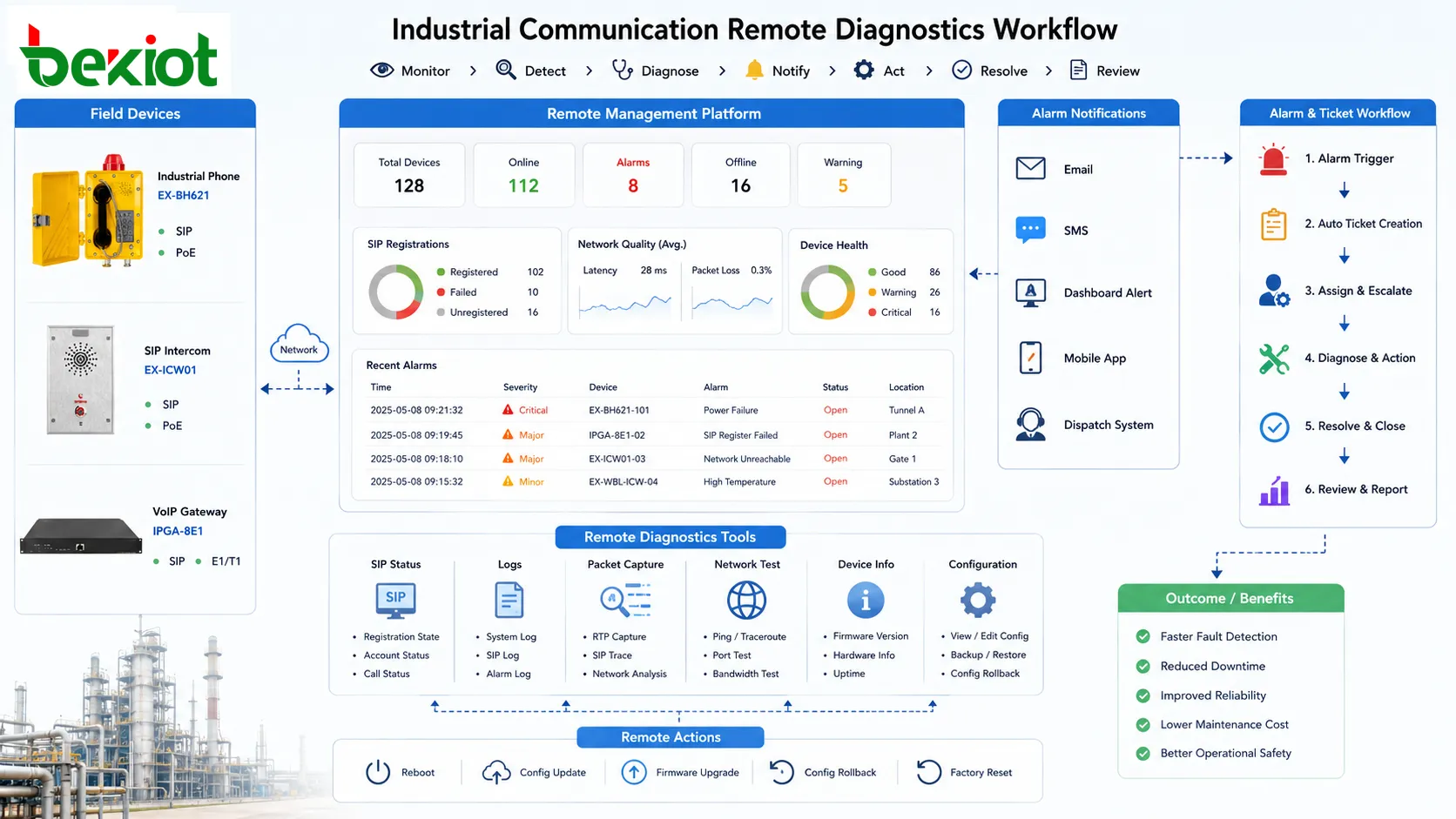
Remote diagnostics should help determine where the fault is located. A communication failure may come from the device, power supply, network switch, SIP server, firewall, cable, gateway, codec negotiation, or routing rule. Without diagnostic tools, engineers may waste time visiting the wrong location.
Useful diagnostic functions include ping test, traceroute, SIP registration log, call log, packet capture, port status, reboot history, configuration comparison, audio test, relay status, and event records.
Some issues require correlation. For example, if several devices behind the same switch go offline at the same time, the problem may be network or power related rather than individual device failure. A central system should help identify such patterns.
Alarm Handling and Maintenance Workflow
Remote management should not only display alarms; it should also support a response process. Each alarm should have severity, time, location, device type, probable cause, assigned owner, and handling status.
Important alarms should trigger notifications through email, SMS, dashboard pop-up, mobile app, or dispatch system. However, alarm design should avoid excessive noise. Too many low-value alerts can cause operators to ignore important events.
Maintenance workflows may include automatic ticket creation, escalation rules, spare device request, site visit scheduling, fault closure, and post-maintenance review. This turns monitoring data into organized action.
Network Segmentation and Access Control
Industrial communication devices should not be placed in an uncontrolled flat network. Segmentation helps separate voice devices, management platforms, office IT, surveillance systems, guest networks, and control systems.
VLANs, firewall policies, ACLs, routing rules, and management zones can limit unnecessary access. For example, a field phone may need to communicate with a SIP server and management platform, but it usually does not need access to office file servers or unrelated industrial controllers.
Access control also protects the management system itself. A central platform with authority over many devices should be treated as a high-value system and protected with strong authentication, logging, backup, and role separation.
Time Synchronization and Log Accuracy
Accurate time is essential for troubleshooting. If device clocks are wrong, call logs, alarm records, registration events, and maintenance actions become difficult to correlate.
All devices should use reliable NTP sources. In isolated industrial networks, local time servers may be deployed. Time zone settings should be consistent across devices and platforms.
During incident review, accurate timestamps help determine whether the root cause was a network outage, power event, server restart, configuration change, or user action.
Asset Inventory and Location Mapping
Remote management becomes more useful when each device is tied to a real physical location and role. A device name should not only be a serial number. It should indicate where the device is installed and what it does.
Inventory records should include model, serial number, IP address, MAC address, extension number, firmware version, installation location, responsible department, power source, network switch port, and maintenance history.
Location mapping is especially important for emergency communication. When a user presses a help button or places an emergency call, the operator must quickly know where the call is coming from.
Daily Maintenance Method
Daily remote checks should include online status, registration state, alarms, failed calls, abnormal reboot, firmware mismatch, configuration drift, network latency, packet loss, and power warnings.
Weekly checks may include backup verification, log review, unused account review, device naming audit, alarm threshold adjustment, and sample call testing. Monthly checks may include firmware planning, security patch review, access permission audit, and spare device readiness.
For high-risk sites, scheduled audio tests and emergency call tests should be performed. A device can appear online but still have weak audio, wrong destination, blocked relay action, or failed speaker output.
Common Mistakes in Remote Maintenance
Opening Management Ports Directly
Direct public access may seem convenient, but it creates security risk. Use VPN, private networks, access control, or secure management gateways instead.
Changing Settings Without Backup
Remote changes should always be preceded by backup. Without a restore point, a wrong setting may require an emergency site visit.
Ignoring Physical Conditions
Remote systems can show logs and status, but they cannot fully replace physical inspection. Cable damage, water ingress, corrosion, blocked microphones, damaged buttons, or broken mounting may still require site checks.
Using One Template for Every Device
Different devices have different roles. Emergency phones, office phones, gateways, and explosion-proof phones should not always share the same configuration profile.
Not Recording Change History
If configuration changes are not recorded, troubleshooting becomes difficult. Every remote change should have time, operator, reason, and result.
Recommended Implementation Path
Start by classifying devices by function and criticality. Emergency endpoints, hazardous-area phones, main gateways, dispatch terminals, and public address devices should be prioritized.
Next, build a secure access architecture. Confirm VPN, firewall rules, account policies, logging, and role permissions before enabling remote control functions.
Then create configuration templates and backup rules. Standardize SIP settings, emergency numbers, VLANs, codec preferences, passwords, and monitoring parameters according to device type.
After that, deploy monitoring and alarm workflows. Define which events are critical, who receives alerts, and how faults are closed.
Finally, review the system regularly. Remote management is not a one-time configuration; it is an operational discipline that must evolve with site expansion, security requirements, firmware updates, and maintenance experience.
Remote management is effective when secure access, reliable monitoring, controlled configuration, backup, diagnostics, and maintenance workflow are designed as one complete operating method.
FAQ
Can remote management completely replace on-site inspection?
No. It can reduce site visits and speed up diagnosis, but physical issues such as cable damage, corrosion, water ingress, impact damage, or blocked acoustic parts may still require field inspection.
What should be checked before enabling remote access?
Check authentication strength, VPN or private network design, firewall rules, account roles, password policy, logging, backup, and whether public exposure is avoided.
Why does a device show online but fail during calls?
Online status only proves basic connectivity. Call failure may be caused by SIP registration errors, codec mismatch, RTP blockage, wrong routing, audio hardware issues, or server-side policy.
How should firmware upgrades be handled across many sites?
Use pilot testing first, schedule maintenance windows, back up configurations, monitor upgrade results, keep rollback plans ready, and avoid upgrading all critical devices at the same time.
What information should be included in device inventory?
Record device model, serial number, IP address, MAC address, extension, location, network port, firmware version, power source, configuration version, and maintenance history.







