


Video surveillance is no longer used only for security viewing and recording. In smart city projects, industrial parks, emergency command centers, traffic platforms, AI analysis systems, building management platforms, and unified communication systems, the same camera resources are often required by several applications at the same time. When every system pulls video directly from cameras, recorders, or monitoring platforms, the result can be unstable streams, high device pressure, video lag, mosaic images, black screens, failed stream pulling, and even network congestion.
A video one-to-many distribution solution solves this problem by placing a video access gateway or video media gateway between the original monitoring resources and third-party business systems. The gateway obtains one video source from a camera, NVR, VMS, or monitoring platform, then converts, transcodes, and distributes multiple output streams to different applications. This creates a cleaner video resource architecture and turns fragmented video access into a unified video capability center.
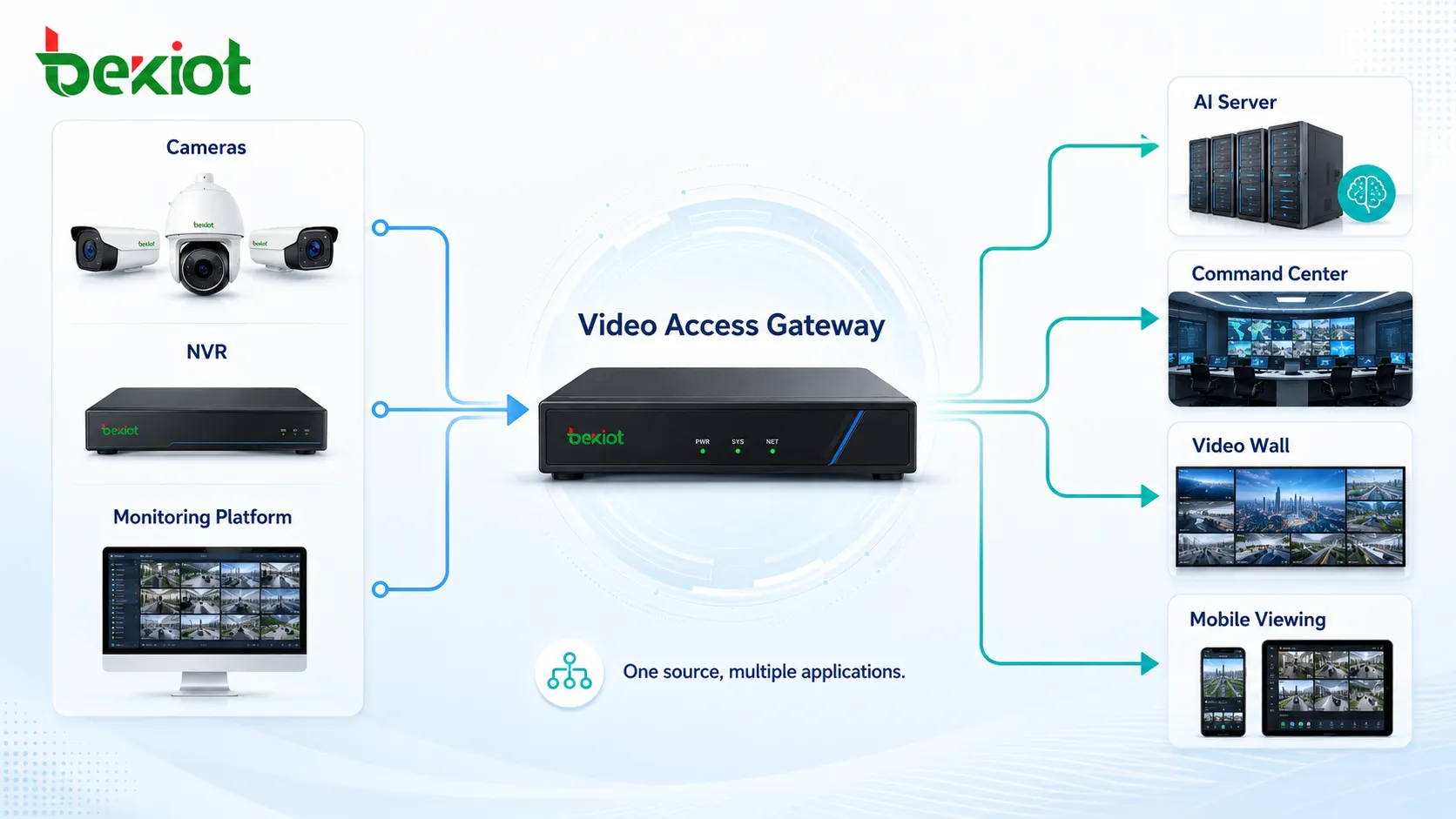
Why Direct Camera Pulling Creates Problems
In many early projects, third-party systems pull video streams directly from cameras through RTSP, SDK, or other device-level interfaces. For one small project, this method may still work. However, when multiple platforms need to use the same surveillance video, direct pulling quickly becomes difficult to manage.
A camera or recorder may need to serve a monitoring client, an AI server, a command platform, a mobile viewing system, a video wall, and a live streaming service at the same time. Each additional connection consumes device resources and network bandwidth. If the camera is not designed to handle many simultaneous pulls, users may experience stream interruption, unstable playback, decoding failure, or delayed video.
The core issue is not the camera itself, but the access method. When all application pressure is pushed to the surveillance side, the monitoring system becomes overloaded. A better design is to let the surveillance system provide one stable source stream, while the gateway handles distribution and adaptation for different business systems.
A Gateway Layer Makes Video Resources Easier to Use
A video access gateway acts as a video middle platform. It can obtain video from multiple layers, including IP cameras, NVRs, video management platforms, streaming platforms, unmanned aerial video resources, and other video systems. After access, it can provide protocol conversion, stream forwarding, codec adaptation, format packaging, and API-based integration for external applications.
This design separates video collection from video application. Cameras and monitoring platforms focus on stable video acquisition and storage, while the gateway focuses on distribution, conversion, and service output. As a result, different business systems no longer need to connect directly to the original surveillance devices.
For organizations with many departments or platforms, this creates a unified entry point for video use. AI analysis, command dispatch, web viewing, mobile apps, video meetings, GIS maps, large-screen visualization, and emergency systems can all access video through a controlled gateway layer.
Multiple Protocol Outputs for Different Applications
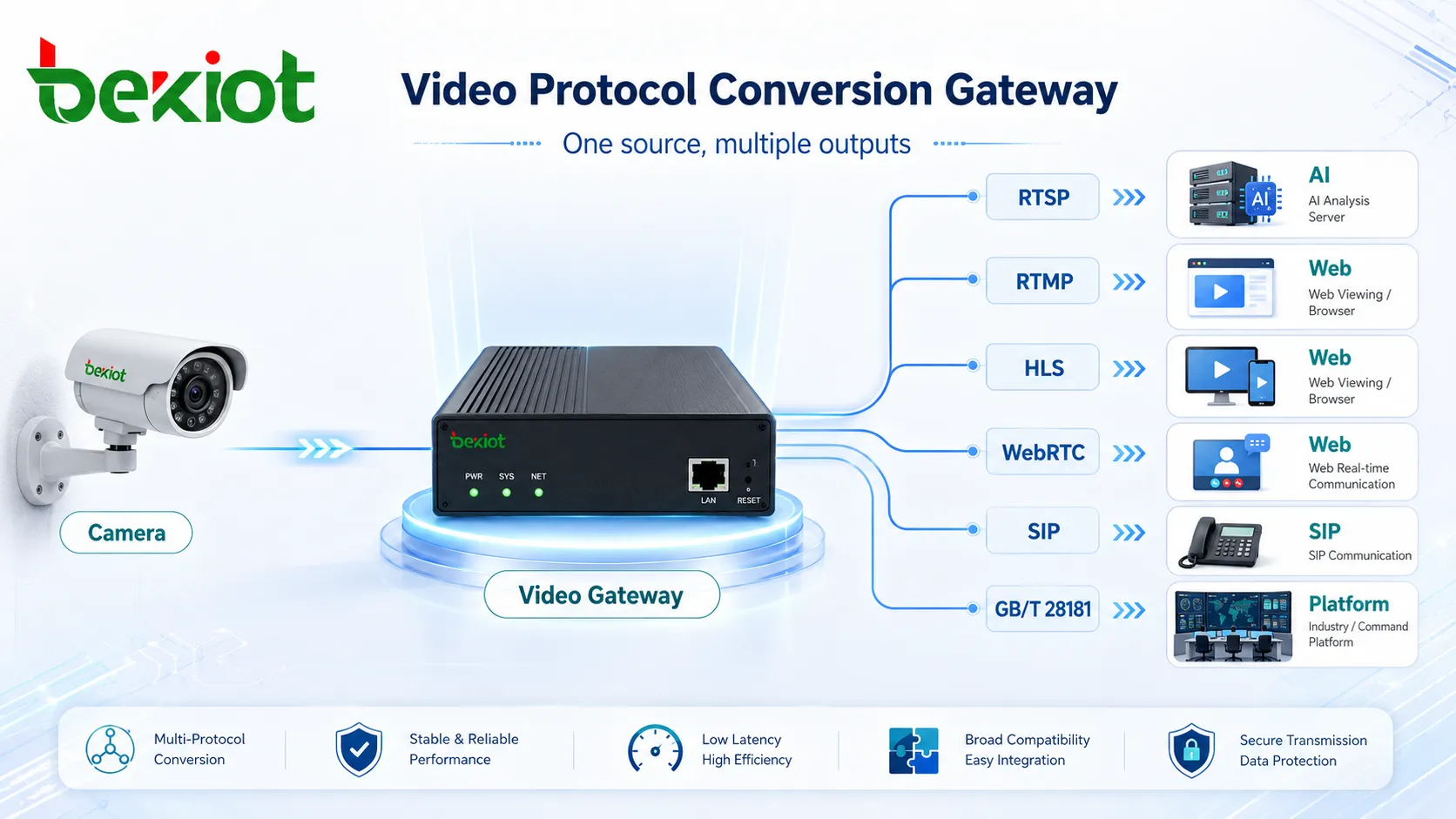
Different systems often require different video protocols. An AI analysis server may prefer RTSP. A web viewing platform may need HTTP-FLV, WS-FLV, HLS, or WebRTC. A video meeting or converged communication platform may require SIP video. A national or industry monitoring platform may need GB/T28181. A live broadcasting system may use RTMP.
A one-to-many distribution solution can output multiple streams from one original source according to application requirements. Common output protocols may include RTSP, RTMP, RTP, HTTP-FLV, WS-FLV, HLS, HTTP-MP4, WebRTC, SIP, SIP Webphone, and GB/T28181. This allows the same camera video to serve different systems without repeated direct access to the camera.
The output method can also be flexible. Some systems obtain stream addresses through configuration. Some require stream pushing. Others need API-based calls for deeper platform integration. A gateway-based design can support these different methods in one architecture.
AI Analysis and Real-Time Viewing Can Work Together
A common scenario is AI video analysis. The AI server may need a stable RTSP stream for object recognition, intrusion detection, behavior analysis, safety monitoring, or event detection. At the same time, operators may still need real-time viewing through a browser, mobile app, or command platform.
Without one-to-many distribution, both the AI server and the viewing platform may pull video directly from the same camera. As more applications are added, pressure increases. With a video access gateway, the camera provides one source stream, the AI server receives an RTSP stream, and the viewing platform receives FLV, HLS, WebRTC, or another suitable stream.
This keeps the monitoring source more stable while allowing AI and human operators to use the same video resource in different ways. It also makes future expansion easier because new applications can be added through the gateway instead of changing the camera-side architecture repeatedly.
Command Centers Need Flexible Video Delivery
Emergency command, dispatch centers, and integrated communication platforms often need to use video together with voice, maps, alarms, and field coordination. In these environments, a camera stream may need to be sent to a video meeting system, a dispatch console, a SIP communication system, or a large-screen command wall.
When a command platform needs SIP video, the video access gateway can convert the monitoring source into a SIP-compatible stream for communication or conference systems. When the same video needs to be displayed on a large screen, the gateway can provide WebRTC, RTSP, or another output suitable for decoding and screen display.
For complex command scenarios, this flexibility is important. The same camera may support live monitoring, emergency meeting sharing, video wall display, mobile viewing, and event recording at the same time. A one-to-many architecture keeps this process organized and reduces repeated integration work.
Large-Screen Visualization and Video Wall Applications
Many smart projects require a “one-map” visual platform or a command center video wall. These systems usually need to combine maps, alarms, data panels, camera feeds, device status, and real-time video into one visual interface. Video must be delivered in a format that the platform can decode and display smoothly.
A video distribution gateway can provide the appropriate stream for large-screen display, decoding walls, or browser-based visualization. For example, WebRTC may be used for low-latency browser viewing, RTSP may be used for professional decoding, and RTMP may be used for live broadcast or streaming distribution.
By centralizing video output, the gateway helps developers build a more stable large-screen application. They do not need to spend excessive time adapting different cameras, SDKs, codecs, and stream formats one by one.
Transcoding Solves Compatibility Barriers
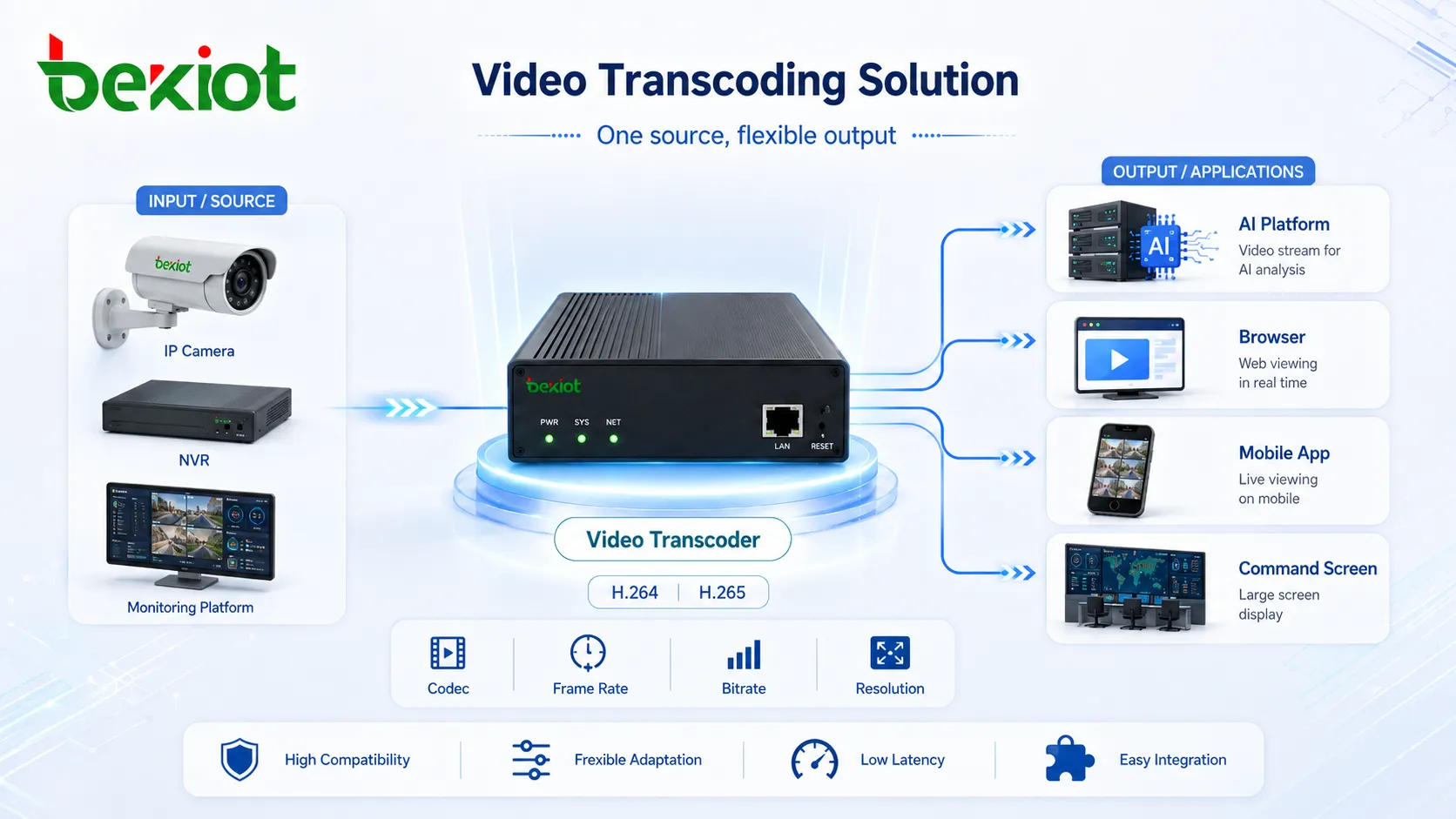
Video compatibility is one of the biggest challenges in video integration projects. Different cameras may use different codecs, frame rates, bitrates, resolutions, stream encapsulation formats, or manufacturer-specific access methods. If every business system must solve these differences by itself, project delivery becomes slow and unstable.
A video access gateway with transcoding capability can adjust video codec, frame rate, bitrate, and resolution according to the receiving system. Hardware-based transcoding can also improve processing efficiency in suitable deployments. This makes video output more compatible with AI servers, browsers, mobile apps, command platforms, video meetings, and third-party development systems.
Transcoding is not just a convenience feature. It can determine whether a video integration project can be delivered successfully. When the gateway handles video adaptation, business software teams can focus on their own application logic instead of spending most of their time solving camera compatibility problems.
Unified Management Reduces System Pressure
One important benefit of video one-to-many distribution is unified management. Instead of allowing every business platform to connect to cameras independently, the gateway becomes the controlled distribution point for video resources. Administrators can manage source access, output protocols, stream addresses, push rules, API calls, and system permissions more clearly.
This reduces pressure on cameras, NVRs, and monitoring platforms. It also reduces pressure on the surveillance network because traffic can be planned and distributed more reasonably. For maintenance teams, troubleshooting becomes easier because video access paths are clearer.
From a security perspective, a gateway layer can also reduce unnecessary exposure of camera access information. Third-party systems can use gateway-provided streams instead of directly accessing camera accounts, device SDKs, or internal monitoring resources.
Practical Use Cases Across Smart Projects
Video one-to-many distribution is suitable for many scenarios where surveillance video needs to serve multiple systems. In AI projects, it can send one stream to an analysis server while providing another stream for real-time viewing. In emergency command projects, it can send SIP video to a communication platform and WebRTC or RTSP video to a command screen.
In smart transportation, the same road camera may support traffic monitoring, violation analysis, event warning, command display, and data sharing. In industrial parks, camera feeds may be used by security teams, safety supervisors, production platforms, visitor systems, and emergency response centers. In smart campuses and buildings, video may need to support security management, alarm linkage, mobile access, and central control rooms.
The more applications need the same video resource, the more valuable the one-to-many architecture becomes. It changes video from a single monitoring resource into a reusable digital capability.
Suggested Architecture and Functional Roles
A complete video distribution solution should include video source access, stream management, protocol conversion, transcoding, stream distribution, API integration, security control, and monitoring. The goal is not simply to split one stream mechanically, but to create a manageable video resource service layer for different business systems.
| Functional Area | Main Role | Practical Value |
|---|---|---|
| Video source access | Connects cameras, NVRs, VMS platforms, streaming systems, and other video resources | Creates a unified entry point for video acquisition |
| Stream distribution | Converts one source stream into multiple output streams | Allows several applications to use the same video without overloading cameras |
| Protocol conversion | Supports RTSP, RTMP, RTP, HTTP-FLV, WS-FLV, HLS, HTTP-MP4, WebRTC, SIP, and GB/T28181 | Improves compatibility with AI, web, mobile, command, and industry systems |
| Transcoding | Adjusts codec, frame rate, bitrate, and resolution | Solves decoding and platform adaptation problems |
| API integration | Provides stream control, platform calls, and business system integration | Helps developers build video-enabled applications more quickly |
| Security and management | Controls access paths, permissions, and distribution rules | Protects monitoring resources and simplifies maintenance |
Planning Points Before Deployment
Before deploying a video one-to-many distribution solution, the project team should first identify all systems that need video. These may include AI servers, monitoring clients, command platforms, video walls, mobile apps, browser viewing systems, SIP communication platforms, and third-party business software.
The team should also check source stream quality, camera capacity, network bandwidth, required protocols, latency requirements, transcoding scale, storage needs, and API integration depth. For example, AI analysis may prioritize stable RTSP output, while command screens may require low-latency WebRTC or RTSP. Public viewing may require HLS or FLV, while communication platforms may require SIP video.
A well-designed solution should avoid repeatedly changing the camera-side system. The gateway should become the place where video is adapted, distributed, managed, and opened to other applications in a controlled way.
Conclusion
Video one-to-many distribution is an effective way to solve the growing demand for shared surveillance video. It reduces direct pressure on cameras and monitoring platforms, supports multiple output protocols, improves video compatibility, and gives business systems a cleaner way to use video resources.
As AI analysis, emergency command, smart transportation, industrial management, and visualized operation platforms continue to grow, video resources need to be reused more intelligently. A gateway-based architecture can turn scattered camera streams into a unified video service capability, helping organizations build more stable, scalable, and developer-friendly video integration projects.
FAQ
Is video one-to-many distribution the same as simple stream forwarding?
No. Simple forwarding only sends a stream from one place to another. A complete solution may also include protocol conversion, transcoding, API control, permission management, stream pushing, and integration with different business systems.
Will one-to-many distribution increase video delay?
It depends on the selected protocol, transcoding process, network condition, and gateway performance. Low-latency protocols such as WebRTC or RTSP may be selected when real-time viewing is important.
Can this solution support both AI analysis and manual monitoring?
Yes. One source video can be sent to an AI server for analysis while another output stream is provided to a monitoring client, command screen, or mobile viewing platform.
Why is transcoding important in video integration projects?
Different platforms may require different codecs, bitrates, frame rates, and resolutions. Transcoding adapts the video stream so that the receiving system can decode and display it correctly.
What should be prepared before integration with a business platform?
The project team should confirm video source addresses, required output protocols, user permissions, API requirements, network bandwidth, delay tolerance, and whether stream pulling or stream pushing is preferred.







