


A command dispatch system can be used in many industries, but the right solution is not the same for every project. Emergency response centers, factories, utility tunnels, airports, rail transit sites, ports, industrial parks, property management teams, and public safety departments may all need dispatching capability, yet their communication methods, system structure, operating workflow, and budget range can be very different.
For users and system integrators, the difficult question is not whether a dispatch platform is useful, but how to choose one that matches the real project. Some systems focus on voice calling, some emphasize video collaboration, some are built around radio trunking, and some combine GIS, IoT alarms, business workflows, broadcasting, and multi-party command. If the selection starts only from product names or interface screenshots, the final system may become too simple, too expensive, or too complicated to operate.
A practical selection process should begin with actual requirements. The project team should first define what needs to be dispatched, who needs to communicate, which terminals will be used, whether mobile positioning is required, whether video needs to be integrated, and whether industry business systems must be connected. Only after these requirements are clear can the platform type, deployment model, terminal configuration, and budget be reasonably planned.
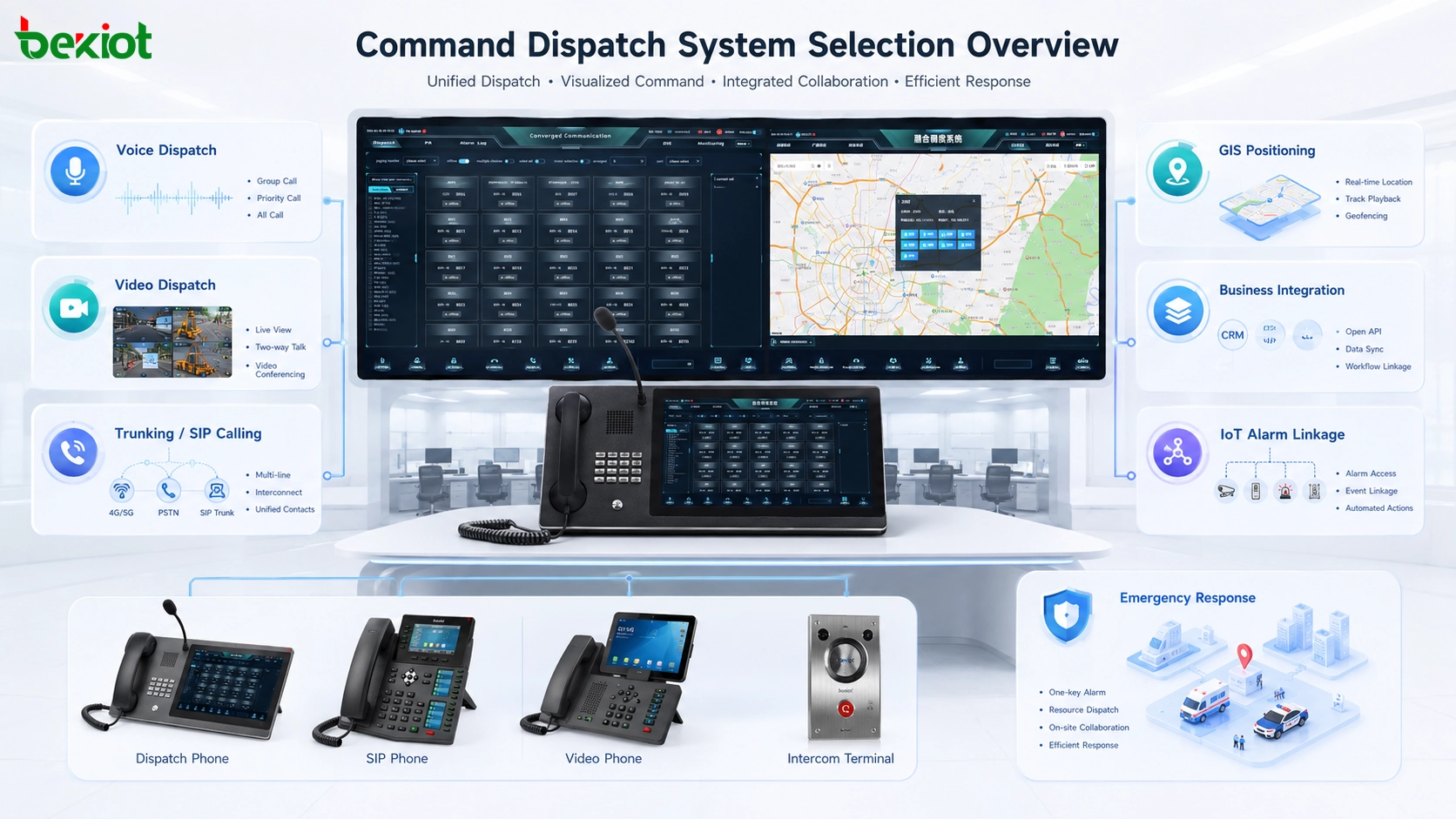
Start with the Real Communication Task
Different projects need different levels of dispatching
Command dispatch is a broad concept. In some projects, the system only needs to deliver voice instructions between a control room and several fixed posts. In other projects, the platform must connect video surveillance, mobile workers, drones, public address systems, alarm devices, GIS maps, and industry databases. These two projects should not use the same selection logic.
A factory workshop may need fast voice calls, group calls, emergency broadcast linkage, and integration with industrial telephones. A public safety project may need mobile team positioning, radio interconnection, video return, incident recording, and multi-agency coordination. A port or airport may need reliable trunking communication, command center visualization, and linkage with operational systems. The system should fit the workflow instead of forcing the workflow to fit the software.
Function-first selection avoids unnecessary complexity
Many command platforms on the market look similar at first glance, but their core capabilities can be very different. Some are communication platforms, some are video dispatch platforms, some are radio trunking consoles, and some are industry-specific command systems with customized business modules.
Choosing a system with many advanced functions is not always the best decision. If a project only needs fixed-position voice dispatch, a heavy GIS-based command platform may increase deployment complexity and cost without improving the actual operation. On the other hand, if the project involves mobile emergency teams, real-time location, video backhaul, and alarm linkage, a basic voice dispatch system will not be enough.
Voice-Based Systems Are Still Practical
Traditional voice remains reliable and cost-effective
Voice dispatch is one of the most traditional and practical forms of command communication. In many industrial, property, tunnel, campus, and facility management scenarios, the dispatcher mainly needs to call different posts, issue instructions, organize groups, and coordinate daily operations or emergency handling.
A typical voice dispatch system can be built around a SIP-based dispatch server, IP phones, SIP terminals, industrial telephones, intercom endpoints, or VoIP devices. Compared with more complex multimedia command platforms, this type of system usually has a clearer structure and a lower overall construction cost.
Voice platforms can also connect with other systems
Although the main capability is voice, many voice dispatch projects still need limited system interconnection. For example, a dispatch platform may need to connect with two-way radios, public address systems, paging speakers, emergency phones, or simple video monitoring resources. In some applications, a dispatcher may open a camera view during a call to check the on-site situation before issuing instructions.
However, this kind of video usage is usually supporting information rather than the main dispatching capability. If the project requires complex video switching, multi-source video access, drone video, video conferencing, or command screen collaboration, the selection should move from basic voice dispatch to a more integrated video or converged communication architecture.
Video Collaboration Is Becoming the Main Direction
Visual communication improves situational awareness
Video dispatch has become an important direction for modern command systems. As SIP terminals, video phones, body-worn devices, mobile applications, drones, surveillance platforms, and video conferencing systems become more common, command centers increasingly need visual communication rather than only voice instructions.
In emergency response, public safety, transportation, industrial production, and large-site management, video can help dispatchers understand what is happening in the field. A voice report may describe an incident, but a live video feed can show the scene, surrounding environment, equipment status, personnel movement, and risk level more directly.
Video dispatch should support multiple sources
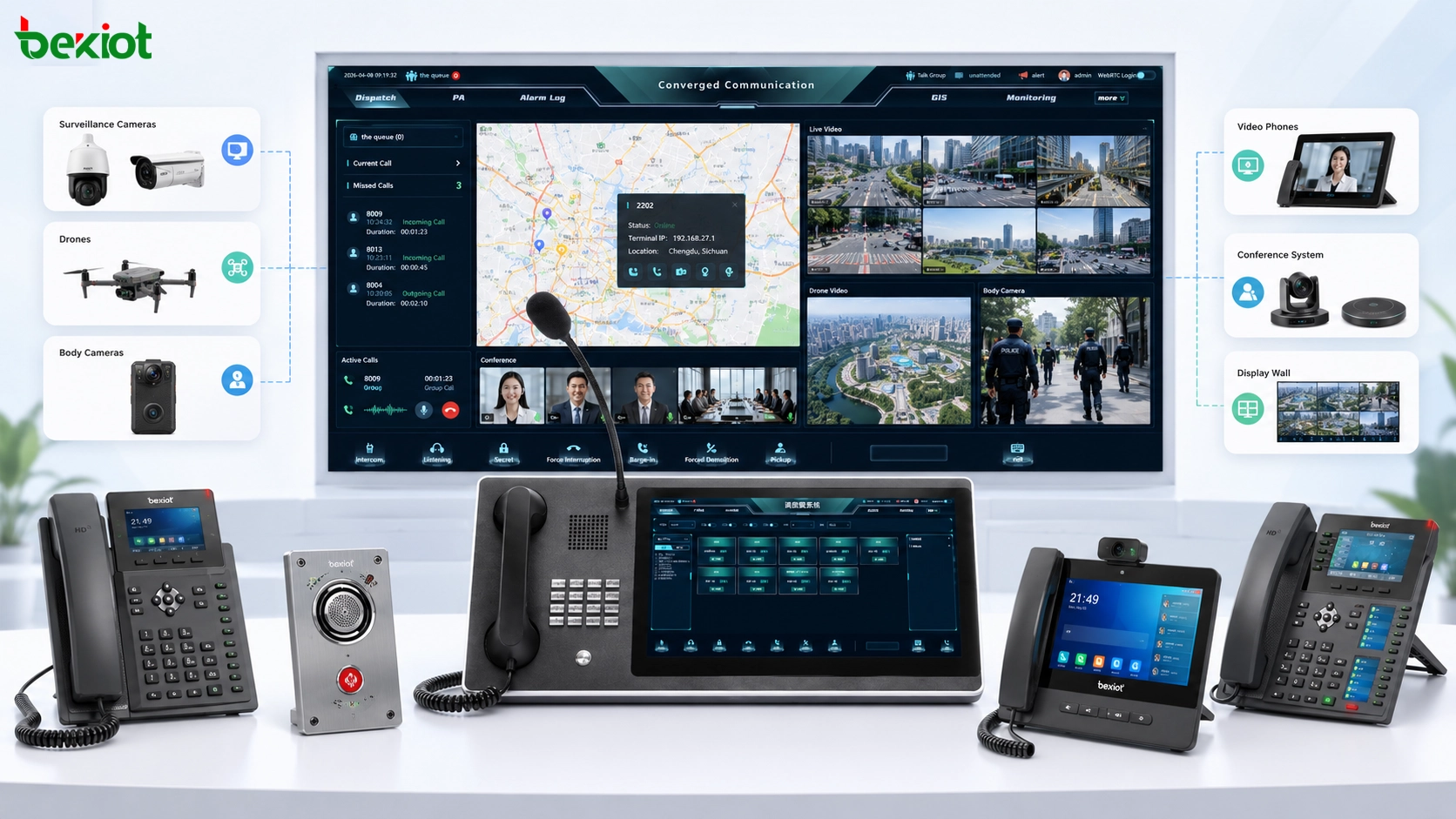
A true video dispatch system should not be limited to video calls between SIP terminals. Many real projects need to connect surveillance platforms, IP cameras, NVRs, drones, mobile inspection cameras, body cameras, video conferencing systems, and temporary field video devices. These sources may use different protocols, resolutions, codecs, and access methods.
For this reason, video access, protocol conversion, stream distribution, and unified calling interfaces are important parts of the system design. A video dispatch platform should allow the command center to call camera images, receive field video, join video meetings, and distribute selected video resources to other command seats or upper-level platforms.
Radio and Trunking Scenarios Need a Different Approach
Narrowband trunking focuses on reliability and large-scale control
Trunking dispatch can be understood as dispatching based on push-to-talk communication. Narrowband trunking is widely used in public safety, emergency services, rail transit, airports, large factories, ports, and industrial parks. Its main strengths are reliability, security, group communication, stable coverage, and suitability for organized teams.
This type of solution is usually suitable for large users with clear operational requirements and enough project budget. The system may require dedicated network planning, base station deployment, terminal configuration, frequency management, and long-term maintenance. It is powerful, but it is not always necessary for smaller projects or light-duty dispatch applications.
Broadband trunking extends voice into multimedia dispatch
Broadband trunking can be divided into private-network broadband trunking and public-network PoC-style trunking. Private-network broadband trunking is often considered an upgrade path from narrowband radio systems. It can provide push-to-talk communication while supporting richer media capabilities such as video calls, video return, live video, image sharing, and data services.
The challenge is that private broadband trunking may require high construction cost and professional network deployment. For users that need strong service assurance, dedicated coverage, and high reliability, this investment may be justified. For general commercial and enterprise scenarios, the cost may be too high.
Public network PoC lowers the deployment threshold
Public network broadband trunking, often known as PoC, uses mobile operator networks and intelligent applications to simulate many push-to-talk functions. It can support voice group communication, video calls, video dispatch, live video, positioning, and multimedia collaboration through smartphones or dedicated smart terminals.
Because it uses existing public mobile networks, PoC deployment is usually simpler and less expensive than private trunking networks. It is now widely used in property management, logistics, city services, industrial parks, event security, and many enterprise-level dispatch scenarios. The limitation is that its service quality depends on the public network environment.
Map-Based Capability Should Match Mobility
GIS is valuable when users and resources move
GIS capability means that the dispatch system can use maps to display personnel, vehicles, terminals, events, resources, and operational areas. It is especially valuable when the project involves mobile workers, patrol teams, emergency vehicles, field response units, or wide-area operations.
With GIS, the command center can see where teams are located, which unit is closest to the incident, how resources are distributed, and how the situation changes over time. This helps improve dispatch accuracy and shortens response time in emergency and mobile operation scenarios.
Fixed-node projects may not need heavy GIS design
If the project only includes fixed communication points, such as control room phones, workshop terminals, tunnel emergency phones, or building intercom stations, GIS may not be necessary. Adding map capability in this type of project can increase software complexity, data preparation work, implementation cost, and operator training requirements.
The selection rule is simple: if location is part of the dispatch decision, GIS matters. If all communication nodes are fixed and already known by the operator, a simpler communication interface may be more efficient.
Industry Business Integration Raises the Difficulty
Communication functions are only the foundation
Voice, video, trunking, and GIS are common communication and coordination functions. They provide the foundation for command dispatch, but many industries require more than communication. Emergency management may need resource databases, event workflows, duty schedules, incident records, and rescue process management. Rail transit may need linkage with train operation information. Airports may need integration with flight operation, ground handling, and security workflows.
When the dispatch system must connect with these industry business systems, the project becomes much more complex. The platform is no longer only a communication tool; it becomes part of the industry operation process.
Customization requires domain knowledge
Business integration usually requires developers, integrators, and industry experts to work together. The project team must understand communication technology, software interfaces, data structures, operational rules, and industry workflows. Without this understanding, the system may connect technically but fail operationally.
This is why industry-level command systems are often more expensive than general voice or video dispatch platforms. They require requirement analysis, interface development, workflow design, testing, training, and long-term optimization. For budget planning, this part should be evaluated early rather than treated as a simple add-on.
Related System: Becke Telcom Converged Communication System
The Becke Telcom converged communication system integrates multiple convergence solutions into one platform, enabling cross-platform and efficient collaborative dispatch. Based on the SIP protocol, it provides HD voice communication without requiring a server, supports plug-and-play deployment, and helps break isolated communication ecosystems. The system supports flexible deployment for different scenarios and provides multiple dispatch methods, including video, voice, GIS, command instructions, and broadcasting. It can improve emergency response and command efficiency for government, enterprise, security, and industrial users.
Alarm Linkage Adds More Operational Value
IoT data can trigger faster dispatch actions
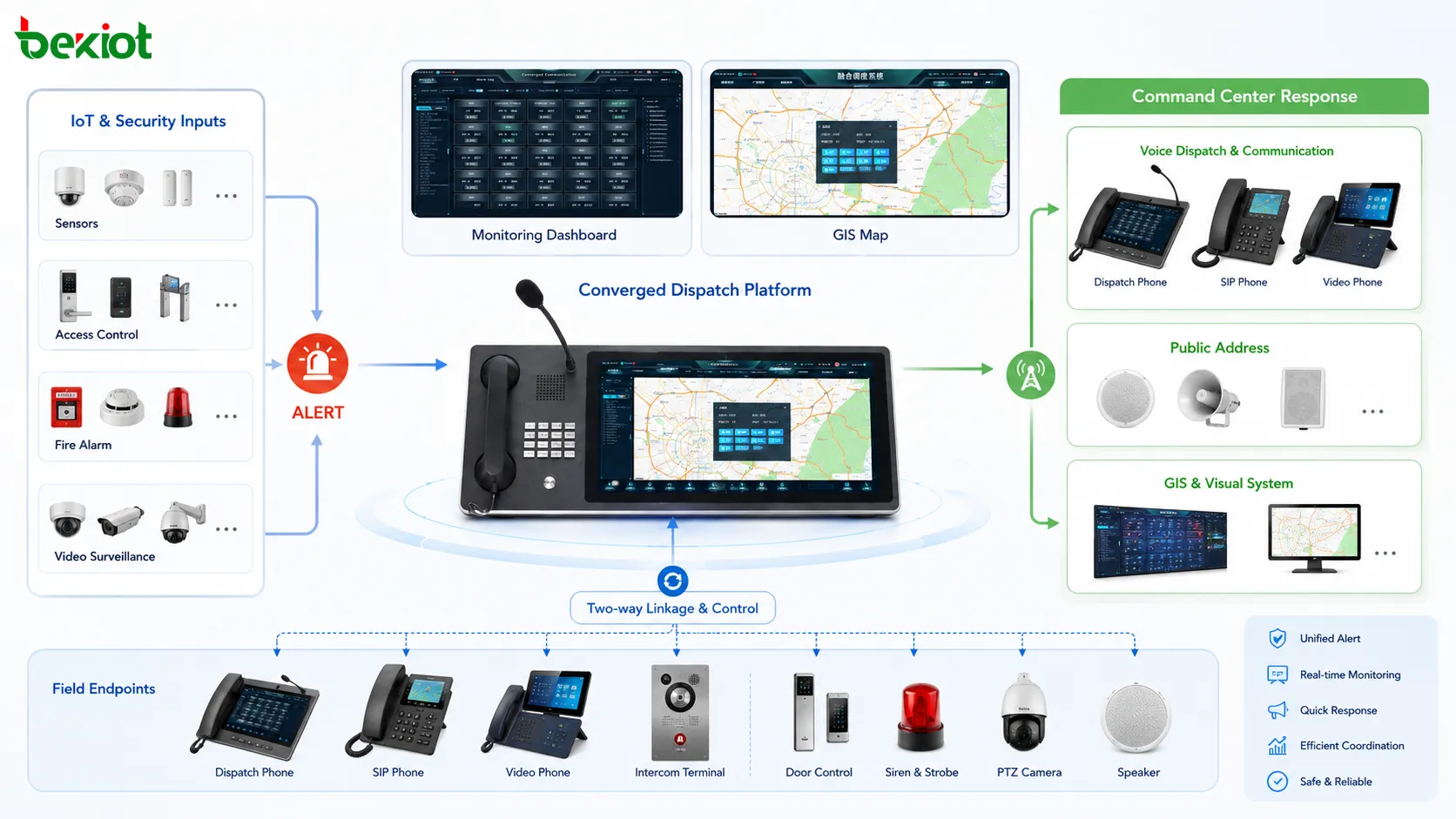
In recent years, linkage capability has become increasingly important in command dispatch projects. By connecting IoT devices, sensors, alarm systems, access control, fire systems, environmental monitoring devices, or industrial control signals, the dispatch platform can receive events automatically instead of waiting for manual reporting.
When an alarm occurs, the platform can trigger voice calls, open related video channels, notify dispatch groups, activate public address zones, display the event location, or generate an incident record. This creates a more accurate and faster dispatch workflow.
Interface complexity must be evaluated in advance
IoT linkage is valuable, but it also increases project difficulty. Field devices may use different protocols, data formats, network methods, and vendor interfaces. Some devices may provide open APIs, while others may require custom development or gateway conversion.
Before selecting a dispatch system, the project team should confirm which devices need to be connected, what data they provide, whether real-time alarms are required, how linkage rules should be defined, and whether the vendor can support interface development. Otherwise, the linkage function may become a risk point during implementation.
A Practical Selection Framework
Define the core dispatch mode
The first step is to decide whether the project mainly needs voice dispatch, video dispatch, trunking communication, mobile PoC dispatch, or a converged command platform. This determines the basic architecture and avoids choosing an oversized system.
Identify terminals and users
The system should be designed around actual users and terminals. Dispatchers, field workers, control room operators, patrol teams, emergency units, supervisors, and external departments may use different devices. These may include SIP phones, industrial phones, smartphones, radios, video phones, dispatch consoles, cameras, drones, or public address endpoints.
Check network and deployment conditions
A command dispatch system may depend on LAN, private networks, public mobile networks, wireless broadband, radio systems, or hybrid networks. Network coverage, bandwidth, latency, redundancy, cybersecurity, and power supply conditions should be evaluated before final selection.
Estimate integration depth and budget
A basic voice dispatch project may have a relatively simple budget structure. A converged platform with video, GIS, IoT linkage, radio interconnection, business system integration, and multi-level command may require more planning and investment. The deeper the integration, the more important it is to define scope clearly.
Matching the System to the Scenario
Factories and industrial sites
Factories often need stable voice dispatch, emergency communication, workshop intercom, broadcast linkage, and sometimes video monitoring. If mobile teams are limited and locations are fixed, a SIP-based voice dispatch system with selected video and alarm linkage may be enough.
Emergency and public safety projects
Emergency scenarios usually require faster response, multi-department collaboration, GIS positioning, video return, event recording, and flexible group communication. In these projects, a converged platform with voice, video, GIS, trunking or PoC integration, and resource coordination is more suitable.
Transportation hubs and ports
Airports, rail transit systems, ports, and logistics hubs often involve wide-area operations, moving teams, safety zones, and complex scheduling. The system may need trunking communication, video surveillance integration, GIS display, broadcast notification, and linkage with operational systems.
Property, campus, and park management
For campuses, buildings, and industrial parks, public network PoC, SIP voice dispatch, video surveillance linkage, emergency broadcast, and simple GIS or floor-plan display may provide a good balance between function and cost.
Final Selection Advice
A command dispatch system can improve daily work efficiency and accelerate emergency response, but only when it matches the real operating environment. The best system is not necessarily the one with the most functions. It is the one that solves the actual communication, coordination, visualization, linkage, and management problems of the project.
For simple fixed-site applications, a voice-centered platform may be more efficient. For visual command, emergency response, and multi-source video coordination, video dispatch and converged communication are more suitable. For large mobile teams and high-reliability group communication, trunking or PoC solutions should be considered. For projects involving mobile resources, GIS becomes important. For industry-level operations, business integration and IoT linkage must be planned carefully.
Before procurement, the project team should prepare a clear requirement list, define the deployment environment, evaluate future expansion, confirm interface openness, and match the budget with the expected operational value. This approach helps avoid overbuilding, underbuilding, and unnecessary customization risk.
FAQ
Should a command dispatch platform be deployed locally or in the cloud?
Local deployment is usually better for sites that require private network operation, stronger data control, or offline survivability. Cloud or hybrid deployment can be useful for multi-site management, mobile users, and projects that need faster expansion with lower local hardware investment.
How important is recording in a dispatch project?
Recording is important when the project requires traceability, incident review, compliance, or training. Voice calls, video sessions, dispatch instructions, alarm events, and operation logs should be stored according to the required retention policy.
What is the risk of choosing a closed dispatch system?
A closed system may be difficult to connect with cameras, radios, SIP devices, IoT alarms, GIS platforms, or business applications later. This can increase future integration cost and limit the project’s ability to expand.
How can operators avoid being overwhelmed by too many functions?
The interface should be designed around daily tasks and emergency procedures. Frequently used actions should be visible, while advanced functions can be placed in secondary menus or administrator settings. Training and role-based permissions are also important.
What should be tested before final acceptance?
The acceptance test should include call quality, group dispatch, video access, alarm linkage, GIS accuracy, terminal compatibility, network failover, permission control, recording, log retrieval, and response workflow simulation under realistic operating conditions.







