


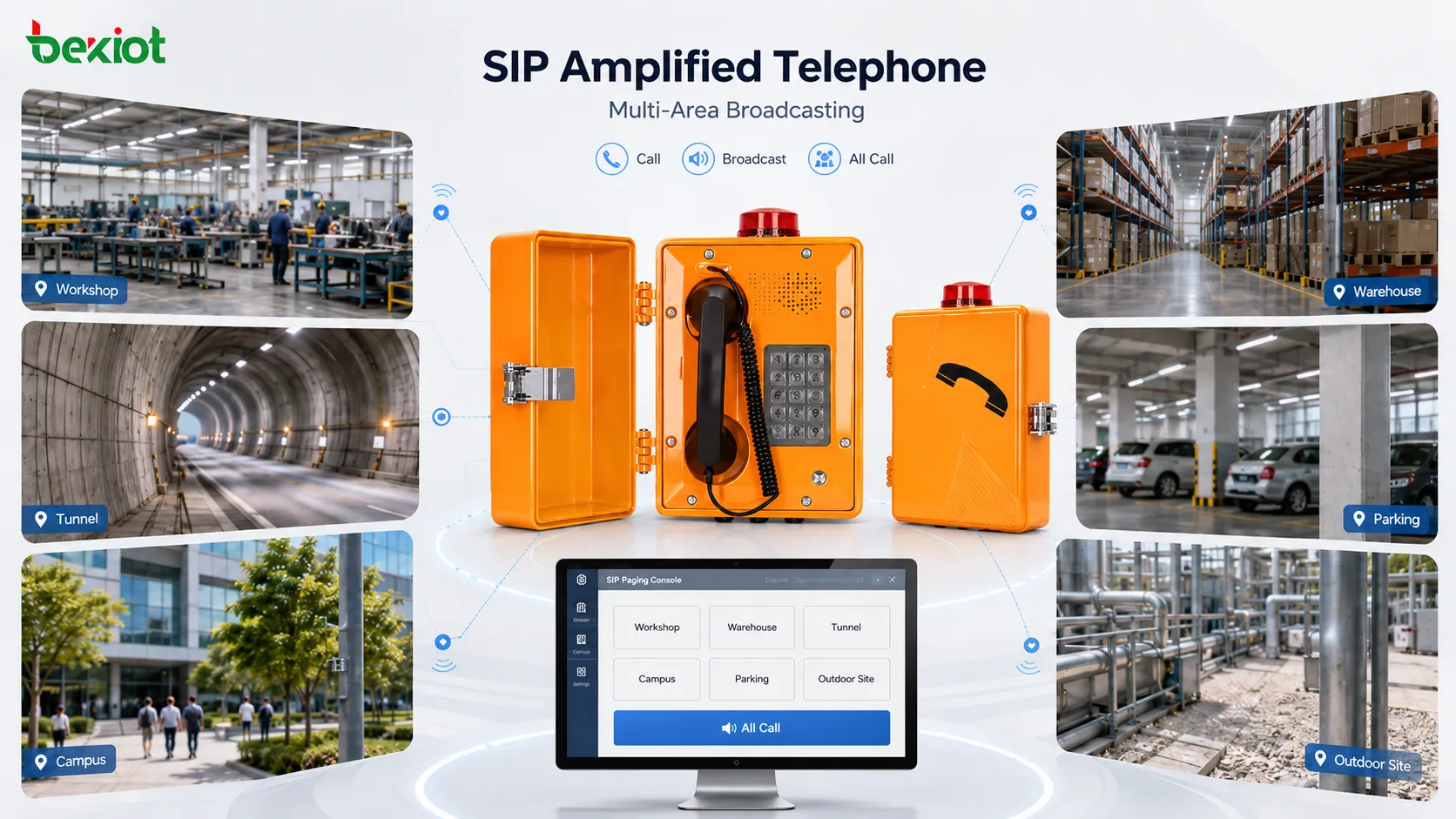
SIP amplified telephones are designed for environments where ordinary telephone communication is not enough. In factories, warehouses, tunnels, campuses, transport hubs, parking areas, utility rooms, and outdoor industrial sites, users may need to make calls, receive instructions, and broadcast messages to nearby or remote areas. When the device includes amplification and SIP network access, it can become both a communication terminal and a local paging point.
The multi-area broadcasting function expands this value further. Instead of sending announcements only to one speaker or one phone, the system can deliver voice messages to multiple zones, buildings, floors, workshops, outdoor points, or emergency areas. This makes SIP amplified telephones useful for daily coordination, operational reminders, security notices, evacuation guidance, maintenance dispatch, and site-wide communication.
What a SIP amplified telephone is
A SIP amplified telephone is a communication terminal that uses the SIP protocol for voice connection and includes enhanced audio output through a built-in amplifier, loudspeaker, or external speaker interface. Compared with a standard desk phone, it is usually designed for fixed installation, louder local output, easier operation, and stronger environmental adaptability.
The SIP function allows the device to register with an IP PBX, SIP server, dispatch platform, or unified communication system. It can make and receive calls like a normal SIP endpoint. The amplified audio function allows it to play voice more loudly and clearly in areas where users may not be close to the handset or speaker. When integrated with paging groups, the same device can also participate in multi-area broadcasting.
This combination is valuable because many industrial and public facilities need both point-to-point communication and wide-area announcement. A worker may call the control room through the telephone. A dispatcher may call back to the same device. The platform may also use the device as part of a paging or broadcast group. One terminal can therefore support several communication tasks.
How multi-area broadcasting works
SIP-based audio access
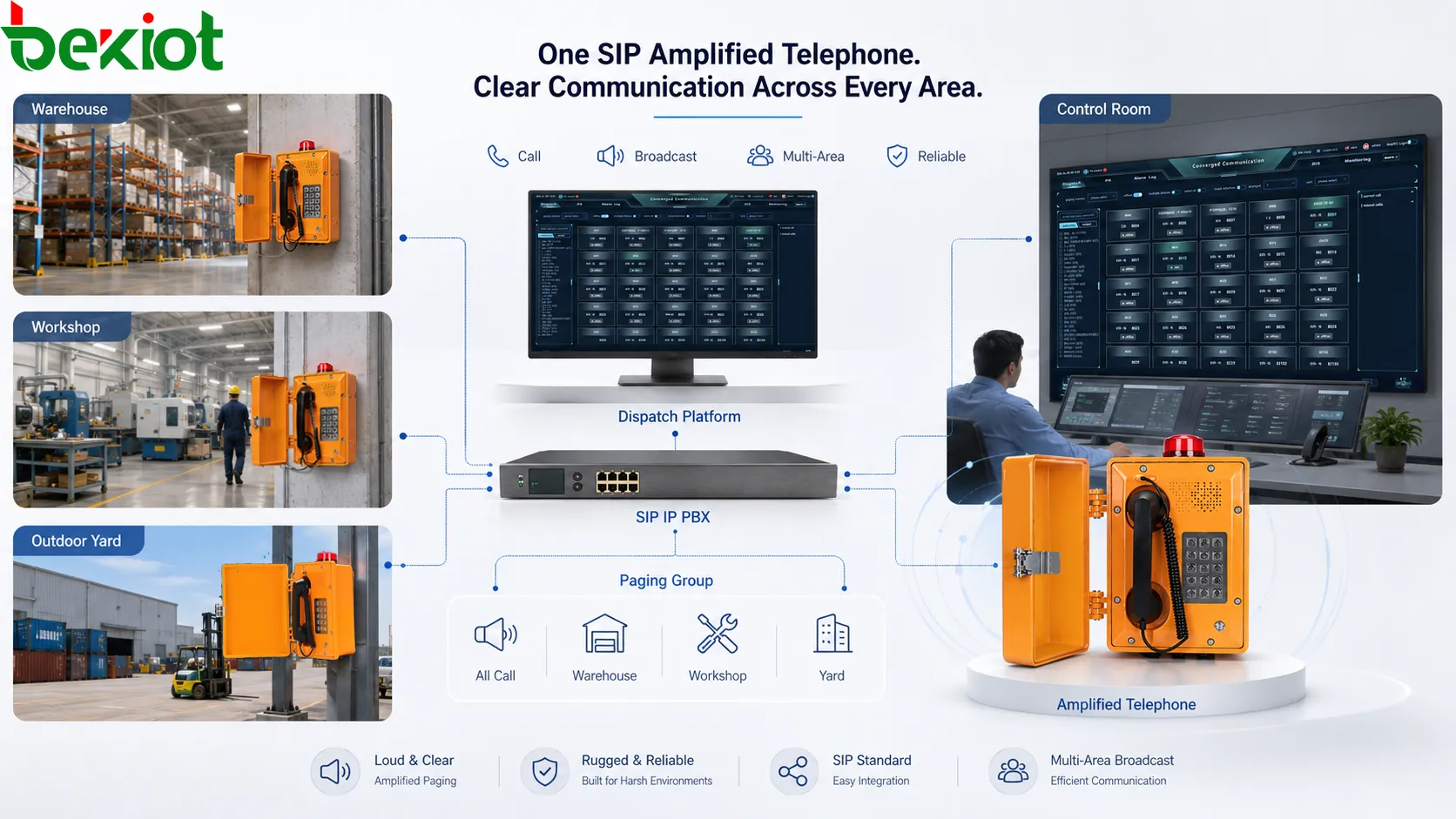
The broadcasting process usually begins from a SIP source. This may be an IP phone, dispatch console, paging microphone, SIP server, IP PBX, emergency platform, or scheduled announcement system. The source sends voice through the IP network to one or more SIP amplified telephones or paging endpoints.
Because SIP is widely used in VoIP systems, SIP amplified telephones can be included in existing communication platforms more easily than isolated analog devices. Administrators can create paging numbers, group extensions, multicast addresses, or dispatch groups depending on the system design. Users can then start a broadcast by dialing a code, pressing a function key, selecting a zone on a console, or triggering an emergency rule.
Zone and group control
Multi-area broadcasting depends on zone and group control. A zone may represent a workshop, gate, warehouse section, corridor, floor, outdoor yard, tunnel section, parking level, or building. A group may represent security staff, maintenance teams, emergency points, or all public areas. The system maps each broadcast target to the required SIP amplified telephones and speakers.
Good zone planning prevents unnecessary disturbance. A maintenance message for one workshop should not interrupt the entire site. A severe emergency announcement, however, may need to cover all configured areas. The system should support flexible choices between single-zone, multi-zone, group, and all-call broadcasting.
Amplified local output
After the SIP amplified telephone receives the audio stream, it plays the announcement through its built-in speaker or connected amplified output. This is especially useful where people may be moving, working with tools, wearing protective equipment, or standing away from the device.
The output should be loud enough for the environment but still intelligible. Strong volume without speech clarity can create noise rather than communication. Speaker design, amplifier power, installation height, acoustic direction, and background noise should all be considered when planning multi-area broadcasting.
Main functional advantages
One device supports calling and broadcasting
The first advantage is functional integration. A SIP amplified telephone can support ordinary voice calls, hotline calls, emergency calls, intercom-style communication, paging reception, and amplified announcement playback. This reduces the need to install separate devices for every communication function.
For example, a warehouse may need a phone for contacting the control room and a speaker for local announcements. A SIP amplified telephone can help combine these roles when the site design allows it. This improves installation efficiency and simplifies system management.
Flexible multi-zone announcement
Multi-area broadcasting allows operators to choose the correct announcement scope. The system may broadcast to one zone, several zones, one building, several buildings, outdoor areas, or all endpoints. This flexibility is useful in facilities where communication needs change throughout the day.
A production supervisor may broadcast only to one line. A security operator may broadcast to gates and parking areas. A facility manager may broadcast to all public areas. An emergency commander may broadcast to the whole site. Flexible zone control helps match message scope with real operational need.
Priority broadcast support
In many systems, SIP amplified telephones can be part of a priority paging design. Emergency announcements may override routine calls, background audio, scheduled messages, or lower-priority broadcasts. This ensures that urgent messages are delivered first.
Priority control should be designed carefully. Too many high-priority messages can disturb daily operation, but weak priority design may delay emergency communication. The system should define who can use priority broadcast, which zones are affected, and whether the action is recorded.
Remote and centralized management
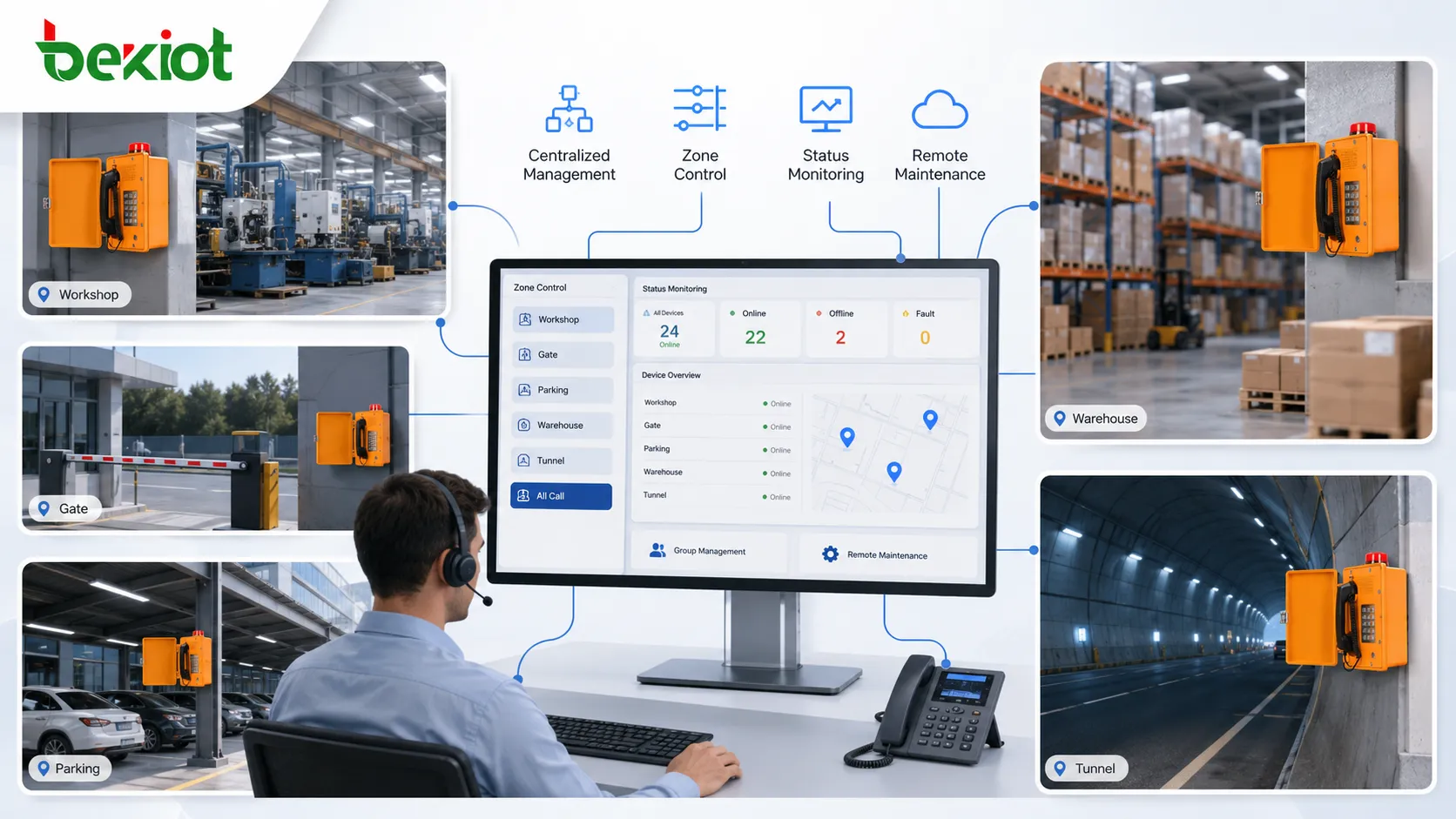
Because SIP amplified telephones are network devices, many systems can support centralized configuration, status monitoring, group management, firmware updates, and remote troubleshooting. This is valuable when devices are installed across many buildings or distributed field points.
Centralized management improves efficiency. Administrators can adjust paging groups, check online status, review call logs, or update settings without visiting every device. For large campuses, industrial parks, transport sites, and logistics centers, this can reduce maintenance workload significantly.
Efficiency value in real operation
The efficiency of SIP amplified telephones appears first in message delivery speed. When an announcement needs to reach several areas, the operator does not need to call each point separately. One paging action can deliver the same message to all selected zones. This reduces delay and keeps the instruction consistent.
Second, the system reduces repeated manual communication. In traditional workflows, supervisors may call team leaders, who then relay the message to workers. Each relay step may create delay or misunderstanding. Multi-area broadcasting sends the original message directly to the relevant places, improving communication accuracy.
Third, the device improves space coverage without making the system overly complex. A properly placed SIP amplified telephone can provide both a call point and a local announcement output. In some areas, this is more efficient than installing one telephone, one separate speaker, and one additional control interface.
Fourth, IP networking makes expansion easier. New zones can be added by installing additional SIP endpoints and updating the paging group. Compared with traditional analog-only paging, SIP-based architecture can be more flexible for multi-building or multi-site deployment, especially when structured network cabling already exists.
Fifth, maintenance becomes more traceable. If the platform supports logs, administrators can review which paging number was used, which zones were selected, when the announcement was sent, and whether devices were online. This helps with operation review and fault analysis.
Application scenarios
Factories and production workshops
Factories often need announcements for production coordination, safety reminders, shift changes, equipment testing, and maintenance response. SIP amplified telephones can be installed at production lines, workshop entrances, control rooms, or equipment zones to support both calls and broadcasts.
In noisy workshops, amplified output helps workers hear important instructions without relying only on personal mobile phones. Zone-based broadcasting also prevents unnecessary disturbance to unrelated production areas.
Warehouses and logistics centers
Warehouses require frequent coordination between loading docks, picking areas, packing lines, vehicle gates, dispatch offices, and storage zones. Multi-area broadcasting allows supervisors to announce loading changes, safety reminders, vehicle movement instructions, or emergency notices to the right zones.
Because SIP amplified telephones can also support direct calls, staff can use the same installed point to contact the office or control room. This is practical in large spaces where employees may not always carry communication devices.
Tunnels, parking areas, and outdoor facilities
Tunnels, parking garages, industrial yards, and outdoor service points often require fixed communication terminals. A SIP amplified telephone can provide local call access while also receiving broadcast messages from the central system.
In these environments, installation position and acoustic design are important. The device should be placed where users can reach it safely and where announcements can be heard clearly. Weather protection, network reliability, and power supply should also be considered.
Campuses and public buildings
Campuses, hospitals, office parks, hotels, commercial complexes, and public buildings may use SIP amplified telephones for service communication, security coordination, facility notices, and emergency announcements. Multi-area broadcasting helps administrators send messages to buildings, floors, outdoor spaces, or special service areas.
In these sites, broadcast control should avoid overuse. Routine announcements should be targeted to specific areas, while all-call or emergency broadcasts should be reserved for messages that truly require wide coverage.
Design and deployment considerations
Plan the zone structure first
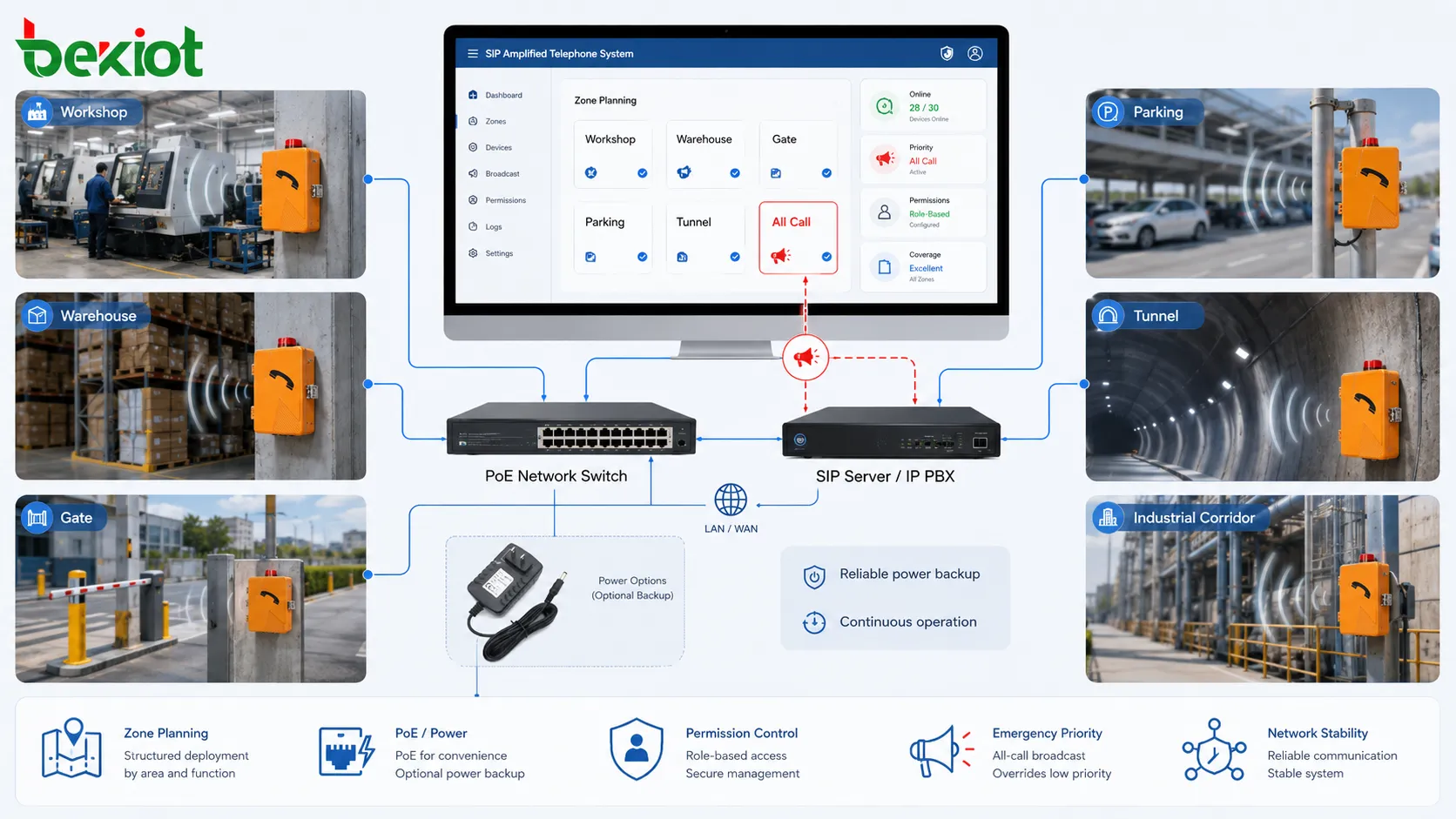
The most important design step is planning the zone structure. The system should define which areas need independent broadcasts, which areas should be grouped together, and which endpoints belong to emergency or all-call coverage. Good zone planning makes daily operation easier and avoids future confusion.
Zone names should match real locations. Operators should see names such as “Warehouse Loading Dock,” “Workshop Line 2,” or “North Parking Area,” not only technical IDs. Clear naming reduces wrong paging and improves response speed.
Evaluate audio coverage
Amplified telephones must be installed where their audio output is useful. Background noise, wall reflection, ceiling height, speaker direction, and user distance all affect audibility. The device should not be evaluated only by output power; speech intelligibility is more important.
Field testing should be performed after installation. The team should confirm whether people can understand the announcement during normal working conditions. If the message is loud but unclear, the design may need speaker adjustment, device relocation, or additional endpoints.
Protect priority and permissions
Because multi-area broadcasting can affect many people, user permissions should be controlled. Routine users may only broadcast to local zones. Supervisors may access department groups. Security or emergency operators may have wider authority. All-call and emergency broadcasts should be protected from accidental use.
Priority rules should also be tested. Emergency broadcast should override lower-priority audio where required, but the system should avoid unnecessary interruptions during daily communication. Permission and priority design protect both safety and operational order.
Consider network and power reliability
SIP amplified telephones depend on network and power. If the device uses PoE, the switch and power backup become part of the communication system. If it uses external power, the power adapter or local supply should be reliable. For emergency applications, backup power should be considered.
The network should support stable SIP and RTP traffic. QoS, VLAN planning, multicast support, firewall rules, and device monitoring may be required depending on the architecture. Poor network design can cause delayed announcements, missing audio, or registration failures.
Common problems and optimization
A common problem is unclear zone planning. If broadcast groups are not designed according to real spaces, operators may send messages to the wrong area or use all-call too often. Optimization should begin with reviewing the site layout, department workflow, and emergency procedures.
Another problem is weak audio intelligibility. A device may have enough volume but still sound unclear because of background noise, echo, poor installation position, or unsuitable speaker direction. Field listening tests are necessary before final acceptance.
Network issues may also affect broadcasting efficiency. SIP registration failure, packet loss, multicast blocking, firewall restrictions, or overloaded switches can cause missing or delayed audio. Troubleshooting should include both endpoint status and network path analysis.
Permission control is sometimes ignored. If too many users can broadcast to all zones, the system may become disruptive. Clear role-based access and priority rules help keep the broadcasting function useful and controlled.
Maintenance and evaluation
Maintenance should include checking device online status, call function, speaker output, microphone quality, network registration, power supply, enclosure condition, cabling, and paging group configuration. For devices installed in outdoor or industrial areas, dust, moisture, vibration, and physical impact should also be inspected.
Evaluation should focus on real use. Can operators send announcements to the correct zones? Can workers understand the message in normal noise conditions? Does emergency priority work? Are broadcast logs available? Can administrators update groups easily? These questions are more important than only checking whether the device powers on.
For larger systems, regular drills and test broadcasts are useful. They help verify that zone lists, device status, audio coverage, and operator procedures remain correct after site changes.
FAQ
What is a SIP amplified telephone?
It is a SIP-based communication terminal with enhanced audio output, usually used for fixed calling, local announcement playback, paging reception, or amplified communication in industrial and public facility environments.
How does multi-area broadcasting work?
The system sends a voice announcement from a SIP source to selected paging groups, zones, or endpoints. SIP amplified telephones in those areas receive and play the message through their built-in or connected amplified output.
Can one SIP amplified telephone cover a large area?
It depends on the speaker output, background noise, installation position, and acoustic conditions. Large or noisy areas may require multiple endpoints or additional speakers for clear coverage.
Why is zone planning important?
Zone planning ensures that announcements reach the correct areas without disturbing unrelated spaces. It also improves emergency response, daily operation, and system maintenance.
What should be tested after installation?
Testing should include SIP registration, call function, paging reception, zone selection, audio clarity, emergency priority, network stability, power recovery, and broadcast logs where supported.
Closing Notes
The multi-area broadcasting function of SIP amplified telephones combines SIP voice communication with amplified audio output and zone-based paging control. It allows one device or one system to support both direct calls and area announcements, improving communication efficiency in factories, warehouses, tunnels, campuses, parking facilities, transport sites, and public buildings.
Its main value lies in faster message delivery, reduced repeated communication, flexible zone coverage, centralized management, emergency priority support, and easier expansion through IP networks. To achieve these advantages, the system should be designed with clear zone planning, suitable audio coverage, stable network access, controlled permissions, and regular maintenance.
For projects that need SIP-based amplified telephones, paging terminals, or multi-area communication solutions, Becke Telcom can provide product and system options for industrial and public facility environments. The best configuration should be selected according to site layout, noise level, broadcast scope, network architecture, and emergency communication requirements.







