


Video has become a core data source in many intelligent projects. Command platforms, IoT systems, emergency dispatch centers, smart buildings, industrial parks, transportation hubs, and city-level management platforms all need to call live video, replay recordings, control cameras, receive alarms, and display visual information together with business data.
In the past, many projects relied on camera SDK development. A device manufacturer provided an SDK, and the integrator used it to call video streams, control PTZ functions, read device information, or build custom video features. This approach can work in a limited environment, especially when all cameras come from one vendor and the project scale is small.
However, in recent years, more intelligent system integrators have started to avoid direct camera SDK development. Instead, they prefer video access gateways, standard protocols, media conversion, and unified API interfaces. This shift is not only a technical preference. It is a response to real project risks, long-term maintenance pressure, and the growing complexity of multi-vendor video environments.
The Project Challenge Behind Direct Camera Integration
Video resources are useful, but formats are not always ready for business systems
Most intelligent applications do not simply need to watch a camera image. They need to combine video with maps, alarms, device status, work orders, emergency events, access control records, production systems, or dispatch workflows. In these scenarios, video must be easy to call, easy to display, and easy to manage.
The challenge is that video streams are not always delivered in the format required by the upper-layer platform. Some devices output RTSP streams. Some platforms require HLS or FLV for web viewing. Some emergency command systems may need WebRTC for low-latency browser playback. Some communication systems may need SIP-based video access. Without a middle layer, every format difference can become a development task.
SDK development solves one connection but creates many dependencies
A camera SDK can provide access to video preview, playback, PTZ control, alarm information, and device parameters. For a single-vendor project, this may look convenient at the beginning. The integrator follows the manufacturer’s SDK documentation, writes the interface logic, and completes the first integration.
The problem appears when the same software product needs to be used in another project, another city, another campus, or another industrial site. The camera brand, device model, firmware version, recorder platform, and network environment may all be different. The SDK logic that worked in one project may not work in the next one.
Why SDK-Based Development Becomes Difficult Over Time
Vendor fragmentation increases repeated adaptation work
The video surveillance market includes many large manufacturers and many smaller device suppliers. Each vendor may provide its own SDK, and the interface style, authentication method, stream calling rule, playback mechanism, PTZ control logic, and alarm callback method may vary.
For an integrator, this means the product can easily fall into continuous adaptation. After completing development for one camera brand, the team may need to adapt another SDK for the next project. When the project includes mixed brands, the workload becomes even heavier. The software architecture gradually becomes complex, and the cost of project delivery rises without creating visible value for the end user.
Version compatibility becomes a long-term risk
Cameras and video recorders are long-life devices. In real projects, it is common to find equipment that has been installed for many years. A platform may be developed with the latest SDK, but the customer site may still be using a device version from five years ago.
Upgrading the customer’s entire video system only to match an SDK is usually not a good option. In large IT and security projects, stable systems are often not upgraded casually because one change may trigger another issue. An SDK upgrade may solve one integration problem, but it may also affect recording, storage, platform compatibility, network behavior, or existing security policies.
Large-scale camera deployment makes device-level access inefficient
When a project has only a few cameras, direct SDK integration may still be manageable. But when the system includes hundreds, thousands, or even tens of thousands of cameras, device-level integration becomes difficult to maintain.
The platform needs directory management, grouping, online status, stream distribution, access permission, recording lookup, alarm linkage, and unified operation. If the upper-layer business system must deal with each camera SDK directly, the engineering workload increases sharply. The system may become difficult to expand, difficult to troubleshoot, and difficult to hand over to the operation team.
Fixed SDK capabilities may limit future expansion
Most SDKs are designed around the vendor’s own devices and platforms. They can usually meet common video access needs, but when a project requires extended media conversion, cross-platform stream distribution, multi-terminal viewing, web playback, unified alarm forwarding, or integration with non-video business systems, SDK functions may not be flexible enough.
Once the project needs capabilities outside the SDK’s design boundary, the integrator must add extra modules, custom middleware, or temporary conversion logic. This makes the project structure more fragmented and increases maintenance difficulty.
A More Scalable Architecture Uses a Video Access Gateway
The gateway becomes the standard video middle layer
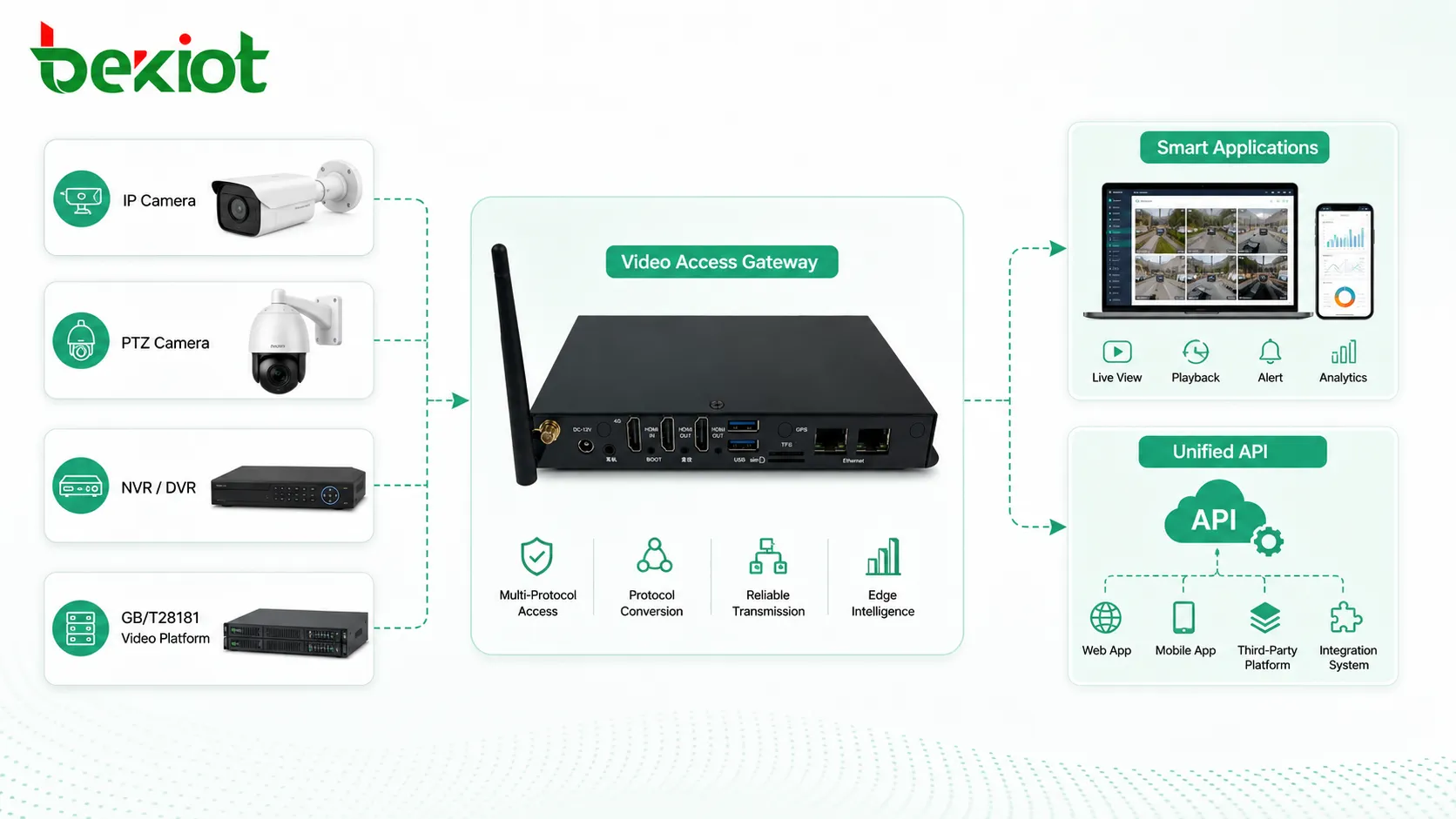
Many modern intelligent projects now use a video access gateway as the middle layer between surveillance resources and business applications. Instead of integrating every camera SDK separately, the gateway connects cameras, NVRs, VMS platforms, or video surveillance systems through standardized protocols and then provides a unified calling method to the upper-layer application.
This approach changes the integration model. The business system no longer needs to know the details of each camera manufacturer. It only needs to call the gateway’s standardized stream address, API interface, directory information, or control command. The gateway handles video access, protocol conversion, stream distribution, and compatibility adaptation.
GB/T28181 supports mature video platform access
In many projects, GB/T28181 is used as a key access protocol. After multiple versions of development and practical deployment, GB/T28181 has become mature in video surveillance integration. It supports common capabilities such as live preview, recording playback, PTZ control, alarm information, device catalog, geographic location, and platform-level interconnection.
For integrators, GB/T28181 reduces the need to connect every camera directly. The gateway can connect with existing cameras, recorders, or surveillance platforms through a structured video access framework. This is especially valuable when the project already has a security platform and the intelligent system only needs standardized video resources.
Stream Conversion Makes Video Easier to Use
Different applications need different video outputs
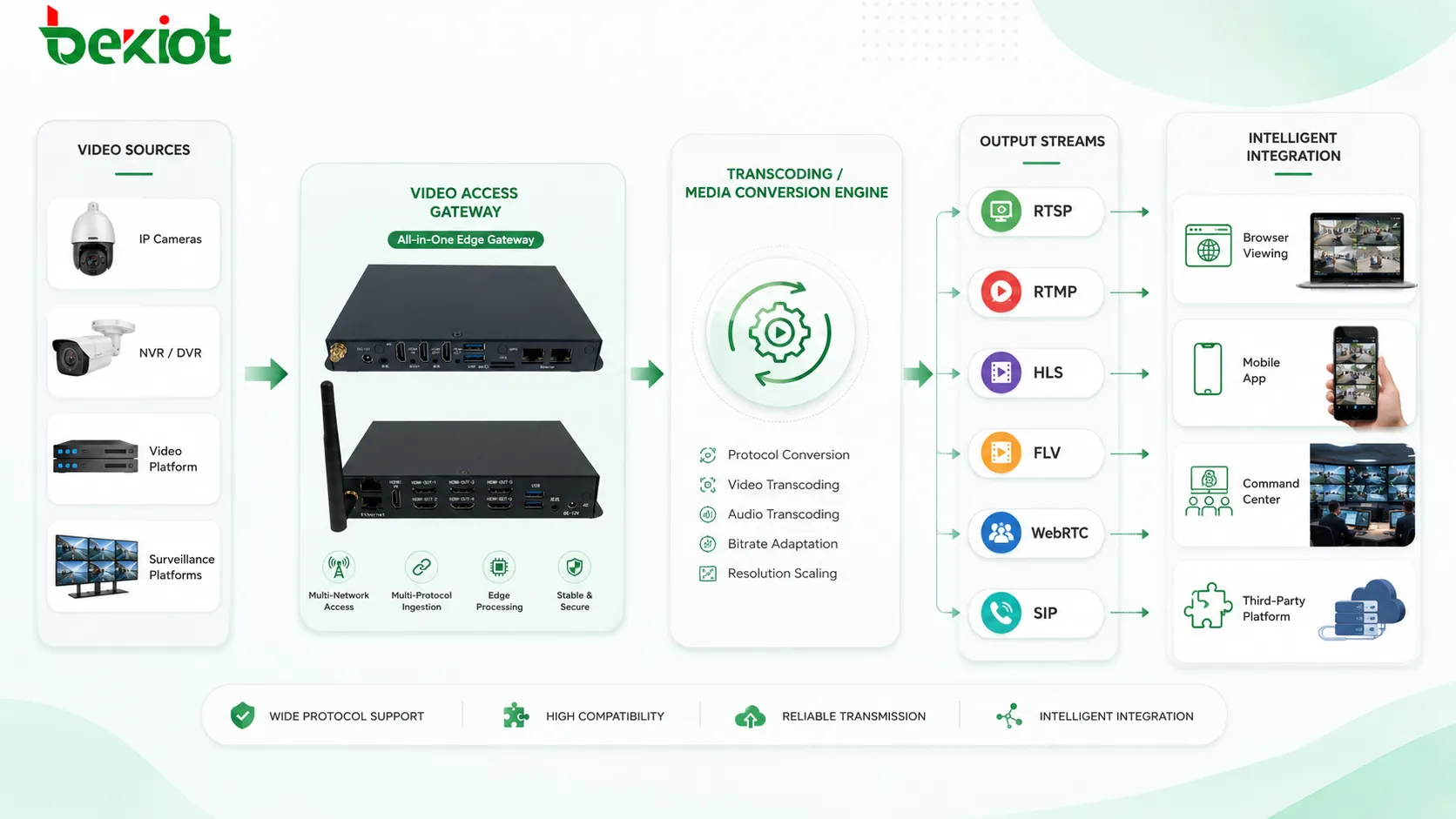
A video access gateway can provide multiple standard video streams for different software scenarios. Common outputs may include FLV, HLS, WebRTC, SIP, RTSP, and RTMP. This means a browser dashboard, a mobile app, a command center, a dispatch console, and a third-party platform can each use the most suitable stream format.
For example, WebRTC may be used when low-latency browser playback is required. HLS may be suitable for stable web distribution. RTSP may be used by professional video systems. RTMP may still be used in some media forwarding scenarios. SIP can support video communication or dispatch system integration. The gateway prevents every application from building its own conversion chain.
Transcoding solves codec and performance mismatch
Video integration is not only about protocol access. Codec format, frame rate, bitrate, and resolution may also affect whether the video can be decoded, transmitted, and displayed smoothly. A camera stream may be too heavy for a web client, incompatible with a browser player, or unsuitable for a low-bandwidth remote site.
With transcoding, the gateway can adjust video encoding format, frame rate, bitrate, and resolution according to project requirements. This makes the upper-layer application easier to develop and helps improve compatibility across browsers, mobile devices, command terminals, and integrated software platforms.
Unified APIs Reduce Engineering Pressure
Business systems can focus on workflow instead of device differences
A well-designed video access gateway provides standardized stream calling rules and unified API interfaces. The intelligent platform can request live video, replay recordings, retrieve device lists, control PTZ, receive alarms, or link video with events through consistent logic.
This allows the development team to focus on business workflows such as alarm handling, GIS display, emergency response, production monitoring, traffic dispatch, campus security, or incident review. The video layer becomes a reusable capability rather than a repeated customization task.
Maintenance becomes clearer for multi-site projects
For integrators working across multiple sites, a unified gateway architecture is easier to maintain than many SDK modules. When a new project is deployed, the team mainly adapts the access side of the gateway instead of rewriting the upper-layer business system. When a new video format or device type is required, the gateway can absorb much of the change.
This is especially important for long-term operation. Intelligent projects are not finished when the platform goes online. They require future expansion, camera replacement, firmware changes, network adjustment, user permission updates, and platform upgrades. A gateway-based model creates a more stable boundary between video resources and business applications.
Where This Model Delivers the Most Value
Smart city and public safety platforms
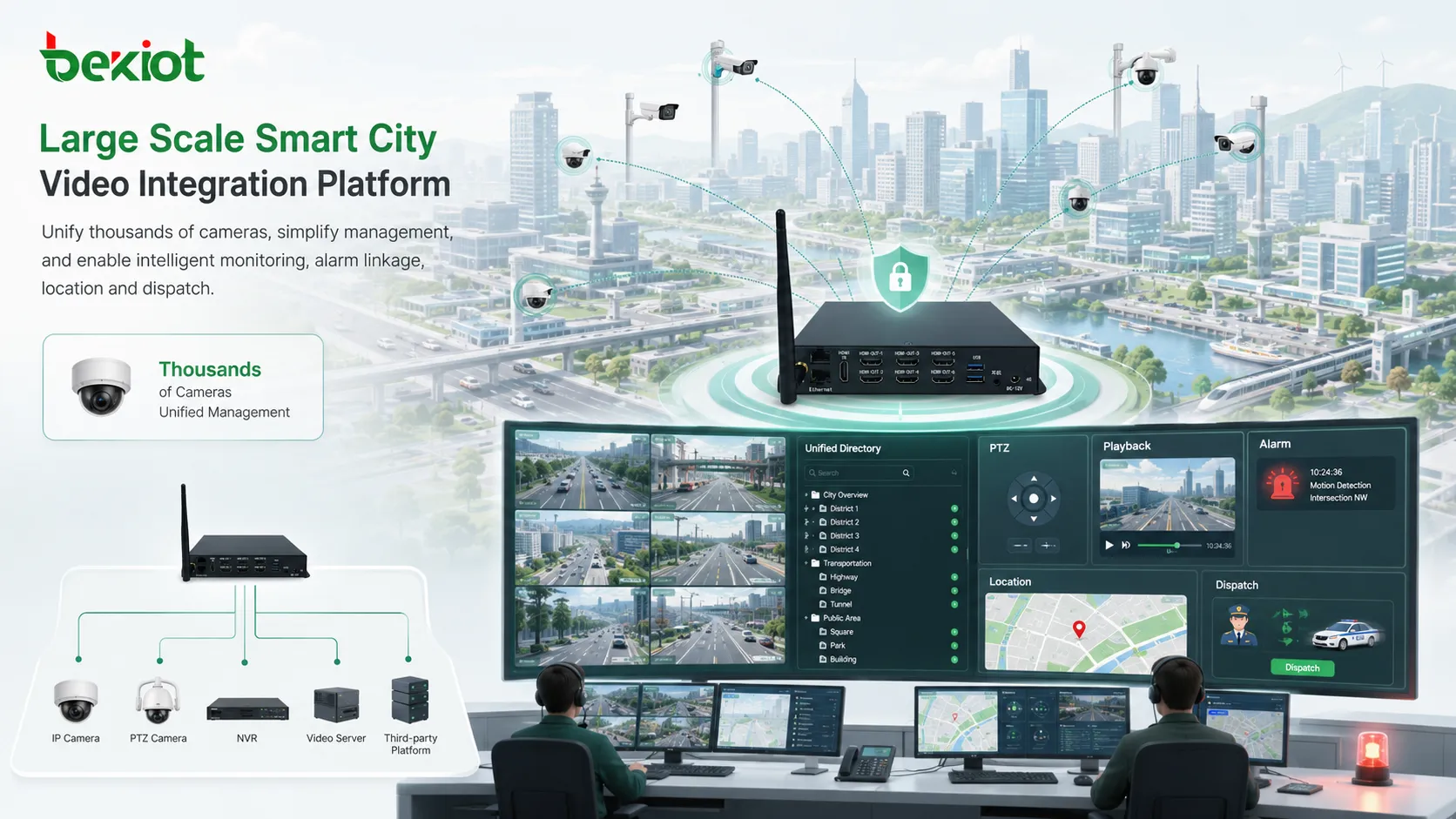
City-level systems often need to integrate cameras from different districts, agencies, platforms, and construction phases. A gateway-based architecture allows the command platform to access large volumes of video resources through unified directories and standard streams, improving video availability for event handling and cross-department coordination.
Industrial parks and production sites
Industrial projects may need to connect video with alarms, access control, emergency communication, production lines, storage areas, hazardous zones, and patrol workflows. Standardized video access helps the platform display site conditions quickly while reducing the burden of adapting device SDKs from different manufacturers.
Transportation, campus, and building systems
Transportation hubs, campuses, hospitals, office parks, and large buildings often have mixed video systems due to phased construction. A video access gateway can help these projects reuse existing surveillance assets while supporting new business applications, browser dashboards, mobile terminals, and centralized management.
Design Considerations for Project Implementation
Start with the existing video environment
Before choosing an integration method, the project team should identify existing cameras, NVRs, VMS platforms, network structure, stream types, recording storage, user permission rules, and alarm linkage requirements. If the project already has a mature surveillance platform, platform-level access through GB/T28181 or another standard protocol may be more efficient than direct device-level SDK access.
Define the required output formats early
Different applications need different video formats. The project should define whether the final system needs browser playback, mobile viewing, low-latency command display, SIP video linkage, public network access, private network access, or recording replay. These requirements determine whether the gateway should support HLS, FLV, WebRTC, RTSP, RTMP, SIP, or multiple outputs at the same time.
Plan transcoding capacity and network bandwidth
Transcoding is useful, but it consumes computing resources. A project with many simultaneous video calls should evaluate the required number of channels, target resolution, bitrate, frame rate, and expected concurrency. Network bandwidth should also be calculated carefully, especially when video needs to be forwarded across sites or accessed by remote users.
Use open interfaces for future integration
A video gateway should not become another closed system. For long-term scalability, the platform should provide clear API documentation, stable stream rules, authentication control, event callback mechanisms, and management interfaces. This allows the video layer to serve multiple business systems without repeated low-level development.
For projects that combine video, SIP voice, paging, emergency notification, and command dispatch, Becke Telcom can be considered as a practical integration partner for building a more unified communication and response workflow.
From SDK Dependency to Platform-Level Integration
Camera SDK development is not obsolete. It still has value in small, fixed, single-vendor environments or when a project needs a very specific device function that only the manufacturer’s SDK can expose. But for many intelligent integration projects, SDK dependency creates too much repeated adaptation, version risk, and maintenance pressure.
A video access gateway offers a more scalable path. It connects complex video resources through standard protocols, converts streams into formats required by modern applications, supports transcoding, and provides unified APIs for upper-layer platforms. For system integrators, this means shorter development cycles, clearer architecture, easier maintenance, and better project repeatability.
As intelligent systems continue to combine video with alarms, maps, IoT devices, communication platforms, and operational workflows, the value of standardized video access will become even more important. The future of video integration is less about writing separate SDK code for every camera and more about building a stable, reusable, and open video service layer.
FAQ
Can a video access gateway completely replace all camera SDKs?
Not always. A gateway can replace most common integration needs such as live preview, playback, PTZ, stream conversion, and alarm linkage. However, some highly specific device functions may still require the manufacturer’s SDK if they are not exposed through standard protocols.
Is GB/T28181 only suitable for government or public safety projects?
No. Although GB/T28181 is widely used in public safety and security-related projects, it can also be valuable in industrial parks, transportation systems, campuses, energy sites, and large buildings where platform-level video access and structured device catalogs are required.
What should be checked before selecting a video gateway?
Key checks include supported access protocols, output stream formats, transcoding performance, channel capacity, API documentation, authentication method, recording access, PTZ support, alarm integration, deployment mode, and compatibility with the existing video surveillance system.
Does stream conversion increase video delay?
It may introduce some delay, especially when transcoding is involved. The actual delay depends on codec settings, network quality, gateway performance, output protocol, and player behavior. For low-latency scenarios, WebRTC or optimized RTSP workflows may be considered.
How can integrators avoid building another closed video platform?
They should choose an architecture with clear standards, documented APIs, flexible authentication, open stream rules, and scalable deployment options. The goal is to make video a reusable service layer that can support multiple business systems over time.







