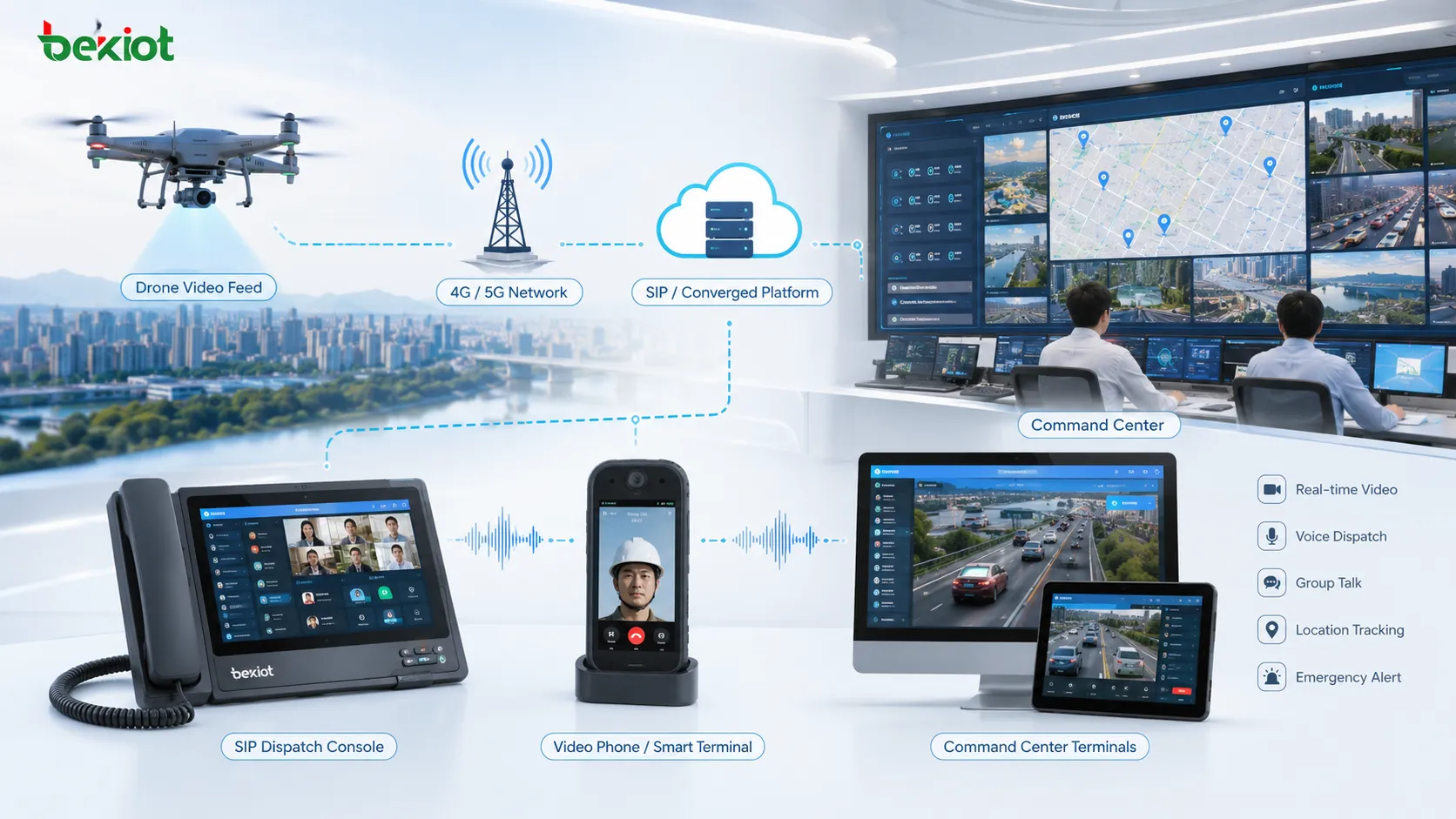
Converged communication systems are increasingly used in daily operations, emergency response, command dispatch, industrial supervision, transportation management, and mobile field coordination. Their value comes from bringing voice, video, intercom, conferencing, dispatch, recording, and collaboration functions into one SIP-based communication environment.
As drone applications become more common, many projects now need to bring real-time drone video into the same communication platform. Instead of letting drone footage stay inside a separate controller, app, or vendor platform, the video can be converted, distributed, and mapped into the converged communication system so dispatchers and field teams can call, view, share, and coordinate around live aerial images.
Why Drone Video Needs a Unified Access Layer
Drone footage should not stay isolated
In many field projects, drones are used for patrol, inspection, emergency reconnaissance, fire rescue, traffic monitoring, power line inspection, water conservancy supervision, large event security, and temporary site monitoring. The drone can quickly provide aerial video, but the video is often locked inside the drone controller, a mobile app, or a manufacturer-specific platform.
This creates a gap between the drone operator and the command center. If the dispatch platform, video conference room, SIP terminal, or emergency communication system cannot directly access the drone stream, operators may have to rely on screen sharing, manual forwarding, or temporary software tools. These methods are often unstable, difficult to standardize, and slow to deploy.
Dedicated gateways and servers make the workflow more reliable
A more practical method is to use a dedicated drone video gateway or drone media server. The gateway or server handles stream access, protocol conversion, SIP mapping, media forwarding, and video distribution. The converged communication platform does not need large-scale redevelopment; it only needs to connect to the media gateway through a standard communication architecture.
This approach improves stability and shortens deployment time. It also supports different drone brands, different controller output methods, different network environments, and different display terminals. The project team can select a system-side server, a front-end gateway, or a combined deployment according to the scenario.
System-Side Server Deployment
Using a public IP or private APN network
One common method is to deploy a drone video server on the system side. Because drones usually operate outdoors or in remote field environments, their video often needs to be transmitted back through mobile networks. For this reason, the drone video server normally requires a public IP address so that the drone controller or drone platform can push streams back to the center.
In some private network projects, APN-based mobile network access can also be used. APN deployment may provide better network control and security, but it also increases cost, planning complexity, and coordination requirements. For most practical projects, the network model should be selected based on security level, bandwidth, latency, operator resources, and project budget.
Drone controllers push streams to the server
Many drone controllers support 4G or 5G network access. The controller can push live video to the drone media server through protocols such as RTMP or GB/T28181. If the project already has a dedicated drone management platform, drone airport, or dock system, that platform can also push the video stream to the media server.
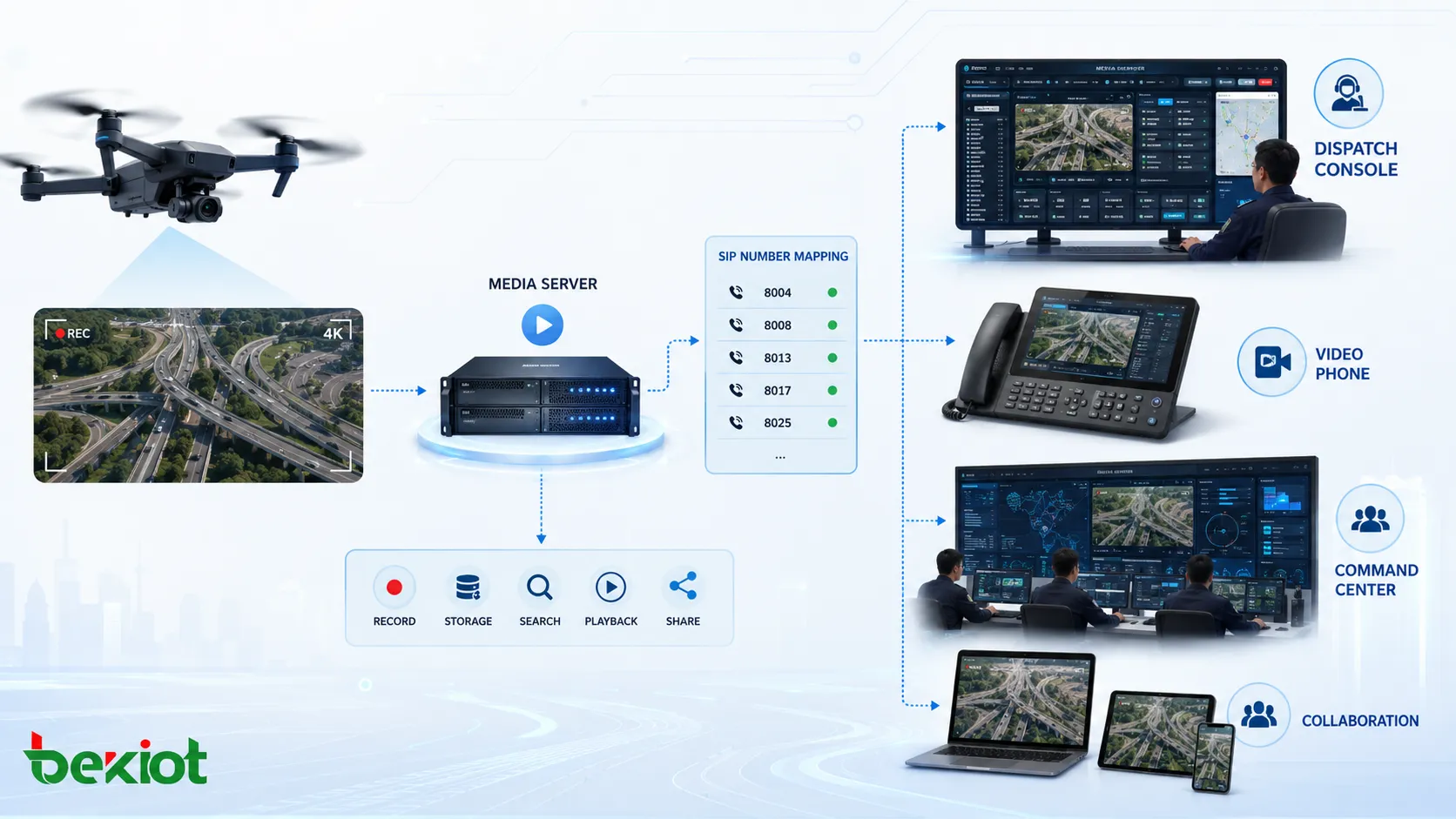
Once the drone video reaches the server, the system can process it as a reusable media resource. It can be viewed by the command center, forwarded to other systems, shared with conference participants, or associated with a SIP number inside the converged communication platform.
Turning Drone Streams into SIP Resources
Mapping each drone video to a SIP number
A key advantage of converged communication integration is SIP networking. The drone media server can connect with the converged communication server through SIP. Each drone video source can be mapped to a SIP number, making the video easy to call and access from existing communication terminals.
For example, a dispatcher can select or call a drone video number from a dispatch console. A video phone can dial the corresponding SIP number to view the drone return image. A smart terminal can also access the stream through the communication platform. This makes drone video part of the same communication workflow rather than a separate video-only application.
Simple configuration instead of heavy development
In many projects, this SIP-based method reduces the need for deep API development. The project team can complete the connection through SIP registration, number planning, stream mapping, routing configuration, and media server settings. This is especially useful when the existing converged communication system is already deployed and the customer wants to add drone video quickly.
At the same time, the media server can still provide streaming output and API interfaces for deeper integration. If the business platform later needs map linkage, event binding, recording retrieval, resource scheduling, or custom web display, the same media layer can support further development.
Related System: Becke Telcom Converged Communication System for Voice, Video, Dispatch, and Emergency Coordination
Front-End Gateway Deployment
When the drone cannot push directly to the center
In some environments, the drone may not be able to push video directly to the platform. The field team may also need local viewing, local distribution, vehicle-mounted display, or temporary site sharing before the stream is sent back to the command center. In these cases, a front-end drone video gateway can be deployed near the drone operation area.
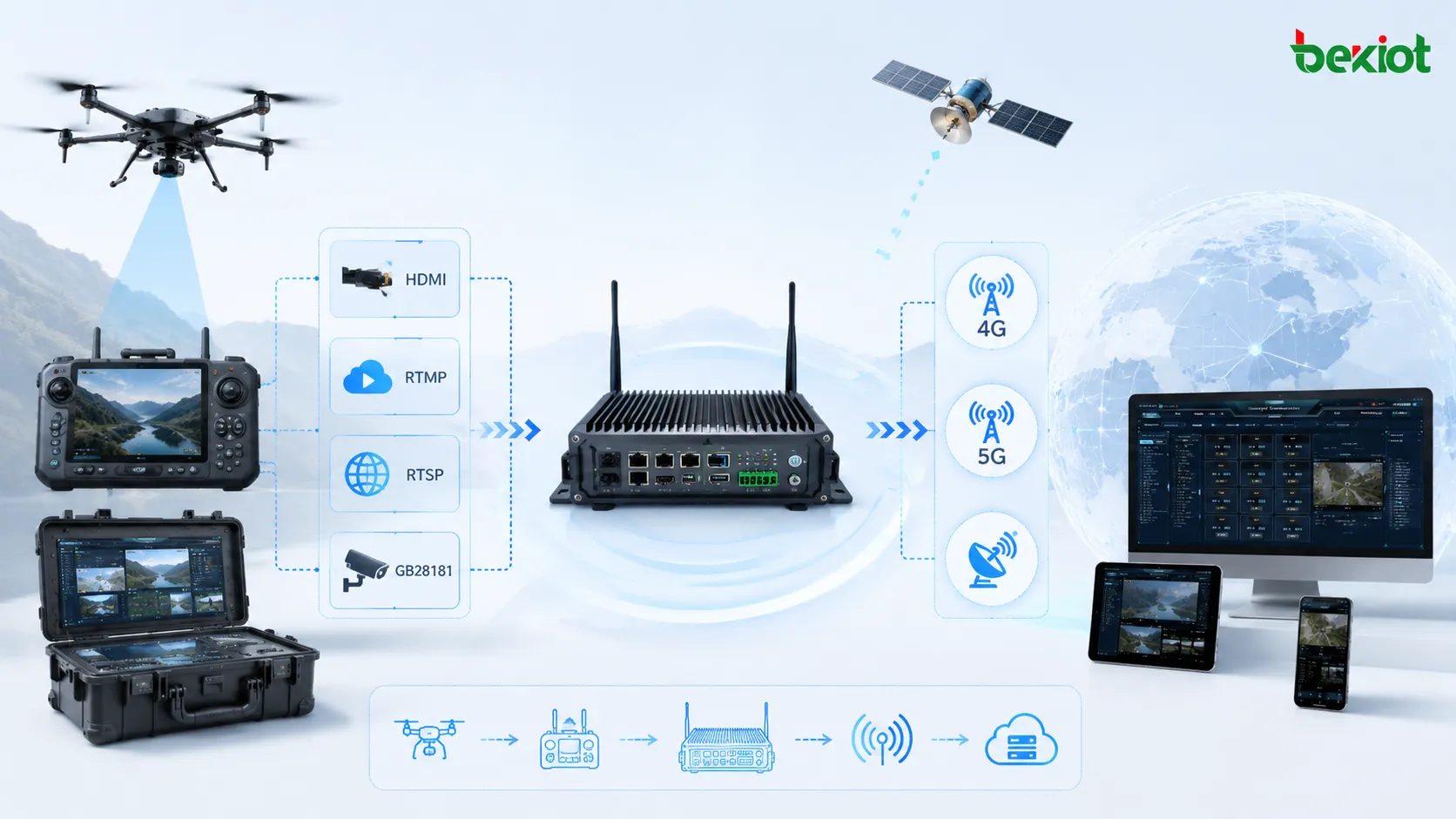
The front-end gateway receives drone video at the field side and then sends it upstream to the converged communication platform through available network links. This model is flexible and works well with mobile command vehicles, portable command boxes, emergency backpacks, temporary field stations, and remote rescue sites.
Flexible access through Wi-Fi, mesh, HDMI, and IP streams
The drone video gateway can receive signals through different methods depending on the drone and field environment. Common access methods include Wi-Fi, ad hoc network, HDMI input, RTMP, RTSP, and GB/T28181. This allows the same gateway to support drones from different brands and models.
After receiving the video, the gateway can transmit it back through 4G, 5G, satellite network, wired network, or private wireless links. If the gateway uses a registration-based connection, it only needs network access and does not require a fixed public IP address. The connected drone stream can still be mapped to a SIP number and accessed by calling from the converged communication platform.
Combined Server and Gateway Architecture
Using both center-side and field-side devices
For larger or more demanding projects, the best design is often a combined deployment. A front-end gateway is used at the drone operation site, while a system-side media server is deployed in the command center or data center. The front-end gateway handles local access, local output, and upstream transmission. The media server manages platform-side distribution, SIP mapping, stream forwarding, and multi-terminal access.
This architecture is useful when the system needs both field-side flexibility and center-side stability. The field team can view or distribute drone video locally, while the command center receives optimized streams for dispatch, conferencing, recording, and cross-department coordination.
Optimizing video for changing network conditions
Drone video transmission often depends on unstable field networks. Bandwidth may change, latency may increase, and signal quality may vary during movement. A gateway and server combination can adjust video encoding, frame rate, bitrate, and resolution according to transmission conditions.
For example, the system may use H.265 encoding during transmission to reduce bandwidth consumption, then convert the stream to H.264 before delivering it to a SIP video phone, dispatch console, browser client, or other terminal that requires H.264 compatibility. This makes the overall system more adaptable and helps avoid playback failure caused by codec mismatch.
Practical Functions for Command and Dispatch
Multi-drone access and unified management
A dedicated drone video server or gateway can support multiple drones, multiple brands, and different video output modes. This is important for emergency response teams, public safety departments, inspection companies, and industrial operators that may use different drone models across different tasks.
Instead of managing each drone stream separately, the platform can organize drone video resources in a unified way. Operators can assign numbers, define names, manage access permissions, view live streams, and distribute video to different users or systems according to the command workflow.
Sharing aerial video with existing terminals
Once drone video becomes part of the converged communication system, it can be used by many existing terminals. Dispatch consoles can open drone video during an incident. Video phones can call a drone stream for live viewing. Smart terminals can access the feed during field coordination. Conference systems can bring the aerial image into a meeting for joint decision-making.
This reduces repeated system construction. The customer can reuse existing communication terminals and platform functions instead of building a separate drone viewing system for every project. For emergency communication, Becke Telcom / 贝克通信 融汇通信系统 can be considered as a lightweight fit when drone video, SIP dispatch, voice intercom, video collaboration, and command coordination need to work together.
Deployment Planning Notes
Confirm the drone output method first
Before implementation, the project team should confirm how the drone outputs video. Some drones can push RTMP through the controller. Some can connect through GB/T28181. Some require HDMI output from the controller. Some need a manufacturer platform, drone dock, or airport system to forward the stream.
This step determines whether the project should use a system-side server, a front-end gateway, or a combined deployment. It also affects bandwidth planning, codec selection, public IP requirements, APN design, and whether field-side equipment is needed.
Plan SIP numbers and user permissions
When drone video is mapped into a SIP-based communication system, number planning becomes important. Each drone video source should have a clear SIP number, name, location, permission rule, and usage scenario. Dispatchers should know which number corresponds to which drone or field team.
User permissions should also be controlled. Not every terminal needs access to all drone videos. Emergency users, command center operators, field supervisors, and maintenance teams may require different access rights. Proper permission design improves security and prevents confusion during operations.
Network and Media Considerations
Bandwidth and latency affect viewing quality
Drone video is sensitive to network quality. If the upstream bandwidth is unstable, the video may freeze, delay, or disconnect. The project team should evaluate video resolution, bitrate, frame rate, uplink bandwidth, network redundancy, and expected viewing terminals before deployment.
For long-distance or remote environments, 4G/5G and satellite links can be used together with adaptive bitrate control. The system should avoid sending unnecessarily high-resolution video to every terminal. A dispatch console may require a higher-quality stream, while a mobile terminal may only need a lower-resolution stream for situational awareness.
Codec compatibility should be checked early
Different terminals may support different codecs. Some drone systems prefer H.265 for efficient transmission, while older SIP video devices or browser-based clients may require H.264 or specific streaming formats. If codec compatibility is ignored, the video may reach the platform but fail to display on the final terminal.
A practical media gateway should support format conversion, stream forwarding, and parameter adjustment. The ability to adjust codec, bitrate, resolution, and frame rate makes drone video integration more reliable in mixed terminal environments.
Operational Value
Better situational awareness for field command
Drone video gives dispatchers an overhead view that fixed cameras and ground users cannot always provide. When integrated with a converged communication system, this aerial view becomes part of the command workflow. Operators can talk to field teams, view drone footage, join a conference, issue instructions, and record the response process in one system.
This is valuable in fire rescue, traffic accident handling, flood control, power inspection, industrial emergency response, border patrol, large event security, and disaster coordination. The system helps decision makers understand the scene faster and coordinate resources more accurately.
Faster project delivery with less platform modification
A dedicated drone media gateway reduces the need to modify the original communication platform. Instead of rebuilding the entire video system, the project can add a gateway or server layer that adapts drone video into SIP and streaming resources. This lowers integration risk and shortens deployment cycles.
For system integrators, the main value is not only video access. It is the ability to turn drone video into a standardized communication resource that can be called, shared, routed, viewed, recorded, and extended according to the actual project requirement.
FAQ
Can drone video be recorded after it enters the communication system?
Yes. Recording can be implemented at the media server, dispatch platform, or video management layer. The project should define whether recording is continuous, event-based, manually triggered, or linked with dispatch incidents.
Can one drone stream be viewed by several departments at the same time?
Yes. The media server can distribute one incoming drone stream to multiple terminals or platforms. Permission control and bandwidth planning should be configured so that multi-user viewing does not overload the field network.
Does drone video integration require changing the original drone system?
Not always. If the drone controller, platform, or dock can output RTMP, RTSP, GB/T28181, or HDMI, the gateway can often receive the video without changing the drone itself. The integration mainly happens at the media access and communication platform layer.
What is the difference between pushing and pulling a drone stream?
Pushing means the drone controller or platform actively sends video to the media server. Pulling means the server or gateway obtains the stream from an available address or device. The best method depends on network topology, public IP availability, firewall rules, and device capability.
Can the system work in a mobile command vehicle?
Yes. A front-end gateway can be installed in a mobile command vehicle to receive local drone video and send it back through 4G/5G, satellite, or private network links. It can also provide local viewing or HDMI output for vehicle-mounted displays.