


Video phones are now widely used in ICT projects. They can support point-to-point video calls, video meetings, remote visual communication, and in many system integration projects, they are also used to view surveillance video, access video resources, or work together with video gateways and dispatch platforms.
Most video phones use a desktop design with a built-in or external camera, a visual display, and an intelligent operating system. This allows the device to handle more than ordinary voice calls. In practical projects, users may expect one terminal to support video calling, video conferencing, monitoring preview, intercom linkage, and other visual applications.
However, many integrators find that video phones do not always play video smoothly. Typical symptoms include black screen, delayed playback, freezing, slow operation, or failure to open surveillance video. These problems are especially common when a video phone is used to call video streams from another system, such as an IP camera, NVR, video platform, video gateway, or surveillance management platform.
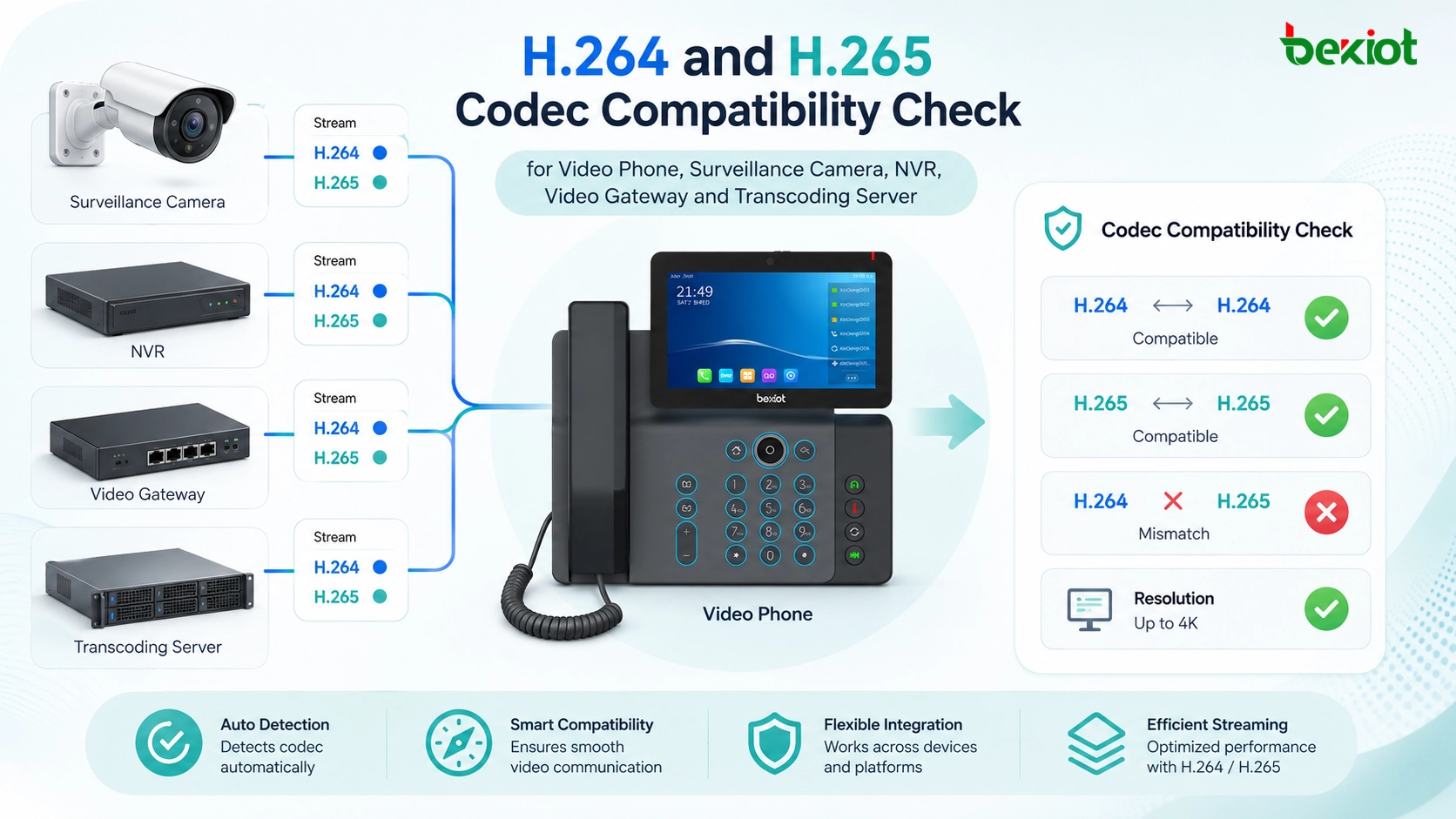
Start from the Actual Playback Scenario
Video calling and monitoring preview are not the same task
A SIP video call between two compatible video phones usually follows a negotiation process. Before the call is established, both sides may negotiate parameters such as video resolution, frame rate, bitrate, and codec format. If the devices use compatible settings, the call can normally proceed.
Viewing surveillance video is different. When a video phone is used to open a camera stream or call video from another platform, the stream may already have fixed parameters. The video phone may not have the opportunity to negotiate a suitable resolution, codec, or bitrate. As a result, the source video may exceed the decoding capability of the video phone.
Small terminals have limited processing capability
A video phone is not a professional video decoding server. Its screen size, processor capacity, memory, operating system, and media decoding capability are all limited by product positioning and cost. A stream that plays smoothly on a PC, NVR client, or video wall decoder may not necessarily play well on a desktop video phone.
This is why troubleshooting should not only focus on network connectivity. The project team should also check whether the video format itself is suitable for the terminal.
Resolution Limits Are a Common Starting Point
Many devices only support 1080P or 720P
Because the display size of most video phones is not very large, ultra-high-resolution video does not provide much visible advantage on the terminal screen. For this reason, many video phones support a maximum video resolution of 1080P, while some models only support 720P.
If the video source exceeds the maximum resolution supported by the video phone, the terminal may fail to decode the stream. In practical projects, this may appear as a black screen, no video output, repeated loading, or abnormal playback.
Check both terminal capability and stream output
When a video phone cannot play video, the first step is to check the maximum supported resolution of the terminal. The second step is to confirm the actual resolution of the video stream being called.
For example, if the video source is 4K or higher than the video phone’s supported decoding range, the problem may not be the SIP account, network, or platform interface. The video stream simply needs to be reduced to a compatible resolution before it reaches the terminal.
Codec Compatibility Can Cause a Black Screen
H.265 saves bandwidth but needs stronger decoding
Video encoding is one of the most important factors in video playback. H.265 can save about half of the bandwidth and storage space compared with H.264 under similar image quality. This is why many surveillance systems, NVRs, and IP cameras now use H.265 as a common encoding format.
The challenge is that H.265 decoding requires stronger processing capability than H.264. Supporting H.265 may increase hardware requirements and product cost. Therefore, many video phones, especially older or cost-sensitive models, may not support H.265 decoding.
Surveillance systems often output H.265 by default
In many monitoring integration projects, the camera or recorder has already been configured to output H.265 streams. When a video phone that only supports H.264 tries to play this stream, it may show a black screen even though the stream address, network route, and access permission are correct.
During project troubleshooting, integrators should confirm whether the video phone supports H.265 and whether the video source is transmitting H.265. If the terminal does not support the codec used by the camera or platform, the stream must be changed at the source or converted through a transcoding system.
Bitrate Mismatch Leads to Freezing and Delay
High bitrate may overload the terminal
Another issue that is often ignored is bitrate. If the bitrate is too high, the video phone may become slow, delayed, or unstable. The user may see video freezing, long response time, delayed control, or even device crash in severe cases.
In many SIP video call scenarios, the device and platform negotiate the bitrate before communication starts. But when a video phone is used to view video from another business system, the stream may bypass this negotiation process. The video source may be designed for a computer client or a professional decoder rather than a video phone.
Typical project values show the mismatch clearly
In many video phone projects, the terminal-side video bitrate is usually below 2 Mbps. However, many surveillance streams can reach 4–6 Mbps or even higher depending on resolution, frame rate, codec settings, and image complexity.
When a 4–6 Mbps stream is directly sent to a terminal that is designed for lower-bitrate video communication, the video phone may not be able to process the media data smoothly. This explains why some video phones can register normally, make voice calls normally, and even start video playback, but still suffer from serious lag or unstable display.
Network Problems Should Be Checked After Media Parameters
Do not treat every failure as a network fault
When video cannot be displayed, many teams first suspect network problems. Network quality is important, but not every playback failure is caused by packet loss, routing, NAT, VLAN, or firewall settings.
If the video phone can register, make calls, access the platform, and receive stream requests, the next step should be media parameter checking. Resolution, codec, frame rate, and bitrate are often more directly related to black screen and freezing problems.
Bandwidth still affects stability
Network capacity still matters, especially when multiple video phones, cameras, and monitoring streams are used at the same time. A single high-bitrate stream may work in testing, but several simultaneous streams may overload the local network, wireless connection, or uplink bandwidth.
For engineering acceptance, the project team should test not only one video channel, but also realistic concurrent use cases. This helps confirm whether the network, terminal, and stream configuration can support actual business operation.
Transcoding Provides a Practical Engineering Solution
Changing every source parameter is not always possible
In small projects, video playback problems may be solved by changing camera settings. The integrator can reduce resolution, switch H.265 to H.264, lower bitrate, or create a sub-stream for video phone access.
In large projects, this may not be easy. Existing surveillance systems may already be running with fixed recording strategies, storage plans, platform rules, or customer-defined video standards. Changing camera parameters may affect recording quality, platform compatibility, AI analysis, or other business systems.
Media conversion creates a compatible output
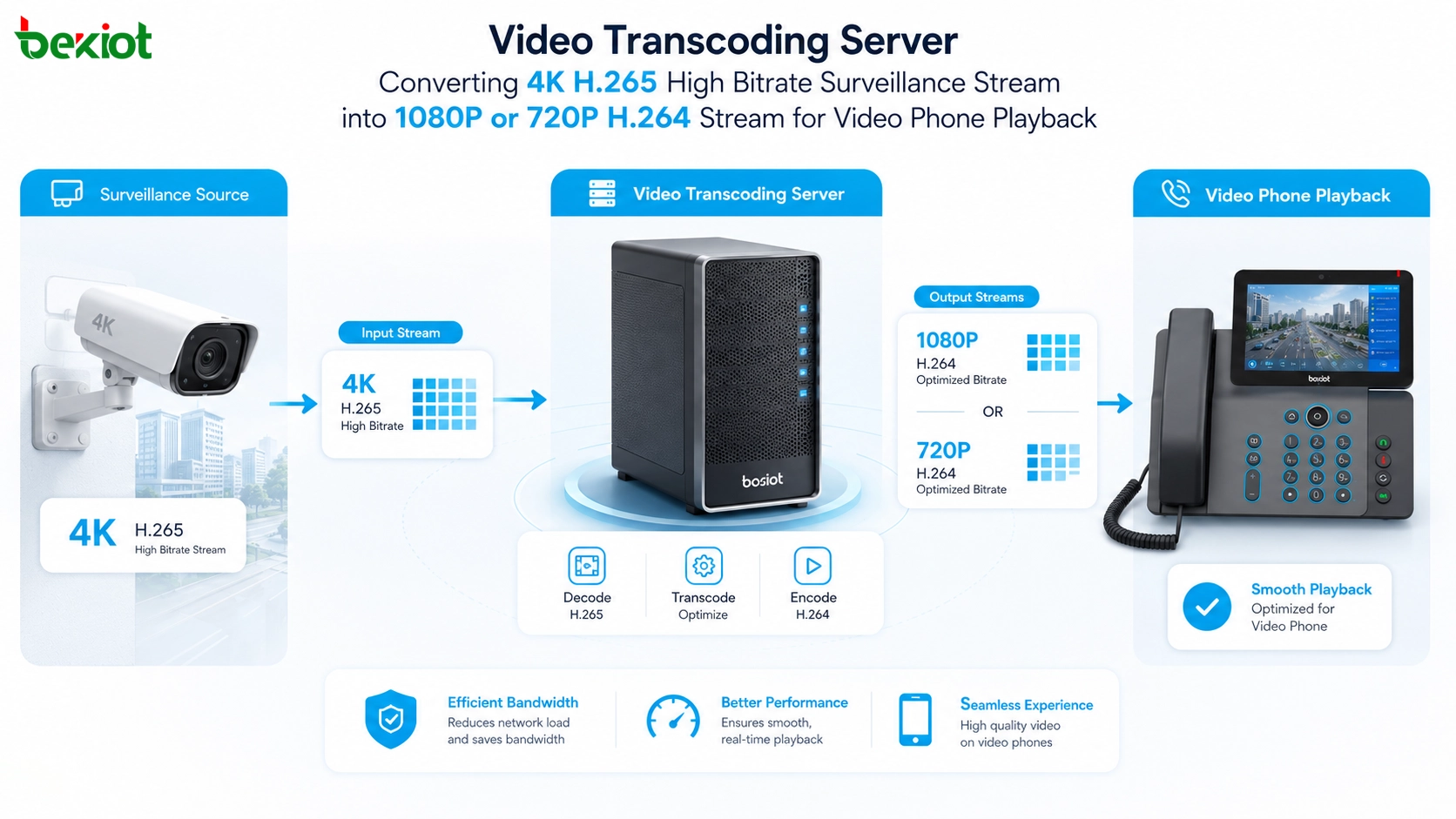
A video transcoding server or video gateway can solve these compatibility problems by converting streams before they reach the video phone. Oversized video, unsupported codecs, high-bitrate streams, or incompatible formats can be converted into a terminal-friendly output.
For example, a 4K H.265 stream can be converted into a 1080P or 720P H.264 stream with a lower bitrate. The original stream can still be used by the surveillance platform, while the converted stream is used by the video phone or dispatch terminal. This avoids changing the entire monitoring system while improving terminal playback stability.
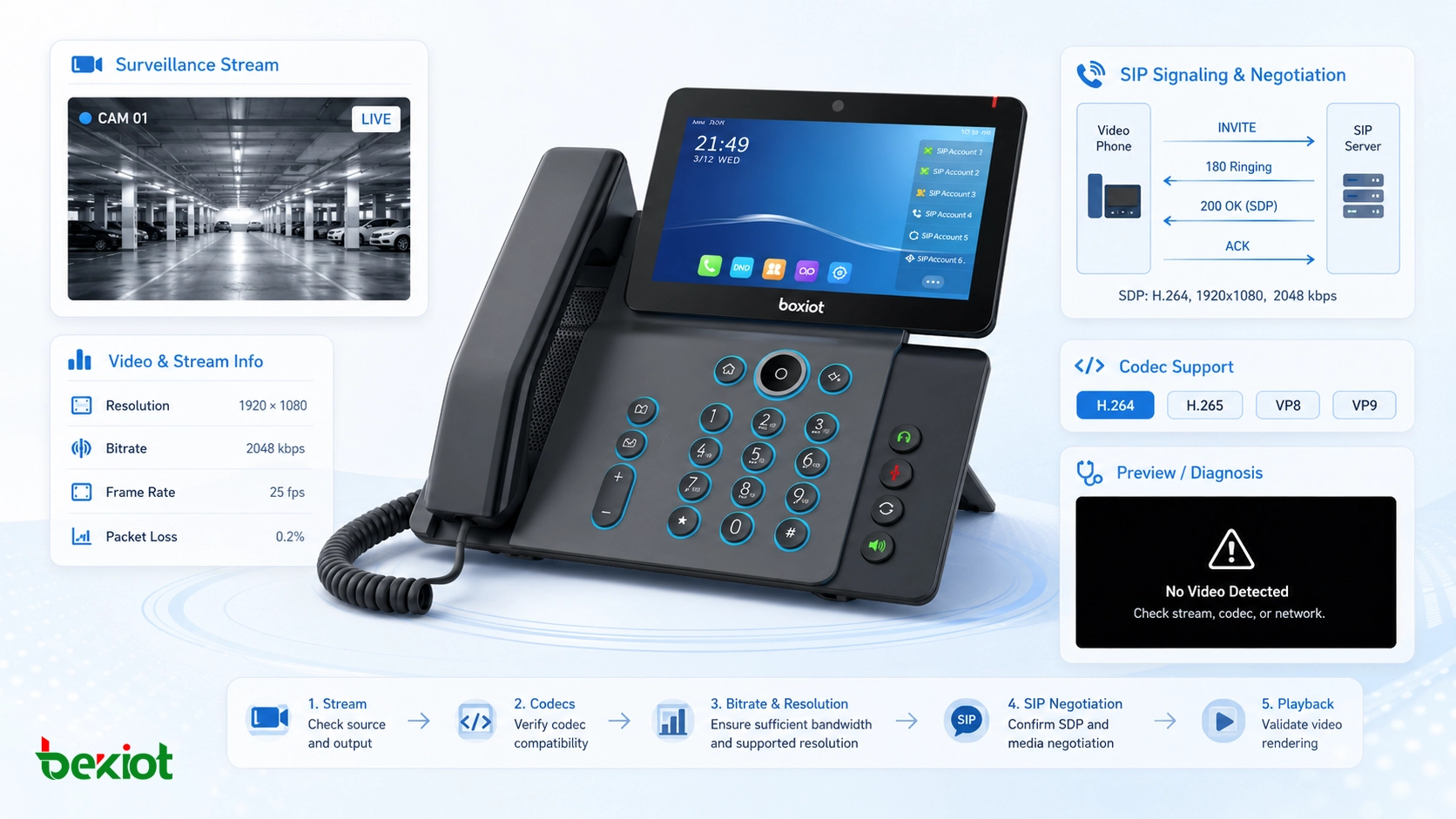
Recommended Troubleshooting Workflow
Confirm the video phone specification first
The first step is to review the video phone datasheet or system configuration. The project team should confirm the maximum supported resolution, supported codecs, maximum bitrate, recommended frame rate, SIP video capability, and whether the model supports the required stream format.
This prevents unnecessary troubleshooting. If the terminal does not support the required codec or resolution, changing SIP account settings or network routes will not solve the root problem.
Check the actual source stream
The second step is to inspect the video source. The team should confirm whether the stream comes from an IP camera, NVR, VMS platform, video gateway, or media server. The actual stream parameters should be checked, including resolution, codec, bitrate, frame rate, transport method, and whether a sub-stream is available.
If the source stream is too heavy for the video phone, the project can either change the source output or introduce a transcoding layer.
Test with a standard stream
A useful method is to test the video phone with a known standard stream, such as 720P or 1080P H.264 with a moderate bitrate. If the standard stream works but the project stream fails, the problem is likely related to media compatibility rather than terminal failure.
This test can also help integrators define a recommended stream profile for future deployment. Once a compatible profile is confirmed, it can be applied to cameras, gateways, or transcoding servers.
Design Advice for Integration Projects
Use sub-streams where possible
Many IP cameras and NVRs support main stream and sub-stream output. The main stream can be used for recording or high-definition monitoring, while the sub-stream can be used for video phones, mobile terminals, or web clients.
For video phone playback, a sub-stream with H.264 encoding, 720P or 1080P resolution, and controlled bitrate is usually easier to handle than a high-resolution main stream.
Plan video parameters before deployment
Video phone integration should not be left until the final stage of the project. The expected video sources, display terminals, codecs, stream formats, and bandwidth conditions should be defined during system design.
This is especially important for projects involving surveillance linkage, emergency dispatch, video intercom, command centers, industrial sites, or multi-brand video platforms. Early planning can reduce on-site debugging time and avoid repeated compatibility issues.
Keep the architecture flexible
A flexible architecture should allow the same video source to serve different systems in different formats. A surveillance platform may need high-definition recording, a command center may need low-latency display, a browser client may need web-compatible streaming, and a video phone may need a lower-bitrate H.264 stream.
For projects that combine SIP communication, video phones, paging, emergency notification, and monitoring linkage, Becke Telcom can be considered as a practical integration partner for building a more unified voice and video communication workflow.
Final Thoughts
When a video phone cannot play video, the problem is often not a single fault. It may come from resolution mismatch, unsupported H.265 codec, excessive bitrate, missing SIP media negotiation, unsuitable surveillance stream settings, or limited terminal processing capability.
A practical troubleshooting method is to compare the video phone’s supported parameters with the actual stream output. If the source video exceeds the terminal’s capability, the project can reduce camera parameters, use a sub-stream, or deploy a transcoding server to convert the video into a suitable format.
As video phones become part of broader ICT, surveillance, dispatch, and emergency communication systems, media compatibility should be treated as an engineering design issue rather than only a terminal problem. With proper parameter planning and transcoding support, video phones can provide smoother visual communication and more reliable monitoring access in real projects.
FAQ
Why does audio work while video fails on a video phone?
Audio and video use different media streams and codecs. A device may successfully register and complete audio communication while failing to decode the video stream due to unsupported codec, high resolution, high bitrate, or blocked video RTP traffic.
Should the main stream or sub-stream be used for video phone access?
In most projects, the sub-stream is more suitable for video phones. It usually has lower resolution and lower bitrate, which makes it easier for desktop terminals, mobile devices, and low-power endpoints to decode smoothly.
Can firmware upgrades solve playback problems?
Sometimes. Firmware may improve codec support, stream compatibility, or stability. However, firmware cannot overcome hardware limits. If the processor does not support a codec or resolution, transcoding or source parameter adjustment is still required.
What should be recorded during project acceptance?
The acceptance record should include tested stream resolution, codec, bitrate, frame rate, video phone model, firmware version, network condition, concurrent channel count, and playback result. This helps future maintenance teams reproduce and diagnose problems.
Is a transcoding server necessary for every project?
No. If all video sources can output a compatible H.264 sub-stream with suitable resolution and bitrate, transcoding may not be required. A transcoding server becomes valuable when source parameters cannot be changed or when multiple systems need different output formats.







