


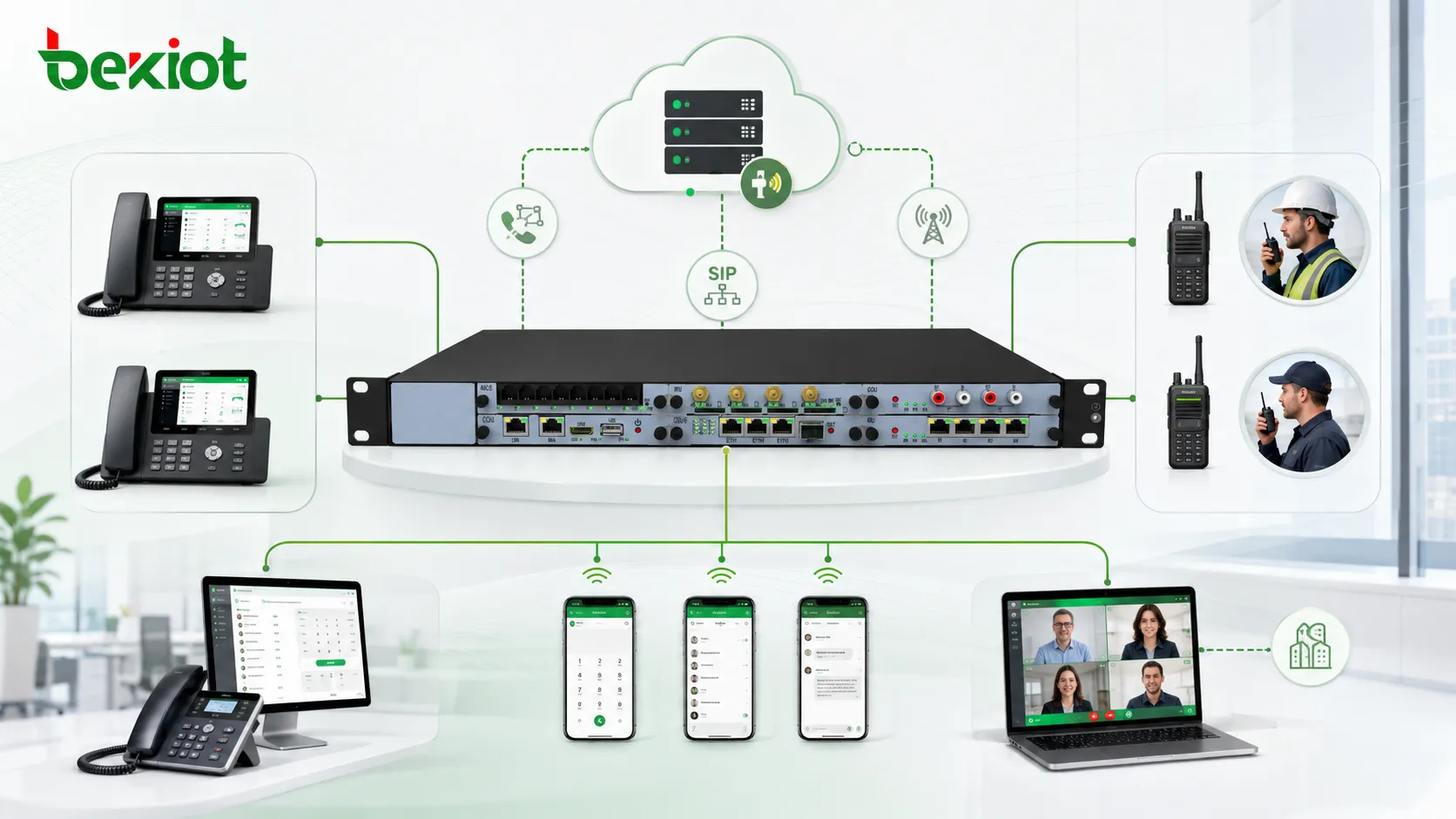
Many enterprises still build internal communication around IPPBX or softswitch systems. A telephone gateway connects the organization to the public telephone network, while desktop IP phones support daily office calling, internal extension dialing, and lower communication costs. This model has been used from the analog telephone era to today’s VoIP environment because it is stable, familiar, and efficient for office communication.
However, enterprise communication needs have changed. Office users are no longer limited to fixed desks. Industrial workers, field teams, maintenance crews, logistics staff, security teams, and mobile supervisors often need wireless communication, group push-to-talk, mobile voice calls, video calls, and connection with existing office extensions. A traditional telephone system alone cannot fully support these mobile and wireless working scenarios.
A more practical approach is to extend the telephone system with a public network push-to-talk server, SIP trunking, smart mobile terminals, and radio gateway integration. This architecture allows enterprises to keep their existing IPPBX while adding wireless intercom, mobile office, internal extension calling, and interoperability with analog or digital radio systems.
Why Traditional Office Communication Needs Extension
IPPBX remains useful but not enough for mobile teams
An IPPBX system is still a reliable foundation for enterprise communication. It supports internal extension numbers, call routing, external line access, call management, and centralized configuration. For office users, IP phones and softphones can meet most daily communication requirements.
The limitation appears when communication moves outside the office desk. Workers in mines, factories, warehouses, parks, construction areas, patrol routes, utility sites, and emergency response locations may not be able to use fixed IP phones. They need portable terminals that can communicate instantly, join groups, receive dispatch instructions, and still remain connected with the enterprise telephone system.
Wireless communication has gone through several phases
Enterprise wireless communication has developed through different technical stages. Earlier solutions such as DECT and PHS once played a role in mobile office communication, but in many markets they are no longer easy to deploy or maintain. The industrial chain has become limited, and compatible products or complete solutions are much less common than before.
For larger organizations, private radio systems such as DMR or TETRA can provide reliable professional trunking communication. These systems are powerful and suitable for demanding group communication scenarios, but they often require higher construction cost, dedicated planning, frequency resources, professional maintenance, and specialized terminals.
The Challenge with Dedicated Radio Networks
Radio systems are strong at push-to-talk
DMR, TETRA, analog radio, and other professional trunking systems are designed for group communication. They are useful when teams need fast push-to-talk, stable coverage, command control, and reliable operation in industrial or public safety environments.
But these systems are mainly built around intercom-style communication. Although some trunking platforms can support full-duplex phone calling, channel resources are limited. If users occupy radio channels for long phone calls, it can affect group communication availability. This makes it unrealistic to treat a dedicated radio system as both a long-duration mobile phone system and a push-to-talk network at the same time.
Cost and deployment complexity must be considered
A private trunking network may be suitable for large enterprises, government agencies, transportation operators, energy companies, or industrial users with strong reliability requirements. However, many enterprises only need a more flexible way to connect mobile workers, office phones, and intercom groups.
In these cases, building a complete private radio network may be too expensive. The project may require base stations, repeaters, frequency planning, dedicated terminals, engineering deployment, and ongoing maintenance. For many enterprise mobile office scenarios, a lighter architecture based on public network PTT and SIP integration is more practical.
Using a Public Network PTT Server as the Middle Layer
The server connects mobile terminals with the phone system
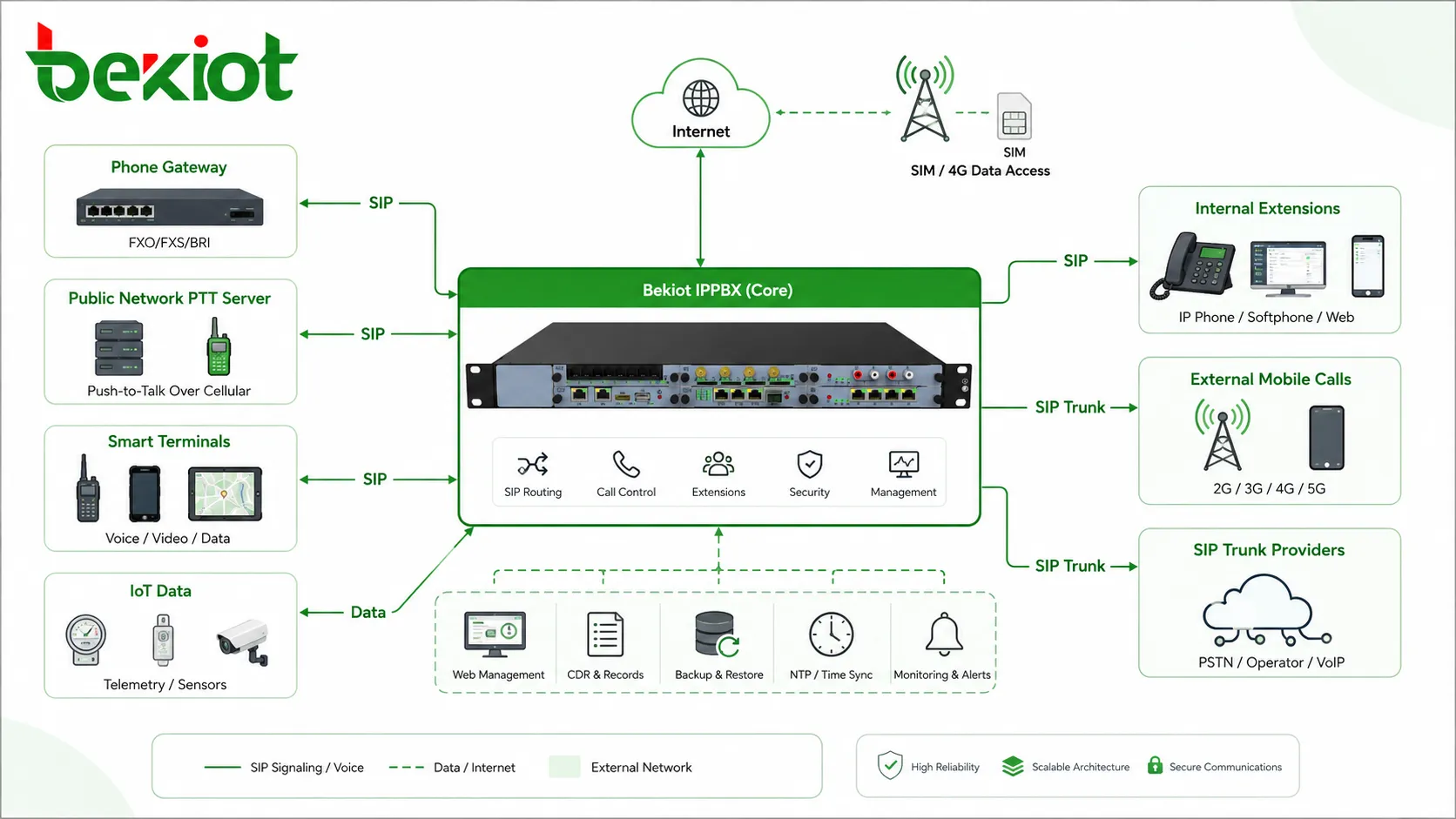
A public network push-to-talk server can act as the communication bridge between smart terminals and the enterprise IPPBX. The enterprise deploys one PTT server, configures smart terminals according to the project size, and connects the PTT server with the existing IPPBX through SIP trunking.
After SIP trunking is configured, the enterprise can assign an extension number range to the smart terminals and define call routing rules. This means a mobile terminal is no longer an isolated intercom device. It becomes part of the enterprise communication system and can be called through an internal extension number.
Deployment is simpler than building a private network
The public network PTT server can be configured with a public IP address, while smart terminals use mobile data cards or enterprise mobile network access. The server centrally manages users, groups, permissions, call behavior, and terminal registration.
This design reduces the need for dedicated radio infrastructure. Enterprises can use existing mobile network coverage and Internet resources while keeping the management logic under their own communication system. It is especially suitable for organizations that need mobile intercom but do not want to build a complete private trunking system.
How Smart Terminals Extend Mobile Office Capability
Push-to-talk groups support field operations
Smart terminals can provide intercom-style group communication. Once users are assigned to groups, they can use push-to-talk for fast coordination in workshops, mines, warehouses, patrol routes, logistics areas, construction sites, and industrial parks.
This type of communication is close to the work habits of radio users. It is fast, direct, and suitable for team coordination. At the same time, because the system is based on a public network PTT server, group management, user permissions, and communication records can be handled centrally.
Internal numbers make mobile users reachable
Each smart terminal can be assigned an internal number. Office users can dial the smart terminal directly from an IP phone, and the mobile terminal can also call office extensions. This creates a bridge between fixed office communication and mobile field communication.
The same terminal can also support voice calls, video calls, and calls to external mobile phone numbers depending on the system configuration. For mobile office users, one device can support intercom, enterprise extension calling, visual communication, and external contact.
Video calling adds more context to field work
In many enterprise scenarios, voice alone is not enough. A field worker may need to show equipment status, confirm a fault location, report site conditions, or support remote inspection. Smart terminals with video capability can provide more direct communication between field staff and office users.
When the mobile terminal is integrated with the telephone system, video and voice communication can become part of a broader enterprise collaboration workflow. This is useful for maintenance support, emergency response, equipment troubleshooting, safety inspection, and remote supervision.
Connecting Existing Radio Systems
Analog and digital radios can be integrated
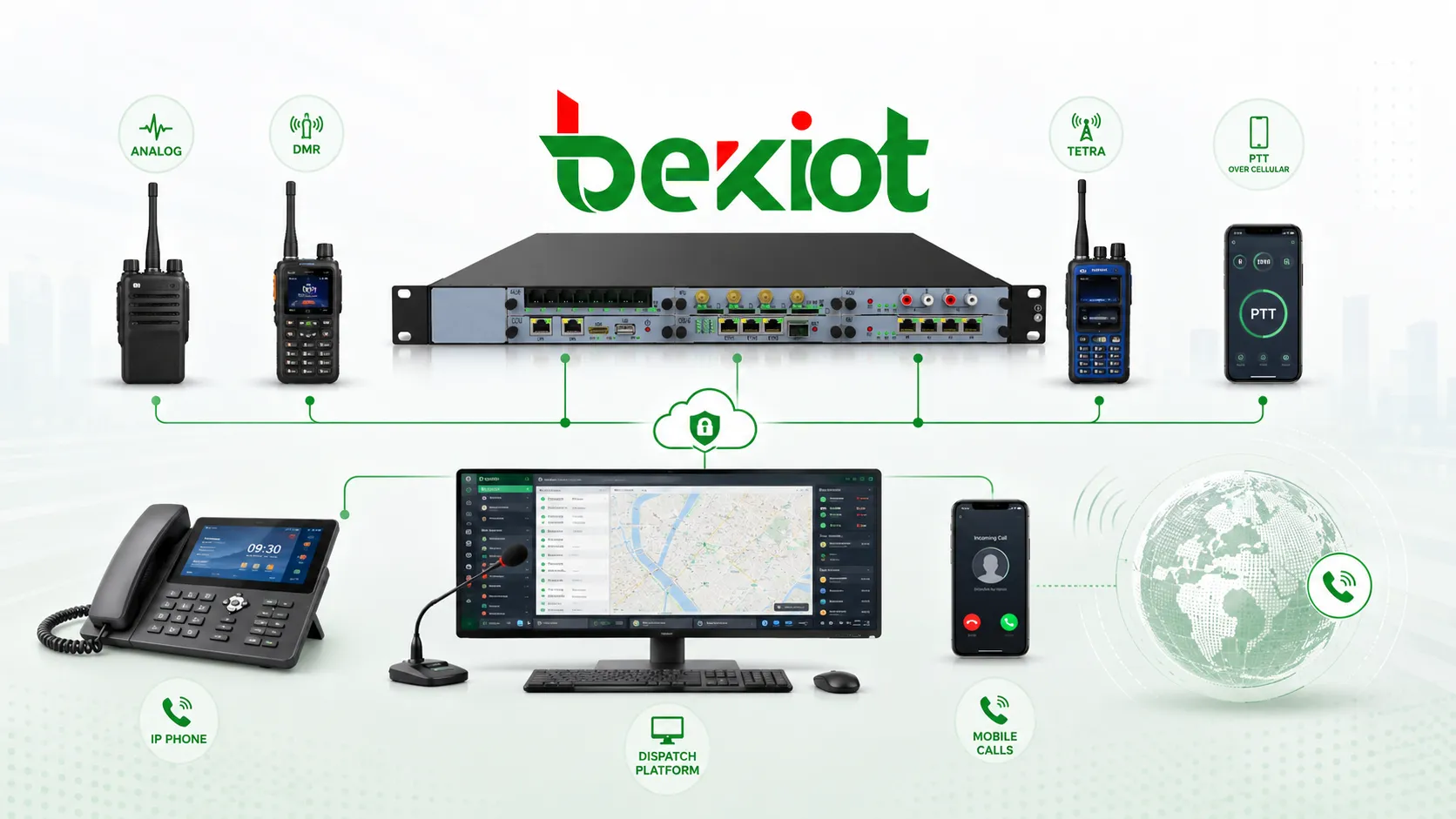
Some enterprises already have analog radios, DMR systems, TETRA systems, or other private radio networks. These existing assets do not need to be abandoned. Through radio gateways or trunking gateways, the public network PTT server and telephone system can be connected with the existing radio system.
This allows public network PTT users, private radio users, and office phone users to communicate across different systems. For organizations that are gradually upgrading their communication network, this hybrid model can protect previous investment while adding new mobile office capability.
Hybrid communication supports broader coverage
A hybrid architecture can combine the advantages of multiple networks. Private radio can serve local high-reliability areas. Public network PTT can support wide-area mobile users. IPPBX can continue to serve office phones and external calls. With proper routing and gateway configuration, the communication system becomes more flexible.
This model is especially useful for factories, mines, ports, industrial parks, logistics companies, property management, municipal service teams, and emergency support organizations. Different teams can use the terminals that fit their work environment while remaining connected through one communication architecture.
System Architecture for Enterprise Deployment
Core components
A typical deployment includes the existing IPPBX or softswitch, telephone gateway, desktop IP phones, public network PTT server, smart terminals, SIP trunk configuration, user number plan, call routing rules, and optional radio gateway. If the enterprise needs visual dispatch or centralized management, a dispatch platform can also be added.
The IPPBX continues to handle office extensions and external telephone access. The PTT server manages smart terminals and intercom groups. SIP trunking connects both systems. Radio gateways connect legacy radio networks. The result is a layered architecture that keeps existing systems while adding new wireless capability.
Number planning is important
To make the system easy to use, smart terminals should be assigned clear extension numbers. Office users should be able to dial mobile users directly, and mobile users should know how to call internal extensions, group numbers, dispatch seats, or external numbers.
A well-designed number plan reduces training difficulty and improves daily communication efficiency. It also makes future expansion easier when new departments, terminals, work groups, or sites are added.
Call routing determines user experience
SIP routing should be planned according to actual work scenarios. Some calls may stay inside the enterprise network. Some calls may be routed to the public telephone network. Some calls may go to the public network PTT server, while others may reach radio users through a gateway.
Clear routing rules help avoid communication confusion. They also ensure that the system can support both office communication and field communication without forcing users to change their working habits too much.
Practical Benefits for Enterprise Users
Lower cost than building a dedicated trunking system
Compared with building a complete private trunking network, a public network PTT and SIP integration model can greatly reduce deployment cost. The enterprise can use public mobile networks and existing IPPBX resources while adding smart terminals and group intercom services.
Better mobility for daily work
Mobile workers can use smart terminals for push-to-talk, extension calling, video communication, and external calls. This helps enterprises support mobile office, field coordination, emergency notification, and cross-department communication.
More flexible network integration
The system can connect internal LAN resources, Internet access, mobile data networks, public telephone networks, and private radio networks. This creates a more flexible communication model that can adapt to different sites and project phases.
Easier management and expansion
Centralized server management allows administrators to configure users, groups, permissions, numbers, and call routing. When new terminals or departments are added, the system can be expanded without rebuilding the entire communication network.
For projects that need SIP telephony, mobile push-to-talk, radio interoperability, video calls, dispatch seats, and emergency communication in one architecture, Becke Telcom can be considered as a practical integration partner for building a more connected enterprise communication system.
Where This Solution Fits Best
Factories and industrial parks
Factories and industrial parks often need communication between control rooms, workshops, warehouses, gates, maintenance teams, and security staff. A hybrid telephone and PTT system can connect fixed IP phones with mobile workers and intercom groups.
Mines and energy sites
Mining and energy users often have wide areas, field teams, and strong wireless communication needs. Smart terminals and radio integration can help connect mobile personnel with dispatch centers and office communication systems.
Logistics and property management
Logistics centers, property teams, and service organizations need fast coordination across mobile staff. Public network PTT provides a lower-cost way to support wide-area communication without building a private radio network.
Emergency support and maintenance teams
Emergency and maintenance teams need quick group communication, individual calling, and sometimes video confirmation. Integrating smart terminals with the telephone system makes it easier to connect field users with office experts and supervisors.
Implementation Notes for Integrators
Check the existing IPPBX capability
Before deployment, the project team should confirm whether the existing IPPBX supports SIP trunking, number routing, external line access, codec compatibility, and user capacity. These details affect how smoothly the PTT server can be connected.
Plan mobile network access
Smart terminals depend on mobile data or wireless network access. Coverage, signal quality, data plan, network stability, and user density should be evaluated before large-scale deployment.
Define intercom groups clearly
Push-to-talk groups should match the organization’s actual working structure. Groups may be designed by department, site, work area, emergency role, patrol route, or project team. Poor group design can reduce communication efficiency.
Test cross-system calling early
The project should test office phone to smart terminal calling, smart terminal to office phone calling, group intercom, external mobile calls, radio gateway calls, and emergency call scenarios before final acceptance. Early testing can prevent routing problems after deployment.
A More Flexible Direction for Enterprise Communication
Enterprise communication is moving from fixed office calling toward mobile, wireless, and multi-network collaboration. Traditional IPPBX systems still provide a strong foundation, but they need extension when users require field communication, group intercom, mobile office, and integration with radio systems.
By deploying a public network PTT server, connecting it with the IPPBX through SIP trunking, assigning internal numbers to smart terminals, and integrating existing radio systems through gateways, enterprises can build a flexible communication architecture with lower cost and easier deployment.
This solution does not replace the existing telephone system. It expands it. Office phones, smart terminals, public network PTT, private radios, video calls, and external mobile communication can work together, giving enterprises a more practical path toward unified communication and mobile collaboration.
FAQ
Can public network PTT replace all private radio systems?
Not always. Public network PTT is useful for wide-area mobile communication and lower-cost deployment, but private radio systems may still be better for sites that require dedicated coverage, strong reliability, local survivability, or special industry compliance.
Does the smart terminal need an internal extension number?
It is strongly recommended. Assigning internal numbers makes the terminal easier to call from office phones and helps users understand the communication workflow. It also simplifies routing, management, and future expansion.
Can this architecture support video communication?
Yes, if the selected smart terminals, server platform, network bandwidth, and IPPBX or communication platform support the required video capability. Video calling should be tested under real mobile network conditions before large-scale use.
What should be considered when connecting analog radios?
The project should confirm radio frequency, channel plan, audio interface, PTT control method, gateway compatibility, group mapping, and operating rules. Analog radio integration often requires careful field testing.
How can enterprises keep the system secure?
Security planning should include account control, SIP trunk authentication, network firewall rules, terminal permission management, encrypted access where available, SIM card management, and regular review of user groups and routing rules.







