


Highway toll stations, unattended parking areas, service entrances, and public help points often require a simple but reliable way for drivers or staff to contact the control room. A one-touch intercom terminal is commonly used for this purpose. Most modern one-touch intercom devices use SIP-based VoIP communication, making them flexible for IP network deployment, remote dispatch, and integration with other communication systems.
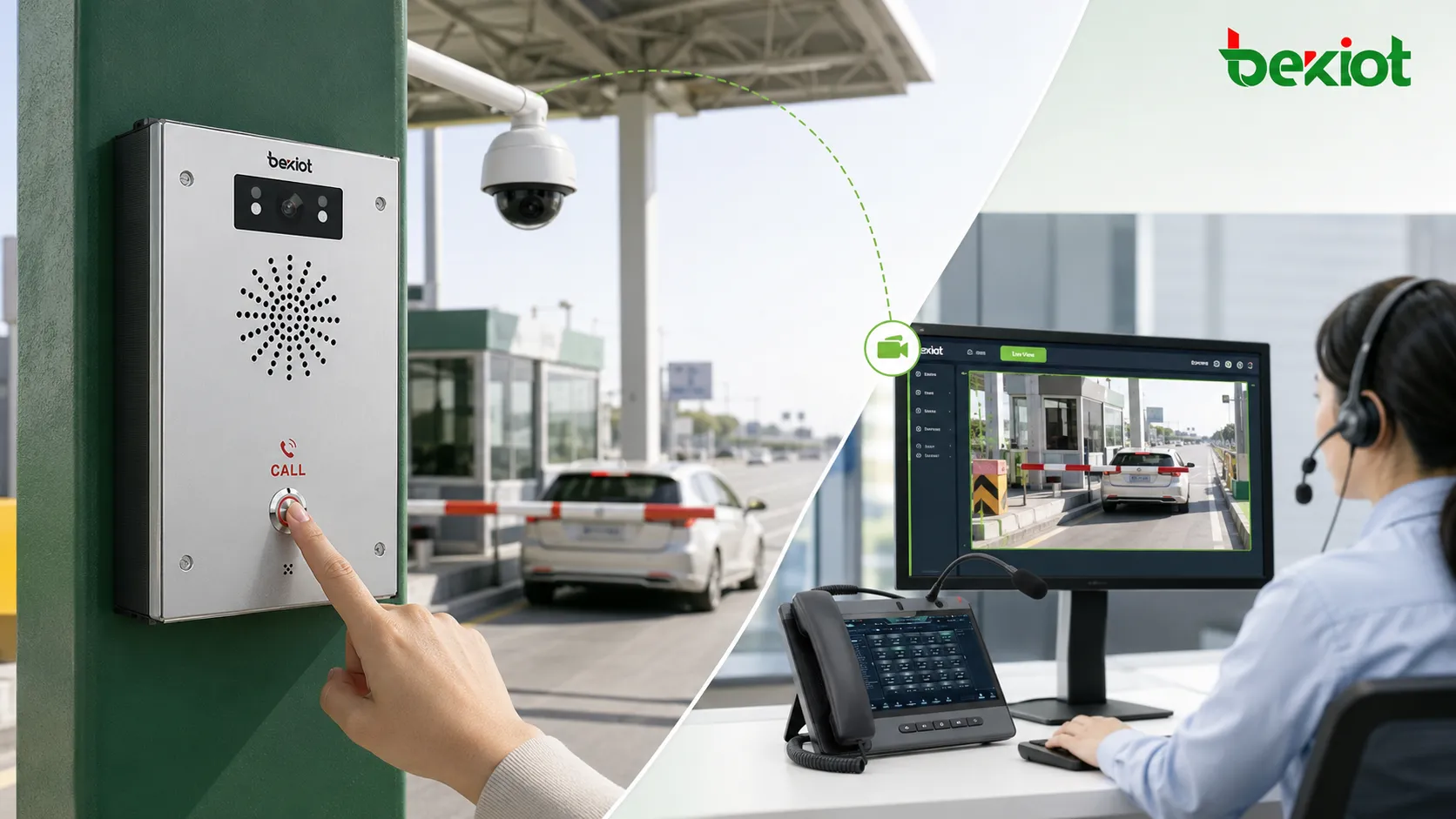
In a practical toll station project, the intercom is often linked with a nearby surveillance camera. When a user presses the call button, the system not only starts a voice call but also automatically brings the corresponding camera video to the dispatch console or video phone. This gives the operator both voice communication and live visual confirmation at the same time.
Where the System Is Used
Toll lanes, booths, and unattended service points
A one-touch intercom and camera linkage system is suitable for toll station entrances, exit lanes, ETC/MTC lanes, toll booths, parking exits, roadside help points, and unattended management areas. When a driver encounters payment issues, lane blockage, equipment failure, accident risk, or emergency help demand, the intercom provides a direct communication path to the control room.
Compared with a voice-only help point, camera linkage allows the operator to immediately check the on-site situation. The control room can see the vehicle position, lane condition, user behavior, nearby obstacles, and surrounding traffic status before deciding how to respond.
Why voice and video should work together
In toll station operations, a voice call can explain the problem, while video helps verify the scene. If the operator only hears the caller but cannot see the lane, it may be difficult to judge whether the issue is a simple inquiry, a payment dispute, equipment fault, traffic congestion, safety incident, or emergency request.
By linking the one-touch intercom with a camera, the system improves response accuracy. The operator can communicate with the caller, check the live video, notify maintenance staff, guide the driver, or escalate the event to the monitoring center when necessary.
The Basic Direct-Pull Method
Using RTSP for simple camera linkage
The most basic method is to configure an RTSP stream address on the one-touch intercom terminal or the dispatch-side device. For example, if one intercom is installed near a specific toll lane, the system can bind that intercom to the RTSP address of the camera watching the same lane.
When the intercom button is pressed, the dispatch console or video phone pulls the corresponding RTSP stream and displays the video. This is a simple and direct configuration method, especially suitable for small projects with fewer cameras, fewer intercom points, and a clear one-to-one relationship between help point and camera.
Limitations of direct camera access
Although direct RTSP pulling is easy to understand, it may create problems in larger highway projects. The project may include cameras from different manufacturers, different video encoding formats, different resolutions, and different network segments. Some cameras may use H.265, while some display terminals only support H.264. Some streams may be too large for smooth display on a video phone or dispatch terminal.
Another common problem is overload. If several terminals or systems pull video from the same camera at the same time, the camera or NVR may not handle the pressure well. Cross-network access, permission control, stream security, and protocol compatibility can also make project delivery more difficult.
Why a Gateway Layer Is Often Needed
Solving protocol and network compatibility issues
A video access gateway can be added between the camera system and the intercom dispatch system. Instead of allowing each intercom terminal or dispatch device to pull streams directly from cameras, the gateway centrally receives, converts, and distributes video resources.
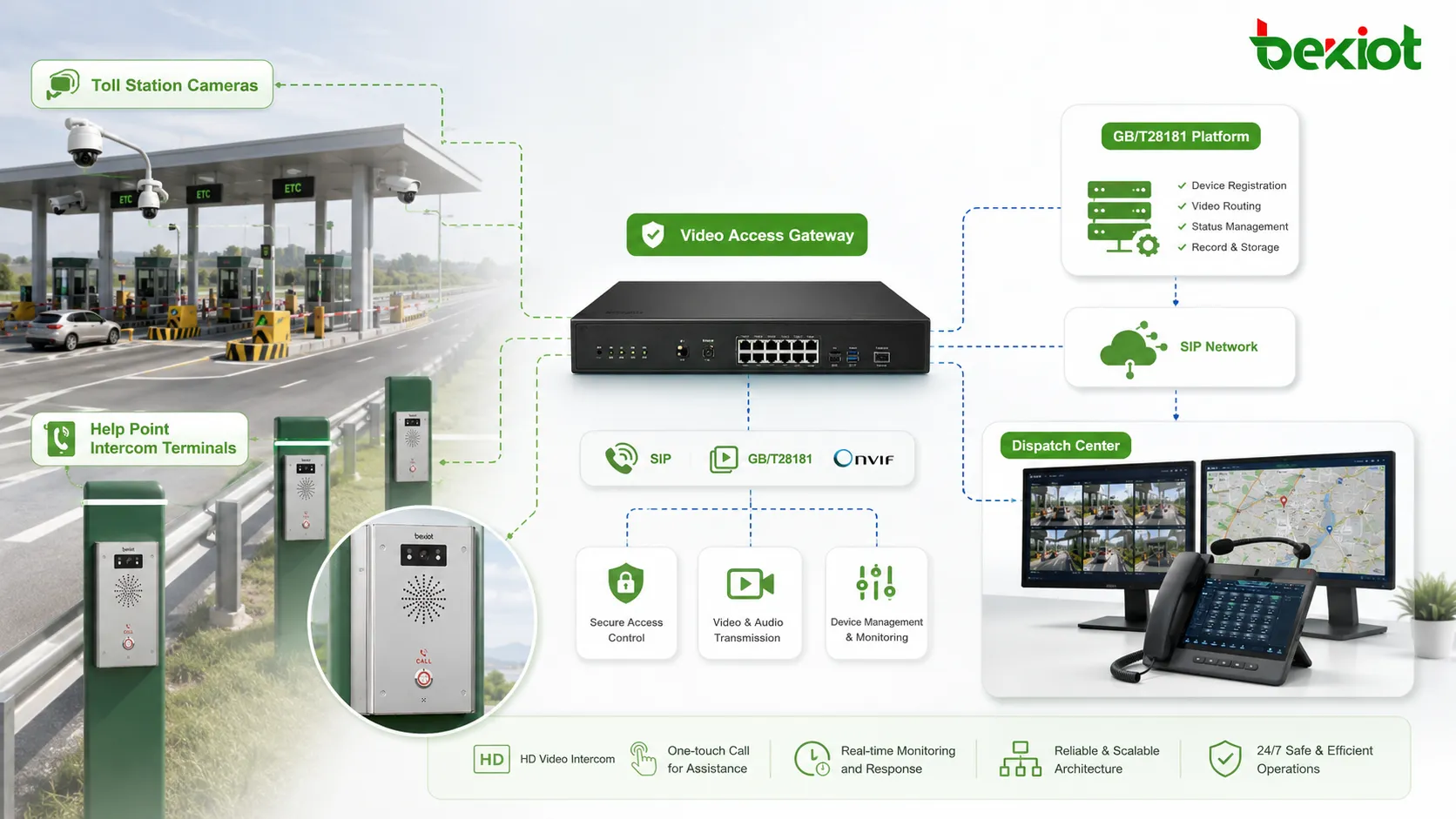
For toll station projects, the gateway may support RTSP, GB/T28181, and other video access methods. In a larger highway system, GB/T28181 can be used to connect with the upper-level video platform, allowing the gateway to manage video resources in a more standardized way. The intercom system can then obtain the required video stream from the gateway rather than from each camera directly.
Building a more manageable video layer
With a gateway-based architecture, the system becomes easier to maintain. Cameras, NVRs, video platforms, intercom points, and dispatch consoles do not need to be connected in a scattered way. The gateway works as a video middle layer that provides unified access, stream conversion, and controlled distribution.
This is especially useful when a toll station project expands from a few lanes to multiple stations, service areas, management centers, and regional command platforms. The video access gateway helps keep the system scalable while reducing repeated integration work.
Architecture for Toll Station Deployment
Field layer, access layer, and dispatch layer
A practical architecture can be divided into three layers. The field layer includes one-touch SIP intercom terminals, IP cameras, toll lane cameras, booth cameras, NVRs, emergency help points, and network switches. These devices are installed close to the toll lane or service point.
The access layer includes the video access gateway, SIP server or IP-PBX, video platform, and network routing equipment. This layer handles SIP registration, camera access, RTSP or GB/T28181 stream management, video conversion, and connection between the toll station and the command center.
The dispatch layer includes the dispatch console, video phone, monitoring workstation, recording system, and operation management platform. When a one-touch call is triggered, the operator can answer the call and view the related video stream on the same screen or on a linked display.
Typical linkage workflow
The workflow usually starts when a driver or staff member presses the intercom button. The SIP intercom sends a call request to the dispatch center. At the same time, the system identifies the related camera according to the intercom ID, lane number, device binding table, or predefined linkage rule.
The dispatch console then answers the SIP call and pulls the related video stream from the camera, NVR, platform, or video access gateway. If the video stream needs conversion, the gateway can output a compatible format to the dispatch terminal. The event can also be recorded, logged, and used for later review.
Related Product: BHP-SOS16 / BHP-SOS16V SIP Intercom for One-Touch Help Point Applications
Handling Video Format Problems
Converting H.265 to H.264 for better terminal support
In many projects, camera systems are upgraded faster than intercom terminals or dispatch devices. A surveillance camera may output H.265 high-definition video, but the video phone or embedded dispatch terminal may only support H.264. Without conversion, the video may fail to display or may play with abnormal delay.
A video access gateway with transcoding capability can re-encode the stream before sending it to the intercom or dispatch system. For example, it can convert H.265 to H.264, reduce a high-resolution stream to a lower resolution, or adjust the bitrate to match the playback capacity of the terminal.
Reducing overload from repeated stream pulling
Another important value is stream distribution. Instead of allowing multiple devices to directly pull from one camera, the gateway can receive one upstream stream and then distribute it to several downstream users. This helps reduce camera-side pressure and improves stability when the same video needs to be viewed by a dispatch console, monitoring workstation, video phone, or management platform at the same time.
For highway toll stations with many lanes, cameras, and control seats, this design helps prevent unstable video pulling, stream interruption, and device overload during peak traffic or emergency response.
More Than One-Touch Intercom Linkage
Calling cameras from video phones and dispatch consoles
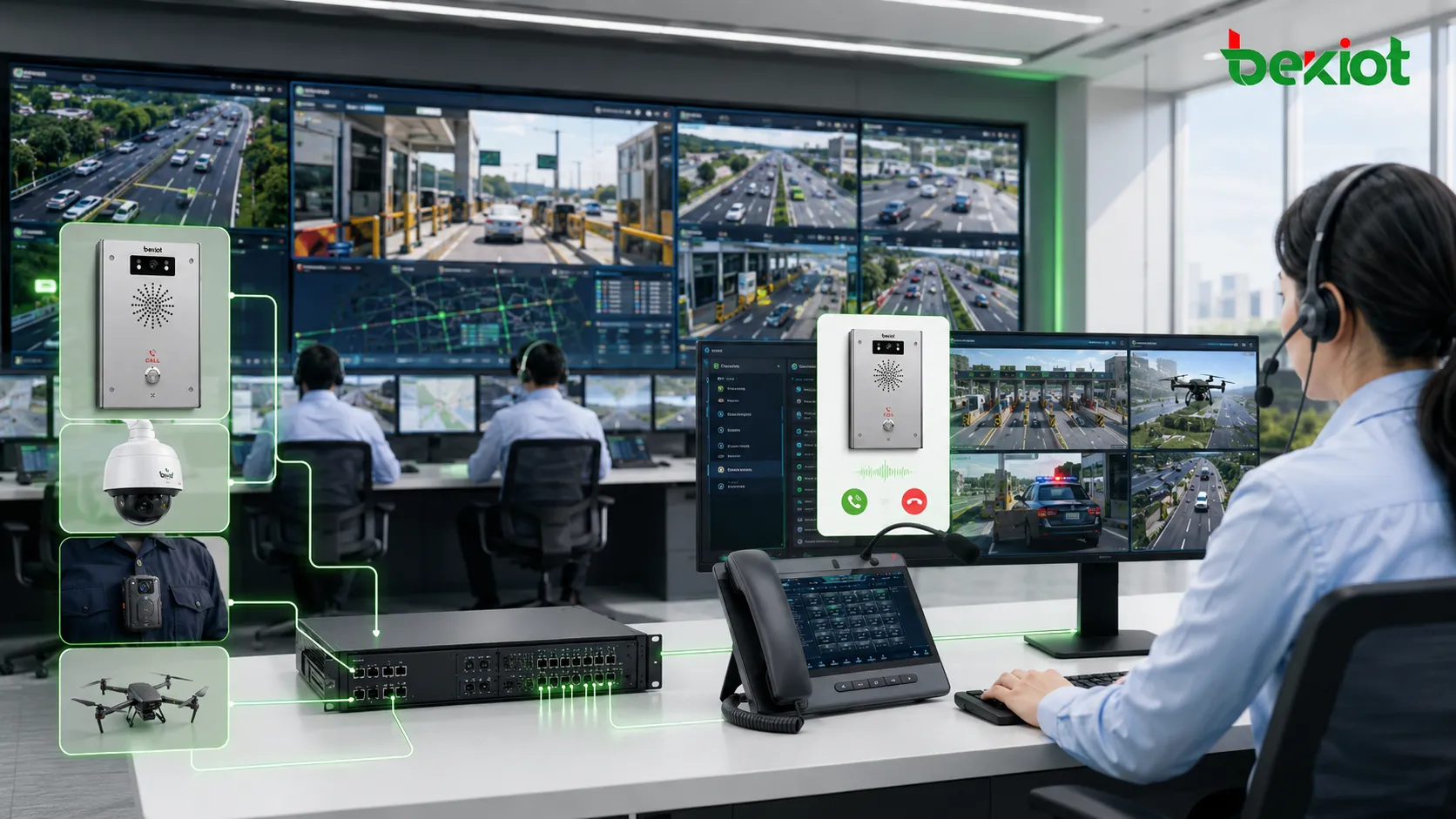
The video access gateway does not only serve one-touch intercom linkage. In some projects, it can also support SIP-based access to video resources. This means operators may call or select camera video from a video phone, dispatch console, or command terminal.
This makes video resources more interactive. Instead of only waiting for an intercom event to trigger video, the operator can actively call the camera view, check a lane, verify a help point, or inspect a remote area during routine operation.
Expanding to drones, mobile cameras, and recorders
Highway operation centers may also need access to mobile video sources such as drones, portable monitoring balls, body-worn recorders, patrol vehicle cameras, and temporary surveillance devices. These sources may use different transmission methods and media protocols.
A video gateway can help unify these resources and send them to the dispatch platform, monitoring center, or emergency command system. This turns the gateway into a broader video capability layer rather than a device used only for one toll station linkage scenario.
Deployment Recommendations
Plan device binding before installation
Before deployment, the project team should create a clear binding table between each intercom terminal and its related camera. The table should include intercom location, lane number, SIP account, camera IP address, RTSP address, GB/T28181 device ID, stream type, display terminal, and dispatch group.
This preparation helps avoid confusion during testing and operation. When a call is triggered, the system can immediately identify which video stream should be shown and where it should be displayed.
Check codec, resolution, and network conditions
The team should confirm whether the camera outputs H.264 or H.265, whether the video phone supports the selected codec, whether the stream resolution is suitable, and whether network bandwidth is enough for real-time viewing. For cross-network projects, routing, firewall rules, VLAN planning, and security policy should also be checked.
For projects involving multiple stations or upper-level platforms, it is recommended to use a video access gateway to standardize stream access and conversion. Becke Telcom can be considered where SIP intercom terminals, dispatch communication, emergency help points, and video linkage need to be integrated into a practical highway communication solution.
Operational Value
Faster response and better situational awareness
When voice and video are linked, the operator can quickly understand what is happening at the toll lane. This reduces repeated questioning, improves event judgment, and helps staff respond more accurately. For unattended or semi-unattended service points, this is especially important.
The system can support daily service requests, payment assistance, equipment fault reporting, emergency help, lane abnormality handling, and incident verification. It improves the practical value of both the intercom system and the video surveillance system.
A scalable foundation for highway communication
A well-designed intercom and camera linkage system is not just a single-function project. It can become part of a larger highway communication and command platform. With SIP communication, video access gateway integration, GB/T28181 video management, and dispatch linkage, the system can support future expansion across toll stations, service areas, tunnels, bridges, and regional command centers.
This architecture helps highway operators move from isolated devices to coordinated communication and video response. It improves compatibility, reduces repeated integration work, and provides a stronger foundation for long-term operation and maintenance.
FAQ
Can one camera be linked with multiple intercom terminals?
Yes. In some toll station layouts, several nearby help points may share one wide-angle camera or PTZ camera. The system should define clear binding rules so the dispatch operator can still identify which intercom triggered the call.
Should each toll lane use a fixed camera or a PTZ camera?
Fixed cameras are suitable for stable lane views, while PTZ cameras are useful when one camera needs to cover a larger area or follow different positions. For critical toll lanes, a combination of fixed camera and PTZ camera can provide better coverage.
Is recording required for both voice and video?
It is recommended for operation review and dispute handling. Voice recordings, video clips, call time, device ID, operator action, and event notes can help the management team review service quality and incident handling.
How can the system handle camera failure?
The platform should support offline status detection, fault alarms, and fallback rules. If the primary camera is unavailable, the dispatch console can switch to a nearby backup camera or display a warning message to the operator.
What should be tested before project acceptance?
Acceptance testing should include button calling, SIP registration, video pop-up speed, RTSP or GB/T28181 stream access, codec compatibility, dispatch display, recording linkage, network delay, overload conditions, and recovery after device or network interruption.







