


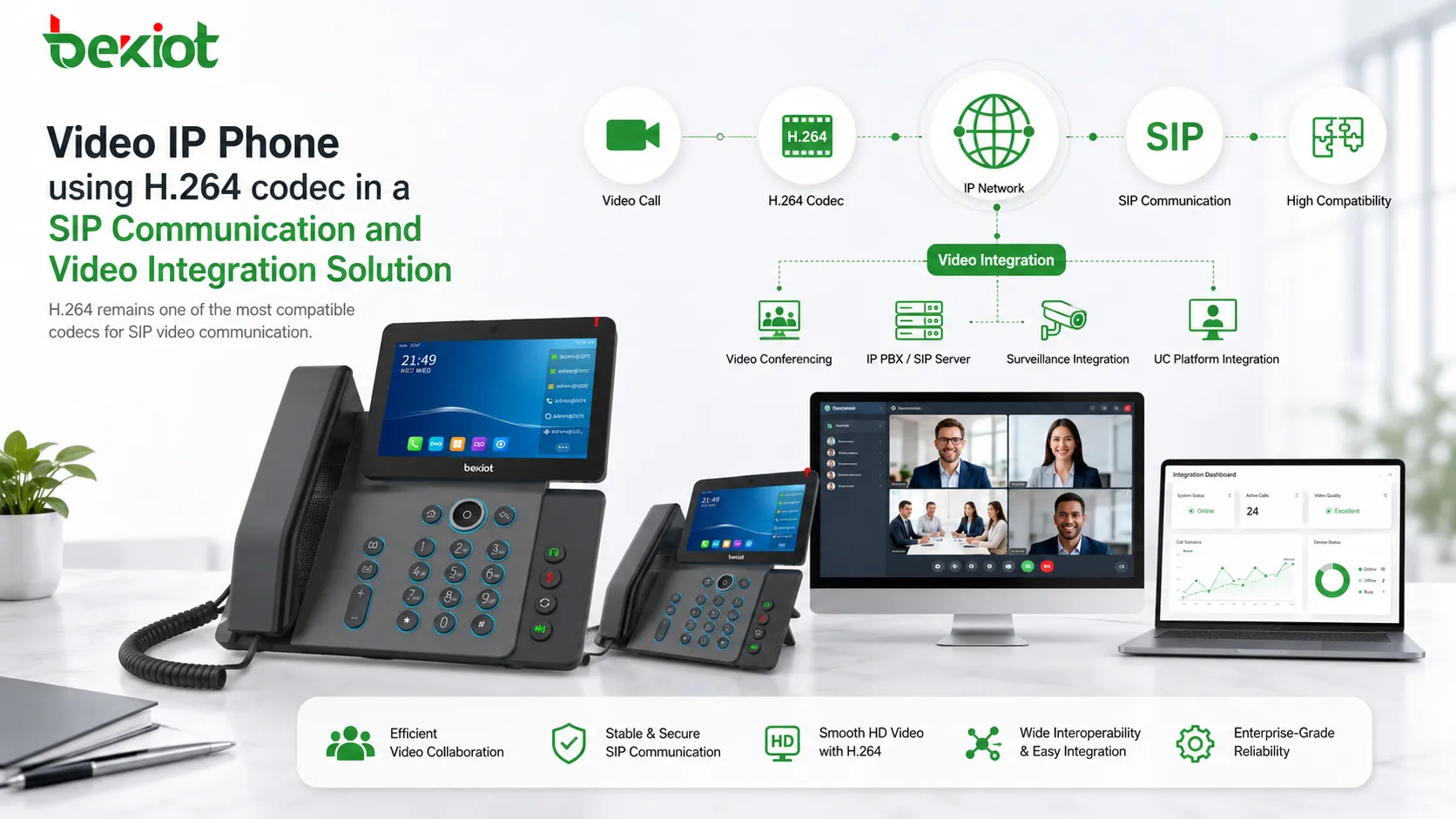
Video IP phones are widely used in enterprise communication, command centers, industrial control rooms, security offices, building intercom systems, emergency dispatch platforms, and unified communication projects. They can support point-to-point video calls, SIP video communication, remote consultation, video conferencing, and visual coordination between different work positions.
However, many project teams notice the same technical issue during system integration: most video IP phones support H.264 video encoding, but they usually do not support H.265. This can create problems when the project needs to display H.265 video streams from surveillance cameras, video platforms, drones, NVR systems, or other video sources. The phone may support video calling, but it cannot directly decode every video stream used in the wider system.
The Real Problem Is Not Only Video Quality
At first glance, H.265 seems like the better choice. It provides a higher compression ratio than H.264 and can reduce bitrate significantly under the same image quality. In many video surveillance and streaming scenarios, H.265 is attractive because it can reduce storage pressure and network bandwidth consumption.
A common technical comparison is that H.265 can reduce the bitrate by about 50% compared with H.264 under similar visual quality. This advantage is meaningful for high-resolution monitoring, long-term recording, remote video transmission, and large-scale camera systems.
But video IP phones are not the same as video surveillance servers or streaming platforms. A video phone is a real-time communication terminal. It must handle SIP signaling, audio encoding, video encoding, network transmission, user interface, touchscreen operation, echo cancellation, speakerphone processing, camera input, and sometimes Android-based application services. Adding H.265 is not only a software option; it can affect hardware design, cost, compatibility, and product positioning.
Processing Power and Hardware Cost
H.265 provides better compression efficiency, but its encoding and decoding complexity is much higher than H.264. This means the device needs stronger CPU, GPU, DSP, or dedicated hardware codec capability to process video smoothly.
For a video IP phone, this matters directly. The terminal must remain stable during real-time calls, avoid delay, keep audio and video synchronized, and maintain smooth user interaction. If H.265 decoding is added without enough hardware capacity, the device may experience high CPU usage, heat, frame loss, delay, or unstable video display.
Stronger hardware increases the cost of the terminal. For many customers, video IP phones are purchased in batches for offices, control rooms, duty desks, gatehouses, service counters, hospital stations, industrial posts, and security rooms. If the cost rises only for a codec that is rarely used in daily SIP video calls, it may reduce the customer’s willingness to deploy the product at scale.
This is one of the most practical reasons why many manufacturers continue to use H.264. It provides enough video quality for most SIP communication scenarios while keeping hardware requirements and terminal costs under control.
Codec Licensing Makes H.265 More Complicated
The second reason is licensing. H.265, also known as HEVC, has a more complex patent licensing structure. Its patent rights are distributed across multiple organizations and patent pools, including MPEG LA, HEVC Advance, and Velos Media. Each patent pool may have its own licensing model and fee structure.
For large video communication platforms, codec licensing can become a serious cost factor. If a platform serves millions or even billions of users, licensing fees calculated by device count, usage, or distribution model can become extremely expensive.
Video IP phone manufacturers face a similar problem on the terminal side. They need to understand whether the hardware, firmware, codec library, operating system, application layer, and distribution region require specific licensing. Compared with this complexity, H.264 has a much more mature and predictable licensing environment. Many basic H.264 patents have expired or become low-cost, making it a safer and more economical choice for communication terminals.
For product design, stability is not only technical stability. It also includes commercial stability, supply chain stability, legal clarity, and long-term support. This is why H.264 remains the default codec for many SIP video devices.
Compatibility Is the Biggest System-Level Barrier
Even if a video IP phone supports H.265, the whole communication system must also support it. A SIP video call requires both sides to negotiate compatible codecs. If one terminal supports H.265 but the other terminal, IPPBX, SIP server, video gateway, recording platform, or conferencing system only supports H.264, the video may fail to display.
This creates a classic compatibility problem. Manufacturers may hesitate to add H.265 because most existing systems still use H.264. Project owners may hesitate to choose H.265 devices because other equipment in the system may not support it. As a result, H.264 remains the practical common language of SIP video communication.
In many unified communication projects, the system may include video IP phones, SIP intercoms, indoor monitors, door stations, IPPBX platforms, dispatch consoles, video conferencing systems, recording servers, mobile clients, and third-party SIP terminals. Replacing all these devices only to support H.265 would be costly and difficult.
For this reason, H.264 is not only a codec choice; it is a compatibility strategy. It allows more devices to communicate with each other and reduces the risk of video negotiation failure during real deployments.
Related product: Becke Video IP Phone
Why Surveillance Video Often Uses H.265
The reason many integration projects still face H.265 problems is that surveillance systems and communication systems have different priorities. Video surveillance often focuses on long-term recording, high-resolution image retention, remote preview, storage efficiency, and bandwidth reduction. In this environment, H.265 is very useful.
A large camera system may include hundreds or thousands of video streams. Reducing bitrate can lower storage cost, reduce network pressure, and make remote transmission easier. This makes H.265 popular in NVR systems, VMS platforms, IP cameras, video access gateways, and cloud video services.
Video IP phones, however, focus on real-time conversation. The video stream is usually used for a call, a door intercom session, a dispatch conversation, a visitor confirmation process, or a short visual communication task. The system needs fast call setup, broad compatibility, stable decoding, and low operation cost. These priorities make H.264 more suitable for most video phone designs.
The Practical Integration Challenge
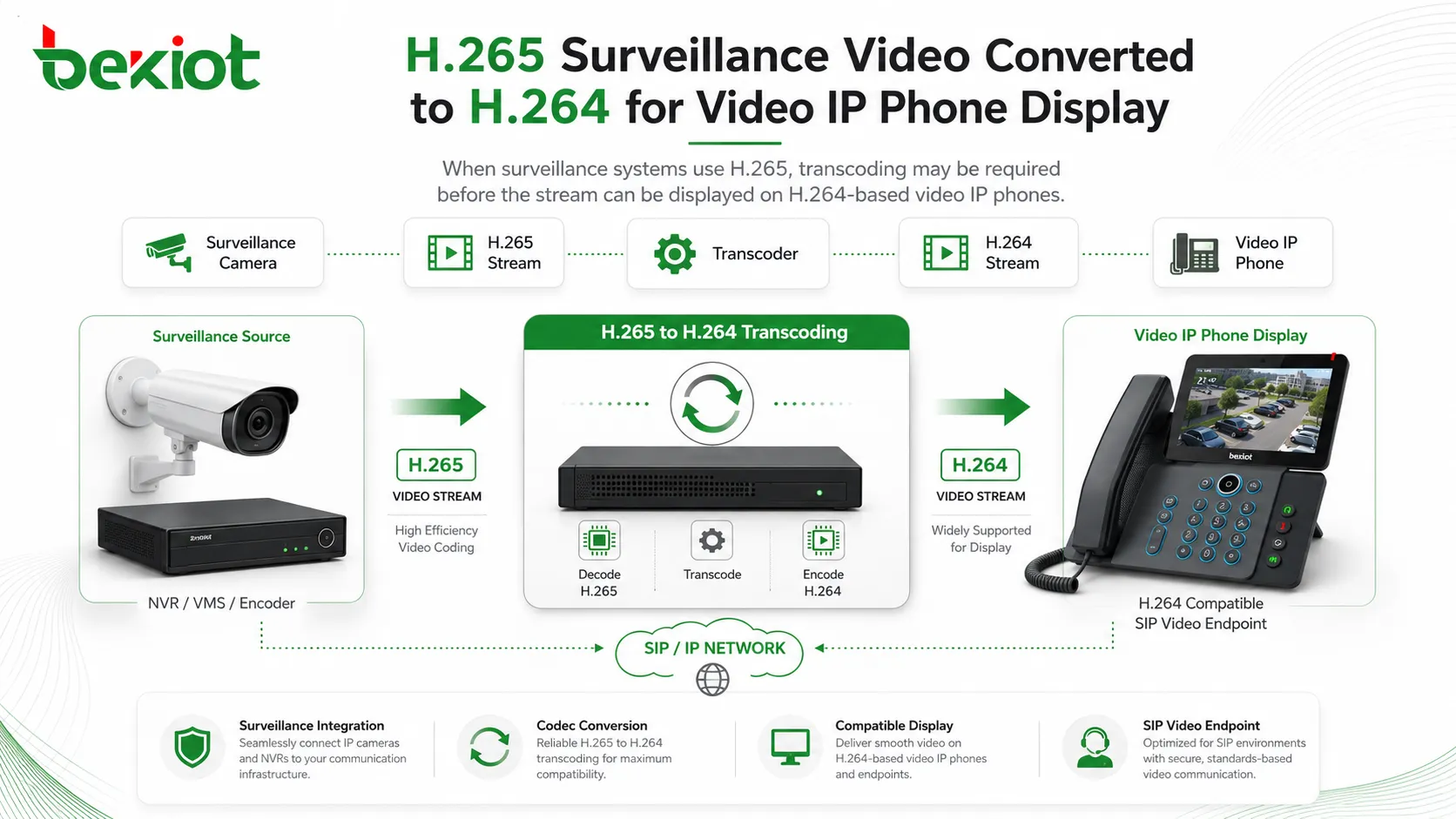
In real projects, the problem usually appears when users want to display camera video on a video IP phone. The camera, NVR, or video platform outputs H.265, while the phone can only decode H.264. Direct connection fails because the codec is not compatible.
Another common case is a command and dispatch system that needs to push video resources to a SIP video phone during an alarm event. For example, when a door station, emergency intercom, alarm point, or security camera triggers an event, the operator may want the nearby video to appear on the phone screen. If the source stream is H.265, the H.264-only phone cannot display it directly.
The same issue can appear in industrial monitoring, smart building systems, hospital communication, railway stations, campuses, parks, tunnels, factories, and emergency command centers. The communication system and the video system are both valid, but the codec gap prevents smooth integration.
Use Transcoding Instead of Replacing Every Device
The most practical solution is not to replace every video IP phone with a more expensive H.265-capable terminal. A better architecture is to deploy a video transcoding layer between the H.265 video source and the SIP communication system.
A video transcoding server or media gateway can receive H.265 video streams and convert them into H.264 streams that video IP phones can decode. This allows existing H.264-based SIP terminals to display video resources without changing the entire terminal system.
This approach protects existing investment. The project can keep its deployed video IP phones, SIP servers, IPPBX platforms, dispatch consoles, and VoIP endpoints. The transcoding layer handles the codec conversion, while the communication platform continues to use the more compatible H.264 format.
In many projects, this is more efficient than forcing H.265 support at every endpoint. It centralizes the processing burden, simplifies compatibility management, and reduces the amount of custom development needed for video integration.
Recommended Architecture for SIP Video Projects
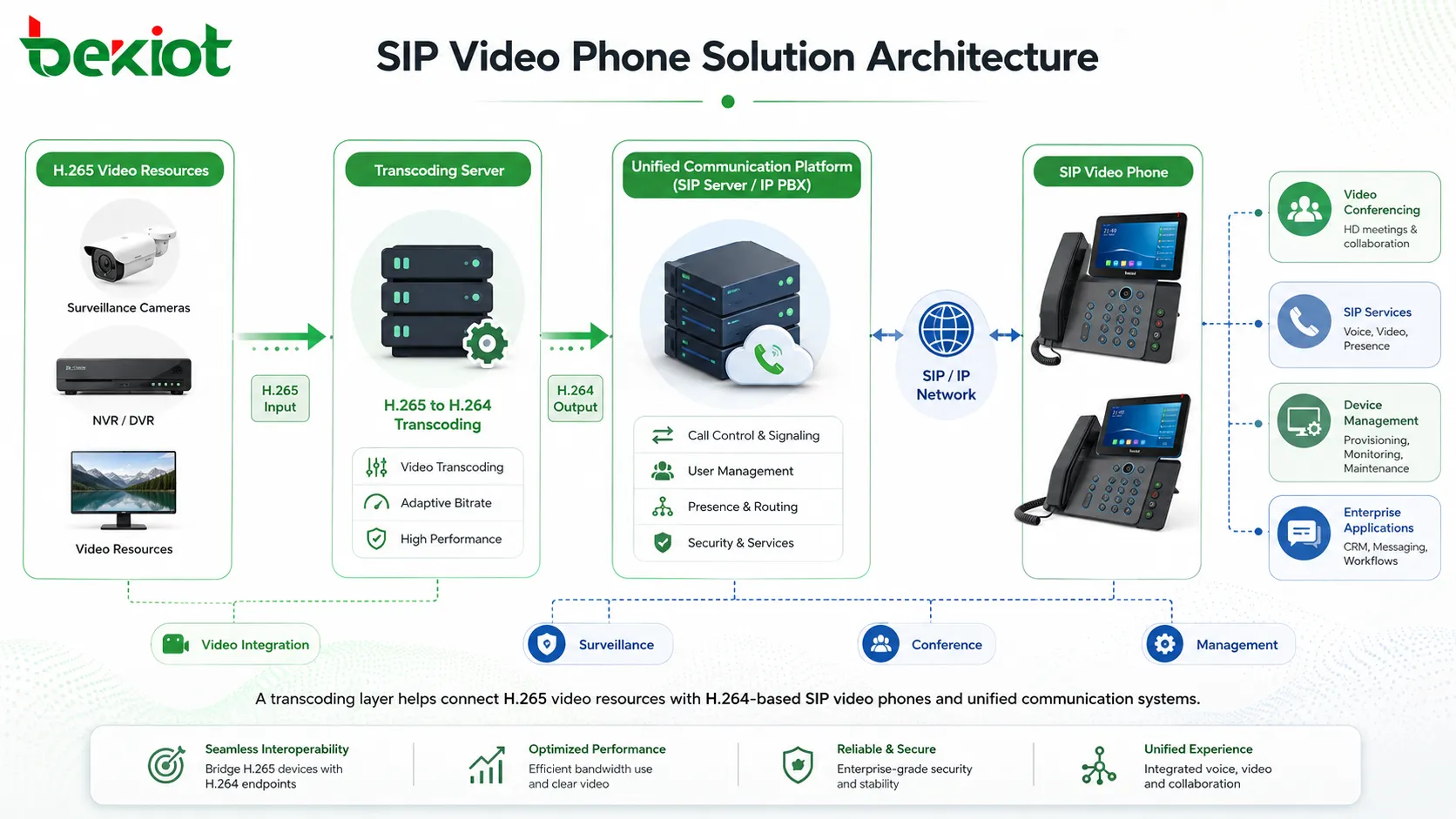
A practical SIP video integration architecture can be divided into three parts. The first part is the video source layer, including IP cameras, NVR systems, video management platforms, drones, video gateways, or other streaming sources. These sources may output H.265, H.264, RTSP, ONVIF, or other video formats depending on the system.
The second part is the media adaptation layer. This layer handles video access, stream conversion, protocol adaptation, resolution adjustment, bitrate control, and codec transcoding. When H.265 streams need to be displayed on video IP phones, this layer converts them into H.264 streams suitable for SIP video communication.
The third part is the communication terminal layer. This includes video IP phones, SIP video intercoms, dispatch terminals, mobile clients, IPPBX platforms, and unified communication systems. These devices receive video in a format they can negotiate and decode reliably.
| System Layer | Main Components | Role in the Solution |
|---|---|---|
| Video source layer | IP cameras, NVR, VMS, drones, video gateways | Provides H.265 or H.264 video streams |
| Media adaptation layer | Video transcoding server or media gateway | Converts H.265 video to H.264 and adapts stream parameters |
| Communication platform | IPPBX, SIP server, dispatch system, unified communication platform | Handles SIP signaling, call routing, user registration, and video call control |
| Terminal layer | Video IP phones, SIP intercoms, dispatch terminals, mobile clients | Displays video and supports real-time communication |
Bandwidth Planning Still Matters
Although transcoding solves the codec compatibility problem, bandwidth planning is still important. H.265 can reduce bitrate by about 50% compared with H.264 at similar quality, but after conversion to H.264, the stream may require more bandwidth.
For this reason, the transcoding layer should not simply convert the codec. It should also support practical stream control, such as bitrate adjustment, frame rate control, resolution selection, and stream profile configuration. A video IP phone usually does not need to display a full high-resolution surveillance stream at maximum bitrate. A lower resolution and moderate frame rate may be enough for visual confirmation.
For example, a command center may only need to see whether a person is present at a door, whether a vehicle has entered a gate, or whether an alarm area is occupied. In these cases, optimized H.264 output can provide a good balance between clarity, bandwidth, and terminal decoding stability.
Designing for Real-Time Communication
Video surveillance can tolerate buffering in some playback scenarios, but SIP video communication is more sensitive to delay. When video is used in a call, door intercom, emergency dispatch session, or remote consultation, the system should minimize latency.
The transcoding server, network path, SIP platform, and video phone should be tested together. Excessive resolution, high bitrate, unstable network conditions, or overloaded transcoding resources can increase delay and affect the user experience.
A good design should prioritize smooth, reliable, and timely video over unnecessary image detail. In a video phone scenario, the goal is usually communication efficiency rather than cinematic image quality.
Where This Solution Is Useful
This architecture is useful in smart buildings where video door phones need to display camera feeds, and in industrial parks where security rooms need to view surveillance video through SIP video phones. It is also suitable for command centers that need to push alarm-related video to operators or duty personnel.
In hospitals, the same approach can support visual consultation, nurse station communication, access control video, and emergency response. In transportation projects, video IP phones can be used in stations, control rooms, service points, and emergency posts, while video streams from cameras are converted into compatible formats when needed.
For factories, campuses, tunnels, ports, mines, and public facilities, transcoding allows the communication system and the video surveillance system to work together without forcing every endpoint to support every codec.
Implementation Process
Confirm the video sources
The project team should first list all video sources that need to be displayed on video IP phones. This may include cameras, NVR channels, video platforms, door stations, drones, or external video streams. For each source, confirm the protocol, codec, resolution, frame rate, bitrate, and access method.
It is also important to identify which streams are truly needed on the phone screen. Not every surveillance stream should be pushed to communication terminals. The project should focus on door access points, alarm areas, command-related cameras, emergency positions, and high-value monitoring points.
Define the communication workflow
The project should define how video appears on the phone. It may be shown during a SIP video call, triggered by an alarm event, opened manually by an operator, linked with an intercom call, or displayed during a dispatch workflow.
This workflow affects how the SIP platform, media server, video system, and terminal are configured. A clear workflow reduces later integration problems and avoids unnecessary development.
Configure transcoding profiles
Different terminals may require different video parameters. A large-screen video phone, a small indoor monitor, a mobile client, and a dispatch terminal may not need the same resolution or bitrate.
The transcoding layer should provide suitable H.264 output profiles for different use cases. This can improve compatibility and prevent terminal overload.
Test with real calls and real streams
Testing should include codec negotiation, video display, audio-video synchronization, call setup time, stream delay, long-duration stability, bandwidth usage, and terminal CPU load. Testing only with a short demo stream is not enough for professional deployment.
The system should be verified using actual cameras, actual SIP terminals, actual network paths, and the real IPPBX or unified communication platform used in the project.
Long-Term Planning
H.265 may become more common in some communication terminals over time, but H.264 will continue to remain important because of its broad compatibility. Many existing SIP systems, video phones, IPPBX platforms, and intercom terminals are already built around H.264.
For project owners, the best strategy is not to depend on one codec only. A flexible media adaptation layer gives the system room to handle different video sources, different terminals, and future upgrades. This makes the communication platform more adaptable as video technology continues to change.
Instead of asking every video IP phone to decode every possible format, a system-level design can place transcoding and protocol adaptation where they are easier to manage. This creates a more reliable and maintainable solution for real-world projects.
FAQ
Does H.265 provide better compression than H.264?
Yes. H.265 can reduce bitrate by about 50% compared with H.264 under similar visual quality, which is why it is widely used in video surveillance and high-resolution streaming.
Why do most video IP phones still use H.264?
H.264 requires less processing power, has a more mature licensing environment, and offers much better compatibility with existing SIP video systems, IPPBX platforms, and video communication terminals.
Can an H.264-only video phone display H.265 camera streams?
Not directly. The H.265 stream must be converted into H.264 through a video transcoding server or media gateway before the phone can decode and display it.
Is replacing all video phones a good solution?
Usually not. Replacing every terminal can be expensive and may still create compatibility issues with other systems. A centralized transcoding layer is often more practical.
What should be tested before project delivery?
The project should test codec conversion, SIP video negotiation, stream delay, bandwidth usage, image quality, terminal decoding stability, audio-video synchronization, and real event linkage workflows.







