


In many unified communication projects, the telephone system needs to connect with a conference room, command center, meeting hall, training room, or public address environment. The goal is not only to make a phone call audible in the room, but also to allow remote callers to hear the microphones, discussion, announcements, and other selected audio sources from the venue.
This type of integration is widely used in telephone conferencing, emergency command, dispatch communication, remote coordination, government meeting rooms, enterprise boardrooms, industrial control centers, and public service facilities. Since most modern communication platforms are based on SIP and VoIP, the key is to convert the mixer’s audio input and output into a SIP-based voice endpoint.
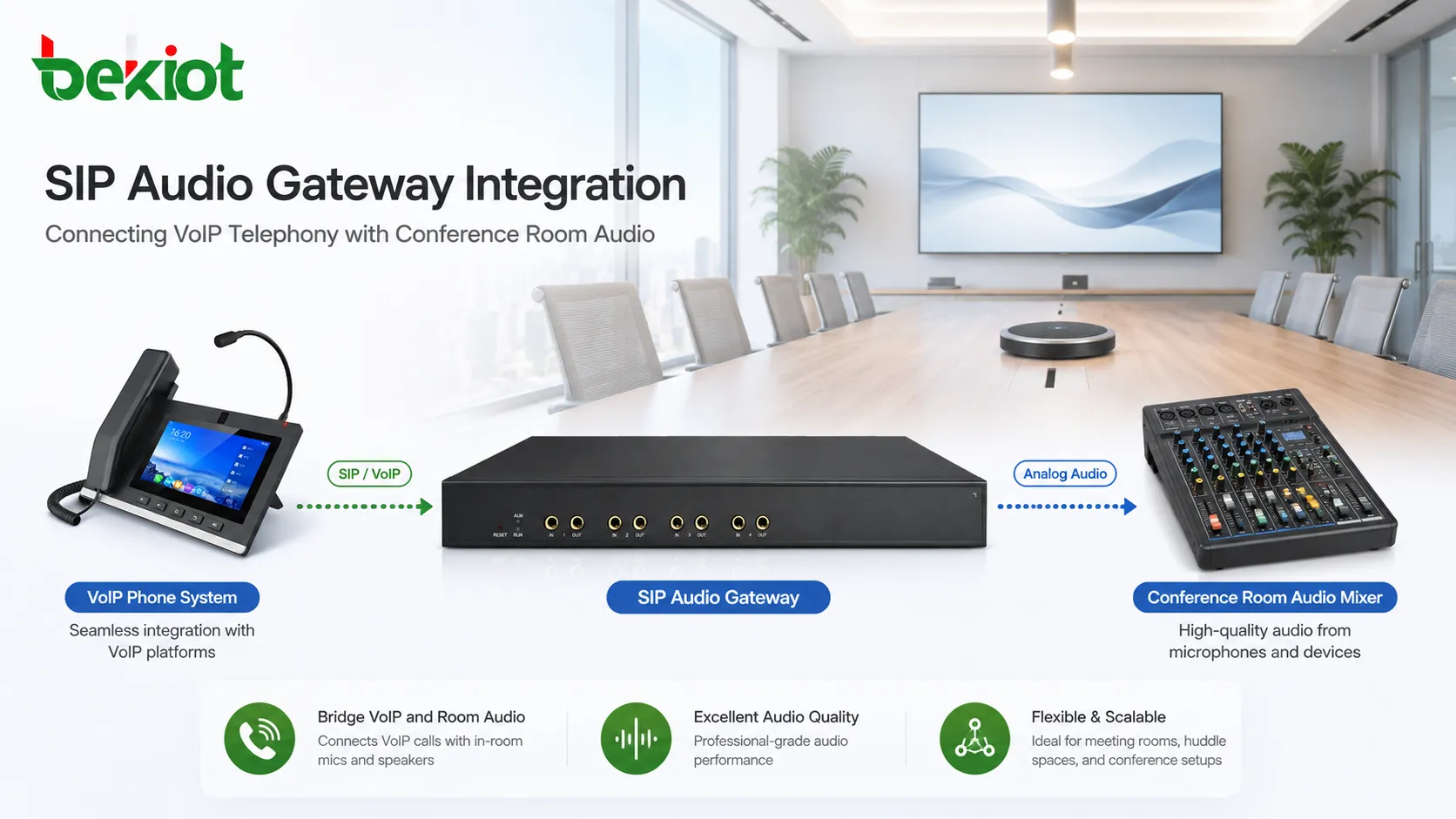
Why the Two Systems Need to Work Together
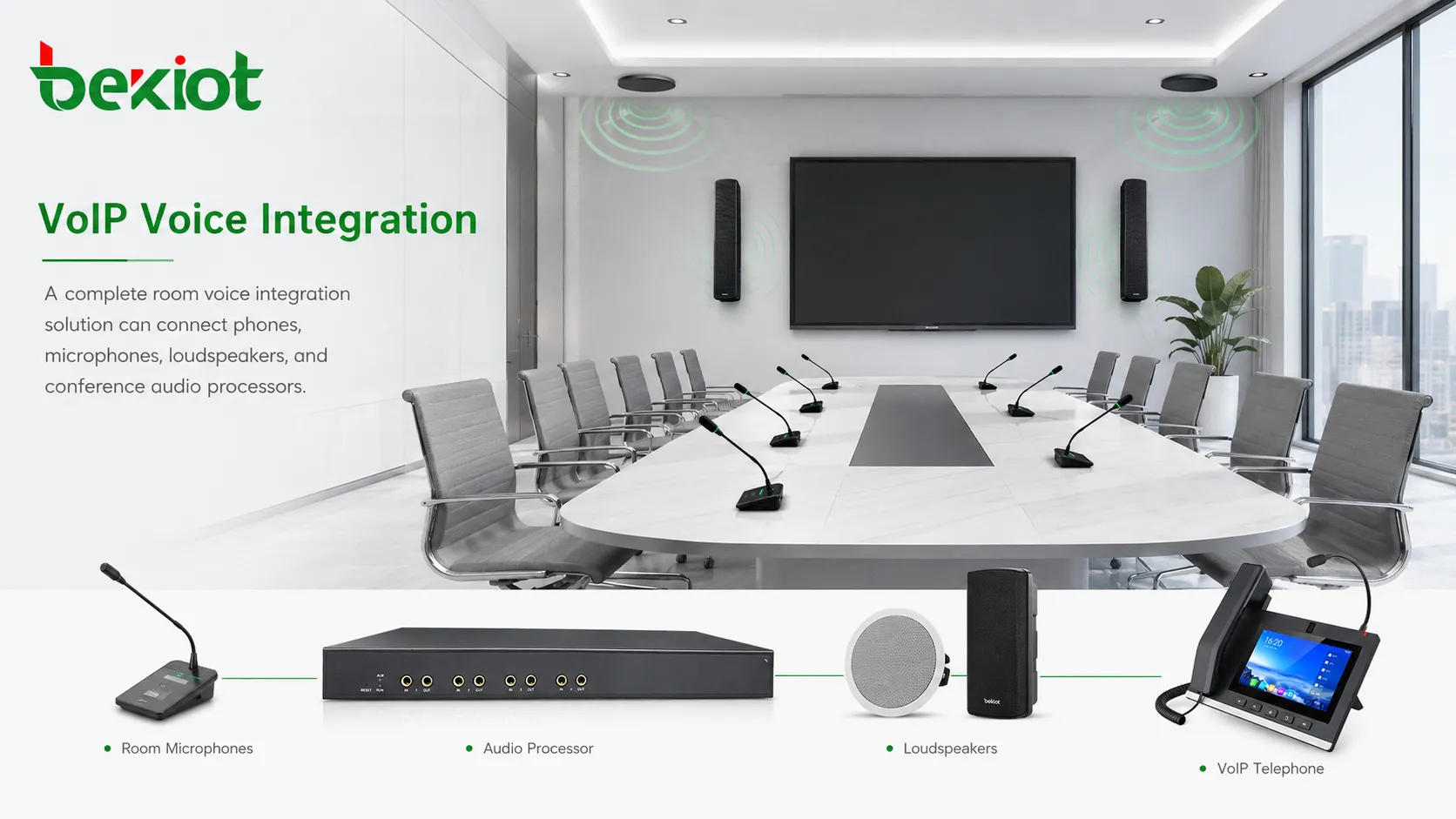
A telephone system and a conference room sound system are usually built for different purposes. The telephone platform handles SIP registration, extension numbers, call routing, outside lines, recording, permissions, and remote access. The mixer or audio processor handles microphones, loudspeakers, amplifiers, equalization, routing, gain control, and room sound reinforcement.
If these two systems remain isolated, remote callers may only hear sound from a small speakerphone or laptop microphone, while people in the room may struggle to hear the caller clearly. In a large room, this can lead to low volume, echo, poor speech intelligibility, and inefficient communication.
By connecting telephone voice to the mixer, the room can use its existing microphones, loudspeakers, amplifiers, and audio processor. Remote users can join the room through a normal phone call, SIP extension, dispatch console, mobile extension, or outside line. The room audio system becomes part of the communication workflow instead of remaining a separate sound system.
The Core Technical Logic
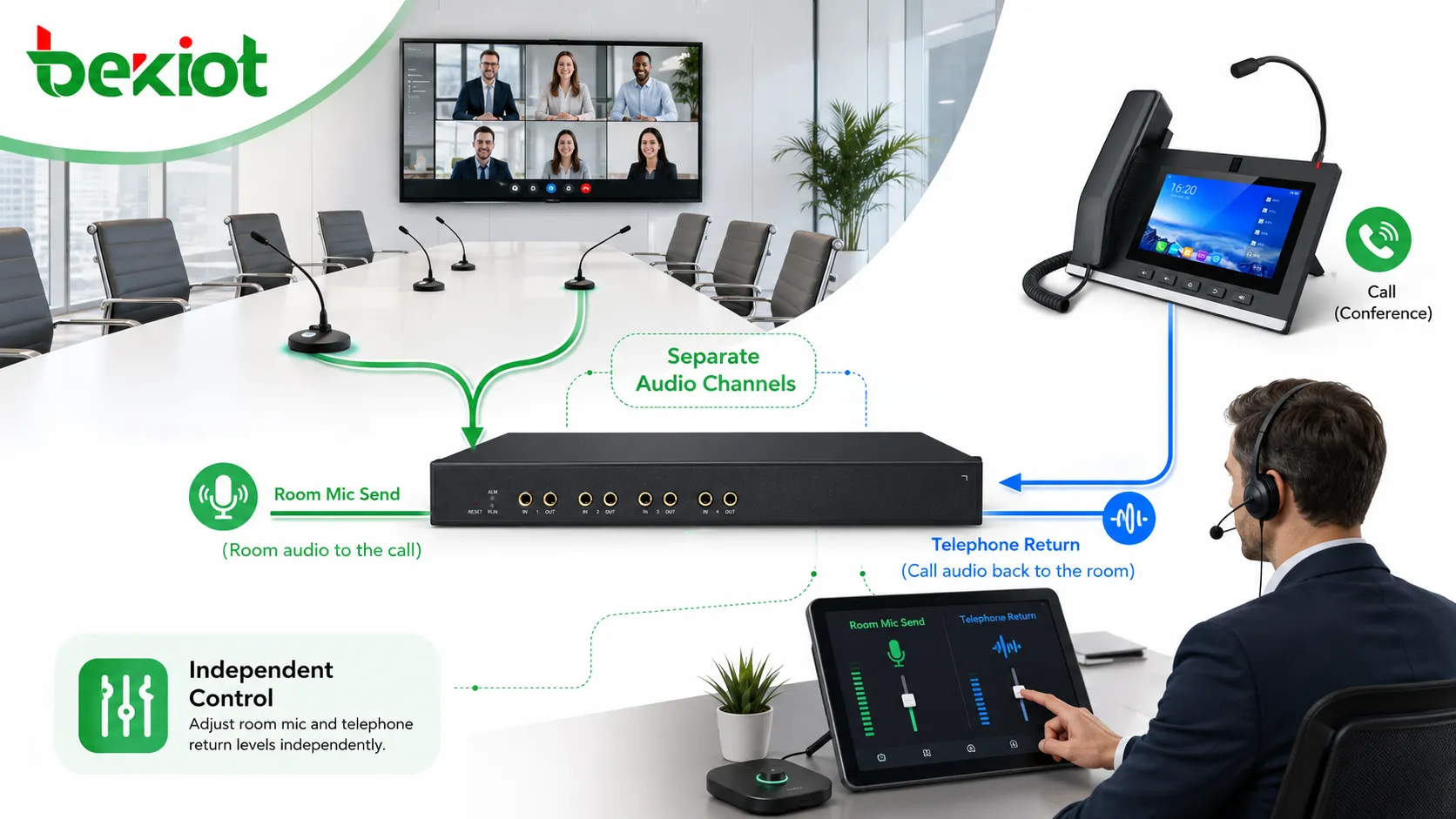
The whole solution is based on two independent audio paths. The first path sends selected room audio into the telephone system. The second path sends telephone audio back into the room sound system.
In most cases, the mixer provides an AUX output, group output, matrix output, record output, or dedicated line output. This signal can be sent into a SIP audio gateway or a computer running a softphone. The return audio from the telephone side is then connected to one input channel of the mixer, where it can be controlled like a normal audio source.
Because SIP is an open and widely adopted voice protocol, this integration can work with many IPPBX platforms, unified communication systems, dispatch systems, SIP servers, VoIP gateways, and cloud or private voice networks. The exact wiring and configuration may vary, but the principle is the same: analog or digital room audio is converted into a SIP call.
Method One: Using a SIP Audio Gateway
How the gateway works
A SIP audio gateway is usually the preferred method for fixed and professional installations. It provides audio input and output interfaces and can register to the telephone system as a SIP extension. Once registration is complete, the conference room audio system becomes a dialable voice endpoint.
For example, an operator can dial the extension assigned to the audio gateway. The gateway can answer the call automatically, send selected room audio to the caller, and play the caller’s voice through the room sound system. This creates a stable audio bridge between the VoIP network and the physical venue.
This approach is especially useful when the room needs to be called frequently, when unattended answering is required, or when the system must be managed by the communication platform rather than by a local computer user.
Typical wiring logic
The mixer’s AUX output, matrix output, or selected audio output is connected to the audio input of the SIP gateway. This allows microphones and room audio selected by the mixer to enter the telephone system.
The audio output of the SIP gateway is connected to one input channel of the mixer. This allows telephone audio to be controlled by the mixer just like any other sound source. The operator can adjust volume, mute the channel, route it to loudspeakers, send it to recording, or include it in a broadcast path.
For professional environments, balanced audio wiring is preferred when available. Balanced connection helps reduce interference, noise, and signal loss, especially when the cable distance is long or when the room contains many electrical devices, power cables, amplifiers, screens, or control equipment.
Where this method is suitable
The gateway method is suitable for command centers, emergency meeting rooms, enterprise conference rooms, training halls, dispatch centers, government meeting rooms, hotel conference facilities, industrial control rooms, and other fixed venues where the system needs to run reliably for a long time.
It is also a good choice when the project requires clear extension management, automatic answering, stable call behavior, centralized maintenance, call recording, and integration with an IPPBX or unified communication platform. Since the gateway works as a dedicated SIP endpoint, it does not depend on a user’s laptop, app status, sound card, or operating system audio setting.
Method Two: Using a Softphone
How the softphone method works
A softphone is a software-based telephone client installed on a computer, tablet, or mobile device. Many IPPBX and unified communication systems support softphone registration, allowing the device to work as a SIP extension.
In this method, the computer running the softphone becomes the bridge between the telephone network and the room audio system. The mixer sends room audio into the computer’s microphone input, line input, USB audio interface, or external sound card. The computer’s audio output is then connected back to one mixer input channel.
When the softphone answers or starts a call, the remote caller can hear the audio sent from the mixer, while the caller’s voice is returned to the mixer and played through the room loudspeakers or selected audio zones.
Connection points to consider
The computer audio interface is often different from the professional audio interface on a mixer. A laptop may use a 3.5 mm audio jack, USB sound card, Bluetooth audio device, or external audio interface, while a mixer may use 6.35 mm TRS, XLR, RCA, terminal block, or balanced line input and output.
Because of this, the cable must be selected or made correctly. The signal level should also be checked. Microphone input, line input, AUX output, headphone output, and speaker output may have different signal levels and impedance. Incorrect matching can cause low volume, distortion, echo, hum, or background noise.
Where this method is useful
The softphone method is useful for temporary meetings, small conference rooms, mobile deployment, testing, demonstrations, remote training, and projects where no dedicated SIP audio gateway is available.
However, it is usually less suitable for unattended or mission-critical sites. The stability depends on the computer, operating system, softphone client, sound card, network connection, power status, and user operation. For long-term professional deployment, a dedicated SIP audio gateway is usually easier to manage.
Choosing the Better Integration Method
| Item | SIP Audio Gateway | Softphone |
|---|---|---|
| Deployment style | Fixed engineering installation | Temporary or flexible setup |
| System stability | Higher, because it is a dedicated endpoint | Depends on computer and software status |
| Operation | Can support automatic answering and extension dialing | Usually requires manual software operation |
| Audio interface | Designed for audio input and output connection | Requires careful cable and sound card matching |
| Maintenance | Can be managed as a SIP endpoint | Depends on local computer maintenance |
| Best use case | Command rooms, dispatch centers, fixed meeting rooms | Small meetings, testing, mobile use, temporary events |
Recommended Solution Architecture
For a fixed professional system, the recommended architecture is to use a SIP audio gateway or SIP-compatible audio interface connected to the mixer or audio processor. The gateway registers to the IPPBX, SIP server, dispatch platform, or unified communication platform as a normal extension.
When a remote user, dispatch operator, outside caller, or mobile extension calls the assigned number, the room audio system can join the call. The mixer or audio processor controls the room-side audio, while the communication platform manages dialing, routing, permissions, call connection, recording, and extension management.
For temporary or small-scale use, a softphone and computer audio interface can be used as a quick solution. However, the cable matching, sound card configuration, volume control, and echo behavior must be tested carefully before real operation.
Important Deployment Considerations
Separate the send and return paths
The audio sent from the mixer to the telephone system and the audio returned from the telephone system to the mixer should be treated as two separate paths. This helps avoid feedback, echo, and uncontrolled audio loops.
A clear routing plan should define which microphones are sent to the phone system, whether telephone audio should return to the room speakers, and whether any channel should be excluded from the mix-minus output.
Control echo and feedback
If room loudspeakers are picked up again by microphones and sent back to the telephone side, echo may occur. In large rooms, the problem can become more obvious because of speaker distance, room reflection, microphone placement, and gain level.
A practical solution is to use proper mixer routing, echo cancellation, lower speaker volume near microphones, directional microphones, or a conference audio processor. For professional installations, testing should be done with real microphones, real loudspeakers, and actual call scenarios.
Match signal levels and connectors
Professional audio devices and consumer computer interfaces do not always use the same signal level. A mixer’s balanced output may not match a computer’s microphone input directly. Incorrect matching can create noise, clipping, weak audio, or unstable volume.
Before final installation, check whether the interface is balanced or unbalanced, microphone level or line level, mono or stereo, and whether the connector type is XLR, TRS, RCA, 3.5 mm, terminal block, or another format.
Network and SIP Configuration
The audio connection is only one part of the solution. The SIP endpoint must also register correctly to the communication platform. The network should allow SIP signaling and RTP media transmission between the gateway or softphone and the IPPBX, SIP server, or dispatch platform.
For private networks, this is usually straightforward. For cross-site deployment, VPN, SBC, NAT traversal, firewall rules, or secure SIP configuration may be required. The project team should confirm extension number planning, codec compatibility, DTMF mode, registration interval, transport mode, and media path before commissioning.
If the system is used in emergency command or operational dispatch, network reliability becomes more important. Redundant network links, backup power, stable switches, and clear IP address planning can reduce the risk of call interruption during important meetings or emergency events.
Commissioning and Acceptance Testing
After wiring and SIP registration are completed, the system should be tested in real operating conditions. A basic test should include incoming calls, outgoing calls, automatic answering, room microphone pickup, telephone return audio, mute control, volume adjustment, and long-duration call stability.
The installer should also check whether the caller can clearly hear the speaker in the room, whether the room can clearly hear the caller, and whether there is echo, feedback, delay, clipping, or background noise. Testing should not be limited to one short call. Different microphone positions, loudspeaker levels, and speaking distances should be verified.
For projects involving recording, broadcasting, or dispatch linkage, the acceptance test should also confirm whether telephone audio is included in the correct output path, whether room audio is recorded correctly, and whether emergency calls or priority calls can be handled according to the planned workflow.
Using the Same Logic with Audio Processors
Many modern meeting rooms no longer use a traditional analog mixer. Instead, they use a conference audio processor, DSP, matrix processor, or digital audio system. The integration principle is still similar.
The processor provides an audio output for the telephone system and receives telephone return audio through an input channel. The difference is mainly in the interface type, routing configuration, echo cancellation capability, and software control method.
For projects involving unified communication, dispatch, emergency command, or hybrid meetings, this makes the audio processor an important part of the overall voice solution. It can manage microphones, loudspeakers, recording, remote callers, and room audio routing in a more centralized way.
Maintenance and Long-Term Operation
After the system is delivered, the extension number, SIP account, wiring diagram, mixer channel name, cable type, and routing logic should be documented clearly. This helps future maintenance teams understand how the telephone system and audio system are connected.
For fixed installations, it is useful to label the mixer channel used for telephone return audio and the output used for telephone send audio. This reduces the risk of accidental volume changes or cable removal during later room maintenance.
Periodic testing is also recommended, especially in command centers, emergency meeting rooms, and facilities where the system is not used every day but must work immediately when needed. A short scheduled call test can confirm that the SIP registration, audio path, loudspeaker output, and microphone pickup remain normal.
FAQ
Can a telephone system be connected directly to a mixer?
Usually, it should not be connected directly without an audio conversion device or softphone path. A telephone system uses SIP signaling and voice codecs, while a mixer uses analog or digital audio signals. A gateway, softphone, or compatible interface is needed to bridge the two systems.
Is a balanced audio connection necessary?
It is not always mandatory, but it is recommended for professional rooms, longer cable runs, or electrically noisy environments. Balanced wiring can reduce interference and improve audio stability.
Can this solution work with an emergency command system?
Yes. The same integration method can be used in emergency command rooms, dispatch centers, and control rooms. The telephone platform can connect field calls, outside lines, SIP extensions, or mobile users into the room audio system.
What should be tested before delivery?
The system should be tested for call connection, room microphone pickup, telephone return audio, echo, feedback, volume level, automatic answering, routing behavior, and long-duration stability. If recording or dispatch linkage is required, those workflows should also be tested.







