


The terms paging and pagination are often confused because they look similar and share the same linguistic root. However, in modern technical usage, they refer to very different concepts. In communication systems, paging usually relates to alerting, announcing, or reaching a person or group. In websites, software, and databases, pagination refers to dividing content into separate pages for easier viewing and navigation.
Understanding the difference matters because these terms appear in product documentation, telecom solutions, user interface design, software development, and enterprise systems. Although the words seem related, their meanings are not interchangeable in professional communication or technical writing.
What Is Paging?
Basic Meaning of Paging
Paging usually refers to the act of sending an alert, message, announcement, or call request to a person, device, or group. In communication terminology, it is an action-oriented function. A system is actively trying to notify someone, attract attention, or deliver a voice message to a defined destination.
Historically, paging was associated with pagers and one-way wireless notification devices. Today, the term is still widely used in hospitals, industrial plants, schools, transport systems, commercial buildings, and public address networks. In these environments, paging may include overhead announcements, zone-based voice alerts, staff notification, emergency broadcasting, or group call functions.
How Paging Is Used in Communication Systems
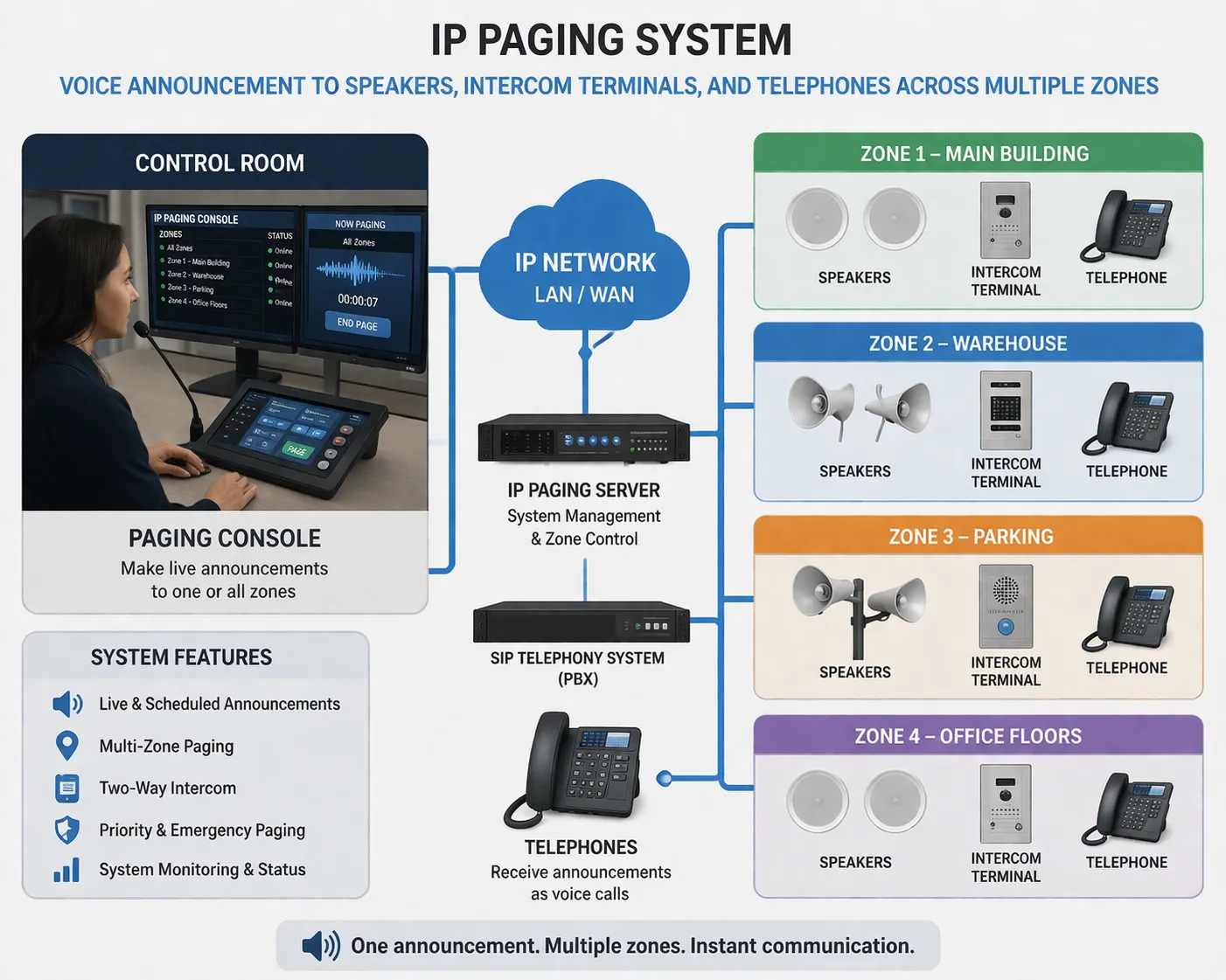
In modern communication systems, paging can describe one-way or group voice delivery across speakers, intercoms, IP phones, or paging gateways. For example, a control room operator may send a paging announcement to a warehouse, a platform area, a hospital department, or an emergency assembly zone. The goal is immediate information delivery rather than content browsing.
Paging is therefore closely associated with communication flow, urgency, awareness, and response. It is common in SIP paging systems, IP public address platforms, emergency communication networks, nurse call workflows, and dispatch environments where voice or alerts must reach people quickly and clearly.
What Is Pagination?
Basic Meaning of Pagination
Pagination refers to the process of dividing content, records, or results into separate pages. It is a structure-oriented function used to organize information into manageable sections instead of showing everything at once. In digital systems, pagination improves readability, navigation, and performance when large amounts of data need to be displayed.
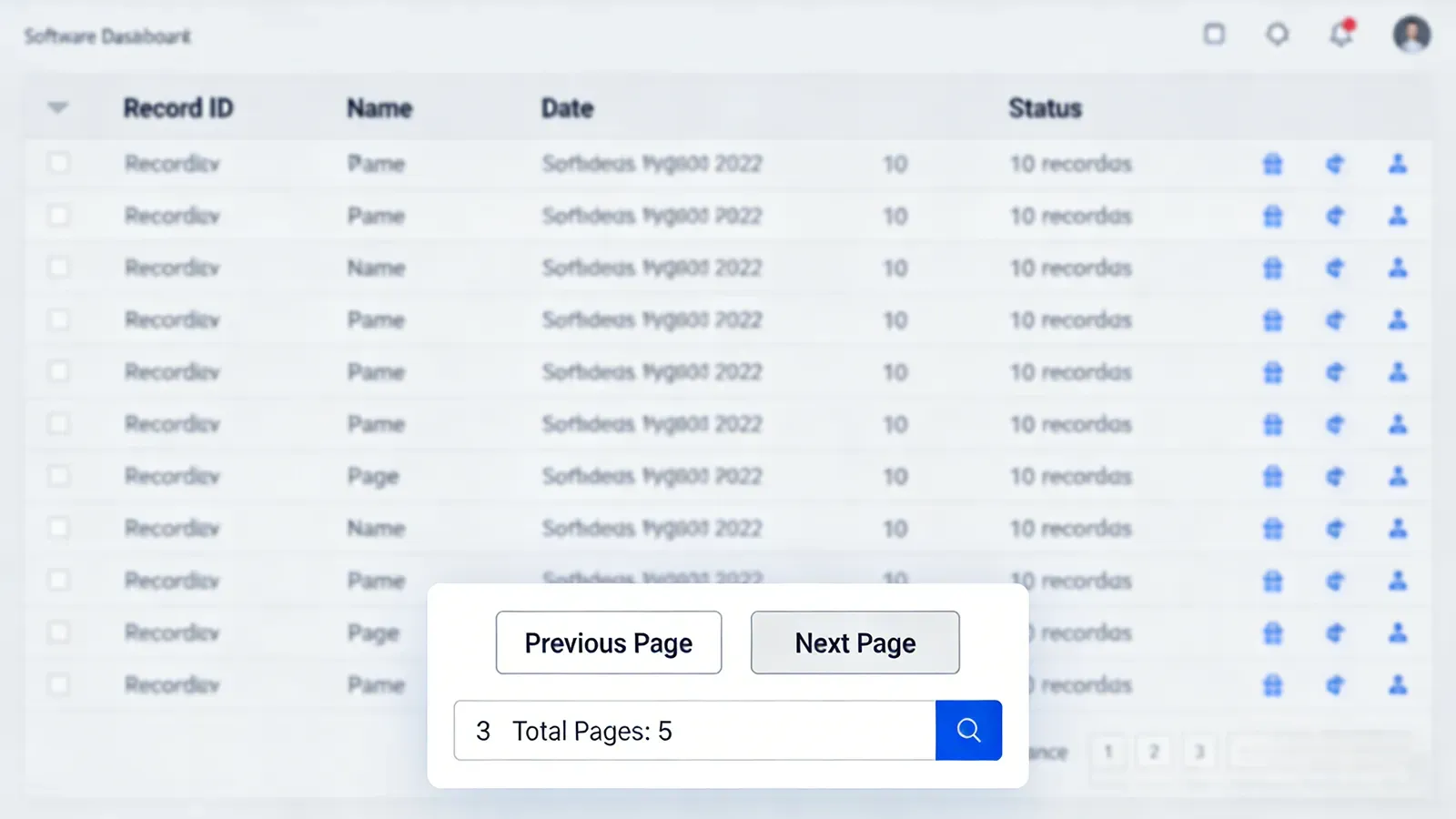
Pagination is common in websites, article archives, product listing pages, search results, support ticket systems, dashboards, and database queries. Instead of loading hundreds or thousands of items onto one screen, the system presents them page by page so users can browse more easily.
How Pagination Is Used in Websites and Software
In a website or application, pagination may appear as numbered pages, next and previous controls, or segmented result sets. A user reading a blog archive, viewing e-commerce products, or checking call logs may move from page 1 to page 2 and continue through the dataset in an orderly way.
Unlike paging in communication systems, pagination does not send alerts or messages. Its purpose is to arrange information. It is mainly concerned with user interface design, data presentation, loading efficiency, and content management rather than active voice delivery or notification.
The Core Difference Between Paging and Pagination
Difference in Purpose
The most important difference is purpose. Paging is used to notify, alert, announce, or call attention to something. Pagination is used to split and organize content into multiple pages. One is about communication delivery, while the other is about information layout and navigation.
This is why the two terms should not be used as substitutes. Even though they look similar, they solve completely different problems in technical environments.
Difference in Functional Role
Paging performs an active communication role. It sends information outward to recipients, often in real time. Pagination performs an organizational role. It structures existing information so people can read or manage it more efficiently.
In practical terms, paging is usually associated with speakers, phones, intercoms, notification devices, and alert workflows. Pagination is usually associated with websites, applications, databases, documents, and user interfaces.
Difference in User Experience
Paging often expects an immediate reaction. Someone hears an announcement, receives an alert, or notices a call request and is expected to respond or take action. Pagination does not create that type of urgency. It simply helps users move through content step by step.
This difference makes the terms especially important in professional writing. A reader who sees paging in a communication solution should think about voice distribution or alerts. A reader who sees pagination in a software specification should think about page structure and content display.
Paging in Communication Industry Terminology
Public Address and Group Notification
In the communication industry, paging often refers to a voice announcement or alert that is sent to one zone, multiple zones, or all connected endpoints. A paging function may be used in factories, schools, hospitals, metro stations, tunnels, airports, office buildings, and industrial sites. The source can be a dispatch console, a microphone, an IP phone, a SIP server, or an emergency platform.
For example, an IP paging system may allow an operator to broadcast an instruction to loudspeakers and intercom terminals in a selected area. In emergency scenarios, paging can be linked to alarms, scheduled announcements, and evacuation workflows. In daily operations, it may be used for staff coordination, routine notices, or service announcements.
One-Way and Group Communication Context
Paging is often one-way or one-to-many communication. The sender delivers the message, and the main purpose is awareness rather than conversation. Some systems also support response paths through intercom or telephony, but the paging action itself is still primarily about outbound notification.
This is why paging is widely used in industrial communication, healthcare communication, transportation communication, and security communication. It allows a system to reach people efficiently without requiring individual calls to each recipient.
In communication terminology, paging usually means reaching people with a voice alert, announcement, or call request rather than dividing information into separate pages.
Pagination in Software and Content Management
Website and Database Context
Pagination belongs mainly to the software and content management world. It is commonly used when a system has too much information to show on one screen. Rather than loading an entire dataset, the interface divides it into sections such as page 1, page 2, page 3, and so on.
This is especially useful for search results, archives, product catalogs, ticket systems, transaction histories, and call detail records. Pagination improves usability and often reduces performance strain by limiting how much data is displayed at one time.
Content Readability and Navigation
From a user experience perspective, pagination helps readers stay oriented. It allows users to move through content in a controlled sequence and makes long lists easier to scan. In some applications, pagination also supports filtering, sorting, and record management more effectively.
For this reason, pagination is considered a layout and navigation mechanism rather than a communication mechanism. It changes how content is presented, not how alerts or messages are delivered.
Why Paging and Pagination Are Often Confused
Similar Word Form
The confusion usually comes from the fact that both words are derived from the word page. At a glance, they appear closely related. In casual discussion, some people may even use paging loosely when they actually mean page switching or paged data views.
However, in formal and technical writing, the meanings are much more distinct. Paging is the correct term for alerting or announcement functions in communication systems, while pagination is the correct term for dividing content into multiple pages.
Different Professional Domains
Another reason for confusion is that the two terms belong to different professional domains. Paging is strongly associated with telecom, intercom, public address, dispatch, and alerting systems. Pagination is strongly associated with websites, backend systems, software products, databases, and publishing formats.
When the context is clear, the intended meaning is usually easy to identify. A hospital communication platform may offer paging. A web admin panel may offer pagination. The similarity is visual and linguistic, not functional.
Why the Difference Matters
Better Technical Writing
Using the correct term improves technical clarity. If a product brochure says a system supports paging, readers will expect alerting or announcement functions. If it says a system supports pagination, readers will expect page-based browsing of content or records. Choosing the wrong term can confuse buyers, engineers, and end users.
This is especially important for communication vendors, software developers, documentation teams, and SEO writers who need to describe functions accurately for professional audiences.
Better System Understanding
The distinction also helps readers understand how systems work. Paging belongs to communication delivery and real-world response scenarios. Pagination belongs to information organization and interface behavior. Once that difference is understood, it becomes much easier to interpret manuals, platform features, and solution documents correctly.
In some enterprise platforms, both functions may appear together. A communication management system may support paging to broadcast voice alerts and also use pagination to display device lists, call records, or alarm history. Even in the same platform, the two functions remain entirely different.
Conclusion
Although paging and pagination sound similar, they describe different functions in different technical contexts. Paging is mainly about sending alerts, announcements, or call requests in communication systems. Pagination is about dividing content or records into multiple pages for easier browsing and management.
In simple terms, paging is a communication action, while pagination is a content organization method. Understanding that distinction helps readers use the correct terminology in telecom, software, documentation, and professional product writing.
FAQ
Is paging the same as pagination?
No. Paging usually refers to alerts, announcements, or communication delivery, while pagination refers to splitting content into separate pages for browsing.
What does paging mean in communication systems?
In communication systems, paging usually means sending a voice announcement, alert, or notification to a person, device, zone, or group.
What does pagination mean in software?
In software, pagination means dividing large amounts of content or data into separate pages so users can navigate information more easily.
Can paging and pagination appear in the same platform?
Yes. A communication platform may support paging for voice broadcast while also using pagination to display logs, records, contacts, or device lists.
Which term should be used for page-by-page website navigation?
The correct term is pagination. In formal technical writing, pagination is the more accurate word for dividing and navigating content across multiple pages.







