


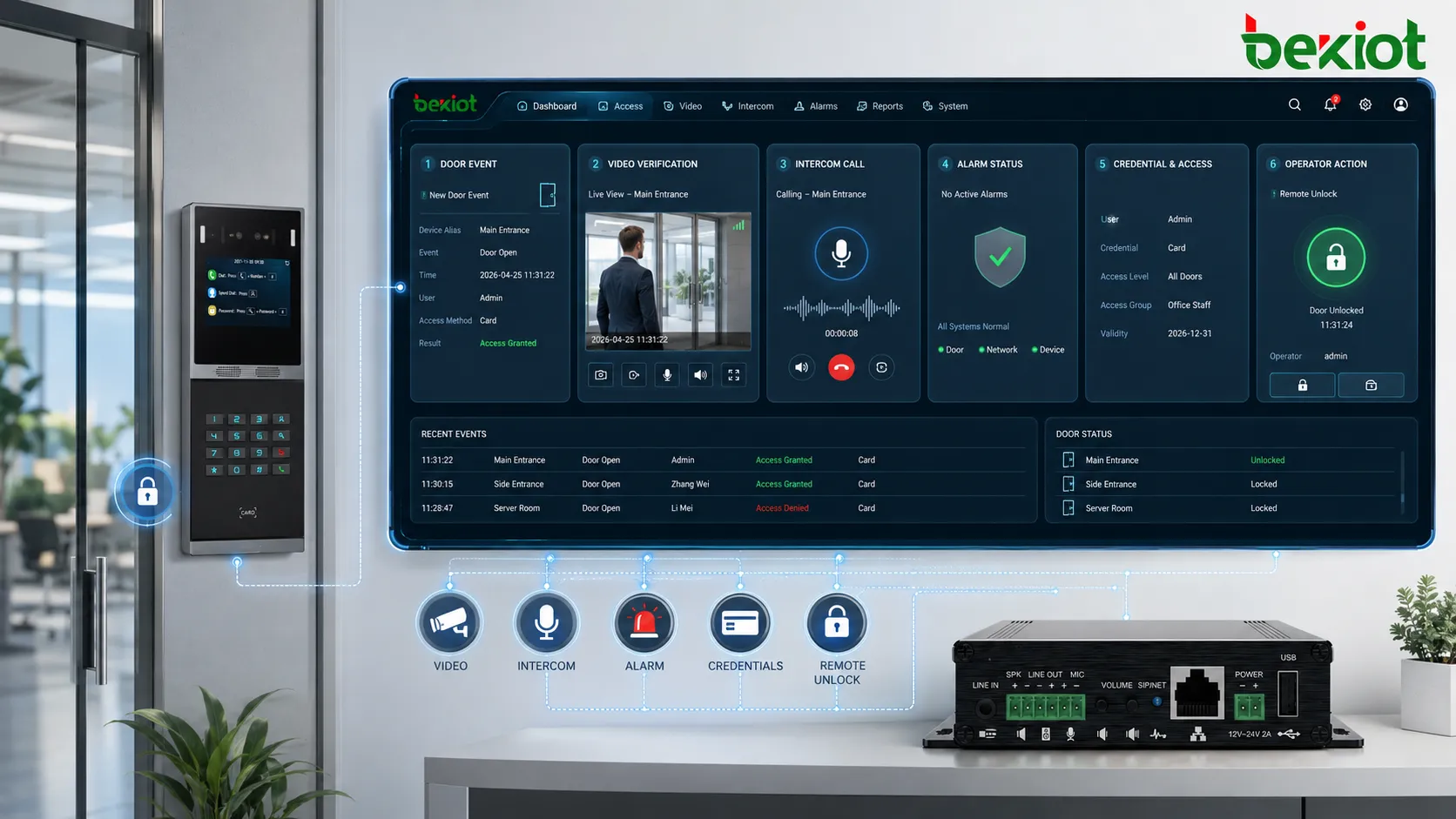
Access control integration is the process of connecting door controllers, readers, locks, credentials, identity databases, video surveillance, intrusion alarms, visitor management, intercoms, elevators, turnstiles, mobile apps, and security management platforms into one coordinated system. Instead of treating each security device as a separate island, integration allows events, permissions, alerts, and records to work together across the whole site.
In modern buildings and industrial environments, access control is no longer limited to opening or closing a door. A single access event may trigger a camera bookmark, update an attendance record, release an elevator floor, notify a security desk, or generate an alarm when an invalid credential is used repeatedly. This makes access control integration a key part of physical security, operational management, compliance, and emergency response.
A Practical Definition
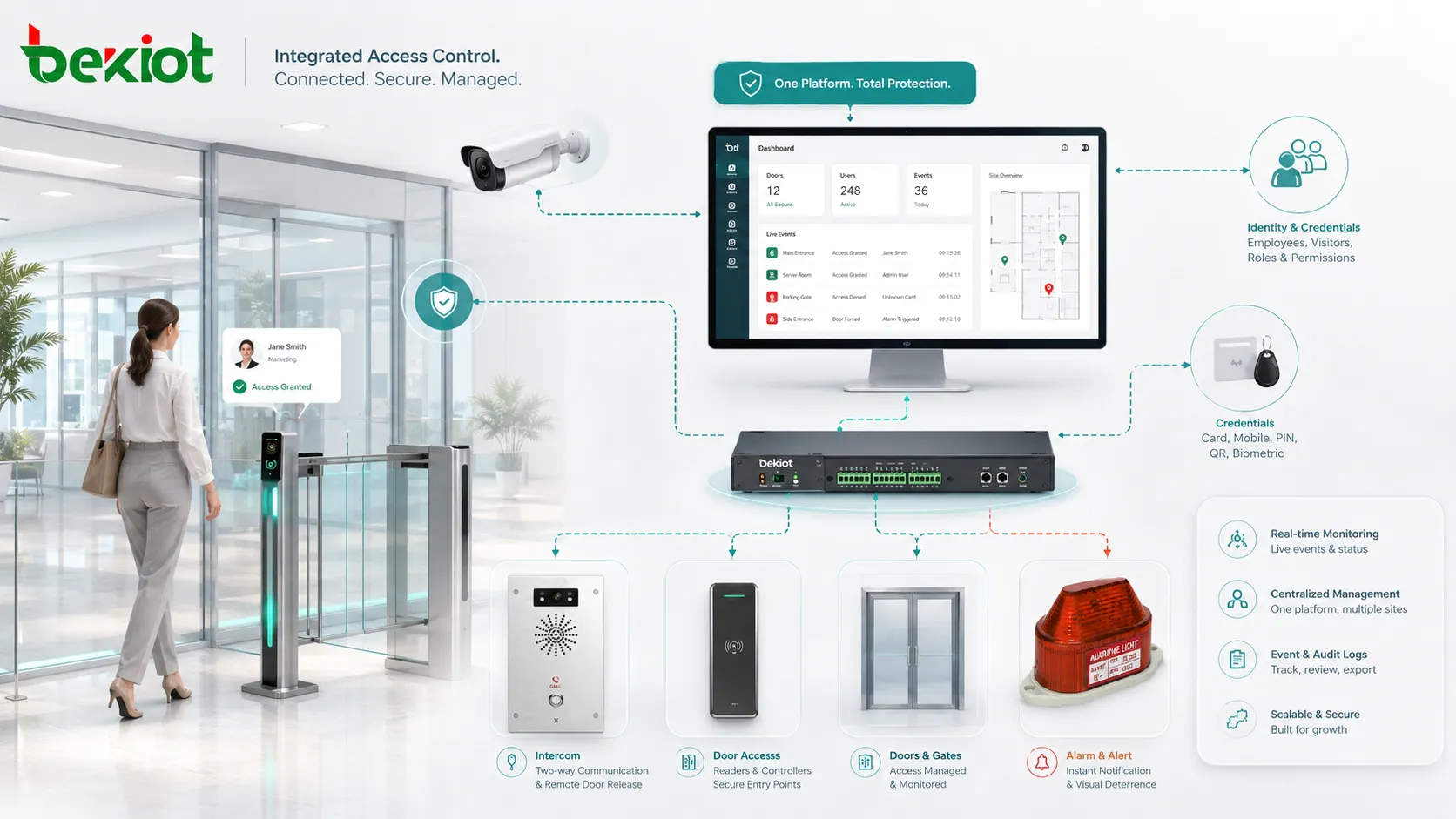
Access control integration means linking access control hardware and software with other building, security, IT, and operational systems so they can exchange information and respond to events automatically. The core goal is not only to control who can enter an area, but also to understand what happened, where it happened, who was involved, and what action should follow.
A basic standalone access system may verify a card and unlock a door. An integrated system can do much more. It can compare the cardholder with an HR database, record the event in a central log, associate the event with nearby video, activate an intercom call when assistance is needed, and alert security personnel if the access attempt is abnormal.
From door control to security coordination
Traditional access control focuses on authorization at a specific entry point. The system checks whether a credential is valid, whether the user has permission, and whether the time schedule allows entry. This is still the foundation of the system, but integration expands the role of access control beyond the door.
When access control is integrated with video, alarms, communication, and identity systems, every door event becomes part of a larger security picture. Security teams can review video linked to an access event, confirm the identity of a visitor, handle forced-door alarms more quickly, and reduce manual verification work.
Physical security and IT working together
Access control integration often sits between physical security and IT. Physical security teams care about doors, zones, people flow, alarms, and incident response. IT teams care about user directories, network security, authentication, data protection, and system availability. A successful integration must respect both sides.
For example, an employee leaving the company can be removed from the HR or identity management system, and that change can automatically disable building access. This reduces the risk of forgotten badges, outdated permission groups, and manual data entry errors.
How the Connected System Works
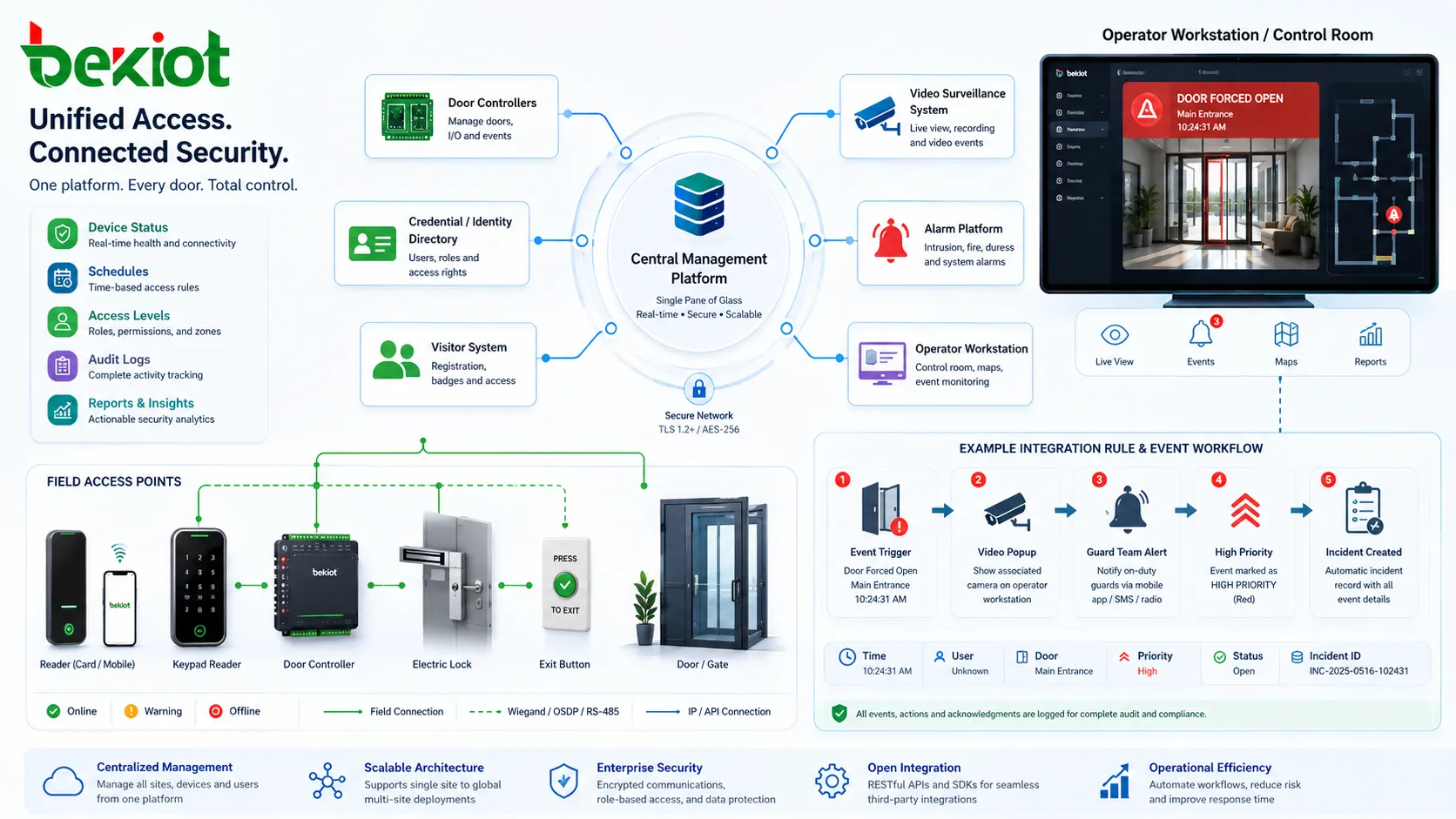
An integrated access control environment normally includes field devices, controllers, management software, databases, and connected third-party systems. These components communicate through network protocols, APIs, middleware, event rules, relay inputs and outputs, or platform-level integration modules.
The exact architecture depends on the site size and security requirements. A small office may only connect door access with video recording and visitor registration. A campus, hospital, airport, logistics center, or manufacturing plant may connect hundreds of doors, multiple buildings, emergency systems, elevators, parking barriers, control rooms, and centralized security platforms.
Field devices and local decision-making
At the field level, the system includes card readers, biometric readers, keypads, door contacts, request-to-exit buttons, electric locks, magnetic locks, turnstiles, gates, and controllers. These devices handle the immediate access process at entrances and protected zones.
Controllers are important because they allow local decision-making even when the network connection to the central server is temporarily unavailable. In a well-designed system, essential door functions continue to operate according to cached permissions and local rules instead of failing completely during a network interruption.
Central software and event rules
The central management platform stores users, credentials, access levels, schedules, zones, device status, alarm rules, and audit logs. Administrators use this software to assign permissions, review events, manage devices, and generate reports.
Integration rules define what should happen when specific events occur. For example, a door forced open event may trigger a camera to display on the control room screen, send a notification to the guard team, mark the event as high priority, and create an incident record for follow-up.
Common integration methods
Access control systems can be integrated in several ways. Simple integrations may use dry contacts, relay outputs, alarm inputs, or Wiegand-style device connections. More advanced systems use TCP/IP communication, REST APIs, SDKs, database synchronization, message queues, webhooks, ONVIF-compatible video integration, directory services, or security management platforms.
The best method depends on the required response speed, data depth, cybersecurity policy, vendor ecosystem, and long-term maintainability. Relay-based integration may be simple and reliable for basic triggers, while API-based integration is better for rich data exchange, centralized automation, reporting, and multi-system workflows.
Core Features That Matter in Real Projects
Access control integration is valuable because it turns separate tools into coordinated workflows. The most important features are not only technical functions, but also the ability to reduce risk, simplify management, and support repeatable security procedures across different locations.
| Feature Area | What It Does | Project Value |
|---|---|---|
| Identity synchronization | Links users, departments, roles, and status with HR or directory systems | Reduces manual account work and improves permission accuracy |
| Video association | Connects access events with nearby camera footage | Speeds up verification, investigation, and evidence review |
| Alarm correlation | Combines door alarms, intrusion alarms, and abnormal access events | Helps operators judge incident priority more quickly |
| Visitor workflow | Connects invitations, check-in, temporary credentials, and host approval | Makes visitor entry more controlled and auditable |
| Emergency control | Supports lockdown, muster, evacuation, or door release logic | Improves response during high-risk situations |
Unified credential and user management
One of the most useful features is centralized user management. Administrators can create, update, disable, or remove users from one trusted source instead of repeating the same task in several systems. This is especially important for organizations with frequent staff changes, contractors, shift workers, or multiple branches.
Integrated identity management also reduces permission drift. Without integration, old cards, duplicate user records, or outdated access groups can remain active longer than intended. With synchronization, user status and access rights can be updated more consistently.
Event-driven video verification
Video integration allows operators to view the camera footage related to a door event without manually searching through recordings. When someone enters a restricted room, uses an invalid credential, holds a door open, or forces a door, the system can display the relevant camera view and attach a video bookmark to the event record.
This feature is particularly useful for security desks, campuses, data centers, warehouses, and high-value storage areas. It helps distinguish between normal operational exceptions, user mistakes, tailgating, and real security incidents.
Automated alerts and escalation
Integrated systems can classify events by priority and send notifications to the right people. A low-level denied access event may simply be logged, while repeated failed attempts at a critical door may trigger an operator alert, a mobile notification, and an escalation procedure.
Automation does not replace human judgment. Instead, it filters routine events, highlights serious exceptions, and gives operators better context so they can respond faster and more accurately.
Audit logs and compliance reports
Access records are important for compliance, internal audits, incident investigation, and operational review. Integrated systems can combine access logs with visitor records, video references, alarm responses, and operator actions, creating a more complete record of what occurred.
For regulated environments, reports may show who entered restricted areas, when they entered, whether the access was approved, and how long the door remained open. These records can support security policy reviews, insurance requirements, and internal governance.
Applications Across Different Sites
Access control integration is used in many environments because most organizations need to protect people, spaces, equipment, data, and business processes. The specific design changes by industry, but the underlying principle is the same: connect access events with the systems that need to know or respond.
Commercial buildings and office campuses
In office buildings, integration often connects employee badges, visitor registration, elevator control, parking access, turnstiles, meeting room access, and video surveillance. This creates a smoother user experience while keeping sensitive floors, server rooms, and executive areas protected.
For multi-tenant buildings, integration can separate access rights by tenant, floor, time schedule, and shared facility. Building managers can control common areas while tenants manage their own user groups within defined boundaries.
Factories and logistics facilities
Industrial sites use access control integration to manage production areas, warehouses, chemical storage, utility rooms, control rooms, and loading zones. The system may connect access permissions with shift schedules, contractor authorization, vehicle gates, CCTV, emergency alarms, and safety procedures.
In logistics environments, integrated access helps control vehicle entry, staff movement, high-value cargo zones, and after-hours operations. When access events are linked to cameras and incident logs, managers can investigate exceptions more efficiently.
Hospitals and healthcare buildings
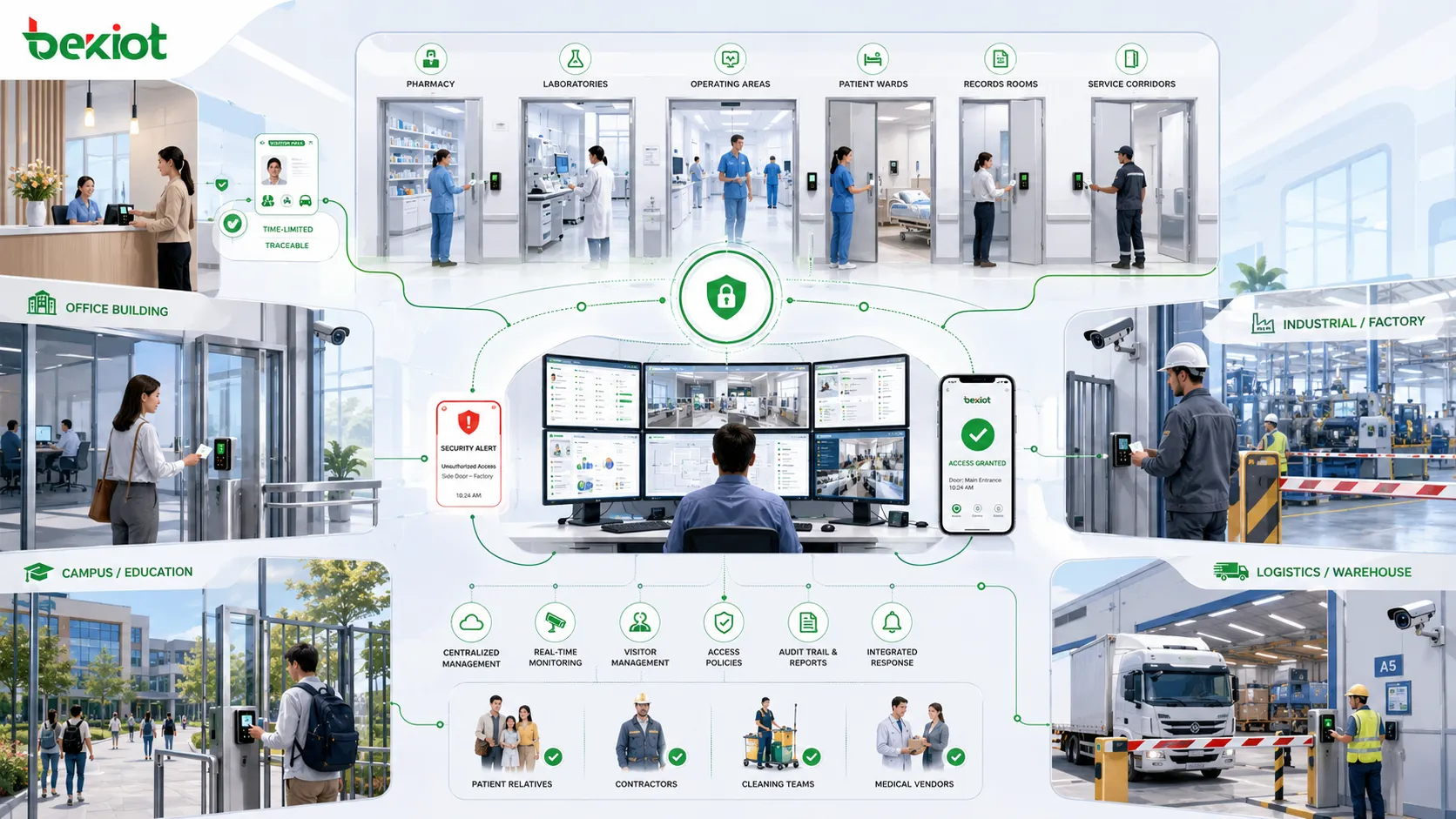
Healthcare facilities require controlled access to pharmacies, laboratories, operating areas, patient wards, records rooms, and restricted service corridors. Integration can help balance security with fast movement for authorized staff.
Visitor management is also important in healthcare. Temporary access can be issued for patients' relatives, contractors, cleaning teams, and medical vendors, while records remain traceable and time-limited.
Education and public facilities
Schools, universities, libraries, government offices, and cultural venues can use integrated access control to protect classrooms, laboratories, dormitories, offices, equipment rooms, and public-facing areas. The system can support scheduled access, emergency lockdown, visitor check-in, and security patrol review.
For campuses with many buildings, centralized management is especially valuable. Security teams can manage permissions across multiple sites while still allowing local administrators to handle day-to-day changes within their own departments.
Data centers and critical infrastructure
Data centers, utility sites, transportation hubs, and communication facilities often require stricter access control. Integration may include multi-factor authentication, mantrap doors, video verification, biometric readers, anti-passback rules, intrusion detection, and detailed audit trails.
In these environments, access control is part of resilience planning. The system must remain reliable during network issues, power events, emergency procedures, and maintenance operations.
Planning a Reliable Deployment
A good integration project starts with a clear understanding of security objectives, site layout, user roles, emergency procedures, IT policies, and future expansion needs. Without planning, integration can become a collection of isolated connections that are difficult to maintain.
Define the workflow before choosing technology
Technology should support the workflow, not the other way around. Before selecting devices or software modules, project teams should define how users enter the site, how visitors are approved, how alarms are handled, how video is reviewed, and how emergency modes should work.
Clear workflow design helps avoid unnecessary integration. Not every system needs to talk to every other system. The goal is to connect the systems that improve safety, response speed, management efficiency, and accountability.
Check compatibility and data ownership
Compatibility is a major factor in access control integration. Project teams should confirm which APIs, protocols, authentication methods, database fields, event types, and device models are supported. They should also clarify which system is the source of truth for users, credentials, permissions, and event records.
Data ownership matters because inconsistent records can cause security and operational problems. If HR, access control, visitor management, and security platforms all store user data separately, the project must define how updates are synchronized and which system has authority.
Design for cybersecurity and privacy
Because integrated systems exchange identity data, access logs, video links, and operational events, cybersecurity must be included from the beginning. Network segmentation, strong authentication, encrypted communication, secure API keys, least-privilege permissions, software updates, and audit logging are all important.
Privacy also needs attention. Access and video data should be used for legitimate security and operational purposes, retained according to policy, and protected from unnecessary exposure. Clear internal rules help prevent misuse and support compliance obligations.
Prepare for maintenance and expansion
Integrated access control systems need ongoing maintenance. User roles change, doors are added, software is updated, cameras are replaced, and new buildings may be connected. A maintainable system uses clear naming, documented rules, tested backups, version control for configuration changes, and regular review of permissions.
Scalability should also be planned early. A system that works for ten doors may not work well for hundreds of doors across multiple sites unless the architecture, licensing, network capacity, and management process are designed for growth.
Common Mistakes to Avoid
Many access control integration problems come from unclear requirements rather than hardware failure. A project may use good devices but still create operational issues if workflows, user data, alarm priority, and maintenance responsibilities are not well defined.
Connecting systems without a response plan
Integration can generate more alerts, more logs, and more information. If the team does not define who responds to each type of event, the system may overwhelm operators instead of helping them. Alarm priority and escalation rules should be designed carefully.
A useful system makes important events easier to see. A poorly tuned system may create alert fatigue, causing staff to ignore warnings that actually matter.
Ignoring offline operation
Access control must continue to support safe operation during network outages, server maintenance, or temporary communication failures. Project teams should test how doors, controllers, credentials, and emergency modes behave when central software is unavailable.
Offline behavior should be matched to the risk level of each area. A main staff entrance, a secure storage room, a fire exit, and a data center mantrap may all require different fail-safe or fail-secure logic.
Over-customizing without documentation
Custom integration can solve unique project needs, but undocumented custom logic can become difficult to maintain. When staff change or software is upgraded, nobody may understand why a specific script, rule, relay, or API connection exists.
Every critical rule should have a clear purpose, owner, test method, and recovery plan. This makes future troubleshooting easier and reduces dependency on a single installer or administrator.
FAQ
Can access control integration work with older door hardware?
In many cases, yes. Existing locks, door contacts, request-to-exit buttons, and some readers can often be reused if they are electrically compatible and still meet safety requirements. However, older controllers or proprietary readers may limit software integration, event detail, encryption, or credential upgrade options.
Is cloud-based access control easier to integrate than on-premises systems?
Cloud platforms often provide modern APIs, remote management, and simplified multi-site administration. On-premises systems may offer tighter local control, lower dependency on internet connectivity, and easier integration with internal security networks. The better choice depends on cybersecurity policy, site scale, uptime expectations, and data governance rules.
What is the difference between access control integration and building automation integration?
Access control integration focuses on identity, permissions, entry events, alarms, and security response. Building automation integration focuses on systems such as HVAC, lighting, energy management, and environmental control. They can overlap when occupancy data, schedules, or emergency modes need to influence building behavior.
How often should access permissions be reviewed?
High-risk areas should be reviewed more frequently than general office spaces. Many organizations perform periodic access reviews by department, role, or area owner, especially after staff changes, contractor projects, audits, or security incidents.
Does integration increase system risk?
Integration can increase risk if it is poorly designed, because more systems share data and depend on each other. A well-designed integration reduces overall risk by using secure communication, limited permissions, clear logging, tested failure modes, and documented recovery procedures.







