


A business VoIP telephone system is a modern communication solution that allows companies to make, receive, route, and manage voice calls over an IP network. Instead of depending only on traditional copper phone lines, it uses internet protocol technology to transmit voice as digital data. This makes business communication more flexible, scalable, and easier to integrate with modern office and enterprise systems.
For small offices, customer service teams, multi-site companies, factories, campuses, hotels, logistics centers, and control rooms, VoIP has become a practical alternative to traditional PBX systems. It supports internal extensions, external calling, SIP trunks, voicemail, call recording, remote users, conference calls, call routing, and integration with business applications.
A business VoIP telephone system is not just an internet calling tool. It is a structured communication platform designed for daily operations, customer interaction, internal collaboration, branch connectivity, and, in some industries, emergency or dispatch communication.
What Is a Business VoIP Telephone System?
Basic Definition
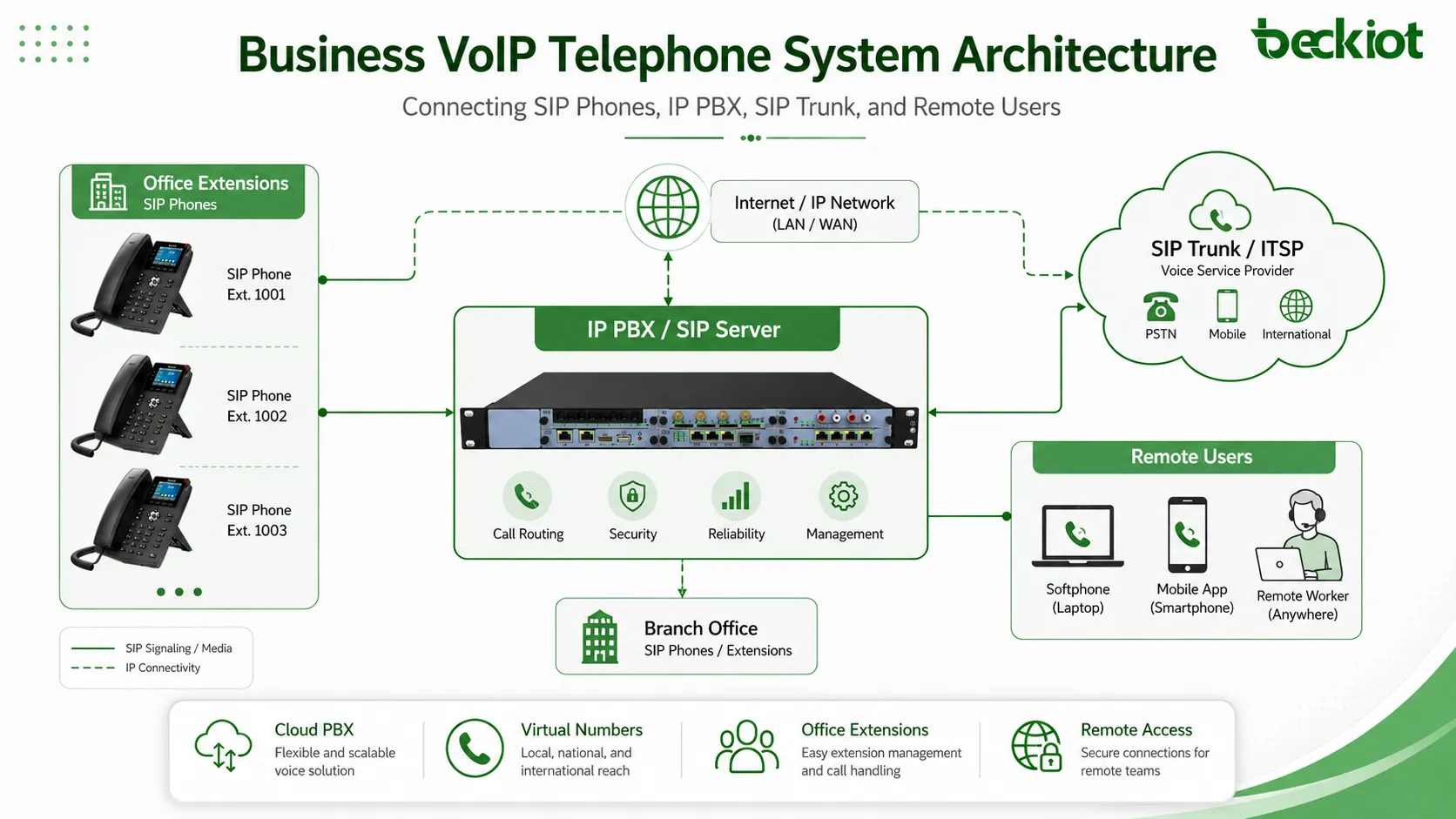
A business VoIP telephone system is a phone system that uses Voice over Internet Protocol technology to carry voice calls through IP networks. In this system, voice signals are converted into data packets and transmitted through LAN, WAN, internet, VPN, or private enterprise networks.
Employees can use IP desk phones, softphones, mobile apps, conference phones, SIP intercoms, or other SIP-compatible endpoints. The system manages extension numbers, call permissions, call routing, voicemail, recordings, and external calling through SIP trunks or gateways.
Why Businesses Use VoIP
Businesses use VoIP because it is easier to expand and manage than many traditional phone systems. New users can often be added through software configuration. Branch offices and remote staff can connect to the same telephone system. Call routing, voicemail, recording, and reporting can be managed from a centralized platform.
VoIP also supports integration with CRM platforms, helpdesk systems, dispatch platforms, access control systems, paging systems, and other IP-based applications. This makes it suitable for organizations that want communication to become part of a larger digital workflow.
How Does a Business VoIP Telephone System Work?
Voice Is Converted into IP Data
When a user speaks into a VoIP phone, the voice signal is converted into digital packets. These packets travel over the IP network and are then reassembled into audio at the receiving end. Codecs such as G.711, G.729, G.722, and Opus may be used depending on call quality requirements, bandwidth conditions, and system configuration.
Call quality depends on network bandwidth, latency, jitter, packet loss, codec selection, device performance, and Quality of Service settings. For business environments, voice traffic should be prioritized so that calls remain clear even when other applications are using the same network.
SIP Handles Call Control
Most business VoIP telephone systems use SIP, which stands for Session Initiation Protocol. SIP is responsible for registering devices, setting up calls, transferring calls, placing calls on hold, ending calls, and connecting with other systems.
In a typical VoIP call, SIP manages call signaling while RTP carries the actual voice media. This separation allows VoIP systems to support flexible routing, remote extensions, multi-device registration, conferencing, paging, and integration with different communication endpoints.
Main Components of a Business VoIP Telephone System
IP PBX or Hosted VoIP Platform
The IP PBX is the central call control platform of many business VoIP systems. It manages extension registration, call routing, voicemail, call transfer, ring groups, call queues, IVR menus, call permissions, and system settings.
An IP PBX can be deployed on a local server, appliance, virtual machine, private cloud, or service provider platform. A hosted VoIP platform provides similar functions through a cloud service and is usually managed by a provider.
SIP Phones and Softphones
SIP phones are physical IP phones used by office staff, reception teams, operators, service departments, and meeting rooms. Softphones are software-based phone clients installed on computers or mobile devices. They allow users to make and receive business calls without a dedicated desk phone.
Other endpoints may include conference phones, video phones, SIP intercoms, paging speakers, door phones, emergency phones, and industrial telephones. The right endpoint depends on the user role, installation environment, audio requirements, and communication workflow.
SIP Trunks
SIP trunks connect the business VoIP system to the public telephone network through an IP-based carrier service. They allow companies to make and receive external calls without relying only on traditional analog or digital phone lines.
SIP trunks can provide flexible call capacity, easier number management, lower long-distance costs, and centralized external calling for multiple offices. They are commonly used in modern enterprise phone system deployments.
VoIP Gateways
VoIP gateways connect IP-based phone systems with analog phones, PSTN lines, legacy PBX systems, E1/T1 circuits, or other communication networks. They are useful when a company wants to keep some existing infrastructure while gradually moving to VoIP.
For example, a business may use gateways to connect analog fax machines, elevator phones, older phones, public lines, or legacy PBX equipment to a newer IP-based telephone system.
Session Border Controllers
A Session Border Controller, often called an SBC, helps protect and manage SIP communication at the network edge. It can support NAT traversal, topology hiding, SIP normalization, access control, call admission control, and interoperability between carriers and enterprise systems.
For companies using SIP trunks, remote users, or multi-site VoIP, an SBC can improve security, reliability, and compatibility. It is especially important when voice traffic crosses public internet connections or connects with third-party service providers.
Core Features of a Business VoIP Telephone System
Extension Management
Extension management allows employees to call each other using short internal numbers. Administrators can create users, assign devices, define permissions, configure call groups, and manage different departments from a central interface.
This is useful for businesses with multiple teams, branch offices, service desks, warehouses, or remote employees. It keeps communication organized and makes internal calling faster and easier.
Call Routing and Auto Attendant
Call routing allows incoming calls to be directed to the right department, user, queue, or branch based on business rules. An auto attendant can answer calls automatically and guide callers through menu options such as sales, support, finance, or emergency contact.
These features reduce missed calls, improve customer experience, and help businesses handle call traffic more efficiently during busy periods.
IVR and Call Queues
IVR stands for Interactive Voice Response. It allows callers to select options through keypad input or voice prompts. Call queues place callers in line when all agents are busy and distribute calls according to predefined rules.
IVR and call queues are especially useful for customer service centers, sales teams, technical support departments, hotels, hospitals, and service organizations with high call volume.
Voicemail and Call Forwarding
Voicemail ensures that important messages are not lost when employees are unavailable. Call forwarding allows calls to be redirected to mobile phones, other extensions, branch offices, or backup numbers.
These features support flexible work arrangements and help businesses maintain communication continuity when employees are away from their desks.
Call Recording and Call Logs
Call recording helps businesses review service quality, verify instructions, support training, and keep communication records. Call logs provide information about call time, caller number, duration, missed calls, and call direction.
These records can help managers understand call volume, customer response patterns, staff workload, and service quality. Businesses should manage recording functions according to local privacy and compliance requirements.
Conference Calling
VoIP systems often support conference calls, multi-party calling, call transfer, call hold, and call pickup. These features make daily collaboration easier for internal teams, remote employees, external partners, and customer meetings.
For organizations with distributed teams, conference calling is an important part of business communication because it reduces the need for separate meeting tools for simple voice collaboration.
Benefits of a Business VoIP Telephone System
Lower Communication Costs
VoIP can reduce communication costs by using IP networks and SIP trunks instead of relying only on traditional phone lines. It can also reduce the need for separate cabling, multiple carrier contracts, and branch-level phone infrastructure.
The cost advantage is not only about lower call rates. Centralized management, easier expansion, remote access, and simplified maintenance can also reduce long-term operational costs.
Easy Scalability
A VoIP telephone system can scale from a small office to a large enterprise with multiple branches. New extensions and devices can often be added through software settings instead of major hardware changes.
This makes VoIP suitable for growing companies, seasonal teams, temporary project offices, expanding service departments, and organizations that expect future communication changes.
Support for Remote Work
VoIP allows employees to use business extensions from different locations. A remote worker can use a softphone, a branch employee can use a SIP phone, and a field worker can use a mobile app while still staying connected to the company phone system.
This helps businesses maintain a consistent communication experience across headquarters, branches, home offices, and mobile work environments.
Centralized Management
Administrators can manage users, extensions, permissions, routing rules, voicemail, recordings, reports, and device registration from a central platform. This reduces the complexity of managing separate phone systems in different locations.
Centralized management is especially useful for companies with multiple branches, distributed departments, and changing employee structures.
Integration with Business Systems
Because VoIP is IP-based, it can integrate with CRM systems, helpdesk platforms, access control, paging systems, alarm systems, video surveillance, and dispatch platforms. This allows voice communication to become part of a wider business process.
For example, an incoming call can open a customer record, a support ticket can trigger a callback, or an emergency phone call can be linked with a control room workflow.
Common Deployment Models
Cloud-Based VoIP
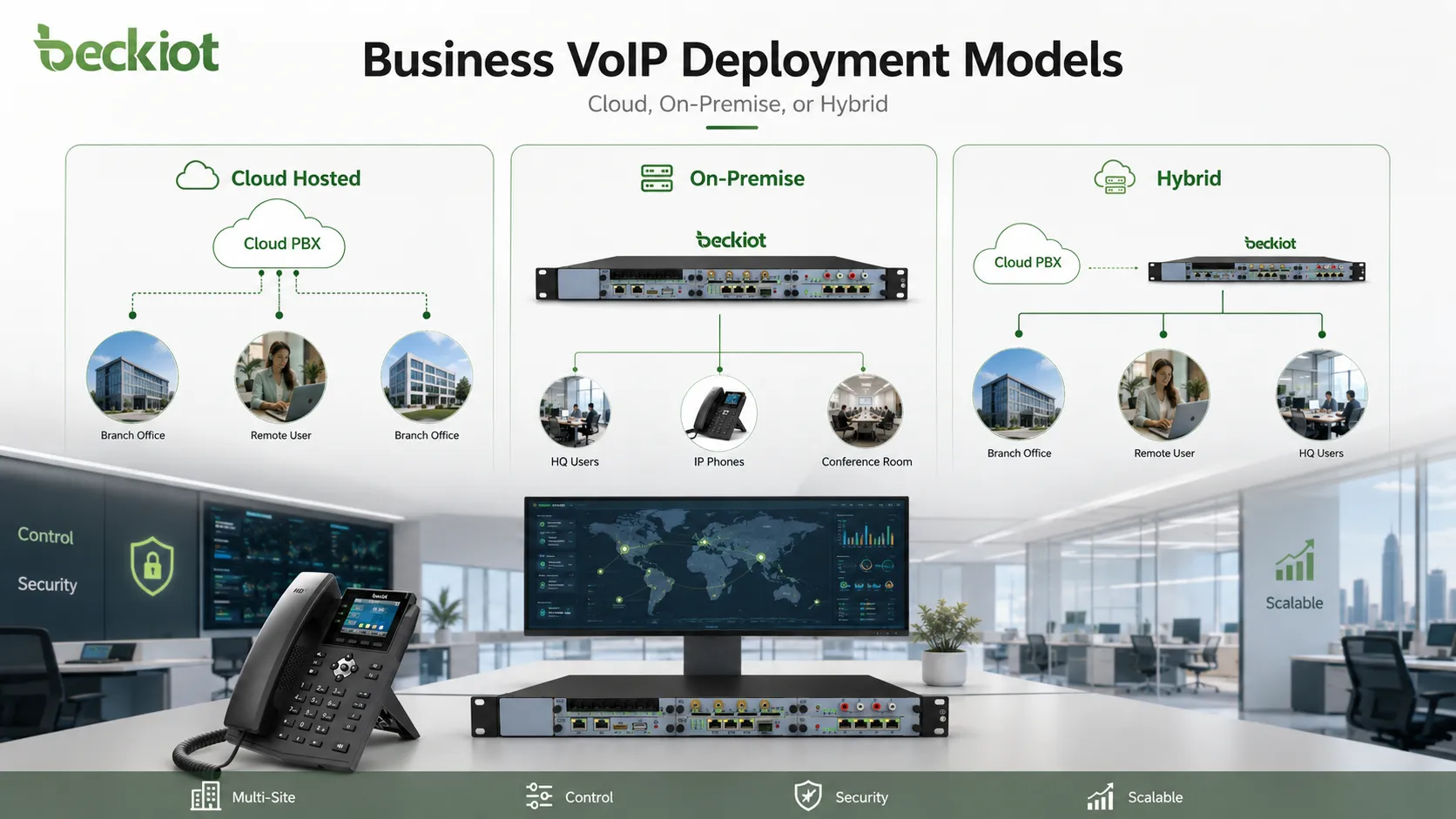
A cloud-based VoIP system is hosted by a service provider. The business uses IP phones, softphones, and web portals while the provider maintains the core platform. This model is popular with small and medium businesses that want fast deployment and lower maintenance responsibility.
Cloud VoIP is suitable for offices, remote teams, retail chains, professional services, and companies without dedicated telecom infrastructure. However, it depends heavily on internet stability, provider reliability, service terms, and data security arrangements.
On-Premise IP PBX
An on-premise IP PBX is deployed inside the company’s own network or data center. It gives the business more control over call routing, recordings, security settings, device registration, and integration with local systems.
This model may be preferred by enterprises, industrial sites, transportation command centers, energy facilities, campuses, and organizations with strong security, customization, or internal network requirements.
Hybrid VoIP
A hybrid VoIP system combines cloud services, local IP PBX equipment, SIP trunks, gateways, and existing phone infrastructure. It allows businesses to modernize communication step by step without replacing every device at once.
Hybrid deployment is useful when a company still needs analog phones, fax machines, elevator phones, PSTN backup lines, legacy PBX connections, radio gateways, or industrial endpoints.
Business Applications
Office Communication
In office environments, VoIP supports internal calling, reception service, department routing, voicemail, call transfer, conference calls, and external customer communication. It helps teams communicate faster and manage calls more effectively.
For daily office work, VoIP can simplify communication between departments, reduce missed calls, and make it easier for administrators to manage users and devices.
Customer Service and Sales
Customer service and sales teams often need call queues, IVR, recording, call reports, CRM integration, and agent management. VoIP can help these teams answer calls more efficiently and maintain better visibility into customer communication.
Call records and reports can help managers evaluate service quality, response speed, customer demand, and staff workload.
Multi-Site Enterprises
For companies with multiple branches, VoIP makes it easier to build a unified phone system across different locations. Headquarters, branch offices, warehouses, service centers, and remote teams can share a common numbering plan and call routing strategy.
This reduces management complexity and improves internal collaboration between different locations.
Industrial and Operational Environments
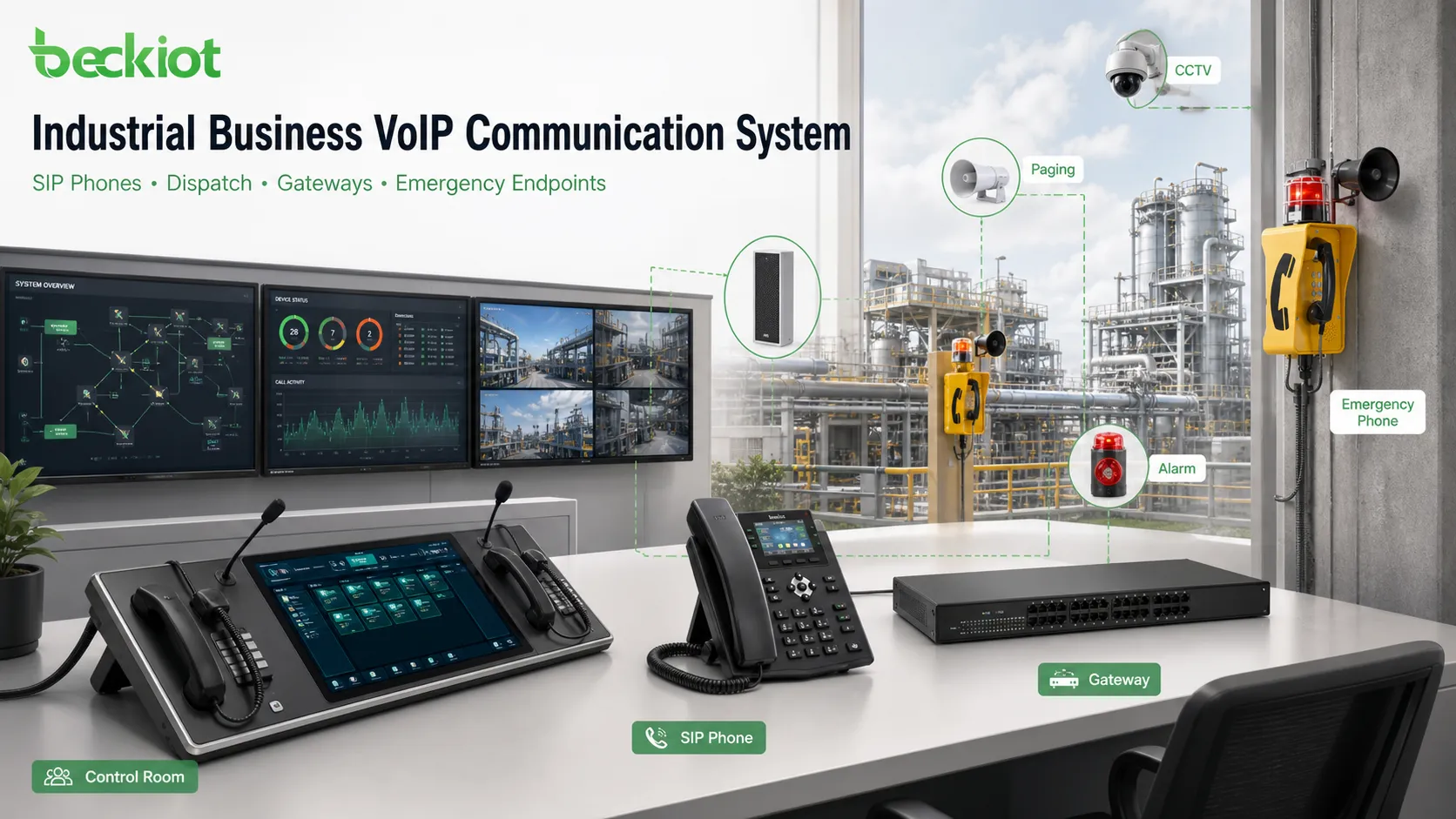
In industrial environments, VoIP can connect control rooms, workshops, gates, warehouses, outdoor areas, tunnels, substations, and maintenance teams. SIP phones, intercoms, emergency phones, paging speakers, and dispatch consoles can all be part of the same communication system.
For harsh or safety-critical sites, rugged SIP endpoints may be required. In these cases, suppliers such as Becke Telcom can provide industrial telephones, waterproof phones, explosion-proof telephones, paging terminals, and related VoIP communication devices for field and control-room communication.
How to Choose a Business VoIP Telephone System
Evaluate Network Readiness
Before deploying VoIP, businesses should evaluate network bandwidth, switch capacity, router performance, firewall rules, VLAN planning, and internet stability. Voice communication is sensitive to latency, jitter, and packet loss.
Quality of Service should be configured to prioritize voice traffic. For larger networks, managed switches, voice VLANs, redundant links, and monitoring tools can help maintain stable call quality.
Define Required Features
A small office may only need extensions, voicemail, call forwarding, and SIP trunk calling. A call center may need IVR, queues, recording, reporting, and CRM integration. An industrial site may need emergency phones, paging, alarms, and dispatch communication.
Businesses should list the number of users, call volume, branch structure, endpoint types, recording needs, integration requirements, and future expansion plans before selecting a system.
Consider Security
VoIP security should include strong SIP passwords, firewall rules, access control, call permission settings, TLS/SRTP support, SBC deployment, anti-fraud policies, and regular system updates.
Security is especially important when remote users, SIP trunks, or public internet connections are involved. Poorly protected VoIP systems may face unauthorized registration, toll fraud, service interruption, or data exposure.
Plan for Reliability
For critical communication, businesses should consider backup internet links, redundant servers, local survivability, PSTN backup, UPS power, failover routing, and emergency calling plans.
A reliable VoIP system should remain available during daily operation and continue supporting key communication during unexpected incidents.
Check Endpoint Compatibility
The system should support the endpoints the business actually needs, such as desk phones, softphones, conference phones, analog adapters, SIP intercoms, paging speakers, door phones, emergency phones, or industrial telephones.
Endpoint compatibility is important because a phone system is only useful when it matches real working environments and user habits.
Common Mistakes to Avoid
Choosing Only by Price
A low-cost VoIP service may look attractive, but businesses should also consider call quality, system stability, security, support, scalability, device compatibility, and integration capability.
The cheapest system may become expensive if it causes poor voice quality, missed calls, limited expansion, or difficult maintenance.
Ignoring Network Quality
Many VoIP problems are caused by unstable networks rather than the phone system itself. Poor routers, unmanaged switches, overloaded internet connections, weak Wi-Fi, and missing QoS settings can all affect voice quality.
Before deployment, businesses should check latency, jitter, packet loss, bandwidth usage, firewall rules, and network topology.
Overlooking Future Expansion
A business may start with only a few extensions, but future requirements can change. New branches, remote staff, call center functions, emergency endpoints, paging zones, recording storage, and software integration may be needed later.
A scalable VoIP architecture can protect the investment and reduce replacement costs when the business grows.
Conclusion
A business VoIP telephone system is a flexible communication platform that helps companies manage voice calls over IP networks. It supports internal extensions, external calling, SIP trunks, voicemail, call routing, recording, remote users, conference calls, and integration with business systems.
Compared with traditional phone systems, VoIP offers better scalability, centralized management, remote access, and integration capability. It can serve small offices, customer service teams, multi-site enterprises, industrial sites, and organizations with complex communication needs.
To choose the right system, businesses should evaluate network readiness, deployment model, required features, security, reliability, endpoint compatibility, and future expansion. A well-planned VoIP system can improve communication efficiency, reduce complexity, and support long-term business growth.
FAQ
Is a business VoIP telephone system the same as a cloud phone system?
Not always. A cloud phone system is one type of business VoIP deployment. Business VoIP can also be deployed on-premise or as a hybrid system depending on control, security, budget, and operational needs.
Does VoIP work without the internet?
Internal VoIP calls can work over a local IP network if the IP PBX and endpoints are deployed locally. However, external calls through SIP trunks, cloud services, or remote users usually require internet or carrier network connectivity.
What equipment is needed for a business VoIP telephone system?
A typical system may include an IP PBX or hosted VoIP platform, SIP phones, softphones, network switches, routers, SIP trunks, VoIP gateways, SBCs, and optional devices such as paging speakers, intercoms, emergency phones, or conference phones.
Is VoIP suitable for industrial sites?
Yes, but industrial sites need suitable endpoint devices and network design. Rugged SIP phones, waterproof telephones, explosion-proof telephones, paging gateways, and dispatch endpoints may be required for harsh, noisy, outdoor, or high-risk environments.
How can a business improve VoIP call quality?
Businesses can improve VoIP call quality by using stable bandwidth, managed switches, QoS, voice VLANs, reliable routers, proper firewall configuration, suitable codecs, good endpoint devices, and continuous network monitoring.







