A paging system is the voice communication layer used to deliver announcements, alerts, instructions, and emergency messages across buildings, campuses, factories, tunnels, transport facilities, and public areas. For buyers, the key is not only choosing speakers, but selecting a system that fits the site environment, paging zones, emergency workflow, integration needs, and future expansion plan.
This guide explains how to evaluate a paging system from real project requirements to architecture, devices, network reliability, emergency response, system integration, and total cost.
What Is a Paging System?
A paging system is a communication system used to broadcast voice announcements, tones, scheduled messages, emergency alerts, or operational instructions through speakers, amplifiers, IP endpoints, paging gateways, or integrated communication platforms.
A simple system may only support basic announcements through ceiling speakers. A more advanced IP or SIP paging system can support zone paging, multicast audio, SIP calls, pre-recorded emergency messages, alarm-triggered broadcasting, visual alerts, two-way intercom, and dispatch center integration.
How to Evaluate a Paging System Before Selection
Choosing a paging system should follow a clear project evaluation process. Buyers should first understand the site environment, communication purpose, emergency requirements, user groups, integration needs, and future expansion plan before comparing device models or prices.
The following seven steps provide a practical framework for selecting the right paging solution. They are not isolated product checks, but a complete decision path covering project requirements, acoustic design, system architecture, device selection, network reliability, emergency workflows, and long-term operating value.
Step 1: Define the Use Case and Site Requirements
The first step is to clarify how the paging system will be used. A system designed for a school, hospital, office, factory, tunnel, railway station, or outdoor industrial site will have different priorities.
Buyers should confirm whether the system is mainly for daily announcements, emergency notification, production coordination, passenger guidance, security response, or multi-purpose communication.
Daily announcement needs
Offices, schools, hotels, hospitals, retail stores, and public buildings often use paging for routine announcements, service reminders, visitor guidance, shift notices, and general information broadcasting. In these sites, voice clarity, zone control, simple operation, and clean installation are usually more important than extreme output power.
Emergency notification needs
Safety-sensitive sites need priority control, reliable message delivery, alarm linkage, pre-recorded messages, live operator announcements, and clear instructions during critical events. The paging system should be part of the emergency communication workflow rather than a standalone audio tool.
Industrial and harsh environment needs
Factories, tunnels, mines, substations, ports, petrochemical sites, and outdoor infrastructure projects may require rugged speakers, horn speakers, visual alerts, industrial telephones, emergency phones, corrosion resistance, weather protection, and stable operation under noise, dust, humidity, vibration, or temperature challenges.
Step 2: Plan Coverage, Zones, and Acoustic Performance
After the use case is clear, buyers should plan where announcements must be heard and how the site should be divided into paging zones. Zone design affects speaker quantity, cabling, system control, user permissions, emergency override rules, and long-term operating efficiency.
A good paging system should not simply be loud. It should deliver clear and understandable voice messages to the correct area.
Zone paging
Zone paging allows announcements to be sent to selected areas instead of the entire facility. A school may divide zones by classroom building, playground, dormitory, gym, and administration office. A factory may divide zones by production line, warehouse, loading dock, control room, hazardous area, and outdoor yard.
Good zone design reduces noise pollution and prevents message fatigue. People should hear the messages that matter to their area, while emergency messages should still be able to override normal zones when full-site notification is required.
Voice intelligibility and STIPA measurement
Voice intelligibility is more important than simple loudness. A system can produce high sound pressure levels but still fail to deliver understandable speech if reverberation, background noise, or poor speaker placement distorts the message.
To objectively measure speech intelligibility, the industry uses the Speech Transmission Index for Public Address Systems (STIPA), standardized in IEC 60268-16. STIPA produces a single numeric value between 0 and 1, where a higher value indicates better intelligibility. For emergency sound systems, international standards and national codes such as China's GB/T 50526-2021 typically require a STIPA value of no less than 0.5 in acoustically critical zones. Buyers should request STIPA verification reports or plan post-installation STIPA measurements to ensure that the installed system meets the required intelligibility target rather than only checking sound pressure level.
Indoor and outdoor coverage
Indoor areas usually require balanced sound coverage and clean installation. Outdoor areas may require longer projection distance, higher sound pressure level, waterproof design, anti-corrosion protection, surge protection, and more careful mounting.
Step 3: Choose the Right System Architecture
Once the project requirements and zone plan are clear, buyers can choose the most suitable architecture. Common options include analog paging, IP paging, SIP-based paging, and hybrid paging.
Analog paging systems
Analog paging systems use traditional amplifiers, audio cables, microphones, and speakers. They are still practical for small sites that only need basic announcements.
Their limitation is flexibility. Analog systems usually require more dedicated cabling, hardware-based zoning, manual maintenance, and limited integration with modern communication platforms.
IP paging systems
IP paging systems use the data network to transmit audio to IP speakers, SIP speakers, paging gateways, amplifiers, and management platforms. They support Ethernet cabling, PoE power, network-based configuration, centralized management, and software-defined zones.
IP paging is suitable for campuses, hospitals, industrial parks, transportation sites, logistics centers, and multi-building projects because it can expand by building, floor, workshop, station, parking area, or outdoor zone.
SIP-based paging systems
SIP-based paging systems use the same communication protocol as IP phones, SIP intercoms, IP PBX systems, and VoIP platforms. Staff can dial a paging extension from a phone, dispatch console, emergency phone, or communication platform and speak directly to a selected zone.
For projects that already use SIP phones, IP PBX, dispatch systems, emergency call stations, or industrial telephones, SIP paging helps reduce system silos and unify voice communication with public address functions.
Hybrid paging systems
Hybrid paging systems combine existing analog infrastructure with newer IP or SIP-based components. This is often suitable for upgrade projects where amplifiers, speaker lines, or ceiling speakers are still usable.
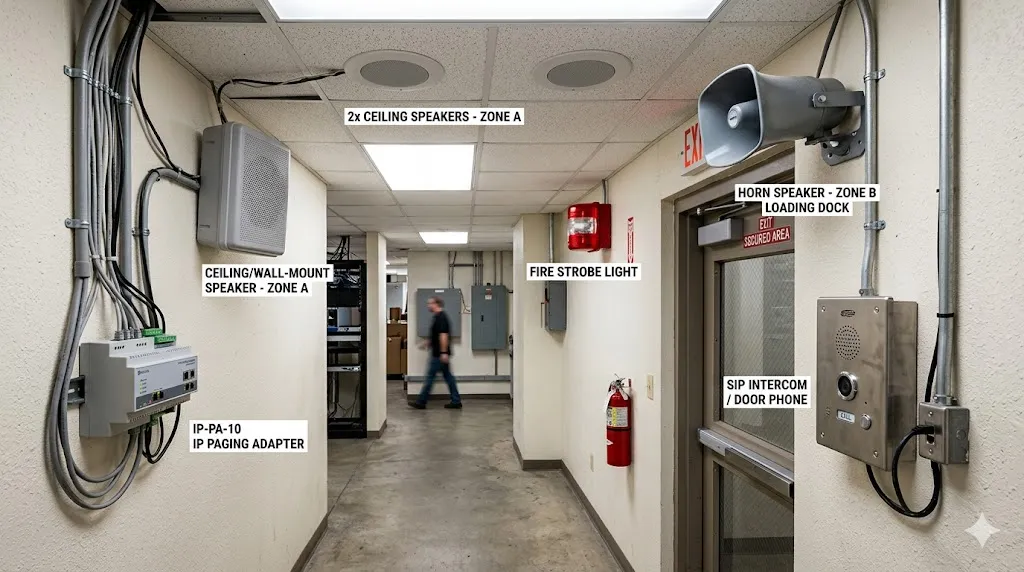
By using IP paging adapters, SIP gateways, or network audio interfaces, buyers can modernize control, add SIP access, improve zone management, and integrate emergency workflows without replacing every speaker at once.
Key International Standards and Compliance for Emergency Paging
When a paging system is intended for emergency notification or life safety purposes, it must comply with relevant international and local standards. These standards define system performance, equipment certification, installation practices, and mandatory testing procedures that go beyond general commercial audio requirements.
Buyers should confirm which standards apply to their project before finalizing specifications. The following are among the most important emergency paging and voice alarm standards used worldwide:
IEC 60849 / EN 50849 — Sound Systems for Emergency Purposes
IEC 60849 internationally and its European successor EN 50849 define the performance requirements for sound systems used to broadcast evacuation signals and emergency voice messages. These standards cover system architecture, intelligibility, fault monitoring, power backup, and environmental resilience. Systems designed to these standards must remain functional during fire conditions and power failures.
EN 54-16 / ISO 7240-16 — Voice Alarm Control and Indicating Equipment
These standards specifically address the control equipment used in fire detection and fire alarm systems that include voice alarm functionality. EN 54-16 European and ISO 7240-16 international specify requirements for the voice alarm controller, its interfaces with fire alarm panels, mandatory monitoring functions, and fail-safe operation.
EN 54-24 / ISO 7240-24 — Loudspeakers for Voice Alarm Systems
These standards define the performance, durability, and environmental testing requirements for loudspeakers used in fire detection and alarm voice evacuation systems. Certified speakers must withstand specified temperature, humidity, and corrosion tests to ensure reliable operation during emergency conditions.
GB 16851 and related national standards
China's GB 16851 standard sets forth requirements for fire alarm and public address systems used in life safety applications. It addresses system integrity, emergency power, message priority, and coordination with fire detection panels. Buyers should check national or regional codes that may impose additional requirements beyond international standards.
For any project where emergency communication is a key function, referencing the applicable standards at the design stage helps ensure the selected system can be certified, accepted by authorities, and relied upon during critical events.
Step 4: Select Suitable Paging Devices
Device selection should be based on acoustic conditions, mounting location, coverage distance, environmental protection, system protocol, installation method, maintenance access, and the type of message being delivered.
Different spaces need different audio endpoints. A quiet office, a hospital corridor, a high-ceiling warehouse, a noisy factory floor, an outdoor parking area, and a tunnel should not use the same speaker layout.
Ceiling speakers
Ceiling speakers are suitable for offices, schools, hospitals, hotels, retail stores, corridors, and indoor public spaces. They provide clean appearance and even sound distribution in finished interiors.
Wall-mounted speakers
Wall-mounted speakers are useful in corridors, stairways, service areas, workshops, warehouses, and retrofit projects where ceiling installation is not practical.
Horn speakers
Horn speakers are designed for long-distance voice coverage and noisy environments. They are commonly used in factories, parking lots, outdoor yards, tunnels, ports, mines, utility sites, and industrial areas.
Talk-back speakers and intercom points
Talk-back speakers, SIP intercoms, emergency phones, and industrial telephones allow users to respond to the control room. They are useful when the project requires two-way communication instead of one-way broadcasting only.
Strobe lights and visual alerts
Visual alerts help people notice emergency messages in noisy areas, hearing-protection zones, machine rooms, factories, warehouses, tunnels, and public spaces. Strobe lights, beacons, LED signs, and multi-color indicators can reinforce audio announcements.
IP paging adapters and gateways
IP paging adapters and gateways can connect existing analog amplifiers or speaker lines to an IP or SIP-based system. They are useful for upgrade projects that need modern control while preserving part of the original infrastructure.
Step 5: Design Network, Power, and Reliability
For IP and SIP paging systems, network and power design directly affect reliability. Buyers should check PoE capacity, switch performance, VLAN planning, QoS, multicast support, cable distance, surge protection, outdoor network protection, UPS backup, and redundancy requirements.
In emergency communication projects, backup power and network resilience should be planned early. A paging system used for safety notification should not fail because one switch, one cable route, or one power source was overlooked.
Multicast paging
Multicast paging allows one audio stream to be delivered to multiple endpoints at the same time. It can reduce server load and improve efficiency in large IP paging deployments.
Buyers should confirm that switches, VLANs, and network policies can support multicast audio before deployment.
Unicast paging
Unicast sends audio from one source to one destination or one controlled endpoint path. It can be easier to manage in smaller systems or cloud-connected scenarios, but it may consume more resources when many endpoints receive the same message.
PoE and backup power
Many IP speakers and SIP paging devices support Power over Ethernet. PoE simplifies installation because one cable can provide both network and power. Buyers should still calculate switch capacity, PoE budget, UPS backup, and redundancy requirements.
Step 6: Plan Integration and Emergency Workflows
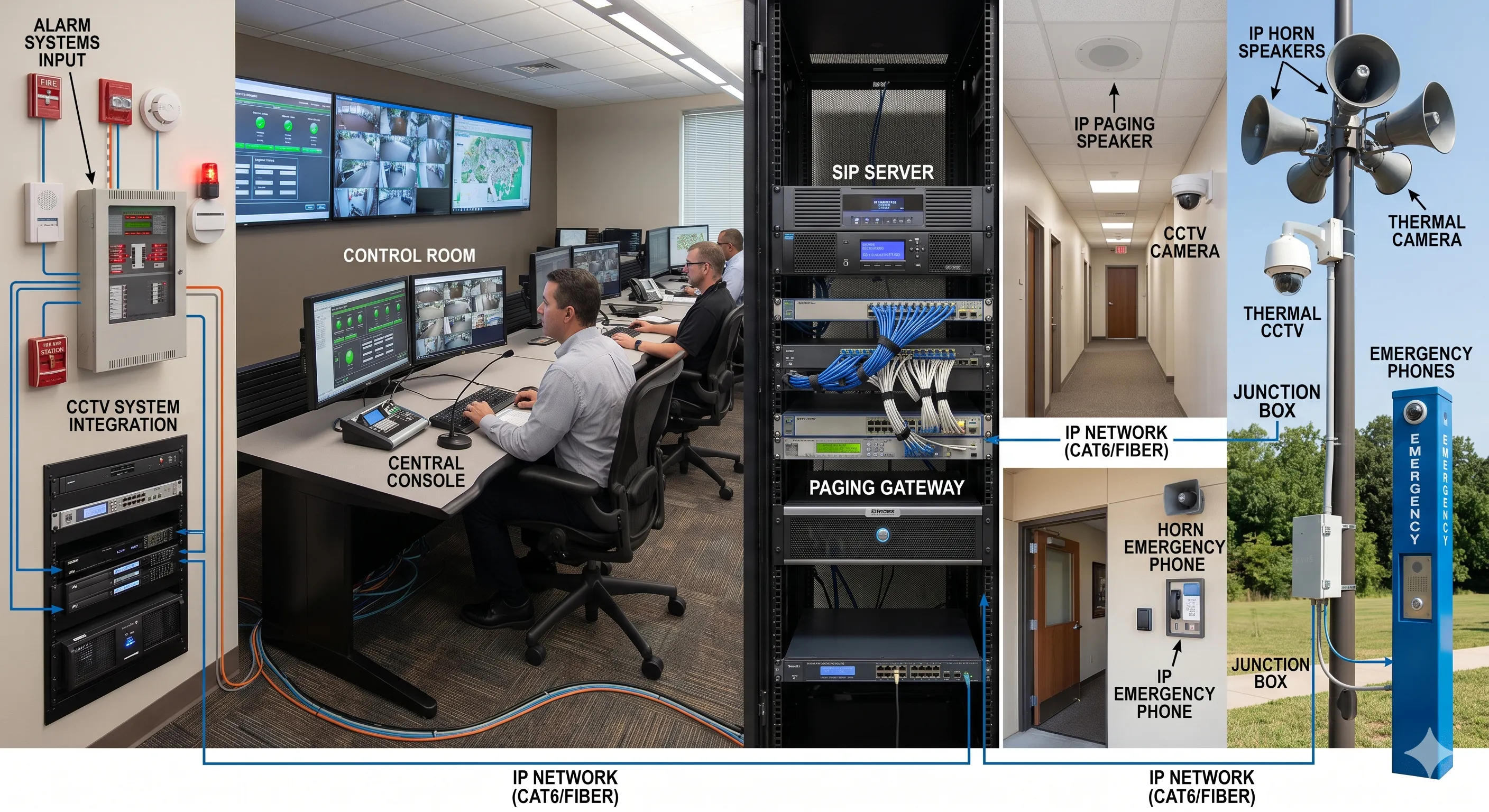
A paging system becomes more valuable when it can connect with existing communication, security, and safety systems. Buyers should evaluate integration with IP PBX, SIP servers, emergency phones, industrial telephones, dispatch platforms, CCTV, fire alarms, access control, sensors, SCADA systems, and building management systems.
Emergency priority control
Emergency announcements should override background music, scheduled messages, routine paging, and lower-priority calls. Priority control helps prevent important instructions from being blocked by normal traffic.
Pre-recorded emergency messages
Pre-recorded messages help deliver consistent instructions during stressful events such as evacuation, shelter-in-place, fire alarm response, security alerts, hazardous gas warnings, severe weather notices, or equipment shutdown procedures.
Alarm-triggered broadcasting
Fire alarm panels, access control systems, emergency buttons, sensor alarms, SCADA systems, and building management systems may trigger automatic voice messages or operator review workflows.
CCTV and dispatch linkage
When an alarm occurs, the control room may need to view CCTV, answer an emergency phone, speak to a local zone, notify security staff, and record the event. A paging system connected with dispatch and monitoring systems can support faster situational awareness.
SIP and communication platform integration
If the organization uses an IP PBX or SIP server, paging zones can often be assigned as dialable extensions. Authorized users can call a paging group from an office phone, control room phone, SIP terminal, or dispatch console.
For emergency use, the best paging system is not the loudest one. It is the one that delivers the right instruction, to the right zone, with the right priority, while helping operators coordinate the next action.
Step 7: Evaluate Maintenance, Expansion, and Total Cost
The final step is to compare long-term value, not only the initial quotation. Buyers should calculate equipment cost, cabling, installation, configuration, software, commissioning, training, maintenance, spare parts, future expansion, and system upgrade costs.
Analog systems may appear cheaper at the device level but can require more cabling and may become expensive when zones need to change. IP systems may require better network planning but can reduce future expansion cost. Hybrid systems can protect existing investment but require careful design to avoid creating a patchwork system that is hard to maintain.
Maintenance and device management
Buyers should ask how devices are configured, monitored, updated, and replaced. For larger sites, centralized device management and clear maintenance procedures can reduce long-term operating cost.
Expansion planning
A paging system should leave room for future buildings, additional zones, new SIP endpoints, more emergency phones, extra visual alerts, and integration with new safety or communication platforms.
Total cost of ownership
The cheapest quotation may not be the lowest-cost solution over five or ten years. Buyers should compare installation difficulty, future modification cost, maintenance workload, software licensing, spare parts, downtime risk, and upgrade flexibility before making a final decision.
Paging System Buyer Checklist Before Purchase
Before approving a paging system proposal, buyers should check whether the solution matches the real site conditions instead of only comparing product names and prices.
Coverage and acoustics
Confirm the coverage area, background noise level, ceiling height, wall materials, outdoor exposure, and required voice intelligibility. Request STIPA measurement plans or verification reports for critical zones.
Zones and permissions
Define how many zones are required, who can page each zone, which zones need emergency override, and whether zone assignments may change in the future.
Emergency workflow and standards compliance
Check whether the system supports emergency priority, pre-recorded messages, alarm input, manual live paging, visual alerts, event logs, and control room operation. Confirm which international or local standards apply and whether the proposed equipment carries the required certifications.
SIP and platform compatibility
Confirm whether the system can work with the customer’s IP PBX, SIP server, dispatch platform, emergency phones, industrial telephones, or unified communication platform.
Power and network resilience
Check PoE budgets, UPS backup, network redundancy, cable routes, outdoor protection, surge protection, and failover plans.
Common Mistakes When Buying a Paging System
Many paging problems are caused before installation because the buyer focused on hardware price instead of system design. Avoiding common mistakes can save time, budget, and operational risk.
One mistake is using the same speaker type everywhere. A horn speaker that works outdoors may be too harsh for an office. A ceiling speaker that sounds clean in a corridor may not cover a noisy workshop.
Another mistake is ignoring emergency priority. A system that works for daily announcements may fail during a critical event if emergency messages cannot override background audio or normal paging.
A third mistake is treating paging as separate from the rest of the communication system. In many projects, paging should connect with SIP phones, emergency phones, CCTV, alarms, dispatch platforms, and control room workflows.
Buyers should also avoid underestimating network and power design. IP paging performance depends on stable switches, PoE capacity, correct VLAN planning, multicast support, and backup power.
Finally, overlooking certification and testing standards can lead to regulatory rejection or unreliable emergency performance. A system that meets commercial audio expectations may still fail the specific requirements of life safety standards if not verified through STIPA measurement and certified against applicable emergency sound system standards.
Where Paging Systems Are Commonly Used
Paging systems are used across many industries, but the design focus changes by environment.
Industrial facilities
Factories, power plants, petrochemical sites, warehouses, and mining facilities often need paging for production coordination, maintenance calls, safety reminders, emergency evacuation, and alarm notification.
Schools and campuses
Campuses use paging for class schedules, public announcements, security alerts, emergency instructions, and coordination with emergency phones.
Hospitals and healthcare facilities
Hospitals need clear announcements, controlled zones, staff coordination, emergency alerts, and reliable communication in public areas, nurse stations, corridors, and service rooms.
Transportation and public areas
Airports, railway stations, metro systems, bus terminals, ports, parking facilities, and public buildings use paging for passenger information, safety announcements, crowd guidance, service updates, and emergency response.
Tunnels and utility sites
Tunnels, utility corridors, substations, pump stations, and outdoor infrastructure sites require durable communication devices, clear voice coverage, emergency phone integration, and alarm linkage.
Paging System Solution Recommendation
For projects that need SIP paging, IP speakers, emergency phones, paging gateways, or industrial communication endpoints, Becke Telcom can provide suitable device options for commercial, industrial, transportation, campus, and public safety environments.
Related Solution: Paging and Intercom Broadcasting System
Final Buying Advice
Choosing the right paging system is not only about buying speakers, amplifiers, or endpoints. It is about designing a communication path that can deliver clear voice messages during daily operations and critical events.
For simple buildings, an analog or small IP paging system may be enough. For larger, multi-zone, safety-sensitive, or fast-growing projects, an IP or SIP-based paging system usually provides better flexibility, integration, and long-term value. For upgrade projects, a hybrid system can modernize control while protecting existing speaker infrastructure.
The best result comes from matching technology to the site: coverage, acoustics, zones, emergency priorities, integration needs, maintenance capability, and future expansion. A well-designed paging system should be easy to use on a normal day and dependable when the situation becomes urgent.
FAQ
Can existing analog speakers be reused in a new paging system?
In many upgrade projects, existing analog speakers or amplifier lines can be reused through IP paging adapters, SIP gateways, or network audio interfaces. The final decision depends on speaker condition, cable quality, zoning needs, and the required level of system control.
When should a project choose SIP paging instead of basic PA equipment?
SIP paging is more suitable when the project needs IP PBX integration, dialable paging extensions, emergency phone linkage, dispatch console operation, multi-site management, or unified communication with SIP phones and industrial telephones.
What should be tested before handing over a paging system?
The handover test should include zone paging, full-site paging, emergency priority override, alarm-triggered messages, microphone paging, recorded messages, speaker audibility, visual alerts, network stability, power backup, and operator permissions. For emergency sound systems, STIPA measurement and verification against applicable standards should also be included in the commissioning report.
How can paging systems avoid disturbing people with unnecessary announcements?
Proper zone planning, user permission control, scheduled message rules, volume adjustment, and emergency priority settings can reduce unnecessary noise while still ensuring that important messages reach the right area.