


A video converged communication system is not built with only one video protocol. In real projects, cameras, NVRs, video platforms, dispatch consoles, mobile apps, web clients, drones, command centers, and third-party security systems may all use different transmission methods. The purpose of system design is to connect these video resources into one manageable workflow instead of leaving every device or platform isolated.
In a typical command and dispatch scenario, live preview, low-latency conversation, video recording, platform cascading, mobile viewing, emergency linkage, and remote sharing may all be required at the same time. This is why protocols such as RTSP, RTP/RTCP, ONVIF, RTMP, HLS, WebRTC, SRT, and GB28181 often appear together in one project. Each protocol solves a different problem, and the final solution depends on latency, compatibility, bandwidth, network conditions, device access, and command-center operation needs.
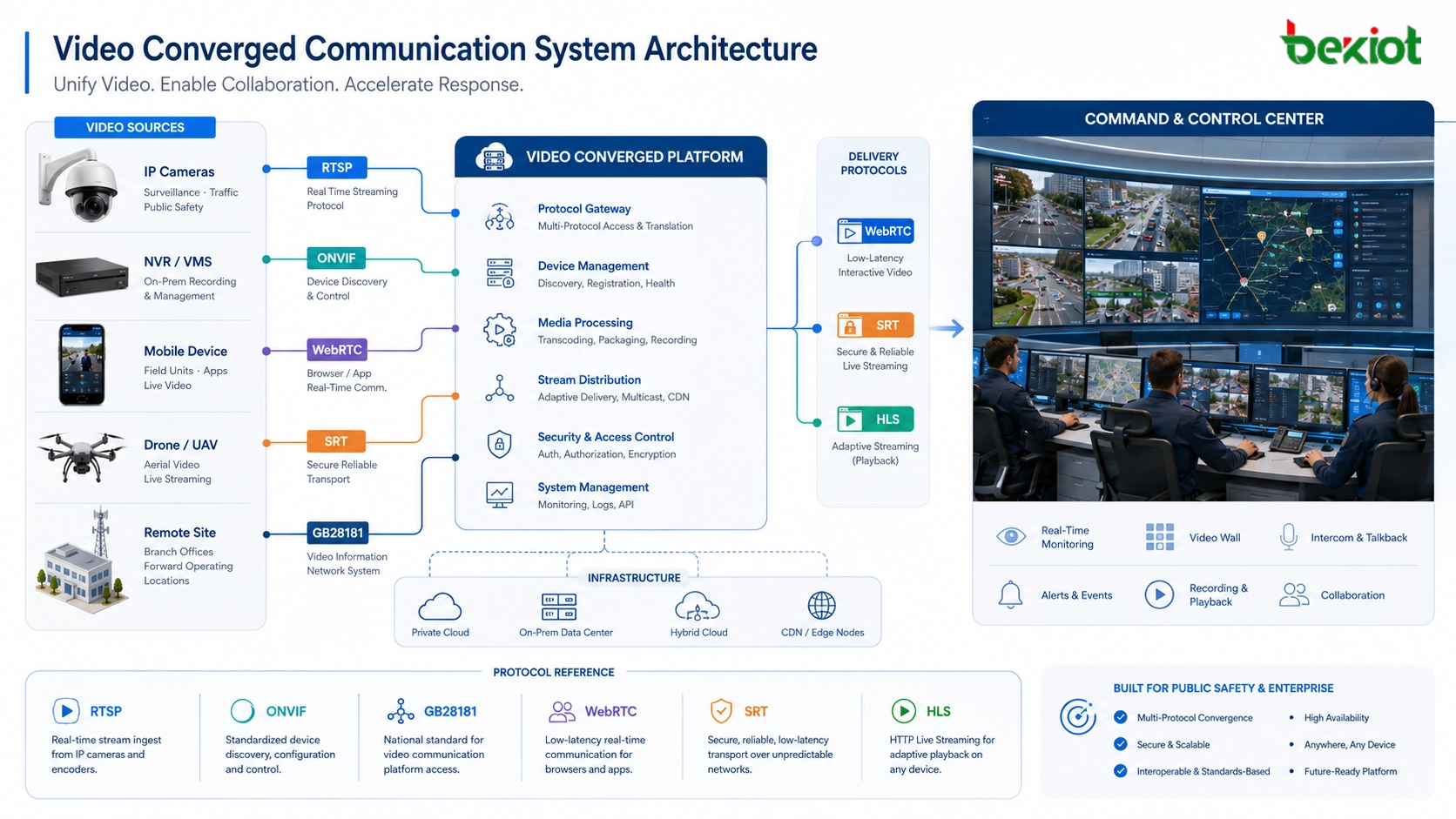
Why One Video Method Is Not Enough
Video communication projects usually include multiple layers. The front-end layer may include IP cameras, body-worn cameras, drones, mobile phones, video intercoms, NVRs, DVRs, and intelligent edge devices. The platform layer may include a video management system, SIP dispatch platform, emergency command system, recording server, media gateway, or cloud service. The user layer may include control-room screens, browser clients, mobile apps, dispatch consoles, and third-party command platforms.
These layers do not always speak the same protocol. A camera may provide RTSP streaming, while a security platform may require GB28181 access. A browser may prefer WebRTC for low-latency interaction or HLS for stable playback. A large public network transmission project may need SRT to improve reliability under packet loss. A drone or mobile device may use its own private transmission method and then output RTMP, HTTP API data, or SDK-based video streams.
Therefore, a practical video converged communication system must be designed as a protocol coordination architecture. It should receive video from different sources, convert streams when necessary, manage signaling and control, and deliver the right format to the right user scenario.
RTSP for Camera and NVR Stream Access
RTSP, or Real Time Streaming Protocol, is one of the most common ways to access video streams from IP cameras, NVRs, DVRs, and many video devices. It is often used for live preview, device stream pulling, platform access, and internal video routing.
In many projects, RTSP is responsible for controlling the video session, while the actual media data is usually transmitted through RTP. Depending on the device and network environment, the stream may use TCP or UDP. UDP can reduce delay, while TCP may improve stream stability in certain network conditions.
RTSP is suitable for professional video access inside a LAN, private network, security system, industrial control center, or dispatch platform. However, it is not always the best choice for direct browser playback or large-scale public internet distribution. In those cases, the system may need to convert RTSP into WebRTC, HLS, RTMP, or another delivery format.
RTP and RTCP as the Media Transport Layer
RTP, or Real-time Transport Protocol, is a core media transport method used by RTSP, SIP video calls, WebRTC, and other real-time communication systems. It carries audio and video packets across the network, usually over UDP, to support real-time media transmission.
RTCP works alongside RTP. It provides transmission quality feedback, packet statistics, jitter information, synchronization support, and other status data. In a command communication system, this helps engineers evaluate whether delay, packet loss, or network instability is affecting the video experience.
RTP/RTCP is usually not something end users operate directly, but it is fundamental to system performance. If the system needs voice-video intercom, video dispatch, emergency call linkage, or real-time monitoring, the media layer must be tested carefully.
ONVIF for Device Discovery and Control
ONVIF is widely used in video surveillance projects because it helps platforms discover, access, and control IP cameras from different manufacturers. It is especially useful when a system integrator needs to connect cameras without relying on a single brand ecosystem.
ONVIF is often used for device discovery, stream profile acquisition, authentication, PTZ control, and camera capability management. In many deployments, ONVIF provides device management and control, while the actual video stream is still pulled through RTSP.
For a video converged communication system, ONVIF improves access efficiency and compatibility. However, engineers still need to verify whether each camera supports the required ONVIF profile, whether PTZ commands work properly, and whether the expected stream format can be obtained reliably.
RTMP for Streaming Push and Platform Distribution
RTMP, or Real-Time Messaging Protocol, was originally associated with Adobe Flash, but it is still widely used for stream pushing, live distribution, video platform input, and some cloud media services. It is often used when a device or platform needs to push video to a media server.
RTMP usually offers lower delay than HLS. In many practical environments, RTMP latency may be around 1 to 2 seconds, depending on network quality, server processing, and playback configuration. This makes it useful for live streaming and platform distribution where ultra-low latency is not mandatory.
In modern systems, RTMP is often converted into HLS, FLV, WebRTC, or other formats for final playback. It is a practical bridge protocol, especially when front-end devices or mobile encoders already support RTMP output.
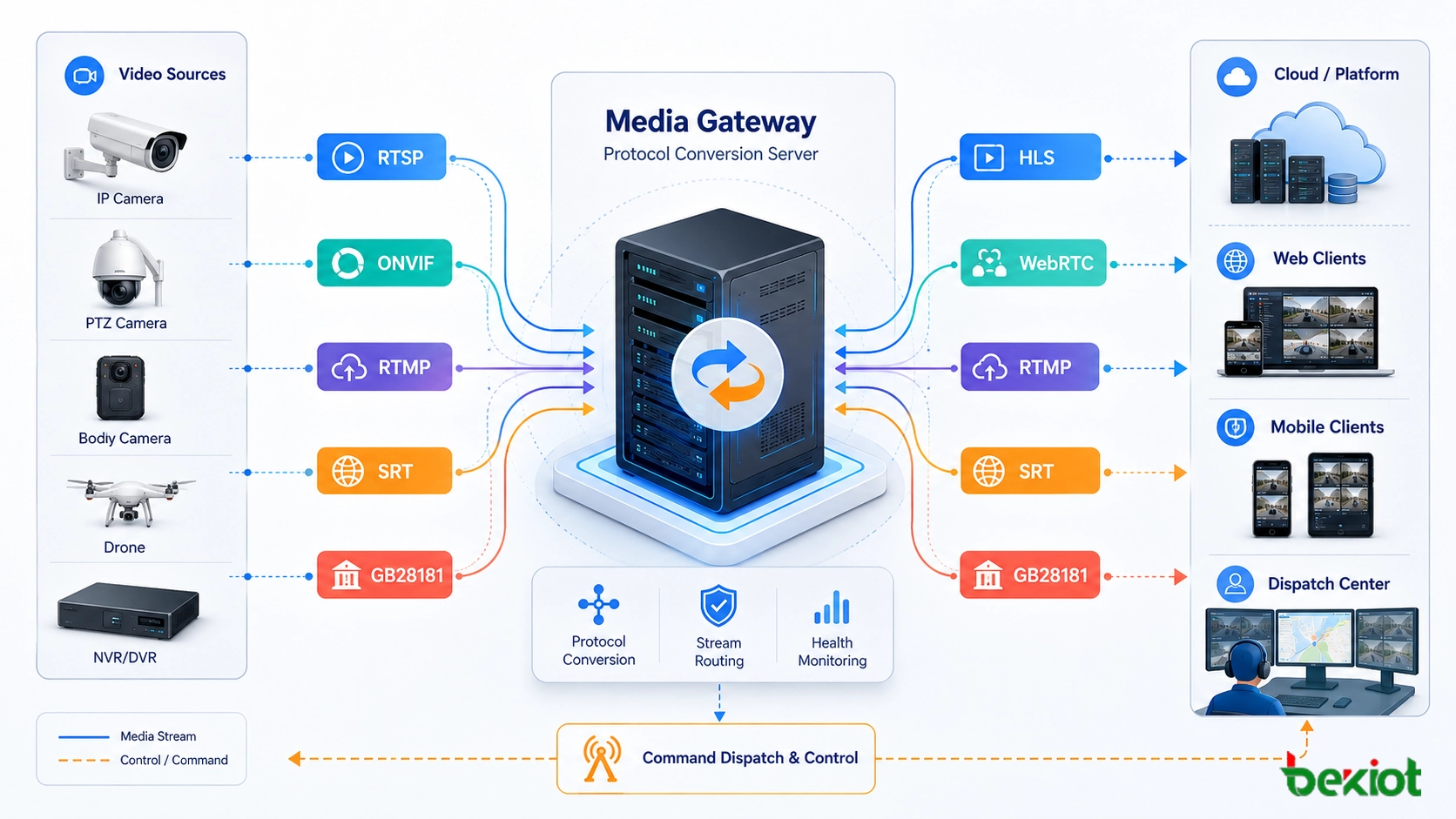
HLS for Web Playback and Large-Scale Viewing
HLS, or HTTP Live Streaming, is widely used for browser playback, mobile viewing, web portals, and large-scale video distribution. Because it is based on HTTP, it can work through common web ports such as 80 and 443 and is friendly to CDN delivery, firewall traversal, and large audience access.
The trade-off is latency. HLS usually has a higher delay than RTMP or WebRTC. In many projects, typical latency may be around 5 to 8 seconds, although optimized configurations can reduce it in certain scenarios. This makes HLS suitable for stable viewing, public display, recorded playback, web monitoring pages, and non-interactive live preview.
HLS is not always suitable for emergency dispatch actions that require immediate response. If operators need real-time two-way interaction or fast video confirmation, WebRTC or another low-latency method may be more appropriate.
WebRTC for Low-Latency Interaction
WebRTC is designed for real-time audio and video interaction in browsers and mobile applications. It is commonly used for video calls, browser-based dispatch, low-latency video preview, remote command communication, video intercom, and interactive emergency response workflows.
One major advantage of WebRTC is latency. In suitable network environments, WebRTC can often achieve delay in the range of about 200 to 500 milliseconds. This makes it valuable for command centers, remote support, video intercom, AI-assisted monitoring, and situations where operators must see and respond quickly.
WebRTC also brings engineering challenges. NAT traversal, firewall policy, signaling servers, TURN/STUN services, browser compatibility, codec negotiation, and server concurrency must be considered. For professional projects, WebRTC should be planned as part of the whole system architecture rather than treated as a simple player format.
SRT for Reliable Transmission Over Unstable Networks
SRT, or Secure Reliable Transport, is used when video must be transmitted over unstable or long-distance networks. It is useful for public internet transmission, remote sites, mobile vehicles, temporary command posts, cross-region video return, and field communication scenarios where packet loss and jitter may occur.
SRT improves reliability through mechanisms such as ARQ and FEC. These technologies help recover lost packets and maintain stream quality under network fluctuation. For emergency command, transportation, industrial inspection, and remote monitoring, this can be more reliable than simple UDP streaming.
SRT is not always used for final playback. In many solutions, it is used as a robust contribution or backhaul protocol, then converted at the media platform into WebRTC, HLS, RTMP, GB28181, or other formats required by users and platforms.
GB28181 for Security Platform Interconnection
GB28181 is widely used in China’s video surveillance and public security integration projects. It is important when video resources need to be connected with security platforms, government systems, command centers, or multi-level video networking platforms.
Technically, GB28181 is based on SIP, SDP, and RTP. SIP handles registration, signaling, device access, and session control. SDP describes the media session, while RTP carries the media stream. This makes GB28181 suitable for platform cascading, device registration, live view, playback, control, and multi-level video resource sharing.
For converged communication projects, GB28181 is often the key to connecting surveillance video with command and dispatch workflows. However, licensing, platform permission, device ID planning, network routing, media compatibility, and inter-platform access rules must be confirmed before deployment.
Drone and Private Video Access Methods
Some field systems use drones, body-worn cameras, mobile terminals, AI video devices, or vendor-specific transmission modules. These devices may use private protocols such as OcuSync, LightBridge, SDK-based transmission, proprietary UDP media, HTTP API output, RTMP push, or cloud relay methods.
In a converged communication solution, these devices usually require an access gateway or platform adapter. The goal is to turn private or device-specific video resources into standard streams that can be viewed, dispatched, recorded, shared, or linked with alarms.
This part of the project should be verified early. Even when a device can display video in its own app, it may not automatically support third-party platform access. Engineers should confirm SDK availability, stream output method, authentication, latency, resolution, bitrate, and recording requirements.
How Becke Telcom Fits into the Solution
Becke Telcom can be considered in projects where video communication needs to work together with SIP voice, industrial telephony, emergency broadcasting, command dispatch, radio interconnection, alarm linkage, and control-room operations. In this type of solution, video is not an isolated surveillance resource; it becomes part of a broader emergency communication and dispatch workflow.
For industrial parks, tunnels, ports, energy facilities, campuses, transportation sites, and emergency response centers, Becke Telcom solutions can help integrate video preview, voice dispatch, SIP endpoints, paging, alarms, and command-center operations. The final configuration should be selected according to camera access methods, platform protocols, delay requirements, number of users, recording needs, and third-party integration conditions.
A reliable video converged communication solution should match each protocol to the right task: device access, real-time interaction, stable web viewing, cross-platform networking, or long-distance transmission.
Choosing the Right Protocol by Scenario
For Camera Access
RTSP and ONVIF are commonly used for connecting IP cameras and NVRs. ONVIF helps with discovery and control, while RTSP usually provides the live video stream.
For Browser and Mobile Viewing
HLS is suitable for stable web viewing and large-scale distribution. WebRTC is more suitable when low latency and interaction are required.
For Platform Push and Stream Ingestion
RTMP is still useful for pushing streams to media servers, live platforms, and intermediate media gateways. It can later be converted into other formats for playback.
For Long-Distance Field Return
SRT is suitable for unreliable networks, remote sites, temporary command vehicles, and field video return where packet loss and jitter may affect quality.
For Security System Cascading
GB28181 is suitable for connecting cameras and video platforms into public security, government, or multi-level surveillance systems.
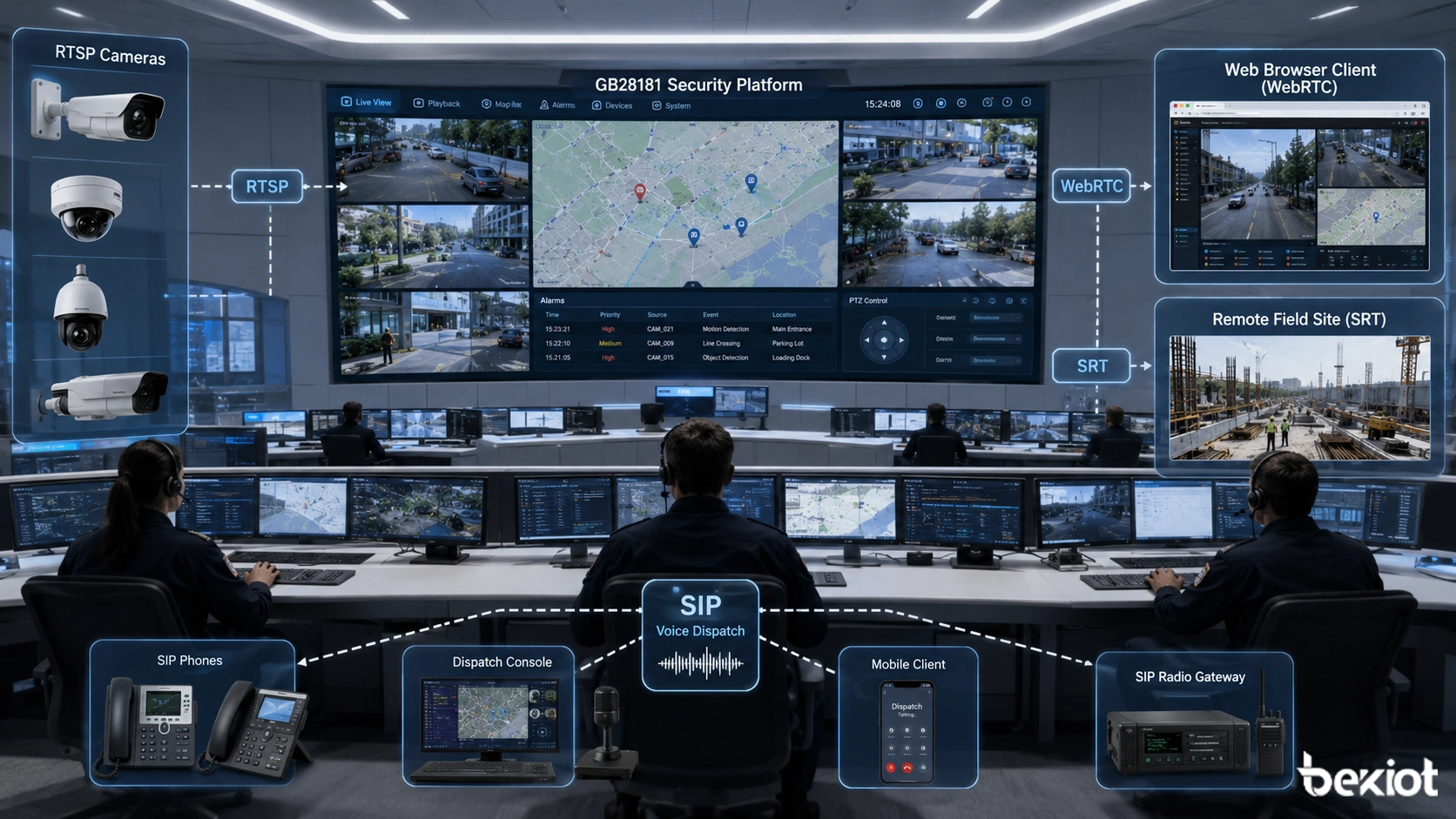
Engineering Checks Before Deployment
Before the project begins, engineers should confirm all front-end video sources, platform interfaces, stream formats, codec types, bitrate, resolution, frame rate, authentication methods, firewall rules, network topology, storage requirements, and display scenarios.
Latency expectations should also be clarified. A monitoring wall may accept several seconds of delay, but a remote command session or video intercom call may require sub-second response. The protocol should be selected according to the operational need, not only according to device availability.
Testing should include live preview, multi-screen viewing, PTZ control, playback, recording, browser access, mobile access, packet loss simulation, firewall traversal, platform cascading, and user permission control. This avoids the common problem where the stream works in a laboratory but fails during real command-center deployment.
Conclusion
A video converged communication system depends on a combination of protocols rather than a single video technology. RTSP and ONVIF are useful for camera access, RTP/RTCP supports real-time media transport, RTMP helps with stream pushing, HLS supports stable web viewing, WebRTC enables low-latency interaction, SRT improves transmission reliability over unstable networks, and GB28181 supports platform-level video networking.
The best solution is not to use every protocol everywhere, but to assign each protocol to the correct role. With proper media gateway design, platform integration, testing, and command workflow planning, video resources can become part of a unified communication system that supports monitoring, dispatch, emergency response, recording, and cross-system collaboration.
FAQ
Which video protocol is best for low-latency command communication?
WebRTC is usually preferred for low-latency browser or app-based interaction. In suitable network conditions, it can often reach about 200 to 500 milliseconds of delay, making it useful for video intercom and emergency command scenarios.
Is RTSP enough for a full video converged communication system?
No. RTSP is useful for pulling camera streams, but a full system may also need ONVIF for device control, HLS for web playback, WebRTC for low latency, SRT for reliable long-distance return, and GB28181 for platform interconnection.
Why is GB28181 important in video integration projects?
GB28181 is important when video resources need to connect with security platforms, government systems, or multi-level surveillance platforms. It uses SIP, SDP, and RTP for registration, signaling, and media transmission.
When should SRT be used?
SRT is suitable for long-distance or unstable network transmission, such as remote sites, temporary command vehicles, field operations, and cross-region video return where packet loss and jitter may occur.
What should be tested before final acceptance?
The project team should test stream access, latency, codec compatibility, PTZ control, recording, playback, browser access, mobile viewing, firewall traversal, platform cascading, user permissions, and real network stability.







