


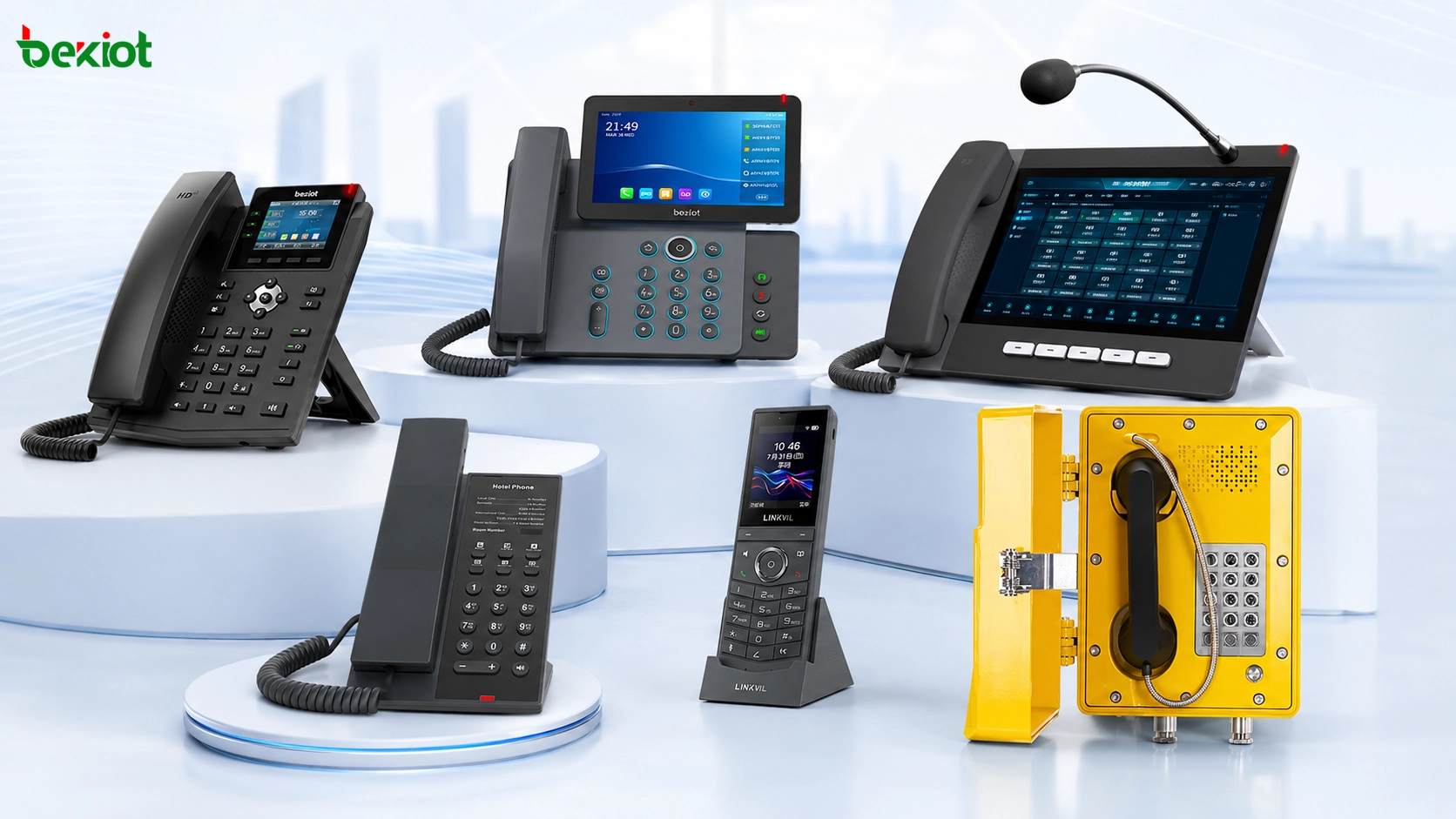
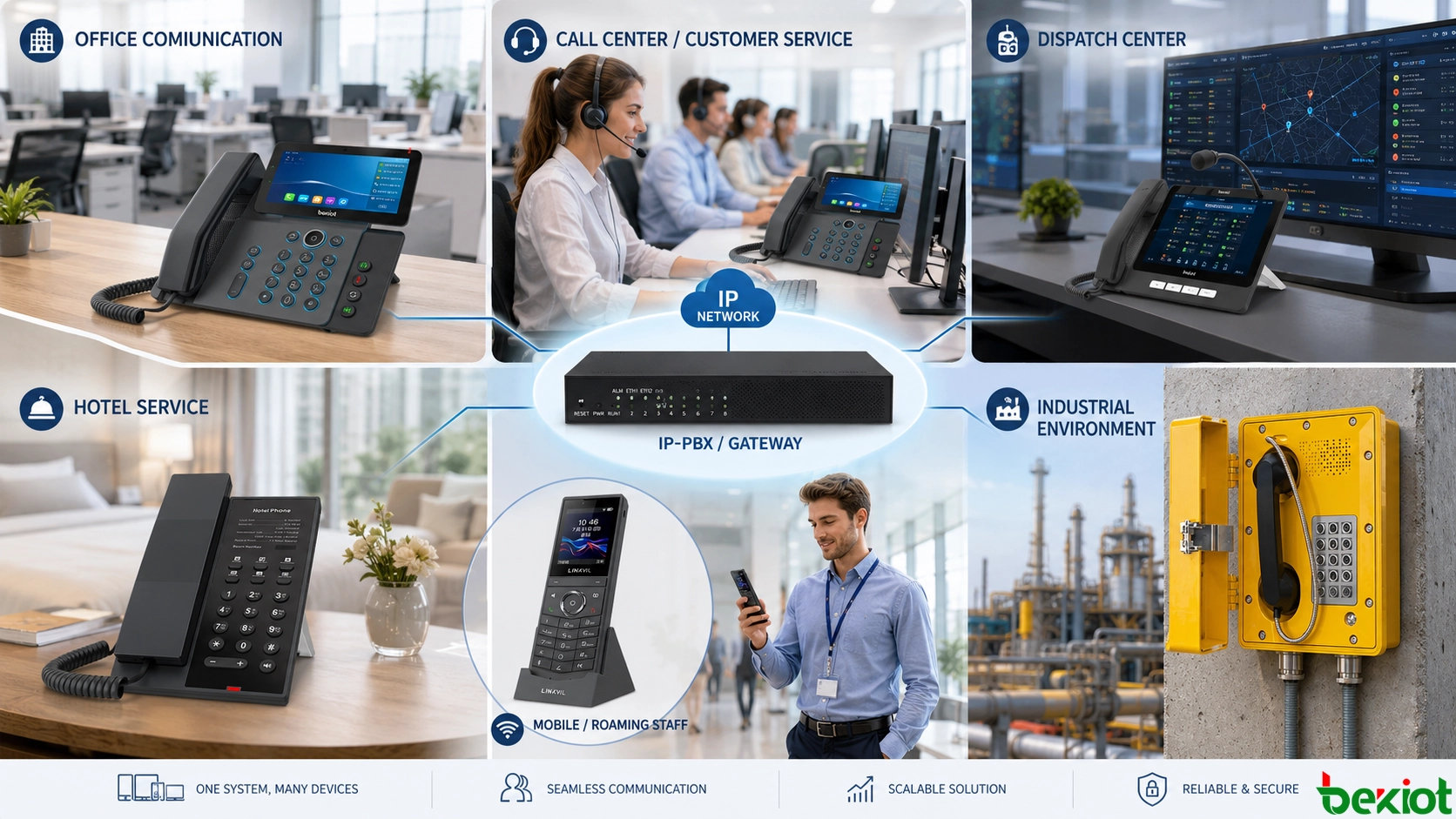
IP phones are communication terminals that use VoIP technology to transmit voice and video over IP networks. By working with IP PBX systems, softswitch platforms, SIP servers, gateways, and unified communication systems, IP phones can support much more than basic calling. They can be used for office communication, video collaboration, call center operation, hotel service, wireless mobility, emergency dispatch, industrial intercom, and harsh-environment communication.
As IP communication has become widely adopted, IP phones have also developed into many different forms. A standard office desk phone, a video phone, a conference phone, a Wi-Fi handset, a call center headset phone, a hotel service phone, a dispatch console phone, and an explosion-proof industrial phone all belong to the broader IP phone category, but their design logic and application value are very different.
How IP Phones Fit into Modern Communication Systems
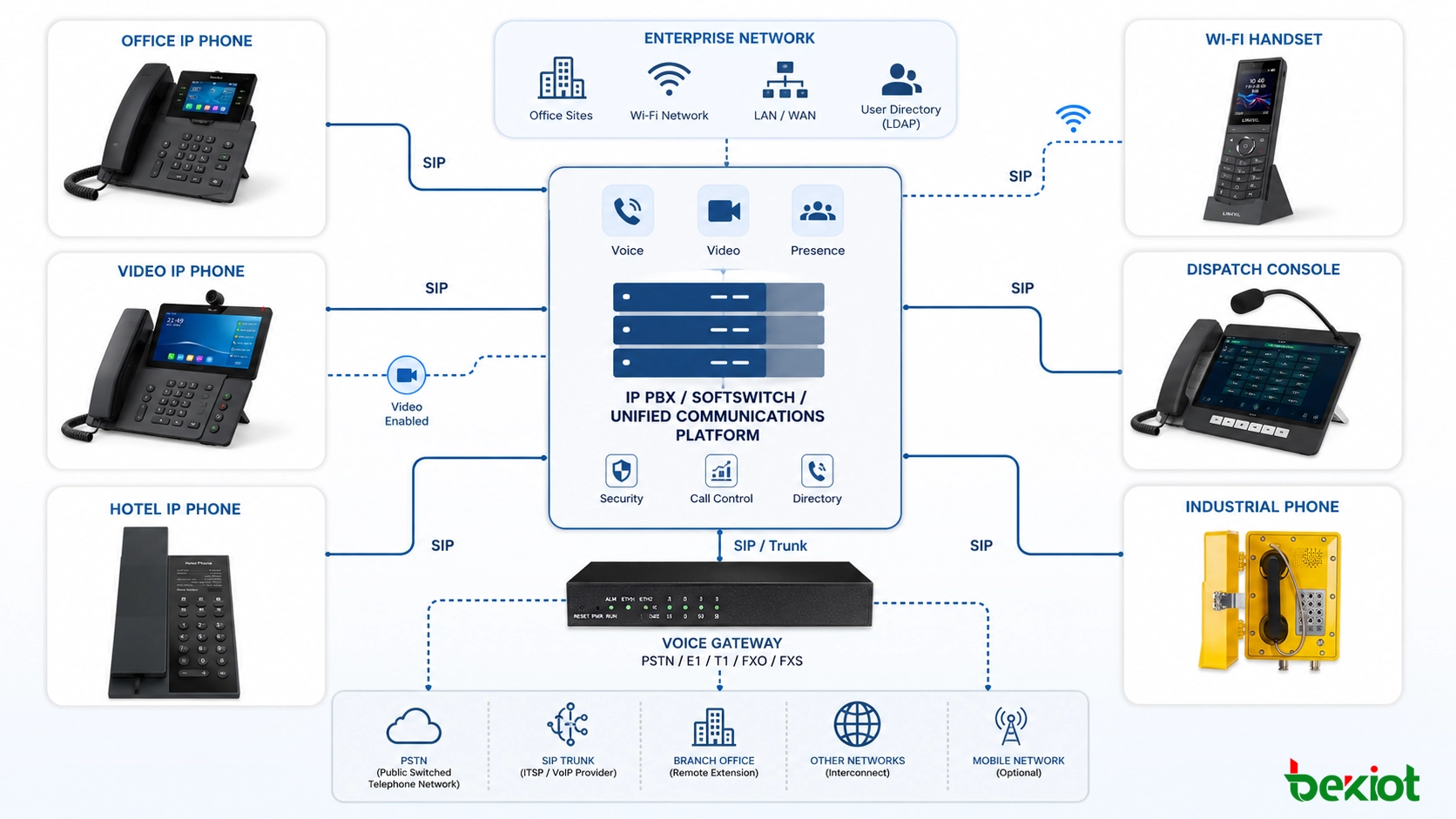
An IP phone is not an isolated device. It is usually part of a complete IP communication architecture. The phone registers to an IP PBX, SIP server, softswitch, or converged communication platform through the network. After registration, it can make internal extension calls, receive incoming calls, join call groups, participate in conferences, access external lines through gateways, and interact with other SIP-based endpoints.
Because most IP phones are based on standard SIP protocols, different types of terminals can often work together in the same project. A desktop IP phone can call a Wi-Fi phone. A dispatch IP phone can call an emergency intercom. A video phone can connect with video communication resources. An industrial SIP phone can register to the same IP PBX as office extensions, as long as network planning, codec compatibility, numbering, permissions, and routing are configured correctly.
This compatibility is one of the reasons IP phones are widely used in enterprise and industrial projects. They allow organizations to build flexible communication systems without being limited to one fixed device form. The endpoint can be selected according to the user role, working environment, service process, and emergency response requirement.
Desk Phones for Everyday Office Communication
The desktop IP phone is the most common form of IP phone. It is mainly used for daily office communication and is often deployed in large numbers across enterprises, schools, government offices, hospitals, business parks, and service organizations. Compared with more advanced terminals, a standard desk IP phone is usually cost-effective and easy to manage.
The main purpose of this type of phone is voice communication. Most office desk IP phones focus on making and receiving calls, transferring calls, holding calls, managing contacts, and supporting extension dialing. Some models may include small displays, programmable keys, headset ports, PoE power supply, and support for multiple SIP accounts, but they usually do not focus on video functions.
When connected to an IP PBX, a desk IP phone can support voice mail, call forwarding, call transfer, call pickup, conference calling, ring groups, and external line routing. For organizations that need stable and low-cost voice endpoints, this remains the most practical IP phone form.
Video Phones for Visual Communication
A video IP phone is an upgraded form of the desktop phone. It usually includes a larger screen, camera, stronger processor, and video codec capability. This allows users to make video calls, join video meetings, view remote video streams, and use richer communication functions than a basic voice phone.
Video IP phones are often used for important positions, executive offices, reception points, visitor management, control rooms, medical consultation, security desks, and command-related communication. Many models use 7-inch or 11-inch displays, and their cost is usually higher than standard voice phones because video processing requires better hardware and software support.
Some video phones use Android-based systems and can install selected communication or service applications. In video integration projects, they can work with video access gateways or platform services to display surveillance video, visitor video, remote site images, or other visual resources on the phone screen. This makes the device more like a compact desktop communication terminal than a simple telephone.
Conference Phones for Meeting Rooms
A conference IP phone is designed for meeting rooms and group discussions. Unlike a normal desk phone, it must capture voices from multiple directions and provide strong speaker output so that all participants can hear clearly. This makes microphone design and speaker performance much more important than in ordinary office phones.
Conference IP phones often include multiple microphones, echo cancellation, noise reduction, wideband audio, and high-power speaker systems. Some models can support extension microphones for larger meeting rooms. They usually connect to the IP PBX through Ethernet, and users can join meetings by dialing a conference number or answering an incoming conference call.
This type of IP phone is suitable for boardrooms, project meetings, remote collaboration, training rooms, emergency coordination meetings, and multi-party business discussions. The goal is not only to connect the call, but to make speech clear for everyone in the room.
Wireless Phones for Mobile Staff
Wireless IP phones are mainly used in Wi-Fi environments. They are designed for users who need to move while staying reachable through the enterprise communication system. Security guards, warehouse workers, hotel service teams, medical staff, facility technicians, and property management personnel often need this type of mobility.
A Wi-Fi IP phone connects to the wireless network and registers to the IP PBX as an extension. The system can assign it an extension number, call permissions, and routing rules just like a desk phone. In some deployments, the wireless IP phone can also be linked with a user’s desk phone so that calls can ring on both devices or follow the user while they move.
The key requirement for wireless IP phone deployment is network quality. Wi-Fi voice is sensitive to coverage, roaming, latency, jitter, and packet loss. A Wi-Fi network that is good enough for web browsing may still perform poorly for real-time voice. Therefore, access point planning, roaming optimization, QoS, VLAN design, and signal testing are important before large-scale deployment.
Agent Phones for Call Centers
In call center environments, the communication requirement is usually focused and repetitive. Agents mainly make outbound calls, answer inbound calls, use customer service scripts, work with CRM systems, and handle high call volumes. For this reason, call center IP phones often simplify the traditional phone structure.
Many agent IP phones remove the handset and are designed to work directly with headsets. They also reduce unnecessary function keys so that the device stays simple, efficient, and cost-effective. This design helps agents focus on customer communication while reducing hardware cost in large call center deployments.
Agent IP phones are commonly used in customer service centers, telemarketing teams, technical support departments, reservation centers, after-sales service teams, and enterprise contact centers. They are usually integrated with call center platforms, recording systems, queue systems, and customer information systems.
Hotel Phones for Guest Service
Hotels are another important application environment for IP phones. Compared with office phones, hotel IP phones focus more on service scenarios. A guest room phone does not need many complicated enterprise calling features. It needs to be simple, reliable, easy to clean, and convenient for guests to use.
Hotel IP phones often retain basic dialing and calling functions while adding quick-service keys for reception, room service, housekeeping, restaurant booking, wake-up calls, emergency assistance, and other hotel services. Different models may be designed for guest rooms, bathrooms, corridors, leisure areas, entertainment spaces, or service desks.
Some hotel video phones can also be integrated with room service, entertainment, ordering, information display, and multimedia systems. In this case, the IP phone becomes part of the hotel’s digital service experience, not only a voice device.
Dispatch Phones for Command and Control
A dispatch IP phone is designed for command, control, and dispatch scenarios. It usually has more function keys, a larger touch screen, a gooseneck microphone, stronger audio capability, and richer platform integration than a standard office phone. Its purpose is to help operators communicate quickly with many endpoints or groups.
Some dispatch IP phones can support more than 100 programmable function keys. Operators can assign terminal numbers, departments, broadcast zones, intercom points, emergency contacts, camera links, door access controls, alarm actions, or group calling functions to these keys. With one touch, the operator can make a call, start a broadcast, view video, open a door, trigger an alarm, or connect to a specific communication group.
Dispatch IP phones may focus on audio dispatch, video dispatch, or both. They are suitable for control rooms, security centers, transportation dispatch rooms, emergency command centers, industrial operation centers, campus security rooms, and large property management sites. Because their functions are richer, their cost is usually higher than ordinary IP phones.
Rugged and Explosion-Proof Phones for Harsh Environments
Rugged and explosion-proof IP phones are designed for environments where ordinary office phones cannot survive. They are often used in factories, petrochemical plants, coal mines, tunnels, power stations, ports, construction sites, and outdoor industrial areas. These environments may involve dust, water, impact, vibration, corrosion, high noise, high humidity, or explosion-risk zones.
The design focus of these phones is protection and reliability. Depending on the environment, the device may require weatherproof housing, anti-vandal protection, waterproof and dustproof construction, corrosion-resistant materials, high acoustic output, one-button emergency calling, automatic answering, broadcast linkage, and alarm integration. In chemical plants, coal mines, or hazardous areas, explosion-proof or intrinsically safe designs may be required.
Software and Special-Purpose IP Phones
In addition to hardware IP phones, software IP phones are also widely used. A softphone can run on a computer, tablet, smartphone, or industrial terminal. It registers to the SIP server through an application and provides voice or video calling through the device’s microphone, speaker, camera, and network connection.
Softphones are useful for remote work, mobile office, temporary users, customer service, field operations, and integration with business applications. They can reduce hardware investment and provide flexible access, but they also depend heavily on operating system stability, application permissions, headset quality, network performance, and user behavior.
There are also special-purpose IP phones for military vehicles, onboard communication, door intercom, elevator emergency calling, clean rooms, public help points, and other specialized environments. These devices may look very different from office phones, but if they use IP networking and SIP-based communication, they are still part of the IP phone ecosystem.
How to Select the Right Type
The first selection factor is the user role. Office workers usually need standard desk phones. Executives or reception desks may need video phones. Meeting rooms need conference phones. Mobile staff may need Wi-Fi phones. Call center agents need headset-based terminals. Dispatch operators need programmable keys and command features. Industrial workers may need rugged or explosion-proof phones.
The second factor is the working environment. A clean office, hotel room, warehouse, tunnel, factory, control room, and hazardous area have completely different requirements for durability, sound pressure, installation method, protection rating, and emergency functions.
The third factor is system integration. If the phone only needs to make internal calls, a basic SIP desk phone may be enough. If it must work with video monitoring, public address, door access, alarms, dispatch platforms, or external line gateways, the endpoint must support the required protocols, codecs, keys, audio interfaces, and platform functions.
Common Mistakes to Avoid
One common mistake is using the same IP phone model for every user. This may simplify procurement, but it often creates poor user experience. A call center agent does not need the same device as a command center operator. A hotel guest room does not need the same phone as a factory emergency point.
Another mistake is selecting phones only by price. Low-cost phones may be suitable for basic office communication, but they may not meet requirements for video decoding, Wi-Fi roaming, conference audio, programmable dispatch keys, emergency calling, or industrial protection.
A third mistake is ignoring SIP compatibility and platform testing. Even though SIP is widely standardized, real projects still need to test registration, codecs, DTMF, call transfer, hold, call recording, BLF keys, paging, video, and gateway routing. Compatibility testing before deployment can reduce later maintenance problems.
Recommended Deployment Framework
A practical IP phone deployment should begin with a role-based terminal plan. Divide users into office users, managers, mobile staff, call center agents, hotel guests, dispatch operators, industrial workers, and emergency users. Then select the appropriate IP phone type for each group.
The next step is network and platform planning. Confirm SIP server capacity, extension numbering, codec policy, PoE power supply, VLAN design, QoS, Wi-Fi coverage, external trunk routing, recording requirements, and emergency call rules. For video phones and dispatch terminals, confirm video codec support and platform compatibility early.
The final step is acceptance testing. Test call quality, registration stability, busy status display, paging, forwarding, transfer, conference, headset behavior, Wi-Fi roaming, emergency call buttons, alarm linkage, and special function keys. A good IP phone deployment is not only about buying terminals; it is about matching each endpoint to the communication workflow.
As a professional provider of industrial converged communication products and solutions, Becke Telcom can provide a wide range of communication terminals, including SIP office phones, rugged IP phones, emergency intercom terminals, and dispatch terminals, as well as core equipment such as IPPBX systems and communication gateways. It can also deliver one-stop industrial converged communication solutions tailored to the scenario requirements of different industries.
Conclusion
IP phones have many forms because communication scenarios are different. A desktop IP phone is suitable for daily office voice. A video IP phone supports visual communication and richer application functions. A conference IP phone is designed for meeting rooms. A wireless IP phone supports mobile users within Wi-Fi coverage. A call center IP phone improves agent efficiency. A hotel IP phone focuses on guest service. A dispatch IP phone supports command operations. A rugged or explosion-proof IP phone keeps communication available in harsh industrial environments.
The common foundation behind these forms is VoIP and SIP-based communication. By connecting with IP PBX, softswitch, gateways, and converged communication platforms, different IP phones can work together in one system. The best project design is not to choose the most advanced phone everywhere, but to choose the right form for the right environment and user role.
As IP communication continues to develop, IP phones will keep expanding beyond traditional desktop calling. They will become more closely integrated with video, dispatch, emergency communication, public address, access control, mobile applications, and industrial communication systems.
FAQ
What is an IP phone?
An IP phone is a communication terminal that uses VoIP technology to transmit voice or video over an IP network. It usually registers to an IP PBX, SIP server, softswitch, or converged communication platform and works as a network-based extension.
What is the most common type of IP phone?
The most common type is the desktop office IP phone. It is mainly used for daily voice communication, internal extension calls, external calls, call transfer, call forwarding, conference calling, and voice mail through an IP PBX.
When should a video IP phone be used?
A video IP phone should be used when users need visual communication, visitor video, remote consultation, video dispatch, or integration with video resources. It is often used in executive offices, reception areas, control rooms, healthcare, and command centers.
What is the difference between a Wi-Fi IP phone and a desk IP phone?
A desk IP phone normally connects through Ethernet and is used at a fixed position. A Wi-Fi IP phone connects through WLAN and allows users to move within Wi-Fi coverage while still making and receiving calls through the IP PBX.
Why do industrial sites need rugged or explosion-proof IP phones?
Industrial sites may involve dust, water, corrosion, high noise, impact, outdoor exposure, or hazardous gases. Rugged and explosion-proof IP phones provide stronger protection, emergency calling, alarm linkage, and reliable SIP communication in these environments.







