


A dispatch console in a converged communication system is no longer limited to voice calling. In emergency command centers, industrial control rooms, campus security rooms, transportation hubs, energy facilities, and public safety projects, operators often need real-time voice, video communication, monitoring access, intercom control, group coordination, event handling, recording, and status visibility from one unified interface.
WebRTC, short for Web Real-Time Communication, provides a practical technical foundation for this type of web-based dispatch platform. It allows browsers and mobile applications to transmit audio, video, and data through standard APIs without requiring users to install extra plug-ins or dedicated client software. This makes it highly suitable for dispatch console systems that need fast deployment, multi-terminal access, and real-time communication.
For integrators and end users, the value of WebRTC is not only technical convenience. It changes the deployment model of the dispatch seat. Operators can log in through a browser, open the communication panel, view terminal status, answer calls, start video sessions, and coordinate multiple endpoints without relying on a heavy local client. This reduces installation complexity and makes future upgrades easier.
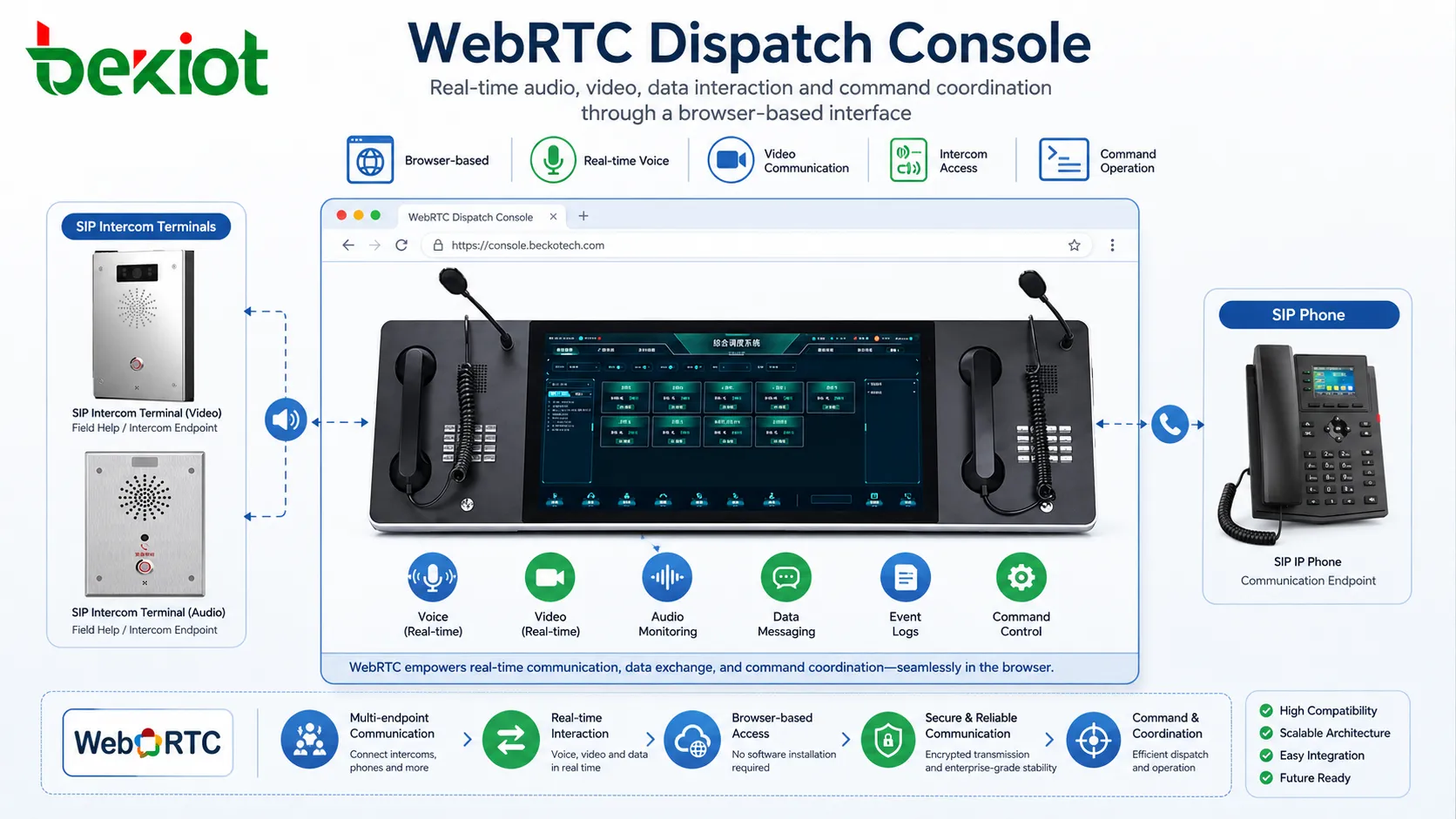
Real-Time Communication Is the Core Requirement
Dispatch systems are usually used in time-sensitive environments. Operators may need to call a field terminal, answer an emergency intercom request, join a group call, check a video feed, or coordinate several teams at the same time. In these situations, communication delay directly affects response efficiency.
WebRTC was designed for real-time communication. It supports low-latency audio, video, and data exchange, making it suitable for dispatch applications that require instant interaction between the command center and remote terminals.
When used in a dispatch console, WebRTC can help operators start audio and video sessions directly from the web interface. Instead of switching between different communication tools, the operator can manage calls, video, intercom access, and coordination tasks in one browser-based workspace.
Browser-Based Operation Simplifies Deployment
Traditional dispatch software often requires a dedicated desktop client. This can create extra installation work, version control problems, compatibility issues, and maintenance pressure. When many operator seats or remote users are involved, client-side software management becomes more difficult.
WebRTC changes this model. Because it runs inside modern browsers, a dispatch console can be accessed from supported browsers such as Chrome, Firefox, Safari, and other WebRTC-compatible environments. Users can work from desktop computers, laptops, tablets, and even mobile devices when the system design allows it.
This browser-based approach reduces deployment complexity. The project team does not need to install heavy client software on every workstation. Updates can be delivered through the web platform, and users can access the latest dispatch functions after logging in through the browser.
No Plug-In Means a Better User Experience
Older browser communication solutions often depended on plug-ins such as Flash, Java, or vendor-specific browser controls. These methods created compatibility problems, security risks, installation barriers, and poor user experience.
WebRTC avoids this problem because it is built into supported browsers. Users do not need to install extra plug-ins to make real-time audio and video communication work. This is especially valuable in projects where many users need access, or where operator seats may change frequently.
For dispatch console software, this means the operator can focus on the work itself: answering calls, starting group communication, viewing video, monitoring events, and coordinating responses. The technology layer becomes less visible and easier to maintain.
Working Together with SIP Systems
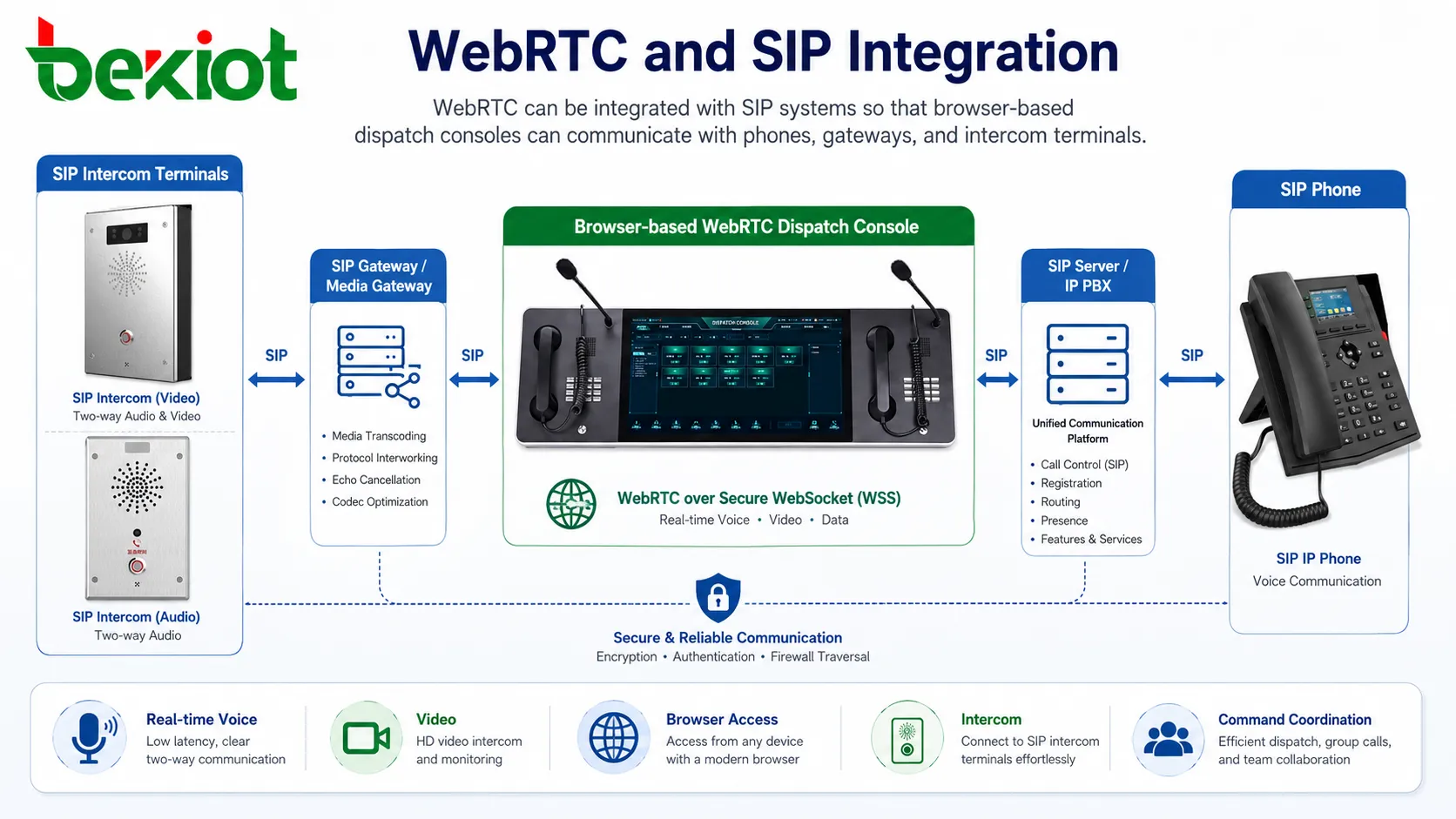
Many converged communication platforms already use SIP for voice, intercom, IP phones, gateways, paging, recording, and dispatch communication. A practical WebRTC dispatch console often needs to connect browser-based communication with existing SIP resources.
When WebRTC and SIP are integrated through the proper platform or gateway architecture, the browser-based console can communicate with SIP phones, SIP intercom terminals, voice gateways, dispatch servers, and other SIP endpoints. This allows the web console to become part of the existing communication network rather than a separate island.
This integration is one of the main reasons WebRTC is widely used in converged communication dispatch projects. It provides a modern front-end experience while still connecting with established SIP communication infrastructure.
Status Visibility Helps Operators Make Faster Decisions
A dispatch console is not only a calling tool. It also needs to show the current state of terminals, groups, and ongoing events. Operators may need to know which extensions are online, which terminals are busy, which devices are offline, which calls are waiting, and which emergency events need immediate handling.
Web-based dispatch interfaces can combine WebRTC communication with real-time status panels, contact lists, queues, alarms, maps, and device groups. This allows operators to make decisions based on both communication status and operational context.
For example, when an emergency call arrives from an intercom terminal, the console can show the caller location, device name, call duration, nearby camera, handling status, and available response options. This makes the workflow more direct than a simple phone call.
Security for Sensitive Communication
Dispatch systems often handle important operational information. In public safety, industrial production, transportation, campus security, or emergency command scenarios, communication security cannot be ignored.
WebRTC includes encryption mechanisms for media transmission, helping protect audio and video communication during transport. This makes it more suitable for modern network environments where communication must be protected against unauthorized interception or tampering.
Of course, WebRTC security should also be combined with platform-level measures. Account authentication, role permissions, HTTPS access, device management, firewall policy, recording control, and log auditing are still important parts of a complete dispatch system security design.
Open Standards Reduce Development Difficulty
WebRTC is an open standard with broad developer support, mature APIs, and a strong ecosystem. This makes it easier for software teams to build dispatch console interfaces using existing web development methods.
A WebRTC-based console can be designed with familiar web technologies. Functions such as call buttons, video windows, contact lists, status indicators, monitoring panels, alarm pop-ups, group communication panels, and dispatch records can be developed as part of the same web application.
This improves development efficiency and makes future function upgrades easier. Instead of rebuilding a heavy client program each time a function changes, the platform can evolve through web-based updates and interface improvements.
Flexible APIs Support Industry Customization
Dispatch platforms are often highly scenario-based. A transportation dispatch center may care about route coordination and emergency calls. A factory control room may focus on workshop intercom, equipment alarms, and production zones. A campus security center may require video linkage, emergency help points, and access control events.
WebRTC provides APIs and capabilities that can be used for audio processing, video handling, data channels, media control, device access, and network connection management. These functions allow developers to build dispatch interfaces according to the real workflow of each industry.
This flexibility makes WebRTC suitable not only for simple one-to-one calls, but also for more complex dispatch applications such as multi-party coordination, audio and video intercom, command seat collaboration, browser-based monitoring, and event-driven communication.
Related Product Introduction: Becke Dispatch Console
Media Servers and Gateways Are Still Important
Although WebRTC runs in the browser, most dispatch systems still need server-side media processing. A media server may handle audio routing, video forwarding, mixing, recording, multi-party sessions, bandwidth adaptation, and communication between browser users and SIP devices.
Gateways are also important when WebRTC needs to communicate with traditional SIP networks, radio gateways, public address systems, video platforms, or third-party command systems. The gateway layer can help translate signaling, adapt media formats, and connect different communication domains.
In other words, WebRTC is usually the front-end real-time communication technology, while the complete dispatch solution depends on a stable back-end architecture. The quality of the media server, SIP gateway, network design, and platform logic directly affects the final user experience.
Video Compatibility Needs Planning
Although WebRTC is powerful, video compatibility still needs careful design. In many video surveillance and command projects, field cameras or video sources may use different encoding formats. Some streams may use H.265, while WebRTC applications commonly require browser-friendly formats such as H.264 depending on the environment and implementation.
If the dispatch console needs to display monitoring video, intercom video, or platform video streams inside the browser, the system may need media adaptation, stream conversion, or transcoding. This allows the console to receive video in a format that the browser can decode and display smoothly.
Therefore, a complete WebRTC dispatch solution is not only a front-end page. It usually includes signaling control, media processing, gateway access, stream adaptation, user permission management, and platform integration behind the interface.
Recording and Playback Improve Traceability
In many dispatch scenarios, call recording and event playback are essential. Emergency calls, command instructions, intercom conversations, and video sessions may need to be stored for later review, incident analysis, training, or responsibility tracking.
A WebRTC dispatch console can work with the communication platform or media server to support recording functions. Depending on the system architecture, recording may occur at the server side, gateway side, SIP platform side, or through a dedicated recording service.
Recording should be planned together with storage policy, file retention, permission control, search rules, and compliance requirements. For a control room, the ability to review what was said, when it happened, and which operator handled it can be as important as the live communication itself.
Suitable for Multi-Device Command Scenarios
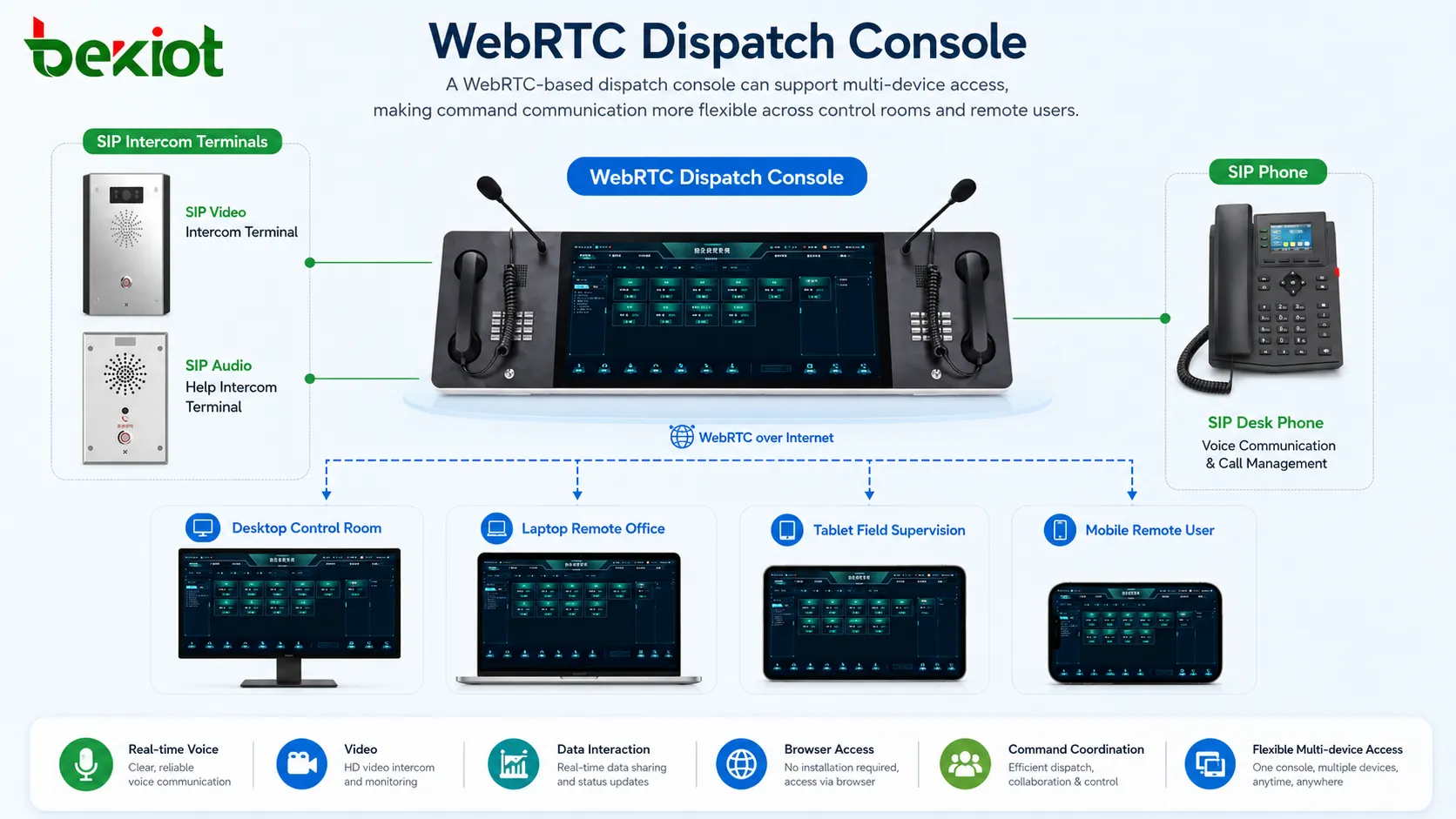
One advantage of WebRTC is that it can support different access devices. Operators may use desktop workstations in the command center, laptops for temporary duty, tablets for mobile supervision, or mobile phones for remote coordination. As long as the platform design supports the device type and browser environment, the same system can serve multiple usage modes.
This is useful in modern command projects because dispatch work is becoming more distributed. A central control room may coordinate with branch sites, security rooms, on-site personnel, mobile teams, and remote managers. WebRTC makes it easier to extend communication capability beyond a fixed dispatch terminal.
For organizations that need flexible command access, browser-based dispatch reduces hardware dependence and improves operational mobility.
Lower Maintenance Pressure for Large Deployments
In large projects, every installed client application becomes a maintenance object. IT teams must manage installation packages, operating system compatibility, software versions, patches, permissions, and troubleshooting for every operator terminal.
A WebRTC-based dispatch console can reduce this burden. The main application is delivered through the browser, and many upgrades can be completed on the server or web platform side. This is especially valuable for projects with multiple duty rooms, remote operation points, or temporary command seats.
The result is a more maintainable architecture. Operators get easier access, developers get a more flexible update path, and administrators reduce repeated client-side maintenance.
Practical Design Points for Implementation
When planning a WebRTC dispatch console, the project team should first confirm the communication objects. These may include SIP phones, intercom terminals, video phones, gateways, monitoring platforms, radio systems, mobile clients, recording systems, and business platforms.
The team should also evaluate audio codec support, video codec support, NAT traversal, signaling protocol, SIP interworking, recording needs, browser compatibility, permission control, media server architecture, and bandwidth requirements.
For command projects, stability is more important than visual effect alone. The interface should be clear, the buttons should be easy to operate, call status should be obvious, and emergency actions should be accessible without complex steps.
Where This Architecture Is Commonly Used
WebRTC dispatch consoles are suitable for many converged communication and command scenarios. They can be used in emergency command centers, factory dispatch rooms, campus security centers, transportation operation centers, energy operation platforms, industrial parks, building control rooms, public service centers, and remote monitoring projects.
These scenarios often share the same needs: real-time communication, fast access, multiple terminal types, video interaction, remote coordination, and integration with existing systems. WebRTC matches these needs because it combines real-time media capability with web-based deployment.
In projects where communication types are diverse and response speed is important, WebRTC is often a more efficient choice than traditional client-based dispatch software.
Conclusion
WebRTC has become a popular technology for modern dispatch console development because it supports real-time audio, video, and data communication directly in the browser. It reduces the need for plug-ins, improves cross-platform access, simplifies deployment, supports secure transmission, and provides flexible APIs for customized dispatch workflows.
When connected with SIP systems, gateways, media servers, and communication platforms, WebRTC can become the front-end communication layer of a converged dispatch solution. It allows operators to manage calls, video, intercom, monitoring, and emergency coordination from a unified web interface.
For projects that require fast response, multiple communication types, flexible access, and long-term scalability, WebRTC provides a practical and future-oriented foundation for dispatch console software.
FAQ
Can WebRTC dispatch consoles work without an IP PBX?
Yes, depending on the system architecture. Some WebRTC systems use a media server or communication platform directly, while others connect with an IP PBX or SIP server for telephony functions.
Does WebRTC require a dedicated desktop client?
No. A major benefit of WebRTC is that real-time audio and video can run in supported browsers, reducing the need for dedicated client installation.
Can a WebRTC console record calls?
Recording is possible when supported by the platform, media server, or communication system. The design should define whether recording is handled at the browser side, server side, or SIP platform side.
What affects WebRTC call quality?
Network bandwidth, packet loss, latency, device performance, microphone quality, camera quality, browser support, codec selection, and media server design can all affect call quality.
Is WebRTC suitable for emergency command systems?
Yes, but it should be designed with reliability, security, permission control, backup access, and clear operational workflows. Emergency scenarios require more than a browser interface; they require a complete system architecture.







