


Many public sites now need more than conventional CCTV. A charging station, park, scenic area, unmanned retail store, campus gate, parking lot, tunnel entrance, industrial park, or remote service facility may require live monitoring, emergency help calls, two-way audio, video verification, local recording, and centralized dispatch at the same time. When these functions are built with separate systems, daily operation becomes fragmented and emergency response becomes slower.
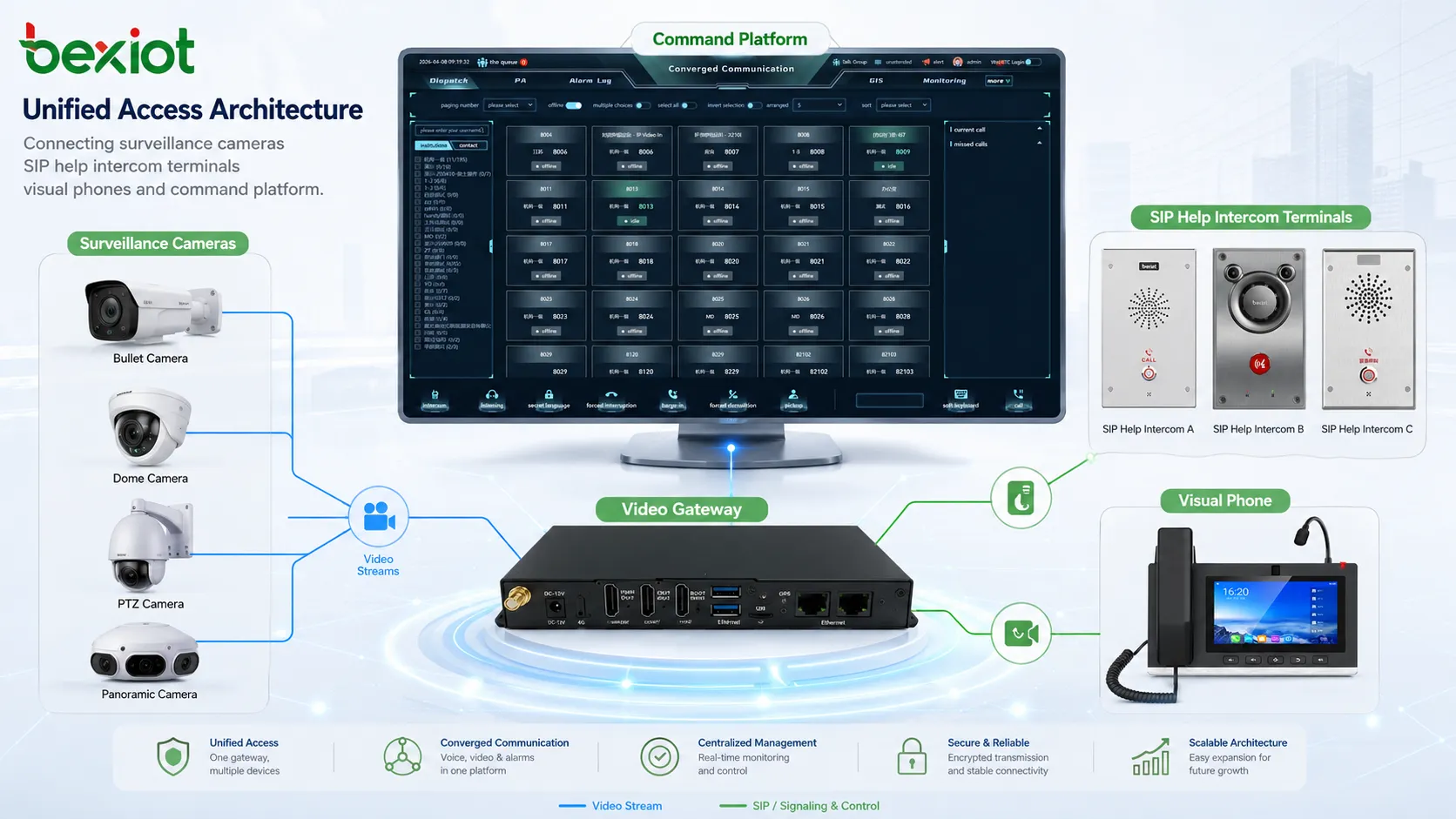
A video gateway provides a practical way to bring surveillance cameras, recording devices, SIP help intercom terminals, visual phones, drones, and third-party platforms into one unified access architecture. Instead of building one system for monitoring and another system for emergency communication, the gateway becomes a shared access layer for video, voice, control, alarm, and platform integration.
For project owners, this approach is not only about reducing equipment quantity. It also helps simplify system topology, improve resource reuse, reduce repeated platform development, and create a clearer workflow for operators. When a help request, camera image, voice call, and event record are connected in one process, the site can move from passive monitoring to active incident handling.
Why Separate Systems Create Operational Gaps
Traditional video monitoring platforms were mainly designed to connect cameras, recorders, and monitoring screens. They worked well for viewing and storing video, but they were not always designed to handle interactive communication. As more sites deploy help points, emergency call boxes, video intercoms, and remote service terminals, video monitoring alone is no longer enough.
If the CCTV system and the help intercom system are deployed independently, operators may need to switch between different interfaces. A help call may arrive on one platform, while the related camera feed is viewed from another platform. In a time-sensitive situation, this separation can delay verification, conversation, dispatch, and response.
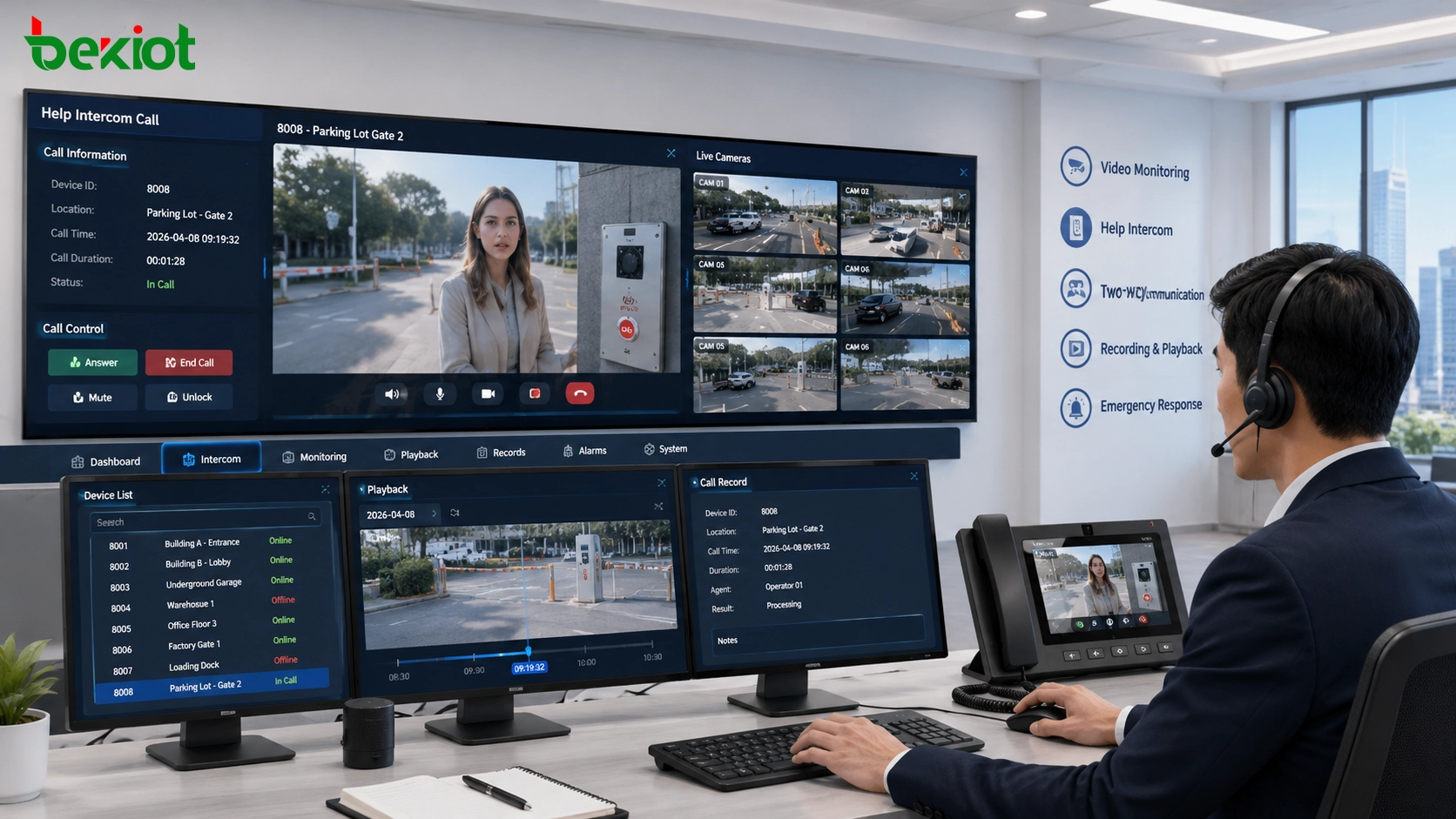
A unified gateway approach reduces this gap. The control center can receive a call, open the associated video, talk to the person on site, check nearby cameras, review recordings, and trigger further handling from a more centralized workflow. This is especially valuable when the site is unattended or when the nearest staff member is not immediately available.
A Shared Access Layer for Cameras, Recorders, and Help Points
The key value of this architecture is not simply connecting more devices. The value is that different device types can be organized under one access layer. A video gateway can connect surveillance cameras, video platforms, network video recorders, SIP help intercom terminals, visual phones, and other video resources according to project needs.
This is especially useful in sites that already have video monitoring infrastructure but later need to add emergency assistance or remote service communication. Instead of rebuilding the whole system, the gateway can help combine camera access and SIP-based help points into a unified operating environment.
The deployment scale is usually planned according to the total number of camera channels, recorder resources, help terminals, and visual communication endpoints. This makes the architecture suitable for both small distributed projects and larger multi-site deployments.
In practical design, cameras can be grouped by zone, entrance, road section, building, equipment room, or service point. Help intercom terminals can be bound to nearby cameras or to a predefined monitoring scene. When an operator receives a call, the system can present the most relevant visual resources instead of forcing the operator to search manually.
Deployment Pattern for Distributed Sites
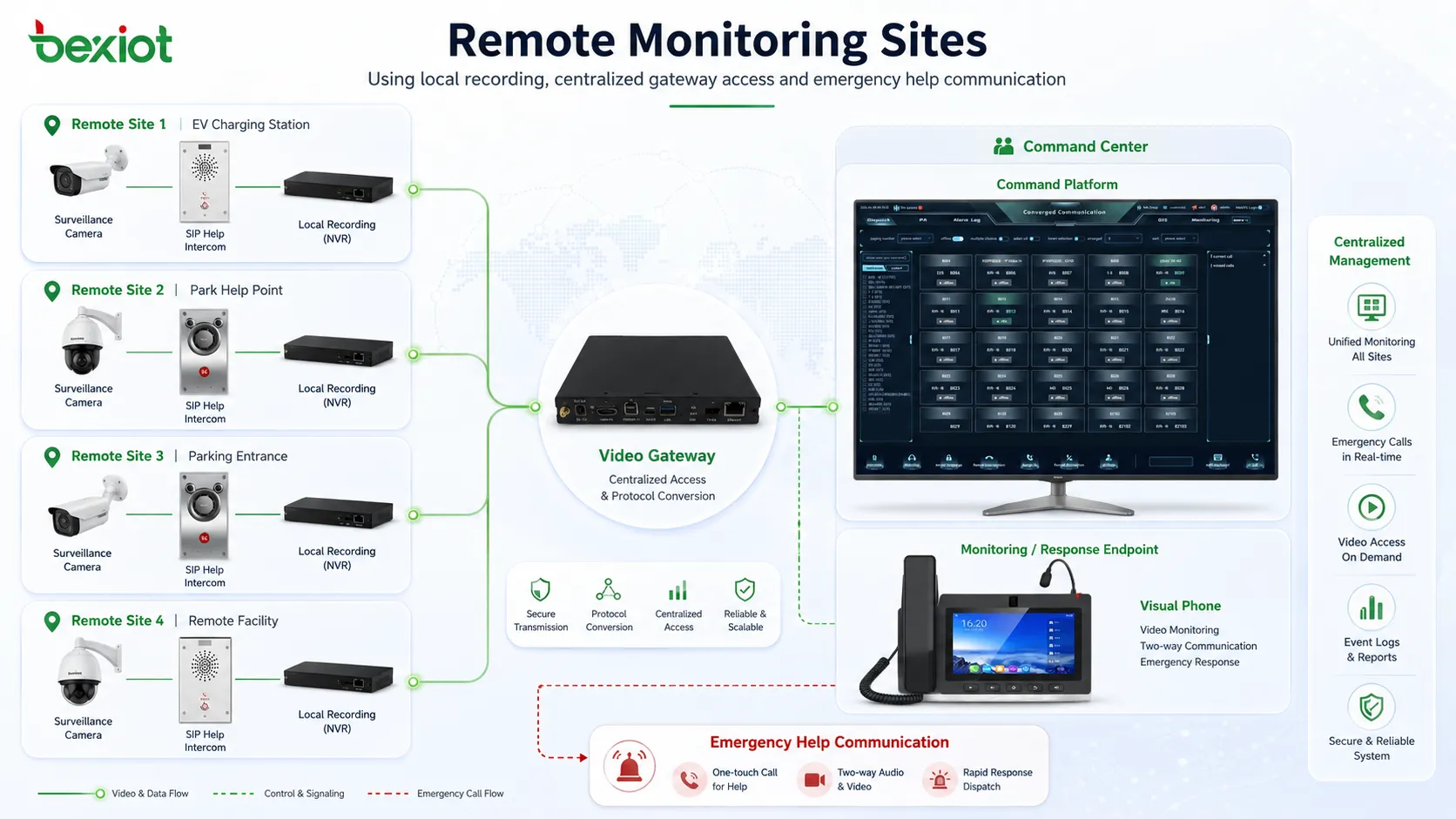
A common deployment method is to install the video gateway at the cloud platform, headquarters, monitoring center, or command room. Remote sites connect their cameras, local recorders, and help intercom terminals to the gateway through the available network.
In distributed environments, local recording remains important. Because public network bandwidth may be limited, it is often more efficient to store video locally at the front-end site through an NVR or recorder, while allowing the gateway to retrieve live video and historical footage remotely when needed.
This design balances bandwidth usage and operational control. Operators do not need to stream every video channel to the center all the time, but they can still view live video, call up recordings, and check site conditions when an event occurs.
For remote points such as charging stations, parking entrances, service kiosks, scenic area gates, or outdoor help points, this structure also reduces dependence on local staff. The central team can verify the situation visually, communicate with the caller, guide the person on site, and decide whether security, maintenance, or emergency personnel should be dispatched.
How Monitoring Cameras Are Brought Online
For camera access, GB/T28181 is a common protocol used in video networking projects. Cameras or local recording devices can connect to the video gateway through GB/T28181, allowing the platform to organize video resources in a structured directory.
Once connected, operators can view camera status, open live streams, retrieve recordings, and manage video resources from the platform side. For supported devices, the system can also provide functions such as PTZ control, focal adjustment, and alarm information acquisition.
This turns camera access from a simple viewing function into a controllable monitoring resource. In practice, operators can locate a site, select a camera from the directory, open the video, and use the image as visual evidence for handling a call or alarm.
Camera access planning should also consider naming rules, channel grouping, image quality, retention time, and network routes. A clean resource directory makes daily operation easier, while a confusing directory can reduce the value of integration. For large sites, standardized camera names and zone labels help operators quickly find the correct video source during an incident.
How SIP Help Terminals Join the Workflow
Most modern help intercom terminals are based on SIP. They may support audio-only communication or video intercom communication depending on the application scenario, budget, and installation environment. The video gateway can provide SIP account registration for these terminals, allowing them to join the same communication and video workflow.
After the SIP information is configured on the help terminal, the terminal can register to the platform. Operators can call the terminal, receive help calls, start two-way talk, and view the terminal video when available. A hotline number can also be configured so that pressing the help button directly calls a designated operator, desk phone, or dispatch seat.
In a more advanced setup, the video from a help terminal can be pushed to a visual phone screen. The system can also bind a nearby surveillance camera to the help point, so that when a call arrives, the operator can immediately see the surrounding scene rather than relying only on voice.
This is important for public-facing environments because the person requesting help may be under stress, unable to describe the location clearly, or surrounded by noise. Visual confirmation allows the operator to understand whether the event is a service request, safety issue, equipment fault, medical concern, access problem, or security incident.
Related Product Introduction: SIP Intercom Solution
Visual Phones as Both Communication and Monitoring Endpoints
Visual phones can also register to the platform through SIP. This allows a phone user to start audio and video communication with a help intercom terminal, answer incoming assistance calls, and view selected camera resources from the system.
For sites where security desks, reception rooms, operation centers, or service counters need both voice communication and visual verification, visual phones can become lightweight monitoring endpoints. They are not only used for calls, but also for checking specific camera images when authorized by the system design.
Compared with a full monitoring workstation, a visual phone is easier to deploy at a small guard room, entrance desk, service counter, or local duty room. It can act as a practical extension of the command center, allowing nearby staff to participate in communication without giving them access to the entire monitoring platform.
Control Room Benefits After Integration
Once surveillance and help intercom access are unified, the control room can handle events with fewer system jumps. A typical workflow may include receiving a help call, opening the related video, checking nearby cameras, speaking with the person on site, reviewing recorded footage, and escalating the event if necessary.
This improves response efficiency because operators can combine visual confirmation with real-time communication. It also helps reduce false alarms, improves situational awareness, and makes event handling more traceable.
For large-area monitoring projects, the unified directory structure is also useful. Cameras, help points, and communication endpoints can be grouped by site, zone, building, floor, or service area, making the system easier to operate and maintain.
From a management perspective, integrated access also supports a more complete event record. A help call can be associated with call time, operator handling, related video footage, terminal location, alarm information, and follow-up action. This makes later review, responsibility tracking, maintenance planning, and service quality evaluation more practical.
Where This Architecture Is Most Useful
This solution is suitable for projects where video surveillance and emergency assistance need to work together. Typical locations include EV charging stations, public parks, scenic areas, unmanned stores, campuses, industrial parks, transportation facilities, parking areas, community entrances, remote service points, and outdoor unattended facilities.
These environments often have three common characteristics. First, they require visual monitoring. Second, they need a way for people on site to request help. Third, the operation team may not be located near the site. A unified video and SIP access architecture directly addresses these requirements.
The same idea can also be applied to semi-enclosed or restricted areas, such as equipment rooms, perimeter gates, energy stations, storage yards, service tunnels, and logistics entrances. In these places, operators need to know not only that someone is calling, but also what is happening around the call point.
Network and Bandwidth Planning
A reliable video gateway solution should be planned with network conditions in mind. Live video, historical playback, video intercom, SIP signaling, audio streams, and platform access may share the same network path. If the uplink is unstable or too narrow, video delay and call quality problems may appear during peak use.
A practical design usually separates continuous recording from on-demand viewing. Local recording can stay at the site, while the center retrieves live or historical video only when needed. For important help points, bandwidth should be reserved for real-time audio and emergency video so that the call experience remains stable during an incident.
Platform Connection and API Expansion
A video gateway can be used directly as part of the platform-side operation system, or it can be connected to a third-party platform. In projects that require deeper customization, API integration can allow business systems, command platforms, alarm systems, and data dashboards to use video and communication resources more flexibly.
This makes the architecture more than a device-level connection method. It can become part of a larger emergency communication, smart park, public safety, remote operation, or integrated command solution.
Through platform integration, video and voice resources can support more business workflows. For example, an alarm event may automatically open a related camera, display a help terminal location, start a call record, notify the duty team, or send event information to a management dashboard.
Related Product Direction
For the help communication side of the solution, SIP intercom terminals are often selected according to installation location, call method, protection level, audio pickup distance, camera requirement, button design, and integration needs. Outdoor help points may focus on weather resistance and vandal resistance, while indoor service points may focus on clear audio, simple operation, and easy wall mounting.
When used with a video gateway, SIP intercom devices can become part of a broader visual communication workflow. They are no longer isolated call boxes; they can be linked with cameras, visual phones, operators, recording resources, and platform-side event handling.
For industrial and public safety projects, the selection should also consider installation height, cable route, PoE availability, acoustic environment, lighting condition, maintenance access, and whether the terminal needs a camera. A good endpoint design should be easy for the public to recognize, simple to operate, and stable enough for long-term outdoor or semi-outdoor use.
Operation and Maintenance Considerations
After the system is deployed, daily maintenance should focus on device status, registration status, camera online rate, recording availability, call test results, and network health. A unified access platform can make these checks easier because cameras and communication terminals are no longer managed as completely separate islands.
Regular testing is also important. Help buttons should be tested, audio quality should be checked, camera binding should be verified, and recording retrieval should be confirmed. These routine checks help ensure that the system works correctly when a real emergency or service request occurs.
Conclusion
A video gateway can simplify projects that require both video monitoring and help intercom access. By supporting camera networking, GB/T28181 video access, SIP help terminals, visual phones, local recording, remote viewing, control functions, alarm information, and API expansion, it helps turn separated subsystems into a unified operating architecture.
For distributed public sites and unattended service scenarios, this approach improves visibility, communication, response speed, and system scalability. It allows the project team to build one coordinated solution instead of repeatedly integrating multiple independent systems.
More importantly, the gateway-based architecture creates room for future expansion. As sites add more cameras, help points, service terminals, command seats, or third-party platforms, the same access logic can continue to support broader monitoring and communication needs.
FAQ
Can this solution be deployed step by step?
Yes. A project can start with camera access and basic SIP help points, then gradually add visual phones, alarm linkage, API integration, and multi-site management as operational needs grow.
Does the gateway replace the NVR?
Not necessarily. In many deployments, the NVR remains responsible for local recording, while the gateway provides centralized access, communication integration, remote viewing, and platform connection.
What should be tested before acceptance?
The acceptance test should include camera online status, live video delay, playback retrieval, SIP registration, help call routing, two-way audio quality, video linkage, and event handling workflow.
Can audio-only help terminals be used in this architecture?
Yes. Audio-only SIP help terminals can be used together with nearby surveillance cameras. This design is often practical when the call point does not need its own camera.
Is this solution only for emergency scenarios?
No. It can also support remote service, visitor assistance, equipment fault reporting, access coordination, site inspection, and daily operation communication in distributed facilities.







