


Intercom systems are widely used in system integration projects, but the word “intercom” does not always mean the same type of solution. In some projects, it refers to mobile push-to-talk communication over public mobile networks. In others, it refers to fixed SIP-based help terminals installed at stations, parks, parking lots, banks, campuses, industrial sites, and other service points.
Understanding the difference between public network intercom and IP intercom helps project teams choose the right architecture. One solution focuses on mobile teams, outdoor patrols, emergency dispatch, and wide-area coordination. The other focuses on fixed locations, one-button help calls, unattended service points, door access, parking assistance, and on-site communication with back-office staff.
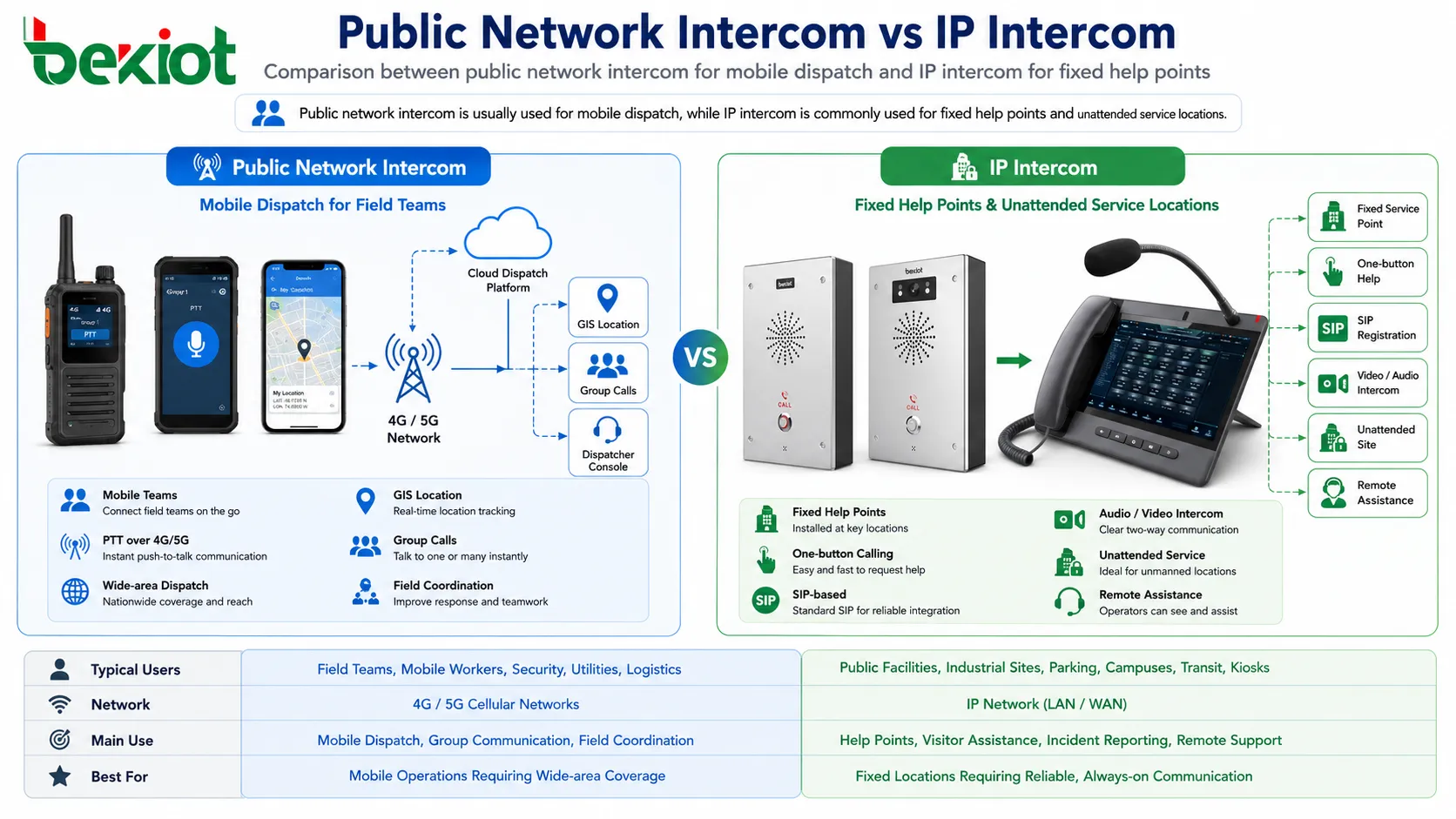
Two Different Needs Behind the Same Word
In many integration projects, users simply say they need an “intercom system.” However, the actual requirement may be very different. Some users want mobile staff to communicate like radio users across a wide area. Others want visitors, drivers, passengers, or on-site personnel to press a button and talk to a service desk.
These two requirements should not be designed with the same technical logic. Public network intercom is usually built for mobile communication. IP intercom is usually built for fixed terminal communication. They may both support voice interaction, dispatch management, and system integration, but their network environment, device form, operation mode, and application value are different.
A good solution design should first answer three questions: Are the users moving or fixed? Is the communication based on group dispatch or point-to-point help? Does the project need mobile terminals, fixed wall-mounted terminals, or both?
Mobile Push-to-Talk Over Public Networks
Public network intercom is often known as POC, or PTT Over Cellular. It uses smart terminals or mobile applications to simulate the working experience of a traditional two-way radio. Instead of relying on private radio base stations or repeaters, it uses mobile data networks such as 4G and 5G to transmit voice, data, location, and other service information.
This model is suitable for mobile environments. Patrol teams, field workers, security staff, emergency response teams, logistics teams, maintenance personnel, and temporary project groups can communicate through rugged smart terminals or mobile apps. The user presses a push-to-talk button, speaks to a group, and other members receive the message through the public network.
Compared with traditional radio systems, public network intercom can reduce the engineering complexity of deploying base stations and repeaters. In many projects, the platform can be deployed on a cloud server or a private server, and users can join the system through compatible smart terminals. This makes initial deployment faster and more flexible.
More Than Voice for Mobile Teams
Public network intercom can provide more than basic voice calls. Because it is based on smart terminals and mobile networks, it can support video calls, GIS location, messaging, group management, dispatch control, and multimedia service expansion.
GIS location is especially useful for mobile operations. A dispatcher can view the approximate position of team members, assign tasks based on location, and coordinate response actions more effectively. In emergency, security, municipal, logistics, and maintenance scenarios, knowing where the team is can be as important as hearing the voice message.
Video and messaging also extend the value of the system. A field worker can share site conditions, send images, report abnormal situations, or start a video call when voice alone is not enough. This turns public network intercom from a simple talking tool into a mobile dispatch and coordination platform.
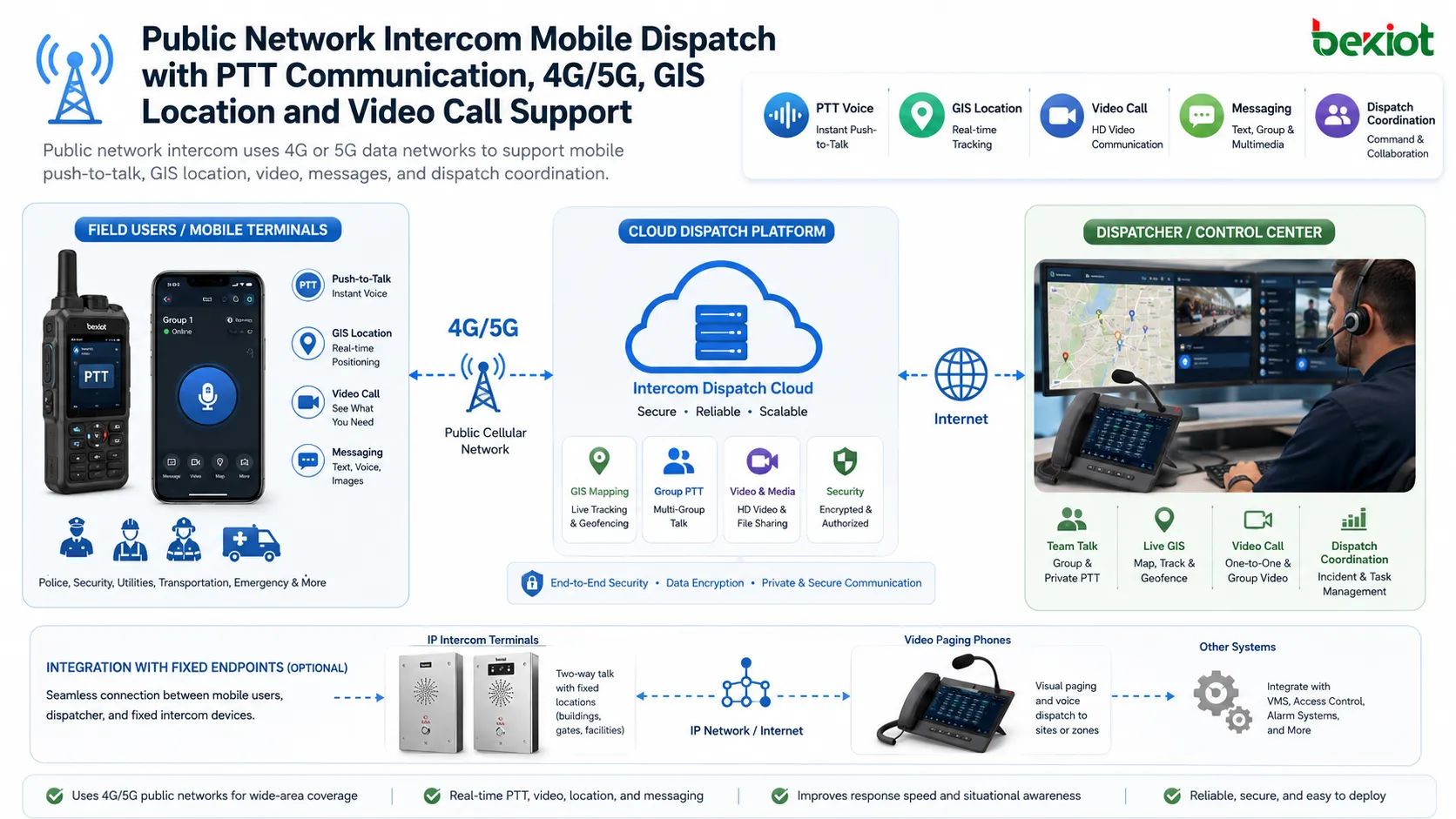
Cloud or Server Deployment for Dispatch Management
A public network intercom system can often be deployed through a cloud platform or an independent server. After the platform is configured, rugged smart terminals or mobile apps can be registered to the system and used by field teams.
A dispatcher can use a computer-based dispatch console to manage groups, view terminal status, coordinate communication, and handle tasks. This is one reason public network intercom is popular in projects that need quick team communication across multiple locations.
The system can also be expanded through gateways. For example, trunking gateways, telephone gateways, video gateways, and related integration devices can connect radios, telephones, video surveillance, drones, and other resources into the broader dispatch system. This makes the architecture suitable for projects that need unified access to different communication and monitoring resources.
Fixed Help Points Need a Different Architecture
IP intercom is usually used in fixed locations. These are the help terminals people often see at stations, stadiums, parks, banks, parking entrances, campuses, industrial gates, building entrances, and public service areas. The main purpose is simple: when someone presses the call button, the terminal quickly connects to a back-office staff member or service operator.
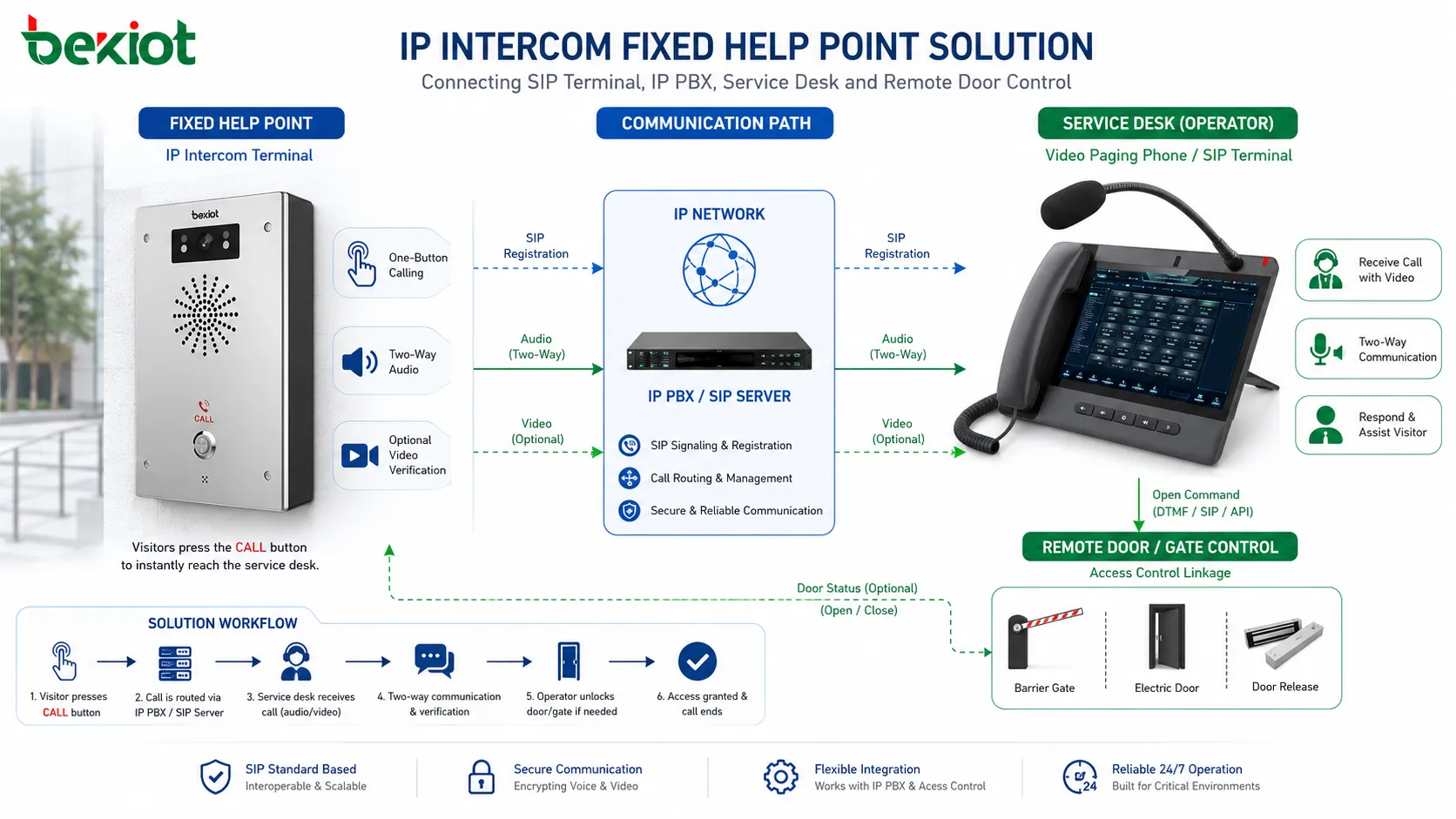
From a technical perspective, many IP intercom terminals work like special SIP phone endpoints. They are not designed as normal desk phones, but they use SIP communication to register to an IP PBX, SIP server, or communication platform. Once registered, the terminal can make a call, receive a call, and join a larger voice or video communication system.
This makes IP intercom very practical for unattended sites. A visitor, driver, passenger, or worker does not need to know an extension number. They only need to press one button, and the terminal automatically dials the configured service desk, IP phone, dispatch console, or operator extension.
Simple SIP Deployment for Service Staff
A basic IP intercom system can be built with an IP PBX or SIP server, service staff IP phones, and front-end intercom terminals. The back-office team uses phones or a dispatch console, while the front-end terminal is installed at the service point.
When a user presses the button, the IP intercom terminal starts a call to the designated extension. The staff member answers the call and talks with the person on site. This creates a fast two-way voice channel without requiring the site to be staffed all the time.
The same logic can be used in parking lots, gates, emergency help points, industrial entrances, campus doors, elevator areas, self-service facilities, and public service counters. It is especially useful where a clear and reliable one-button calling process is more important than mobile group communication.
Related Product Introduction: SIP Intercom Solutions
Voice, Video, Camera Linkage, and Remote Control
IP intercom is not limited to audio-only communication. Depending on the terminal and platform design, it can support video intercom, camera linkage, monitoring preview, and integration with on-site control signals.
For example, a video-enabled terminal can show the caller to the operator. If the terminal itself does not have a camera, the system may still link a nearby surveillance camera to the call point. When a call arrives, the operator can see the surrounding environment and verify the situation more accurately.
IP intercom terminals can also provide dry contact or relay control for remote actions. In access control and parking scenarios, this allows staff to open a door, release a barrier gate, trigger a signal, or coordinate an unmanned operation after confirming the situation through voice or video.
Where Each Solution Fits Best
Public network intercom is usually better for mobile teams. It is suitable for emergency response, security patrol, field service, logistics coordination, mobile inspection, large-area operation, temporary events, and work dispatch. Its value comes from wide-area communication, group calling, location visibility, and mobile terminal access.
IP intercom is usually better for fixed service points. It is suitable for gates, parking lots, banks, stations, airports, parks, campuses, building entrances, industrial facilities, and public help points. Its value comes from simple operation, fast calling, fixed location recognition, and integration with local cameras or control devices.
Some projects may need both. A smart park, transportation hub, industrial site, or emergency management project may use IP intercom terminals at fixed help points and public network intercom terminals for mobile patrol teams. The two systems can be integrated through dispatch platforms, gateways, or unified communication architecture when needed.
Network Design and Reliability Considerations
Public network intercom depends on public mobile network coverage. Its performance is affected by signal strength, data network quality, terminal battery status, server access, and platform capacity. It is flexible, but project teams should consider coverage testing and backup communication plans for critical operations.
IP intercom usually depends on a local IP network, VPN, private network, or enterprise network. Its reliability depends on cabling, PoE power, switch quality, SIP server stability, network route, and emergency power design. For fixed help points, the network should be planned as part of the site infrastructure.
In both cases, the communication system should be tested in the real environment. A solution that works well in a demo room may perform differently in a basement parking lot, outdoor park, remote area, noisy factory, crowded station, or weak-signal zone.
Operation Mode and User Experience
Public network intercom usually follows a push-to-talk workflow. Users press a PTT button, speak to a group, and release the button when finished. This is familiar to users who have experience with radio communication, and it is efficient for group dispatch.
IP intercom usually follows a one-button calling workflow. The person on site presses the call button and waits for the operator to answer. The user does not need to manage groups, choose channels, or understand the communication platform. This makes it suitable for public-facing help terminals.
These differences affect hardware design. Mobile public network intercom terminals need portability, battery life, mobile network access, rugged design, and user identity management. Fixed IP intercom terminals need clear buttons, durable panels, weather resistance, audio pickup, speaker volume, wall mounting, and integration with local facilities.
Choosing the Right Path for Integration Projects
A project team should choose the solution according to the real work process, not only by product category. If the main users are moving across a wide area and need group voice dispatch, public network intercom is usually the better starting point. If the main requirement is fixed help calling at a service point, IP intercom is usually more suitable.
If the project includes both mobile teams and fixed service terminals, the architecture should be planned from the platform level. The system may need dispatch control, SIP integration, video access, telephone access, gateway conversion, recording, GIS, and alarm linkage.
Good planning helps avoid isolated systems. Instead of building one platform for mobile PTT and another unrelated platform for fixed help calls, integrators can consider how communication, video, events, and dispatch workflows should work together.
Conclusion
Public network intercom and IP intercom are both useful, but they solve different problems. Public network intercom, or POC, is designed for mobile push-to-talk communication over 4G or 5G networks. It is suitable for mobile teams, emergency response, security patrol, and work dispatch.
IP intercom is designed for fixed locations. It uses SIP-based communication to connect help terminals with IP PBX systems, service phones, dispatch consoles, and communication platforms. It is suitable for unmanned service points, gates, parking lots, stations, airports, parks, and emergency help locations.
For modern smart projects, the best solution may not be one or the other. The best solution is the architecture that matches the site: mobile communication for moving teams, SIP intercom for fixed points, and platform integration where both types need to work together.
FAQ
Can public network intercom replace all traditional radio systems?
Not always. It depends on coverage, reliability requirements, response priority, local regulations, and operating environment. Some critical industries may still need dedicated radio systems or hybrid communication.
Does an IP intercom always need an IP PBX?
It usually needs a SIP server, IP PBX, or communication platform to manage registration and call routing. In some small systems, a simplified SIP server or direct calling method may be used depending on device capability.
Which solution is better for a parking lot help point?
IP intercom is usually more suitable because the help point is fixed. It can provide one-button calling, video linkage, and remote barrier or gate control when integrated with the site system.
Can mobile PTT users talk to fixed intercom terminals?
Yes, but it usually requires platform integration, SIP interworking, or gateway conversion. The project should confirm call routing, permissions, audio format, and dispatch workflow during design.
What should be tested before deployment?
Test network coverage, call delay, audio clarity, group communication, SIP registration, one-button dialing, video linkage, remote control signals, recording, and recovery after network interruption.







