


In emergency command, unified communications, public safety, industrial dispatch, transportation management, and campus security projects, more dispatch consoles are being built with WebRTC. WebRTC provides strong real-time communication capability, browser-based access, and rich open-source ecosystem support. It makes it easier to integrate voice calls, video calls, conferencing, collaboration, and real-time command functions into a web-based dispatch interface.
However, a modern dispatch system is not only a voice communication platform. It often needs to access surveillance cameras, mobile video terminals, body-worn cameras, drones, video conferencing systems, video phones, and third-party monitoring platforms. The main challenge is that these video resources may use different codecs, resolutions, streaming protocols, and transmission methods. Without proper video adaptation, a WebRTC dispatch console may fail to pull or display surveillance video correctly.
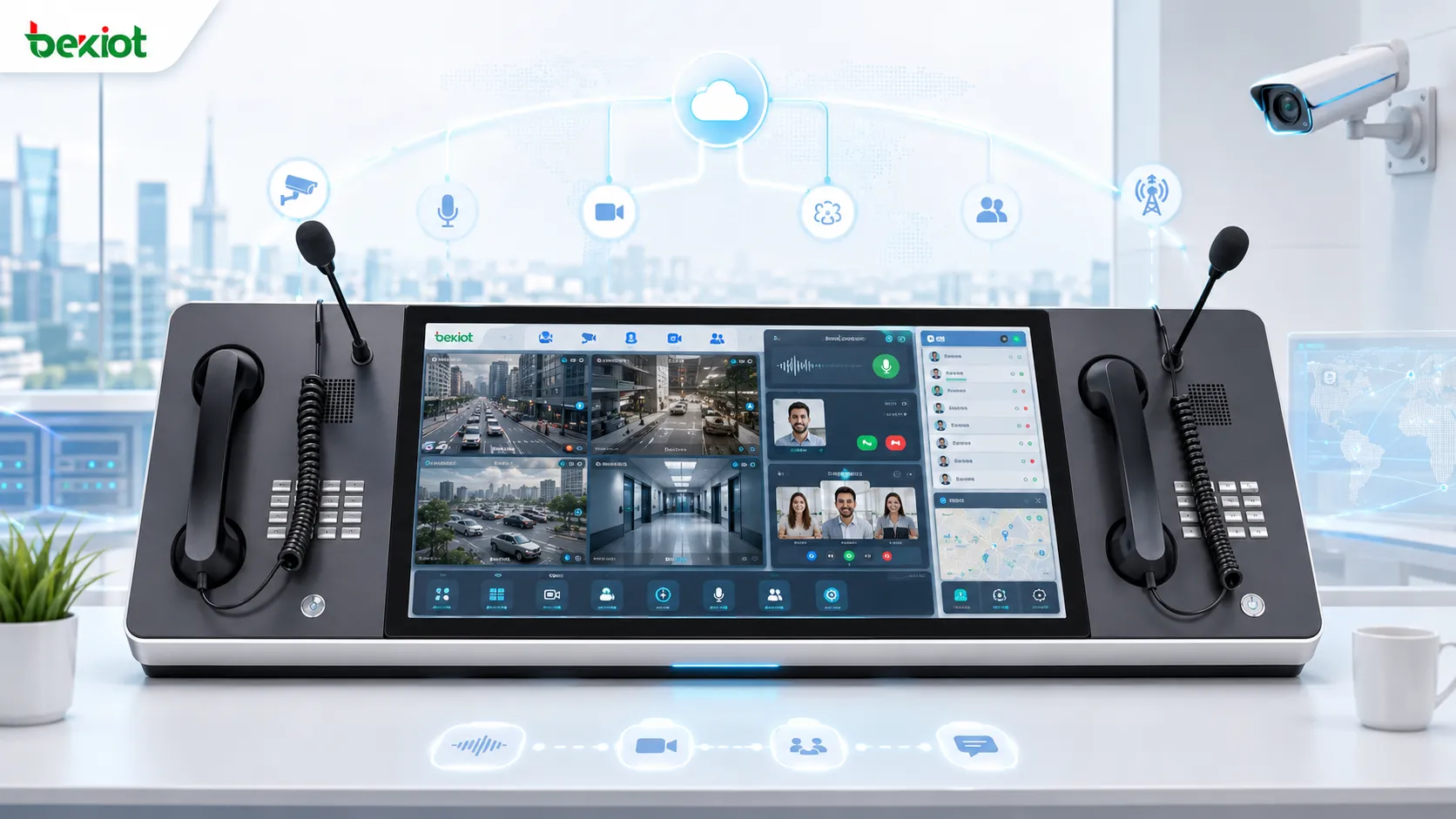
The Integration Challenge Behind Browser-Based Dispatch
WebRTC is well suited for real-time audio and video communication in web applications. It allows dispatch operators to work through a browser without relying on traditional desktop software. This is valuable for command centers, remote dispatch seats, mobile command workstations, and cross-department collaboration.
The difficulty appears when the dispatch console needs to display video from existing surveillance systems. Many surveillance platforms and cameras do not output video in a WebRTC-ready format. Some systems use GB/T28181, RTSP, RTP, RTMP, FLV, or HLS. Some cameras use H.265 encoding, while WebRTC environments are usually more compatible with H.264. These differences can create playback failure, black screens, delay, format mismatch, or unstable video display.
For this reason, a complete WebRTC dispatch solution should include a video adaptation layer between the surveillance source and the browser console. This layer handles codec conversion, protocol conversion, stream forwarding, and media optimization before the video reaches the WebRTC interface.
Why H.265 Surveillance Streams Need Adaptation
H.265 is widely used in surveillance systems because it can reduce storage and bandwidth pressure compared with older encoding methods. Many cameras and video platforms now support H.265 by default, especially in high-definition monitoring projects.
The problem is that WebRTC does not always provide smooth and universal support for H.265 playback across browsers and devices. In many practical projects, H.265 streams from third-party surveillance platforms cannot be directly displayed inside a WebRTC dispatch console. This creates a serious problem for emergency command systems because operators need to view camera images immediately when an incident occurs.
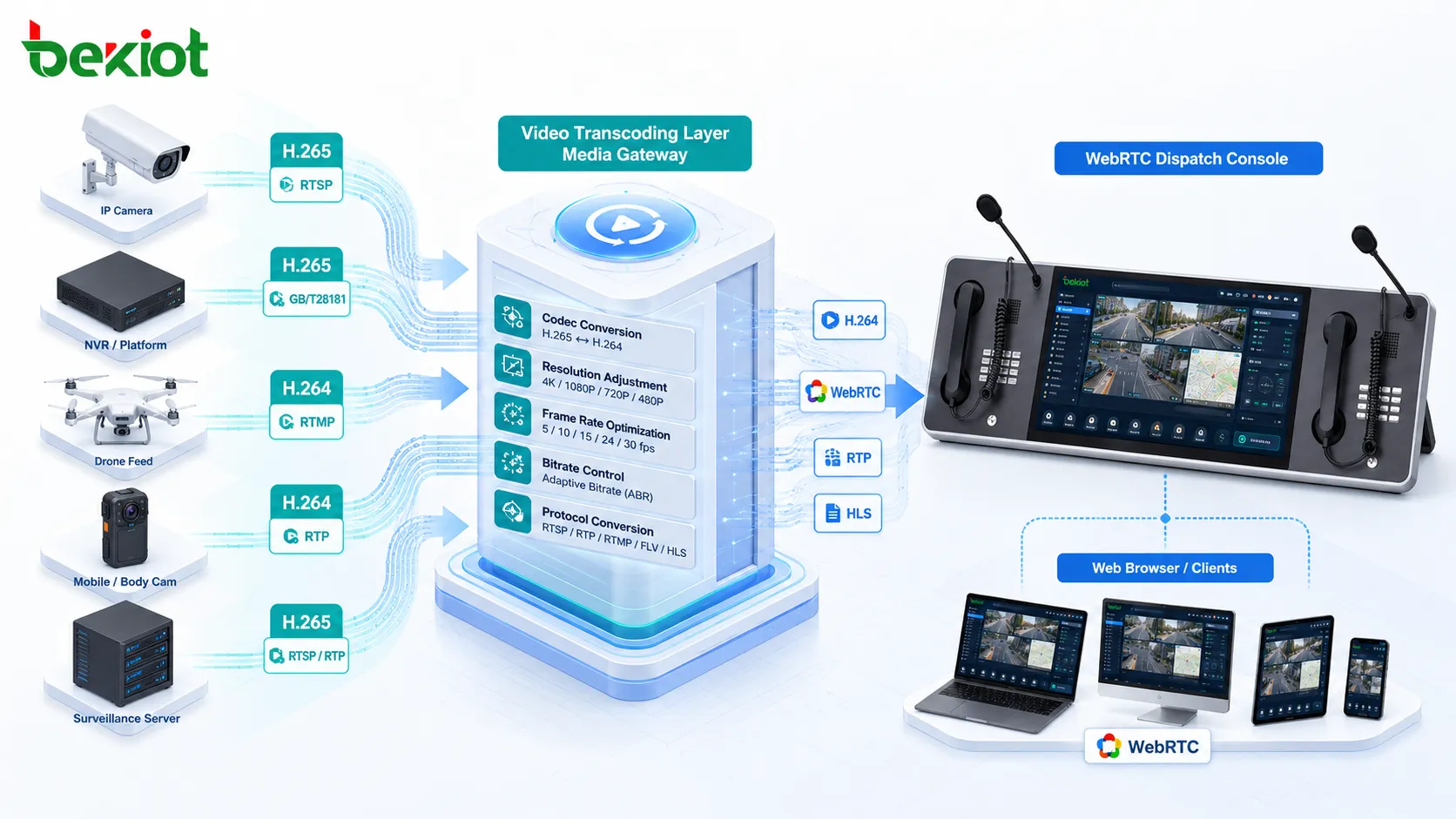
A practical solution is to deploy a video transcoding service inside the communication and dispatch architecture. The transcoding service converts H.265 video streams into H.264 streams that are easier for WebRTC applications to call and display. In many cases, this allows the existing WebRTC console structure to remain unchanged while solving the video playback compatibility problem at the media processing layer.
Video Transcoding as the Core Media Bridge
A video transcoding layer acts as a bridge between traditional video systems and modern browser-based dispatch applications. It receives video streams from cameras, monitoring platforms, video phones, video conferencing systems, and other sources, then converts them into formats that can be used by the dispatch console.
The key processing capabilities include codec conversion, resolution adjustment, frame rate control, bitrate adjustment, stream forwarding, and protocol encapsulation. These functions are important because video incompatibility is not caused by codec differences alone. In many projects, video may also fail because the resolution is too high, the frame rate is unsuitable, the bitrate is unstable, or the output protocol cannot be recognized by the receiving system.
By adjusting these parameters in real time, the platform can make video more suitable for command center display, browser playback, low-bandwidth transmission, mobile access, and multi-screen monitoring. The result is a more stable video experience for dispatch operators.
Protocol Conversion for Multiple Video Sources
A dispatch platform usually needs to access different types of video systems. A single protocol cannot cover all real-world requirements. Therefore, the video integration layer should support multiple input and output protocols, including GB/T28181, RTSP, RTP, RTMP, FLV, HLS, SIP, and WebRTC.
GB/T28181 is commonly used in video surveillance networking. RTSP is widely used by IP cameras and NVR systems. RTP and RTMP may appear in real-time media transmission and streaming projects. FLV and HLS are often used for web playback and platform integration. SIP may be involved when video phones, video intercom terminals, or communication platforms need to be integrated with the dispatch system.
With protocol conversion, the dispatch console does not need to directly understand every camera or video platform. The media gateway receives streams from different sources, performs conversion, and provides a unified output for the dispatch application. This reduces development complexity and improves compatibility with existing video resources.
Stream Pulling and Forwarding Workflow
In a practical WebRTC dispatch console, video pulling usually follows a layered workflow. First, the video source is registered or connected to the media service through a supported protocol. Second, the media service pulls or receives the original stream. Third, the stream is transcoded, repackaged, or optimized according to the console requirement. Finally, the processed video is delivered to the browser dispatch interface.
This workflow allows dispatch operators to open camera images directly from the console. For example, when an incident is reported, the operator can select a nearby camera, pull the live stream, display it in the dispatch panel, and continue voice communication or command collaboration at the same time.
The same architecture can also support video forwarding to other platforms. A processed video stream can be sent to a large-screen display, emergency command platform, recording system, video conferencing system, or mobile client. This makes video resources reusable across different business systems.
Recommended Dispatch Console Product
Related Product: Becke IP Dispatch Console
Benefits for Emergency and Unified Communication Projects
The first benefit is better compatibility. By converting H.265 to H.264 and supporting multiple video protocols, the system can connect more surveillance resources to a WebRTC-based console. This helps dispatch operators view monitoring images without rebuilding all existing camera systems.
The second benefit is lower development pressure. Instead of writing separate video adaptation logic for every platform, developers can rely on a media conversion layer. The dispatch console only needs to call a unified video output interface, which makes system development and maintenance easier.
The third benefit is stronger business integration. Video monitoring, video calls, video conferencing, emergency command, voice dispatch, GIS location, recording, and alarm linkage can be integrated into one working environment. This is especially useful for command centers that need fast situational awareness and coordinated response.
The fourth benefit is more flexible deployment. The solution can be used in public safety command, enterprise emergency response, industrial park dispatch, transportation monitoring, campus security, energy facilities, hospitals, utilities, and other scenarios where surveillance video needs to be combined with real-time communication.
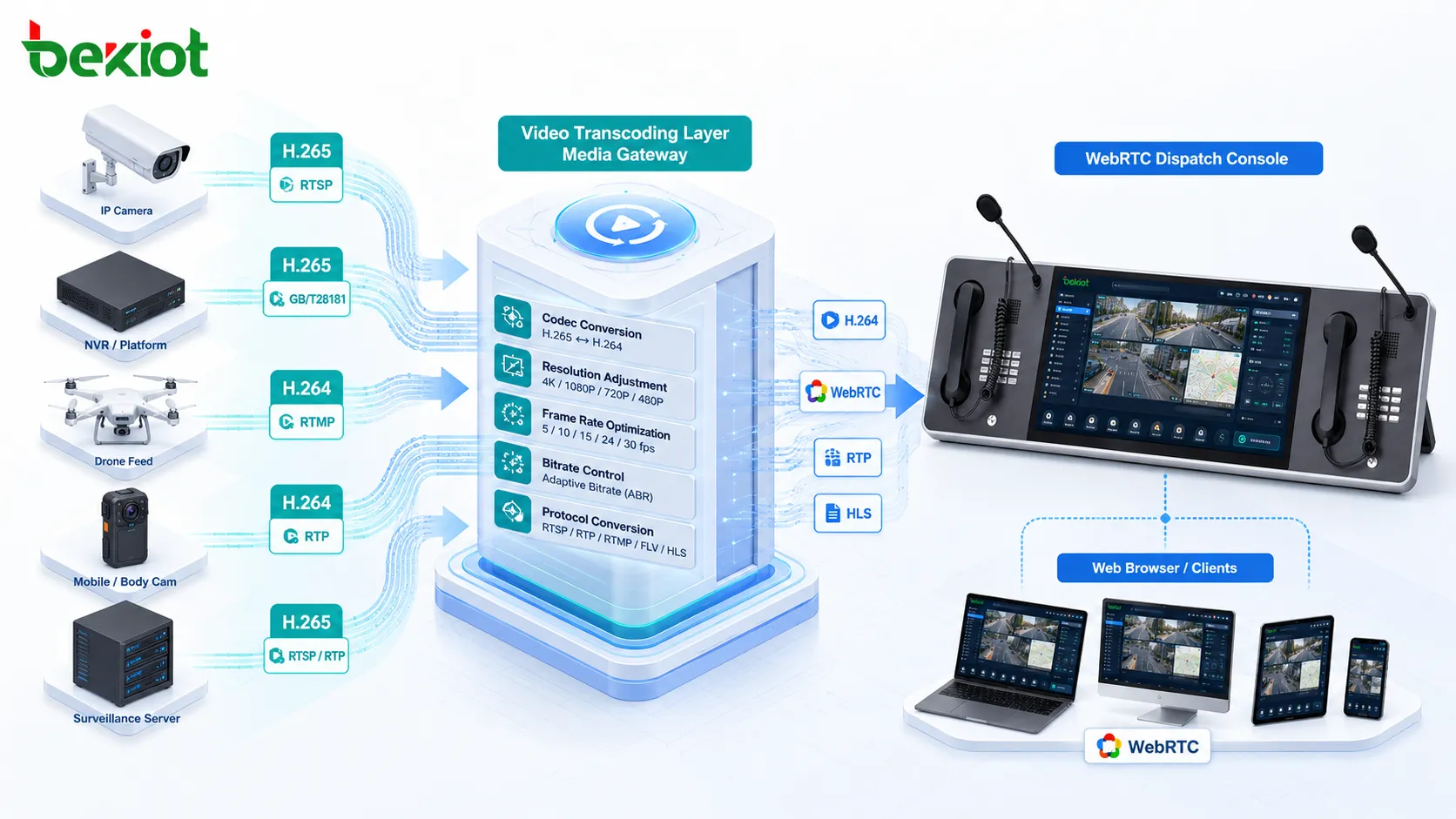
Practical Design for Command Center Operations
In a command center, operators need more than video playback. They need to search video resources, open multiple camera windows, switch streams quickly, start voice communication, join conference calls, view alarm information, and coordinate teams from one interface. A WebRTC dispatch console can support this working style when video access is properly integrated.
The console can display real-time video beside voice dispatch controls, contact lists, call status, group communication panels, and event handling records. When video sources are connected through a unified media service, the operator can pull live video without leaving the command interface.
This improves operational efficiency. It reduces switching between separate monitoring software, communication software, and command platforms. It also helps the dispatcher make faster decisions based on live images and real-time communication.
Planning Considerations Before Deployment
Before deploying a WebRTC dispatch video solution, project teams should first confirm the types of video sources that need to be connected. These may include IP cameras, NVR systems, GB/T28181 platforms, video phones, drone video, mobile terminals, or third-party surveillance platforms.
The second step is to check video encoding formats. If many sources use H.265, the system should include reliable H.265 to H.264 transcoding. If video needs to be displayed in browsers, WebRTC, FLV, HLS, or other web-friendly output formats should be considered.
The third step is to evaluate concurrency, bandwidth, latency, resolution, recording requirements, and user permissions. Emergency command systems usually require low delay and stable playback. Surveillance management may require continuous viewing and recording. Mobile users may need lower bitrate streams. These requirements should be reflected in the stream processing strategy.
Long-Term Value of a Media Gateway Architecture
A media gateway architecture gives the dispatch system room for future expansion. As new video sources are added, the gateway can handle access and conversion without changing the dispatch console repeatedly. This is useful for projects that expand over time, such as multi-site command centers, smart parks, smart campuses, transportation networks, and industrial safety platforms.
It also helps protect existing investment. Cameras, NVR systems, video platforms, and communication systems can continue to be used. The media gateway provides compatibility between old and new systems, while the WebRTC console provides a modern and unified operating interface.
For developers, this architecture separates front-end console development from complex video protocol processing. The browser console can focus on user experience, dispatch workflow, and business interaction, while the media layer handles stream access, conversion, and delivery.
Conclusion
WebRTC is a strong technology choice for modern dispatch console development, especially in emergency command and unified communication systems. It supports browser-based real-time communication and makes it easier to integrate audio, video, conferencing, and collaboration functions.
The key challenge is how to pull and display surveillance video from existing systems. Because many video sources use H.265 encoding or non-WebRTC streaming protocols, a video transcoding and protocol conversion layer is necessary. By supporting H.265 to H.264 conversion, GB/T28181, RTSP, RTP, RTMP, FLV, HLS, SIP, and WebRTC, the system can connect diverse video resources and deliver them to the dispatch console in a usable format.
For command centers that need live monitoring, voice dispatch, video calls, emergency collaboration, and multi-system integration, this solution provides a practical path to build a browser-based dispatch platform with reliable video access and strong scalability.
FAQ
Can WebRTC directly play every surveillance camera stream?
No. Many camera streams use protocols or codecs that are not directly suitable for WebRTC playback. A media conversion layer is often needed to convert the stream before it is displayed in the browser.
Why is H.264 often preferred for WebRTC dispatch display?
H.264 has broader compatibility across browsers, devices, and real-time communication systems. When surveillance systems output H.265, converting the stream to H.264 can improve playback compatibility.
Does protocol conversion affect video delay?
It may add some processing delay, but a properly designed media gateway can keep latency within an acceptable range for command and monitoring scenarios. The final delay depends on codec, network quality, stream settings, and system architecture.
Can one video source be delivered to multiple systems at the same time?
Yes. After stream processing, the same video source can be forwarded to a WebRTC console, large-screen platform, video recording system, mobile client, or third-party business platform.
What should developers confirm before integrating video into a dispatch console?
Developers should confirm the source protocol, codec format, stream resolution, expected delay, user concurrency, browser compatibility, authentication method, and whether the receiving system needs WebRTC, FLV, HLS, RTSP, or another output format.







