


Voice dispatch has long been used in command and communication systems because it is fast, direct, and easy to operate. In early dispatch platforms, telephone systems, intercom systems, radio systems, and public address systems were integrated mainly to improve voice calling, group communication, broadcast notification, and emergency command efficiency.
As video technology becomes more widely used in command centers, industrial sites, transportation systems, campuses, emergency response, and security operations, dispatch systems are moving from voice-only communication toward visual command. Video calls, video surveillance, video conferencing, drone video, and remote field video are becoming part of daily dispatch workflows. However, moving from voice dispatch to video dispatch is not just adding a camera. It requires solving protocol compatibility, video encoding, transcoding, gateway access, API integration, and user operation problems.
From Audio Coordination to Visual Command
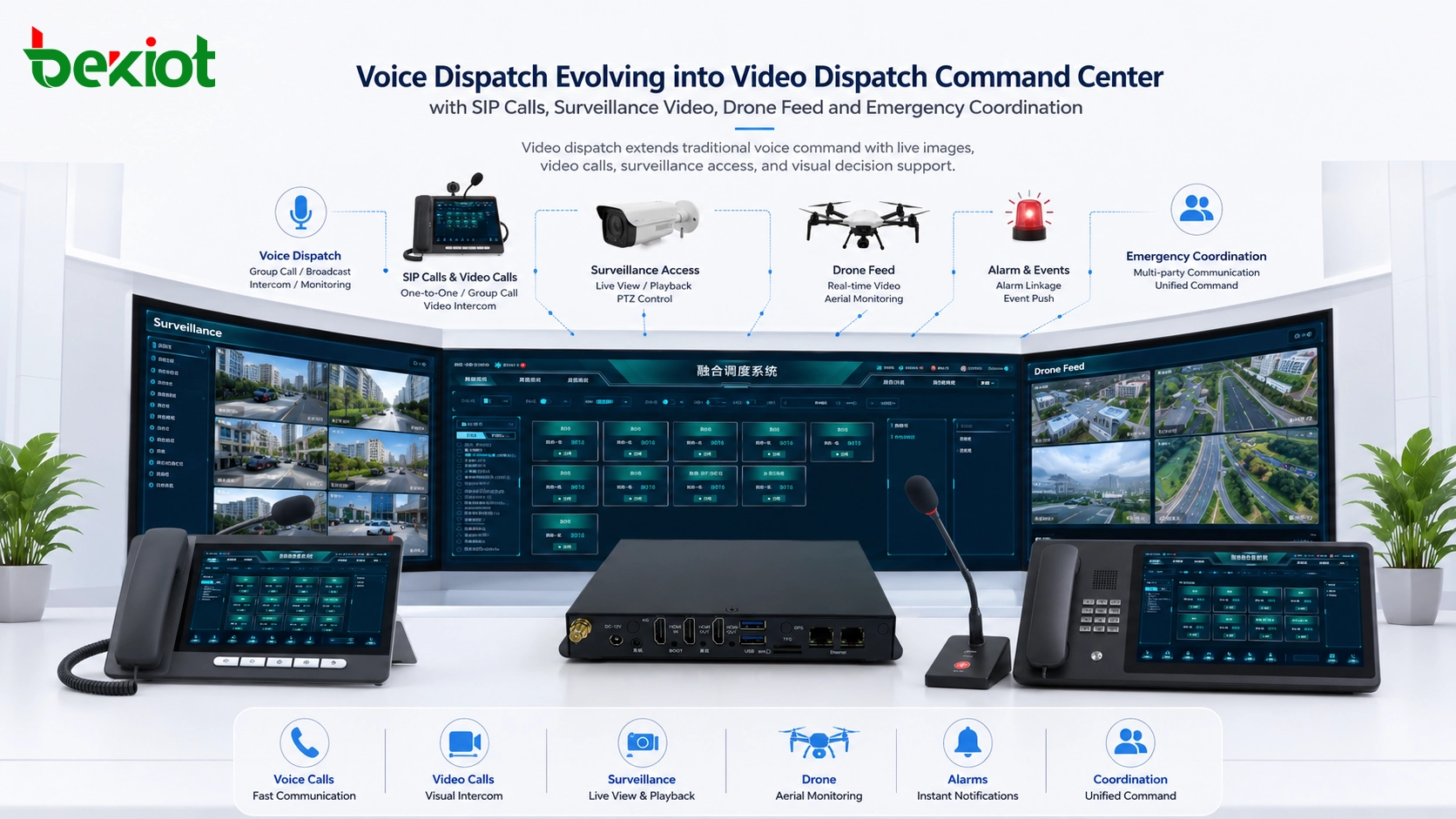
Traditional voice dispatch focuses on fast audio communication. A dispatcher can call a user, join a group, broadcast a message, monitor a channel, or coordinate multiple teams through a dispatch console. This model works well when the main requirement is voice instruction.
Modern dispatch scenarios often require more context. A dispatcher may need to see a surveillance camera, join a video call, check a drone feed, verify an alarm scene, or share visual information with field personnel. This is why video dispatch, also called visual command, is becoming an important direction for next-generation communication systems.
Visual command does not replace voice dispatch. Instead, it extends voice communication with real-time video, multimedia access, and platform-level integration. The key is to make audio, video, and data work together inside one operational workflow.
Different Systems Speak Different Video Languages
The first challenge is video protocol compatibility. Different video systems use different streaming and communication protocols. If a project wants to create a unified video dispatch platform, cross-system access is unavoidable.
For example, a video conference system may use SIP-based video communication, while a video surveillance system may use GB/T28181. If the dispatch platform needs to pull surveillance video into a video meeting, these two systems must be interconnected. Without protocol conversion, the project may require complicated physical connection methods, extra equipment, and much higher integration cost.
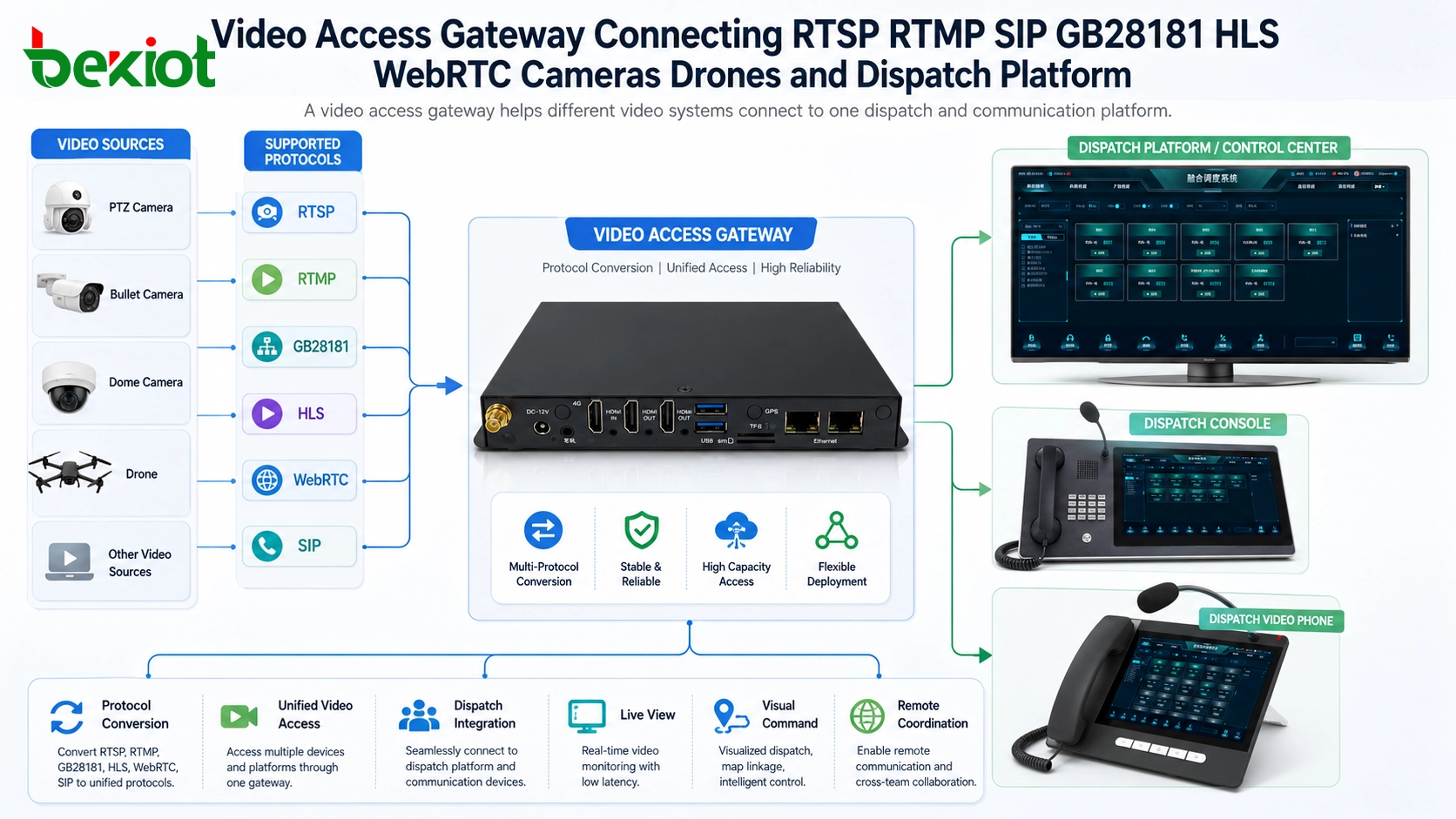
The same problem appears when integrating cameras, recorders, drones, video encoders, monitoring platforms, and web-based video applications. RTSP, RTMP, SIP, GB/T28181, FLV, HLS, and WebRTC may all appear in one project. A video dispatch system must be able to handle these different protocols in a manageable way.
Gateway Access as the Practical Integration Layer
In a converged dispatch project, a video access gateway is usually used to solve cross-platform video interconnection. The gateway acts as a protocol conversion and media access layer between the video sources and the dispatch communication platform.
Early video gateways were often used to convert GB/T28181 surveillance video into SIP video, allowing monitoring resources to be accessed by a unified communication system. Today, this is no longer enough. A practical video dispatch project may need conversion among RTSP, RTMP, SIP, GB/T28181, FLV, HLS, WebRTC, and other video access methods.
With a suitable gateway, more video devices can be connected to the dispatch platform without forcing every system to use the same protocol.
Codec Differences Can Block Real Video Use
The second major challenge is video encoding compatibility. Even if the streaming protocol is connected, the video may still fail to display if the codec is not supported by the receiving device or software.
In many surveillance systems, H.265 has become common because it can reduce bandwidth and storage pressure. However, in communication systems, H.264 is still widely used as a mainstream video codec. This difference creates compatibility problems when surveillance video needs to be displayed in a SIP video phone, video conference terminal, web client, or dispatch console.
Resolution is another issue. Some modern video sources use 4K resolution, but not every terminal, browser, conference system, or dispatch client can decode or display 4K video smoothly. In WebRTC-based applications, H.265 playback may also be difficult because many browser and WebRTC environments are more naturally aligned with H.264-based workflows.
Transcoding Turns Incompatible Video Into Usable Video
When protocol conversion alone cannot solve the problem, video transcoding becomes necessary. A video transcoding server can convert video streams into formats that different terminals and platforms can actually use.
A practical transcoding service should support multi-channel 4K and 1080P video transcoding, flexible conversion between H.264 and H.265, frame rate adjustment, bitrate adjustment, resolution conversion, and watermark overlay. In latency-sensitive dispatch scenarios, low-latency processing is especially important. A well-designed transcoding architecture can keep transcoding delay below 35 ms, helping the video remain suitable for real-time command use.
Transcoding reduces the development burden on the platform side. Instead of forcing every application to support every video format, the system can use a dedicated transcoding service to prepare the video stream for SIP terminals, WebRTC clients, conference systems, large screens, and dispatch consoles.
APIs Make Deeper Command Integration Possible
Video dispatch is not only about displaying a video image. In many complex projects, the system must support deeper interaction between communication, video, alarm, GIS, recording, user management, and command workflows.
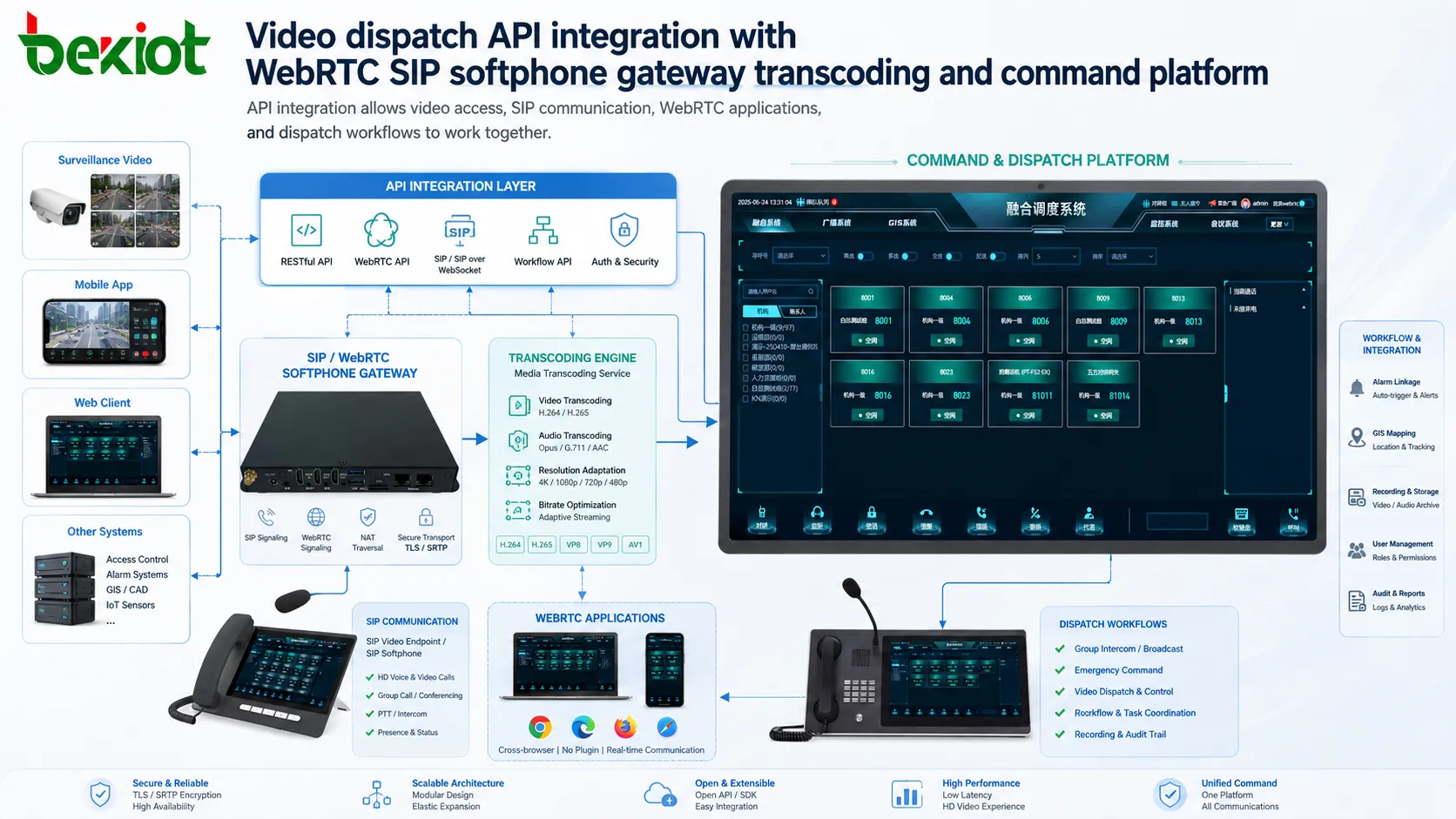
This is where API capability becomes important. A video access gateway and transcoding server can provide interfaces for video channel control, stream access, status query, resource management, conference integration, and secondary development. With proper APIs, integrators can embed video functions into their own dispatch platform instead of operating separate systems side by side.
For example, a WebRTC demo program can show how browser-based video access works, while an embedded SIP softphone development capability can help connect voice and video communication inside a custom dispatch interface. These capabilities make cross-system integration smoother and reduce the risk of fragmented user experience.
Architecture Planning for a Video Dispatch Solution
A complete video dispatch solution should be designed as a layered architecture. The source layer includes cameras, video recorders, drones, encoders, conference terminals, mobile video devices, and monitoring platforms. The access layer uses gateways to connect different video protocols. The processing layer uses transcoding servers to solve codec, resolution, frame rate, and stream adaptation problems.
The service layer provides SIP communication, video calling, conference control, recording, user management, and permission control. The application layer presents everything to users through a dispatch console, command screen, browser client, video phone, mobile terminal, or integrated command platform.
| Layer | Main Function | Typical Components | Project Value |
|---|---|---|---|
| Video Source Layer | Provides field and monitoring images | Cameras, NVRs, drones, encoders, video terminals, mobile devices | Brings visual information into dispatch workflows |
| Access Layer | Solves protocol interconnection | Video access gateway, GB/T28181 gateway, SIP video gateway, RTSP access module | Connects different video systems without heavy custom development |
| Processing Layer | Solves codec and stream adaptation | Transcoding server, stream conversion service, resolution adaptation service | Makes video playable across terminals, browsers, and platforms |
| Communication Layer | Provides voice and video communication | SIP server, dispatch server, conference service, recording system | Combines calling, meetings, dispatch, recording, and visual command |
| Application Layer | Presents unified operation | Dispatch console, command platform, WebRTC client, large screen, video phone | Improves operator experience and command efficiency |
Reducing Complexity in Real Projects
As more video systems and devices are connected, integration difficulty increases quickly. A project may include old cameras, new 4K cameras, different recorder brands, drones, conference systems, SIP terminals, browser clients, and third-party dispatch software. If every compatibility issue is handled through custom development, the project becomes expensive, slow, and risky.
Dedicated gateway and transcoding equipment can greatly reduce this difficulty. The gateway focuses on protocol conversion, while the transcoding server focuses on codec and stream adaptation. The dispatch platform can then focus on user workflows, command logic, recording, permissions, and operation experience.
This division of work is important for project delivery. Without deep video development experience, trying to connect every video device directly to the platform may lead to unstable playback, poor compatibility, delayed delivery, and unsatisfactory user experience.
Deployment Checklist Before Upgrading
Before upgrading from voice dispatch to video dispatch, the project team should review existing voice systems, video systems, network conditions, terminal types, and platform integration requirements. The team should list all camera protocols, recorder platforms, drone video methods, SIP video requirements, conference requirements, and browser access needs.
Codec planning is equally important. The project should confirm whether video sources use H.264, H.265, 4K, 1080P, or other formats. It should also confirm whether the target terminals support these formats directly or require transcoding.
For real-time command scenarios, latency, network bandwidth, QoS, permission control, recording, API integration, and emergency response workflow should be evaluated before deployment. A successful video dispatch system must be technically compatible and operationally simple.
From Voice Dispatch to Visual Collaboration
The development from voice dispatch to video dispatch is a natural step for modern command systems. Voice remains the fastest way to issue instructions, while video provides direct field awareness. When the two are combined with gateways, transcoding, API integration, and unified operation, dispatch becomes more accurate, visible, and efficient.
The goal is not to add video for display only. The real value is to make video part of the command workflow: call a field user, view a camera, join a video meeting, verify an alarm, share a drone feed, record the process, and coordinate response actions in one system.
For organizations building industrial command centers, emergency platforms, transportation dispatch systems, campus security systems, or integrated communication solutions, video dispatch should be planned as a complete architecture rather than a simple video plug-in.
FAQ
Can a voice dispatch platform be upgraded to video dispatch directly?
It depends on the platform architecture. If the system already supports SIP video, gateway access, media processing, and API integration, the upgrade may be smoother. If it only supports voice calls, additional gateway, transcoding, and platform development may be required.
Is a video access gateway always required?
Not always. If all video sources and terminals use the same protocol and codec, a gateway may not be necessary. In real projects, however, different cameras, monitoring platforms, drones, and communication systems usually require gateway-based conversion.
Why can a video stream be connected but still fail to display?
This often happens because the protocol is connected but the codec, resolution, frame rate, or browser compatibility is not supported by the receiving device. Transcoding is usually needed in this situation.
What should be prioritized: protocol conversion or transcoding?
Both are important, but they solve different problems. Protocol conversion allows different systems to connect. Transcoding makes the video stream playable and suitable for the target terminal or application.
How can users avoid a complicated operating experience?
The system should hide technical complexity behind a unified dispatch interface. Cameras, drone feeds, calls, meetings, alarms, and recordings should be accessed through clear names, permissions, buttons, and workflows rather than separate disconnected platforms.







