


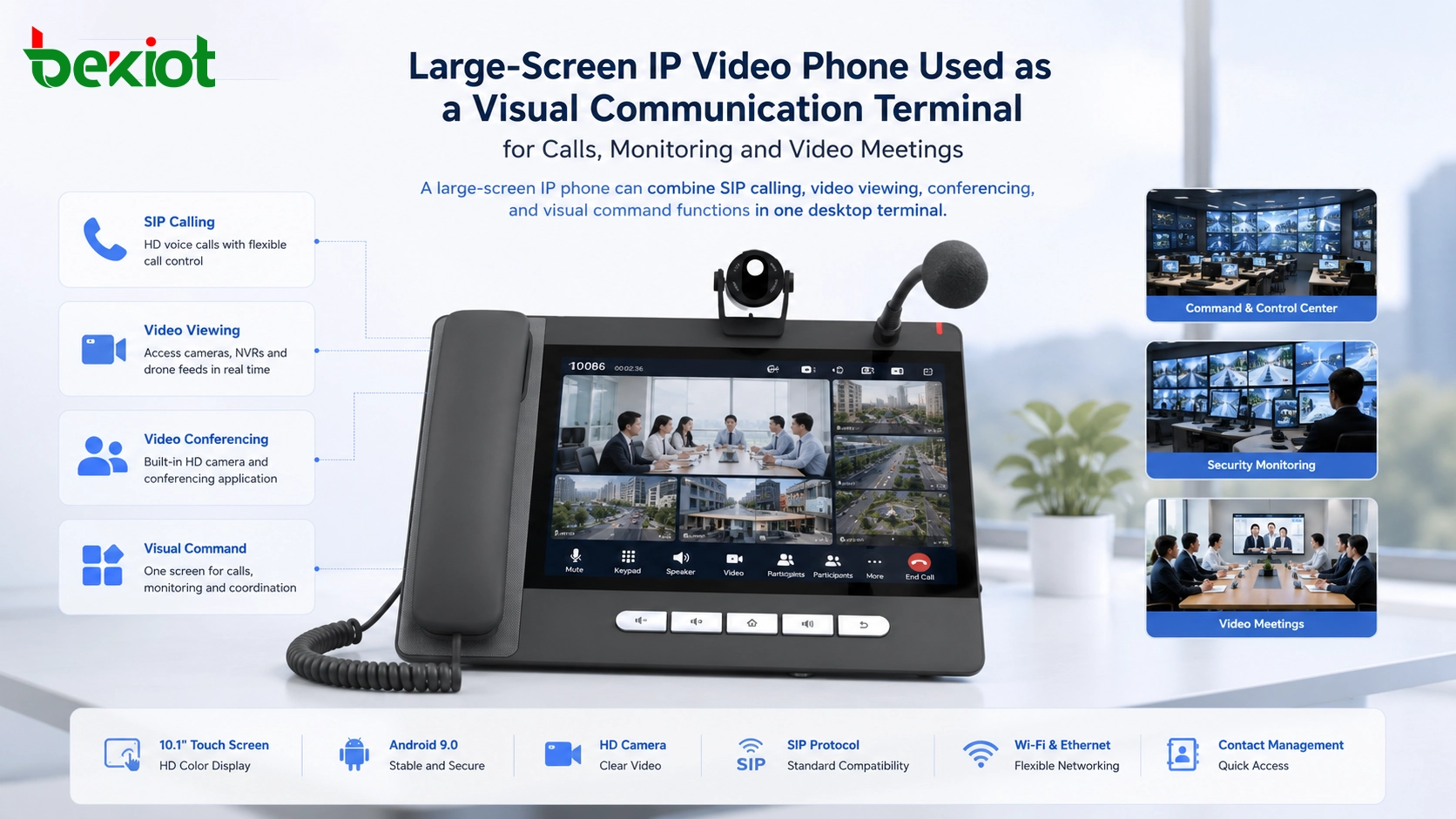
A large-screen IP phone is no longer only a desktop device for voice communication. When it combines SIP calling, HD video, a touch display, Android-based applications, video gateway access, and built-in conferencing, it can become a compact visual communication terminal for offices, control rooms, service centers, emergency response teams, and command scenarios.
The core idea is simple: the screen makes communication visible. Instead of only speaking through a handset or speakerphone, users can view surveillance cameras, access drone video channels, join video meetings, call video intercoms, and manage frequently used video resources through a contact list. This turns the IP phone from a voice endpoint into a practical visual collaboration terminal.
From Voice Endpoint to Visual Workstation
Traditional IP phones were mainly designed for voice communication. Their main tasks were making calls, receiving calls, transferring calls, holding calls, and supporting basic PBX features. With the development of video communication, many IP phones now include larger displays, cameras, touch operation, and application-based functions.
A typical large-screen IP video phone may include a high-definition touch screen, an HD camera, SIP protocol support, local contact management, speakerphone audio, network connectivity, and built-in video communication functions. Taking the GP320i IP phone as an example, the device uses a 10.1-inch color HD touch screen, runs on Android 9.0, supports multi-touch operation, and works as a SIP phone with additional video conferencing capability.
This hardware and software combination gives the device more value than a normal office phone. It can become a small dispatch screen, a meeting endpoint, a monitoring viewer, a video intercom terminal, or a desktop communication console for daily operations.
Connecting Video Resources Through a Gateway
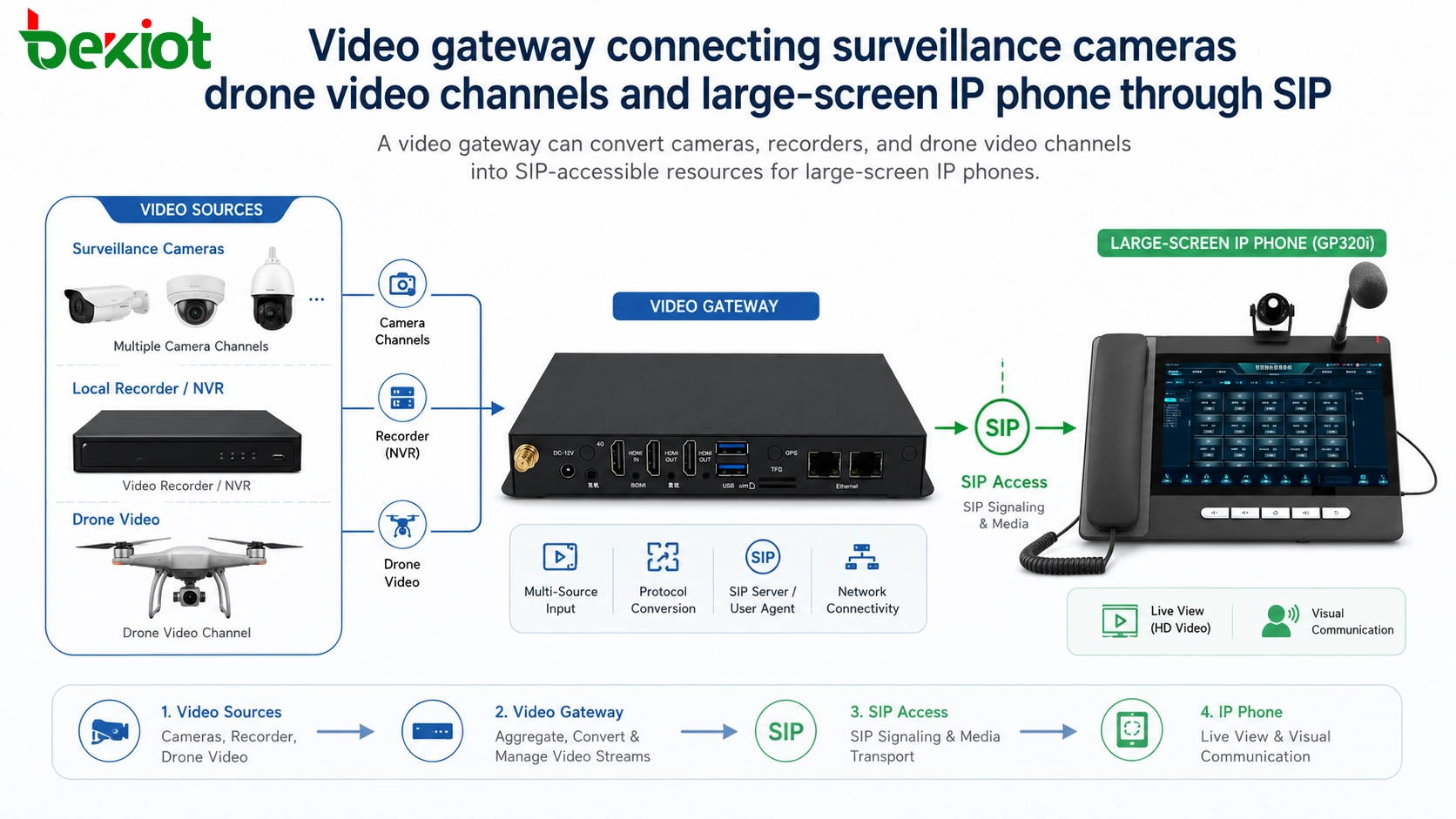
One of the most important solution ideas is to connect the large-screen IP phone with a video access gateway. The gateway can integrate video resources such as surveillance cameras, video recorders, monitoring platforms, and drone video channels. After the gateway processes these resources, it can output them through standard SIP-based access methods.
This makes the IP video phone easier to use in visual communication scenarios. Instead of opening a separate monitoring platform on a computer, users can call a video resource from the phone itself. Each camera, drone channel, or video source can be assigned a SIP number, allowing the phone to access the video stream through a familiar dialing workflow.
For organizations that already use SIP PBX, video dispatch, or unified communication platforms, this method can reduce the complexity of video access. The gateway handles video resource integration, while the phone provides a simple and visible user interface.
Direct Viewing of Cameras and Drone Feeds
After video resources are connected to the gateway, the large-screen IP phone can directly call the assigned SIP number to view the corresponding image. For example, a monitoring camera can be assigned one SIP number, while a drone video channel can be assigned another number.
The user can open the dialing interface, enter the video resource number, and display the monitoring image on the large screen. The same logic can be used for drone video. By calling the SIP number of the drone channel, the phone can show the live aerial video feed on its display.
This is useful in command centers, security rooms, industrial parks, transportation sites, campuses, emergency response operations, and temporary field command scenarios. It allows staff to access visual information quickly without switching between multiple systems.
Contact-Based Access for Easier Operation
Dialing video resource numbers manually is possible, but it is not always convenient. Camera numbers, drone channel numbers, meeting numbers, and intercom numbers may be difficult to remember, especially when there are many resources in the system.
A practical solution is to use the phone’s built-in contact management function. Frequently used video resources can be saved as contacts with clear names. Instead of remembering complex numbers, users can tap a contact name such as “Warehouse Camera,” “Main Gate,” “Drone Channel 1,” or “Meeting Room Video.”
This makes the system easier for operators, reception staff, control room users, and rotating teams. It also reduces wrong dialing and improves response speed during real-time communication or emergency handling.
Built-In Meetings for Small Collaboration Scenarios
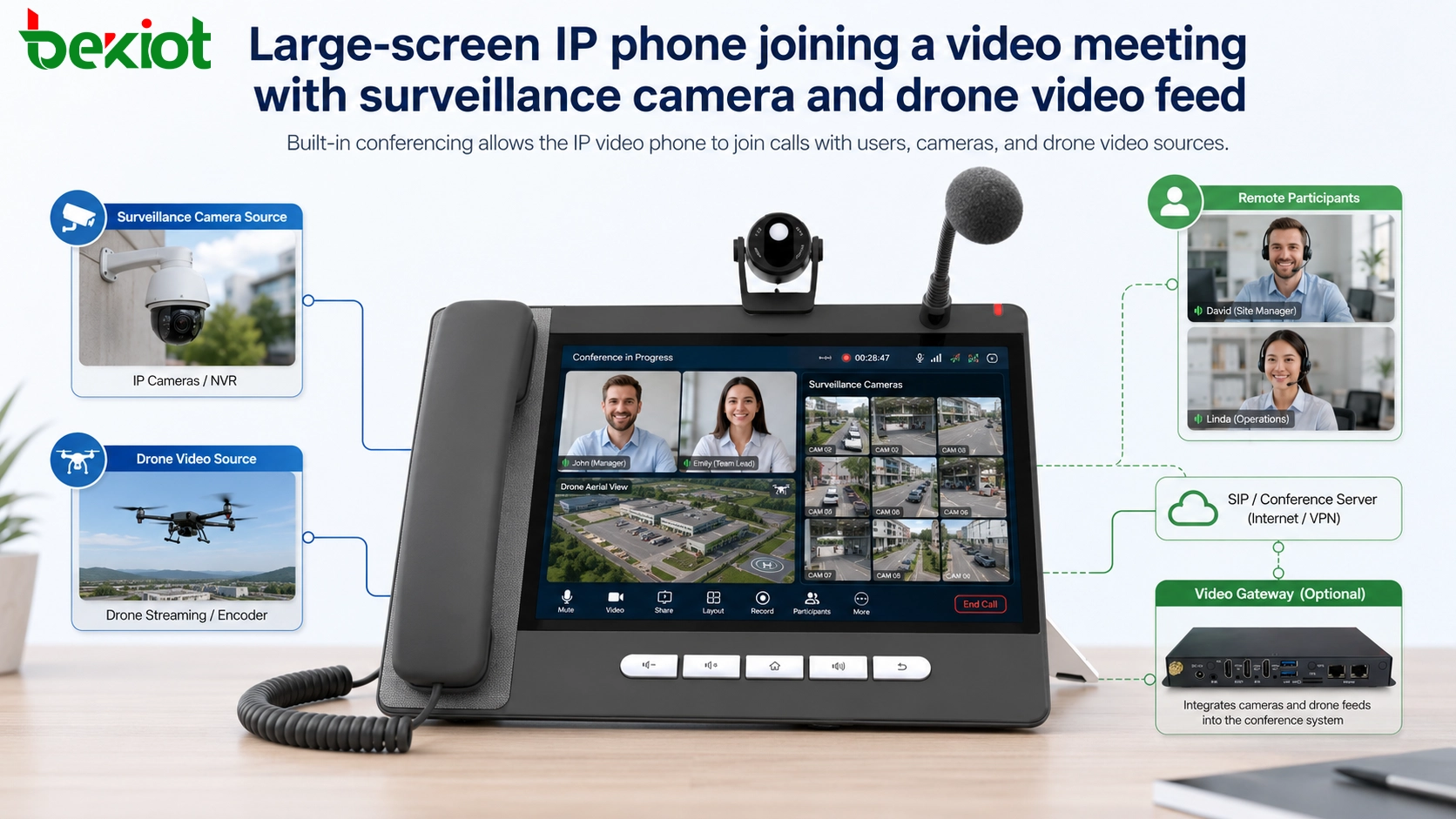
Large-screen IP video phones can also support built-in video conferencing. In smaller collaboration scenarios, the user can create a video meeting directly from the phone and invite participants from the contact list.
The meeting can include other video phones, video monitoring channels, drone video feeds, and other SIP-accessible video resources. This allows a small team to discuss an event while viewing live field images on the same communication endpoint.
For example, during a site inspection, a supervisor may join from another video phone, a control room may add a surveillance camera, and a field team may provide drone video. The large-screen phone becomes a simple meeting and viewing terminal without requiring a full command center workstation.
When an MCU Improves the Experience
Although a large-screen IP phone can support small video meetings, its local video mixing capability may be limited. If many video participants, camera feeds, or drone channels need to appear together, the phone may not be the best device to handle all video layout processing by itself.
For better performance, a video access gateway can be connected with a dedicated MCU. The MCU handles video mixing, layout processing, stream distribution, and conference control. The large-screen IP phone then receives the processed meeting layout instead of doing all the mixing locally.
This architecture is more suitable for professional visual command, multi-party video meetings, emergency coordination, and dispatch scenarios where stable video layout and better user experience are required.
Useful Scenarios Across Different Industries
A large-screen IP video phone can be useful wherever communication and visual information need to be combined. In a security room, it can call cameras and join video meetings. In a factory control room, it can view production area cameras and communicate with field staff. In a campus or hospital, it can work with intercoms, access control, and emergency communication points.
In transportation or emergency management, the device can support visual dispatch by displaying surveillance images, drone feeds, or remote site video. In hotels or enterprise offices, it can serve as a high-end communication endpoint for reception desks, managers, meeting rooms, and service centers.
The value is not that the phone replaces a full command platform. Its value is that it provides a compact, easy-to-operate, SIP-compatible visual terminal that can be placed exactly where users need fast access to communication and video resources.
Architecture Overview for Deployment
| Layer | Main Function | Typical Components | Project Value |
|---|---|---|---|
| Terminal Layer | User operation and visual display | Large-screen IP video phone, video phone, SIP terminal | Provides calling, video viewing, contact access, and conferencing at the desktop |
| Gateway Layer | Video resource integration | Video access gateway, camera access module, drone video channel access | Converts different video resources into SIP-accessible channels |
| Conference Layer | Video meeting and layout processing | Built-in meeting function or external MCU | Supports multi-party meetings, mixed video layouts, and better collaboration |
| Platform Layer | Communication control and numbering | SIP server, IP PBX, dispatch platform, unified communication platform | Manages registration, routing, numbering, permissions, and service integration |
This layered architecture allows the solution to remain flexible. Small systems can use the phone’s built-in video meeting capability. Larger systems can add a video gateway, SIP platform, and MCU to support more resources and better performance.
Planning Points Before Implementation
Before deploying this type of solution, the project team should confirm whether the IP phone supports SIP video calling, compatible video codecs, multi-touch operation, contact management, conferencing, and the required display size. The network should also be checked for bandwidth, latency, jitter, and multicast or unicast requirements if video resources are widely used.
For camera and drone access, the video gateway must support the required camera platforms, recorders, video protocols, and channel management methods. Each video source should have a clear SIP number, name, permission setting, and usage rule.
If the project requires multi-party meetings with several video sources, an MCU or professional conference platform should be considered. This can improve layout quality, reduce endpoint pressure, and provide a better meeting experience for command and collaboration scenarios.
Solution Value for Modern Communication
The main value of a large-screen IP phone is that it brings voice, video, contacts, meetings, monitoring, and visual access into one terminal. It simplifies user operation and makes communication more direct.
For organizations that already use SIP systems, video surveillance, drones, or unified communication platforms, this type of terminal can extend visual access to more desks, control rooms, and service points without adding a full workstation everywhere.
As communication systems become more visual and integrated, large-screen IP video phones can play a practical role in daily coordination, emergency response, visual inspection, security monitoring, and lightweight command collaboration.
FAQ
Does a large-screen IP phone need a separate video gateway?
It depends on the source of the video. If the phone only communicates with other SIP video terminals, a separate gateway may not be necessary. If it needs to access surveillance cameras, recorders, or drone video channels, a video gateway is usually required.
Can the phone replace a professional monitoring workstation?
Not completely. It is better used as a lightweight visual access terminal. A professional workstation is still more suitable for large-scale monitoring, multi-screen control, advanced playback, and complex security management.
What network conditions are important for video use?
Stable bandwidth, low latency, controlled jitter, proper QoS, and reliable LAN or WAN design are important. Video communication requires more network resources than ordinary voice calls.
Can different brands of cameras be connected?
They can be connected if the video gateway supports the required camera protocol, recorder platform, or stream access method. Compatibility should be tested before project deployment.
Who benefits most from this type of terminal?
Reception desks, control rooms, security teams, dispatch operators, managers, emergency response teams, service counters, and industrial site supervisors can benefit from a desktop terminal that combines voice and visual access.







