


In a modern converged communication project, the system is not simply a collection of phones, radios, cameras, speakers, and dispatch screens. Behind every stable voice call, video session, emergency alert, intercom request, recording task, and GIS-based dispatch operation, there is a layered architecture that determines how information is registered, routed, converted, displayed, and managed.
The three most important building blocks are servers, gateways, and terminals. Understanding these three layers helps system integrators, project owners, and engineering teams design a clearer architecture before choosing devices, estimating capacity, or connecting different communication networks.
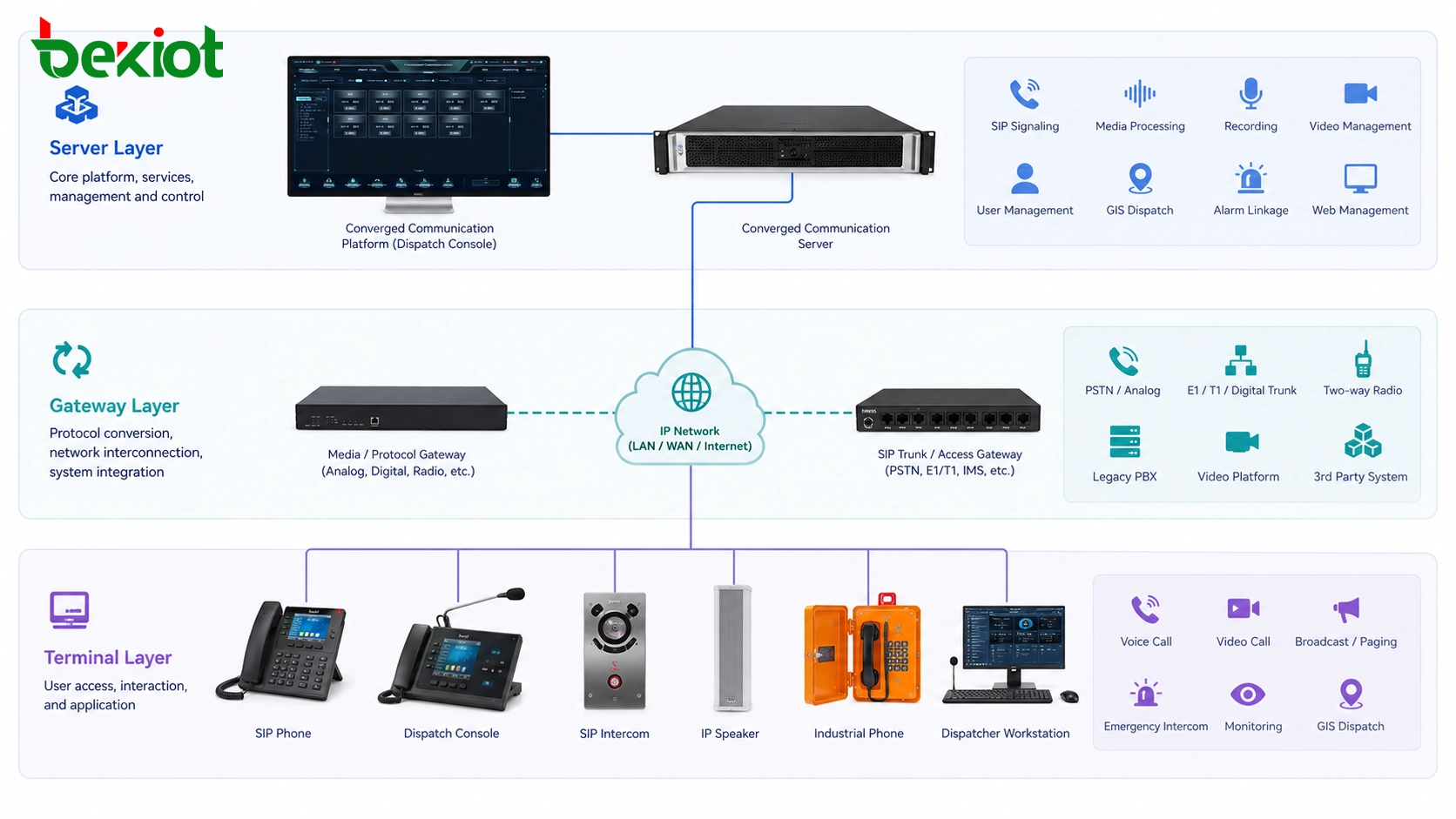
A Clear Structure Before System Deployment
Many communication projects become difficult because all devices are discussed together without a clear system structure. A SIP phone, a dispatch console, a radio gateway, a recording service, a video access unit, and a platform server may all appear in the same solution, but they do not play the same role.
The server layer provides the core switching, registration, management, media processing, recording, and platform services. The gateway layer connects external or non-SIP systems to the IP communication platform. The terminal layer presents the actual functions to users in offices, control rooms, industrial sites, emergency points, public areas, vehicles, tunnels, campuses, and remote facilities.
This layered thinking is especially important in unified communication, emergency command, industrial dispatch, public address, video linkage, and multi-network integration projects. It allows the whole system to remain open, scalable, and easier to maintain.
From Traditional Switching to Software-Based Platforms
Early communication systems were mainly built around circuit-switched telephone exchanges. Telephone lines were connected through physical switching equipment, and the whole network depended heavily on dedicated telephone infrastructure. In that type of structure, the concepts of server, gateway, and terminal were not as clearly separated as they are today.
With the development of IP networks and VoIP technology, communication switching gradually moved toward software-based architecture. Voice, video, signaling, user registration, dispatch control, and management services can now run over IP networks. This change created the need to classify devices according to their position and function in the overall communication network.
In a softswitch-based system, SIP has become one of the most common standards for session control. As long as devices follow compatible signaling and media standards, different services can be organized through a software platform instead of relying only on traditional hardware exchanges.
The Platform Layer That Coordinates Core Services
The server is usually the core of a converged communication system. In many projects, the platform is built around one or more SIP servers. These servers may include signaling servers, media servers, authentication servers, proxy servers, recording servers, video recording servers, user management servers, GIS map servers, and web management platforms.
The main value of the server layer is that key communication capabilities are implemented through software. This makes the system easier to expand, easier to upgrade, and often more cost-effective than a rigid hardware-only architecture.
What the Server Layer Usually Handles
A typical converged dispatch server can support SIP user management, extension registration, audio switching, video switching, voice dispatch, video dispatch, GIS dispatch, recording, video storage, permission control, system configuration, and background administration.
In larger systems, signaling and media processing may be separated across different servers to improve capacity and stability. In smaller and medium-sized projects, many of these services can often be deployed on one physical or virtual server, because the project scale may not require a distributed server cluster.
This is why some project owners may not see many separate servers in a real deployment. The functions still exist, but they may be integrated into one platform server or a compact server group.
Why Centralized Software Services Matter
Centralized server services reduce repeated configuration work and make user management more consistent. SIP users, dispatch permissions, recording rules, call groups, emergency numbers, paging zones, and terminal registration information can be managed from the platform side.
This also supports future expansion. When more IP phones, SIP intercoms, broadcast speakers, emergency help points, video terminals, or dispatch seats are added, the platform can manage them through standard configuration rather than redesigning the whole system.
The Interconnection Layer for Different Networks
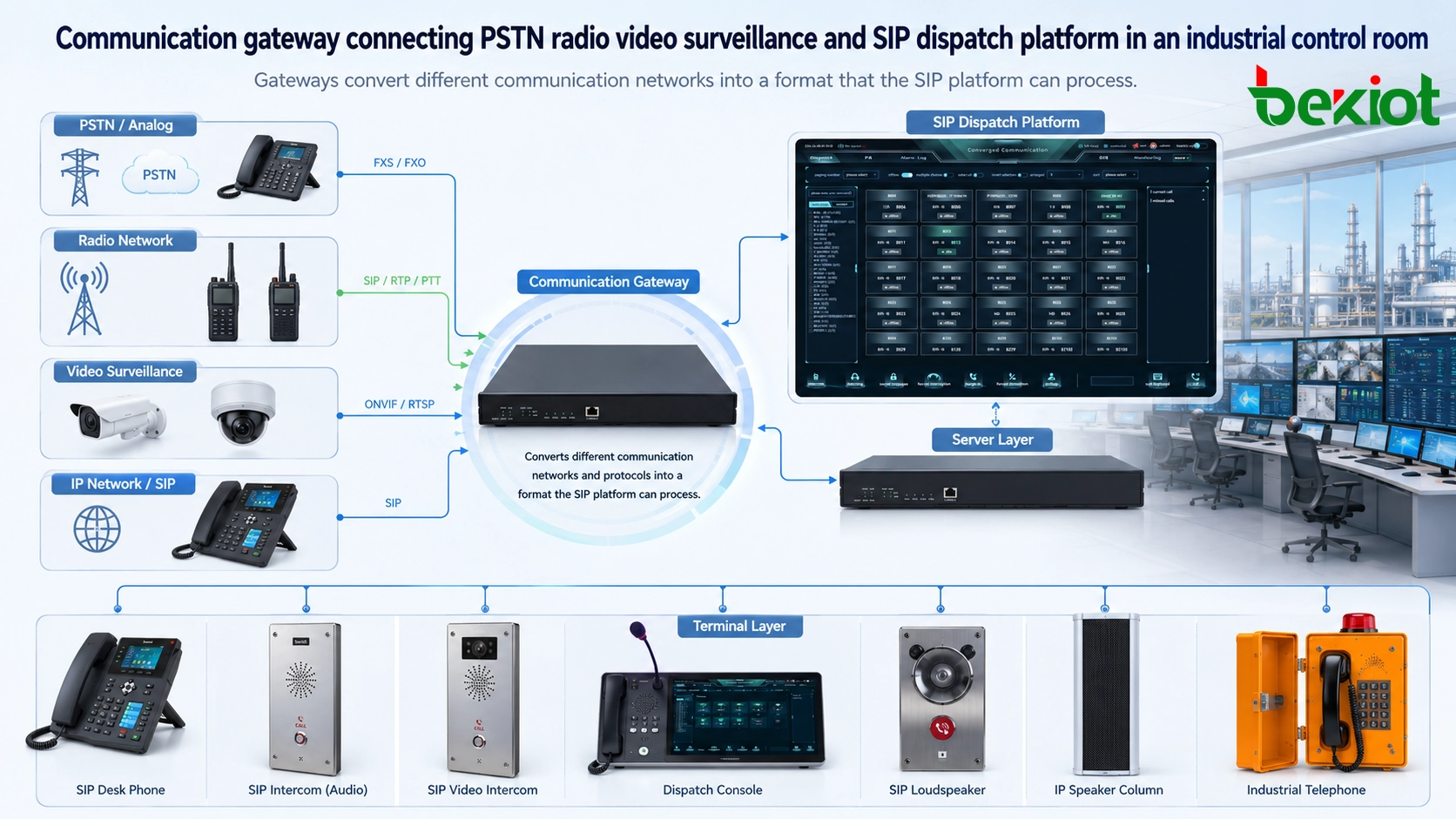
Although SIP-based communication is flexible, real projects rarely contain only SIP devices. Many sites still need to connect traditional telephone lines, analog phones, public switched telephone networks, radio systems, video surveillance systems, alarm systems, public address systems, or other third-party platforms.
These external systems may use different network structures, signaling methods, media formats, and communication protocols. They cannot always communicate directly with a SIP-based softswitch platform. This is where gateways become necessary.
Why Gateways Are Used Instead of Heavy Platform Customization
In theory, a server platform could be developed to support every third-party protocol directly. However, this approach often makes the core platform complicated, heavy, and difficult to maintain. Every new network may require a new integration workload, and the system loses the open and modular advantage of softswitch architecture.
A better method is to use dedicated gateway devices. Each gateway focuses on one type of cross-system connection, such as telephone access, radio access, video access, paging access, or alarm linkage. The server platform can then continue to process communication services through a more standardized SIP workflow.
Typical Gateway Applications
For telephone system integration, an FXS, FXO, E1, or VoIP gateway can connect legacy telephone lines and analog extensions to the IP communication platform. For trunked radio or push-to-talk integration, a RoIP gateway can bridge radio voice channels into the dispatch system. For video linkage, a video access gateway can help bring surveillance video or field video into the command platform.
This division of work keeps the core platform cleaner. The gateway handles protocol conversion and media conversion, while the server handles registration, routing, dispatch, recording, and system management.
The User-Side Layer Where Functions Become Visible
Terminals are the devices that users actually operate. Servers and gateways are usually deployed in equipment rooms, server rooms, control centers, or backend network locations. Terminals are placed where communication happens: on desks, at entrances, in tunnels, at emergency stations, in factories, on platforms, in warehouses, in vehicles, or in command centers.
A smartphone is a simple example of a terminal. Most users do not care how the backend system completes signaling exchange, media routing, or authentication. They care about whether the device can make a call, receive an alert, display video, trigger help, broadcast audio, or connect to the correct person quickly.
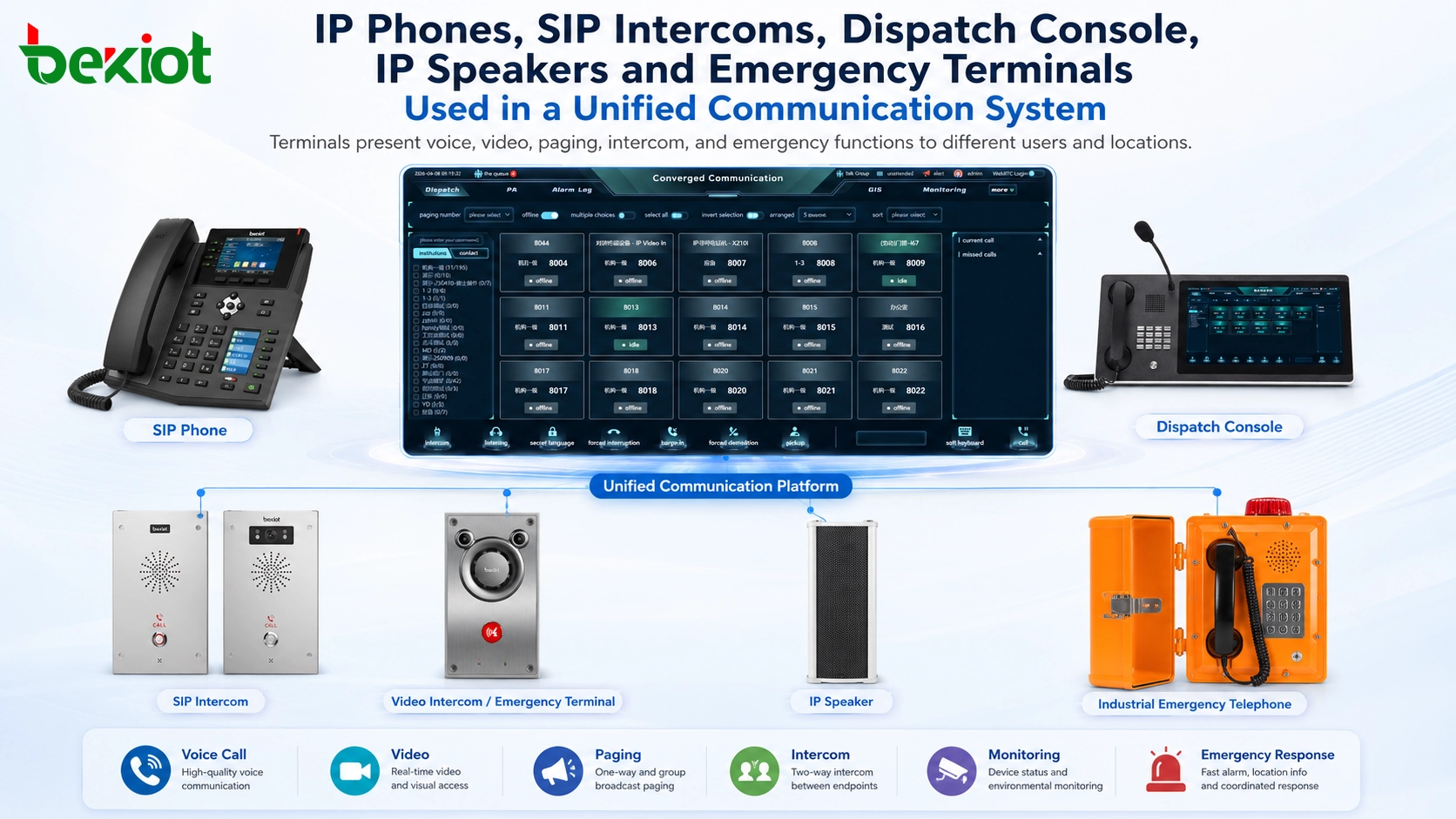
Terminals Are More Than Desk Phones
The most common terminal in many projects is the IP phone. It is usually placed on a desk and provides voice or video communication for office users, operators, reception desks, hotel front desks, control rooms, or service counters.
However, the terminal category is much broader. It may include SIP phones, video phones, smart terminals, dispatch consoles, IP speakers, SIP intercoms, emergency help points, industrial telephones, SIP cameras, public address endpoints, door intercoms, and rugged field devices.
Each terminal focuses on function presentation. The server creates the user account, extension number, password, permission, group, or service profile. After authentication and registration, the terminal can use the communication services provided by the platform.
Why Protocol Matching Is Important
A terminal should match the communication protocol and service requirements of the system. In SIP-based solutions, SIP compatibility, codec support, PoE power supply, network security, audio quality, environmental protection, and platform interoperability should all be checked before deployment.
For example, an office phone may prioritize extension calling and transfer functions, while an emergency terminal may need one-button calling, hands-free operation, waterproof housing, alarm linkage, and reliable operation in outdoor or industrial environments.
A Practical Architecture for Real Projects
A well-designed solution does not treat servers, gateways, and terminals as isolated products. It defines their responsibilities in the same architecture. The server provides central control. The gateway enables interconnection. The terminal delivers user-facing applications.
| Layer | Main Role | Typical Devices or Services | Project Value |
|---|---|---|---|
| Server Layer | Core communication control and service management | SIP server, media server, dispatch server, recording server, GIS platform, management platform | Centralized control, scalable services, easier management, lower expansion complexity |
| Gateway Layer | Protocol conversion and external system access | VoIP gateway, telephone gateway, RoIP gateway, video access gateway, paging gateway | Cross-system connection, legacy system reuse, cleaner platform architecture |
| Terminal Layer | User-side function presentation | IP phone, SIP intercom, dispatch console, IP speaker, emergency phone, SIP camera, smart terminal | Direct communication experience, field operation, emergency response, site-level service access |
This structure is suitable for many types of projects, including enterprise unified communication, emergency command centers, industrial dispatch systems, transportation communication, public safety platforms, energy facilities, campus notification, hotel communication, and multi-site operation management.
For projects that require SIP phones, industrial terminals, RoIP access, voice gateways, dispatch platforms, or emergency communication endpoints, Becke Telcom / 贝克通信 can be considered as a practical product and solution reference during system selection.
Value for Dispatch, Emergency, and Industrial Scenarios
The server-gateway-terminal model is valuable because it supports flexible solution design. A command center may need dispatch seats, GIS maps, recording, video linkage, radio access, telephone access, and emergency call points. A factory may need IP phones, industrial phones, SIP speakers, alarm linkage, paging zones, and control room communication. A transportation project may require tunnel phones, station intercoms, public address, CCTV linkage, and centralized dispatch.
These requirements are very different, but the architecture logic remains consistent. The server organizes the communication service. The gateway connects different networks. The terminal brings communication capability to the actual user location.
This is also one of the main advantages of modern converged communication systems. By using open protocols and modular access methods, the platform can support richer functions, more terminal types, and a more stable ecosystem for integrators, manufacturers, operators, and end users.
Design Checklist Before Implementation
Before deploying a solution, the project team should confirm the number of SIP users, concurrent call requirements, recording requirements, video access needs, GIS linkage, radio integration, telephone network access, public address zones, terminal installation environments, and future expansion plans.
The next step is to decide whether services should be deployed on one server or separated into multiple servers. For many small and medium projects, one integrated dispatch server may be enough. For larger projects, signaling, media, recording, video, and management services may need independent deployment or redundancy design.
Gateway selection should be based on the systems that need to be connected. Terminal selection should be based on the actual use environment, user behavior, protection level, audio requirements, installation method, and platform compatibility.
FAQ
How should a project team estimate server capacity?
Capacity should be estimated according to registered users, concurrent calls, video sessions, recording channels, dispatch seats, storage requirements, and integration services. A small voice-only system and a large command platform with video, GIS, and recording will require very different server resources.
Can existing analog phones or traditional telephone lines still be used?
Yes. Legacy telephone resources can usually be connected through suitable telephone gateways. This allows existing analog phones, PSTN lines, or PBX resources to be reused while the main platform moves toward IP-based communication.
Should gateways be installed near the server or near field equipment?
It depends on cabling, network quality, maintenance access, and the type of connected system. Some gateways are placed in the control room for centralized management, while others are installed close to radio equipment, analog lines, paging amplifiers, or field systems to reduce wiring complexity.
What factors affect voice quality in this architecture?
Voice quality can be affected by network latency, packet loss, codec selection, echo control, terminal microphone quality, speaker design, PoE stability, gateway performance, and server media processing capacity. Network planning is as important as device selection.
How can the system remain easy to maintain after expansion?
The best approach is to keep the platform architecture modular. Servers should handle standardized service logic, gateways should handle external protocol conversion, and terminals should remain compatible with the selected platform. Clear documentation, unified naming rules, and remote management tools also help long-term maintenance.







