


In many security, emergency response, and service scenarios, video surveillance and help intercom systems are often deployed separately. Cameras are connected to a monitoring platform, while help points or intercom terminals are connected to a voice or SIP communication system. This separated structure can increase equipment cost, integration difficulty, operation complexity, and maintenance workload.
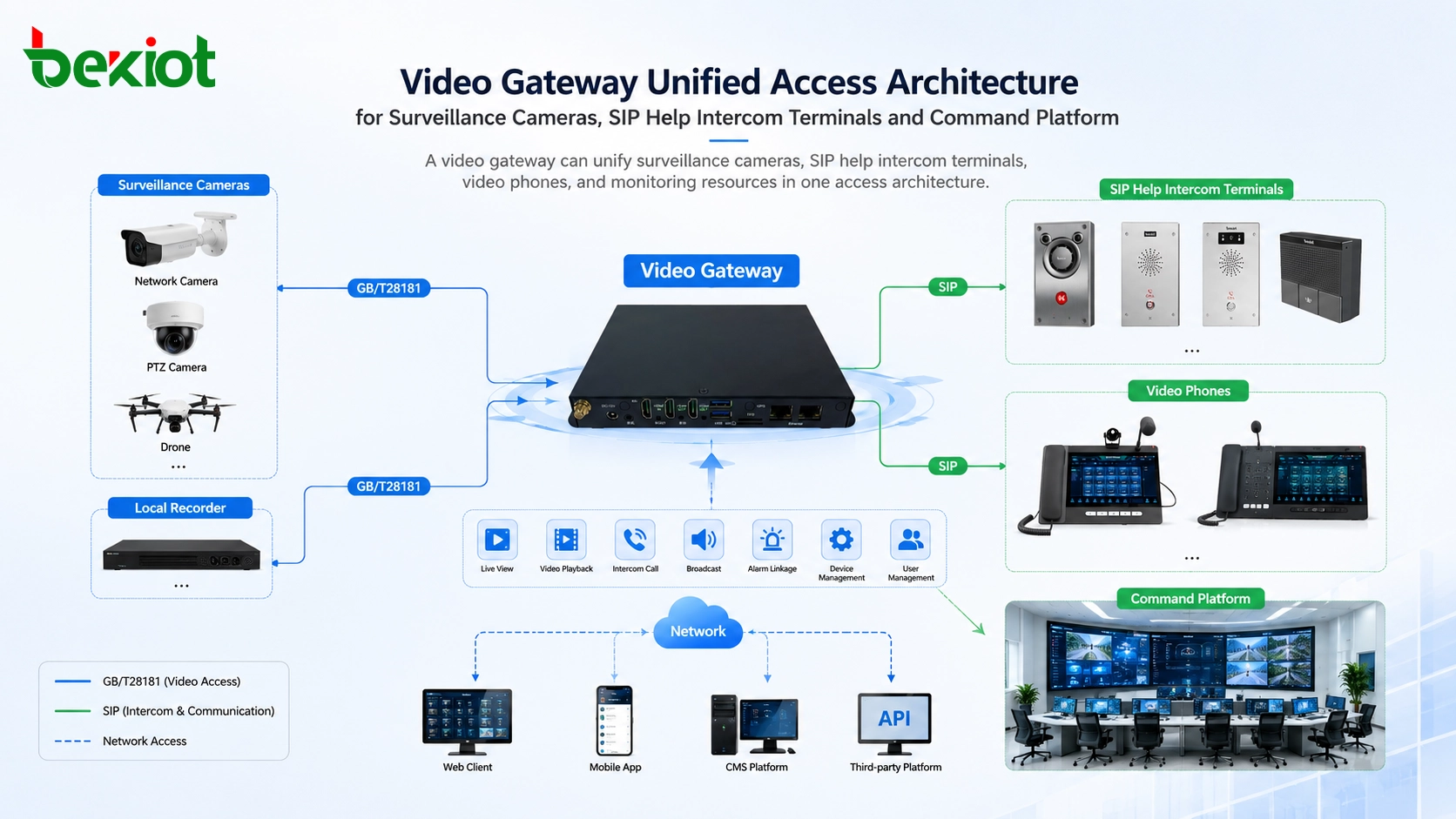
A video access gateway provides a more practical approach. It can connect surveillance cameras, recording devices, monitoring platforms, drones, video phones, and SIP intercom terminals through one unified access layer. For sites that need both real-time monitoring and emergency help communication, this architecture makes the system easier to deploy, manage, and expand.
A Unified Layer for Visual Security and Emergency Help
Traditional video monitoring software usually focuses on cameras, recorders, and monitoring platforms. It may be able to view live images, manage camera channels, and retrieve recordings, but it is not always designed to connect help intercom terminals, SIP video phones, drones, or communication endpoints.
A modern video access gateway is different. It is not only a video monitoring access device. It can also support access from surveillance cameras, video platforms, local recorders, drones, video phones, and IP help intercom terminals. This allows monitoring and communication resources to be brought into the same operational system.
For scenarios such as charging stations, public parks, scenic areas, unattended retail stores, campuses, transportation stations, industrial sites, and public service points, this unified design is especially useful. The site can provide both visual monitoring and emergency help communication without building two completely separate systems.
Simple Deployment From Cloud or Headquarters
The deployment model can be straightforward. A video gateway may be deployed on a cloud platform, in a headquarters data center, or in a central equipment room. Once deployed, it can provide unified access for monitoring cameras and help intercom terminals from multiple sites.
The system scale is usually planned according to the total number of camera channels and help intercom terminals. This makes project design clearer. Instead of calculating two isolated systems, the project team can plan video resources, emergency call points, storage requirements, user permissions, and platform access in one architecture.
For multi-site projects, centralized gateway deployment can also reduce operation and maintenance complexity. Administrators can manage camera status, terminal registration, video access, remote viewing, and intercom communication from a more unified platform.
Connecting Cameras Through Standard Video Access
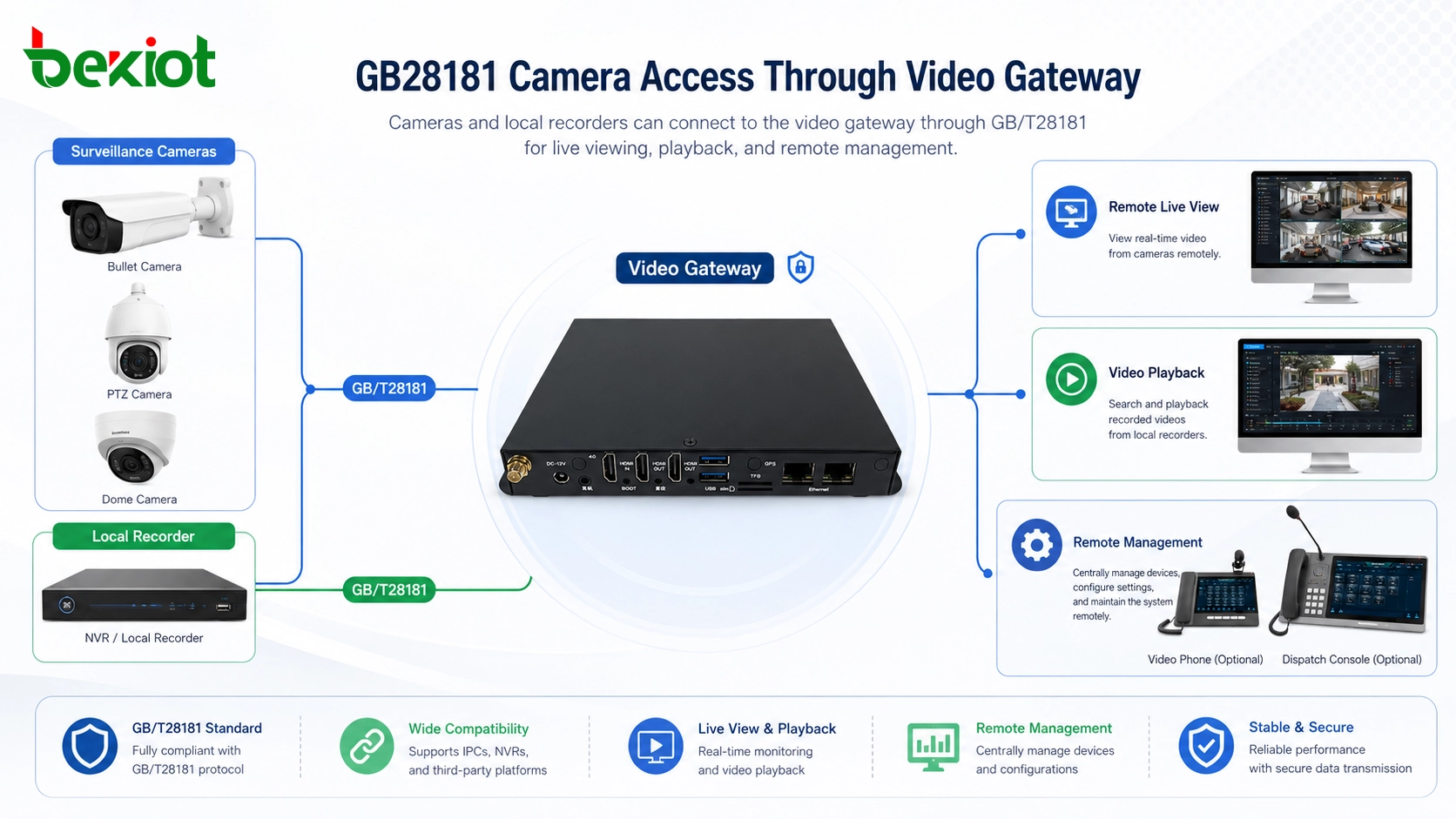
In a practical surveillance deployment, cameras can connect to the video gateway through GB/T28181. This allows camera resources to be networked and managed through the gateway. For field environments, local recorders can also be added near the front-end site and connected to the gateway through GB/T28181.
This local recorder design is useful when internet bandwidth is limited. Live video can be accessed remotely when needed, while recordings can be stored locally to reduce bandwidth pressure. The video gateway can then provide remote access to both live camera images and recorded video resources.
Beyond basic viewing, the gateway can also support camera control functions. Users may view camera status in a directory structure, open a video channel by clicking the camera name, control PTZ movement, adjust focus, and obtain alarm information from connected camera resources.
Bringing Help Points Into the Same Platform
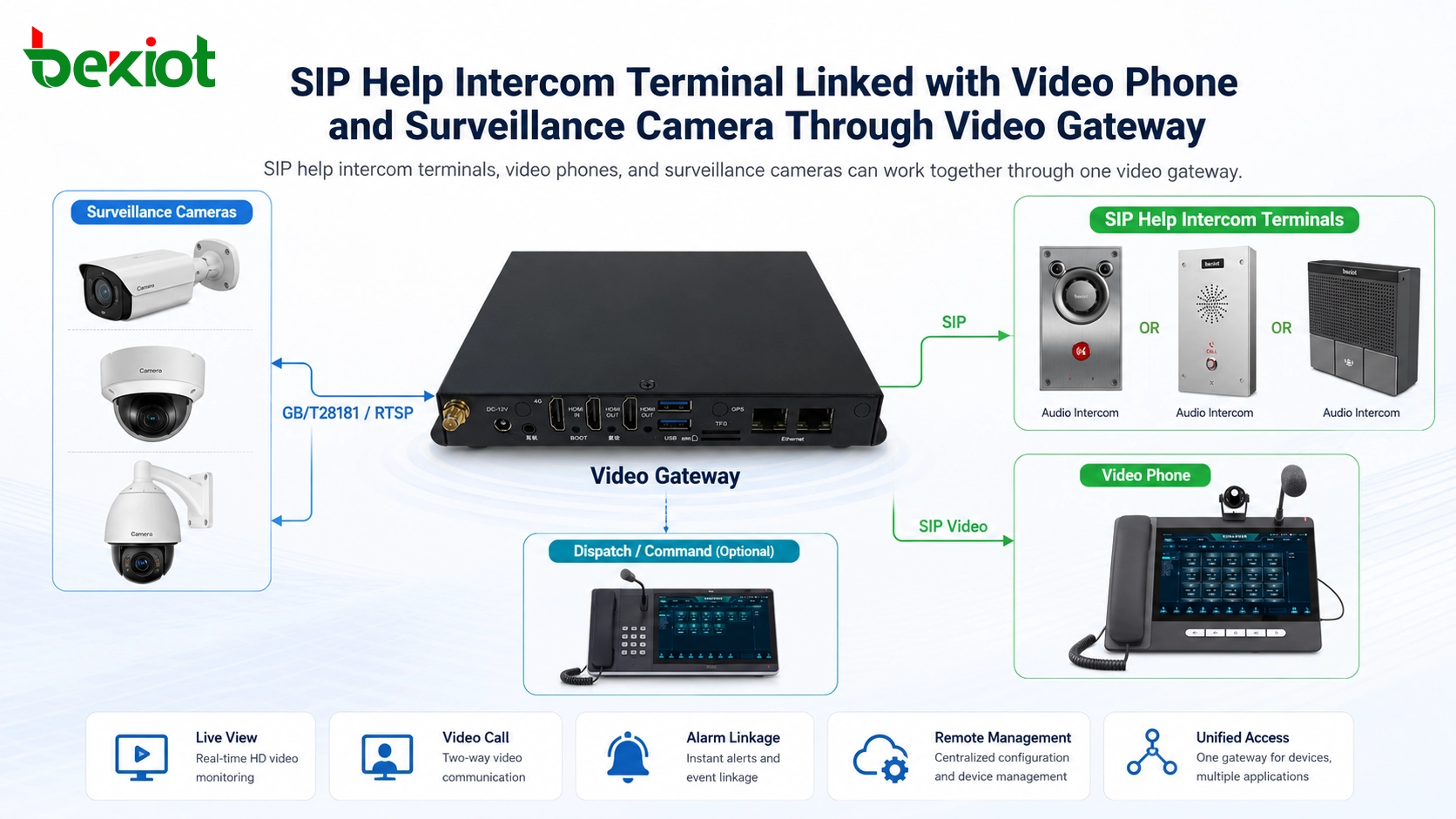
Help intercom terminals are increasingly based on SIP. Depending on the application scene and budget, a project may choose audio intercom terminals or video intercom terminals. Both can be connected to the video gateway by registering with SIP account information.
The gateway provides SIP accounts for help intercom terminals. After the SIP server address, account, password, and related registration information are configured on the terminal, the help point can be integrated into the system. Operators can then communicate with the terminal, make announcements, and view related video from the gateway interface.
Related product: SIP Intercom
This approach is practical for outdoor help points, emergency call stations, parking lots, service counters, gates, scenic areas, public facilities, and unattended service locations. Becke Telcom SIP intercom terminals can be considered when a project needs emergency call access, hands-free communication, video linkage, and platform-based management.
Hotline Calls and Visual Linkage
A help intercom terminal can be configured with a hotline number. When a user presses the help button, the terminal can automatically call a designated operator phone, dispatch seat, service desk, or command center extension.
If the terminal includes a camera, its video image can be pushed to the screen of a video phone or visual dispatch terminal. If the terminal itself does not have a camera, the system can also bind a nearby surveillance camera to the help point. When the help call is triggered, the related monitoring image can be displayed on the operator’s screen.
This visual linkage is important because a voice call alone may not provide enough context. Operators can see the caller’s location, surrounding environment, possible risks, and real-time situation while handling the help request.
Video Phones as Visual Operation Terminals
Video phones can also register to the video gateway through SIP. After registration, they can communicate with SIP help intercom terminals through audio and video calls. This allows a video phone to work as a lightweight visual operation terminal for reception desks, security rooms, service centers, and control points.
A video phone can also view camera resources connected to the gateway. This means an operator does not always need a full monitoring workstation to check a site image. For smaller sites or distributed service points, a video phone may be enough to handle help calls, view related cameras, and communicate with field terminals.
This design helps connect communication and video monitoring in a more natural workflow. The operator receives a call, sees the related image, speaks with the person on site, and can coordinate the next action from the same endpoint.
Reducing Equipment and Integration Complexity
In many wide-area monitoring projects, help intercom terminals are required together with video surveillance. In the past, multiple devices and platforms were often needed to complete this integration. One system handled cameras, another handled intercom calls, and additional middleware or custom development was required to link them together.
A video gateway simplifies this structure. It can provide unified access for video monitoring and help intercom terminals in one device or one gateway layer. The platform side can directly use the gateway functions, connect with another platform, or use API interfaces for deeper development.
This makes project implementation easier. Instead of repeatedly solving protocol access, terminal registration, video stream viewing, and call linkage separately, the gateway centralizes the access logic and provides a cleaner foundation for integrated applications.
Architecture for Multi-Scenario Deployment
A complete solution can be designed in layers. The front-end layer includes cameras, local recorders, SIP help intercom terminals, video phones, drones, and other video resources. The gateway layer provides GB/T28181 access, SIP registration, video resource management, and terminal access. The application layer provides monitoring, calling, help response, visual dispatch, recording retrieval, and API-based platform integration.
| Layer | Main Function | Typical Components | Project Value |
|---|---|---|---|
| Front-End Layer | Collects video and help request information | Cameras, NVRs, SIP help intercoms, video phones, drones | Provides live images, emergency calls, and field communication |
| Gateway Layer | Unifies access and resource management | Video gateway, SIP registration service, GB/T28181 access module | Connects monitoring and intercom resources through one access layer |
| Storage Layer | Supports local and remote video recording | Local recorder, platform storage, playback service | Reduces bandwidth pressure and supports evidence review |
| Application Layer | Presents unified operation | Monitoring interface, dispatch console, video phone, API platform | Improves response speed, management efficiency, and user experience |
This architecture is suitable for projects that need both monitoring and emergency communication. It can be used in public areas, distributed facilities, service sites, industrial environments, charging infrastructure, tourist areas, and unattended operation scenarios.
Planning Points Before Implementation
Before deployment, the project team should confirm the total number of camera channels, help intercom terminals, video phones, and recording resources. The gateway capacity should be selected according to both surveillance access and SIP terminal access requirements.
Network planning is also important. Live video, remote playback, SIP calls, and video intercom sessions require stable bandwidth and proper network quality. If the front-end site has limited uplink bandwidth, local storage should be considered so that video recordings do not need to be transmitted continuously to the center.
For better operation, each camera, help point, and video phone should have a clear name, location, number, permission setting, and linkage rule. This helps operators quickly identify the correct resource during emergency handling.
Value for Security, Service, and Emergency Response
The main value of this solution is not only that one gateway connects more devices. The real value is that monitoring and help communication become part of the same workflow. Operators can view a site, receive a help call, open related video, talk to the person on site, retrieve recordings, and coordinate response actions more efficiently.
This is especially useful where people may need help but staff are not always nearby. A visitor at a scenic area, a driver at a charging station, a customer in an unattended store, or a worker in a remote industrial area can press a help terminal and immediately reach the service or command center.
By combining video access and SIP intercom access, the system becomes more visible, more responsive, and easier to manage. It gives project owners a practical path to build integrated security and emergency communication without overcomplicating the deployment.
FAQ
Can one video gateway connect both cameras and SIP help intercom terminals?
Yes. A video gateway can connect camera resources through video access protocols and connect help intercom terminals through SIP registration, depending on the gateway capability and project configuration.
Does every help intercom terminal need a built-in camera?
No. A terminal can be audio-only or video-enabled. If it does not have a built-in camera, the system can bind a nearby surveillance camera to provide visual context during a help call.
Why use local recording at the front-end site?
Local recording is useful when the site has limited internet bandwidth. Video can be stored locally, while the gateway still allows remote live viewing and recording retrieval when needed.
Can operators answer help calls from a video phone?
Yes. If the video phone registers to the same SIP-based system, it can communicate with help intercom terminals and view related video resources according to the system configuration.
What should be checked before choosing a video gateway?
The project team should check supported video protocols, SIP registration capacity, camera channel capacity, recording access, remote playback, PTZ control, alarm integration, API availability, and compatibility with existing monitoring platforms.







