


Analog trunk, digital trunk, and IP trunk are three common ways to connect telephone systems, PBX platforms, carrier networks, and modern unified communication systems. They all serve the same basic purpose: allowing one communication system to exchange calls with another system. However, they are very different in interface type, channel capacity, signaling method, deployment cost, scalability, and long-term upgrade value.
For a small office, several analog lines may be enough. For a large enterprise or carrier-grade telephone access, E1 digital trunking can provide higher call capacity and stable dedicated-line quality. For modern SIP-based communication platforms, IP trunking is usually more flexible, easier to expand, and better suited for multi-site voice, video, dispatch, and cloud communication services.
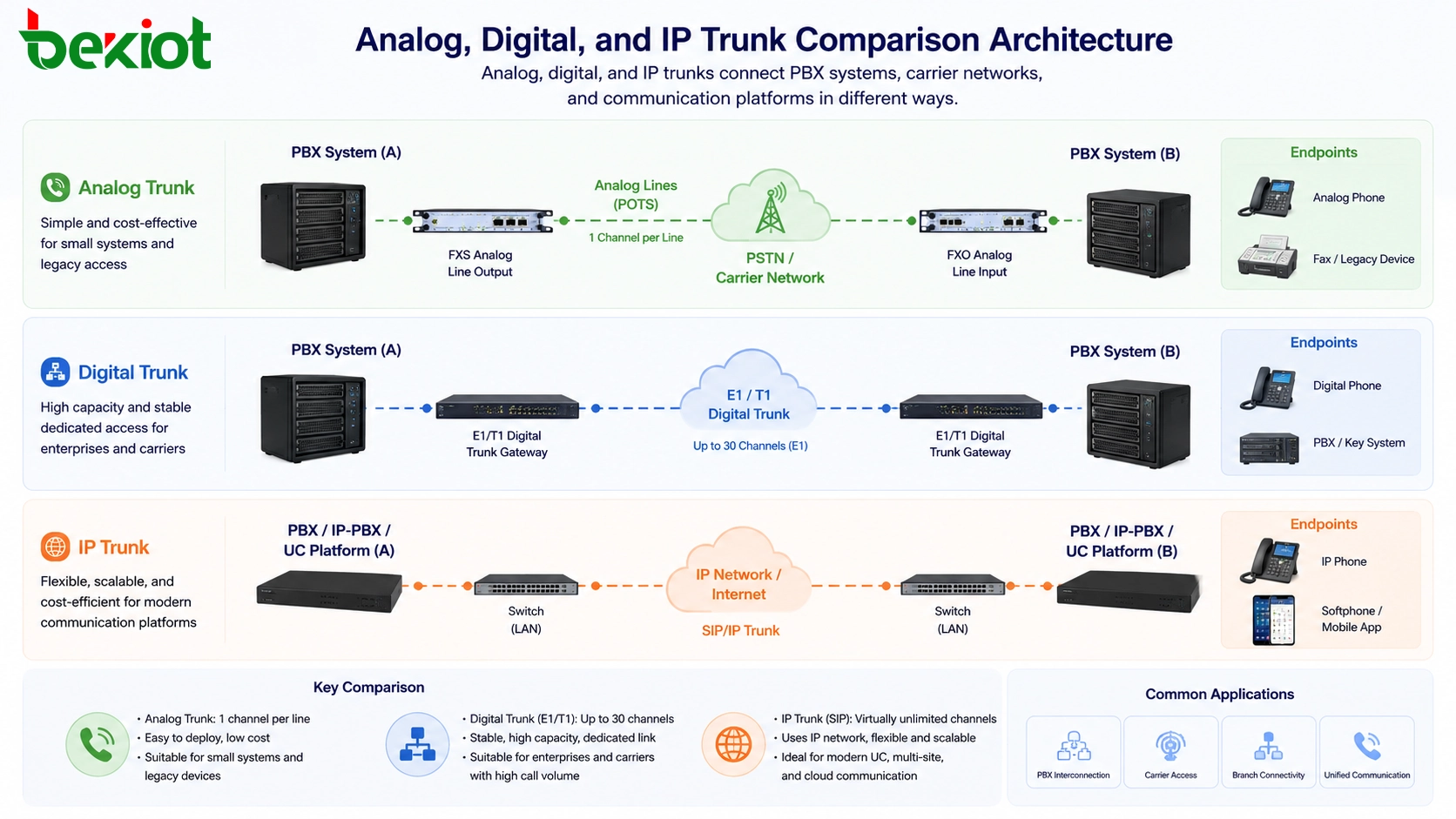
Why Trunk Type Matters in System Planning
In a communication project, the trunk is not just a physical line or a network connection. It determines how two systems exchange calls, how many concurrent calls can be supported, what type of gateway or interface is required, and whether the system can be expanded smoothly in the future.
A trunk may be used between two PBX systems, between an enterprise telephone system and a telecom operator, between a legacy voice system and an IP PBX, or between a private dispatch platform and a public voice network. If the trunk type is selected incorrectly, the project may face limited call capacity, complicated wiring, incompatible signaling, poor voice quality, difficult maintenance, or high upgrade cost.
For this reason, project teams should not choose a trunk only by price. They should compare current line resources, expected call traffic, existing PBX interfaces, operator access type, network condition, security requirements, and future migration direction.
Simple Line-Based Access for Smaller Systems
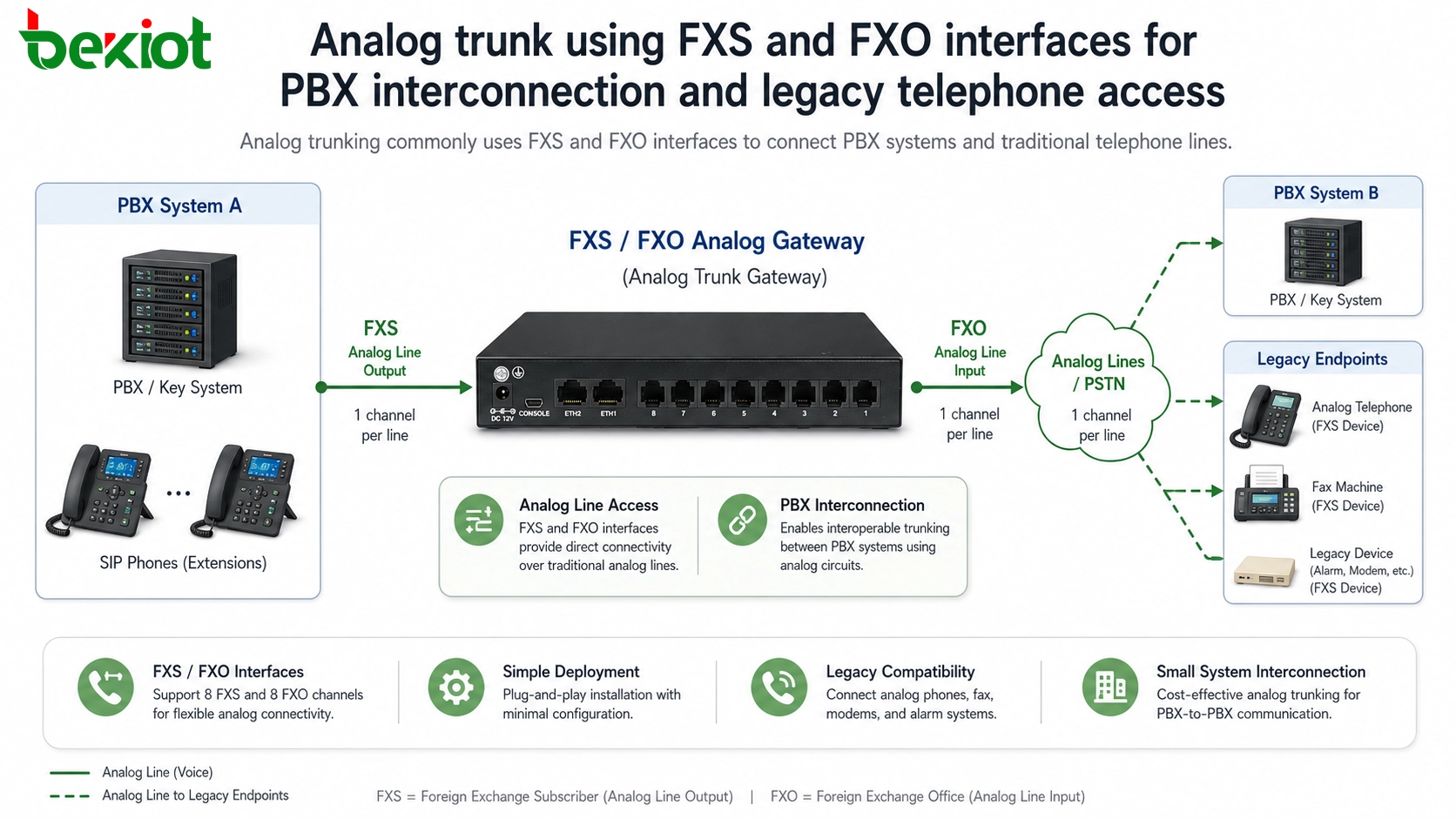
Analog trunking is based on traditional telephone line technology. It is easy to understand and is still used in many small offices, legacy PBX systems, hotels, service counters, and local telephone access scenarios. Each analog line usually supports one call at a time.
In PBX interconnection, the analog output side is often provided through an FXS interface. FXS stands for Foreign Exchange Station. For example, an 8-port FXS board can output 8 analog telephone lines. These lines may connect directly to analog telephones, or they may be connected to another PBX system.
The receiving side usually uses an FXO interface. FXO stands for Foreign Exchange Office. If two PBX systems are connected by 8 analog lines, they can provide 8 voice channels between the two systems. After number routing and dialing rules are configured, users under both systems can call each other.
Related solution: Analog Gateway Solution
Where This Method Is Still Useful
Analog access is suitable when the project scale is small, the number of required channels is limited, and the existing telephone infrastructure is already analog. It is also useful when an IP communication platform needs to retain analog phones, PSTN lines, fax machines, elevator phones, emergency phones, or legacy PBX extensions.
The advantages are clear: low entry cost, simple wiring logic, easy troubleshooting, and broad compatibility with older telephone equipment. For many small and medium-sized systems, analog trunking remains a practical option.
The limitation is also obvious. When the project requires many concurrent calls, analog trunking becomes inefficient because every call channel needs a separate physical line. Large-scale analog wiring is difficult to manage and is not ideal for modern expandable communication platforms.
Dedicated High-Capacity Links for Voice Networks
Digital trunking is used when analog lines cannot meet capacity and stability requirements. Instead of using many separate analog lines, a digital trunk carries multiple voice channels over one digital communication link. This makes it suitable for enterprise PBX systems, carrier access, call centers, and high-volume voice projects.
Digital trunks are commonly divided into T1 and E1 systems. E1 is widely used in China and many other regions. E1 is an international digital communication standard originally defined by ITU-T for transmitting voice, data, and signaling.
An E1 line uses time-division multiplexing. One E1 is divided into 32 time slots. Time slot 0 is used for frame synchronization, and time slot 16 is commonly used for signaling transmission. Each time slot carries 64 Kbps, so the total bandwidth of one E1 is 2.048 Mbps. This is why E1 is often called a 2M line.
In practical telephone communication, one E1 line usually supports 30 simultaneous voice calls. It can be transmitted over optical fiber and may connect to terminal equipment through twisted pair or coaxial cable, depending on the transmission equipment and site design.
Related solution: Trunk Gateway Solution
Signaling Must Match on Both Sides
Digital trunking is not only about physical connection. Signaling compatibility is a key requirement. Common telephone signaling methods include R2 signaling, China No.1 signaling, SS7 signaling, and ISDN-PRI signaling.
When two systems are connected by E1 trunking, both sides must use the same signaling method. In many current projects, SS7 and ISDN-PRI are among the more common options. Engineers also need to confirm coding mode, verification mode, clock settings, routing rules, and related trunk parameters.
The main advantages of digital trunking are stable voice quality, higher security, larger concurrency, and dedicated-line reliability. The disadvantages are higher access cost, more professional configuration requirements, and less flexibility than pure IP-based trunking.
Network-Based Access for Modern Platforms
IP trunking connects communication systems through an IP network. It is widely used in SIP PBX, unified communication platforms, dispatch systems, cloud voice services, enterprise voice networks, and operator IMS environments.
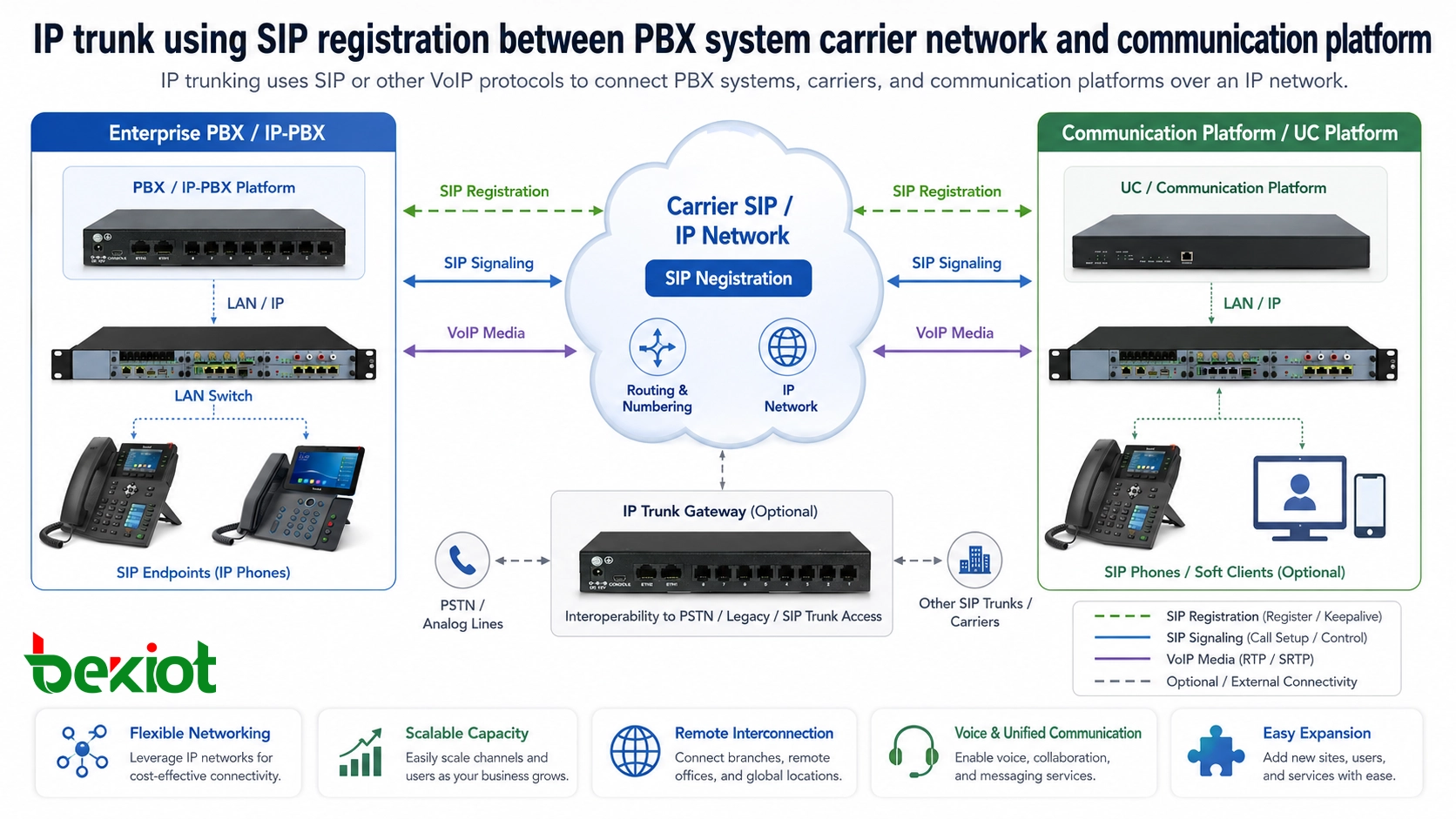
SIP is the most common protocol used for IP trunking. If two systems both support SIP and can reach each other through the network, engineers can create trunks on both systems and point each side to the IP address of the other system. This is often used for point-to-point interconnection between two communication platforms.
Another common method is registration-based access. In this model, the carrier or service provider gives the customer SIP account information, server address, port, password, and authentication parameters. The customer-side PBX or gateway registers to the provider platform, and calls are routed through that registered SIP trunk.
Beyond Basic SIP Connectivity
SIP is the mainstream protocol for modern IP trunking, but some systems may also support H.323, IAX, or other VoIP interconnection methods. In telecom operator networks, IMS core systems are also commonly based on SIP architecture.
The biggest advantage of IP trunking is flexibility. It does not depend on heavy physical line construction like analog or E1 access. It can support remote interconnection, multi-branch networking, voice routing, video communication, recording, number management, and platform integration through IP networks.
However, IP trunking also depends heavily on network quality and security planning. Latency, jitter, packet loss, NAT traversal, firewall policy, SIP registration stability, codec compatibility, and cyberattack protection can all affect voice quality and system reliability.
How the Three Options Compare
Analog, digital, and IP trunking are not simply old, newer, and newest technologies. They serve different project needs. The right choice depends on the existing system, carrier resources, channel capacity, budget, deployment environment, and future upgrade plan.
| Trunk Type | Typical Interface | Channel Capacity | Main Advantages | Typical Scenario |
|---|---|---|---|---|
| Analog Trunk | FXS / FXO | One call per analog line | Low cost, simple deployment, compatible with legacy systems | Small PBX access, analog line reuse, legacy telephone connection |
| Digital Trunk | E1 / T1 | One E1 usually supports 30 simultaneous calls | Stable quality, dedicated access, higher capacity, better reliability | Carrier access, enterprise PBX interconnection, high-volume voice service |
| IP Trunk | SIP / H.323 / IAX | Depends on bandwidth, codec, licensing, and platform capacity | Flexible networking, easy expansion, rich service integration | SIP PBX, unified communication, cloud voice, dispatch platforms, multi-site systems |
For small systems, analog trunks are often enough. For dedicated carrier-grade telephone access, E1 digital trunks remain valuable. For new communication platforms that require scalability, remote access, and service integration, IP trunking is usually the preferred direction.
Migration Strategy for Existing Voice Systems
Many organizations do not replace their entire telephone system at once. A more realistic approach is gradual migration. Existing analog lines, E1 circuits, old PBX equipment, and new SIP platforms may coexist for a long time.
In this type of project, gateways become the bridge between different technologies. An analog gateway can connect FXS or FXO lines to a VoIP platform. An E1 trunk gateway can connect digital carrier lines or legacy PBX trunks to SIP-based systems. A SIP trunk gateway can help manage carrier access, routing, codec conversion, and network adaptation.
This approach protects existing investment while allowing the communication system to move toward IP-based architecture. It is useful for enterprises, hotels, campuses, industrial plants, transportation systems, emergency command centers, and multi-branch organizations.
Deployment Checklist Before Selection
Before choosing a trunking solution, the project team should confirm the number of concurrent calls required, the current PBX interface type, the carrier access method, the signaling protocol, the number plan, the routing rules, and the expected future capacity.
For analog trunking, the key checks include FXS and FXO port quantity, line quality, caller ID support, polarity reversal, fax requirements, and wiring distance. For digital trunking, the key checks include E1 interface type, signaling mode, clock source, coding method, and operator-side configuration.
For IP trunking, the key checks include SIP compatibility, registration mode, IP reachability, NAT traversal, codec negotiation, firewall policy, bandwidth, QoS, security protection, and failover route design. These details directly affect voice quality and system reliability after deployment.
Building a Practical Voice Access Architecture
A good voice access architecture does not force every project into one trunk type. Instead, it uses the right access method for each part of the system. Analog lines may remain useful at the edge. E1 may still be required for dedicated carrier access. IP trunking can become the main direction for platform integration and future expansion.
The most practical solution is to design a modular access layer. Different trunks are connected through suitable gateways, while the central communication platform handles routing, user management, recording, dispatch, monitoring, and service integration.
With this architecture, organizations can keep existing resources, reduce migration risk, and gradually build a more flexible communication system for voice, video, dispatch, emergency response, and unified communication services.
FAQ
Can analog trunks be converted to SIP trunks?
Yes. Analog trunks can be converted to SIP through an analog gateway. The gateway connects to FXS or FXO lines on one side and communicates with the SIP platform on the other side.
Is E1 better than SIP trunking for voice quality?
E1 provides dedicated-line stability, while SIP trunking depends on IP network quality. If the IP network has proper bandwidth, QoS, and security control, SIP trunking can also provide reliable voice service.
Why does one E1 usually provide 30 calls instead of 32?
Although one E1 has 32 time slots, time slot 0 is used for frame synchronization, and time slot 16 is commonly used for signaling. Therefore, 30 time slots are usually available for voice channels.
Do all SIP trunks work with every PBX?
No. SIP is a standard protocol, but different platforms may have different registration methods, authentication rules, codec preferences, header formats, and NAT handling behavior. Compatibility testing is recommended before deployment.
When should a project use a gateway instead of direct trunk connection?
A gateway should be used when the two systems have different interfaces, signaling methods, media formats, or network conditions. It helps convert access types and makes the overall communication architecture easier to manage.







