


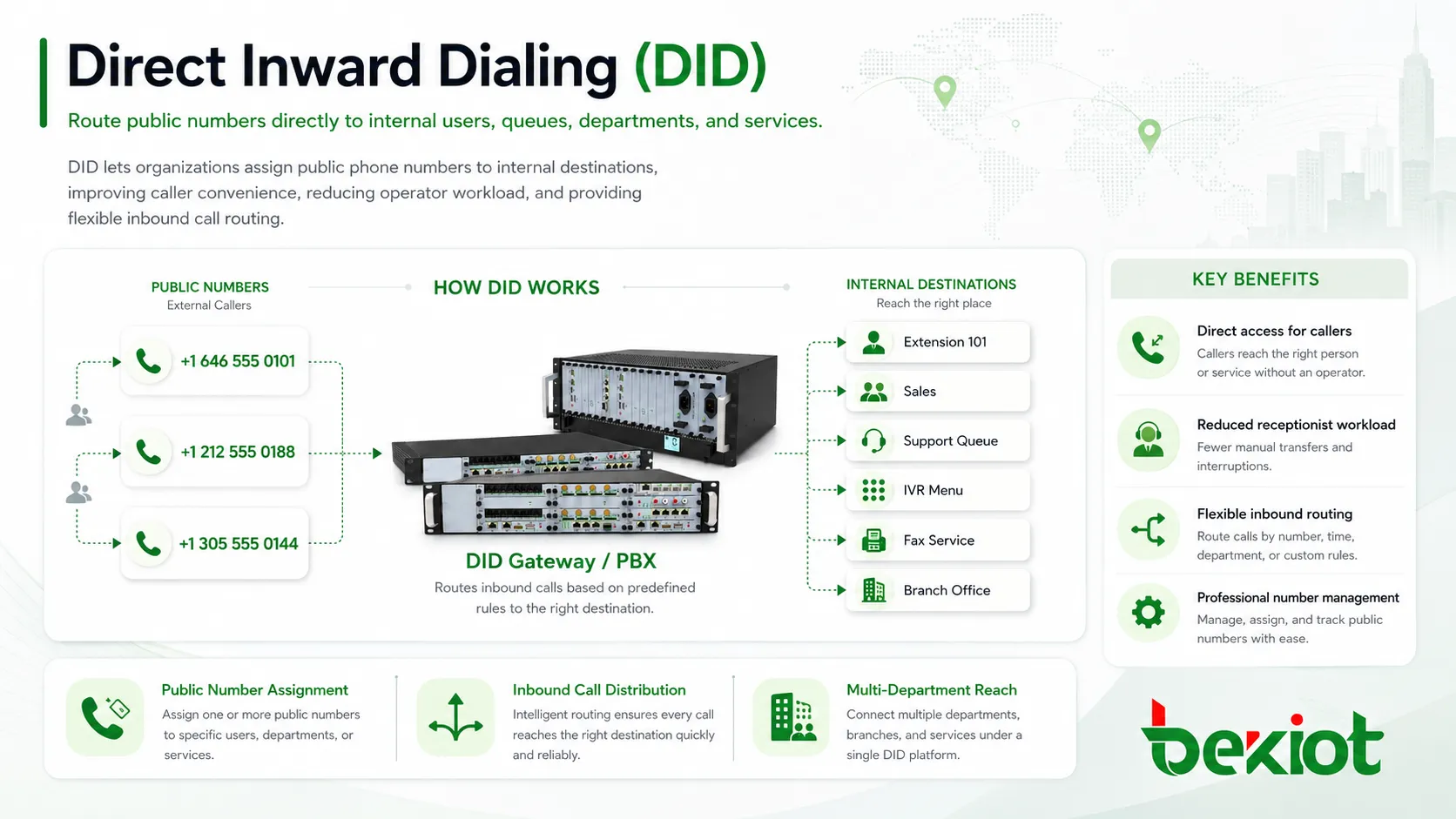
Direct Inward Dialing, commonly abbreviated as DID, is a business telephony feature that allows external callers to reach an internal extension, user, department, queue, IVR menu, fax service, or application directly by dialing a public telephone number. Instead of calling the company’s main number and asking a receptionist to transfer the call, the caller can connect to the intended destination through predefined routing rules.
DID is widely used in PBX systems, IP PBX platforms, SIP trunking, PRI circuits, cloud phone systems, contact centers, hotels, hospitals, schools, government offices, multi-branch enterprises, and service organizations. It improves caller convenience, reduces operator workload, supports professional number management, and gives organizations more control over how incoming calls are distributed.
Why Businesses Use Direct Numbers
In a traditional office phone workflow, most callers dial one main company number. A receptionist, auto attendant, or operator then asks who they want to reach and transfers the call manually. This approach can work for small teams, but it becomes inefficient when a business has many departments, employees, branches, service lines, or customer groups.
DID creates a more direct path. A customer can dial a support number and reach the support queue. A supplier can dial a purchasing number and reach the purchasing team. A hotel guest can dial a department number. A patient can call a clinic extension directly. This reduces waiting time and helps callers reach the right destination with fewer steps.
For the organization, direct numbers also create a cleaner numbering structure. Numbers can be assigned by user, role, department, location, campaign, region, or service type. This makes inbound call routing easier to manage and easier to analyze.
How the Incoming Call Path Works
Public Number Assignment
The process begins when a carrier, SIP trunk provider, cloud phone provider, or telecom operator assigns one or more public numbers to the organization. These numbers may be individual numbers or part of a continuous number range.
For example, a company may receive a block of 100 numbers. Each number can then be mapped to an internal extension, queue, IVR option, conference room phone, fax server, or department destination.
Carrier Sends the Called Number
When an external caller dials one of the assigned numbers, the carrier delivers the call to the organization’s PBX, IP PBX, SIP trunk, PRI interface, or cloud phone platform. Along with the call, the provider sends information about the number that was dialed.
This called number information is essential. The phone system uses it to decide where the call should go internally. If the number is missing, incorrectly formatted, or not matched by any routing rule, the call may fail or go to a default destination.
Inbound Routing Rule Matches the Number
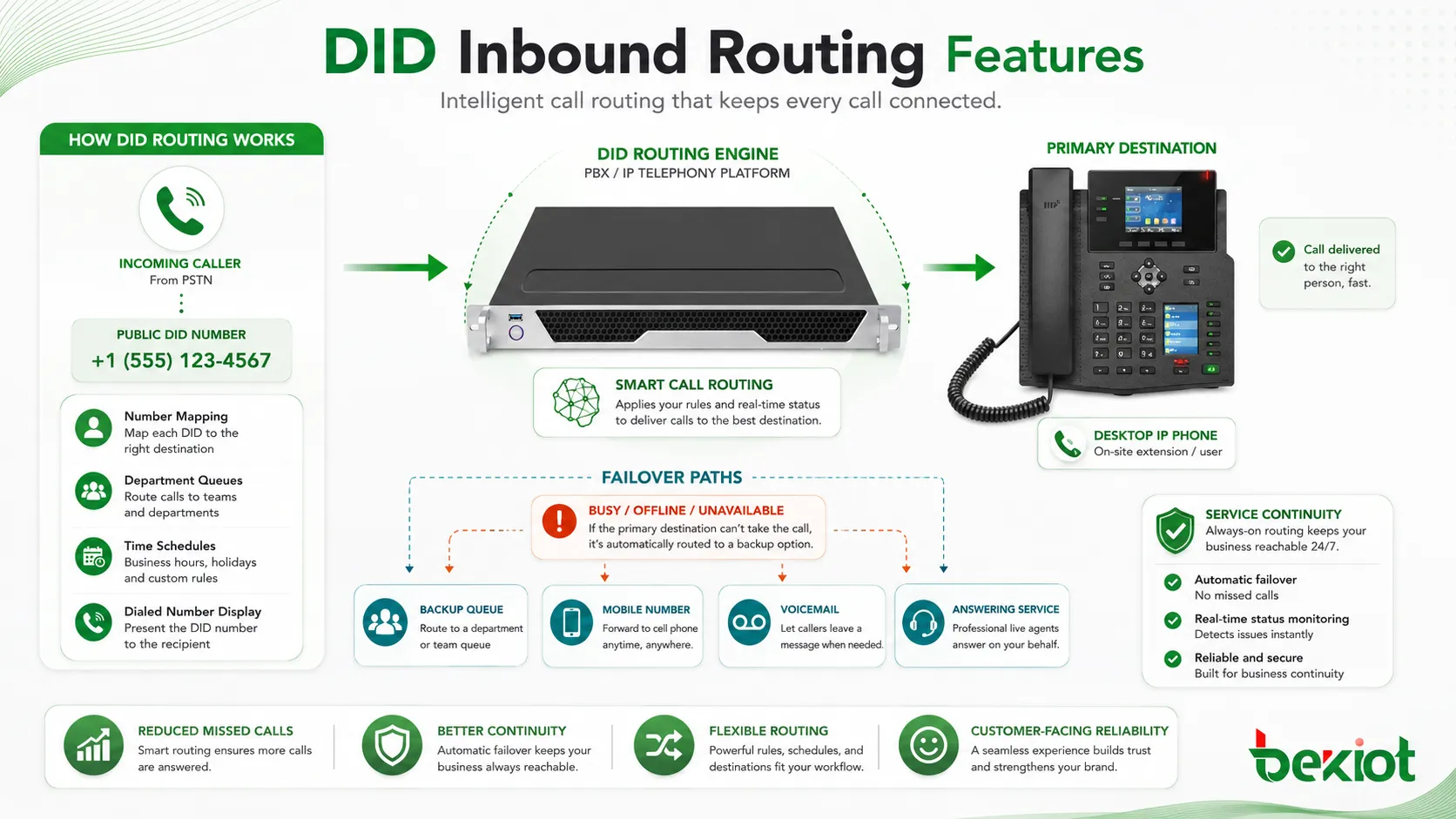
The PBX or communication platform checks its inbound route table. It looks for a rule that matches the dialed public number. Once a match is found, the system sends the call to the configured internal destination.
The destination may be a single user, group, queue, IVR menu, voicemail box, announcement, paging group, mobile extension, or failover route. This routing logic is what turns a public number into a direct access path.
Internal Destination Receives the Call
After routing, the selected internal endpoint or service receives the call. A desk phone may ring, a softphone may receive the call, a contact center queue may distribute it to agents, or an IVR may play a menu.
The caller experiences a direct connection, while the organization retains control through call rules, time schedules, recordings, failover paths, and reporting.
DID is valuable because it connects public numbering with internal call routing. The caller dials a normal phone number, while the PBX decides the correct internal destination.
Core Features in Business Phone Systems
Number-to-Extension Mapping
The most basic feature is mapping a public number to an internal extension. This allows an employee or device to have a direct public number without requiring a separate physical line for each person.
In modern VoIP and SIP environments, this mapping is usually handled through software. Administrators can update routes without rewiring phone lines or changing physical equipment.
Department and Queue Routing
A DID number does not always need to reach one person. It can also route to a department, ring group, hunt group, call queue, or contact center campaign. This is useful when many people share responsibility for the same type of call.
For example, a support number can ring several agents, while a sales number can route to a sales queue. This makes the number useful even if individual staff members change.
Time-Based Rules
Many systems allow different routing behavior based on time schedules. During business hours, a number may route to a live team. After hours, it may go to voicemail, an emergency line, a recorded announcement, or a backup service center.
Time-based routing improves call handling because callers receive a suitable response even when the primary team is unavailable.
Caller ID and Dialed Number Display
When a call arrives, the phone or agent interface may show both the caller’s number and the number the caller dialed. This helps staff understand why the call is coming in.
For example, the same agent may answer calls for sales, support, and billing. Seeing the dialed DID helps the agent answer with the correct greeting and context.
Failover and Overflow Handling
If the primary destination is busy, offline, or unavailable, the call can be sent to another destination. This may include another extension, backup queue, mobile number, voicemail, or external answering service.
Failover rules reduce missed calls and improve service continuity. They are especially important for customer-facing numbers and emergency service lines.
DID Compared with DOD
Direct Inward Dialing and Direct Outward Dialing are often discussed together because both are related to business phone numbers. However, they manage different call directions. DID controls how incoming calls reach internal destinations. DOD controls which caller ID is displayed when internal users make outbound calls.
| Feature | Call Direction | Main Purpose | Example |
|---|---|---|---|
| DID | Inbound | Routes a public number to an internal extension, queue, IVR, or service. | A customer dials a direct support number and reaches the support queue. |
| DOD | Outbound | Controls what caller ID appears when an internal user calls out. | A sales agent calls a customer and displays the sales hotline number. |
| Main Number | Usually inbound and outbound | Represents the general public contact number of the organization. | Callers dial the main company number and reach reception or IVR. |
| Extension Number | Internal | Identifies a user or device inside the phone system. | An employee dials 203 to reach another internal user. |
Business Value of Better Inbound Routing
Faster Caller Access
Direct numbers shorten the path between the caller and the intended destination. Customers do not need to wait for a receptionist or navigate too many IVR options when they already know the correct number.
This improves convenience for repeat customers, partners, suppliers, branch contacts, and service users who regularly call the same department or employee.
Reduced Operator Workload
Receptionists and operators spend less time transferring routine calls when direct numbers are available. They can focus on visitors, complex inquiries, overflow handling, and calls that genuinely need human assistance.
For large organizations, this can significantly reduce repetitive call handling.
Professional Number Structure
DID allows businesses to assign numbers in a structured way. Numbers can represent users, locations, departments, service categories, campaigns, or regions. This makes communication more organized and easier to manage.
A clear number plan also helps with marketing, customer service, reporting, and future expansion.
Improved Customer Experience
When callers reach the right place quickly, the experience feels smoother and more professional. A direct number can also make the business feel more accessible because customers know exactly whom they are calling.
For service teams, direct routing can reduce repeated explanations and unnecessary transfers.
Better Call Analytics
Different numbers can be used to track call sources. A company may assign separate numbers to marketing campaigns, regional offices, service lines, or product teams. Call reports can then show which numbers generate the most traffic.
This helps managers understand demand, staffing needs, campaign performance, and customer behavior.
Where Direct Numbers Are Commonly Used
Enterprise Offices
Office environments use direct numbers for employees, managers, departments, reception desks, conference rooms, and service teams. This allows external callers to bypass the main switchboard when they already know the correct contact.
Direct numbers are especially helpful for customer-facing employees, account managers, and departments that receive frequent external calls.
Contact Centers
Contact centers often assign separate numbers to different queues, campaigns, regions, products, or customer groups. A caller who dials a billing number can be sent to billing agents, while a caller who dials a technical support number can be sent to support specialists.
This improves routing accuracy and helps supervisors measure call volume by service category.
Hotels and Hospitality
Hotels may use direct numbers for reservations, front desk, guest services, restaurants, event sales, housekeeping, and administration. In larger properties, direct routing reduces the number of calls handled manually by the main operator.
Some hotel systems also use direct numbers for back-office staff or special service departments.
Healthcare and Clinics
Healthcare organizations may assign direct numbers to appointments, billing, pharmacy, nurse stations, departments, laboratories, or administrative offices. This helps patients and partners reach the correct team more quickly.
Routing should be planned carefully to protect privacy and avoid sending sensitive calls to the wrong destination.
Schools and Campuses
Education institutions may use direct numbers for admissions, student services, security, dormitory management, faculty offices, IT support, and facility teams. This reduces pressure on the main reception number.
For campuses with multiple buildings, location-based numbering can make direct access easier to understand.
Multi-Branch Organizations
Companies with multiple offices may assign local numbers to each branch while still routing calls through a centralized PBX or cloud phone system. This gives customers a local contact point while keeping call management centralized.
Branch-based routing can also support regional service identity and better call reporting.

Configuration Areas to Review
Number Format
Carriers and PBX systems may present incoming numbers in different formats. A number may arrive with a country code, without a country code, with a leading zero, or in a shortened form. The inbound route must match the format actually delivered by the provider.
Many routing problems happen because administrators configure the expected number format, but the carrier sends a different format.
Destination Type
Each direct number should have a clear destination. The destination may be a user, queue, IVR, voicemail, fax server, announcement, external forward, or time-based route.
Unclear destination planning can create messy call flows. Every number should have an owner and a documented purpose.
Business Hours
Not every number should route the same way all day. A sales number may go to a queue during business hours and voicemail after hours. A service emergency number may route to an on-call team at night.
Business-hour rules should be tested during both open and closed periods.
Failover Destination
If the primary extension or queue is unavailable, the system should know what to do next. Failover may route calls to another team, voicemail, mobile number, answering service, or emergency contact.
Without failover, direct numbers may become dead ends when the assigned user is offline.
Recording and Compliance
Some numbers may require call recording, retention, warning prompts, or special handling. This is common in contact centers, finance, healthcare, legal services, and regulated industries.
Recording rules should be assigned by number, route, department, or queue according to policy.
A direct number should never be configured as only a technical route. It should have a purpose, destination, schedule, fallback plan, and responsible owner.
Common Problems and Troubleshooting
Call Goes to the Wrong Destination
If a call routes incorrectly, check the inbound route order, number format, destination assignment, time condition, and catch-all route. Some systems match the first suitable rule, so route order matters.
Also confirm whether the carrier is sending the full number or only the last few digits.
Number Does Not Ring
If the number does not ring internally, the carrier may not be delivering the number correctly, the SIP trunk may reject the call, the inbound route may be missing, or the destination may be offline.
Review call logs and signaling traces to confirm whether the call reaches the PBX.
Caller Hears Busy Tone
A busy tone may indicate no available channel, full queue, unreachable destination, rejected call, or carrier-side capacity issue. If the problem happens only during peak hours, trunk capacity or queue configuration should be reviewed.
Failover routing can help reduce busy conditions for important numbers.
Wrong Name Appears to Staff
If staff cannot tell which number the caller dialed, the system may need better route labels, screen pop-ups, or DID name display. This is important when the same team handles calls for multiple departments or campaigns.
Clear display labels help agents answer calls with the correct greeting.
Callback Does Not Reach the Same Team
If a caller receives an outbound call and then calls back, the return route depends on the inbound configuration for that number. DOD and DID planning should be aligned so displayed outbound numbers route back to useful destinations.
This is especially important for sales, support, healthcare, and appointment reminder workflows.
Best Practices for Number Planning
Start with a clear numbering plan. Decide which numbers represent individuals, teams, branches, campaigns, or services. Avoid assigning numbers without documentation because unmanaged number growth becomes difficult to maintain.
Use meaningful labels. In the PBX, routes should be named clearly, such as “Support DID,” “Branch Tokyo Main,” “Billing Queue,” or “Clinic Appointments.” This helps administrators troubleshoot later.
Keep direct numbers aligned with inbound and outbound behavior. If a department displays a number on outbound calls, inbound calls to that number should return to the same department or a helpful callback destination.
Test all important routes. Call each number from an external phone, confirm the destination, check caller display, test after-hours behavior, and verify failover rules.
Review unused numbers. Numbers that no longer serve a business purpose should be removed, reassigned, or documented to avoid unnecessary cost and confusion.
Maintenance and Governance
DID routing should be reviewed whenever staff changes, departments merge, branches relocate, numbers are ported, SIP trunks are changed, or call center queues are redesigned. A route that worked last year may not match the current business structure.
Administrators should also monitor call reports. A number with high missed-call volume may need more agents, better failover, improved IVR wording, or a different schedule. A number with no traffic may be retired or repurposed.
For larger organizations, number ownership should be documented. Each number should have a business owner who approves routing changes and confirms whether the number is still needed.
Choosing the Right Setup
The right setup depends on business size, call volume, number availability, customer workflow, and phone system design. A small office may need only a few direct numbers. A contact center may need many numbers mapped to queues and campaigns. A multi-branch enterprise may need local numbers in several regions.
For VoIP and SIP deployments, confirm that the provider can deliver the required number format and capacity. For PRI or legacy systems, confirm how many digits are sent to the PBX and whether the PBX can map them correctly.
For cloud phone systems, review whether direct numbers can be assigned to users, call queues, auto attendants, shared lines, or external destinations. The system should support the call flow the business actually needs.
FAQ
Can one DID number ring multiple users?
Yes. A number can route to a ring group, queue, hunt group, or shared destination instead of only one extension.
Can a DID number be moved from one extension to another?
Yes, if the phone system allows route changes. Administrators can usually remap the number to another extension, queue, IVR, or department without changing the public number.
Why does the carrier send only the last digits of the number?
Some PRI or SIP configurations deliver only a set number of digits for inbound routing. The PBX route must match the digits delivered by the provider.
Can direct numbers be used with an IVR menu?
Yes. A number can route directly to an IVR menu, allowing callers to choose options after dialing a department or service-specific number.
What should be checked before porting DID numbers to a new provider?
Check number ownership, active routing, emergency service records, fax usage, alarm lines, call queues, outbound caller ID dependencies, porting schedule, and fallback plans during the transition.







