


Many buildings, campuses, factories, command centers, and smart city projects already have video surveillance systems. They may include cameras, NVRs, VMS platforms, storage devices, monitoring screens, and video wall display functions. From a daily security perspective, these systems can already support live viewing, recording, playback, and basic monitoring management. This often raises a practical question: if video surveillance is already available, why does the project still need a video gateway?
The answer is that a surveillance system is usually designed to solve monitoring and recording problems, while a smart integration project needs video to become usable data for other platforms. When video feeds must be connected to command systems, emergency platforms, dispatch systems, communication platforms, web applications, mobile clients, or multi-site management platforms, a video gateway becomes the bridge between isolated surveillance resources and wider digital workflows.
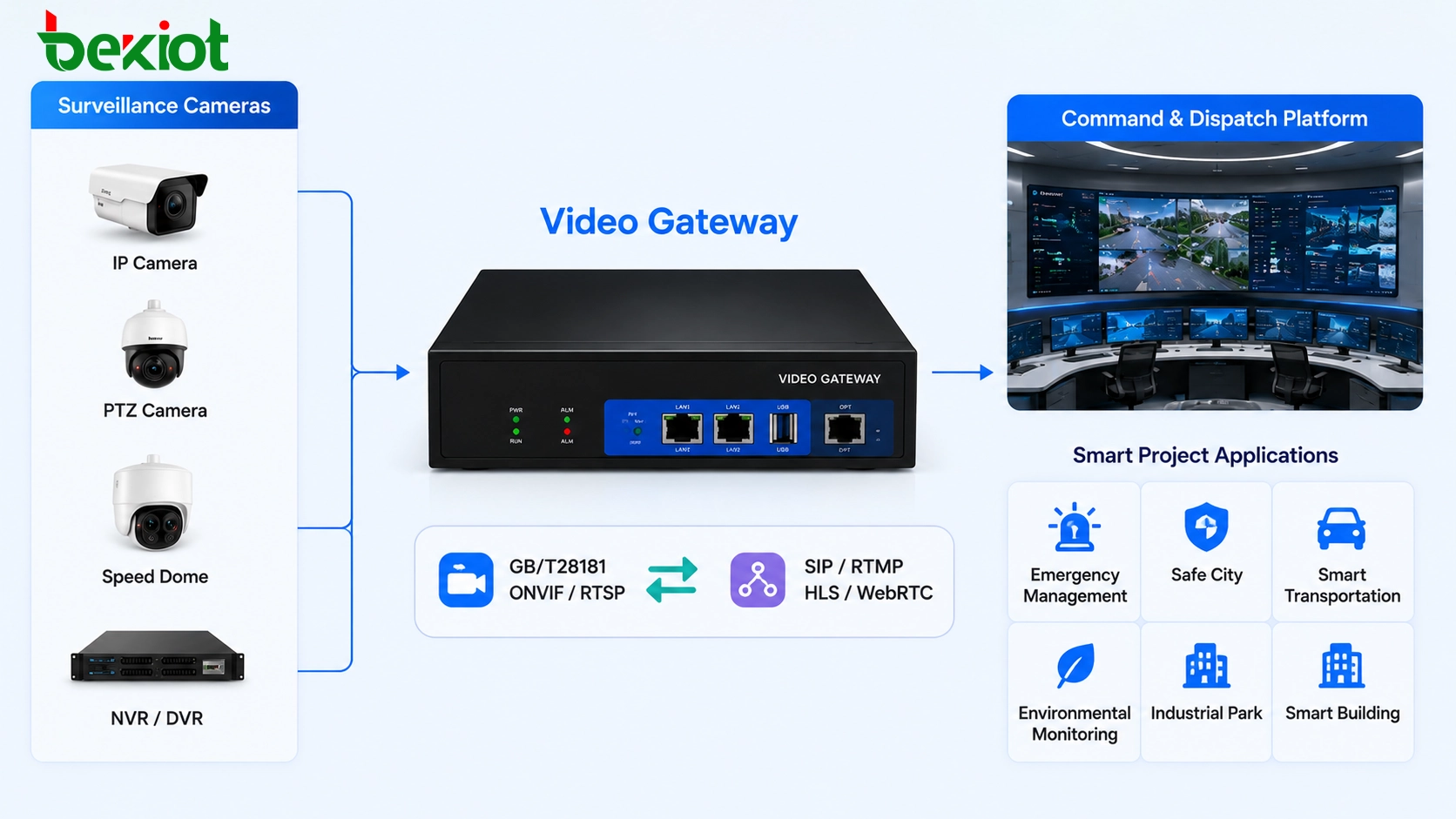
Existing Monitoring Systems Are Often Closed Around Their Own Tasks
A traditional video surveillance system is usually built around cameras, recorders, storage, live preview, playback, and video wall display. Its main goal is to help security teams view important areas, record evidence, and retrieve footage when needed. For this purpose, the system may work very well without any additional gateway.
However, smart integration projects have different requirements. A project may need to open a camera stream inside a web dashboard, show live video in an emergency command screen, push video to a mobile app, connect cameras to a communication platform, or link video with alarms, access control, intercom, broadcasting, and dispatch workflows.
In these situations, the surveillance platform is no longer only a monitoring tool. It becomes a video resource provider for other business systems. If the original system cannot provide the required stream format, access method, codec, or networking structure, a video gateway is needed to complete the integration.
Protocol Conversion Makes Video Easier to Use
Many video surveillance systems support common industry protocols such as GB/T28181, ONVIF, and RTSP. These protocols are useful for camera access, device discovery, platform connection, and video stream retrieval. They are widely used in surveillance environments, especially when cameras, recorders, and VMS platforms need to communicate with each other.
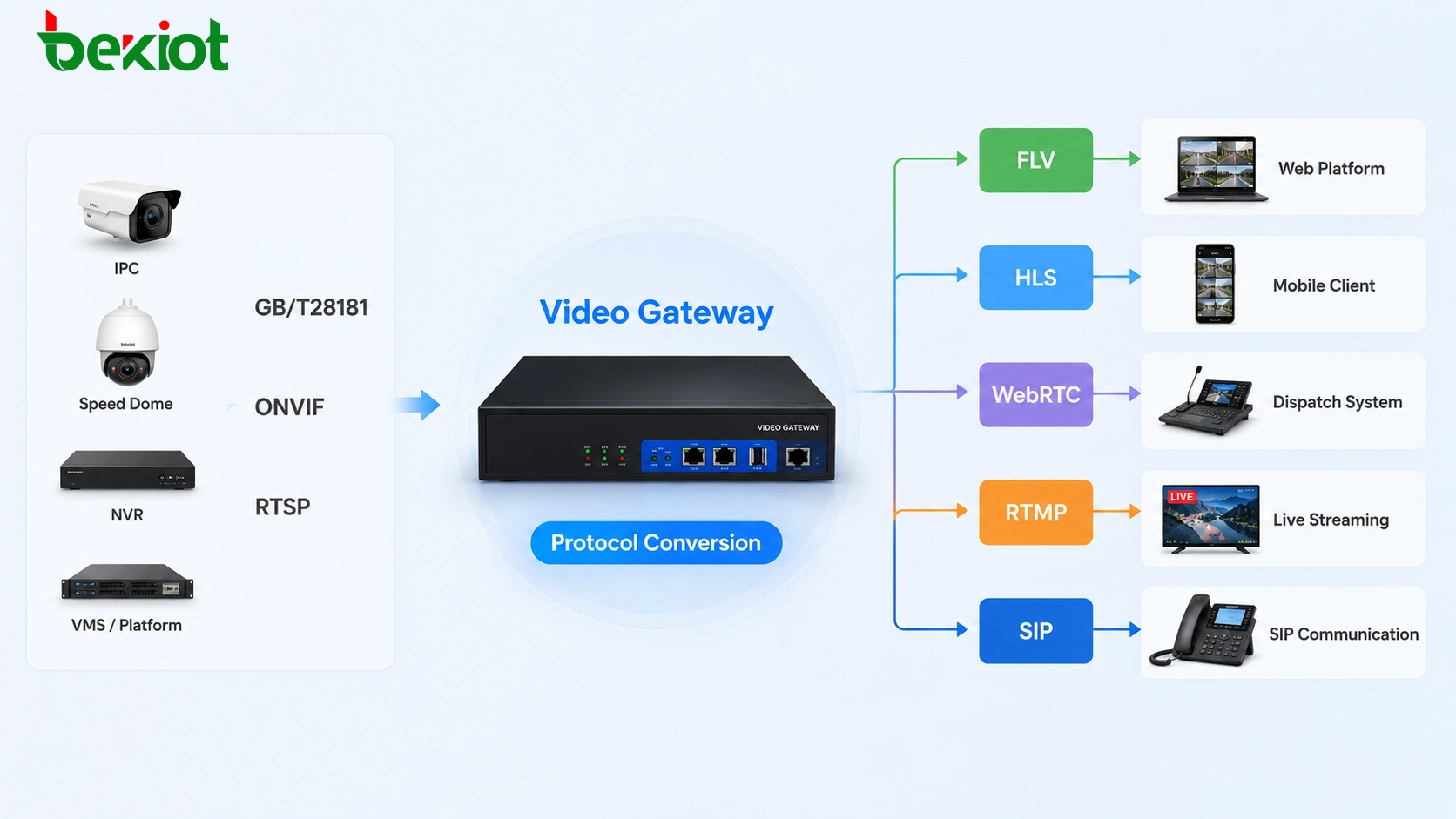
But application developers and smart project platforms often need different output formats. For example, a web-based project may need FLV, HLS, or WebRTC for browser playback. A live streaming workflow may need RTMP. A communication or dispatch system may require SIP-based video access. Some platforms may still need RTSP output for secondary integration.
A video gateway can receive video streams from cameras, NVRs, or monitoring platforms, then package or convert them into the format required by the upper-layer application. This reduces development difficulty and avoids rebuilding the surveillance system from the ground up.
For project delivery, this is especially important. Without a gateway, developers may need to handle device differences, stream pulling, protocol adaptation, browser playback compatibility, and video format issues one by one. With a gateway layer, the video source can be standardized before it is provided to the business platform.
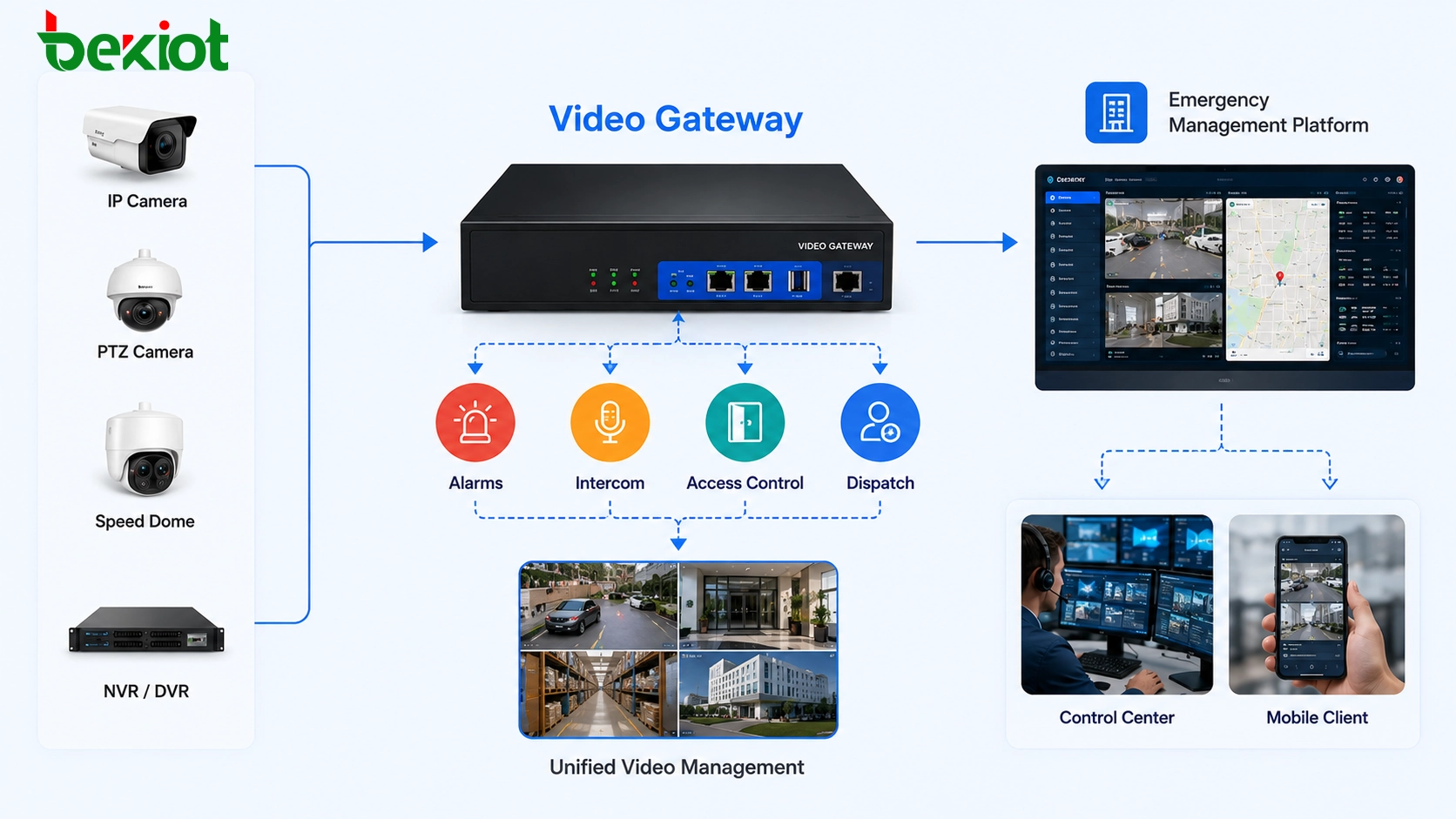
Multi-Site Access Needs a Unified Layer
Another important use of a video gateway is video networking. In many projects, video surveillance systems are not deployed in one location only. A group may have several factories, campuses, stations, office parks, warehouses, substations, branches, or remote sites. Each site may have its own cameras, NVRs, VMS platform, network environment, and management rules.
If every site is managed independently, the upper-level platform may find it difficult to view and organize video resources in a unified way. Operators may need to switch between different systems, remember different access addresses, or rely on local security teams to provide footage. This limits the value of centralized command and remote operation.
A video gateway can help connect multiple independent surveillance systems into a more unified video resource structure. Through standard protocols such as GB/T28181, the gateway can access cameras, recorders, or existing monitoring platforms, then provide streams and device resources to an upper-level platform.
This approach is useful in smart parks, transportation hubs, industrial facilities, campus security, emergency management, energy sites, and multi-branch organizations. It allows the project to reuse existing cameras while improving centralized visibility, remote management, and cross-site coordination.
Codec Differences Can Block System Integration
Video codec compatibility is another common reason to deploy a video gateway. Many earlier surveillance systems use H.264 video encoding. Newer surveillance systems often use H.265 because it can reduce bandwidth and storage usage under similar image quality conditions. Both codecs are widely used, but not every receiving system supports both formats equally.
In many video integration projects, communication platforms, video conferencing systems, web playback modules, command platforms, and third-party applications may still mainly support H.264. If the surveillance camera outputs H.265 and the receiving system cannot decode it properly, live video may fail to display, appear unstable, or require additional processing.
A video gateway can solve this problem through video transcoding. It can convert video from H.265 to H.264, or adapt video streams to the format required by the target platform. In addition to codec conversion, a gateway may also adjust resolution, frame rate, and bitrate to match different network conditions and display requirements.
This is important for real project deployment. A high-resolution video stream may be suitable for local monitoring, but it may be too heavy for a mobile client or remote command platform. By adjusting bitrate and resolution through the gateway, the system can provide different stream profiles for different users and scenarios.
Better Playback Across Web and Mobile Applications
Modern smart projects increasingly need video to be displayed outside a traditional monitoring client. Operators may need to view live video in a browser, on a tablet, inside a large-screen dashboard, or through a mobile application. These environments do not always support native surveillance protocols directly.
For example, RTSP is common in surveillance systems, but it is not always convenient for direct browser playback. HLS is suitable for broad compatibility but may have higher latency. WebRTC is suitable for lower-latency interactive viewing. FLV may be used in some web-based live video systems. RTMP is often used in streaming workflows. Different platforms require different packaging methods.
A video gateway provides a practical adaptation layer. Instead of forcing every application to understand every camera protocol, the gateway converts the original video source into the format required by each application. This improves development efficiency and makes the final platform easier to maintain.
Video Becomes More Valuable When Linked with Events
The real value of video integration is not only watching live pictures. In smart projects, video often needs to be linked with events. When an alarm is triggered, the platform may need to automatically open nearby camera feeds. When an intercom call is made, the operator may need to see the related video point. When a door access event occurs, the system may need to display the entrance camera. When an emergency broadcast starts, the command center may need visual confirmation of the affected area.
A video gateway makes this type of linkage easier because it provides standardized access to video resources. The upper-layer platform can request camera streams according to device ID, area, event type, or business workflow. This turns passive monitoring resources into active support tools for emergency response, security management, and operational decision-making.
For command and dispatch environments, this is especially important. Operators need to see what is happening quickly, not search through isolated monitoring platforms manually. Video gateway integration can shorten response time and improve situational awareness.
A Practical Architecture for Smart Projects
A typical video gateway architecture usually includes four layers. The first layer is the existing video source layer, including IP cameras, NVRs, VMS platforms, and surveillance networks. The second layer is the access layer, where protocols such as GB/T28181, ONVIF, and RTSP are used to obtain streams and device resources.
The third layer is the video gateway layer. This layer handles protocol conversion, stream distribution, codec adaptation, transcoding, stream packaging, device mapping, and output management. The fourth layer is the application layer, where the processed video streams are used by web platforms, mobile apps, dispatch systems, emergency platforms, large-screen dashboards, or third-party business systems.
This layered design helps protect existing investment. The project does not need to replace all cameras or rebuild the entire monitoring system. Instead, the video gateway reuses existing video resources and makes them available to new applications in a controlled and standardized way.
Selection Points for Deployment Planning
Confirm the Source Protocols
Before deployment, engineers should confirm whether the existing video system supports GB/T28181, ONVIF, RTSP, or other access methods. Different cameras and platforms may support different protocol details, authentication methods, stream paths, and device management rules.
Define the Required Output Formats
The project team should clearly define whether the upper-layer platform needs FLV, HLS, WebRTC, RTMP, SIP, RTSP, or other output formats. The right output format depends on whether the video will be used for web playback, mobile viewing, live streaming, command dispatch, video conferencing, or third-party integration.
Check Codec and Performance Requirements
If the project involves H.264 and H.265 conversion, engineers should estimate the number of channels, resolution, frame rate, and bitrate. Transcoding consumes processing resources, so the gateway capacity must match the expected video load.
Plan Network and Security Boundaries
Video traffic can consume significant bandwidth. The deployment should consider LAN and WAN bandwidth, cross-site transmission, firewall rules, platform authentication, stream access permission, and user role control. A video gateway should not only make video easier to access, but also keep access manageable and secure.
Common Project Scenarios
| Scenario | Typical Requirement | Gateway Value |
|---|---|---|
| Smart Park Management | Connect cameras from buildings, entrances, roads, and control rooms | Unified access, stream conversion, and event-based video display |
| Emergency Command | Open related video automatically during alarms or incidents | Fast video retrieval and integration with command workflows |
| Industrial Sites | Connect distributed monitoring points across production areas | Multi-site video networking and remote visual management |
| Web Platform Integration | Display surveillance video in browser dashboards | Convert RTSP or GB/T28181 streams into web-friendly formats |
| Communication and Dispatch | Use video together with intercom, SIP communication, or dispatch systems | Provide compatible video streams for real-time communication platforms |
| Legacy System Upgrade | Reuse old cameras while connecting to new applications | Protocol adaptation, codec conversion, and reduced replacement cost |
Final Takeaway
A video surveillance system and a video gateway solve different problems. Surveillance systems are mainly built for monitoring, recording, playback, and security management. A video gateway is built to make those video resources usable by other platforms, applications, and workflows.
When a project only needs local live view and recording, the existing monitoring system may be enough. But when the project needs protocol conversion, web playback, mobile viewing, multi-site networking, codec adaptation, alarm linkage, command integration, or unified video output, a video gateway becomes an important part of the solution.
For smart integration projects, the video gateway does not replace the surveillance system. It extends the value of existing cameras and monitoring platforms by enabling stream conversion, video networking, transcoding, and cross-platform integration. This allows video resources to support smarter operations, faster response, and more flexible system development.
FAQ
Does a video gateway replace the existing surveillance platform?
No. A video gateway usually works with the existing surveillance system. It receives video streams from cameras, recorders, or monitoring platforms and provides converted or standardized streams to other applications.
Is a video gateway only needed for large projects?
Not necessarily. Large projects often need video gateways for multi-site networking, but smaller projects may also need one when web playback, protocol conversion, or codec compatibility is required.
Can existing cameras continue to be used?
Yes. One of the main advantages of using a video gateway is that existing cameras and monitoring platforms can often be reused, reducing replacement cost and simplifying upgrade work.
What should be tested before final deployment?
Engineers should test source access, output format, codec compatibility, stream delay, bandwidth usage, user permissions, multi-channel performance, and integration with the upper-layer platform.
Which output format is best for browser viewing?
The best format depends on the project requirement. HLS is widely compatible, WebRTC is better for low-latency interaction, and FLV may be used in some web live-view systems. The final choice should match browser support, latency requirement, and platform architecture.







