


Call recording is an important requirement in many telephone system projects. It is used for customer service quality control, dispute review, staff training, compliance management, emergency communication tracing, and operational evidence retention. However, not every telephone system should use the same recording method. Different recording solutions have different costs, deployment complexity, management models, and application focus.
A reliable recording design should be selected according to the telephone architecture, trunk type, extension scale, call flow, recording scope, storage requirement, and management workflow. For some projects, recording only external customer calls is enough. For others, the system must record internal extensions, outbound calls, inbound calls, conference calls, dispatch calls, or selected users. Understanding the available options helps project teams choose a more suitable and maintainable solution.
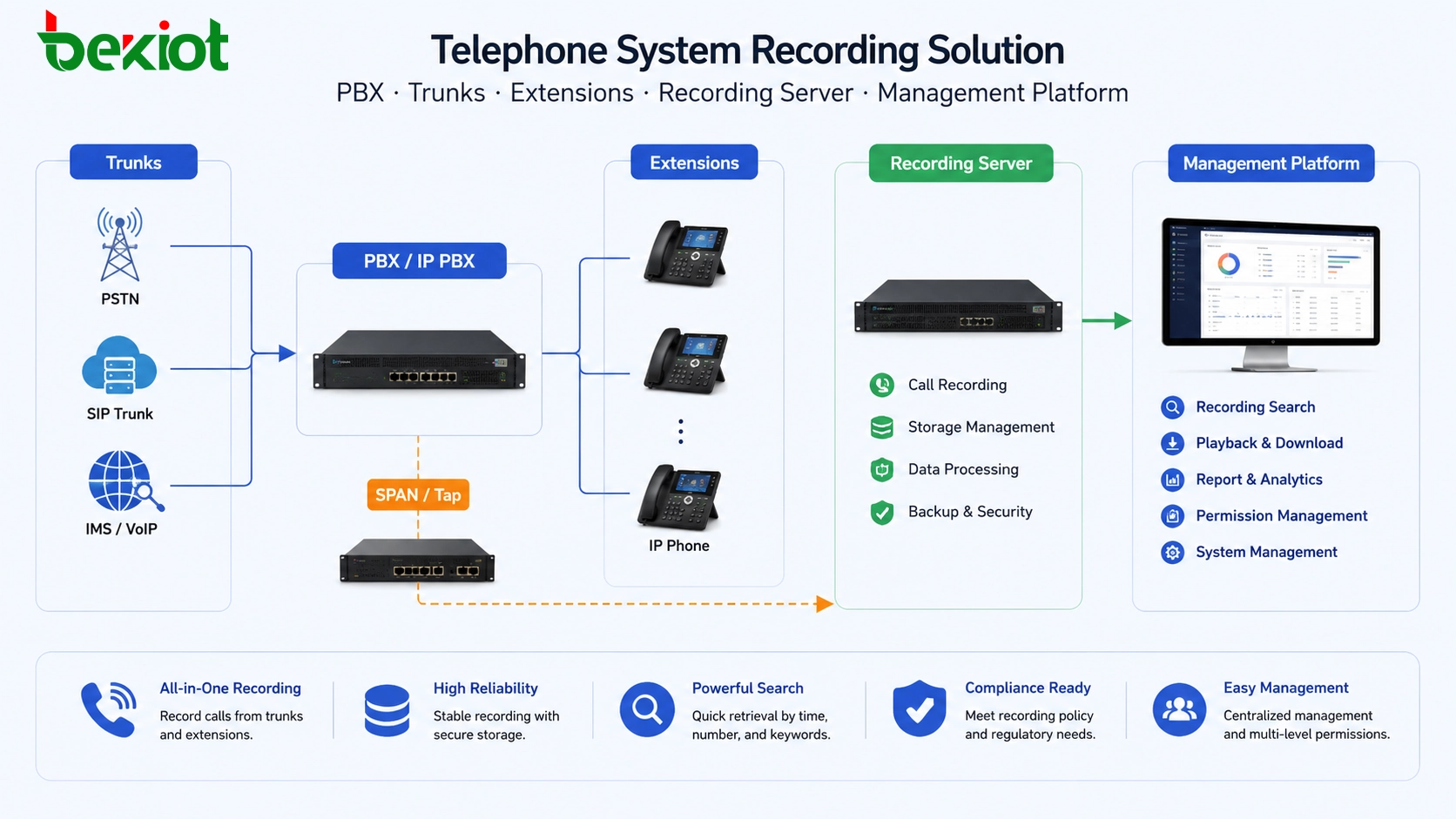
Start from the Recording Scope
Before choosing a technical solution, the project team should first define what needs to be recorded. A call center may only need to record external calls between agents and customers. A corporate office may need selected department recording. A dispatch or emergency communication system may require full-process recording across extensions, trunks, command seats, and conference channels.
The recording scope affects the whole design. If the project only records outside-line calls, trunk-side recording may be enough. If internal extension calls must also be recorded, the solution must be closer to the PBX, IPPBX, SIP signaling layer, or call control platform. If the system needs centralized search, playback, permission control, and long-term storage, terminal-based recording alone is usually not enough.
In practice, the best solution is often not the most complex one. It is the one that records the right calls, supports the required management workflow, and keeps deployment and maintenance under control.
Trunk-Side Recording for Call Center Scenarios
Trunk-side recording is a common method in traditional call center projects. It records calls by connecting recording equipment in parallel with external telephone lines. When customer service agents communicate with outside callers, the recording system captures the voice from the trunk side and stores the conversation for later review.
This method can be used with analog trunk lines and can also support PRI E1 lines in suitable deployments. It is useful when the main goal is to record inbound and outbound customer service calls through public telephone lines.
The limitation is also clear. Trunk-side recording usually records external calls only. It is not ideal for recording all enterprise extensions, especially when the project has many analog phones. If every extension needs to be connected separately, the cabling and implementation cost can become high. Therefore, this method is more suitable for customer service, hotline, sales call centers, and other scenarios where outside-line calls are the main recording target.
Software Interface Recording Through the PBX
Another recording approach is to use the interface provided by the telephone exchange or PBX. Through software integration, a third-party recording program can obtain call information and recording control data from the telephone system. This method is more flexible than pure line-side recording because it can be designed around call events, extension status, call direction, and business workflow.
However, software interface recording depends heavily on the PBX capability. The telephone system must provide usable interfaces, and the recording software must be compatible with those interfaces. Different PBX platforms may provide different APIs, CTI interfaces, call event formats, or control methods. If compatibility is poor, the project may face unstable recording triggers, incomplete call records, or difficult maintenance.
This method is suitable for projects where the PBX supports integration and the customer needs more flexible recording control. It is also useful when recording rules need to be connected with users, departments, queues, call directions, or business systems.
SIP Packet Capture for IP-Based Systems
As more telephone systems move from traditional switching to IP-based communication, many PBX and IPPBX systems now use SIP as the main signaling protocol. In this environment, packet capture recording becomes a practical method. The recording system captures SIP signaling and RTP voice packets from the network, then reconstructs and stores the call audio.
This method can be effective when the network architecture allows the recording server to receive the required signaling and media packets. It is often used in SIP trunk, IPPBX, VoIP gateway, and IP phone environments. Compared with traditional parallel line recording, SIP packet capture is more aligned with modern IP communication networks.
The key challenge is network design. If the voice media path does not pass through the recording point, the recording system may not capture complete audio. Engineers may need to consider switch mirroring, SBC media anchoring, PBX media relay, routing design, encryption settings, and NAT traversal. If the system uses encrypted media, packet capture recording may require additional planning.
Conference-Based Recording for Shared Recording Resources
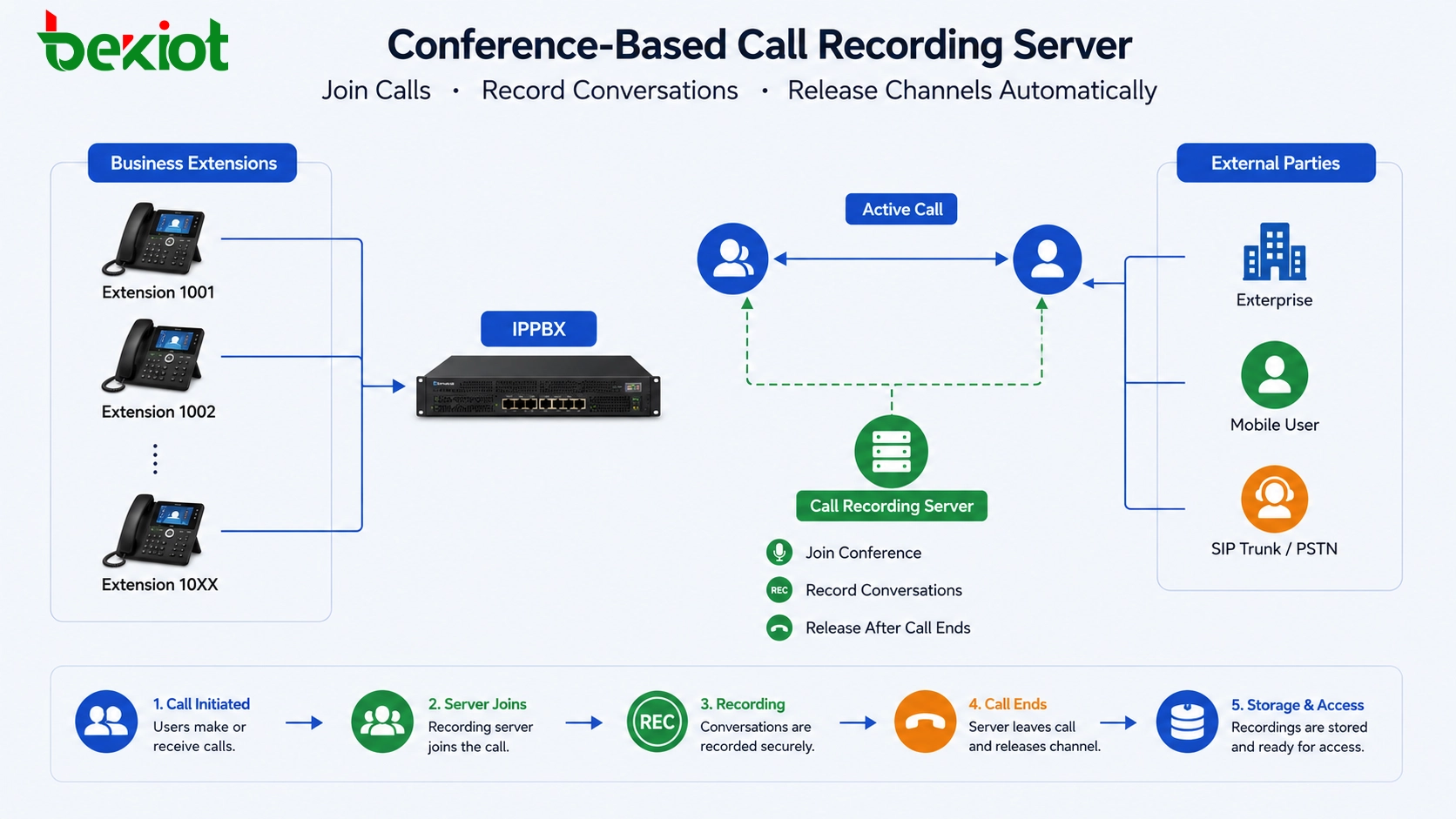
Conference-based recording is another common solution. Instead of physically connecting every line or extension, the telephone system automatically creates a recording conference when a call starts. The recording server joins the call as a silent participant and records the audio. When the call ends, the recording channel is released and can be reused by other calls.
This method is practical because not all users make calls at the same time. A recording server can serve multiple users by dynamically joining active calls. It reduces the need to connect every extension separately and can make centralized recording easier to manage.
Conference-based recording is often suitable for PBX or IPPBX systems that support call control, conference bridging, or recording server integration. It can be used in enterprise communication, dispatch communication, service hotlines, and other systems where recording resources need to be shared efficiently.
Built-In Recording in Modern IPPBX Platforms
Modern telephone exchanges are very different from earlier PBX systems. Older systems often focused mainly on voice switching, while additional functions were implemented through external CTI interfaces or third-party platforms. Today, many IPPBX systems already include call recording as a built-in function.
For projects that are newly built or being upgraded, built-in IPPBX recording is often the simplest option. Because the call control, extension management, SIP signaling, and recording function are handled by the same system, deployment can be easier and compatibility risks can be lower.
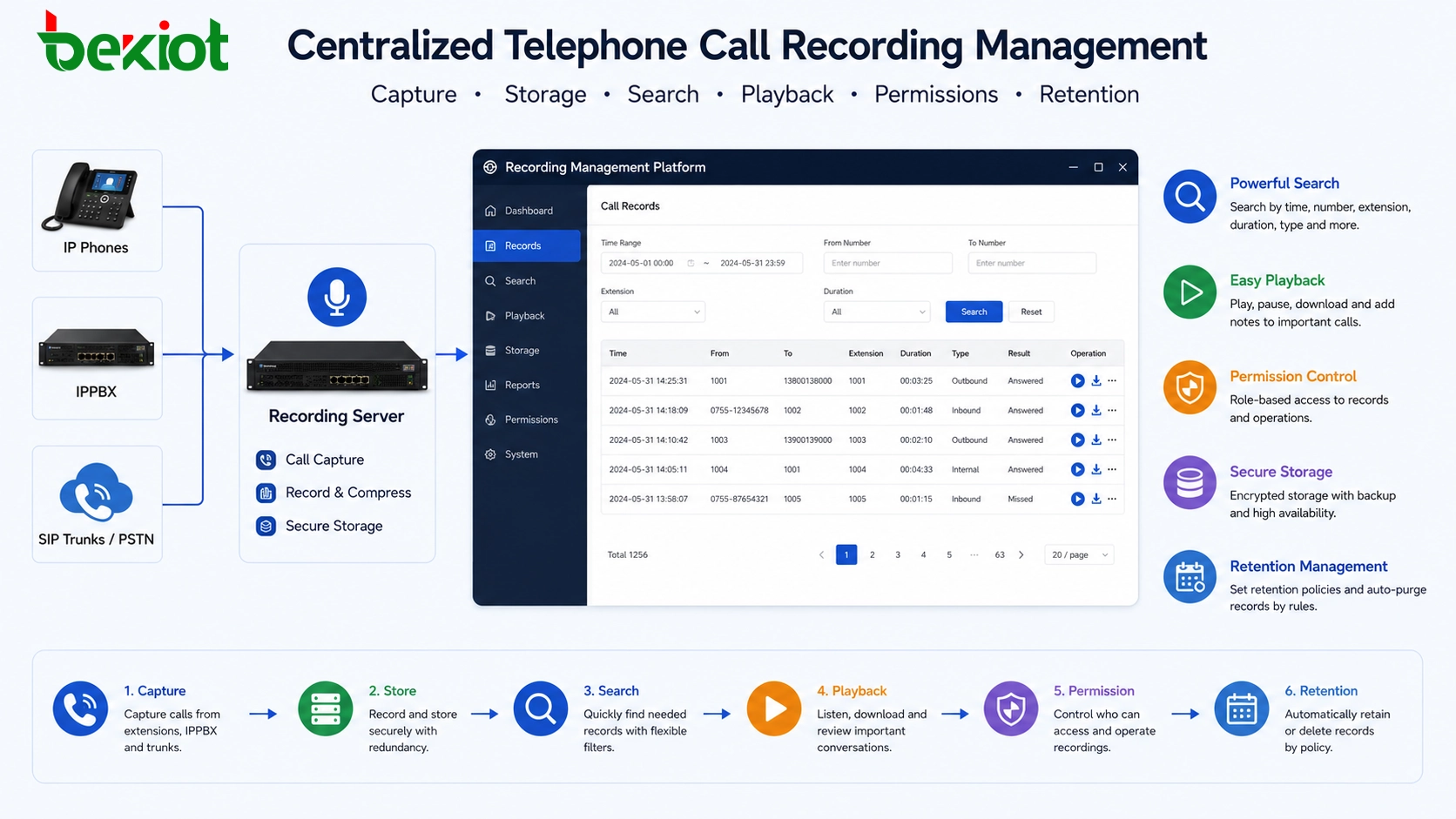
Built-in recording can also support centralized management. Administrators may be able to search recordings by time, extension, caller number, called number, call direction, or department. Some systems can also provide permission control, recording download, playback, storage management, and recording rules based on user roles or call types.
When recording is a clear project requirement, selecting a telephone system with integrated recording capability can reduce the need for additional hardware, external interfaces, and complex integration work. This is especially useful for small and medium-sized business systems, IPPBX upgrades, and unified communication projects.
Terminal-Based Recording for Small-Scale Needs
Not every project needs a large centralized recording platform. For individual users or small departments, terminal-based recording may be enough. Some analog phones and IP phones support local recording. In certain cases, users can insert a USB storage device or use the phone’s local recording function to save conversations.
This method has a low initial cost because only the users with recording requirements need suitable terminals. It is easy to deploy and does not require major changes to the PBX or network architecture.
However, terminal-based recording is not suitable for large-scale or system-level management. Recordings are usually stored locally, making it difficult to apply unified search, centralized backup, access permission, retention policy, or compliance review. If the project needs formal recording management, this method should only be used as a supplementary option.
Centralized Management Is Often the Real Requirement
Many customers initially ask for “call recording,” but what they actually need is more than audio capture. They may need recording indexing, searchable call records, secure playback, storage lifecycle management, permission control, export logs, quality inspection, and evidence retention. These requirements should be discussed early because they affect the solution architecture.
For example, a call center may need recordings linked with agent IDs, queues, customer numbers, and service records. A command system may need recordings linked with dispatch events and emergency handling records. A corporate office may need department-based access control so that managers can only review authorized recordings.
A recording solution should therefore include both the capture method and the management method. Capturing audio is only the first step. The final value comes from being able to find, verify, protect, and use recordings when needed.
Comparing the Main Options
| Recording Method | Best Fit | Main Advantage | Key Limitation |
|---|---|---|---|
| Trunk-Side Recording | Call centers, hotline systems, outside-line calls | Good for recording customer calls on analog trunks or PRI E1 lines | Mainly records external calls; extension-wide deployment can be costly |
| Software Interface Recording | PBX systems with usable APIs or CTI interfaces | Flexible control and integration with call events | Requires PBX interface support and strong compatibility |
| SIP Packet Capture | IPPBX, SIP trunk, VoIP gateway, IP phone systems | Suitable for modern SIP-based communication networks | Depends on media path, network mirroring, routing, and encryption design |
| Conference-Based Recording | Enterprise PBX, dispatch systems, shared recording resources | Recording channels can be reused after calls end | Requires call control or conference integration capability |
| Built-In IPPBX Recording | New IPPBX projects, system upgrades, unified communication systems | Simple deployment and centralized management | Capability depends on the selected telephone system |
| Terminal-Based Recording | Individual users or small-scale recording needs | Low cost and easy deployment | Difficult to manage recordings centrally |
Solution Planning by Project Type
Customer Service and Sales Hotlines
For customer service and sales environments, the recording focus is usually external calls. Trunk-side recording, built-in IPPBX recording, or SIP-based recording can all be considered. If the system has call queues and agents, recording records should ideally be linked with agent information, customer numbers, call duration, and service records.
Enterprise Office Communication
For ordinary office communication, full recording may not be necessary. The project may only need recording for key departments such as customer service, finance, legal, operations, or management positions. Built-in IPPBX recording or rule-based recording is often easier to manage than recording every line separately.
Command and Dispatch Systems
Command and dispatch environments may require more complete recording coverage. Calls, conferences, dispatch instructions, emergency communication, and cross-department coordination may all need to be recorded. In this type of project, centralized recording, permission management, reliable storage, and event linkage are more important than low initial cost.
Legacy PBX Upgrade Projects
For older telephone systems, the recording option depends on available interfaces and line types. Analog trunk recording, PRI E1 recording, CTI-based recording, or migration to an IPPBX with built-in recording may be considered. The project team should compare the cost of keeping the old system with the benefits of upgrading to a more manageable IP-based architecture.
Key Factors Before Deployment
Confirm the Telephone Architecture
Engineers should check whether the system uses analog lines, PRI E1 trunks, SIP trunks, IP phones, analog extensions, VoIP gateways, or an IPPBX platform. The recording method must match the actual call path and media path.
Define Recording Rules
The project should define whether all calls, selected extensions, selected departments, incoming calls, outgoing calls, queue calls, or conference calls need to be recorded. Clear rules help avoid overbuilding the system or missing important call types.
Plan Storage and Retention
Recording files can grow quickly in large systems. Storage capacity, retention period, backup policy, file format, compression method, and search efficiency should be planned in advance. A system that records successfully but cannot manage storage properly will become difficult to maintain.
Design Access Permission
Call recordings may contain sensitive customer, business, or operational information. The platform should support user roles, access logs, playback permissions, download restrictions, and administrator management. This is especially important for customer service, finance, public safety, and emergency communication projects.
Final Takeaway
Telephone system recording has multiple technical paths. Trunk-side recording is practical for external call recording in call center environments. Software interface recording is flexible when the PBX provides reliable integration capability. SIP packet capture is suitable for many IP-based systems. Conference-based recording allows recording resources to be reused. Built-in IPPBX recording simplifies deployment and management. Terminal-based recording is useful for small-scale personal needs but not ideal for centralized control.
The right choice depends on the telephone system structure, recording scope, call volume, management requirements, budget, and future expansion plan. A good recording solution should not only record voice clearly, but also make recordings searchable, secure, manageable, and useful for real business operations.
FAQ
Can a recording solution capture both internal and external calls?
Yes, but the design must support the required call paths. Some methods mainly record outside-line calls, while IPPBX-based or call-control-based solutions can support broader recording coverage when properly configured.
Is packet capture recording suitable for encrypted calls?
Encrypted calls require careful planning. If the media is encrypted and the recording system cannot access decrypted audio, packet capture alone may not produce usable recordings. The design should be verified before deployment.
How long should call recordings be stored?
The retention period depends on business policy, industry requirements, legal obligations, and storage budget. Common projects define retention by department, call type, or compliance requirement instead of using one rule for every recording.
Can users delete their own recordings?
For business systems, deletion permissions should be controlled carefully. In centralized recording platforms, ordinary users usually should not be allowed to delete recordings that may be needed for review, training, or evidence.
What should be tested before the system goes live?
The project team should test call direction, extension coverage, audio quality, recording trigger accuracy, playback, search, storage usage, permission rules, backup, and recovery. Testing should include normal calls, transferred calls, conferences, and abnormal call termination.







