


In video convergence and video networking projects, a video gateway is often used to connect different video resources, forward media streams, convert protocols, and adjust video formats for unified platform access. Because project environments are different, video gateways are commonly deployed in two ways: at the front-end site or at the back-end center. The right choice depends on where the video sources are located, how the network is built, which protocols must be converted, and how the video will be used by the command platform or business system.
Field-Side Deployment for Local Video Access
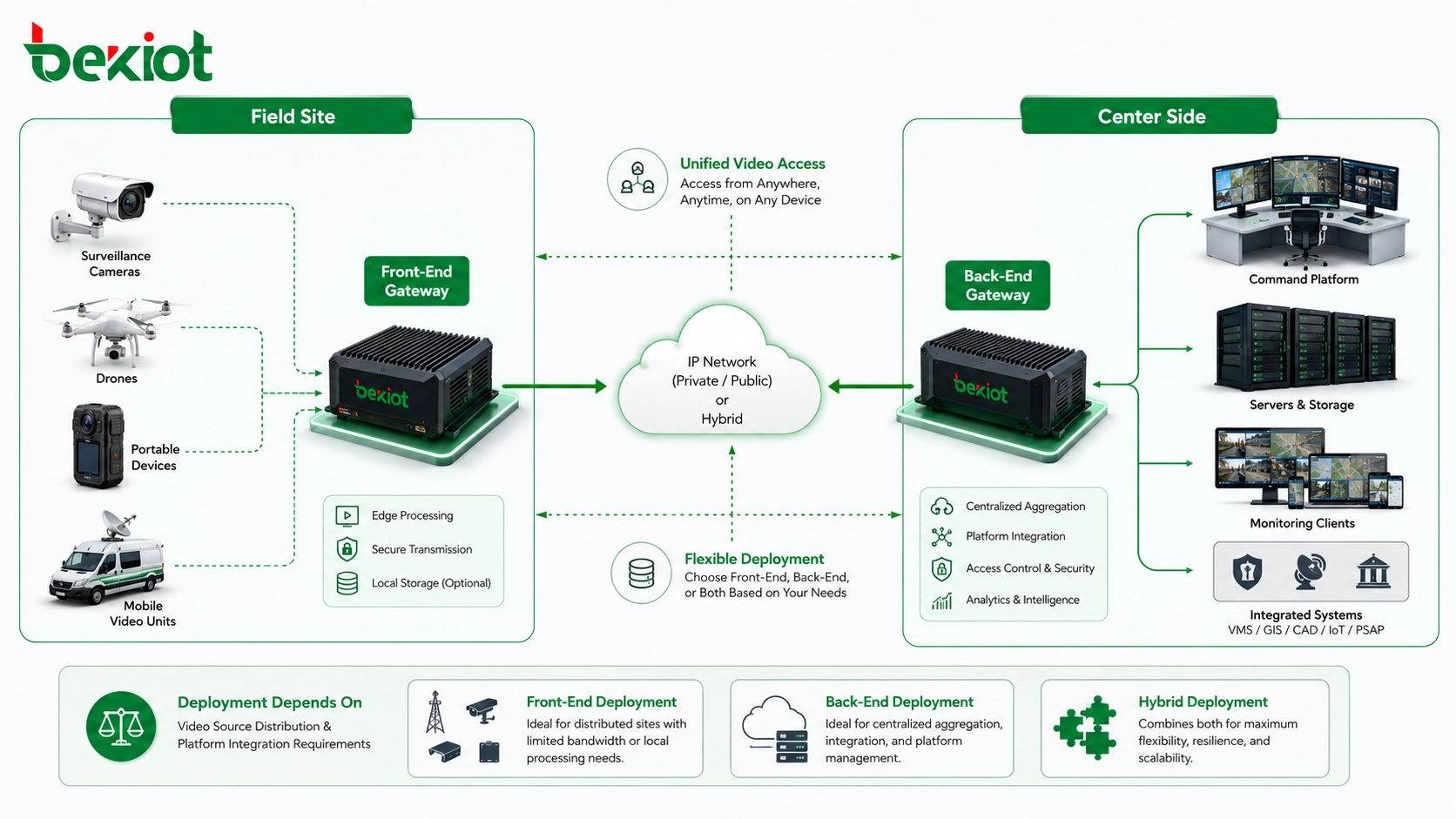
Front-end deployment means placing the video gateway at the project site, branch network, emergency field location, command vehicle, portable command box, or other local operating environment. In this design, the gateway is close to cameras, drones, mobile video devices, encoders, and other on-site video sources.
The main purpose is to collect local video resources first, process them near the source, and then send standardized streams to the back-end platform. This is useful when the field site contains different brands of equipment, different encoding formats, limited bandwidth, or video streams that the central platform cannot receive directly.
For example, an emergency command vehicle may need to access drone video, temporary surveillance cameras, portable video terminals, and field audio channels at the same time. A front-end video gateway can unify these resources locally before sending them back to the command center.
Why Processing Video Near the Source Matters
Field-side gateways are often used to solve practical problems before video reaches the center. They can receive video from different on-site devices, manage local access, and convert the stream into a protocol and format that the back-end server can process.
Typical front-end tasks include accessing drone video and sending it back to the central platform, converting non-standard video into GB/T28181 streams for upper-level platform aggregation, adjusting encoding format, resolution, frame rate, and bitrate, and enabling audio channels from field video devices.
This design is especially valuable when streaming protocols are inconsistent, video encoding is not compatible, or network bandwidth is not sufficient for direct multi-channel transmission. By optimizing the video at the field side, the gateway reduces pressure on the transmission network and improves the usability of video resources.
Front-end deployment is not only about connecting cameras. It is about making field video usable, standardized, and easier to transmit to the back-end platform.
Command Vehicles and Temporary Sites
In emergency response, large events, temporary security control, field inspection, and mobile command operations, video resources often appear quickly and change frequently. The site may include drones, body-worn cameras, vehicle-mounted cameras, portable terminals, and temporary monitoring devices.
A front-end gateway can be installed in a command vehicle or portable command box to collect these video sources. Local operators can view, select, and distribute video before sending selected streams to the center. This supports local presentation, secondary distribution, and more controlled bandwidth use.
This approach is also suitable for branch organizations or remote sites that need to connect multiple local video resources to a headquarters platform. Instead of sending every raw stream directly to the center, the gateway performs local access and conversion first.
Center-Side Deployment for Unified Aggregation
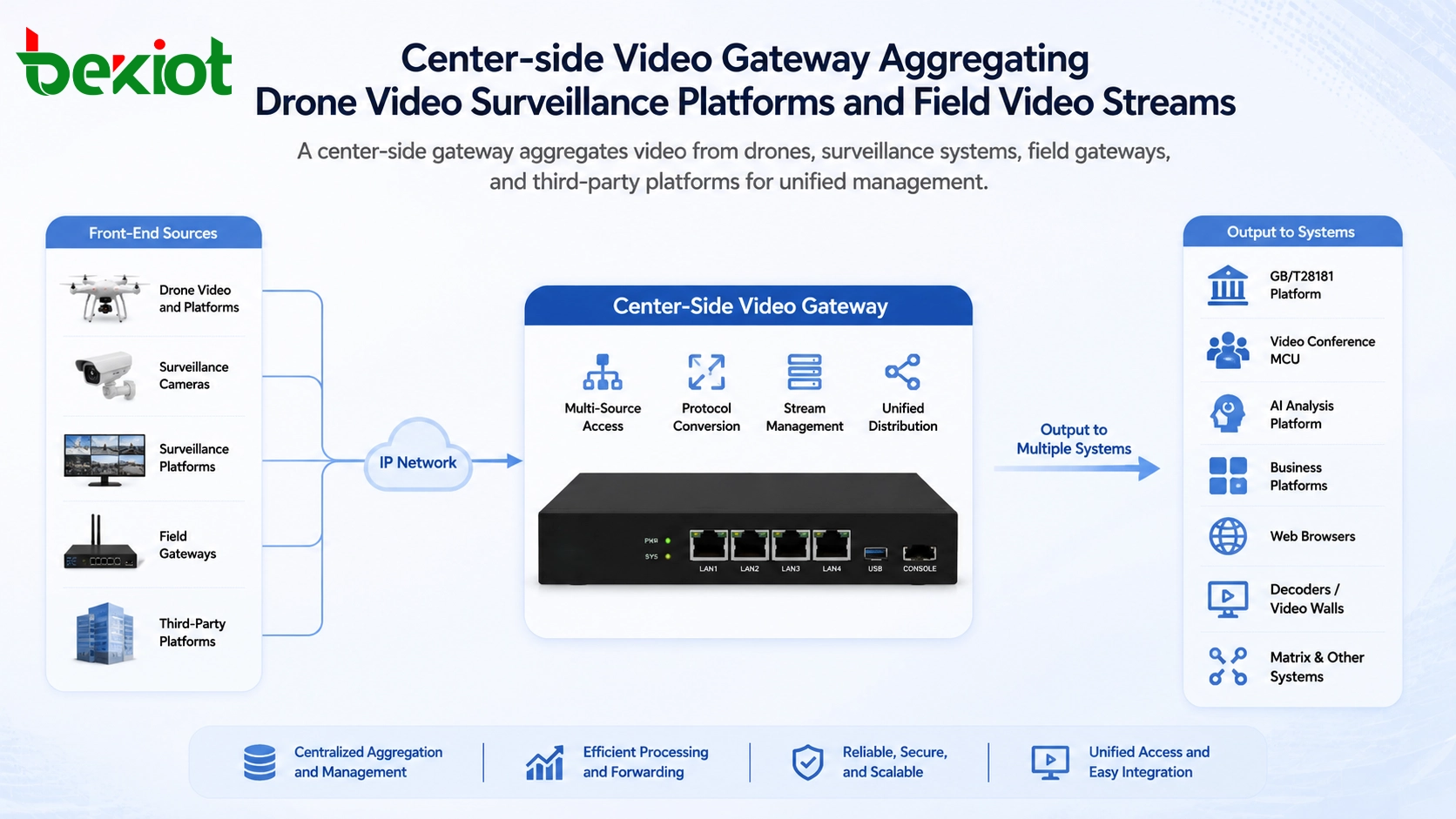
Back-end deployment means placing the video gateway at the central platform side. This is also called center-side deployment. The main goal is to aggregate and manage various audio and video resources from different front-end sites, platforms, devices, and networks.
In this model, the gateway becomes a centralized video access platform. It can receive video from drones, drone platforms, surveillance cameras, surveillance platforms, branch gateways, and other field-side equipment. The center can then manage, forward, decode, distribute, and display these resources through the command platform or business system.
Center-side deployment is usually selected when the project requires larger capacity, centralized management, multi-platform interconnection, and unified distribution to several upper-level or third-party systems.
Protocol Compatibility at the Core
A qualified video gateway should support mainstream protocol access and platform interconnection. In many projects, GB/T28181 upper-level and lower-level cascading capability is important because it allows video resources to be connected across different platform levels.
At the same time, the gateway should support SIP bidirectional video streams for communication-related video applications. It may also need to handle RTSP, RTMP, FLV, HLS, WebRTC, and other media access methods. These protocols are commonly used in surveillance, live streaming, web video, mobile video, dispatch systems, and third-party platforms.
When these access methods are unified through the center-side gateway, the command platform can avoid handling every protocol separately. This simplifies system integration and improves long-term scalability.
Media Conversion and Stream Optimization
Video access is not only about receiving streams. Different sources may use different codecs, resolutions, frame rates, and bitrates. If these differences are not handled properly, the platform may experience playback failure, high bandwidth consumption, decoding pressure, or poor user experience.
A video gateway can adjust encoding parameters, resolution, frame rate, and bitrate according to the platform requirement and network condition. It can also perform high-throughput forwarding so that multiple users or systems can access the same video resource more efficiently.
This capability is important for command centers, surveillance centers, emergency management platforms, industrial control rooms, and multi-site operation platforms where video resources need to be viewed, forwarded, recorded, analyzed, and displayed at the same time.
Output to Multiple Business Systems
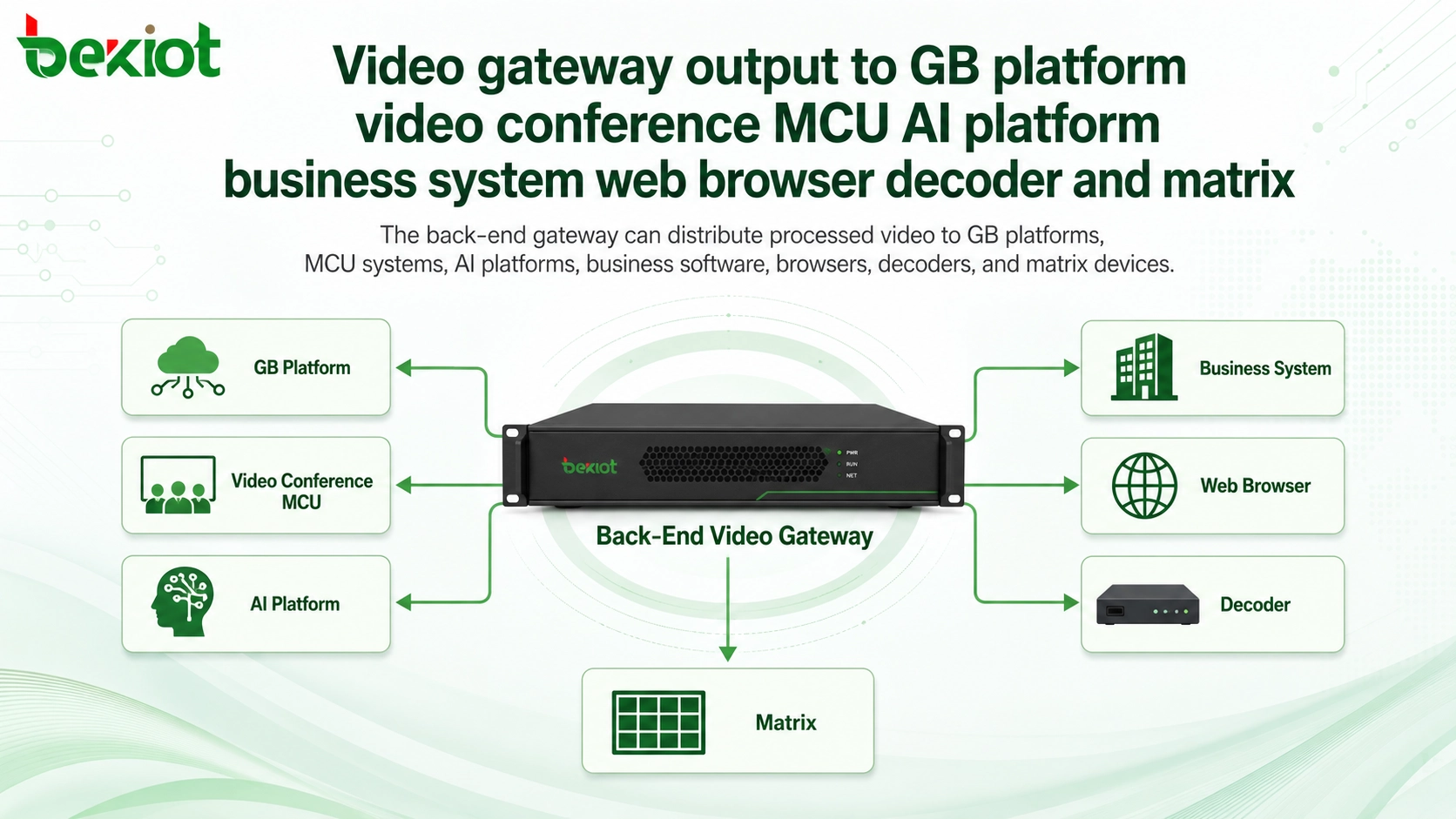
After video resources are aggregated and processed, the gateway can output them to different systems. Common destinations include upper-level GB/T28181 platforms, video conference MCU systems, AI analysis platforms, business management platforms, converged communication systems, web browsers, decoders, and video matrix devices.
This makes the back-end video gateway a comprehensive integration node. It does not simply receive video; it also prepares video for display, analysis, command, conference, recording, and business application scenarios.
For example, the same field video stream may be viewed in a command platform, pushed to a video conference, sent to an AI platform for analysis, displayed on a video wall through a decoder, and accessed through a web browser by authorized users.
Front-End and Center-Side Collaboration
In many real projects, front-end deployment and center-side deployment are not mutually exclusive. They can work together. Field-side gateways handle local access, protocol conversion, stream optimization, and on-site distribution. The center-side gateway receives these streams and provides unified aggregation, management, forwarding, and output to other systems.
This collaborative architecture is useful for large projects with multiple branches, emergency sites, command vehicles, mobile units, surveillance platforms, and upper-level management platforms. It allows video resources to be processed close to the source while still being managed centrally at the back end.
The result is smoother video retrieval, more flexible distribution, and better control over bandwidth, protocol compatibility, and platform integration.
Choosing the Right Deployment Model
The choice between front-end and back-end deployment should be based on project requirements. If the site has only a small number of local video sources that need to be pushed to the center, a front-end video streaming gateway may be enough. This is common in field sites, vehicles, temporary command points, and small branch locations.
If the project needs large-capacity access, multi-source aggregation, platform interconnection, central video management, and output to several business systems, a larger center-side video gateway is more suitable. This approach is often used in headquarters platforms, command centers, monitoring centers, and integrated video management systems.
In some projects, both types are required. The front end solves local access and transmission problems, while the center side solves aggregation, distribution, and business integration. This layered design is often the most practical choice for complex video networking projects.
Recommended Solution Architecture
A practical video gateway solution can be divided into four layers. The first layer is the field video source layer, including drones, cameras, mobile video terminals, body-worn devices, vehicle-mounted equipment, and existing surveillance platforms.
The second layer is the front-end processing layer. Here, local gateways access field equipment, convert non-standard streams, adjust video parameters, open audio channels, and send selected streams to the center. This layer is especially useful when bandwidth is limited or device protocols are mixed.
The third layer is the center-side aggregation layer. The back-end gateway receives streams from multiple sites, supports GB/T28181 cascading, SIP video access, RTSP, RTMP, FLV, HLS, WebRTC, and other protocols, and manages video forwarding and stream conversion.
The fourth layer is the application layer. Processed video can be sent to command platforms, AI analysis systems, video conference MCU systems, upper-level GB platforms, business platforms, web browsers, decoders, video walls, and converged communication systems.
The best deployment model is the one that matches the project’s video source location, protocol complexity, bandwidth condition, and platform integration goal.
Project Value for System Owners
Better access to mixed video resources
Video gateways can connect drones, surveillance cameras, third-party platforms, field devices, and local gateways. This helps organizations avoid isolated video systems and makes video resources easier to use.
Improved compatibility across platforms
Support for GB/T28181, SIP video, RTSP, RTMP, FLV, HLS, and WebRTC allows the system to connect different devices and software platforms with fewer custom development efforts.
More efficient bandwidth usage
Front-end processing can adjust bitrate, resolution, frame rate, and encoding before the video is transmitted to the center. This is valuable for mobile command, remote sites, and bandwidth-limited networks.
Stronger centralized control
Back-end deployment supports unified aggregation, management, forwarding, output, and integration with command, AI, conference, business, web, decoder, and matrix systems.
Conclusion
Video gateways are divided into front-end and back-end deployment types because video networking projects have different access positions and integration goals. Front-end gateways are placed close to the field site to collect local video, convert protocols, optimize streams, open audio channels, and send usable video to the back end. They are suitable for command vehicles, emergency sites, branch networks, and environments with limited bandwidth or mixed video equipment.
Back-end gateways are deployed at the center side to aggregate, manage, forward, convert, and distribute large numbers of video resources. They support integration with GB/T28181 platforms, SIP video, RTSP, RTMP, FLV, HLS, WebRTC, MCU systems, AI platforms, business platforms, browsers, decoders, matrix devices, and converged communication systems.
For many projects, the most effective solution is front-end and back-end collaboration. The field side solves video access and transmission problems, while the center side provides unified management and business integration. This architecture makes video retrieval smoother, platform interconnection easier, and system expansion more flexible.
FAQ
Can one video gateway handle both front-end and back-end tasks?
Some gateway platforms may support both types of functions, but the deployment role should still be defined clearly. A field gateway usually focuses on local access and transmission, while a center-side gateway focuses on aggregation and distribution.
When should a project use a front-end gateway?
Use a front-end gateway when the field site has drones, temporary cameras, mobile video devices, mixed protocols, limited bandwidth, or the need for local viewing and secondary distribution before sending video to the center.
When is a center-side gateway more suitable?
Center-side deployment is better when the project needs large-capacity video access, centralized management, multi-platform interconnection, upper-level platform reporting, AI integration, video wall output, or unified browser access.
Why is GB/T28181 support important?
GB/T28181 is widely used for video surveillance platform interconnection in China. Support for upper-level and lower-level cascading helps different monitoring platforms exchange and manage video resources more easily.
Does WebRTC support matter in a video gateway?
It can be important when users need low-latency browser-based viewing without installing dedicated clients. WebRTC is useful for web command platforms, remote viewing, and interactive video applications.
What should be checked before selecting a gateway?
Confirm the number of video channels, source protocols, codec formats, required output systems, bandwidth condition, need for audio channel access, resolution requirements, platform compatibility, and whether field-side or center-side processing is more important.







