


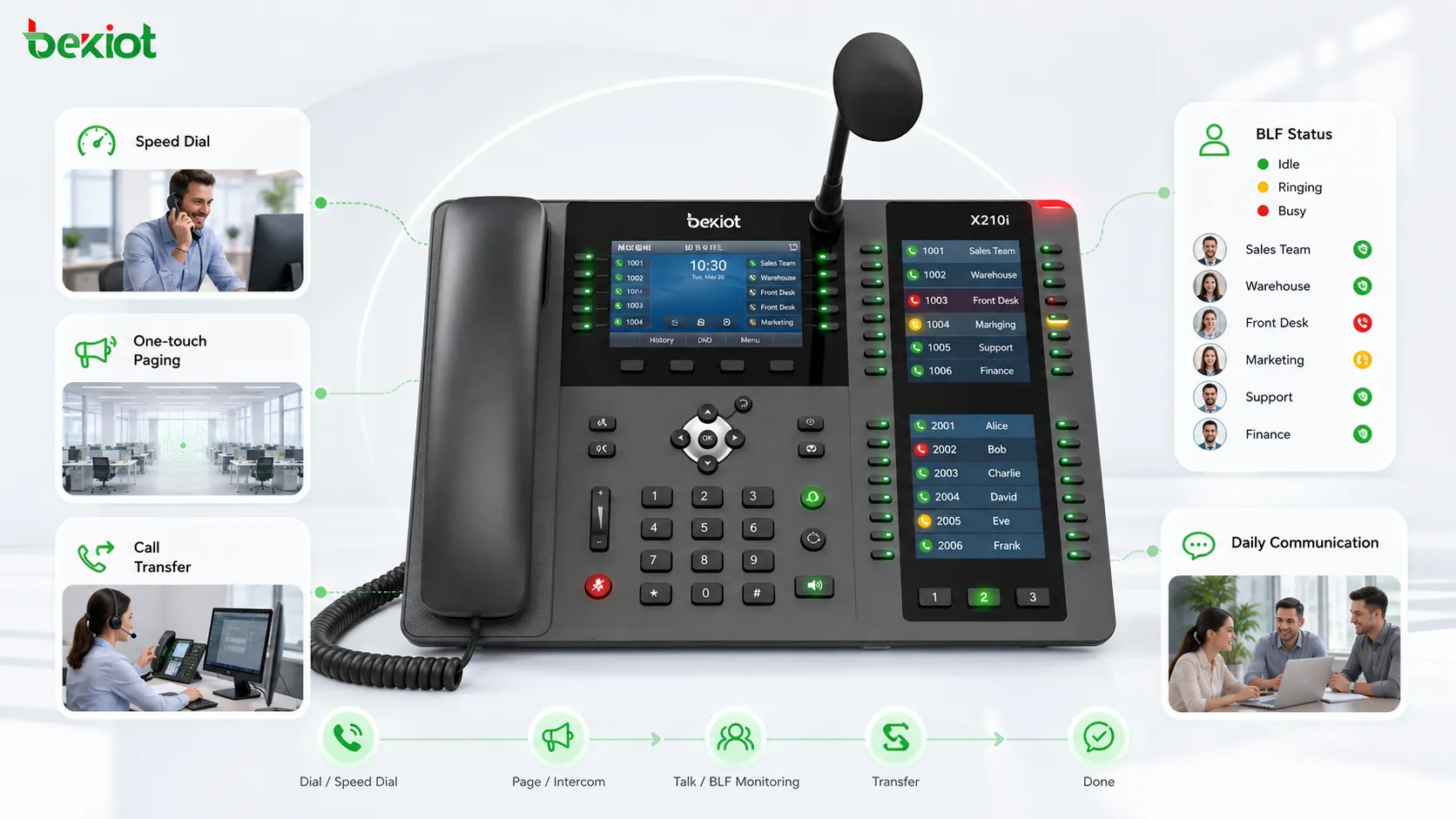
IP phones are no longer limited to ordinary voice calling. Because they work over data networks and include built-in processing capability, they can support richer communication functions than traditional analog phones. DSS keys, also known as Direct Station Selection keys, are one of the most practical examples. With the right configuration, a single key can trigger speed dial, direct calling, call pickup, call park, conference access, paging, video viewing, web access, remote door opening, or SIP URL dialing.
For organizations that manage reception desks, dispatch centers, industrial control rooms, security stations, service desks, campuses, factories, warehouses, transportation sites, and emergency communication points, DSS keys help simplify daily operation. Instead of asking users to remember numbers, feature codes, URLs, or video stream addresses, the phone presents common actions as visible, programmable buttons.
A More Practical Way to Operate IP Phone Functions
DSS stands for Direct Station Selection. On an IP phone, a DSS key is a programmable button that can be assigned to a number, feature, service, URL, status indicator, or system action. Depending on the phone model and expansion capability, an IP phone may provide only 2–4 DSS keys, while higher-end phones or expansion modules may support dozens or even hundreds of programmable keys.
This flexibility makes DSS useful in both small offices and large communication environments. A front desk may only need a few speed dial keys for departments and managers. A dispatch desk may require many keys for extensions, teams, emergency contacts, paging zones, doors, cameras, or system functions. The phone grade should therefore be selected according to the workflow, not only according to appearance or price.
Speed Dial for Frequently Used Contacts
One of the most common uses of DSS is speed dial. Frequently used numbers can be written into DSS key settings in advance. When the user needs to call that contact, they only press the configured key instead of manually entering the number.
A typical configuration includes the key name, the target identity, and the destination number. Some IP phones also support LED color settings, making it easier to identify different departments, emergency contacts, service teams, or priority numbers. This is especially useful in places where staff must react quickly, such as reception counters, security rooms, hotel service desks, industrial duty rooms, and control centers.
Custom Function Keys for Daily Call Handling
Compared with ordinary telephones, IP phones can support a wider range of call functions. Common examples include voicemail, call transfer, call forwarding, call hold, call park, call pickup, conference calling, recording, and other PBX-related services. These functions are often available through menu navigation or feature codes, but DSS keys make them easier to access.
By assigning call functions to programmable keys, users can place the most important actions in the most convenient positions. A team can define the key layout according to its real working habits. For example, a receptionist may place transfer, hold, pickup, and conference keys near frequently used extension keys. A dispatcher may place emergency paging, monitoring, call takeover, or group calling keys in a more prominent area.
Presence Visibility Through BLF Status
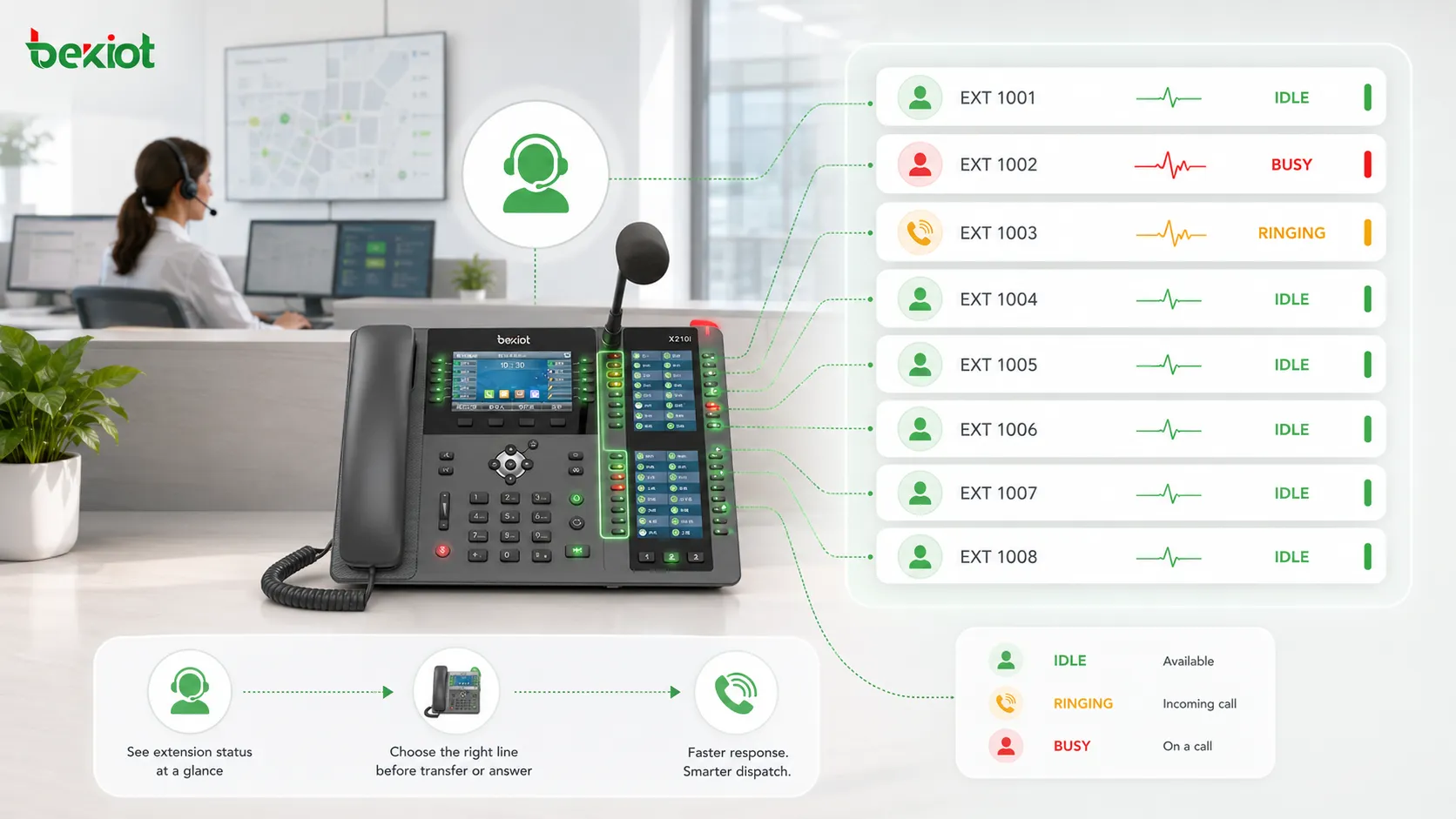
In an IP phone system, BLF stands for Busy Lamp Field. It allows users to see the current status of other extensions, such as idle, ringing, or busy. When BLF is combined with DSS keys, the phone becomes more than a calling device. It becomes a simple status console.
This is very useful in front desk and dispatch applications. Before transferring a call, the operator can check whether the target extension is available. If a line is busy or ringing, the operator can choose another person, hold the call, or use a pickup function according to the workflow. In more advanced communication systems, authorized users may also combine status information with monitoring, barge-in, forced release, or supervisory functions, depending on system permissions and local compliance requirements.
One-Key Paging Without Complex Operation
Many IP phones support multicast paging. With proper network configuration, a DSS key can be used to start a paging broadcast to a selected group or zone. This type of paging can work through multicast technology and may not require every paging scenario to depend on the IP PBX.
For daily announcements, warehouse coordination, campus notices, factory reminders, or security alerts, one-key paging reduces operation steps. Staff do not need to search through menus or remember paging codes. They can press a prepared DSS key and speak to the selected zone. In a larger deployment, paging zones should be planned together with VLAN design, multicast routing, QoS policy, speaker endpoints, and emergency priority rules.
Opening Web Pages and Video Streams from the Phone
An IP phone is essentially a compact network terminal. Many models support web browsing, video display, or URL-based services. In real operation, manually entering a long URL on a phone can be inconvenient. DSS keys solve this problem by storing the URL in advance.
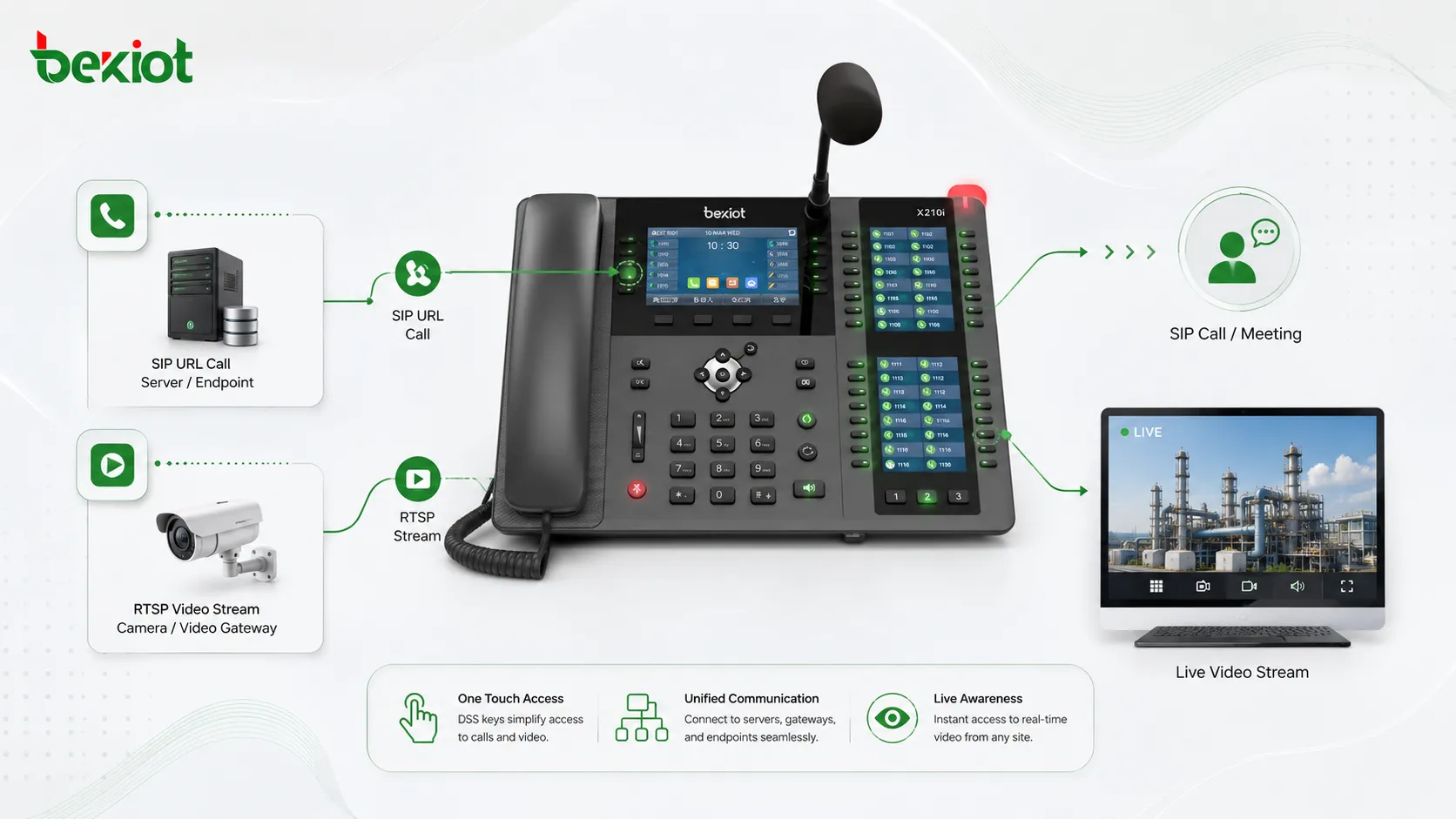
For example, a DSS key can open a web page, a service portal, a camera view, or an RTSP video stream. In security and industrial projects, video gateways can convert camera feeds, drone video, or other video sources into a stream format that the IP phone can access. After the RTSP address is assigned to a DSS key, the user can press one button to view the required video resource directly on the phone.
This creates a practical bridge between voice communication and visual information. A guard station can open a door camera view before responding. A command room can check a field video source during an incident. A maintenance team can use the phone as a lightweight video access terminal when a full workstation is not necessary.
SIP URL Calling for Flexible Access Scenarios
In most enterprise and industrial communication systems, IP phones are registered to an IP PBX or softswitch before they can make and receive calls. Registration provides identity authentication, call routing, extension management, and service control. However, SIP also allows URL-based calling in certain scenarios.
For example, if a server address is 192.168.1.100 and the target number is 6666, the SIP URL may be written as 6666@192.168.1.100. Entering this address manually on a phone can be difficult, especially for non-technical users. By storing the SIP URL in a DSS key, the user can join a service, call a terminal, or access a video conference endpoint with one press.
This is useful for systems where temporary access, meeting participation, platform interconnection, or device-to-device calling is required. It also allows the IP phone to support special communication tasks without affecting its normal phone service.
Deployment Planning for Real Projects
A successful DSS configuration should start from the user workflow. The project team should identify which actions are used most often, which contacts must be reached quickly, which paging zones need one-key access, and which video or web services should be available from the phone. The key layout should be simple enough for operators to remember under pressure.
The next step is device selection. A small office may only need phones with a few programmable keys. A reception desk, command center, hotel operator station, security room, or industrial dispatch position may need a phone with more DSS keys or expansion modules. For high-density scenarios, the design should consider the number of extensions, BLF indicators, paging zones, emergency actions, and future expansion.
Network and platform compatibility are also important. Multicast paging requires proper network support. BLF depends on PBX or platform capability. SIP URL calling requires correct addressing and security control. Video access may need a video gateway, supported codec, RTSP stream, or browser-compatible service. These details should be tested before the system is delivered to end users.
Where This Approach Delivers the Most Value
DSS keys are especially valuable in environments where communication must be fast, visible, and repeatable. Front desks can improve call transfer efficiency. Dispatch centers can combine extension status and action keys. Industrial sites can simplify paging, emergency contact, and equipment access. Security teams can link voice calls with video viewing. Service teams can reduce training difficulty by turning complex operations into labeled buttons.
In these scenarios, Becke Telcom can be considered as a practical solution partner for SIP phones, industrial communication terminals, gateways, paging integration, and dispatch communication systems. The goal is not to make the phone more complicated, but to make daily operation easier, more reliable, and more suitable for real project workflows.
A good DSS design should reduce the number of steps required to complete a task. The best key layout is not the most complex one, but the one operators can use correctly during daily work and urgent situations.
Key Benefits for Communication System Owners
Faster response and fewer manual steps
Users do not need to remember long numbers, feature codes, URLs, or SIP addresses. Common tasks can be completed through labeled keys. This helps new users get started faster and reduces mistakes during busy periods.
Better visibility before call transfer
With BLF indicators, operators can see whether a target extension is idle, ringing, or busy. This improves transfer decisions and reduces failed or unnecessary transfers.
More flexible integration with other systems
DSS keys can connect the phone with paging, video streams, web pages, SIP URL services, remote door opening, and platform functions. This turns the IP phone into a lightweight control endpoint for unified communication scenarios.
Scalable design for different sites
Entry-level phones with 2–4 DSS keys can meet simple needs, while advanced phones and expansion modules can support large numbers of programmable keys. This allows the same design idea to scale from small offices to command centers and industrial sites.
Conclusion
DSS keys make IP phones more useful by turning complex communication actions into simple, visible, one-touch operations. They can support speed dial, custom call handling, BLF status, multicast paging, URL access, RTSP video viewing, SIP URL dialing, and other project-specific functions. When planned correctly, they improve operational efficiency, reduce training difficulty, and help IP phones become practical endpoints in a wider communication solution.
FAQ
How many DSS keys should an IP phone have for a real project?
The number depends on the user role. A normal office user may only need several keys, while a receptionist, dispatcher, hotel operator, or security station may need many more. The safest method is to list the daily actions first, then select the phone model according to the required key quantity.
Can DSS keys replace a professional dispatch console?
They can support many lightweight dispatch actions, but they do not fully replace a professional dispatch console in complex command environments. For large-scale emergency response, GIS, recording, video wall control, and multi-system coordination, DSS keys should work together with a dedicated dispatch platform.
What should be prepared before configuring DSS keys?
The project team should prepare an extension list, function list, paging zone plan, SIP URL list, video stream address list, permission rules, and naming standard. Clear preparation prevents confusing key labels and reduces later maintenance work.
Are DSS keys suitable for industrial and emergency environments?
Yes, but the phone hardware and network design must match the environment. Industrial sites may require rugged terminals, stable PoE power, VLAN planning, multicast support, emergency priority handling, and integration with paging or alarm systems.
How can organizations avoid incorrect operation?
Use clear key names, logical grouping, color indicators where available, permission control, and user training. Critical actions such as emergency paging or remote door opening should be placed carefully and protected by system rules when necessary.







