


In an emergency communication vehicle or temporary field command site, a video gateway may look like a supporting device, but it sits across the entire video workflow. From front-end collection to network transmission and command center display, it helps gather live video from different sources, convert incompatible formats, optimize streams for weak networks, and deliver clear field images to the rear command center.
For rescue operations, public safety, industrial emergency response, transportation incidents, mining rescue, disaster relief, and mobile command vehicles, stable video backhaul is not only a technical function. It directly affects situational awareness, remote consultation, dispatch efficiency, and command decisions.
Field video usually comes from many different sources
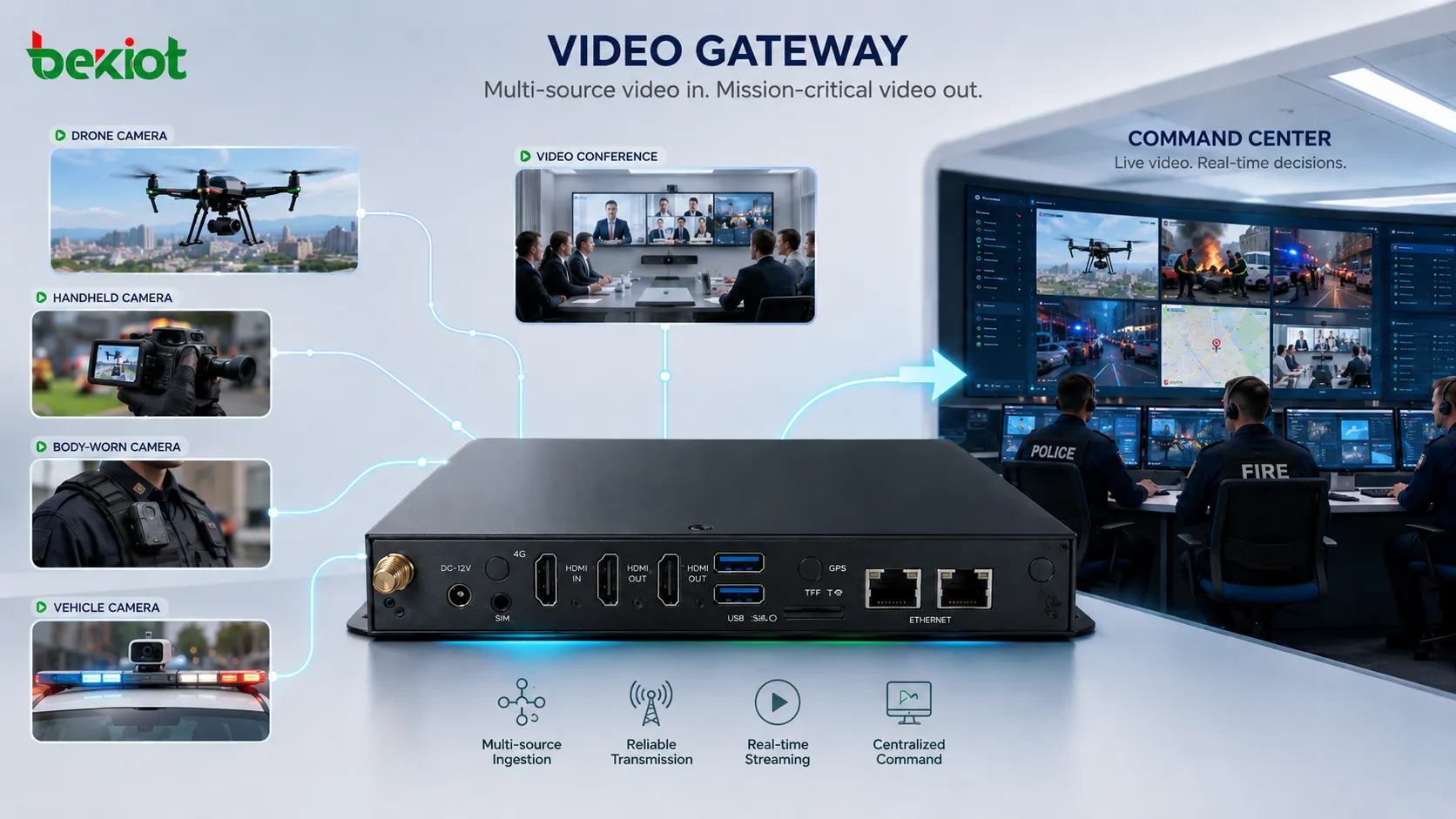
Emergency scenes rarely depend on one camera type. A field command vehicle may need to receive video from drones, portable surveillance cameras, body-worn terminals, vehicle-mounted cameras, video conference terminals, fixed IP cameras, and temporary monitoring devices. These video sources may belong to different departments, systems, and manufacturers.
The problem is that these devices often use different access methods. Some cameras may use GB28181, some may output RTSP, some may push RTMP streams, some may support ONVIF, and some may rely on private or customized interfaces. If these sources cannot be connected into one workflow, the command team may need separate screens, extra converters, temporary computers, and manual switching.
The first role of the video gateway is to bring these field signals into one system. Through network interfaces, HDMI input, and common streaming protocols, it receives different video sources and prepares them for unified processing and delivery.
A common media format reduces integration barriers
After video sources are connected, the next challenge is media compatibility. Different front-end devices may use different codecs, resolutions, stream structures, and packaging formats. Even if the camera is online, the receiving platform may still fail to display the stream if the format is not supported.
A practical video gateway should convert different incoming streams into standard video formats such as H.264 or H.265. This allows video from drones, portable cameras, vehicle cameras, and meeting terminals to be displayed and forwarded through the same system more easily.
In this sense, the gateway works like a “video translator.” It does not simply receive images; it normalizes the protocol and media format so that front-end devices with different standards can appear in the same command workflow.
Centralized viewing improves on-site dispatch
An emergency communication vehicle often contains several independent video systems. A drone ground station, mobile surveillance platform, vehicle monitoring system, and video conference terminal may all generate useful images, but these images are often scattered across different devices.
When operators need to switch between multiple screens and systems, dispatch efficiency decreases. Important scene changes may be missed, and the commander may not get a complete view of the field situation.
A video gateway can act as a local video hub. It gathers video from different sources and outputs them to a monitor, multi-window display, or split-screen system. Operators can view drone footage, portable camera images, body-worn video, and vehicle camera feeds on one screen, making the field situation easier to understand and coordinate.
Weak-network backhaul is the real challenge
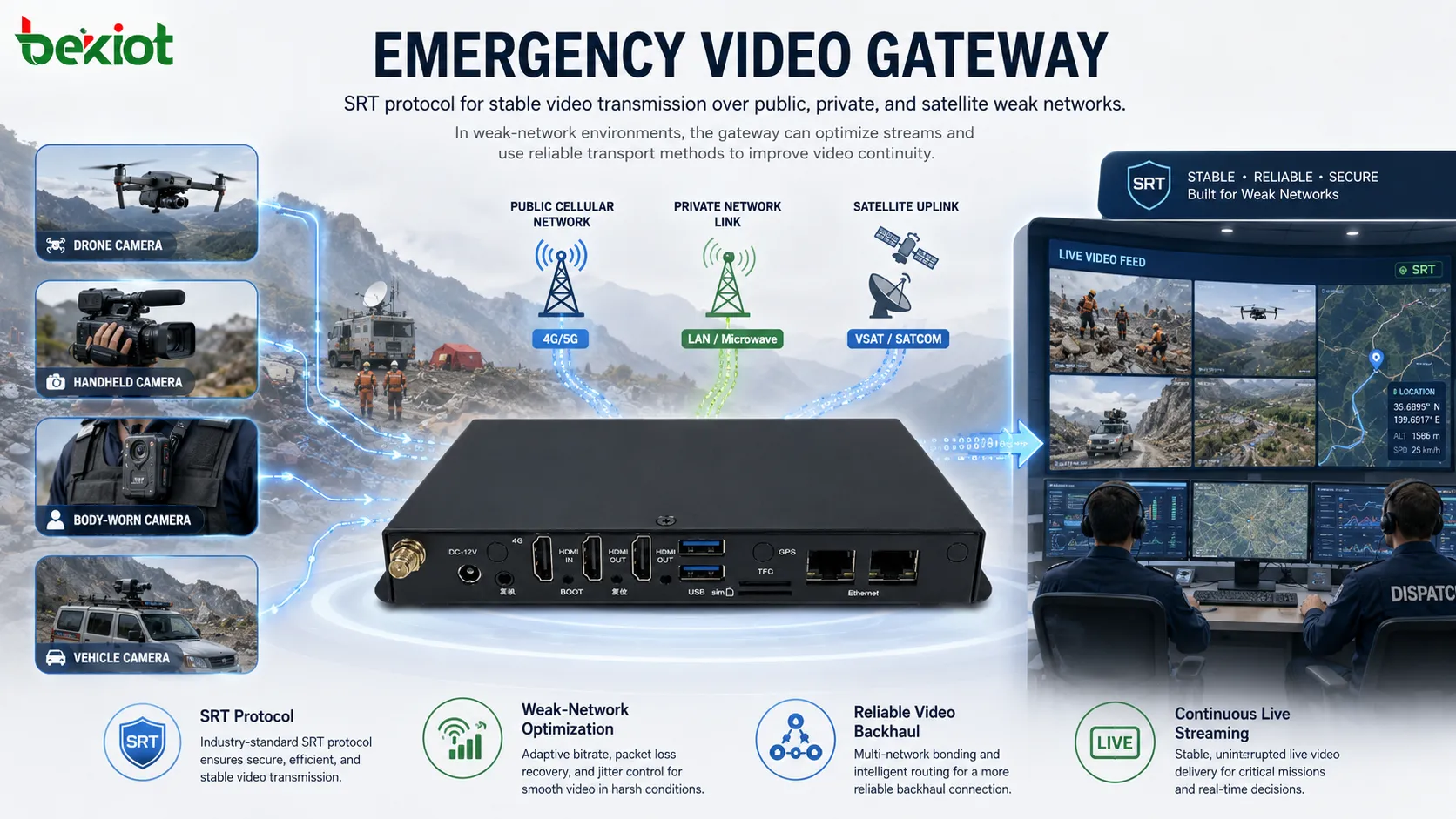
The link between a field command vehicle and the rear command center is often unstable. In many emergency deployments, video may need to travel through public networks, private networks, satellite links, broadband ad hoc networks, or mixed transmission paths. These links may have limited bandwidth, high latency, packet loss, or unstable signal quality.
Under these conditions, simply forwarding the original video stream may cause freezing, delay, mosaic artifacts, playback failure, or complete disconnection. Stable video backhaul requires more than access capability. It needs protocol selection, stream control, codec adaptation, and weak-network optimization.
The video gateway helps solve this by adjusting the video before it is sent back. It can reduce bitrate, change resolution, adjust frame rate, and select suitable output methods according to the available transmission link. The goal is not always to keep the highest possible image quality, but to keep the video continuous, usable, and command-ready.
SRT helps keep video stable over difficult links
SRT, or Secure Reliable Transport, is an important protocol for emergency video backhaul. It is designed to improve live video transmission over unpredictable networks, especially where latency and packet loss are difficult to avoid.
SRT uses mechanisms such as forward error correction and data retransmission to improve stream reliability. When the network has delay, jitter, or packet loss, SRT can help maintain more continuous video delivery compared with simple forwarding methods.
For mobile command vehicles, remote rescue sites, satellite links, outdoor deployment, and cross-region emergency response, this is especially valuable. The rear command center can continue receiving field video even when the communication environment is not ideal.
Command centers need flexible output options
After video reaches the command center, it still needs to enter different systems. Some centers need to display the image on a large screen. Some need to feed video into a conference terminal. Some need to distribute the stream to a dispatch platform, recording system, browser viewer, or remote expert workstation.
A video gateway should therefore support multiple output methods. Common network video outputs may include RTSP, SRT, RTP, and SIP, while HDMI input and output can be used to connect directly with conference devices, display processors, or large-screen systems.
This flexibility allows the command center to use existing infrastructure instead of rebuilding the whole system. Field images can be connected to current display, consultation, recording, and dispatch workflows with less integration work.
Stream optimization should match each use case
Different command center applications have different video requirements. A large display wall may need clearer image quality. Remote distribution may require lower bitrate. Recording may focus on stable long-term storage. A video conference system may require a format compatible with meeting terminals. A browser-based viewer may need a stream that is easy to decode.
The video gateway can optimize streams by adjusting bitrate, resolution, and frame rate. For example, an original high-definition drone feed can be kept clear for local display while also being converted into a lower-bitrate stream for remote backhaul. A vehicle camera stream can be compressed for continuous monitoring, while an important scene can be delivered at a higher quality level.
This flexible stream control helps balance image clarity, bandwidth consumption, latency, and platform compatibility.
A practical architecture for emergency video return
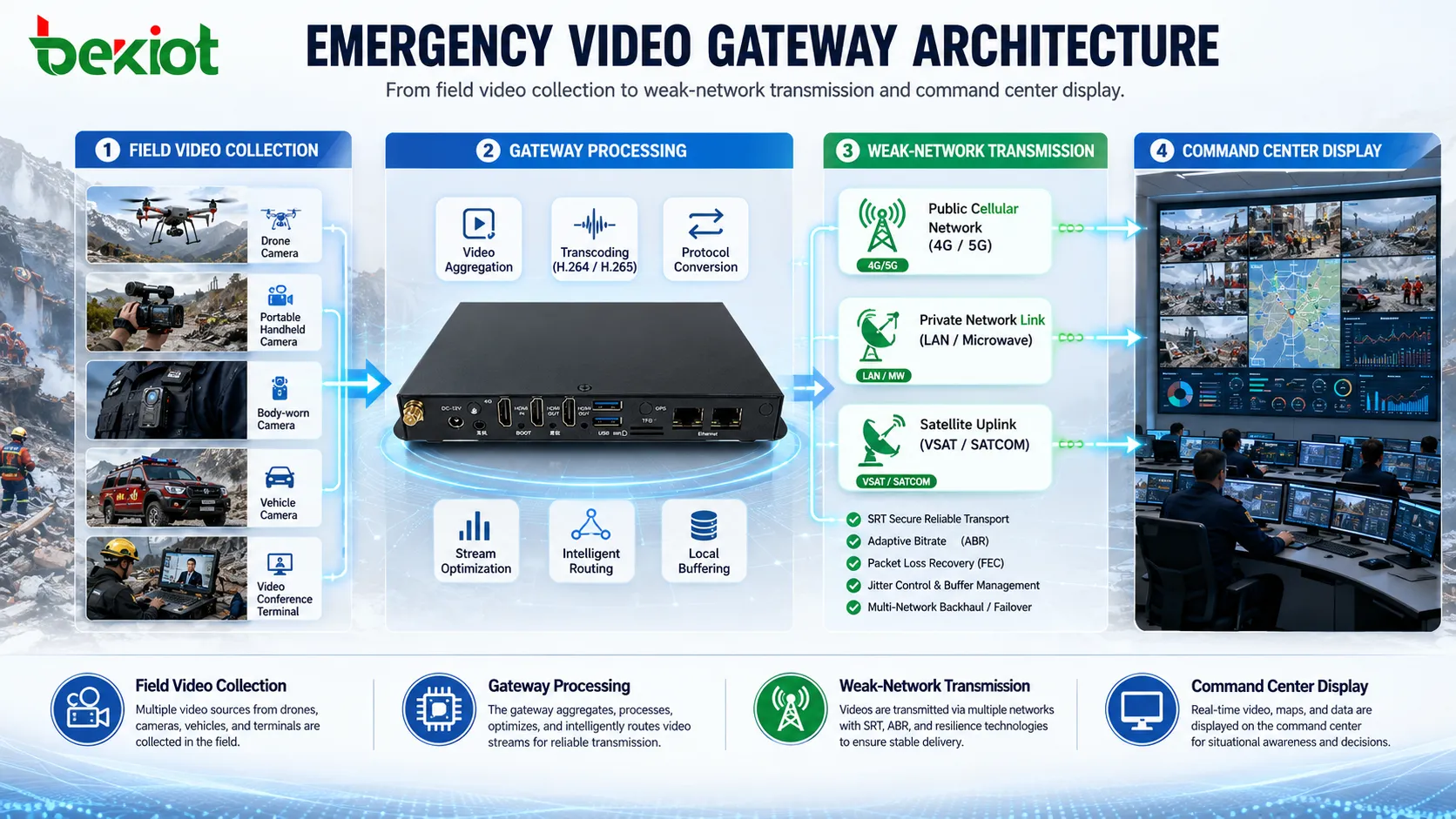
A complete emergency video backhaul solution can be divided into four layers. The first layer is the front-end video layer, including drones, portable surveillance cameras, body-worn terminals, vehicle cameras, video conference terminals, fixed cameras, and temporary field monitoring equipment.
The second layer is the video gateway. It receives streams through GB28181, RTSP, RTMP, ONVIF, HDMI, and other access methods, then performs protocol adaptation, codec conversion, stream optimization, and output management. This layer solves the compatibility problem between field devices and command center systems.
The third layer is the transmission network. Depending on the field environment, it may include public cellular networks, private networks, satellite links, wired temporary connections, or broadband ad hoc networks. SRT and stream optimization help improve video stability across these links.
The fourth layer is the command center application layer. Video can be displayed on large screens, pulled into conference systems, distributed to dispatch platforms, recorded for later review, or shared with remote experts for consultation.
System integration should avoid unnecessary reconstruction
In many emergency command projects, the command center already has video conferencing systems, large-screen display systems, dispatch platforms, surveillance platforms, recording systems, or dedicated communication networks. The video gateway should work as an integration layer rather than forcing the customer to replace existing systems.
By supporting standard protocols and common output interfaces, the gateway can connect field images into the existing architecture. This reduces project risk, shortens deployment time, and makes later expansion easier.
A well-planned integration should allow the command center to receive field video directly, distribute it to the right users, and display it through current systems without major architecture changes.
Where this solution is most valuable
This type of video gateway solution is especially useful in emergency communication vehicles, mobile command vehicles, public safety dispatch, fire rescue, flood control, mining rescue, transportation emergency response, power repair, railway and highway incidents, industrial park safety, and disaster relief.
In these scenarios, video sources are scattered, networks are unstable, and command decisions must be made quickly. The gateway helps convert many field images into a stable, visible, and distributable video resource.
The final value is simple: front-end images can be seen by the command center in time, and the command center can use those images for fast judgment, accurate dispatch, and multi-party coordination.
Planning points before deployment
Before deploying an emergency video gateway, project teams should first confirm the video source types, supported protocols, number of viewing points, command center receiving systems, transmission network conditions, and display requirements.
It is also important to test weak-network performance. Public network coverage, private network bandwidth, satellite delay, packet loss, uplink stability, and real field conditions can all affect video return quality. Testing should include stream delay, image continuity, reconnection behavior, codec compatibility, and large-screen display performance.
Project teams should also plan permissions, recording needs, device management, stream naming, monitoring layouts, and operation procedures. Stable video backhaul is not only a device function; it is a complete workflow from the field to the command center.
Conclusion
A video gateway is both a video converter and a system coordinator in an emergency communication vehicle. It connects front-end video sources, transmission networks, and command center applications into one visual command workflow.
By supporting multi-source access, GB28181, RTSP, RTMP, ONVIF, H.264/H.265 conversion, SRT transmission, HDMI input and output, stream optimization, centralized display, and command center distribution, the gateway solves key problems such as protocol incompatibility, weak-network transmission, and fragmented video systems.
For emergency response projects, the goal is not simply to transmit video. The goal is to make every important field image visible, stable, and usable for command decisions.
FAQ
Can a video gateway connect both network cameras and HDMI video sources?
Yes. A practical gateway can receive network video through protocols such as GB28181, RTSP, RTMP, or ONVIF, and can also use HDMI input when a field device outputs direct video.
Why is SRT useful for emergency video return?
SRT is useful because it is designed for live video over unstable networks. Its reliability mechanisms help reduce the impact of packet loss, jitter, and long-distance transmission delay.
Does H.265 always provide the best result?
Not always. H.265 can reduce bandwidth when supported by the receiving system, but H.264 may be more compatible with older platforms, browsers, decoders, or conference terminals.
Can one video stream be used for different command center applications?
Yes. The gateway can create different output streams from the same source, such as a high-quality version for large-screen display and a lower-bitrate version for remote distribution or recording.
What should be tested before project delivery?
The project should test source access, protocol conversion, codec compatibility, SRT transmission, weak-network behavior, HDMI display, command center platform access, and long-duration stream stability.







