


Video has become a core resource in communication, security, command, and information systems. A single project may involve surveillance cameras, video conferencing platforms, unified communication systems, streaming media services, body-worn recorders, drone video, vehicle-mounted video, and distributed display systems. These video resources often come from different vendors, use different transmission methods, and follow different technical standards.
The challenge is not simply how to display a video image. The real challenge is how to make different video systems communicate with each other. Cross-system video convergence solves this problem by using a gateway layer to convert protocols, adapt codecs, adjust resolution, control frame rate and bitrate, and deliver video streams in a format that the target platform can receive.
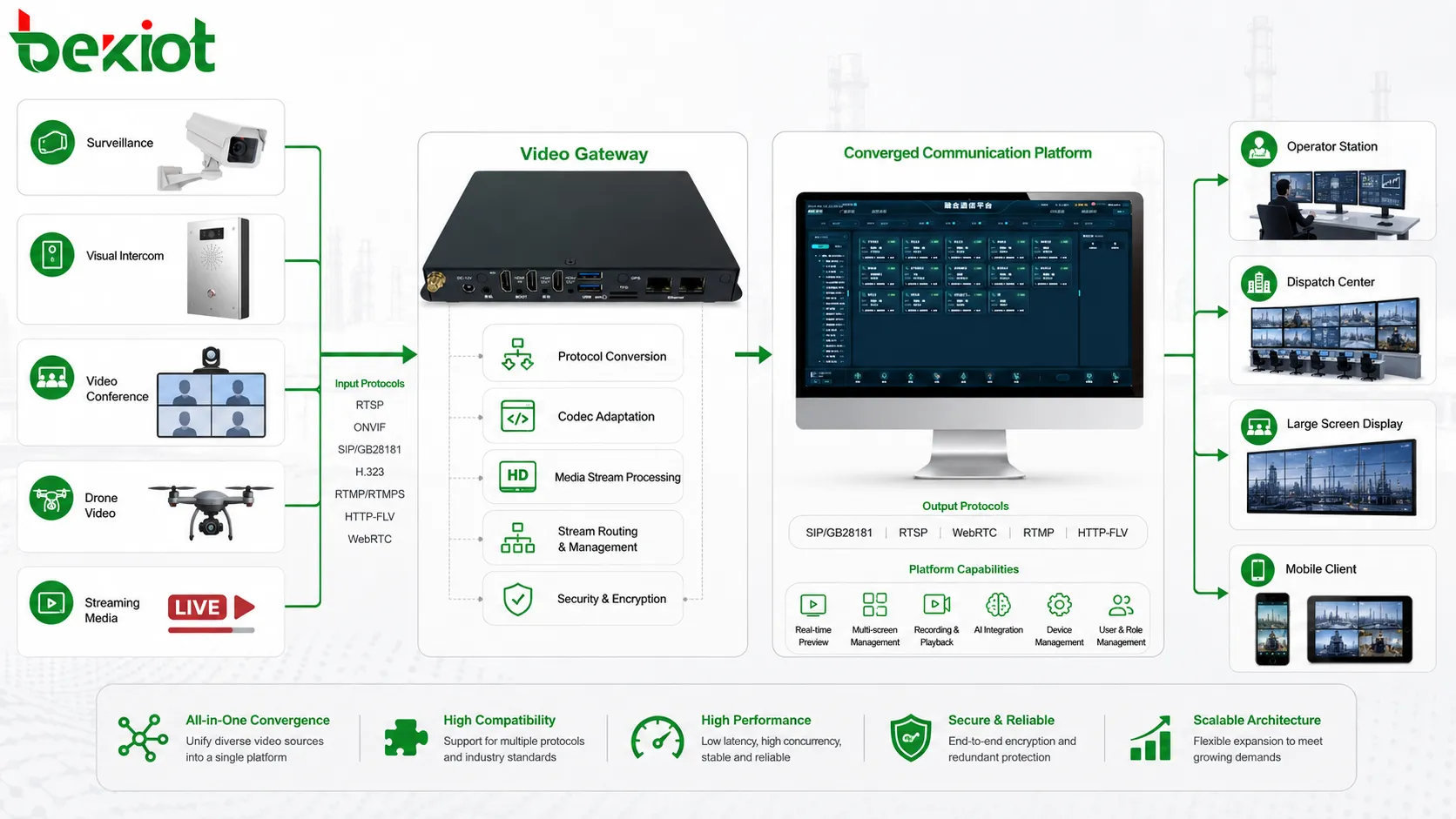
Why Separate Video Platforms Become a Problem
In many projects, video systems are built at different times for different purposes. A security department may deploy a surveillance platform. A command center may use a video conferencing system. A communication team may build a SIP-based unified communication platform. Field teams may use body-worn recorders, drones, mobile video terminals, or temporary streaming equipment. Each system works well inside its own environment, but cross-platform access becomes difficult.
The reason is that each system is designed around its own protocol, codec, media format, and control method. Video surveillance commonly uses RTSP, ONVIF, and GB/T28181. Video conferencing often uses H.323 or SIP. Unified communication systems are usually built around SIP. Drone and live streaming scenarios may use RTMP or GB/T28181. Streaming media platforms may output FLV, RTMP, HLS, or other web-friendly stream formats.
When these systems need to work together, direct connection is rarely simple. A command platform may need to view surveillance video. A video meeting may need to receive a drone stream. A dispatch system may need to push a field camera image to a large screen. Without a conversion and adaptation layer, every interface becomes a separate integration task.
The Gateway Layer Makes Integration Practical
A practical solution is to deploy an external video transcoding gateway between different video systems. The gateway acts as a media adaptation layer. It receives video streams from one platform, processes them according to the target requirement, and outputs them in a protocol, codec, resolution, frame rate, and bitrate that another system can use.
This approach avoids heavy custom development between every pair of platforms. Instead of asking each video system to understand all other systems, the gateway handles the conversion in the middle. This is especially valuable in projects where multiple vendors, old systems, new platforms, and special field devices must be connected under one architecture.
Solution Highlight: Cross-system video convergence is usually achieved through an external video transcoding gateway that handles protocol conversion, codec adaptation, resolution adjustment, and stream optimization.
Protocol Conversion Is the First Step
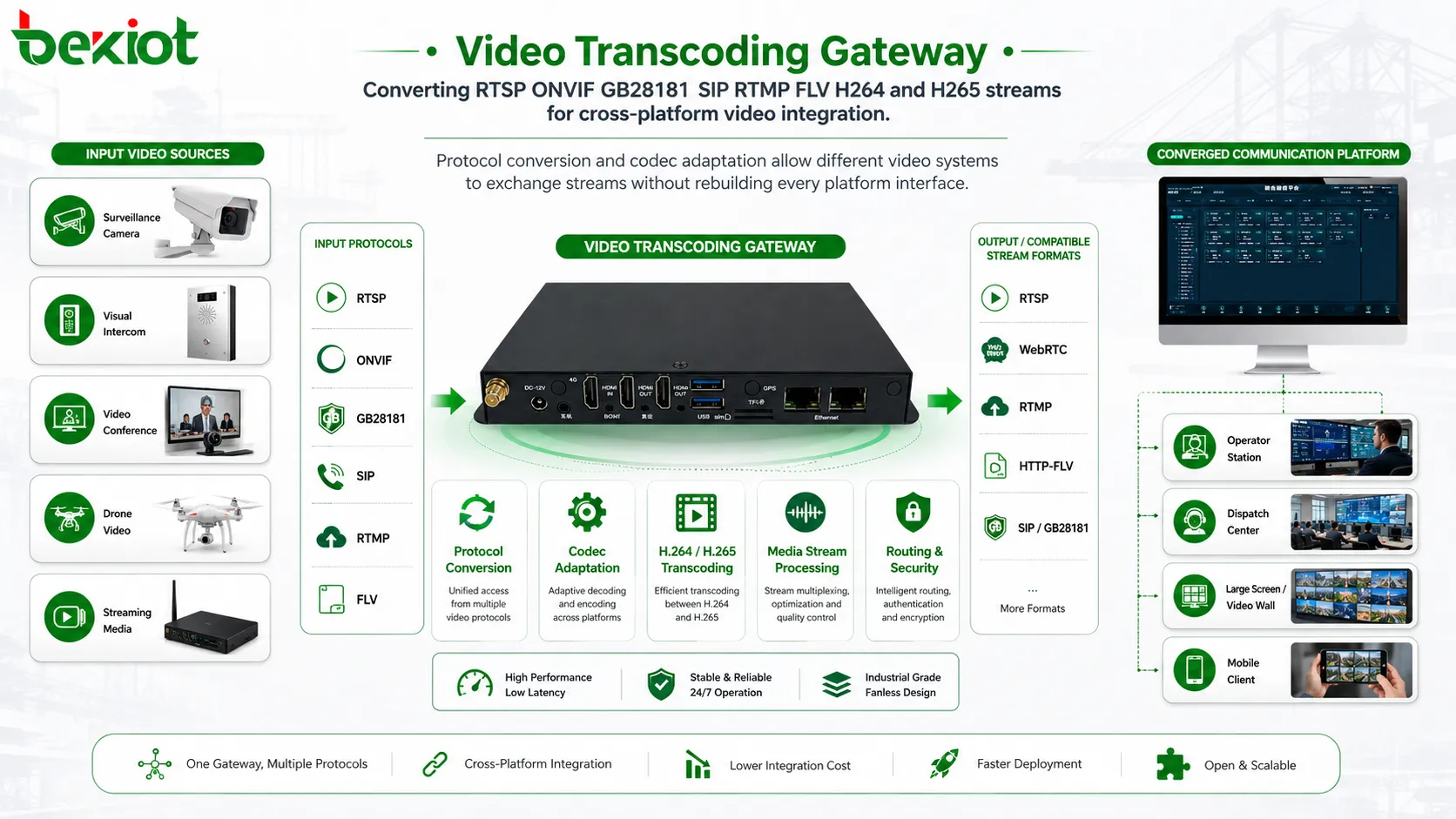
Different video systems speak different protocol languages. A surveillance camera may output RTSP. A security platform may use ONVIF or GB/T28181. A video conference terminal may support H.323 or SIP. A drone live stream may use RTMP. A streaming platform may provide FLV or other web media formats. If these protocols cannot be translated or repackaged, the target platform cannot receive the video correctly.
Protocol conversion allows video streams to move across systems that were not originally designed to interoperate. For example, a GB/T28181 video source may need to be converted for a SIP dispatch platform. An RTSP camera stream may need to be repackaged for a web streaming service. A drone RTMP stream may need to be introduced into an emergency command system. The gateway provides a unified method to bridge these differences.
In project design, protocol support should be checked early. The team should confirm which video sources must be accessed, which target systems must receive them, and which protocol formats are required on both sides. This prevents the integration plan from depending on assumptions that later fail during commissioning.
Codec Adaptation Solves a Deeper Compatibility Issue
Protocol conversion alone is not enough. Video convergence often fails because the codec is not compatible. Two systems may both support IP video, but one may use H.264 while another expects H.265. Some older platforms may not decode newer compression formats. Some lightweight or mobile systems may prefer lower-complexity streams to reduce processing load.
This is why video transcoding is a core capability in cross-system integration. A video transcoding gateway can convert H.264 to H.265, or H.265 to H.264, depending on the receiving platform. This makes video resources usable across systems with different decoding capabilities.
Codec adaptation also affects bandwidth and storage. H.265 can reduce bandwidth compared with H.264 under many conditions, but it may require more decoding capability. H.264 is more widely compatible in many legacy systems. The best choice depends on endpoint capability, platform compatibility, network condition, and project purpose.
Channel Capacity Should Match the Project Scale
Video convergence projects may involve only a few streams, or they may require many simultaneous channels. For small projects, a gateway may only need to process several key camera feeds or one or two field video streams. For larger command and security projects, multiple concurrent streams may need to be converted and distributed at the same time.
A common engineering reference is 16 channels of 1080P concurrent transcoding on a single gateway-class server. This level of capacity can meet many medium-sized video convergence projects, especially when the goal is to connect selected key video resources rather than process every camera in a large surveillance network.
Capacity planning should consider resolution, codec, frame rate, bitrate, transcoding direction, and whether streams are processed continuously or only during events. A system that handles 16 channels of 1080P may not handle the same number of 4K streams under the same conditions. Therefore, channel count should always be evaluated together with media complexity.
Resolution Adjustment Reduces Resource Pressure
Resolution is another important part of video convergence. High-resolution video provides more detail, but it also consumes more bandwidth, storage, decoding capability, and computing resources. In some projects, sending full-resolution streams to every target platform is unnecessary and may even create performance problems.
A video transcoding gateway can adjust resolution according to application requirements. For example, a 4K source may be converted to 1080P or 720P for a dispatch terminal, mobile client, or remote monitoring page. Multi-channel 4K resolution adjustment can be useful when the original video source is very clear but the receiving system only needs a smaller display size or lower bandwidth stream.
This makes system design more flexible. The original high-resolution source can still be preserved where needed, while other platforms receive a lighter version suitable for their display and network conditions. This improves compatibility and reduces unnecessary resource consumption.
Frame Rate and Bitrate Control Improve Delivery Quality
Frame rate affects motion smoothness, buffering behavior, and decoding pressure. Bitrate affects image clarity, bandwidth usage, and transmission stability. In cross-system integration, different platforms may use different frame structures or bitrate settings. If these parameters are not adapted, the receiving system may experience freezing, delay, stream failure, or poor image quality.
Frame rate adjustment helps match the stream to the receiving platform. A high-frame-rate source may be reduced for low-bandwidth transmission or for systems that only need situational awareness rather than detailed motion. A lower frame rate can also reduce decoding pressure and improve stability in constrained environments.
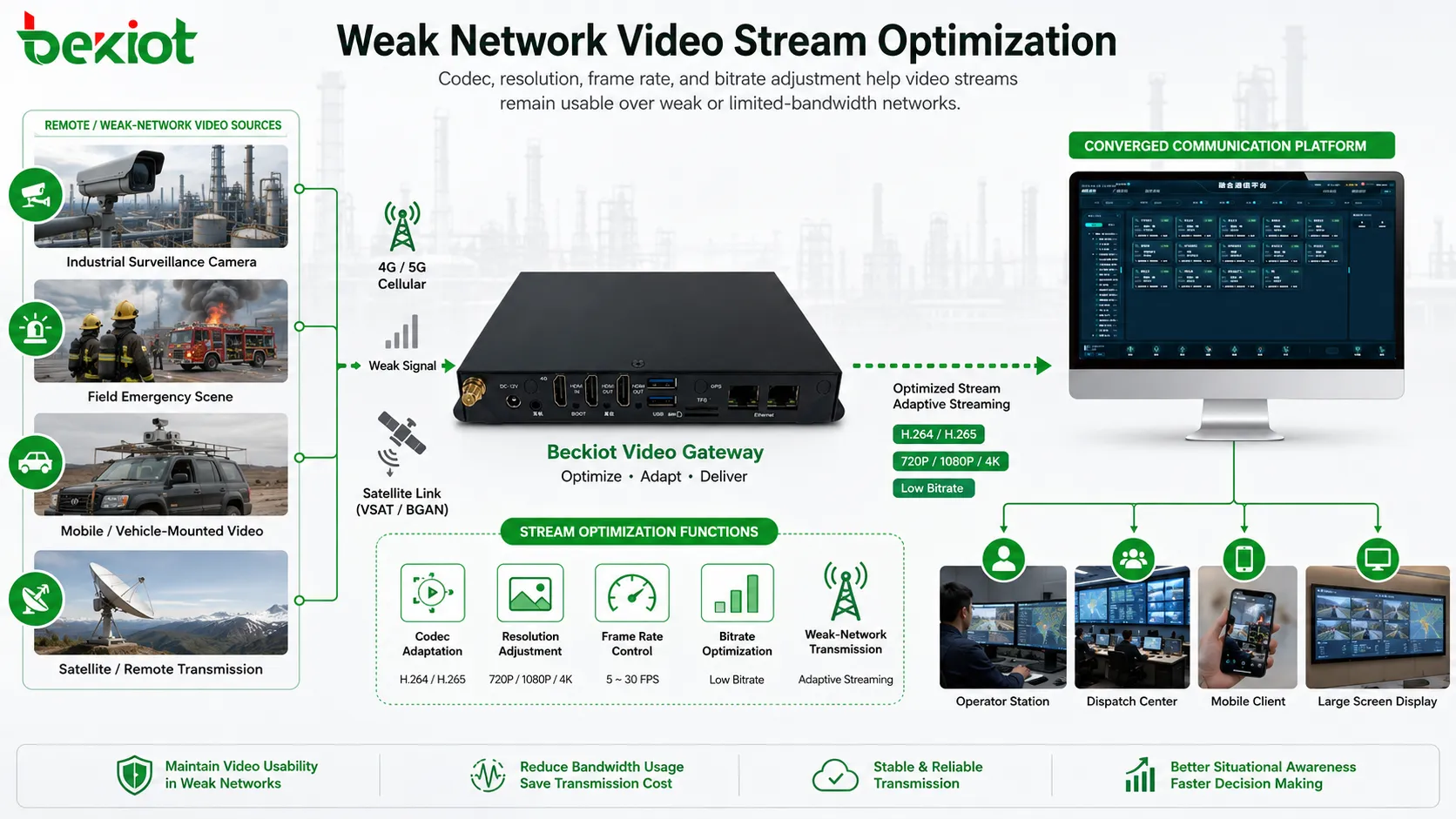
Bitrate control is especially important for lightweight transmission and weak-network conditions. In satellite networks, field emergency networks, temporary wireless links, and remote industrial sites, bandwidth may be limited or unstable. By combining codec conversion, resolution adjustment, and bitrate control, the system can deliver a more stable video stream instead of simply forwarding a heavy original stream.
Weak-Network Scenarios Need Adaptive Stream Design
Many video convergence projects are not deployed in perfect network environments. Emergency vehicles, outdoor field teams, remote facilities, construction sites, industrial parks, pipelines, substations, ports, mines, and transportation corridors may all involve unstable links. In these scenarios, direct high-bitrate video forwarding can cause delay, packet loss, or complete stream interruption.
A gateway-based design allows the project team to prepare different output profiles for different network conditions. A command center may receive a higher-quality stream. A mobile client may receive a lower-bitrate stream. A satellite link may require reduced resolution and bitrate. A large-screen display may require stable frame structure and compatible decoding format.
This kind of adaptation is important because video fusion is not only about compatibility. It is also about making the video usable under real operating conditions. A slightly lower-resolution stream that remains stable may be more valuable than a high-resolution stream that fails during an incident.
Typical Application Architecture
A complete architecture usually includes a video source layer, a gateway processing layer, a platform integration layer, and an application layer. The source layer may include cameras, recorders, drones, conference systems, body-worn devices, vehicle systems, and streaming platforms. The gateway layer receives these sources and performs protocol conversion, transcoding, resolution scaling, frame rate adjustment, bitrate control, and stream repackaging.
The platform integration layer connects the processed streams to command systems, surveillance platforms, unified communication systems, dispatch systems, meeting systems, web platforms, storage systems, or large-screen display systems. The application layer is where users actually view, call, dispatch, record, or share the video resources.
This layered design makes maintenance easier. When a new video source is added, the team does not need to rebuild the whole system. It only needs to confirm the input format, define the output requirement, and configure the gateway processing rule.
Where Cross-System Access Creates the Most Value
Emergency command is one of the most valuable scenarios. Command centers often need to bring together surveillance video, drone video, mobile field video, vehicle video, and video conferencing resources. A gateway-based convergence architecture helps decision makers see more sources from one workflow.
Security operation centers also benefit from this design. Different camera brands, legacy platforms, mobile video systems, and third-party monitoring tools may need to be unified. Instead of replacing all systems, protocol conversion and transcoding allow existing resources to continue being used.
Industrial and utility projects can use video convergence for remote inspection, production safety, maintenance support, and incident verification. Transportation projects can use it for highway monitoring, tunnel events, rail operation, ports, airports, and traffic command. In each case, the goal is to reduce video islands and make useful video resources available to the right system at the right time.
Implementation Points for System Integrators
Before deployment, the project team should list all video sources and target platforms. For each stream, confirm the source protocol, source codec, resolution, frame rate, bitrate, network path, target protocol, target codec, and required display mode. This information forms the basis of the gateway configuration plan.
Testing should include both normal and stressed conditions. The team should verify stream startup, delay, audio-video synchronization if audio is included, long-session stability, reconnection behavior, decoding compatibility, and bandwidth usage. For weak-network projects, testing should include simulated packet loss, bandwidth limitation, and link interruption.
Management also matters. A web-based configuration interface can simplify deployment, but the project should still define naming rules, stream mapping rules, access permissions, monitoring methods, and maintenance procedures. Without clear operation rules, a large video convergence project can become difficult to troubleshoot later.
Common Mistakes to Avoid
One common mistake is assuming that protocol conversion alone solves video integration. In many cases, codec, resolution, frame rate, bitrate, and receiving-platform decoding capability are equally important. A stream may connect successfully but still fail to play smoothly if these parameters are not matched.
Another mistake is forwarding the original high-bitrate stream everywhere. Large streams may work inside a local network but fail across WAN, wireless, satellite, or mobile networks. Adaptive output profiles should be planned for different users and network conditions.
A third mistake is developing separate adapters for every system pair. This increases cost and maintenance difficulty. A centralized gateway layer is often more practical because it provides a repeatable method for integrating multiple video systems.
Final Review
Cross-system video convergence is becoming a common requirement in communication, command, security, industrial, and emergency projects. Different video systems use different protocols, codecs, resolutions, frame rates, and bitrate settings, so direct interconnection is often difficult.
A video transcoding gateway provides a practical solution. It can convert RTSP, ONVIF, GB/T28181, SIP, RTMP, FLV, H.323-related access paths, and other video formats according to project needs. It can also convert between H.264 and H.265, support concurrent 1080P processing, adjust multi-channel 4K sources, and optimize streams for weak-network transmission.
For system integrators, the key is to design video convergence as a media adaptation architecture rather than a simple connection task. When protocol conversion, codec adaptation, resolution scaling, frame rate control, bitrate optimization, and operational management are planned together, complex video integration becomes much easier to deploy and maintain.
FAQ
Is video convergence the same as video surveillance integration?
No. Video surveillance integration usually focuses on camera and monitoring platform access. Video convergence is broader and may include surveillance, video conferencing, unified communication, drones, body-worn cameras, streaming media, and command systems.
Why is transcoding needed if the protocol has already been converted?
Protocol conversion changes how the stream is delivered, while transcoding changes how the video is encoded. A receiving platform may accept the protocol but still fail if it cannot decode the codec, resolution, frame rate, or bitrate.
Can 4K video be used in cross-system projects?
Yes, but 4K video should be planned carefully. Some systems may need the original 4K stream, while others may only need 1080P or 720P output. Resolution adjustment helps match each application scenario.
What is the main risk in weak-network video transmission?
The main risk is unstable playback caused by high bitrate, packet loss, latency, or insufficient bandwidth. Codec, resolution, frame rate, and bitrate should be adjusted together for better stability.
Is it better to customize every platform interface or use a gateway?
For multi-system projects, a gateway is usually more practical. It provides a reusable adaptation layer and reduces the need for separate development work between every pair of video systems.







