


Many organizations build video surveillance systems in phases. Cameras, NVRs, video platforms, and department-level monitoring systems are often purchased at different times, deployed by different teams, and supplied by different brands. As the number of sites and devices grows, the problem is no longer only video recording. The bigger challenge is how to view, manage, share, convert, and integrate these video resources through one unified platform.
A centralized video surveillance management solution helps organizations bring scattered video systems into one architecture. By using a video access gateway or unified video management platform, existing cameras, recorders, and third-party platforms can be connected, organized, and distributed to upper-level platforms, web applications, mobile apps, command systems, and business platforms. This approach reduces isolated systems, simplifies operation, and provides a stronger foundation for video-based business integration.
Why Fragmented Camera Systems Become Hard to Operate
In real projects, video surveillance is rarely built as one complete system from the beginning. A factory may first deploy cameras for production areas, then add warehouse monitoring, perimeter security, office surveillance, and emergency command video. A campus may use one system for gates, another for classrooms, and another for security offices. A large enterprise may have multiple video platforms, many NVRs, and devices from several manufacturers.
This fragmented structure creates long-term management problems. Operators may need to switch between different platforms to view live video. Maintenance teams may not have a clear view of device status. Business departments may request video streams in different formats. Upper-level platforms may require standard uplink access. Developers may need to integrate video into GIS, emergency command, access control, inspection, or service systems.
Without centralized management, every new integration request can become a separate project. The same video source may be repeatedly accessed, converted, and distributed by different systems. This increases maintenance workload, raises system pressure, and makes later expansion more difficult.
A Unified View for Devices, Live Video, and Recordings
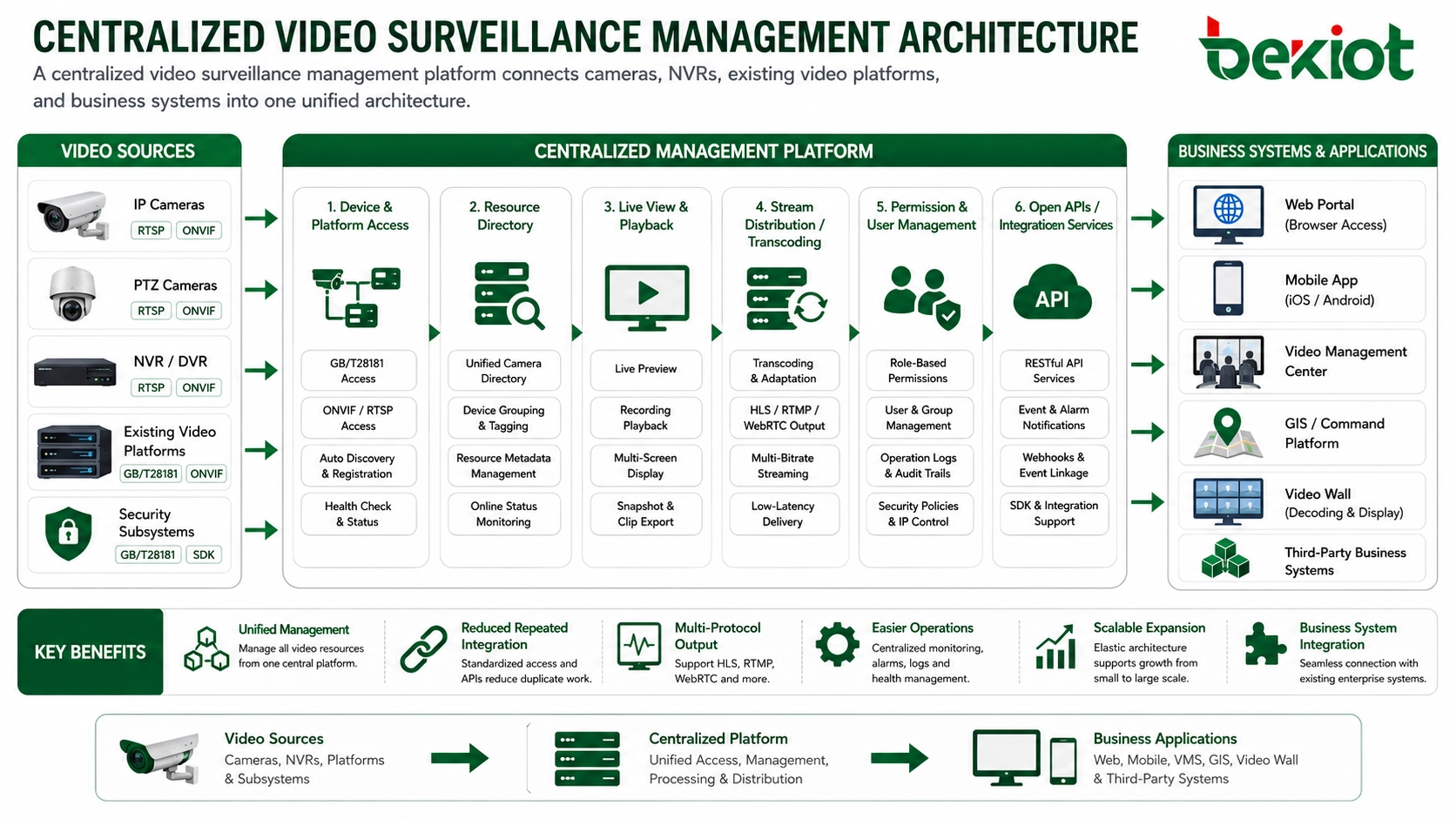
One of the most direct benefits of centralized video management is visibility. When video resources are connected into one platform, operators can view device status, live streams, and recording information more clearly. Instead of checking different systems one by one, the platform provides a unified entry for monitoring, searching, and viewing video resources.
Through standard access methods such as GB/T28181, internal video platforms, NVRs, and IP cameras can be connected to the centralized system. This makes it possible to manage devices from different vendors and different project phases under a consistent resource directory. Users can view live video, call recordings, switch layouts, and display multiple windows according to operational needs.
For security centers, operation teams, and command rooms, this unified view improves response efficiency. When an event occurs, staff can quickly locate the related camera, check the live scene, review historical footage, and share video with other systems when needed.
Standard Uplink for Higher-Level Platforms
Many organizations need to share local surveillance video with a superior platform, regional management center, industry supervision platform, or emergency command system. In this case, a local video access gateway can aggregate video resources and provide standard uplink capability.
GB/T28181 is commonly used in China for video surveillance access and platform interconnection. By configuring GB/T28181 uplink, a local gateway can organize the video directory, manage device relationships, and submit selected video resources to an upper-level platform. This avoids repeated point-to-point integration between every camera and every external system.
A centralized uplink structure is especially useful for multi-site organizations. Each site can manage its own cameras locally, while the headquarters or supervision platform can access authorized video resources through a standard interface. This keeps the architecture clearer and makes later expansion easier.
Flexible Stream Output for Different Applications
Modern video surveillance is no longer limited to security monitoring. Video streams are now used by command platforms, web portals, mobile apps, GIS systems, emergency dispatch systems, AI analysis platforms, and enterprise operation dashboards. These systems often require different stream formats and different playback methods.
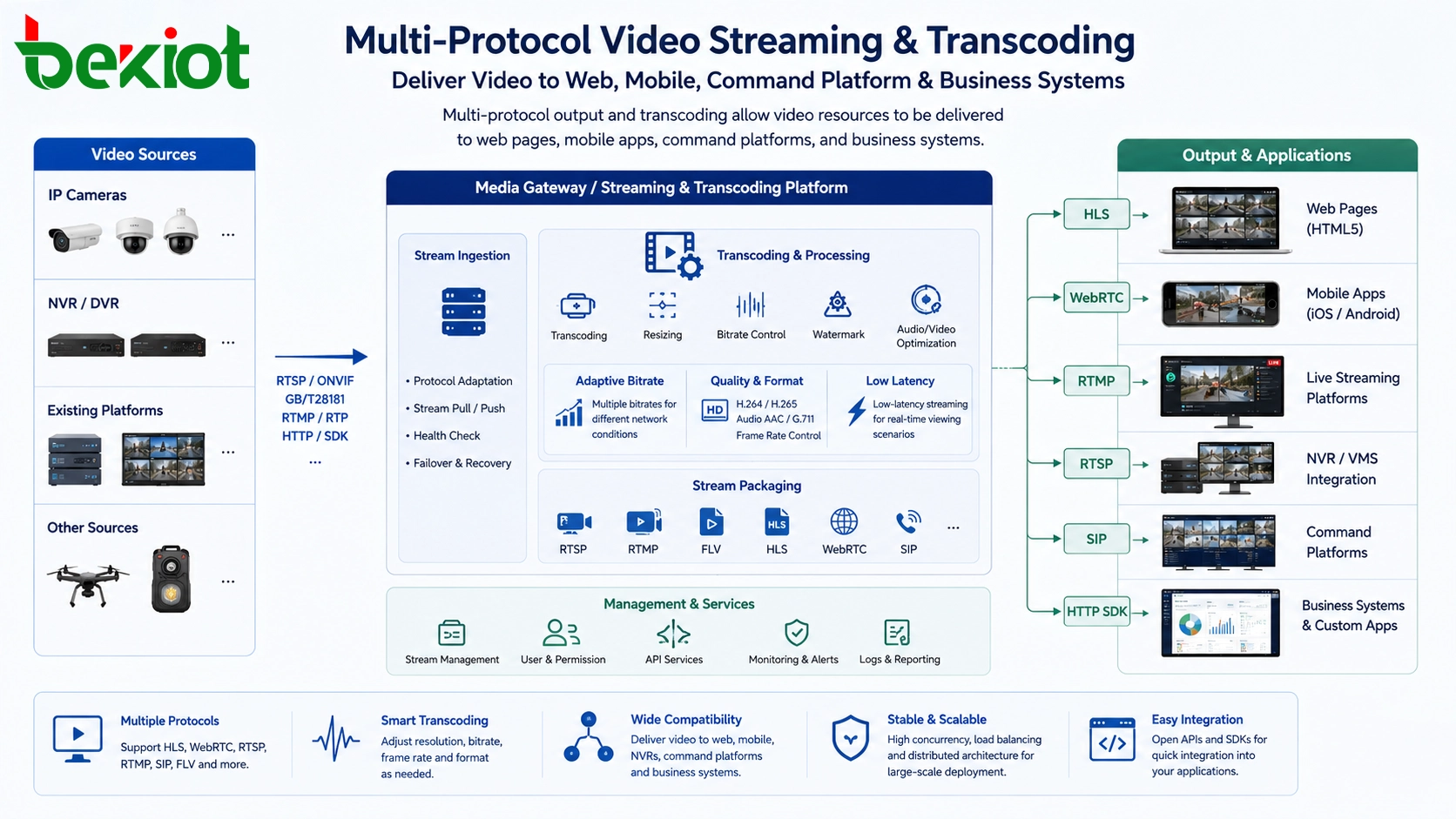
A centralized video management platform can provide multiple stream output capabilities. Common output protocols include FLV, HLS, RTSP, RTMP, SIP, and WebRTC. Instead of asking each business system to connect directly to cameras or NVRs, the business system can request the required stream from the video platform.
This design brings two important benefits. First, it provides richer output options for different terminals and application scenarios. For example, HLS can support web and mobile playback, WebRTC can support low-latency viewing, RTSP can support traditional video systems, and RTMP may be used in streaming workflows. Second, it reduces pressure on the original surveillance system because the platform or gateway handles distribution and format adaptation.
Transcoding Makes Cross-System Playback Easier
Transcoding is another important capability in centralized video integration. Different cameras and platforms may use different encoding formats, resolutions, frame rates, and bitrates. A stream that works well inside one monitoring system may not be suitable for a web browser, a mobile app, an AI platform, or a third-party business system.
With a dedicated video management platform or media gateway, video streams can be converted and adapted before they are delivered. The platform can adjust the encoding format, frame rate, bitrate, and resolution to match the playback environment or integration requirement. This is especially important when video needs to be shared across systems, networks, and terminals.
For example, a high-resolution camera stream may be suitable for local monitoring but too heavy for mobile viewing. The platform can generate a lower-bitrate stream for mobile users while keeping the original stream available for recording or command center display. This improves compatibility and helps maintain a smoother viewing experience.
APIs Help Business Systems Use Video Resources
Centralized video management is not only about viewing cameras. In many projects, video needs to be embedded into business workflows. A security event may need to open related cameras automatically. A GIS platform may need to display nearby video points on a map. A maintenance system may need to attach video evidence to a work order. An emergency command platform may need to combine video, voice, map, alarm, and dispatch information.
A video access gateway or management platform usually provides API capabilities for integration. Through unified APIs, developers can call live video, recordings, device lists, playback controls, stream addresses, alarm linkage, and other video functions. This makes customized application development easier and reduces the need to integrate with every camera brand or NVR separately.
A unified API layer also helps avoid duplicated construction. Instead of rebuilding video access logic for every new system, organizations can expose standard video services through the centralized platform. This simplifies project delivery and makes future business integration more manageable.
A Scalable Architecture for Long-Term Operation
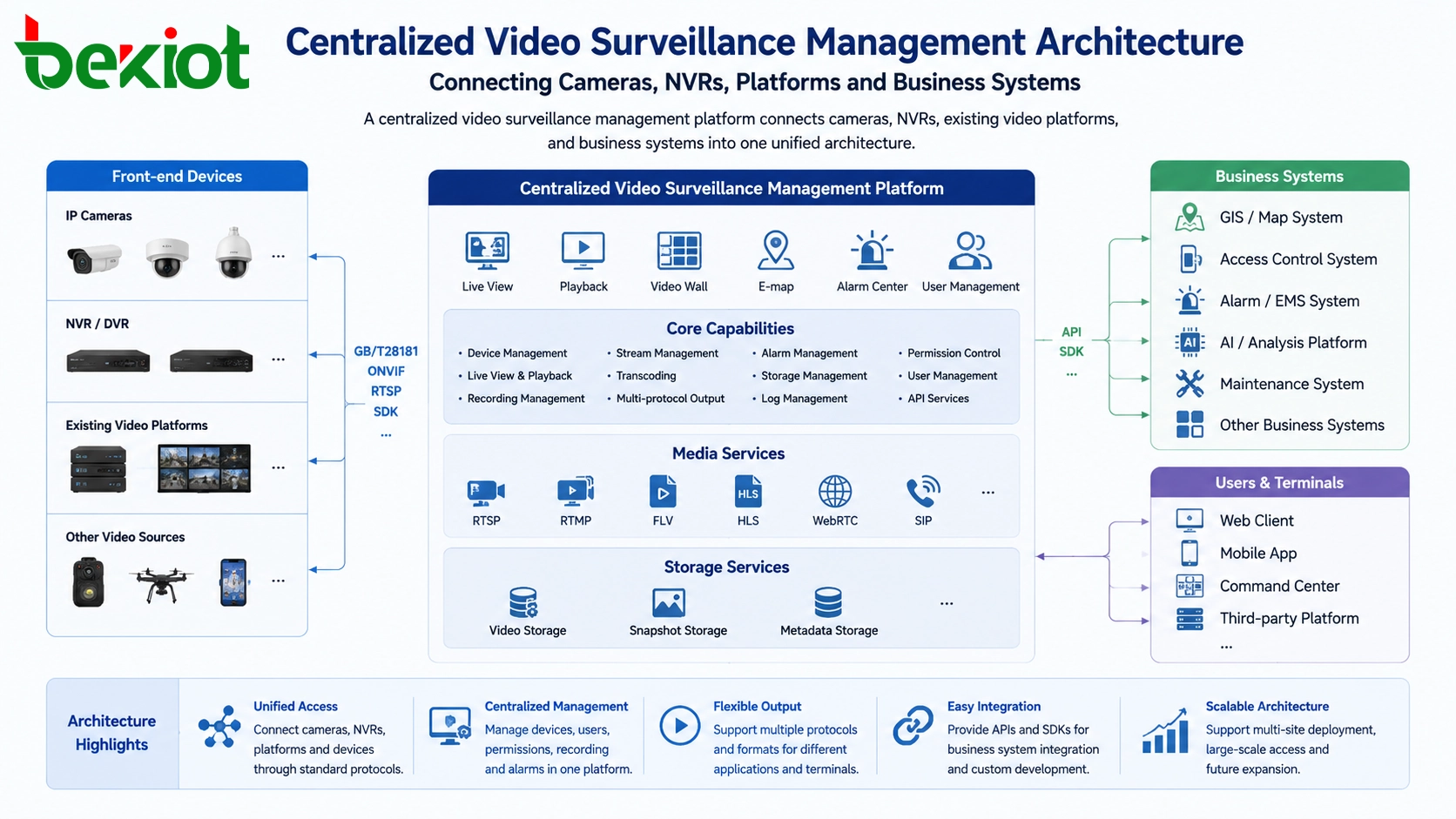
A well-designed centralized video surveillance solution usually includes several layers. The access layer connects cameras, NVRs, DVRs, and existing video platforms. The gateway layer handles protocol conversion, GB/T28181 access, stream pulling, stream forwarding, and uplink. The media processing layer provides transcoding, stream packaging, and multi-protocol output. The platform layer manages directories, permissions, device status, recordings, logs, and APIs. The application layer serves users through web portals, mobile apps, command screens, business systems, and third-party platforms.
This layered model makes the platform easier to expand. New cameras can be added to the access layer. New business systems can use the API layer. New playback formats can be supported through the media processing layer. Upper-level platforms can connect through standard uplink interfaces. As video resources continue to grow, the system does not need to be rebuilt from the beginning.
In many projects, one video access gateway or a group of gateways can centralize and manage video resources from different systems. For large deployments, gateways can be deployed by site, area, or network zone, while the central platform provides unified management and service output.
Where Centralized Management Creates Value
Centralized video surveillance management is suitable for organizations that already have multiple monitoring systems or expect future expansion. Typical scenarios include industrial parks, factories, campuses, hospitals, transportation hubs, energy facilities, commercial buildings, smart communities, emergency command centers, and multi-branch enterprises.
In these environments, video resources are often used by more than one department. Security teams need monitoring and playback. Operation teams need device status. Managers need dashboards. Emergency teams need fast video access. Business platforms need embedded video. IT teams need unified integration and lower maintenance complexity.
By building a centralized platform, organizations can turn scattered video resources into reusable video services. This improves visibility, supports cross-system collaboration, reduces duplicate development, and makes video integration easier for future digital projects.
Planning Recommendations Before Deployment
Before deploying a centralized video management solution, it is important to review the current video environment. The project team should identify how many platforms, recorders, cameras, protocols, networks, and user roles are involved. It should also define whether the system needs GB/T28181 uplink, multi-protocol stream output, web playback, mobile access, transcoding, recording access, API integration, or command platform linkage.
The platform should also be designed with permission control and system pressure in mind. Not all cameras need to be shared with every user or every platform. Stream distribution should be planned carefully to avoid overloading the original surveillance system. Recording storage, bandwidth, concurrent viewing, and security rules should be considered from the beginning.
A centralized video surveillance management platform is most valuable when it is treated as a long-term video integration layer, not only as a replacement for a single monitoring client. Its role is to connect video resources, standardize access, support flexible output, and provide reusable capabilities for future business systems.
FAQ
Can a centralized platform work with old surveillance equipment?
In many cases, yes. If the existing cameras, NVRs, or platforms support standard protocols such as GB/T28181, RTSP, or ONVIF, they can often be integrated through a video access gateway or management platform. The exact method depends on the device model, firmware, network condition, and available protocol support.
Is a video access gateway always required?
Not always. If all devices already connect to the same platform and the platform provides the required output and API capabilities, an additional gateway may not be necessary. A gateway becomes useful when the project needs protocol conversion, platform aggregation, GB/T28181 uplink, stream output adaptation, or cross-system integration.
How should permissions be handled in a unified video platform?
Permissions should be designed by role, department, site, camera group, and business scenario. For example, security staff may access more live views, maintenance teams may access specific areas, and external platforms may only receive selected video resources. Access logs and authentication should also be included.
What should be checked before connecting to an upper-level platform?
The project team should confirm the required protocol, device directory rules, camera naming standards, network route, port policy, authentication method, video quality requirements, and whether live view, playback, alarm linkage, or device status reporting is needed.
Can the same video source be used by multiple business systems?
Yes. A centralized platform can expose video streams or APIs to multiple authorized systems, such as a command platform, GIS map, mobile app, security dashboard, or AI analysis service. Proper stream distribution and permission control are needed to keep the system stable and secure.







