


Reservoirs, waterways, sluices, and other water conservancy facilities are critical areas for public safety and daily water management. Many of these sites are located in remote suburbs, mountain areas, forest regions, or places where on-site supervision is difficult. Without a unified video management system, managers may face problems such as delayed incident discovery, illegal fishing, drowning risks, unsafe activities near water outlets, and limited visibility during water release or drainage operations.
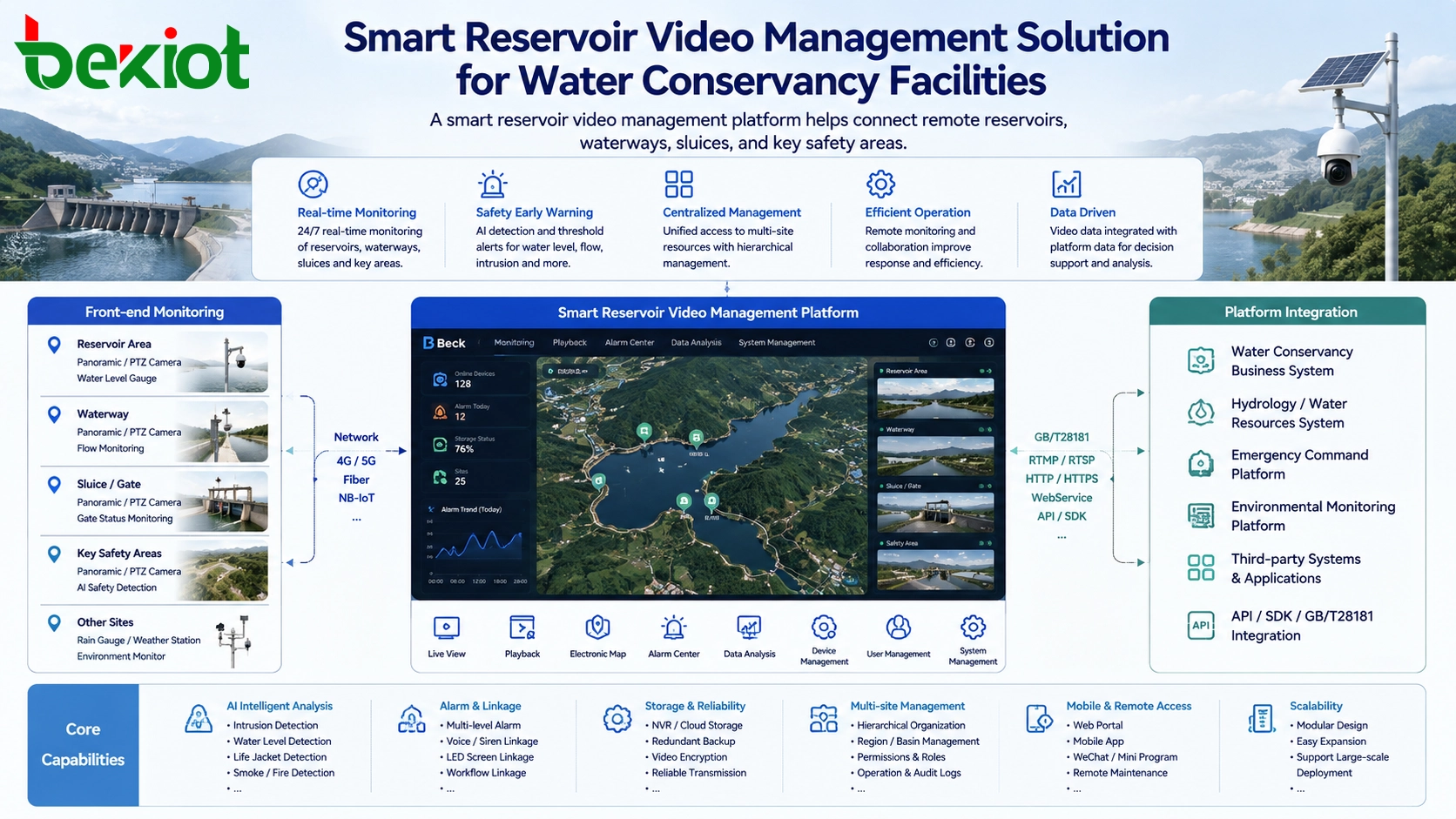
A smart reservoir video management solution uses video networking, wireless cameras, remote viewing, audio broadcasting, alarm linkage, and data integration to build a more visible and responsive water safety management system. The purpose is not only to install cameras, but to connect all video resources into one platform, allowing management teams to view key areas in real time, identify risks earlier, and coordinate emergency response more efficiently.
Safety Challenges Around Remote Water Sites
Reservoir management is different from ordinary building security. The monitored area is often wide, scattered, and affected by terrain, weather, network coverage, and human activity. Some reservoirs may have large open water surfaces, dam areas, spillways, water channels, sluice gates, and remote access roads. These places are difficult to supervise only through manual patrols.
Common management challenges include people entering restricted water areas, illegal fishing, swimming in dangerous zones, damage to facilities, sudden changes in water level, and safety risks caused by water release or drainage. When downstream visitors are close to water channels or sluice outlets, early warning and real-time broadcasting become especially important.
A video-based solution allows managers to monitor these areas continuously. When abnormal activity appears, staff can view the live image, use remote broadcasting to warn people on site, record the event, and coordinate follow-up actions through the management platform.
Building a Unified Visual Management Platform
The core of the solution is to deploy cameras in key reservoir areas, waterways, sluices, entrances, dams, and other important locations. These cameras are connected to a centralized video networking platform, where authorized managers can view live video, check recordings, manage devices, and handle alarms through a unified interface.
This platform should support centralized access for all reservoir cameras, unified viewing, area-based device management, user permission control, alarm processing, and video stream output to other business systems. Instead of managing each camera separately, the water management department can build a complete visual resource system for daily supervision and emergency support.
In a practical deployment, the video platform can be located in the water management center or a data room. Through secure network access and public network mapping when required, remote reservoir cameras can be connected back to the platform for centralized management.
Camera Deployment for Wide-Area Monitoring
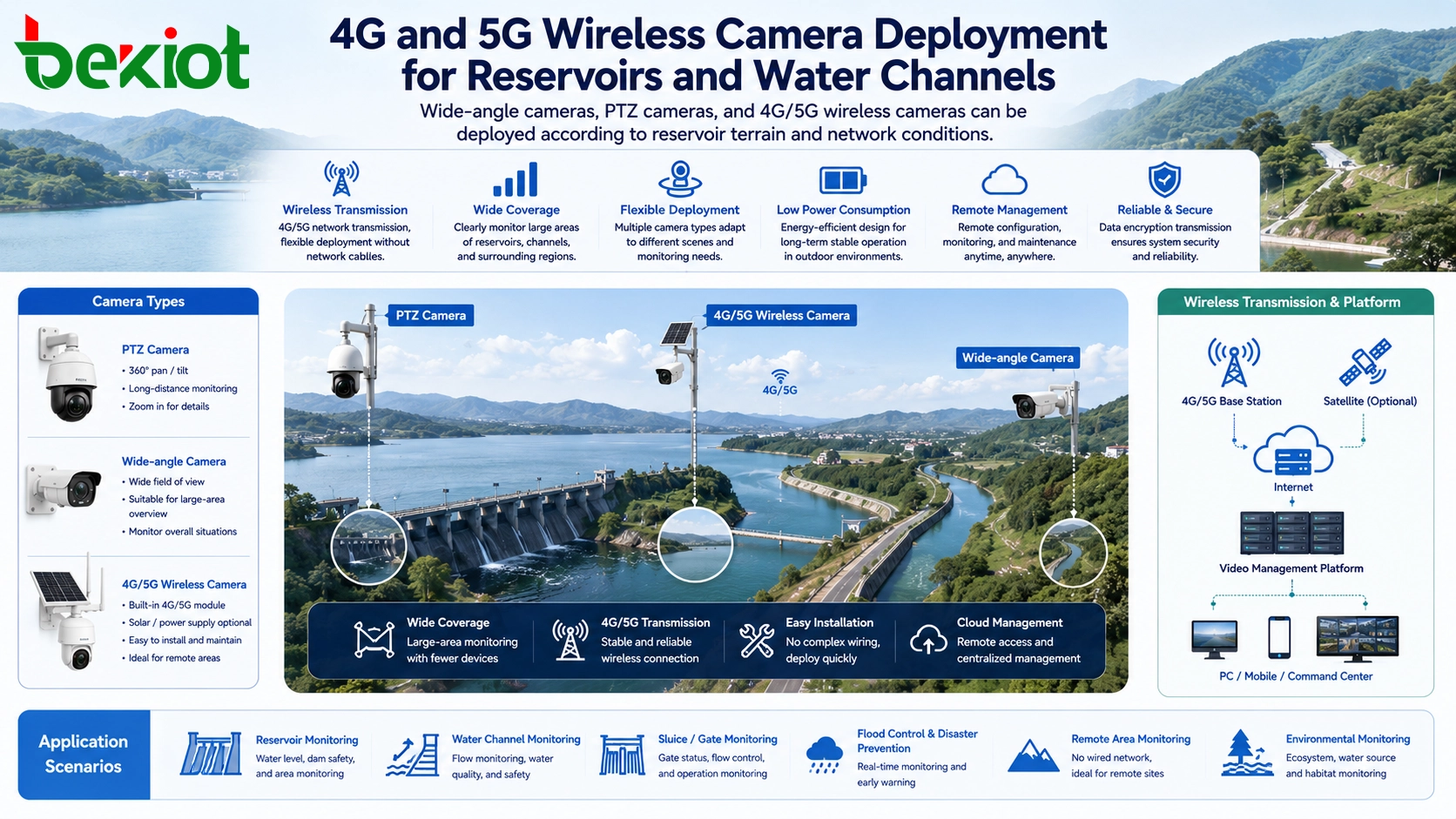
Camera selection should match the actual reservoir environment. For wide-view locations, fixed bullet cameras with wide-angle lenses can be used to cover large open areas. For key points such as dam gates, water outlets, sluice areas, and entrances, PTZ cameras with zoom control can be used to support closer inspection and flexible viewing angles.
Because many reservoirs are located far from urban network infrastructure, camera networking should also consider local signal conditions. Where fixed broadband is unavailable or difficult to deploy, 4G/5G wireless cameras can be selected according to the mobile network coverage in the surrounding area. This reduces cabling difficulty and makes the system easier to deploy across scattered sites.
For sites that require remote warning, cameras should support audio collection and broadcasting. A camera with a built-in microphone and speaker, or an external pickup microphone and waterproof amplifier column, can support remote voice warning. This allows managers to broadcast safety reminders when people enter dangerous areas or when water release operations may affect downstream visitors.
Recording Strategy and Data Traffic Control
Video recording is an important part of reservoir safety management. However, when cameras are deployed in remote locations, the recording strategy should be planned carefully. If video is uploaded to a remote recorder or central platform 24 hours a day, the data traffic cost may become high, especially when wireless communication cards are used.
For this reason, local recording can be considered in some scenarios. Cameras with expandable storage can record video locally, while the platform only pulls live video or key recordings when needed. This approach can reduce continuous upload pressure and help control communication cost.
The final strategy should be based on network quality, data cost, recording duration, event review requirements, and the importance of each monitoring point. Key areas may need central recording and higher reliability, while general observation points may use local storage and on-demand access.
Standard Video Access and Large-Scale Networking
To support long-term expansion and unified management, cameras should support GB/T28181, a widely used national standard protocol for video surveillance networking. Through GB/T28181 access, cameras can be connected to a video networking platform more easily and managed as part of a large-scale video system.
Standardized access is important for reservoir projects because the number of camera points may increase over time. New reservoirs, channels, sluices, pumping stations, and inspection points may be added later. A protocol-based architecture helps avoid isolated systems and reduces the risk of repeated construction.
Besides GB/T28181, the platform should also support common video stream formats for integration with different business systems. Typical output formats may include RTMP, RTSP, FLV, HLS, SIP, and WebRTC. These formats allow video resources to be used by command platforms, web systems, mobile applications, dispatch systems, and large-screen visualization platforms.
Integration With Weather and Hydrological Information
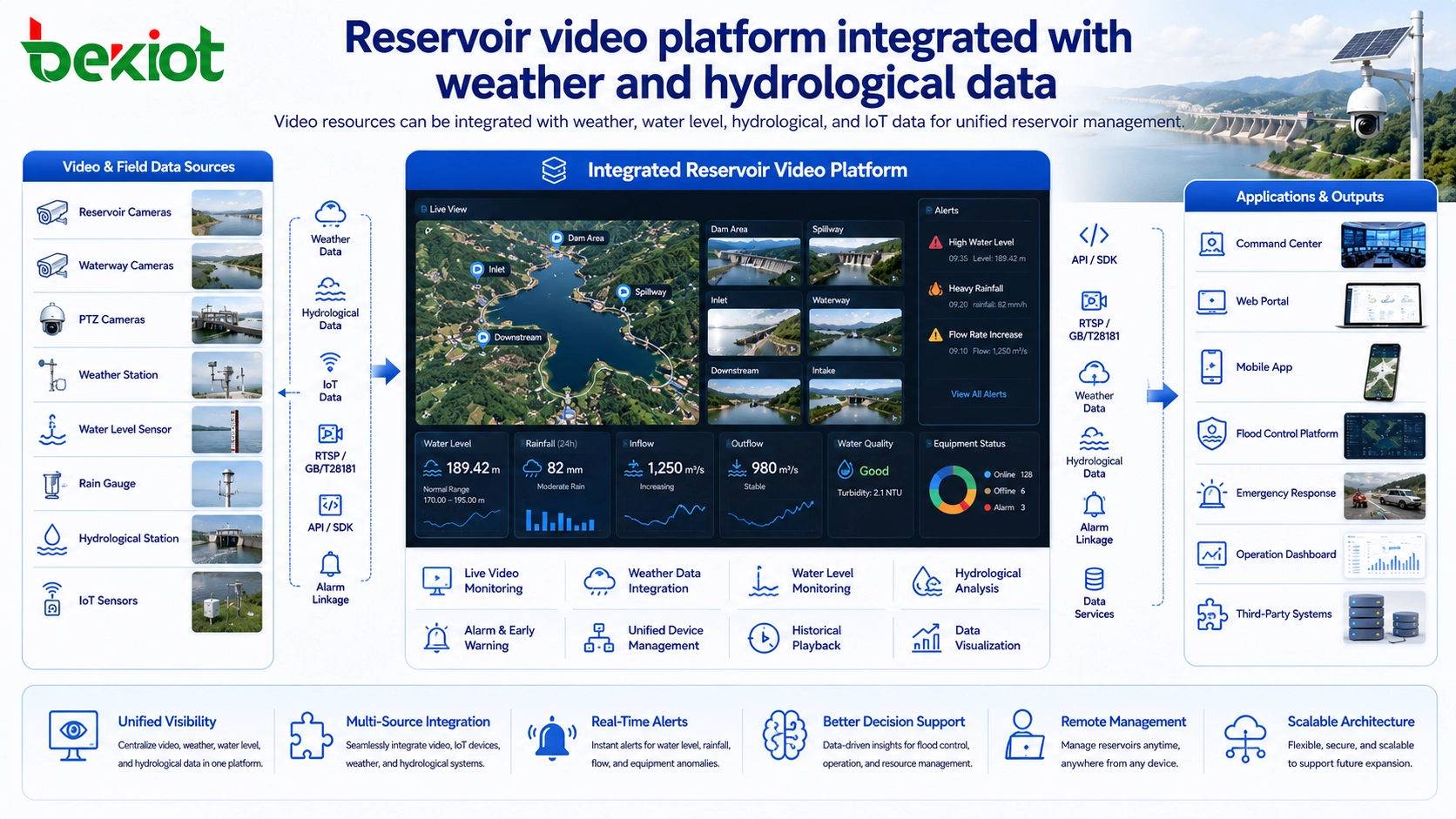
A smart reservoir platform should not treat video as an independent function. Video becomes more valuable when it is integrated with weather data, water level information, hydrological monitoring, IoT sensor data, and alarm events. This allows managers to see both the visual scene and the environmental data behind it.
For example, when rainfall increases, the platform can combine video images with water level data and weather information to support flood control judgment. When a sluice is opened, managers can view the downstream channel, broadcast warnings, and monitor whether people are entering dangerous areas. When an alarm is triggered, the platform can display the related camera image and provide a clearer basis for decision-making.
In one practical solution model, the system can support 500 camera access points and 32-channel video forwarding. Video streams can be output in FLV format to the smart reservoir platform and displayed together with weather and hydrological information on a unified management screen.
Operational Functions for Daily Management
A complete reservoir video management platform should support more than live viewing. It should allow managers to divide cameras by reservoir area, assign responsible personnel, view live video through web pages, check historical recordings, adjust camera focus, control PTZ movement, and handle camera alarms.
Area-based management is useful when a project includes multiple reservoirs or many scattered monitoring points. Each region can have designated administrators, permissions, and operating responsibilities. This helps avoid unclear responsibility and improves daily management efficiency.
The system should also support alarm handling and evidence review. When abnormal behavior, device failure, or safety risk is detected, managers can quickly locate the camera, view the scene, broadcast a warning, and keep video records for later analysis.
Benefits for Water Conservancy Projects
The first benefit is better visibility. Remote reservoirs and water channels can be monitored from a central platform, reducing dependence on manual patrols and improving the ability to discover risks early.
The second benefit is faster response. Through live video, remote broadcasting, alarm handling, and unified viewing, managers can respond to dangerous activity or facility problems more quickly.
The third benefit is system integration. By outputting video streams in multiple formats, the platform can connect with smart reservoir systems, IoT platforms, emergency command platforms, and dispatch systems. This creates a reusable video resource layer instead of separate camera silos.
The fourth benefit is cost-effective construction. A practical solution should focus on solving real problems rather than adding unnecessary functions. By using wireless access, standard protocols, local recording, and scalable interfaces, the project can be deployed efficiently while leaving room for future expansion.
Deployment Planning and Expansion Design
Before deployment, project teams should survey reservoir locations, network conditions, power supply, camera installation points, safety risk areas, and management workflows. The camera type, storage method, network access mode, and platform integration method should be selected based on the actual environment.
The platform should also reserve interfaces for future business expansion. Later, emergency command, dispatch communication, IoT monitoring, flood control systems, and large-screen visualization can be connected to the same video resource platform. This helps share information resources and reduces repeated investment.
A smart reservoir project does not need to start with a complicated system. It can begin with key video points, remote broadcasting, standardized camera access, and basic platform integration. As management needs grow, the solution can expand toward intelligent analysis, emergency linkage, multi-department coordination, and integrated command.
Conclusion
A smart reservoir video management solution helps water management departments improve safety supervision, remote monitoring, risk warning, and emergency response across reservoirs, waterways, sluices, and other water conservancy facilities. By combining 4G/5G wireless cameras, GB/T28181 video networking, remote broadcasting, centralized management, multi-format stream output, and hydrological data integration, the system provides a practical foundation for digital reservoir management.
The key is to build a solution around real management needs: wide-area visibility, early risk discovery, unified viewing, low-cost deployment, scalable integration, and future expansion. With a flexible architecture, the same video resource system can support daily supervision, flood control, emergency command, safety warning, and long-term intelligent water conservancy management.
FAQ
What network method is suitable for remote reservoir cameras?
It depends on the site conditions. If wired broadband is available, fixed network access can be used. If the reservoir is located in a remote or mountainous area, 4G/5G wireless cameras may be more practical, provided that mobile signal coverage is stable enough.
Why is local video recording useful in reservoir projects?
Local recording can reduce continuous upstream traffic, especially when cameras use mobile data cards. It allows important footage to be stored near the camera while live video or selected recordings are accessed remotely when needed.
Can reservoir video be displayed on a large-screen platform?
Yes. If the video management platform supports stream output formats such as FLV, HLS, RTSP, or WebRTC, video can be integrated into large-screen visualization systems, web dashboards, and smart reservoir platforms.
Is voice broadcasting necessary for reservoir monitoring?
It is highly useful in safety management scenarios. Remote broadcasting allows managers to warn people who enter dangerous water areas, restricted zones, downstream channels, or sluice discharge areas.
How should a reservoir video system prepare for future expansion?
The system should use standard video access protocols, flexible stream output, role-based management, scalable camera capacity, and open integration interfaces. This makes it easier to connect with IoT sensors, hydrological systems, dispatch platforms, and emergency command systems later.







