


IP phones and IP PBX systems are now widely used in offices, customer service teams, reception desks, commercial buildings, factories, schools, hotels, and multi-branch organizations. However, many users only use the most basic functions: making calls, answering calls, and hanging up. When they face advanced keys or feature codes on the phone, they may feel confused and eventually ignore functions that were designed to improve efficiency.
The real value of an IP phone is not only replacing an analog telephone. It can become an intelligent communication endpoint connected to the enterprise phone system. Features such as call forwarding, call transfer, call pickup, call park, do not disturb, and programmable keys help teams handle calls faster, reduce missed calls, improve internal coordination, and create a more professional calling experience.
Related Product Introduction: Becke IP Phone
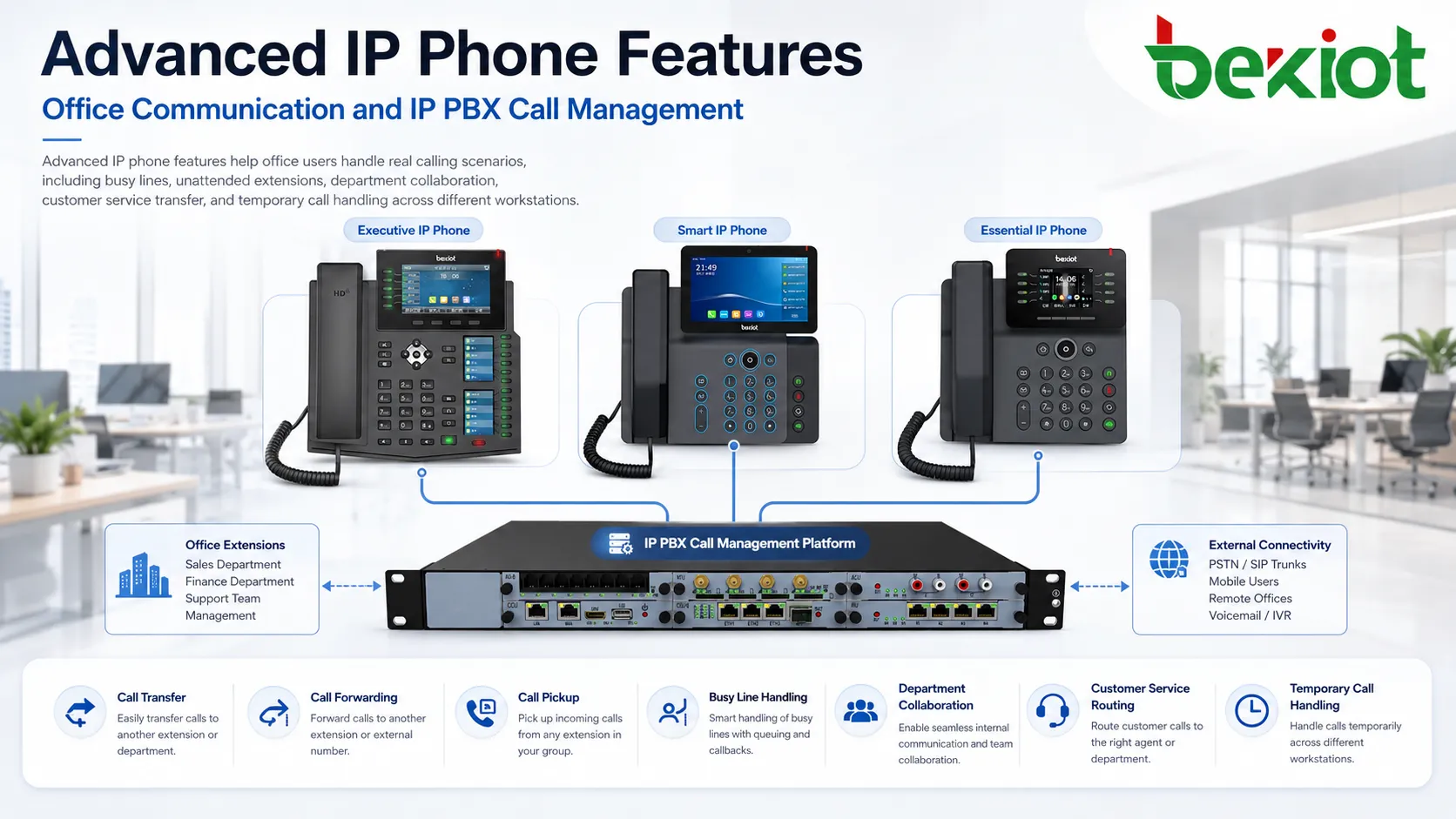
Why Many Teams Underuse Their Desk Phones
In many offices, IP phones are already connected to a powerful IP PBX system, but users may not understand how the available functions work. A phone may include buttons for transfer, forwarding, pickup, park, hold, contacts, DND, and speed dial, yet employees may still handle calls manually because they are unfamiliar with the workflow behind each function.
This creates a common problem: the organization has already invested in a modern communication system, but the daily user experience remains close to a traditional telephone. Calls are missed when employees leave their desks. Customers wait too long when the wrong person answers. Department phones ring without being picked up. Staff may physically move between desks to continue a conversation instead of using the system properly.
Understanding the operating principle of each advanced feature is often more important than memorizing button names. Once users know when and why to use a feature, the IP phone becomes easier to operate. The goal is not to make the phone more complicated, but to make call handling more natural and efficient.
Building a More Flexible Call Flow
An IP PBX system manages extensions, call routing, call permissions, ring groups, voicemail, queues, and many other communication rules. The IP phone acts as the user-facing terminal for these functions. When the phone and IP PBX work together, calls can be routed, redirected, transferred, picked up, parked, or blocked according to real business needs.
For example, a sales employee may need incoming calls to follow them to a mobile number when they leave the office. A receptionist may need to transfer callers to the correct department. A service team may need to answer another colleague’s ringing phone when that person is away. A manager may need to temporarily stop incoming calls during a meeting. These are not unusual situations. They happen every day in real workplaces.
Advanced IP phone functions are designed to solve these daily problems. They reduce dependence on manual coordination and allow the phone system to support business workflow directly.
Forwarding Calls When Users Are Unavailable
Call forwarding is one of the most widely used advanced features in business phone systems. It allows an incoming call to be redirected from the original extension to another number. The forwarded target can be another extension, a department number, a mobile phone, a branch office phone, or another reachable endpoint defined by the system.
There are usually three common forwarding modes. The first is unconditional forwarding, where all incoming calls are forwarded immediately. This is useful when a user leaves the workstation, works remotely, or wants all calls to be answered by another number for a period of time. The second is busy forwarding, where calls are forwarded only when the extension is already in use. The third is no-answer forwarding, where calls are forwarded if the user does not answer within a defined ring time.
In office scenarios, unconditional forwarding is often used when an employee is away from the desk. Busy forwarding helps avoid losing new callers when the user is already on another call. No-answer forwarding can send calls to a colleague, assistant, reception desk, or voicemail when the user cannot answer in time.
Many IP phones provide a shortcut key for call forwarding. Users can enable the function by pressing the key and entering the destination number. In some systems, forwarding can also be activated through feature codes or the IP PBX web portal. A clear deployment plan should define which forwarding mode users can control and which rules should be managed centrally by administrators.
Moving Conversations to the Right Person
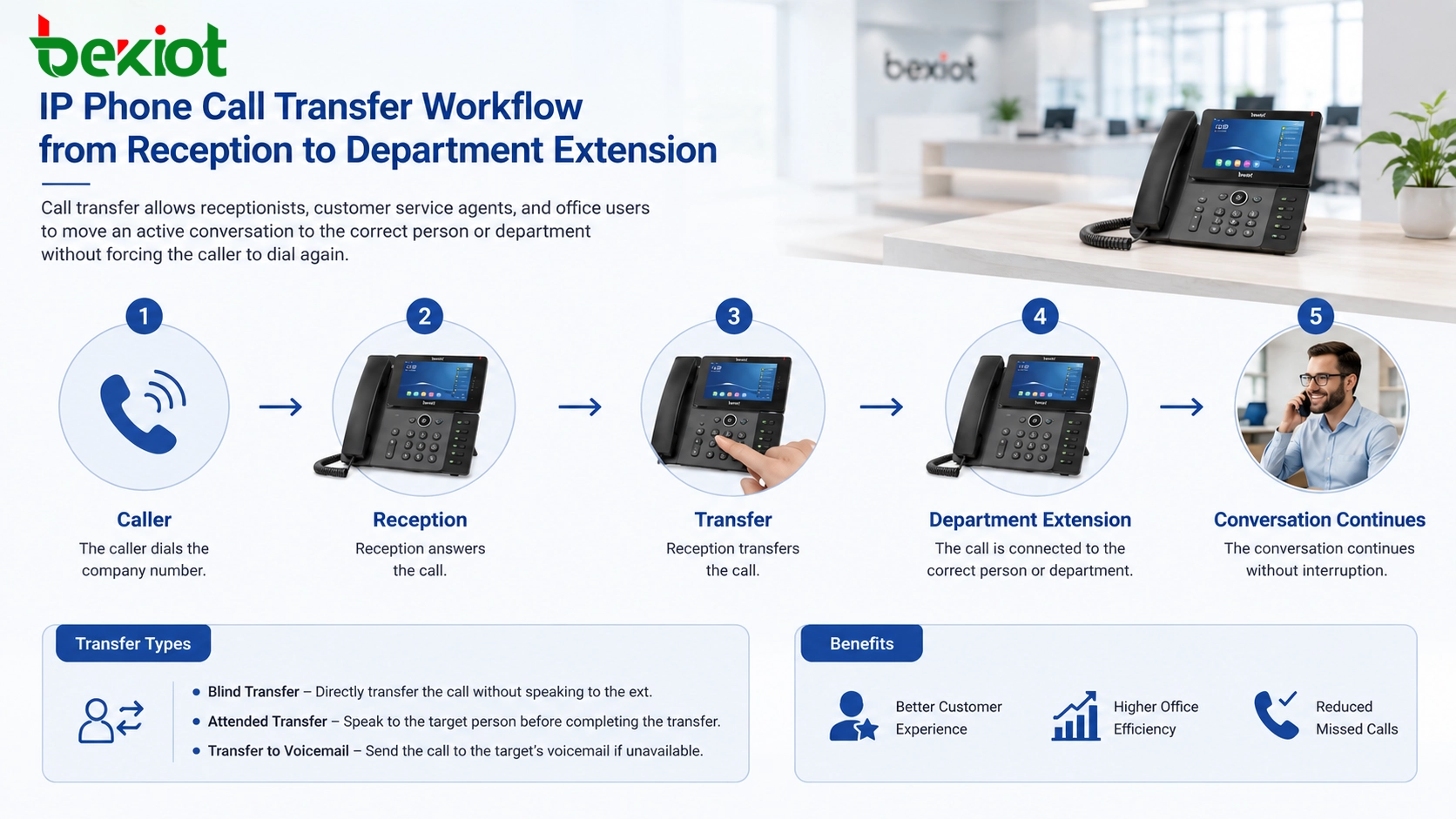
Call transfer is another core feature used in offices, help desks, reception areas, and customer service centers. It is used when the person who answers a call is not the correct person to handle the issue. Instead of asking the caller to hang up and dial another number, the user can transfer the call directly to the right extension or department.
A typical example is a customer calling the main service number. The first staff member answers, confirms the caller’s need, and then transfers the conversation to technical support, sales, finance, after-sales service, or another specialist. This creates a smoother experience for the caller and helps the organization appear more professional.
There are generally two common transfer methods. A blind transfer sends the caller directly to another extension without speaking to the receiving party first. An attended transfer allows the first user to call the receiving party, explain the situation, and then complete the transfer after the receiving party agrees to take the call.
For business environments, attended transfer is often preferred when customer experience matters, because it avoids sending callers to the wrong person without context. Blind transfer is useful when the destination is already clear, such as transferring calls to a known department or queue.
Reducing Missed Calls Across a Department
Call pickup is a practical feature for teams that work in the same department or shared office area. When one extension is ringing but the user is away from the desk, another authorized employee can answer the call from their own IP phone.
This feature is especially useful for sales teams, support departments, administration offices, service counters, and small business teams. Without call pickup, a ringing phone may continue until the caller hangs up. This can lead to missed opportunities, delayed response, or poor customer experience. With call pickup, a nearby colleague can answer the call quickly and handle the request or take a message.
Call pickup is usually controlled by the IP PBX. Administrators can create pickup groups so that only members of the same team or department can pick up one another’s calls. This avoids confusion and prevents unrelated users from answering calls that should remain within a specific group.
In daily use, employees may press a pickup key or dial a feature code. Once activated, the system connects the ringing call to the employee’s phone. For teams with high call volume, this simple function can significantly reduce abandoned calls.
Parking a Call for Flexible Continuation
Call park is useful when a conversation needs to be temporarily placed in the phone system and then retrieved from another extension. Unlike ordinary hold, which usually keeps the call on the same phone, call park stores the call in the IP PBX so that another phone can pick it up using a feature code or shortcut key.
This is helpful in small teams, warehouses, service desks, workshops, hotels, clinics, and offices where employees move between locations. For example, a user may receive a call and then need to check information on another workstation. Instead of keeping the caller waiting while physically moving back and forth, the user can park the call, go to another phone, and retrieve the same conversation there.
Call park can also be used when one person answers a call for another employee who is not at the desk. The first user parks the call and announces the park position by voice, paging, message, or internal communication. The target employee then retrieves the call from the nearest phone.
For a smooth call park experience, the IP PBX should define clear park numbers or park slots. IP phones can also be configured with programmable keys so users can park and retrieve calls without remembering complex codes.
Preventing Interruptions During Focus Time
Do Not Disturb, often abbreviated as DND, is a simple but important function. When enabled, the phone blocks incoming calls or sends them to a predefined destination such as voicemail, reception, or another extension depending on system configuration.
DND is useful during meetings, training sessions, private conversations, focused work, maintenance operations, and other situations where the user should not be interrupted. It gives employees direct control over their availability while allowing the phone system to handle incoming calls according to business rules.
However, DND can also create problems when activated accidentally. In many offices, users may press the DND key without noticing, and then wonder why calls cannot reach their extension. This is a common troubleshooting case. For this reason, DND status should be clearly displayed on the phone screen or indicated by a visible LED. Administrators should also educate users on how to enable and disable the function.
In larger organizations, DND policies should be planned carefully. Some roles may need full control, while emergency lines, reception phones, or service hotlines may need restrictions to avoid missed critical calls.
Turning Function Keys into Workflow Shortcuts
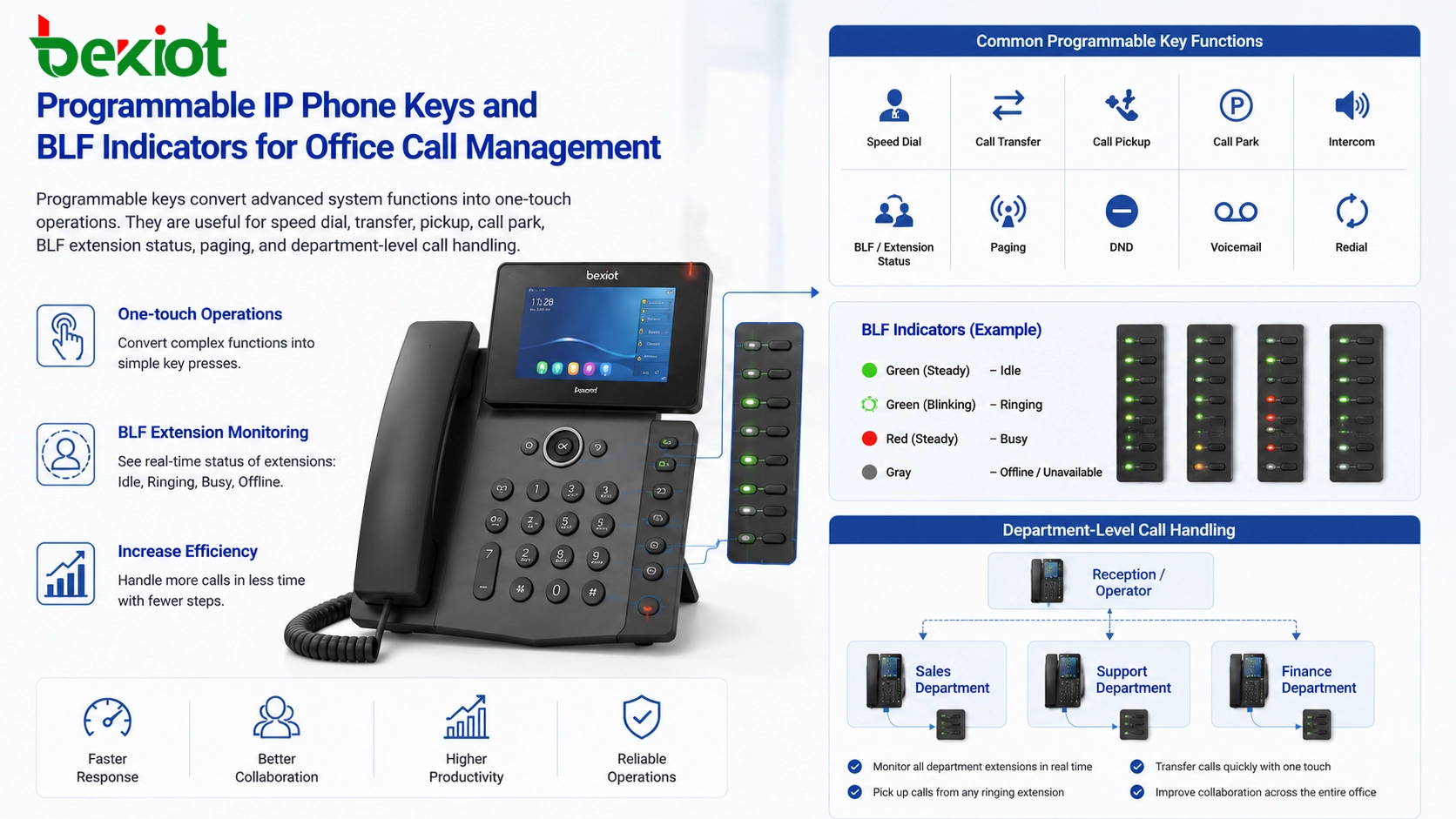
Many IP phones include programmable keys, also known as DSS keys, line keys, BLF keys, or shortcut keys depending on the phone design and IP PBX configuration. These keys can be customized for common operations, including speed dial, call transfer, call pickup, call park, intercom, paging, voicemail, DND, conference, and extension monitoring.
For users, programmable keys reduce the need to remember feature codes. A receptionist can use keys for frequently called departments. A manager can monitor assistant or team extensions. A service desk can assign keys for transfer targets, call park slots, and pickup groups. A hotel front desk can map important service extensions such as housekeeping, engineering, security, and restaurant support.
BLF, or Busy Lamp Field, is especially valuable in office environments. It allows users to see whether another extension is idle, ringing, or busy. This helps users decide whether to transfer a call, wait, or choose another destination. When combined with transfer and pickup features, BLF keys can make daily call handling much faster.
Using Feature Codes When Buttons Are Limited
Not every IP phone has many physical keys. Entry-level phones, wall-mounted phones, compact office phones, and some shared-area phones may have limited buttons. In these cases, feature codes are still important. A feature code is a short dialing command used to activate or cancel a function through the IP PBX.
For example, a system may define codes for enabling call forwarding, disabling forwarding, picking up a ringing call, retrieving a parked call, activating DND, or accessing voicemail. The exact codes depend on the PBX configuration, so organizations should create a simple user guide for employees.
Feature codes are especially useful for large deployments because they provide a consistent method across different phone models. Even if phone hardware varies by department, the same PBX feature code logic can remain available to all authorized users.
Improving Customer Service Response
Advanced IP phone features are not only convenient for internal staff. They also affect the caller’s experience. When calls are transferred correctly, customers reach the right person faster. When pickup groups are configured, fewer calls ring without answer. When forwarding rules are planned well, important calls can follow users even when they leave the desk.
Customer service teams can benefit from transfer, pickup, BLF, park, hold, conference, and speed dial. A call may begin at the front desk, move to a support specialist, involve a supervisor, and then return to another agent for follow-up. If the system is configured properly, this flow can happen without forcing the caller to redial or explain the issue repeatedly.
For small and medium-sized businesses, these features can create a more professional communication experience without requiring a complex contact center system. For larger organizations, they can work together with call queues, IVR menus, recording, CRM integration, and reporting tools.
Planning Features by Role Instead of Enabling Everything
A common mistake in IP phone deployment is enabling too many functions for every user. This may make phones harder to use and create confusion. A better approach is to configure features according to user roles.
Reception phones usually need transfer keys, BLF monitoring, speed dial, paging, and call park. Department users may need pickup, forwarding, and voicemail access. Managers may need extension monitoring, conference, and assistant calling shortcuts. Shared phones may need simple dialing, emergency call access, and limited system functions.
By matching features with real workflows, the organization can keep the interface clean and reduce training difficulty. The phone should help users finish tasks quickly, not force them to understand every possible system function.
| Feature | Main Use | Typical Users | Deployment Value |
|---|---|---|---|
| Call Forwarding | Redirect calls to another number | Office staff, remote workers, managers | Reduces missed calls when users are busy or away |
| Call Transfer | Move active calls to another extension | Reception, service desk, customer support | Improves caller routing and service efficiency |
| Call Pickup | Answer another ringing extension | Departments, sales teams, support teams | Prevents unattended calls from being lost |
| Call Park | Hold a call in the PBX for retrieval elsewhere | Small teams, warehouses, front desks | Allows flexible continuation from another phone |
| DND | Temporarily block interruptions | Meeting rooms, managers, focused users | Protects focus time while keeping call rules controlled |
| Programmable Keys | One-touch access to common operations | Reception, dispatch, service desks, offices | Simplifies daily operation and reduces training burden |
Training Makes the System More Valuable
Even a well-configured IP phone system can fail to deliver value if users do not know how to operate it. Basic training should explain not only which button to press, but also what the function does in real call scenarios.
For example, users should understand the difference between forwarding and transfer. Forwarding is usually configured before or during availability changes, while transfer happens during an active call. Pickup is used when another phone is ringing, while park is used when a call is already answered and needs to be retrieved later. DND blocks interruptions, but it must be turned off after focus time.
A short quick-start guide, desk card, internal wiki page, or training video can help users adopt these functions faster. For departments with high call volume, administrators can also provide role-specific key layouts so employees see only the functions they need most.
Recommended Deployment Approach
For a new IP phone project, the first step is to analyze call flow. The project team should identify who answers calls, who transfers calls, which departments need pickup groups, which users need forwarding, and whether call park is useful for mobile or shared work areas.
The second step is to define system rules in the IP PBX. This includes extension numbers, feature codes, pickup groups, forwarding permissions, call park slots, DND behavior, BLF monitoring, and key templates. After that, IP phones can be configured according to user roles.
The third step is testing. Administrators should test call forwarding, transfer, pickup, park, DND, and programmable keys before large-scale rollout. Testing should include both normal calls and busy/no-answer scenarios. This helps avoid problems after users begin relying on these features in daily work.
Business Value of Advanced Calling Features
Advanced IP phone functions can improve office communication without changing the entire communication architecture. They make the existing IP PBX system easier to use and more aligned with business operations.
For employees, these features reduce repetitive actions and help calls reach the right person faster. For managers, they improve team responsiveness and reduce missed communication. For customers, they create a smoother and more professional calling experience. For administrators, they provide a structured way to manage call behavior across departments.
When planned correctly, an IP phone is not just a desk device. It becomes a practical communication tool for business continuity, customer service, internal coordination, and daily operational efficiency.
FAQ
What is the difference between call forwarding and call transfer?
Call forwarding redirects incoming calls according to a preset rule, while call transfer moves an already answered call to another person or department.
Can call pickup be limited to one department?
Yes. Most IP PBX systems allow administrators to create pickup groups so only authorized users in the same team or department can answer each other’s ringing calls.
Why does a phone show available but still not receive calls?
Possible reasons include DND being enabled, call forwarding being active, network registration failure, PBX routing rules, or extension permission settings.
Do users need to remember feature codes?
Not always. Many functions can be assigned to programmable keys. Feature codes are still useful for phones with fewer buttons or for backup operation.
Is call park the same as putting a call on hold?
No. Hold usually keeps the call on the same phone. Call park places the call in the PBX so it can be retrieved from another extension.
Which IP phone features are most useful for reception desks?
Reception desks usually benefit from BLF monitoring, attended transfer, speed dial, call park, call pickup, paging, and programmable department keys.







