


Video surveillance has become a basic information infrastructure for factories, campuses, transportation sites, warehouses, commercial buildings, public safety projects, and many other industries. In the early stage, cameras were mainly used to record video. Users reviewed stored footage after an event happened. As artificial intelligence becomes more mature, surveillance systems are changing from passive recording tools into active analysis systems that can detect events, generate alarms, and support faster decision-making.
Today, AI video analytics can be used for flame detection, safety helmet detection, high-altitude object detection, workwear recognition, intrusion detection, off-position detection, behavior analysis, and many other scenario-based applications. The key question is no longer whether AI can be used in video surveillance, but where the AI computing power should be deployed: in the cloud, at the edge, or directly inside the camera.
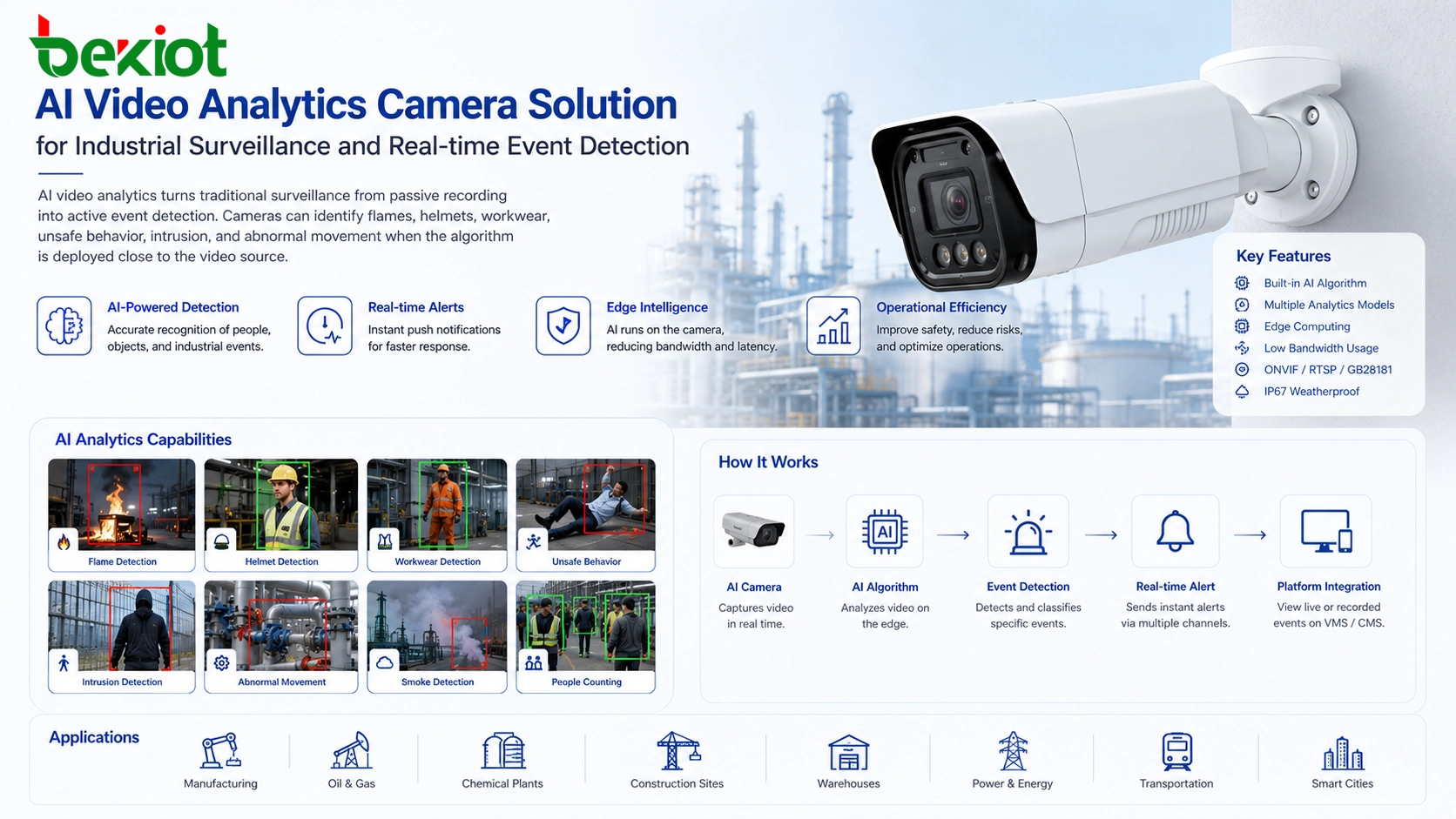
From Recording Footage to Understanding Events
Traditional video surveillance systems were mainly designed to capture, transmit, store, and replay video. This model is still useful, but it depends heavily on manual review. In many practical situations, users do not want to wait until an incident has already happened. They want the system to identify risk earlier and provide useful alerts in real time.
AI analytics changes the role of the camera system. Instead of only recording images, the system can analyze the scene and recognize specific objects, behaviors, or environmental signs. For example, in a factory, it can identify whether workers are wearing helmets or uniforms. In a warehouse, it can detect unauthorized intrusion. In a fire-risk area, it can support flame and smoke-related analysis. In urban management, it can help detect objects falling from high places or abnormal activity in restricted zones.
This shift makes video surveillance more valuable for daily management. The system is no longer only used for evidence after an event. It can also support prevention, response, compliance, safety management, and operation efficiency.
Why Video Analysis Requires Serious Computing Power
AI video analytics is not a simple image comparison process. To analyze a video stream, the system usually needs to decode the video first. After decoding, the video becomes a sequence of frames. These frames are then processed by algorithms to identify objects, events, or patterns. This process must be repeated continuously if the system needs real-time monitoring.
For one or two low-resolution streams, the computing requirement may be manageable. For dozens, hundreds, or thousands of camera channels, the workload becomes much heavier. A single AI server must process large amounts of decoded video data, and ordinary CPU resources are often not enough for this task. In many projects, GPU or dedicated AI acceleration hardware is required.
This creates two practical problems. The first is cost. AI computing servers, GPU cards, storage, cooling, and maintenance can all increase system investment. The second is deployment complexity. Project teams must decide where to place the computing resources, how to connect camera streams to the analytics platform, and how to keep the whole system stable during continuous operation.
Three Main Deployment Paths
In current video surveillance AI projects, there are three common deployment methods: cloud-based analytics, edge-based analytics, and camera-based analytics. These are often described as cloud, edge, and endpoint deployment. Each method has its own value, and none of them is suitable for every scenario.
| Deployment Method | Where AI Runs | Main Advantage | Common Challenge |
|---|---|---|---|
| Cloud analytics | Remote cloud platform or data center | Centralized computing and platform management | High upstream bandwidth demand and network dependency |
| Edge analytics | Local AI server, gateway, or edge computing box | Local processing with flexible computing capacity | Stream access, device integration, and system maintenance complexity |
| Camera-based analytics | Inside the camera itself | Real-time local analysis with lower transmission pressure | Computing capability depends on camera hardware and algorithm design |
Cloud deployment is suitable when centralized management is important and network resources are sufficient. Edge deployment is useful when local computing is needed but cameras do not have enough built-in AI capability. Camera-based deployment is becoming more popular because it reduces video transmission pressure and allows analysis to happen directly at the source.
Why Cloud and Edge Deployment Can Become Complicated
When AI analytics is deployed in the cloud or on an edge server, the algorithm is separated from the camera. The first task is to bring video streams from cameras into the AI analysis platform. This may sound simple, but in real projects it can become complicated because cameras, video platforms, gateways, protocols, stream formats, and network environments are often different.
Many AI software teams are strong in algorithm development, but they may not be equally strong in video stream access, device adaptation, media protocol processing, and large-scale surveillance integration. As a result, some projects face configuration difficulties, failed stream pulling, unstable video access, or limited compatibility with existing camera systems.
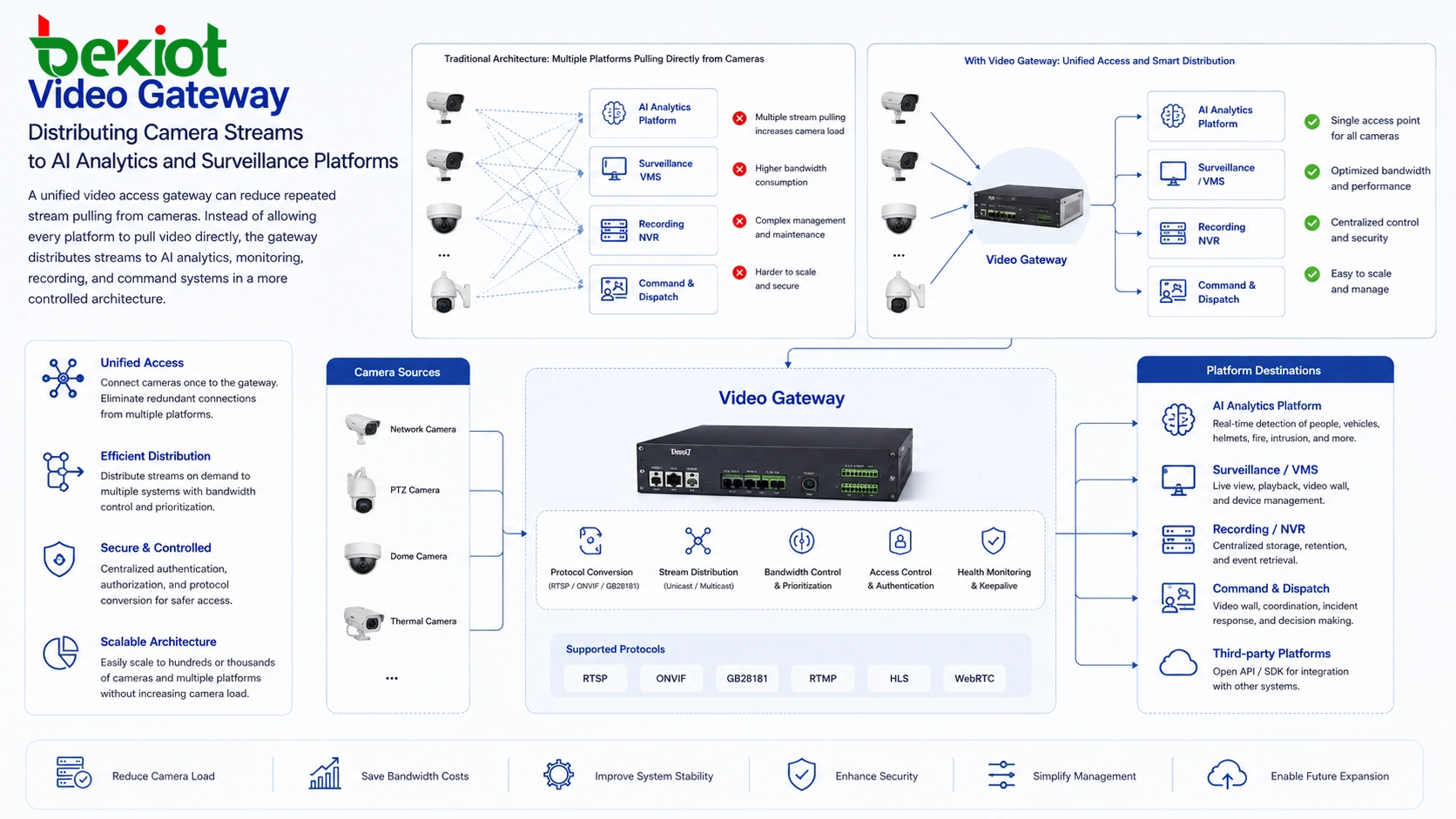
Another issue is that edge analytics devices often pull streams directly from cameras. In earlier surveillance systems, this was less problematic because video applications were simpler and there were fewer platforms requesting video at the same time. Today, cameras may need to serve live preview, recording, video management platforms, AI analysis, mobile access, command platforms, and third-party systems. If multiple services directly pull streams from cameras around the clock, the camera can become overloaded.
The Pressure of 24-Hour Real-Time Stream Pulling
AI analysis is different from occasional video preview. It often requires continuous 24-hour real-time stream access. This means the analysis platform keeps pulling video streams from cameras all day, every day. If the streaming method is poorly planned, the pressure on cameras and the network can become significant.
In some projects, improper stream pulling may cause failures such as unsuccessful stream access, unstable video, black screen, camera overload, or even device crash. These problems are not always caused by the AI algorithm itself. They are often caused by the way video streams are accessed and distributed.
A better architecture is to use a video access gateway or media distribution layer to collect video streams in a unified way. The gateway can obtain the required video source once and then distribute different video streams to different business platforms, including AI analytics servers, monitoring platforms, command centers, recording systems, and mobile clients. This reduces direct pressure on the camera and makes the whole system easier to manage.
Bandwidth Is a Key Reason AI Moves Closer to the Camera
Bandwidth is one of the most important reasons camera-based AI is gaining attention. If AI analytics is deployed in the cloud, video streams must be uploaded from the local site to the remote platform. For a small number of cameras, this may be possible. For large surveillance projects, continuous video upload can quickly exceed the available upstream bandwidth.
This problem becomes more serious when the site has many high-definition cameras or when the network connection is unstable. Real-time AI requires timely video input. If the upload bandwidth is insufficient, the analytics result may be delayed, incomplete, or unreliable. In many field projects, cloud-based real-time analysis of many camera streams is difficult because the upstream bandwidth simply cannot support it.
Camera-based analytics changes the data flow. The camera analyzes the video locally and sends only the result, alarm, snapshot, metadata, or event information to the platform. Instead of transmitting full video streams continuously for analysis, the system can transmit smaller and more valuable data. This reduces bandwidth usage and makes the solution more practical for remote sites, industrial areas, and bandwidth-limited environments.
Hardware Cost Reduction Changes the Design Logic
Early surveillance cameras were not designed for AI analysis. Their main task was video capture and encoding. To keep product costs under control, most cameras had limited computing resources and could not perform advanced AI processing. This created a market for edge AI boxes and local AI servers, which used camera streams as input and performed analysis outside the camera.
This approach still has value, especially when projects require flexible computing power, centralized algorithm management, or support for existing non-AI cameras. However, the situation is changing. As the AI market grows, AI chips, embedded processors, and camera hardware platforms continue to improve. The cost of integrating basic AI capability into cameras has become more acceptable in many scenarios.
As a result, more camera manufacturers are building AI algorithms directly into cameras. This creates competition with edge AI devices, but it also expands the range of deployment choices. For new projects, camera-based AI can reduce system layers. For existing projects, edge AI may still be useful when the current cameras do not support built-in analysis.
Sensor Fusion Improves Detection Accuracy
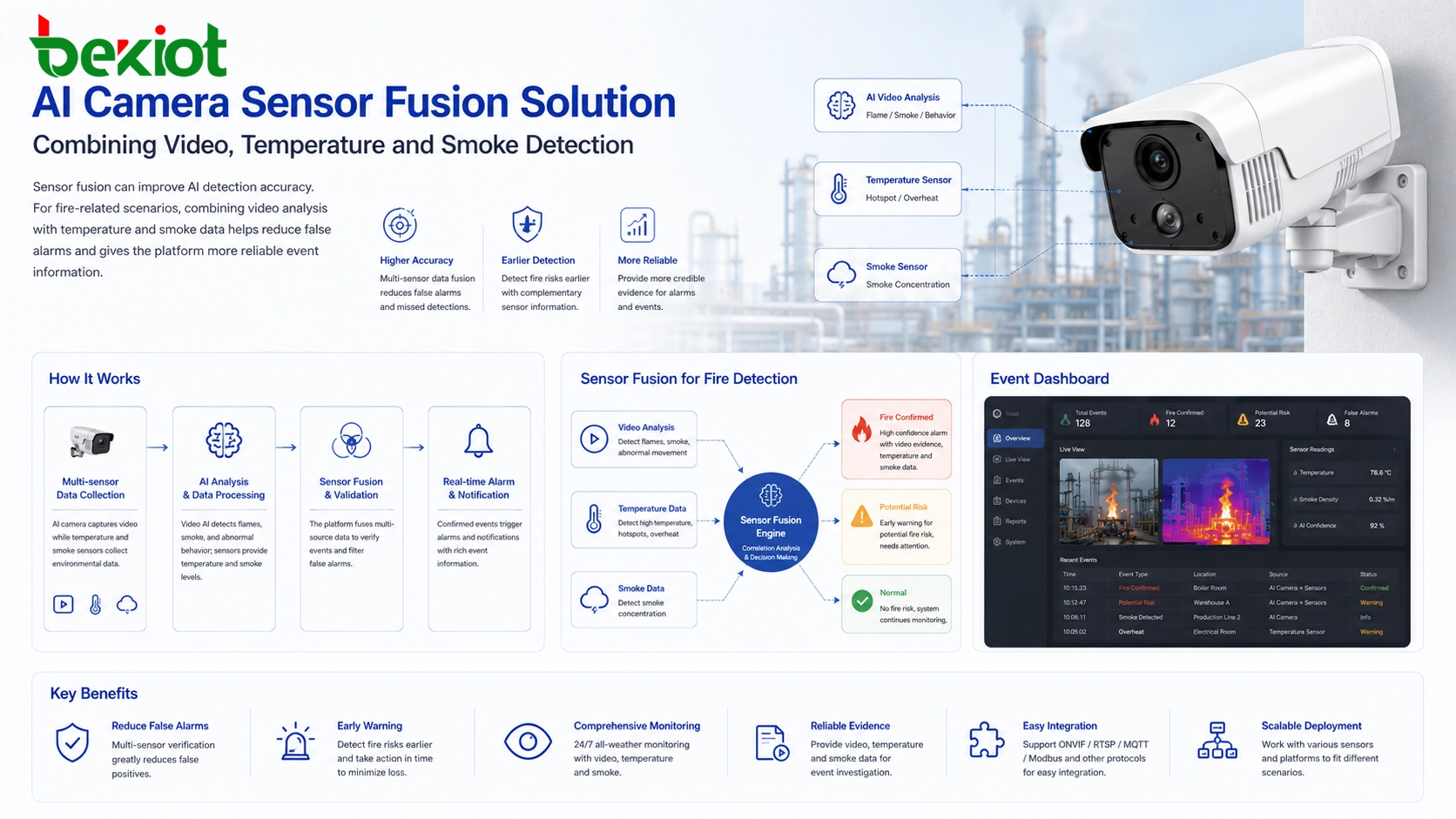
One of the biggest challenges in AI video analysis is accuracy. Pure video analysis depends mainly on visual information. Lighting, angle, occlusion, weather, background complexity, image quality, and object similarity can all affect recognition results. Improving accuracy only through algorithm training is possible, but it can require large amounts of data, long optimization cycles, and high development cost.
Sensor fusion provides another path. When a camera combines visual analysis with additional sensor data, the system can make more reliable judgments. For example, flame detection based only on video may produce false alarms when the image includes lights, reflections, welding sparks, or similar visual patterns. If temperature sensors, smoke sensors, or other environmental sensors are added, the system can compare multiple signals before generating an alarm.
This is one reason integrated AI cameras are attractive in industry-specific applications. A camera with built-in AI and sensor integration can solve multiple problems in one device. It can capture images, analyze video, read sensor information, and output a more reliable result. Compared with cloud or edge deployment, this local integrated design can be simpler because it does not require separate sensors, an IoT gateway, cross-system data integration, and additional result synchronization.
When Camera-Based Intelligence Works Best
Camera-based AI is especially suitable for scenarios with clear detection targets and stable business rules. Examples include helmet detection in construction sites, workwear recognition in factories, flame detection in industrial areas, intrusion detection in restricted zones, and off-position detection in duty areas. In these scenarios, the camera can analyze local images and report only useful events.
It is also suitable for distributed sites where bandwidth is limited. Remote warehouses, substations, construction sites, highways, pipelines, farms, ports, and temporary project areas may not have enough upstream bandwidth to send continuous video to the cloud for AI processing. Local camera analysis helps reduce network dependency while keeping event detection close to the source.
Another suitable case is projects that need fast local response. If an alarm must trigger a local speaker, warning light, access control action, or command platform notification, camera-based analytics can reduce the time between detection and response. The shorter the data path, the easier it is to build real-time response logic.
Where Edge and Cloud Analytics Still Have Value
The growth of camera-based AI does not mean cloud and edge analytics will disappear. Each deployment method still has its own market. Cloud analytics is useful for centralized data management, cross-region platform operation, model training, large-scale event statistics, and unified business analysis. It is also suitable when the system mainly analyzes uploaded snapshots, recorded video, or selected event clips instead of full continuous streams.
Edge analytics is valuable when many existing cameras do not support built-in AI. It allows users to upgrade intelligence without replacing every camera. Edge servers can also run more complex algorithms than many embedded camera platforms, especially when multiple models, higher accuracy, or stronger computing capacity are required.
The practical choice depends on the project. New installations with clear detection needs may prefer AI cameras. Legacy projects may use edge AI boxes or servers. Large platform projects may combine camera AI, edge processing, and cloud management together. A hybrid architecture is often more realistic than a single fixed model.
Architecture Planning for a Reliable System
A reliable AI surveillance solution should begin with the business requirement, not with the algorithm name. The project team should define what needs to be detected, how fast the result must be reported, how many cameras are involved, what network bandwidth is available, and whether local response is required.
If the project needs continuous analysis of many live streams and the upstream bandwidth is limited, camera-based AI or local edge analytics should be considered first. If the project already has a large number of ordinary cameras, a video gateway plus edge AI server may be more practical. If the project focuses on centralized management and has strong network resources, cloud analytics may still be useful.
Video stream architecture should also be planned carefully. Repeated direct stream pulling from cameras should be avoided in large systems. A unified media access layer can help distribute video to different platforms, reduce camera load, and improve system stability. This is especially important when AI analysis, live monitoring, recording, and command dispatch all require video at the same time.
Recommended Selection Method
For small sites with a few cameras and simple detection needs, AI cameras can reduce installation complexity and make the system easier to operate. For medium-sized projects, a combination of AI cameras and a local video gateway may provide a good balance between local intelligence and system integration. For large projects, a layered design is often better: AI cameras handle simple real-time detection, edge servers process more complex tasks, and the cloud platform manages events, reports, and long-term data.
The project team should also evaluate the cost structure. Camera-based AI may increase the unit price of each camera, but it can reduce server cost, bandwidth pressure, and integration difficulty. Edge AI may require additional computing hardware, but it can reuse existing cameras. Cloud AI may simplify local hardware, but it demands stronger network upload capability and stable long-term service access.
The best solution is not always the most advanced one. It is the solution that matches the detection target, network condition, budget, maintenance ability, and future expansion plan.
FAQ
Is an AI camera always better than an ordinary camera with an AI server?
No. An AI camera is efficient for local detection, but an AI server may be better when the project needs stronger computing power, multiple algorithms, or upgrade support for existing cameras.
Can camera-based AI reduce network traffic?
Yes. Since the camera can process video locally and upload only alarms, snapshots, metadata, or event results, it can reduce the need to upload full real-time video streams continuously.
Why do some AI surveillance projects still have false alarms?
False alarms may come from lighting changes, similar objects, poor image quality, weather, occlusion, or limited training data. Sensor fusion and better scene-specific tuning can help improve reliability.
Should old surveillance systems be replaced with AI cameras?
Not always. Existing systems can often be upgraded with edge AI devices or video analytics servers. Full replacement is more suitable when the project also needs new camera positions, better image quality, or integrated sensor functions.
What is the most important factor before choosing an AI deployment method?
The most important factor is the real application requirement. The team should define the detection target, response time, camera quantity, bandwidth condition, accuracy expectation, and maintenance model before selecting cloud, edge, or camera-based analytics.
Can AI cameras work together with a central management platform?
Yes. AI cameras can send alarm events, snapshots, metadata, and selected video streams to a central platform. This allows local analysis and centralized management to work together in the same system.







