


Many video surveillance platforms and command dispatch platforms are built around the GB28181 protocol. Through GB28181, a platform can manage video resources, organize device directories, support audio-video intercom, and provide a familiar monitoring-style operation interface for security, emergency response, industrial parks, transportation, campuses, and smart city projects.
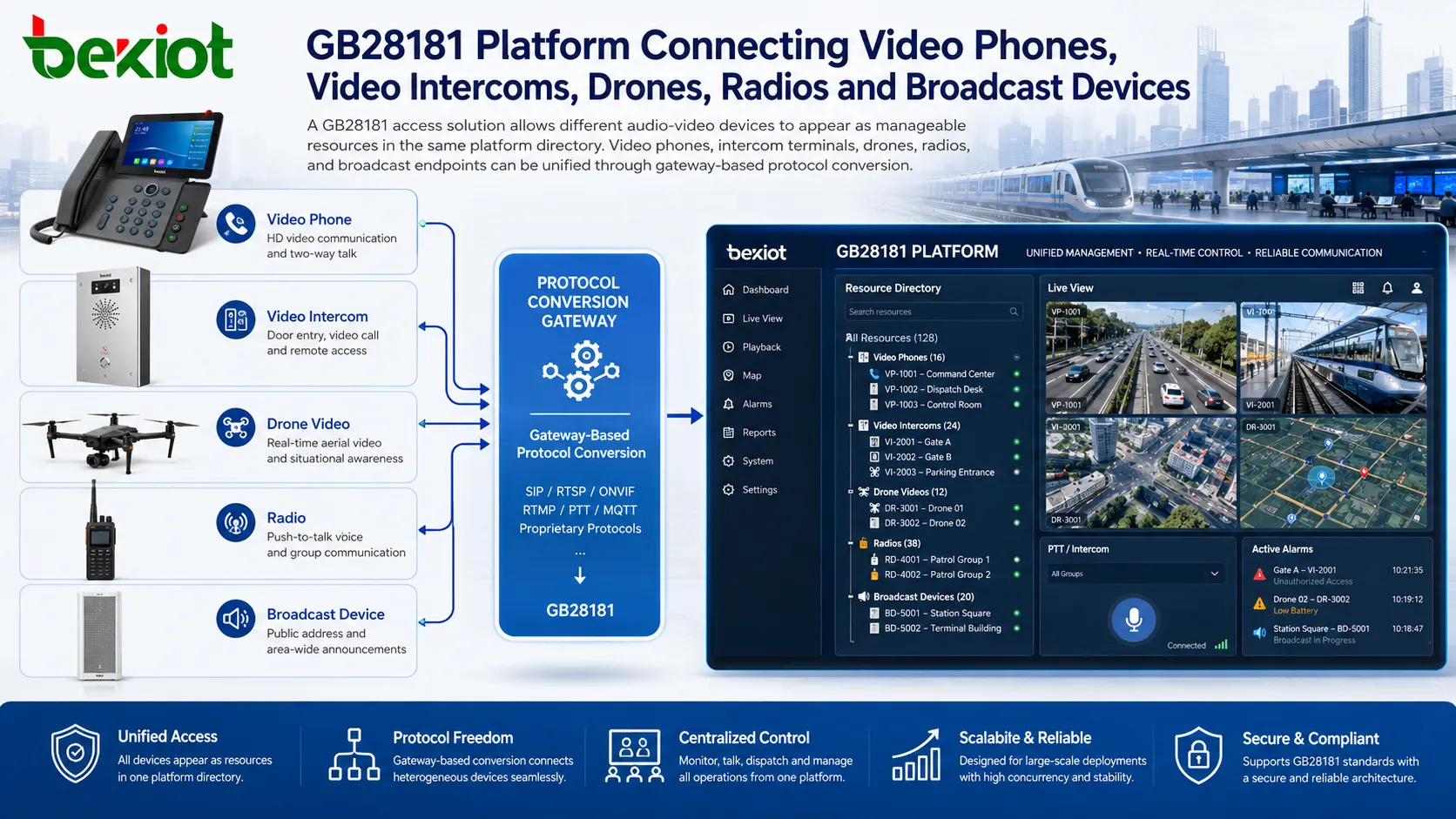
However, traditional GB28181 integration is usually focused on surveillance cameras, NVRs, and video management devices. When a project needs to connect video phones, SIP video intercom terminals, drone video streams, two-way radios, or broadcast speakers, the integration becomes more complicated. A practical solution is to use a video access gateway or protocol conversion gateway to convert these non-GB28181 devices into standardized GB28181 resources, so that the existing platform can manage and dispatch them in the same directory structure.
Why GB28181 Is Widely Used in Video Dispatch Systems
GB28181 is widely used in video networking and surveillance platform integration because it provides a standardized way to register devices, organize device directories, request live video, control media sessions, and support platform-to-platform connection. For users who are already familiar with video monitoring systems, a GB28181-based platform is easy to understand because the operation model is close to traditional surveillance workflows.
In large-scale deployment, standardization is very important. A platform may need to manage thousands of cameras, multiple sites, different branches, and many device manufacturers. Without a common access method, every device type may require separate development, separate software adaptation, and separate operating logic. GB28181 helps reduce this complexity by giving the platform a consistent device management and media access framework.
For command dispatch projects, GB28181 is not only about watching video. It can also support audio-video communication, event verification, remote call handling, and visual dispatch. When video resources are organized clearly, operators can locate the required device in the directory, open live video, start intercom, or coordinate field personnel more efficiently.
Where Traditional Integration Becomes Limited
Although GB28181 has strong advantages in surveillance networking, many real projects involve more than ordinary cameras. A command center may need to contact a SIP video phone in a duty room, answer a call from a help point intercom, receive RTMP drone video from the field, dispatch a radio channel, or trigger a broadcast speaker in an emergency area.
These devices may not support GB28181 directly. Some use SIP for signaling and audio-video calls. Some use RTMP for drone video push. Some radio systems require a radio gateway to convert voice communication into IP-based media. Some broadcast devices are controlled through SIP, IP audio, or platform-specific interfaces. If the central platform only accepts standard GB28181 devices, these resources cannot be used directly.
This creates a practical gap between the platform and the field equipment. The platform has good monitoring and dispatch capability, while the field side has many useful audio-video terminals. The challenge is how to make these different devices appear in the GB28181 platform without rebuilding the whole system.
A Gateway-Based Access Architecture
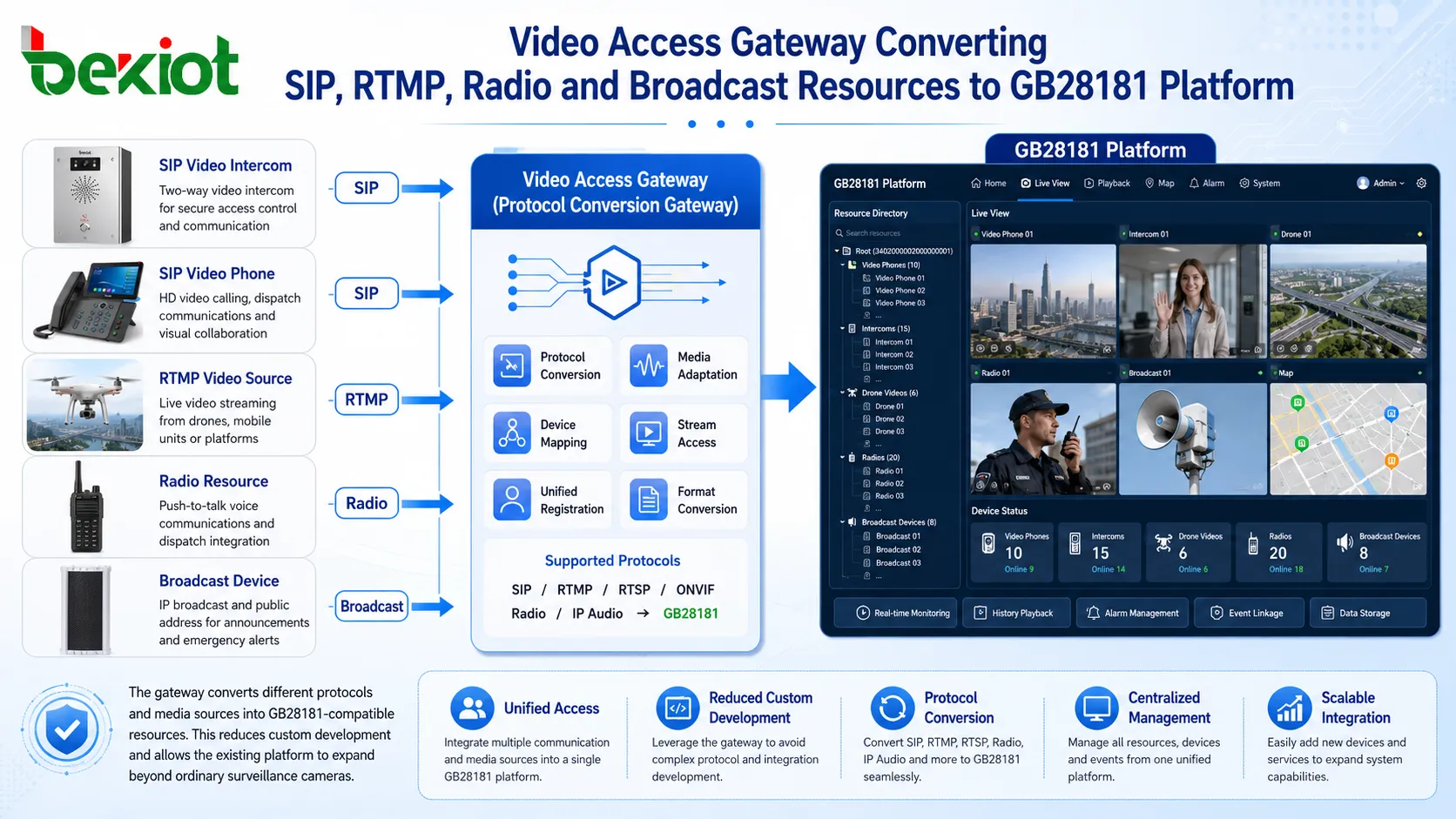
A video access gateway solves this problem by acting as a protocol bridge between non-GB28181 devices and the GB28181 platform. On one side, it connects to SIP video phones, SIP intercom terminals, RTMP drone streams, radio gateways, broadcast endpoints, or other audio-video sources. On the other side, it registers to the GB28181 platform and presents these resources as standard GB28181 devices or channels.
The key idea is mapping. A SIP video phone, for example, can be mapped to a GB28181 device ID. A video intercom terminal can be mapped as another device or channel in the platform directory. A drone RTMP stream can be converted and presented as a video resource. A radio channel can be integrated through a radio gateway and then exposed to the platform through a standardized access layer.
After mapping is completed, the GB28181 platform does not need to understand every original device protocol. Operators can still use the familiar directory, preview, call, and dispatch interface. The gateway handles the protocol conversion, media adaptation, and device presentation behind the scenes.
Connecting SIP Video Phones to the Platform
SIP video phones are commonly used in duty rooms, reception areas, control rooms, offices, command posts, and service desks. They can support video calls, voice calls, extension dialing, hands-free communication, and integration with IP PBX systems. However, a GB28181 surveillance platform usually does not treat a SIP video phone as a standard monitoring device by default.
Through a video access gateway, SIP video phones can be registered or connected on the SIP side and then mapped to GB28181 IDs on the platform side. The gateway can convert the device resource into a form that the GB28181 platform can recognize. Once presented in the platform directory, the operator can open the corresponding resource, initiate audio-video communication, or pull video according to the platform’s supported workflow.
This is useful when a command center needs to call a duty station or receive video from a fixed communication terminal. Instead of operating a separate SIP system and a separate monitoring system, the dispatcher can access the video phone from the existing GB28181 platform interface.
Bringing Video Intercom Terminals into One Directory
Video intercom terminals are widely used at entrances, help points, parking lots, campuses, factories, tunnels, elevators, emergency stations, and public service areas. These terminals are often designed around SIP, ONVIF, RTSP, proprietary APIs, or platform-specific communication methods. If they cannot register to a GB28181 platform directly, a gateway can provide the conversion layer.
The value of this design is operational consistency. When a user presses the call button on a video intercom terminal, the platform can receive or display the corresponding resource in a unified way. When an operator wants to check a help point, they can locate it in the platform directory and open the video or start communication from the same interface used for camera resources.
This is especially important in emergency communication systems. Operators should not need to switch between multiple software systems just to handle one incident. A unified GB28181 access architecture allows monitoring video, intercom communication, dispatch coordination, and event handling to work more closely together.
Adding Drone Video Streams to Command Centers
Drones are increasingly used in emergency response, traffic inspection, public safety, firefighting, construction monitoring, power line inspection, pipeline patrol, and large event security. Many drones or drone platforms can push video through RTMP or other streaming protocols. However, a traditional GB28181 monitoring platform may not directly accept these streams without conversion.
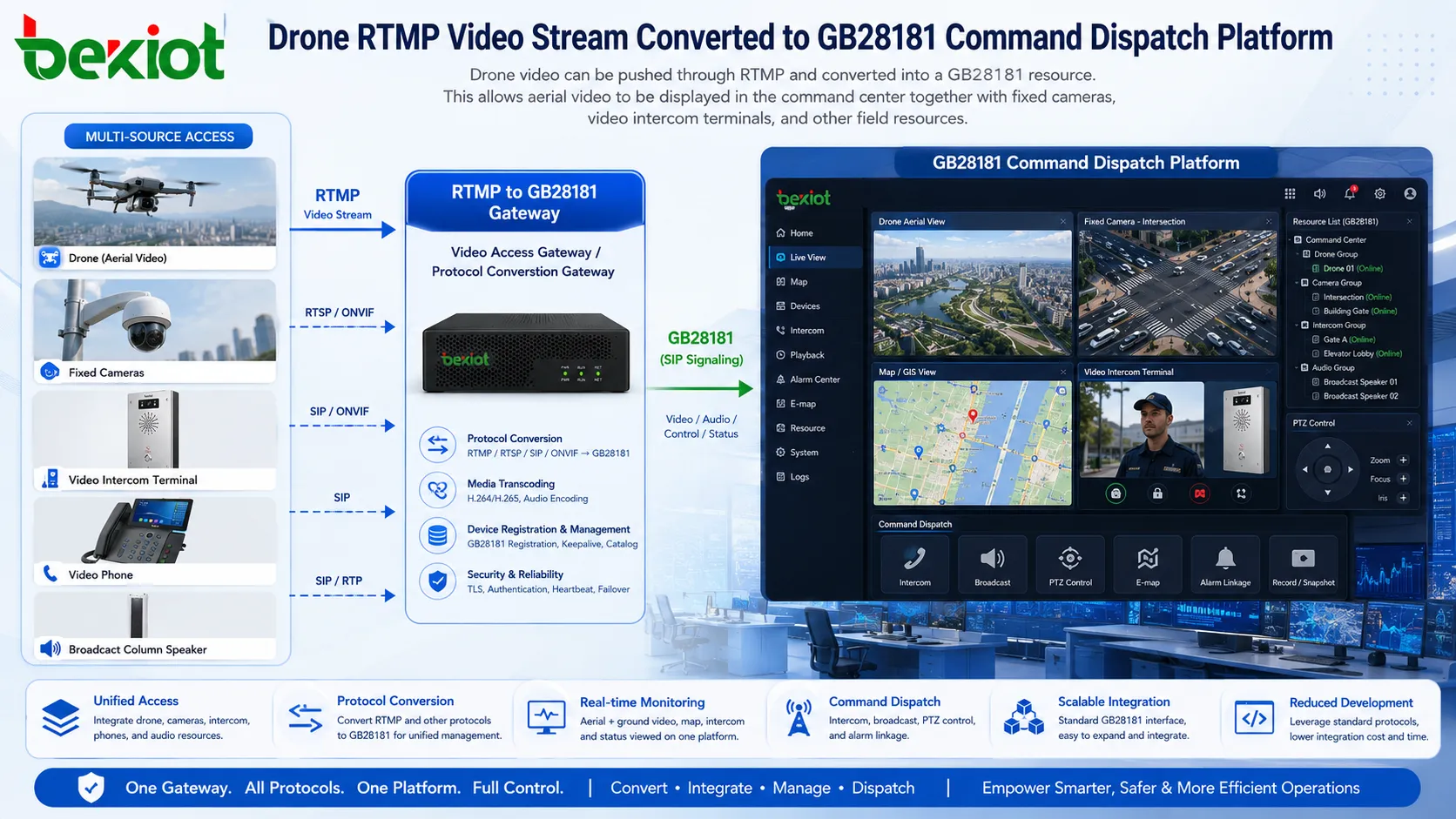
A video gateway can receive RTMP drone video and convert it into a stream format that can be presented through GB28181. After conversion, the drone video can appear as a temporary or fixed video channel in the platform directory. Operators can view aerial footage inside the existing monitoring platform rather than opening a separate drone video application.
This is valuable for command dispatch because drone video often provides a wide-area visual perspective that fixed cameras cannot provide. During an emergency, the command center may need to combine fixed camera video, field intercom calls, mobile drone video, and radio communication. Bringing drone video into the GB28181 platform helps build a more complete visual command workflow.
Integrating Radios and Broadcast Resources
In many field operations, video is only one part of the communication system. Two-way radios are still widely used in security, transportation, emergency response, industrial operations, and public service teams. Broadcast speakers are also important for warning, evacuation, public announcement, and area notification.
These devices do not naturally belong to a video surveillance platform, but they are often needed during the same incident. For example, when a camera detects abnormal activity, the operator may need to call a radio group, speak through a nearby intercom, or trigger a broadcast announcement. If the platform only supports video viewing, the response chain remains fragmented.
A radio gateway can convert radio voice resources into IP-based communication channels. These channels can then be connected to the video access gateway and presented through the GB28181 platform or a related dispatch system. Broadcast endpoints can also be integrated through IP audio or SIP-based control, depending on the system design.
The purpose is not to force every device to become a camera. The purpose is to allow video, voice, intercom, radio, and broadcast resources to participate in the same command workflow.
How Operators Use the Unified Platform
After integration, the daily operation should remain simple. The platform directory can display cameras, video phones, intercom terminals, drone channels, and other mapped resources. When an operator needs to dispatch a SIP video phone, they can select the corresponding item from the directory. When they need to view a drone stream, they can open the mapped drone channel. When they need to handle a help-point intercom, they can access it through the same platform structure.
This avoids a major problem in command centers: too many isolated systems. If every device type requires a separate application, operators must switch screens, remember different login accounts, and manually match information between platforms. In an emergency, this increases response time and error risk.
A unified GB28181 access solution helps keep the operation closer to the user’s existing habits. The system expands capability without forcing the operator to relearn the whole platform. This is one of the most important practical advantages of gateway-based integration.
Reducing Development and Protecting Existing Investment
Many organizations already have a GB28181 monitoring platform or command dispatch platform. Replacing the platform may be expensive and unnecessary. The more realistic requirement is to expand the existing platform’s access capability so that it can work with more types of field devices.
A video access gateway can reduce the need for custom platform development. Instead of modifying the central platform to support every protocol directly, the gateway absorbs the protocol differences. It connects to SIP devices, RTMP streams, radio gateways, and other sources, then presents them in a GB28181-compatible way.
This approach protects previous investment. Existing camera resources, platform accounts, directory structures, user permissions, operation habits, and management processes can continue to be used. At the same time, the platform gains new audio-video communication capability.
| Resource Type | Common Original Access Method | Gateway Role | Platform Experience |
|---|---|---|---|
| SIP video phone | SIP signaling and audio-video call | Map the SIP endpoint to a GB28181 device ID | Operator can locate and call it from the platform directory |
| Video intercom terminal | SIP, RTSP, ONVIF, or device-specific access | Convert terminal resources into standard platform channels | Intercom video and voice can join the dispatch workflow |
| Drone video | RTMP or streaming push | Receive and convert the stream into a GB28181-accessible resource | Aerial video can be viewed in the monitoring interface |
| Two-way radio | Radio gateway or IP voice conversion | Bridge radio communication into the audio-video system | Radio voice can support command coordination |
| Broadcast speaker | SIP, IP audio, or platform control | Connect announcement and warning functions to the dispatch system | Operators can trigger voice notification during incidents |
Planning the Media and Protocol Layer
Successful integration requires more than connecting cables and filling in platform addresses. The project team should plan signaling, media streams, device IDs, directory structure, call permissions, media formats, network routes, and bandwidth. If the gateway receives streams but the platform cannot request or decode them correctly, the integration will not deliver the expected result.
For SIP devices, registration mode, call direction, codec support, video resolution, DTMF behavior, and NAT traversal should be checked. For drone streams, RTMP push address, stream stability, transcoding requirements, latency, and temporary channel management should be considered. For radio and broadcast resources, audio routing, talk permissions, half-duplex or full-duplex behavior, and priority rules may need special planning.
Device directory design is also important. If all mapped resources are placed randomly, operators may find the system difficult to use. A better method is to organize resources by site, building, floor, function, emergency zone, or team responsibility. This makes the GB28181 platform easier to operate during daily monitoring and emergency response.
Network Reliability and Security Considerations
Since the system may carry real-time audio, live video, drone streams, and dispatch commands, network reliability must be considered from the beginning. Bandwidth, packet loss, latency, jitter, access control, firewall rules, and NAT traversal can all affect the user experience.
In multi-site projects, the gateway may need to connect local devices to a higher-level GB28181 platform across private networks, VPNs, public networks, or dedicated lines. The network path should be tested under real load conditions. A stream that works in a small test may become unstable when many video channels, voice calls, and platform operations happen at the same time.
Security should not be ignored. When non-camera devices are added to a GB28181 platform, the platform becomes a larger communication center. User permissions, device authentication, exposed ports, remote access rules, and management accounts should be controlled carefully. For critical environments, VPN, private APN, access whitelist, firewall policy, and separated management networks may be required.
Recommended Deployment Method
A practical deployment can begin with a small pilot. The project team may first connect one SIP video phone, one video intercom terminal, one drone stream, and one additional voice resource through the gateway. The goal is to verify registration, directory presentation, live video, audio interaction, stream stability, and operator workflow.
After the pilot is verified, the project can expand by resource type. SIP video phones and intercom terminals can be mapped according to location. Drone streams can be configured as temporary or task-based resources. Radio and broadcast channels can be grouped according to department or emergency area.
For industrial parks, transportation hubs, tunnels, campuses, and emergency command projects, Becke Telcom can be used as a lightweight reference for compatible SIP intercom, IP phone, dispatch, and gateway-side device planning, especially when the customer wants to combine field communication terminals with an existing GB28181 platform.
Business Value for Command Dispatch Projects
The main value of this solution is capability expansion without changing the core operating habit of the existing platform. Operators can continue to use the GB28181 monitoring platform while gaining access to more communication resources. Video phones, intercom terminals, drones, radios, and broadcast devices no longer remain isolated systems.
This improves response efficiency. When an event occurs, the command center can view fixed camera video, call a video intercom terminal, check drone footage, coordinate radio users, and trigger broadcast announcements through a more connected workflow. The platform becomes not only a video viewing system, but also an audio-video command and dispatch center.
For system integrators, the gateway-based design also reduces custom development work. It provides a practical path to connect heterogeneous devices into a standardized platform. For end users, it protects existing platform investment while improving the value of the GB28181 system.
FAQ
Can a GB28181 platform directly manage every SIP video phone?
Usually not directly. A SIP video phone and a GB28181 platform use different access logic. A video access gateway is normally required to map the SIP endpoint into a GB28181-compatible resource.
Can drone video be shown in a GB28181 monitoring platform?
Yes, when the drone stream is received and converted by a gateway. RTMP drone video can be transformed into a resource that the GB28181 platform can request and display.
Does this solution require replacing the existing monitoring platform?
No. The purpose of gateway-based integration is to keep the existing GB28181 platform and expand its access capability through protocol conversion and resource mapping.
What is the biggest risk in this type of integration?
The main risk is incomplete planning of protocols, media formats, ports, bandwidth, and device directory structure. If these details are not tested, video may be visible while audio, calling, or stream stability remains problematic.
Can radios and broadcast speakers really join the same dispatch workflow?
Yes, but they usually need an intermediate gateway or IP audio control layer. Once converted properly, radio voice and broadcast functions can support the same command response process as video and intercom resources.
When is this architecture most useful?
It is most useful when an organization already has a GB28181 platform and wants to add video phones, help-point intercoms, drone video, radio channels, or broadcast notification without rebuilding the entire command system.







