


Most modern surveillance cameras are already IP-based. They can transmit video over a network and support remote viewing, recording, and basic control. However, these cameras are usually designed for traditional video surveillance systems, not for real-time unified communication environments. When a project needs to connect surveillance video with dispatch consoles, video phones, smart terminals, video conferencing systems, or emergency communication platforms, ordinary cameras may not work smoothly without protocol adaptation.
The main reason is simple: surveillance systems and communication systems often use different technical languages. IP cameras commonly use RTSP, GB28181, ONVIF, or private video protocols, while unified communication systems usually rely on SIP for real-time calling, interaction, session control, and device-to-device communication. To make existing cameras usable inside a SIP-based communication network, the camera video must be converted into a SIP-accessible video resource.
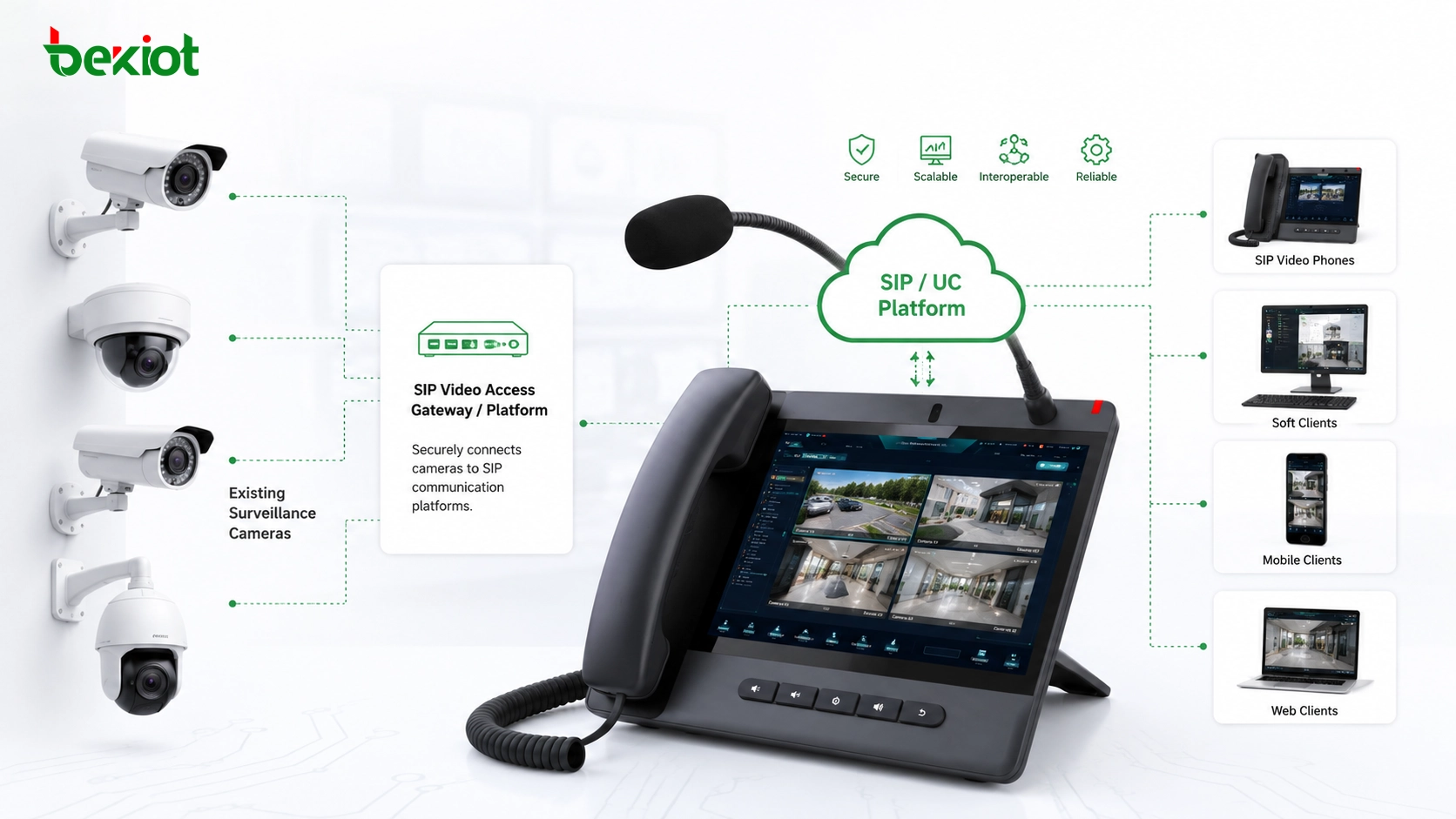
Why Existing Cameras Need Protocol Adaptation
In many video integration projects, the challenge is not the camera itself. The camera may already be installed, powered, connected to the network, and working correctly inside a surveillance platform. The real problem appears when the project team wants communication devices to call, view, or join the camera video through the same operation logic used for SIP calls.
Traditional video surveillance focuses on monitoring, recording, playback, and management. Unified communication focuses on real-time interaction, calling, conferencing, dispatching, and emergency coordination. These two systems are both video-related, but their working logic is different. A surveillance camera may provide an RTSP stream, register to a GB28181 platform, or be discovered through ONVIF, but a SIP video phone or dispatch console may expect the camera to behave like a callable SIP video endpoint.
This creates a practical integration gap. Without conversion, the communication platform may not be able to call the camera directly. Users may need to open a separate monitoring platform, search the camera manually, or switch between systems. This increases operation time and reduces the value of video integration during emergency response, production dispatch, security management, and command center operations.
Preserving Investment Instead of Replacing Devices
Although SIP cameras are available in the market, replacing all existing surveillance cameras is usually unrealistic in large projects. A mature site may already have hundreds, thousands, or even tens of thousands of cameras installed across buildings, roads, factories, campuses, tunnels, stations, industrial parks, ports, or public facilities.
Camera replacement is not only a device cost. It may also include installation labor, cabling, mounting brackets, configuration, platform migration, testing, maintenance interruption, and project management cost. In many environments, cameras are already installed at high positions, outdoor poles, restricted areas, production zones, or hazardous locations. Replacing them only to support SIP access would create unnecessary workload and investment pressure.
A more practical solution is to keep the existing video surveillance resources and add a video access gateway between the camera system and the SIP communication system. The gateway receives video from IP cameras, recorders, or monitoring platforms, then converts those video sources into SIP-callable resources. This approach protects existing investment while extending the camera system into a broader communication workflow.
Solution Highlight: Existing surveillance cameras do not need to be replaced. Through a video access gateway, RTSP, GB28181, ONVIF, recorder, and monitoring platform resources can be converted into SIP-accessible video sources for unified communications and dispatch applications.
How a Video Access Gateway Works
A video access gateway acts as a bridge between the surveillance video world and the SIP communication world. On one side, it connects to existing video resources, such as IP cameras, network video recorders, video management platforms, mobile video equipment, body-worn cameras, or drone video sources. On the other side, it connects to SIP-based systems, such as communication servers, video phones, dispatch platforms, conferencing systems, and intelligent terminals.
The gateway performs protocol conversion, resource mapping, session handling, and media adaptation. A camera that originally outputs RTSP or connects through GB28181 can be presented as a SIP video resource. When a SIP terminal calls the assigned number of that camera, the gateway receives the SIP request, finds the corresponding video source, obtains the video stream, and sends it back in a format the communication system can use.
This design changes how users interact with cameras. Instead of opening a surveillance client, a dispatcher or user can call a camera number from a SIP video phone, dispatch console, or communication terminal. The camera becomes part of the communication address book and can be accessed through a normal call process.
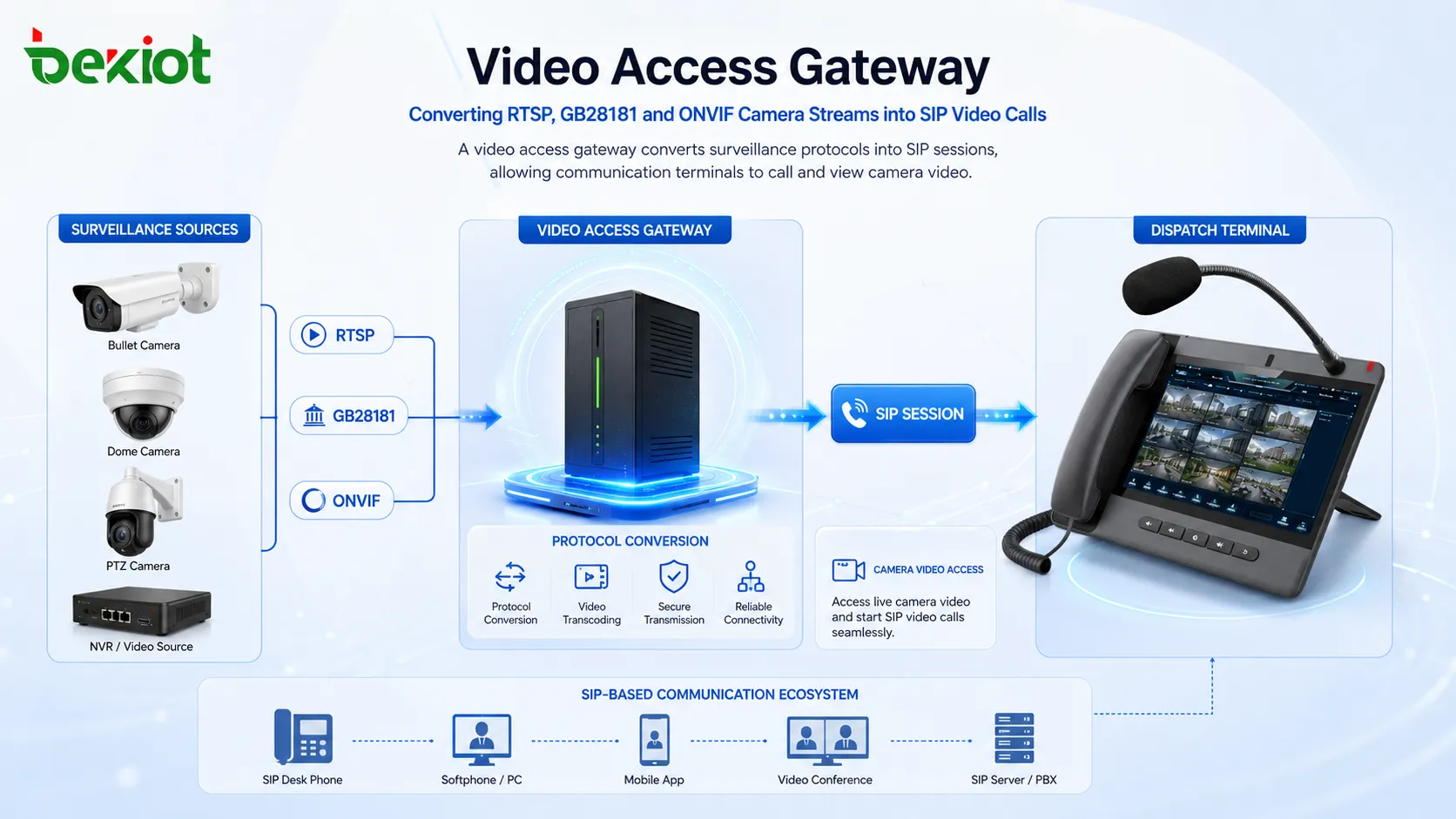
Compatible Access for Cameras, Recorders, and Platforms
A practical camera-to-SIP solution should not be limited to direct camera access only. Real surveillance systems may include different layers, such as IP cameras, network video recorders, video management platforms, national-standard video platforms, and third-party monitoring systems. The video access layer should therefore support multiple access methods.
Direct IP camera access is useful when the project team can obtain camera stream addresses and network permission. Recorder access is useful when cameras are already connected to a centralized recording system. Platform access is useful when video resources are managed by an existing monitoring platform and should be integrated without changing the original surveillance structure.
Support for RTSP, GB28181, and ONVIF is important because these are commonly used in camera integration projects. RTSP is often used to obtain live video streams. GB28181 is widely used in structured video platform access scenarios. ONVIF helps with device discovery, compatibility, and standardized camera communication. With gateway adaptation, these different sources can be unified and made available to SIP-based systems.
Flexible SIP Networking for Communication Platforms
After video resources are converted by the gateway, the next step is SIP networking with the communication platform. A video access gateway may connect through SIP trunk mode or user registration mode depending on the project design. Both methods can allow the communication system to reach camera resources, but the best choice depends on scale, routing, account management, and network conditions.
In trunk mode, the gateway and communication platform can exchange calls through defined routing rules. This is useful when many camera resources need to be accessed through number prefixes or structured routing. For example, all camera numbers under a certain range can be routed to the gateway, and the gateway then locates the specific video source internally.
In user registration mode, the gateway may register one or more SIP accounts to the communication system. This method can be easier for smaller deployments or private-network environments. Once registration succeeds, the communication platform can call the registered resource or route calls through the gateway according to configuration.
The important point is that the user experience remains simple. Operators do not need to understand RTSP, GB28181, ONVIF, media stream addresses, or backend protocol conversion. They only need to select or dial the video resource inside the SIP-based communication system.
Video Access for Phones, Consoles, and Smart Terminals
Once ordinary cameras are converted into SIP video resources, a wider range of communication devices can access them. SIP video phones can call camera numbers and display live video. Dispatch consoles can search and open camera feeds during an event. Smart terminals can receive visual information for field coordination. Command center platforms can combine voice calls, video access, and emergency response workflows.
This is valuable in scenarios where users need fast visual confirmation. A security operator may call the camera near an alarm location. A dispatcher may open a camera view near a worksite incident. A maintenance team may request camera video during remote support. An emergency center may bring live surveillance video into a decision-making process without switching to a separate monitoring platform.
The solution also supports more natural communication logic. When cameras have assigned numbers, they can be called, grouped, searched, or added into workflows in a way similar to other SIP resources. This turns static surveillance devices into active video resources within the communication system.
Joining Video Conferences Through Normal Call Flow
After video sources gain SIP accessibility, they can also be connected to video conferencing environments. A camera, recorder stream, drone feed, or body-worn video source can be added into a meeting through a normal call process if the conference platform supports SIP video access.
This expands the value of video conferencing beyond people-to-people meetings. A conference can include a live camera view from a factory area, a drone inspection image, a body camera from a field responder, or a surveillance feed from a public facility. Participants can discuss the same live scene while communicating in real time.
For command centers, this capability is especially useful. During emergency response, cross-department coordination, industrial troubleshooting, traffic handling, or event security, live video can become part of the conference rather than a separate screen. This improves situational awareness and reduces information delay.
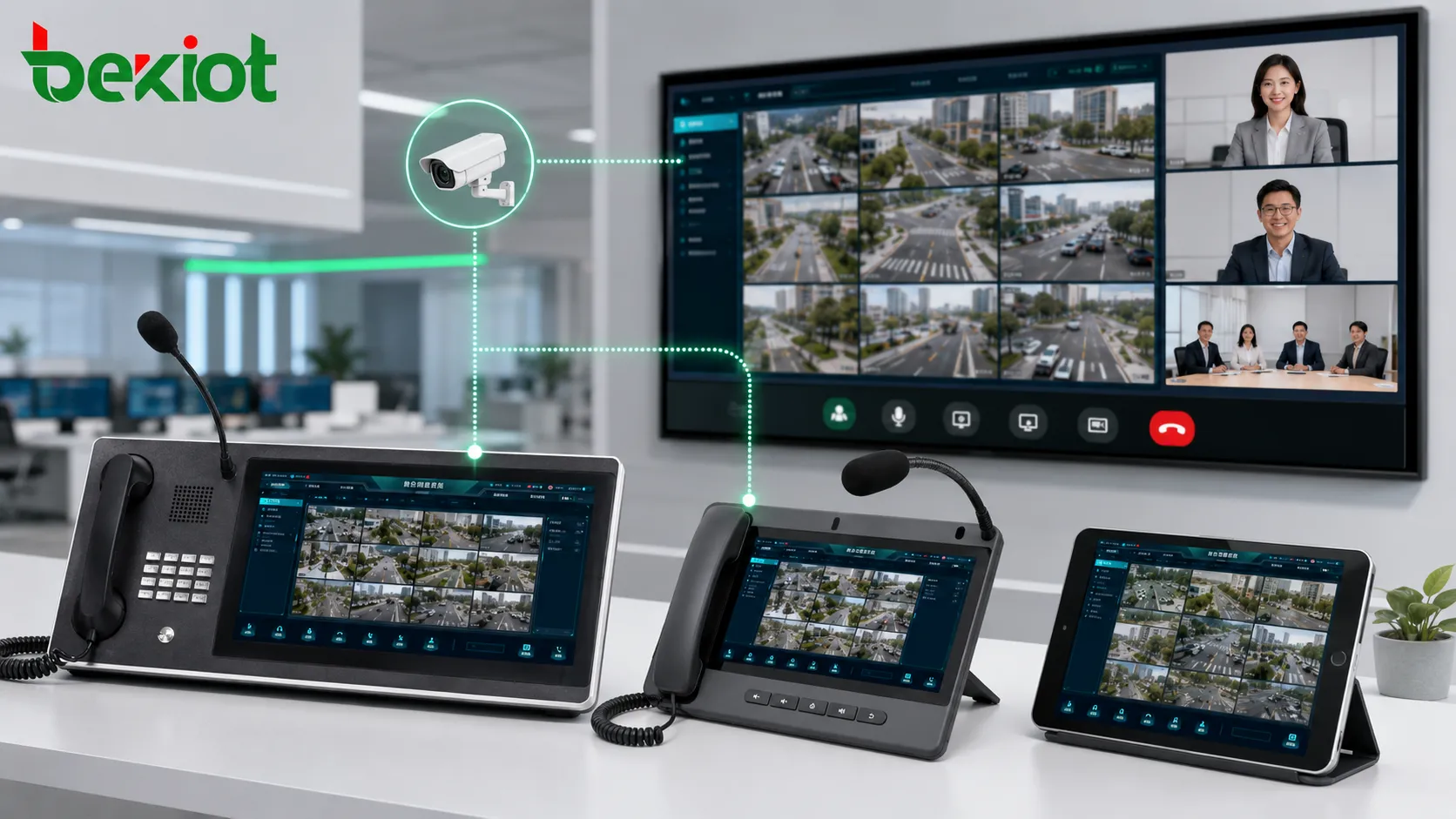
Extending Beyond Fixed Surveillance Cameras
The same conversion idea can be applied to more than fixed IP cameras. Many projects also need to access drone video, body-worn camera video, mobile recorders, vehicle-mounted cameras, portable video terminals, or temporary field video sources. These devices may not originally behave like SIP endpoints, but their video streams can still be integrated through a suitable access gateway.
For example, a drone may provide a live video stream during patrol, rescue, inspection, firefighting, or large-event security operations. A body-worn camera may send visual information from a frontline worker or emergency responder. A mobile recorder may provide video from a vehicle, patrol team, or temporary monitoring point. Through gateway processing, these non-SIP video sources can be output in SIP form and used by communication platforms.
This makes the solution suitable for emergency command, public safety, industrial parks, transportation hubs, energy facilities, campuses, hospitals, ports, logistics centers, and other environments where video and communication must work together.
Reducing Development Workload Through Configuration
One of the most important advantages of a gateway-based solution is that it can reduce custom development. In many projects, building direct protocol integration between a communication platform and multiple types of video systems can require complex software development, API adaptation, media handling, and long testing cycles.
A video access gateway simplifies this process. The project team can configure camera sources, assign numbers, define SIP connection parameters, and map video resources without rebuilding the entire communication system. This allows integrators and platform providers to expand video integration capability more quickly.
Of course, successful deployment still requires careful planning. Camera stream addresses, authentication, network reachability, codec compatibility, bandwidth, numbering rules, firewall policies, and platform access methods should all be confirmed before delivery. But compared with replacing cameras or developing every interface from scratch, a gateway-based approach is often faster, more flexible, and easier to maintain.
Deployment Value for Integration Projects
Unified Video Access for Communication Users
The solution allows communication users to access surveillance video through familiar SIP operation methods. Camera resources can be dialed, selected, or opened from communication terminals without forcing users to switch between isolated systems.
This improves response efficiency, especially when operators need to verify alarms, view field conditions, support remote teams, or coordinate emergency actions.
Lower Cost Through Existing Resource Reuse
By keeping existing cameras, recorders, and monitoring platforms, the project can avoid large-scale device replacement. This is important in sites where camera installation cost is high, where cameras are widely distributed, or where existing surveillance systems are already stable.
The gateway adds a communication access layer on top of the current video system, helping the project achieve SIP integration while protecting previous investment.
Stronger Business Capability for Platform Providers
For softswitch providers, unified communication vendors, video conferencing platforms, command and dispatch systems, and system integrators, camera-to-SIP conversion provides an efficient way to add video fusion capability.
Instead of treating video monitoring as a separate subsystem, they can make surveillance video, drone video, and mobile video part of the communication service portfolio.
Implementation Checklist
Confirm Video Source Types
Before deployment, identify whether video sources come from IP cameras, recorders, monitoring platforms, drones, body-worn devices, vehicle systems, or temporary video equipment. Different sources may require different access protocols and authentication methods.
It is also important to confirm whether the source supports RTSP, GB28181, ONVIF, platform-level access, or other stream output methods.
Plan SIP Numbering and Routing
Each camera or video source should have a clear number or resource identifier. A structured numbering plan helps users find cameras and allows the communication platform to route calls correctly to the video access gateway.
For large deployments, prefix-based routing is usually easier to maintain than mapping every route manually across multiple systems.
Test Media Quality and Compatibility
After configuration, the project team should test video access from different terminals, including video phones, dispatch consoles, smart terminals, and conferencing systems. Testing should include stream opening time, image quality, codec compatibility, one-way or two-way media behavior, and network stability.
Bandwidth planning is also important. Multiple users calling high-definition camera streams at the same time may increase network and gateway load.
FAQ
Can any IP camera be converted into a SIP video resource?
Most IP cameras can be integrated if they provide a supported stream or platform access method, such as RTSP, GB28181, ONVIF, or compatible video platform output. Final compatibility should be verified through testing.
Does the camera need to register to the SIP server directly?
No. In a gateway-based solution, the camera usually does not need to support SIP by itself. The video access gateway handles protocol conversion and presents the camera as a SIP-accessible resource.
Will the original surveillance system still work after integration?
Yes. The original monitoring, recording, and management system can usually continue working. The gateway adds an additional access path for SIP communication systems rather than replacing the existing surveillance platform.
What information is needed before configuration?
Common requirements include camera stream address, login credentials, access protocol, IP address, video encoding format, SIP server address, SIP port, numbering plan, routing rules, and network firewall permissions.
Is this suitable for emergency command projects?
Yes. Emergency command projects often need fast visual access from dispatch consoles, mobile terminals, video phones, and conference systems. Converting existing cameras into SIP resources allows video to be used directly inside the command communication workflow.







