


SIP has become one of the most widely used protocols for building modern communication systems. From voice servers and SIP gateways to video access platforms, dispatch systems, IP phones, conferencing platforms, and emergency communication systems, SIP-based products are now used in many industries where different platforms must communicate with each other.
In real projects, system integration often requires one SIP server to connect with another SIP server, or a SIP server to communicate with a gateway, video access device, branch platform, or third-party communication system. The key challenge is not only whether both sides support SIP, but also which networking mode should be selected according to IP reachability, routing requirements, user scale, security boundaries, and long-term maintenance workload.
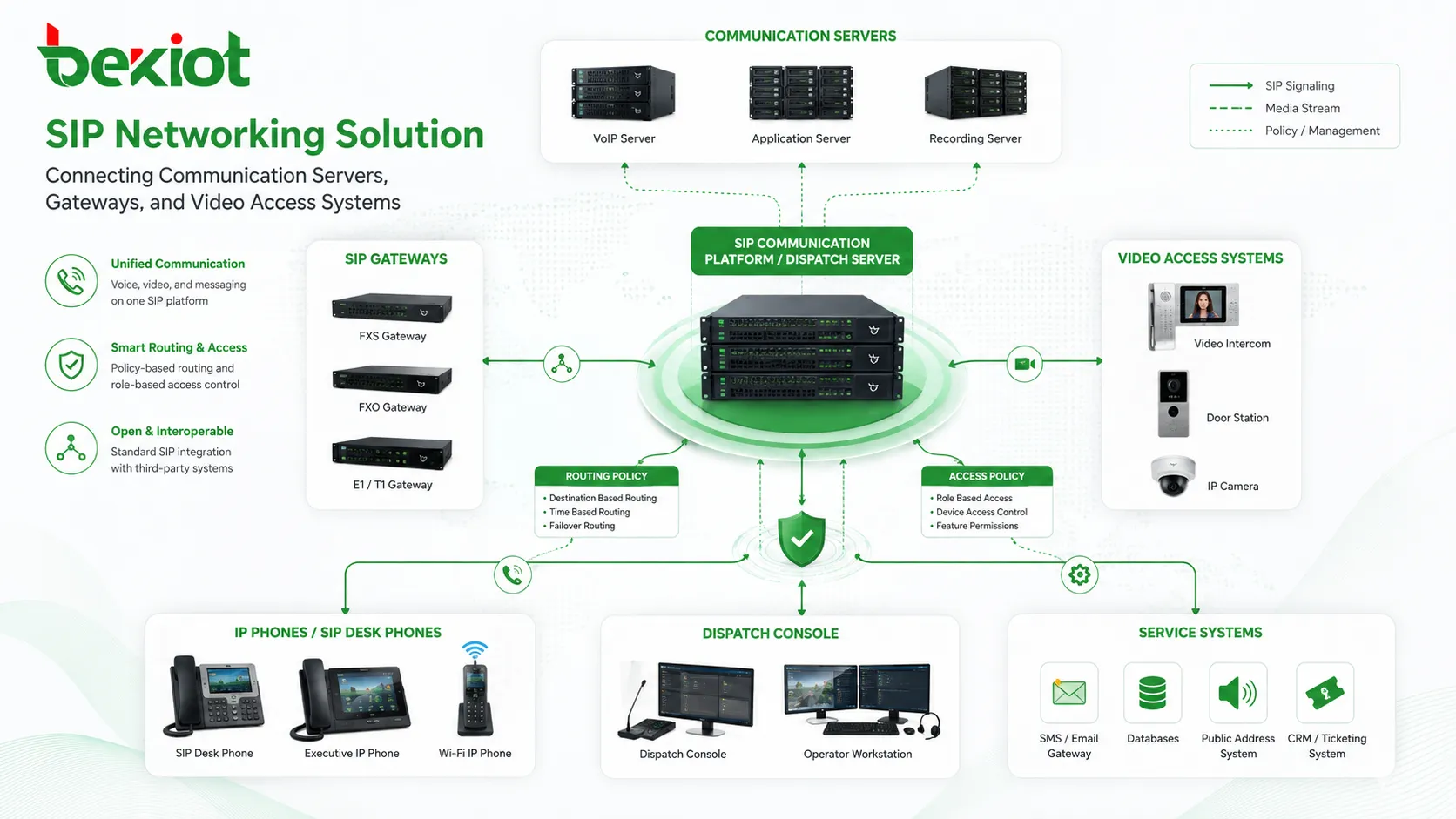
Project Background: Why Interconnection Needs a Clear Design
Many communication projects include systems from different vendors, different service platforms, or different branches of the same organization. A dispatch platform may need to call a video gateway. A conferencing system may need to access surveillance cameras. A SIP server may need to communicate with another SIP server in a different network segment.
In these scenarios, simply connecting devices to the network is not enough. The project team must decide how calls are routed, how numbers are matched, whether both sides have reachable fixed IP addresses, and whether the connected system is inside a private network or exposed to a public network.
In common SIP integration projects, two deployment patterns are frequently used: peer-to-peer mode, also known as IP-to-IP mode, and registration mode. Both can complete SIP interconnection, but their application conditions, configuration logic, and operation methods are different.
Direct System Connection Through Fixed Addresses
Peer-to-peer mode is suitable when two systems can reach each other through fixed IP addresses. In this structure, the communication route of Server A points to the IP address of Server B, and the communication route of Server B points back to the IP address of Server A.
The configuration is relatively direct. As long as both systems support SIP, know the peer IP address, SIP port, and routing direction, they can establish communication. However, completing the connection is only the first step. To make calls reach the correct destination, number routing still needs to be planned carefully.
For example, if all numbers under System A start with 6 and all numbers under System B start with 8, both systems need routing rules. System A should route calls starting with 8 to System B, while System B should route calls starting with 6 to System A. This routing logic allows users on both sides to call each other correctly.
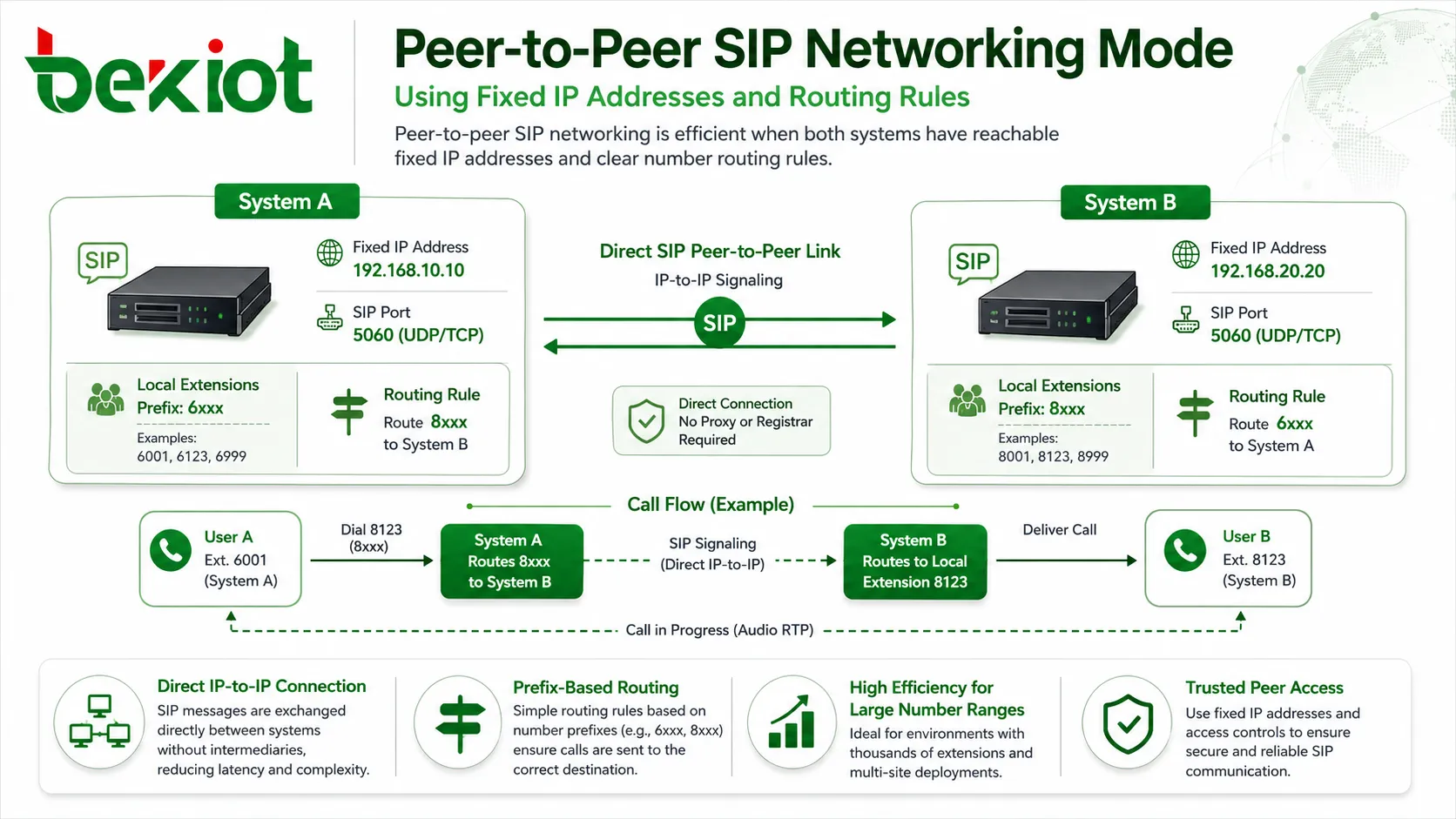
Where IP-to-IP Routing Works Best
Peer-to-peer mode is especially useful when both systems contain many users, devices, or callable resources. Once the route is configured, a large number of numbers can be handled through one routing rule instead of creating separate registration accounts for each destination.
A typical example is a communication platform connecting to a video access gateway. The gateway may manage hundreds, thousands, or even tens of thousands of cameras. If the cameras are assigned a unified numbering plan, the communication platform can route all numbers starting with a specific prefix, such as 8, to the video gateway.
After receiving the call, the gateway searches its own directory for the matching camera number. If the target device is online, the video session can be connected. If the device is offline, the gateway can reject the call or return the appropriate failure response.
This model reduces repetitive configuration and is easier to maintain in large-scale deployments. It is also more secure in many private-network projects because each side can be configured to trust only SIP traffic from the known peer IP address, while traffic from other IP addresses can be rejected.
Account-Based Access for Private Network Devices
Registration mode is another common SIP networking method. It is generally suitable for small-scale communication scenarios, or for projects where the SIP server is on a public network while the connected gateway or platform is located inside a private network.
In this situation, peer-to-peer mode may not be possible because the internal system cannot provide a reachable fixed public IP address. Instead, the main SIP server creates a SIP user account. The connected system then registers to the SIP server just like a SIP endpoint, using a username, password, server IP address, and SIP port.
After registration succeeds, the main SIP server can communicate with the connected system by calling the registered SIP number. This makes registration mode useful for branch access, gateway access, video platform integration, and remote system connection where public IP resources are limited.
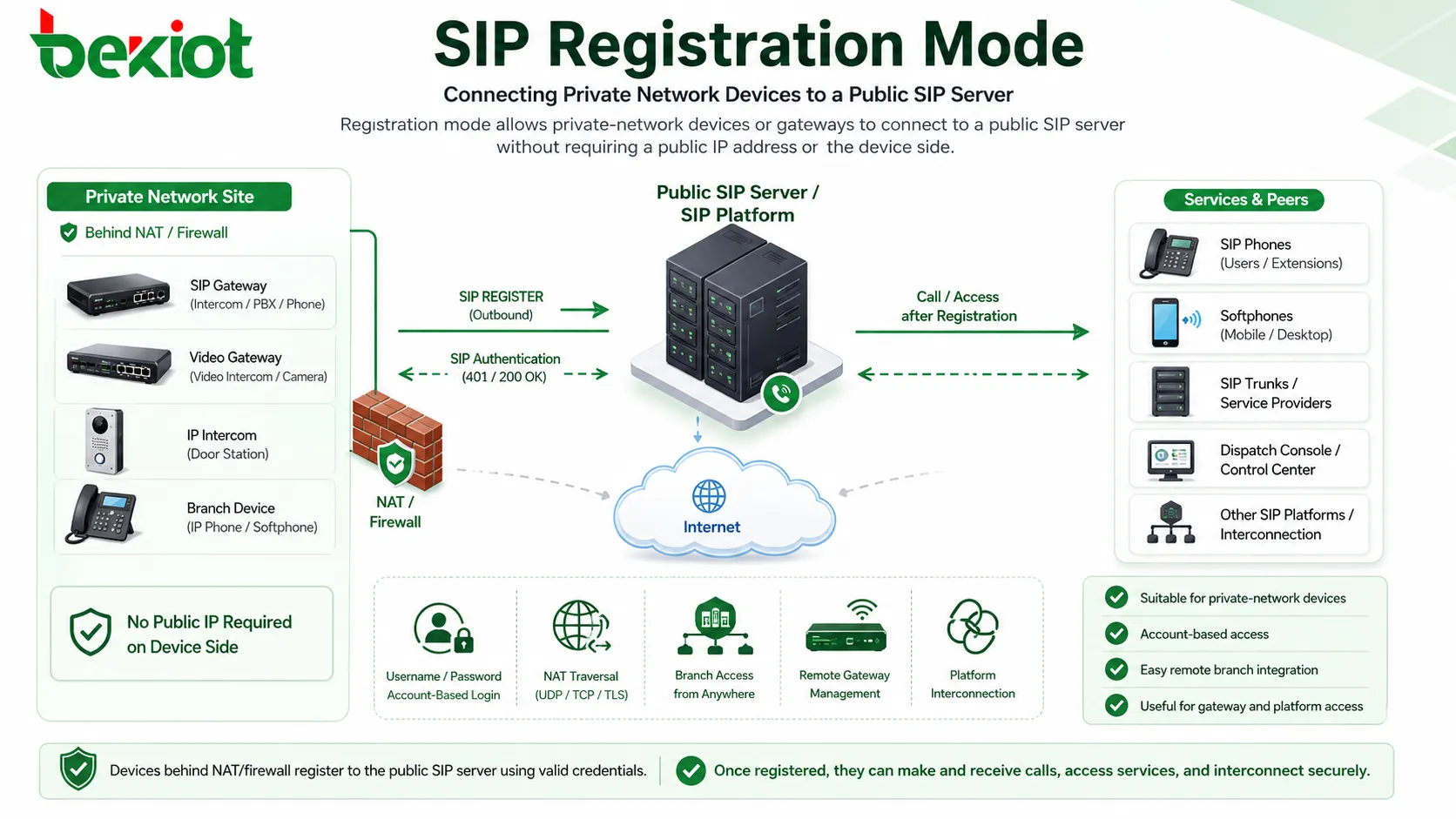
How Registration-Based Integration Handles Resources
In a video or unified communication integration project, the main platform can create a SIP account and password for the connected gateway. The gateway then enters the registration information through its cascade or platform interconnection interface, including the username, password, peer server address, and port.
Once the gateway shows a successful registration status, users on the main communication platform can call resources behind the gateway, such as monitoring cameras, mobile video devices, or drone video feeds. However, one important issue must be solved: the registered number must be mapped to the actual called resources.
This usually requires binding or matching the called numbers inside the gateway. If there are only a few target devices, registration mode is easy to configure. But if there are many devices, each requiring number binding or registration relationship management, the workload can increase quickly.
Number Planning and Route Design
A stable SIP networking solution depends heavily on number planning. Before deployment, each system should have a clearly defined number range. For example, one platform may use numbers beginning with 6, while another platform may use numbers beginning with 8. This prevents overlap and allows each platform to identify where the call should be forwarded.
Number planning should also consider future expansion. If a project may add more branches, gateways, monitoring devices, or dispatch terminals later, the numbering plan should reserve enough space in advance. A narrow or unstructured numbering plan may work during initial testing, but it can become difficult to maintain after the system grows.
Route design should be simple enough for daily operation teams to understand. In large projects, prefix-based routing is usually easier to manage than device-by-device configuration. When a new device is added under the same number range, the main routing structure does not need to be redesigned. This reduces operation workload and helps keep system logic consistent.
Security Boundaries and Access Control
SIP interconnection should not be treated only as a call-routing task. It is also a security boundary between different systems. When peer-to-peer mode is used, access control can be based on trusted IP addresses. The system can allow SIP traffic only from the known peer platform and reject unknown sources.
When registration mode is used, account security becomes more important. Strong passwords, controlled registration permissions, limited account exposure, and proper firewall policies should be applied. If the platform supports registration status monitoring, failed registration attempts should be reviewed to identify wrong configuration or abnormal access behavior.
For internet-facing deployments, additional protection may be required. This may include VPN access, SIP-aware firewall rules, anti-scanning policies, rate limitation, media port control, and session border protection. The goal is to make the interconnection available for business communication while avoiding unnecessary exposure of the internal voice network.
Choosing the Right Pattern for the Project
The choice between peer-to-peer mode and registration mode should be based on the actual project network. If both systems have reachable fixed IP addresses, a large number of users, and stable routing requirements, peer-to-peer mode is usually more efficient. It supports centralized routing, reduces repeated account creation, and is easier to manage at scale.
If the connected system is located in a private network, cannot provide a public IP address, or only needs to connect a small number of resources, registration mode is often more practical. It allows the device or gateway to actively register to the SIP server, avoiding the need for public IP exposure on the gateway side.
For many real-world projects, the two methods can also coexist. A large gateway or platform may use peer-to-peer mode for high-volume interconnection, while smaller branch devices, temporary systems, or private-network endpoints may use registration mode for easier access.
Deployment Value for Integrated Communication Systems
Simpler Cross-System Calling
A planned SIP networking solution allows different communication systems to call each other through unified numbering and routing rules. This is valuable in dispatch centers, video conferencing systems, emergency platforms, enterprise voice networks, and industrial communication projects.
Instead of keeping each system isolated, SIP interconnection creates a shared communication layer where voice, video, and gateway resources can be accessed through a consistent dialing method.
Better Scalability for Large Resource Pools
When thousands of cameras, terminals, gateways, or extensions need to be connected, peer-to-peer routing can greatly reduce configuration workload. A prefix-based route can forward calls to the correct platform, while the receiving platform handles the final resource search internally.
This approach makes the system easier to expand because new devices can be added under the existing numbering plan without changing the routing structure on every connected platform.
Flexible Access for Distributed Sites
Registration mode gives project teams a practical option when the connected device or gateway is behind NAT or located in a private network. The device initiates registration to the public SIP server, making communication possible without complex public IP planning.
This is useful for remote sites, temporary deployments, distributed branches, mobile video access, and small-scale integration scenarios where direct IP-to-IP communication is difficult.
Testing and Acceptance Before Go-Live
Before a SIP networking solution is delivered, both signaling and media paths should be tested. A successful SIP registration or a successful INVITE response does not always mean the service is ready. The project team should also verify two-way audio, video stream access, call release behavior, busy response, offline response, and routing fallback.
Test cases should cover normal calls, failed calls, wrong numbers, offline devices, high call volume, and network interruption. If the project includes video access, camera calling, mobile video, or drone video, each type of resource should be tested separately because media negotiation and bandwidth requirements may be different.
Acceptance documents should record IP addresses, ports, number ranges, routing rules, account information, firewall policies, and troubleshooting steps. This makes later maintenance easier and helps the operation team quickly identify whether a problem is caused by routing, registration, authentication, codec negotiation, or network reachability.
Long-Term Operation and Expansion
After deployment, SIP networking should be managed as part of the communication infrastructure, not as a one-time configuration task. Registration status, call success rate, abnormal call attempts, gateway availability, and route changes should be monitored regularly.
When new branches, gateways, or service platforms are added, the existing numbering plan and routing design should be reviewed before making changes. Adding routes without planning may create conflicts, call loops, or unreachable numbers. A controlled change process helps maintain the stability of the whole communication network.
For projects that continue to expand, it is often useful to define standard templates for peer configuration, registration accounts, number prefixes, firewall rules, and acceptance testing. This makes future integration faster and reduces the risk of inconsistent configuration between different sites.
Implementation Checklist
Confirm Network Reachability
Before choosing a networking mode, check whether both systems can reach each other through fixed IP addresses. If both sides have stable reachable IPs, peer-to-peer mode may be preferred. If one side is hidden behind a private network, registration mode may be more suitable.
Firewall rules, NAT behavior, SIP ports, RTP port ranges, and routing policies should be confirmed during the design stage to avoid one-way audio, failed registration, or unreachable calls after deployment.
Plan Number Prefixes and Routing Rules
A good numbering plan is essential for SIP interconnection. Prefixes such as 6 for one system and 8 for another system can make routing simple and predictable. Each platform should know which number range belongs to the peer system.
This avoids routing conflicts and allows future expansion. When new users or devices are added, the project team can keep the same number logic instead of redesigning the entire call routing structure.
Evaluate Operation and Maintenance Workload
For small systems, registration mode may be faster to deploy. For larger systems, peer-to-peer mode may reduce long-term maintenance because fewer accounts and bindings are required.
The final decision should consider not only initial configuration convenience, but also future device growth, troubleshooting effort, security requirements, and the number of systems that need to be interconnected.
FAQ
Can peer-to-peer mode be used through the internet?
It can be used if both sides have reachable public IP addresses or properly mapped network addresses, but security policies must be carefully configured. In many projects, VPN, firewall rules, or SBC protection may be added to improve security.
Does registration mode always require a username and password?
In most SIP registration deployments, yes. The connected device or system usually needs a SIP account, password, server address, and port to complete authentication and registration.
Which mode is easier for troubleshooting?
Peer-to-peer mode is often easier to trace in large systems because routing is based on fixed peer addresses and number prefixes. Registration mode may require additional checks on account status, password accuracy, NAT traversal, and binding relationships.
Can one SIP platform support both modes at the same time?
Yes. Many SIP platforms and gateways can support both peer-to-peer interconnection and registration access. This allows project teams to select different methods for different branches, gateways, or service platforms.
What causes calls to fail after SIP networking is configured?
Common causes include incorrect SIP port settings, firewall blocking, wrong number routing, failed registration, inconsistent codec settings, NAT issues, or missing device-number binding on the gateway side.







