


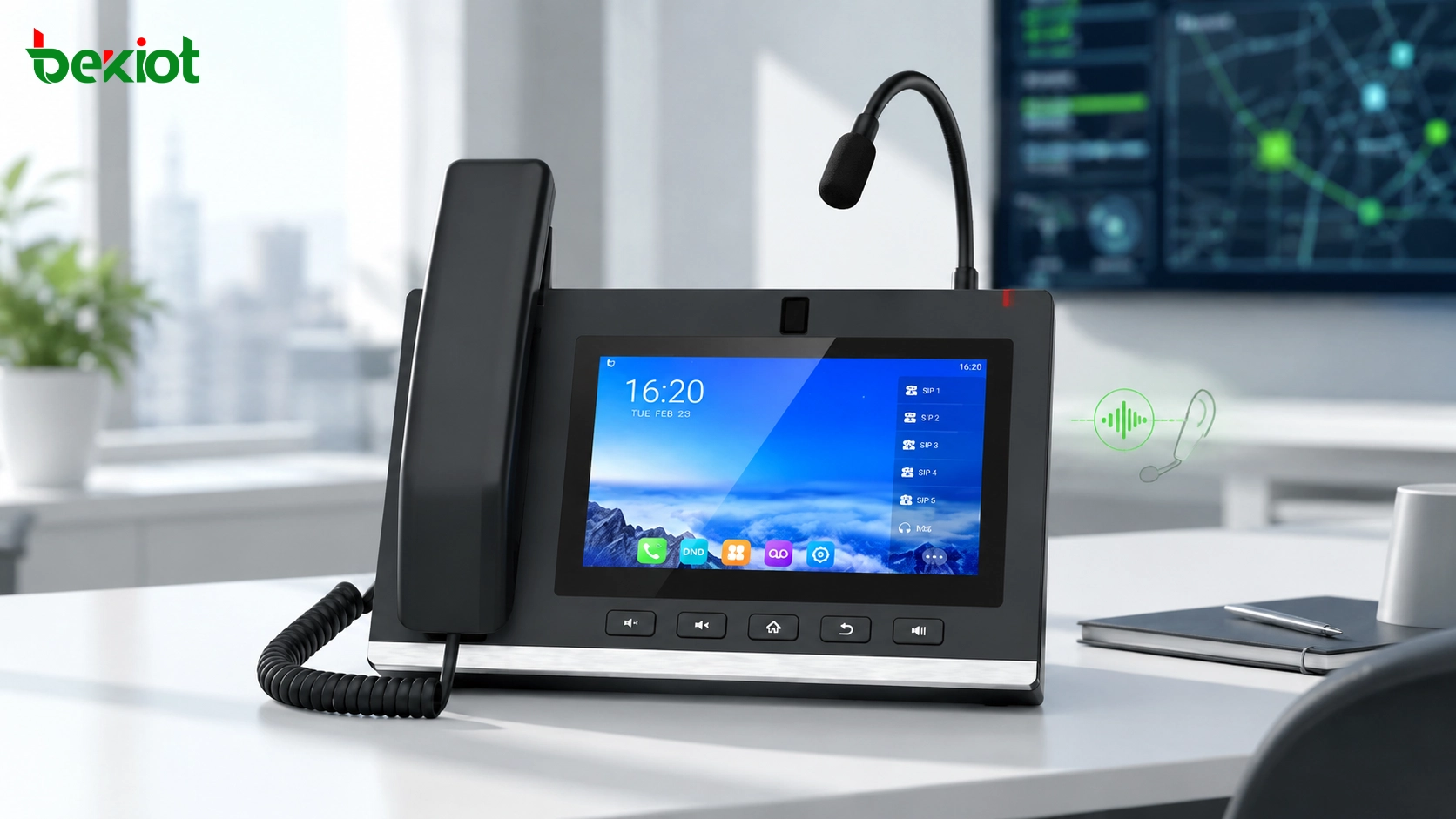
A gooseneck microphone SIP phone is more than a normal VoIP desk phone. In dispatch rooms, duty offices, security centers, industrial sites, campuses, logistics hubs, and emergency communication projects, it can become a practical voice dispatch terminal. With a flexible microphone, large touchscreen, SIP registration, programmable keys, and video call capability, the device allows operators to communicate more clearly while keeping their hands free for other tasks.
When this type of SIP phone is connected with a RoIP gateway, the value becomes even greater. The operator can use the phone to call radio channels, communicate with two-way radio users, trigger group communication, and coordinate field teams from a desktop terminal. This creates a simple but effective bridge between IP communication and traditional radio communication.
Why a Gooseneck Microphone Helps in Dispatch Work
In many control-room and duty-room scenarios, operators need to talk frequently while checking screens, recording information, monitoring alarms, or coordinating with other staff. Using a handset all the time is inconvenient, and using a normal speakerphone may produce poor pickup quality, background noise, or unstable voice clarity.
A gooseneck microphone solves this problem in a practical way. The microphone can be adjusted to a comfortable angle and positioned closer to the speaker’s mouth. This improves directional pickup and helps the far-end listener hear the voice more clearly. Compared with relying only on the built-in hands-free microphone of a phone, a gooseneck microphone is more suitable for frequent calling and command-style communication.
This is why gooseneck microphone SIP phones are useful in dispatch centers, security rooms, factory duty stations, emergency command desks, transportation control rooms, and public address operation points. They allow operators to speak naturally while keeping both hands available.
From VoIP Phone to Radio Dispatch Terminal
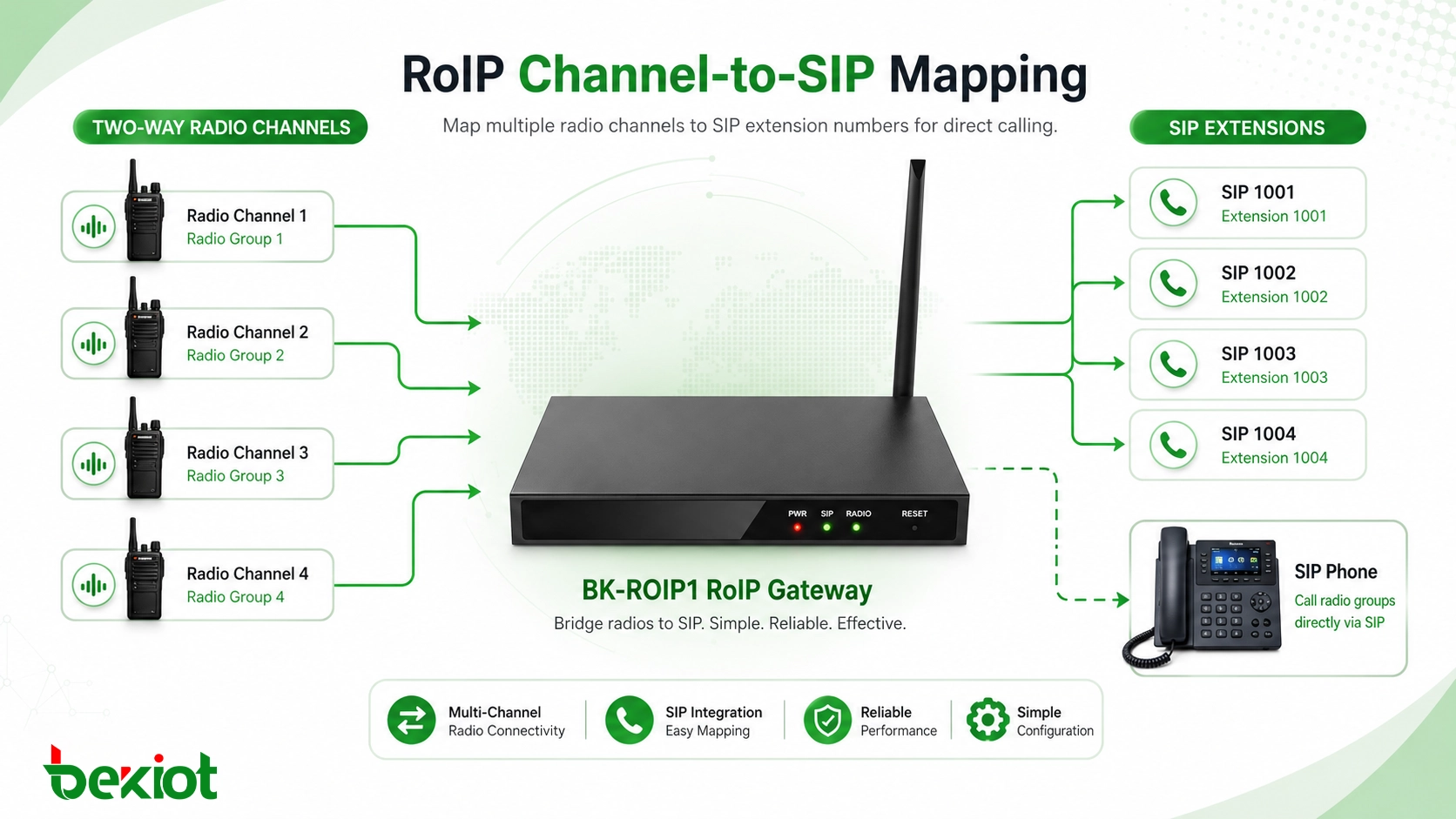
A SIP phone can register to an IP PBX, SIP server, or communication platform like a standard VoIP endpoint. A RoIP gateway can also provide SIP interconnection capability, allowing radio channels to be mapped into SIP extensions. Once the SIP phone registers to the gateway or the related SIP platform, it can call radio channels through assigned extension numbers.
In a typical setup, each radio channel is mapped to a different SIP number. For example, one channel can represent a security radio group, another can represent a maintenance group, another can represent a production team, and another can represent an emergency team. The operator does not need to use a handheld radio directly. Instead, the SIP phone becomes the desktop access point for radio communication.
This design is especially useful when the organization already has two-way radios in the field but wants to add IP-based dispatch at the control room. The radio network can remain in use, while the SIP phone and gateway create a more convenient interface for dispatchers.
Related Solution: GP308i SIP Paging Microphone Console
How the Gateway Maps Radio Channels
The RoIP gateway is the key connection point between the SIP network and the two-way radio system. It converts audio and control signals between the radio side and the IP communication side. In many practical projects, one gateway can connect several radio channels, and each channel can be assigned a separate SIP extension.
For example, a four-channel RoIP gateway can map four different radio channels to four SIP numbers. The SIP phone can then call each number directly. If the phone supports programmable DSS keys, the dispatcher can set one key for each radio channel. This makes radio access much easier because the operator only needs to press one key to contact the required group.
This structure reduces operation complexity. Dispatchers do not need to remember many extension numbers, switch between radios, or operate different devices. The phone screen and programmable keys provide a more visual and direct workflow.
One-Touch Calling Makes Daily Operation Easier
In a busy dispatch environment, speed matters. If operators need to search contacts, dial long numbers, or switch between multiple systems, communication efficiency will decrease. A SIP phone with programmable keys can simplify this process by turning frequently used radio groups, SIP extensions, paging zones, or emergency contacts into one-touch operations.
Some large-screen SIP phones support many DSS keys and multiple SIP accounts or lines. This allows the device to serve as a practical desktop communication console rather than a simple office phone. Operators can arrange keys by department, area, team, priority, or emergency workflow.
For example, the first group of keys can be used for radio channels, the second group for internal SIP extensions, the third group for paging zones, and the fourth group for emergency contacts. This kind of layout makes communication more intuitive and reduces the risk of calling the wrong target during urgent situations.
SIP Server Capacity Supports More Endpoints
A RoIP gateway with built-in SIP server capability can simplify small and medium-sized deployments. Instead of deploying a separate IP PBX in every project, the gateway can allow SIP phones, SIP intercoms, SIP paging devices, and other SIP terminals to register directly.
In the original use case, the gateway can support up to 200 SIP terminal registrations. This gives the system enough room for common project expansion, such as adding duty-room phones, SIP intercoms, paging microphones, security posts, office extensions, or emergency call points.
For larger systems, the architecture can also be connected to a dedicated IP PBX, SIP server, or converged dispatch platform. The key point is that SIP provides a flexible foundation. It allows phones, gateways, intercoms, dispatch consoles, and radio channels to be organized under one communication framework.
Better Voice Quality for Command Communication
Voice clarity is important in radio dispatch. If the dispatcher’s voice is unclear, field teams may miss key instructions. A gooseneck microphone improves the speaking side of the communication path by providing better directional pickup. This is helpful in noisy offices, control rooms with many operators, industrial duty rooms, or environments where hands-free calling is frequently used.
The radio side also needs proper audio tuning. Gateway input and output levels, radio interface cables, audio gain, push-to-talk control, echo, delay, and background noise should be checked during deployment. A system may be technically connected, but if the audio level is too low, too loud, distorted, or delayed, users will not accept it in daily operation.
For professional projects, testing should include SIP-to-radio calling, radio-to-SIP calling, group communication, emergency calling, and long-duration voice operation. This ensures that the system works not only in a demonstration but also in real duty-room conditions.
Video Capability Adds More Use Cases
Many large-screen SIP phones also support video calls. This expands the use case beyond voice dispatch. In a control room, the operator may use the same terminal for SIP voice calls, video intercom, visual confirmation, remote coordination, or small video meetings.
When combined with monitoring platforms, video gateways, or SIP video intercoms, the device can support more visual communication scenarios. For example, a dispatcher can speak to a field radio group through the gateway while also checking a related video source on another system. In a security center, the phone can be used for both radio dispatch and video communication with entrances or field stations.
This does not mean the phone should replace a full dispatch platform or video management system. Instead, it becomes a convenient endpoint for daily communication, quick confirmation, and lightweight visual collaboration.
Typical Architecture for a Small Dispatch System
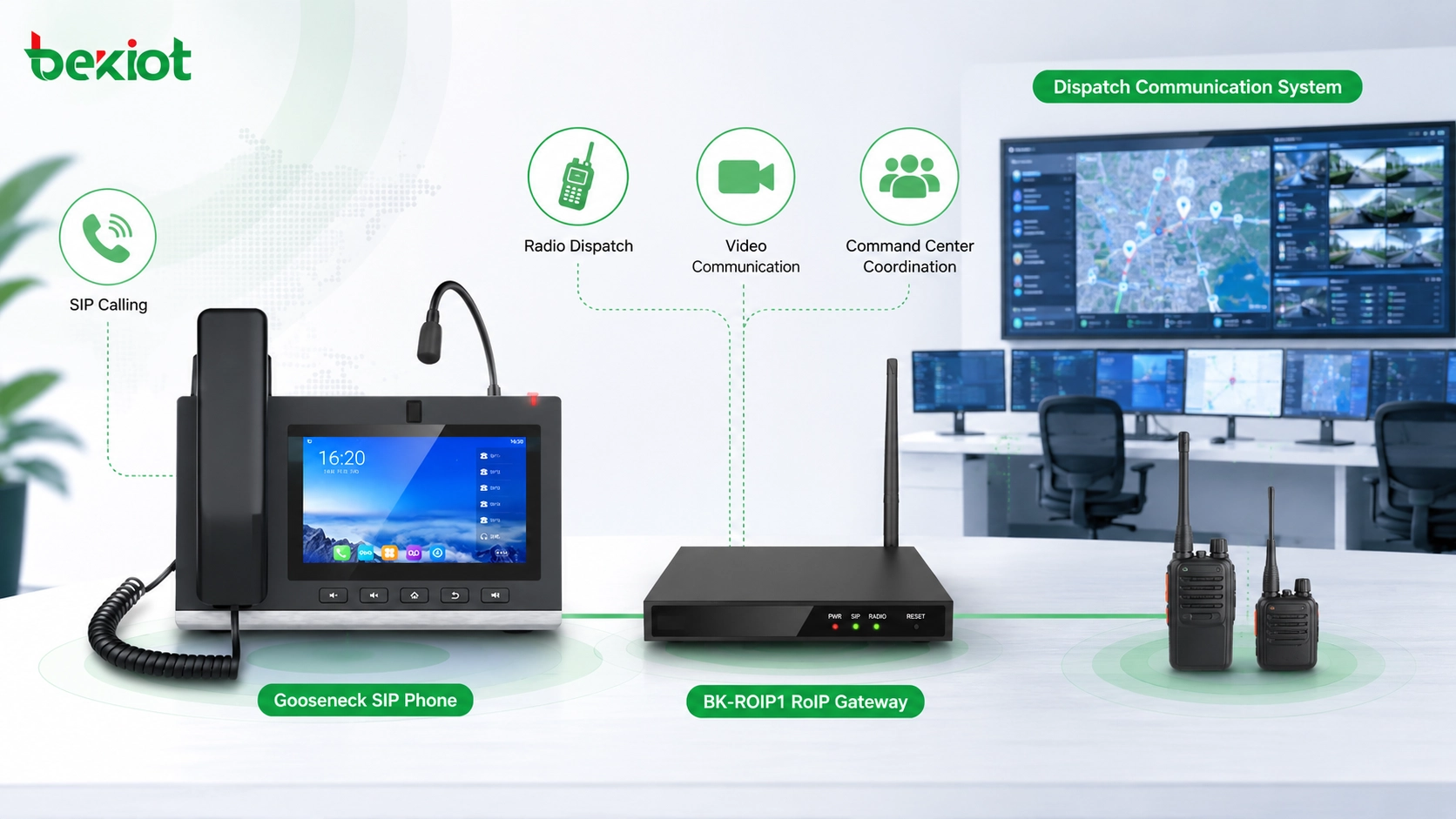
A basic solution usually includes several parts: field two-way radios, a RoIP gateway, network switch, SIP phone with gooseneck microphone, optional SIP intercoms, and optional dispatch software. The RoIP gateway connects to the radio channels and converts them into SIP-accessible communication resources.
The SIP phone registers to the gateway or SIP server. The dispatcher configures radio channels as contacts or programmable keys. When the operator presses a key, the phone calls the related SIP extension. The gateway then bridges the call to the correct radio channel, allowing field radio users and the dispatcher to communicate.
If the project later needs more functions, the system can add SIP paging, call recording, IP PBX integration, mobile clients, video intercom, or a dedicated dispatch console. This staged approach keeps the initial investment low while leaving room for future expansion.
Where This Solution Is Most Useful
This type of solution is suitable for organizations that already use two-way radios but need a more convenient control-room communication method. Typical scenarios include security dispatch, industrial production coordination, property management, logistics parks, warehouses, campuses, transportation stations, utility sites, emergency duty rooms, and small command centers.
In these environments, field workers may prefer handheld radios because they are simple, rugged, and familiar. At the same time, office or control-room users may prefer a desktop SIP phone because it provides clearer audio, easier operation, visual keys, and integration with other IP communication systems.
The RoIP gateway connects these two working habits. Field teams can continue using radios, while dispatchers gain a more professional desktop terminal. This is often more practical than replacing every radio with a new device at once.
Planning Details Before Deployment
Before deployment, the project team should confirm how many radio channels need to be connected, whether the channels are analog or digital, how the gateway interfaces with the radio equipment, and which SIP numbers should be assigned to each channel. The system should also define who can call which channel and whether emergency priority is required.
Network planning is also important. SIP phones and gateways should be placed on a stable network with reliable power supply. If the system is used for duty-room or emergency communication, UPS power, network redundancy, and basic fault recovery procedures should be considered.
Button layout should be designed according to real workflows. It is better to use clear names such as “Security Channel,” “Maintenance Team,” “Emergency Group,” or “Gate Station” instead of only using numbers. Clear naming reduces training time and improves response speed.
Common Mistakes to Avoid
One mistake is treating the SIP phone as only a normal office phone. In this solution, the phone is part of the dispatch workflow. Its microphone, keys, contacts, SIP lines, and user interface should be configured around daily command habits.
Another mistake is ignoring audio tuning. Radio systems and SIP systems handle audio differently. Gateway gain, radio volume, microphone level, codec selection, and network delay should all be checked. Good audio quality is essential for user acceptance.
A third mistake is building a system without future expansion. If the project may later add more radio channels, SIP intercoms, paging zones, recording, or dispatch software, the initial design should reserve enough SIP capacity, network ports, and gateway expansion options.
A gooseneck microphone SIP phone and RoIP gateway can create a low-cost but practical dispatch bridge between control-room operators and field radio users.
Lightweight Product Fit for Project Design
For projects that need a desktop paging and radio-dispatch access point, a SIP paging microphone console can be a practical fit. It provides a more comfortable speaking position than a handset, clearer operation than a basic phone, and better workflow support than using a handheld radio at the dispatch desk.
Becke Telcom can be considered as a solution reference for SIP paging consoles, RoIP gateway integration, SIP endpoint access, and converged communication deployment. In small and medium-sized projects, this kind of configuration can help users achieve more professional dispatch capability with a controlled investment.
Practical Value for Field Communication
The main value of this solution is not that it adds another device to the desk. Its value is that it connects two communication worlds: the IP communication system used in offices and control rooms, and the radio communication system used by field workers.
With a RoIP gateway and SIP phone, organizations can create a simple dispatch workflow. The dispatcher presses one key, the gateway connects the correct radio channel, and field users receive the message through their existing radios. The system is easy to understand, easy to operate, and easy to expand.
For many practical projects, this is a cost-effective way to upgrade radio communication without rebuilding the entire network. It improves voice quality at the dispatch desk, simplifies radio channel access, supports SIP endpoint expansion, and leaves room for video, paging, recording, or full dispatch platform integration in the future.
FAQ
Can one SIP phone call multiple radio channels?
Yes. If the RoIP gateway maps different radio channels to different SIP numbers, the SIP phone can call each channel separately. Programmable keys can make this operation faster and easier.
Does the system require a separate IP PBX?
Not always. If the RoIP gateway includes SIP server capability, SIP terminals may register directly to the gateway. Larger projects may still use a dedicated IP PBX or dispatch platform for better management and expansion.
Can field radio users call back to the SIP phone?
Yes, this depends on gateway configuration and radio interface design. In many systems, radio users can communicate with the SIP-side dispatcher through the mapped channel or assigned call path.
What should be tested before handover?
The project team should test SIP registration, one-touch channel calling, radio-to-phone audio, phone-to-radio audio, PTT control, delay, noise level, emergency communication, and network recovery after interruption.
Is this solution suitable for large command centers?
It can be part of a larger command system, but large command centers usually need additional functions such as GIS dispatch, recording, multi-seat management, video linkage, alarm integration, and centralized permission control.







