


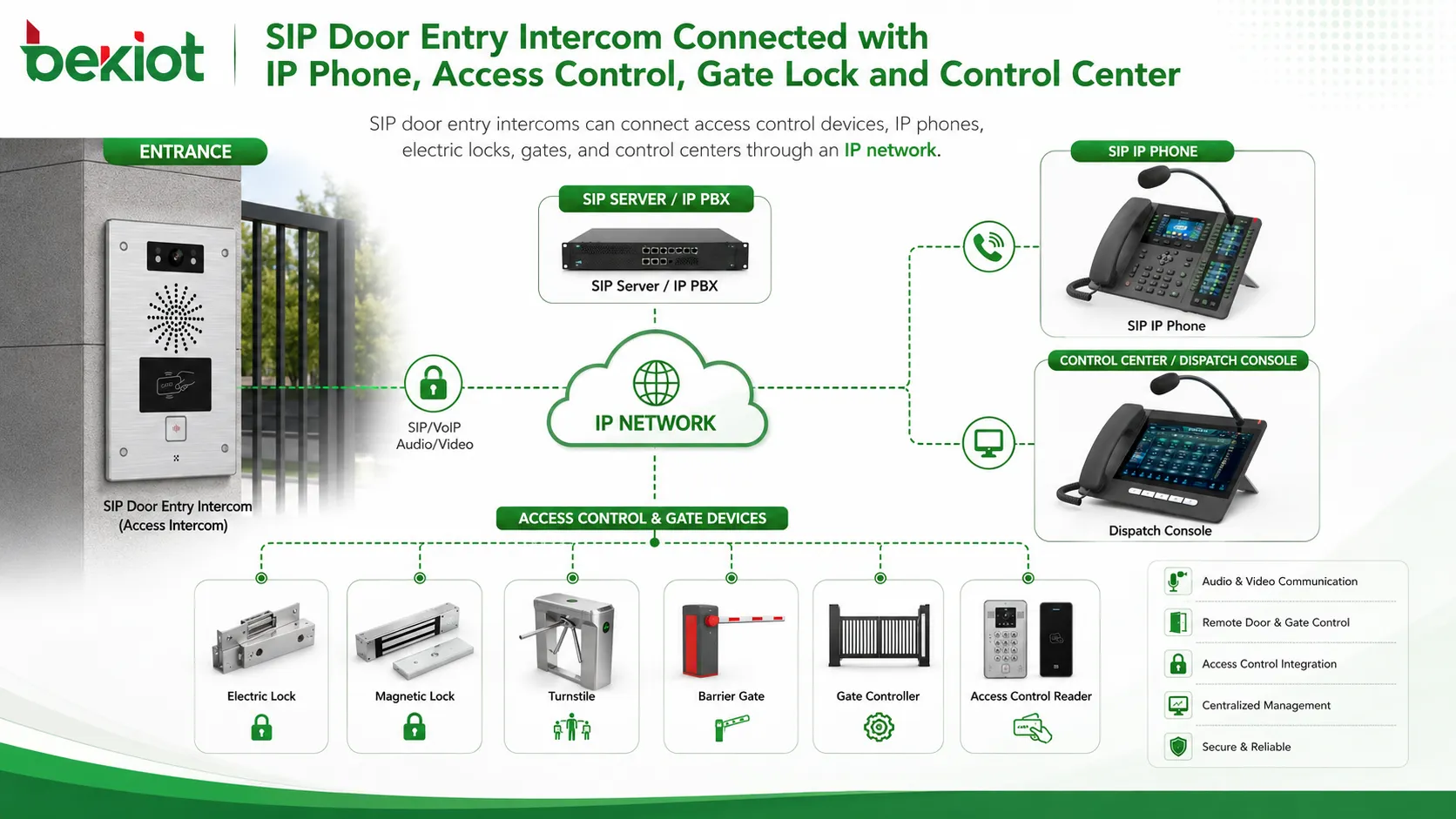
A SIP door entry intercom solution uses SIP communication protocol to combine access control, voice intercom, video intercom, remote unlocking, emergency help, and system integration in one IP-based communication architecture. Compared with many traditional door entry systems based on private protocols, SIP intercom devices offer stronger compatibility, easier deployment, and better scalability across IP phones, IP PBX systems, call centers, dispatch platforms, video gateways, and existing network infrastructure.
For offices, industrial parks, residential communities, campuses, parking lots, transportation stations, public venues, and unattended service locations, SIP-based access intercom is not only a door communication device. It can become an endpoint in a wider communication system, allowing visitors, operators, security teams, and control centers to communicate through voice, video, and remote control workflows.
A Flexible Endpoint for Modern Entry Management
SIP door entry intercom devices can be designed in several forms according to the use case. Common types include one-button intercom, dial-pad intercom, audio intercom, and video intercom. Each form serves a different access control workflow.
A one-button intercom is suitable for simple help or visitor calling scenarios. The user presses one key, and the device automatically calls the control center, reception desk, security room, or duty phone. This design is easy to operate and works well in public areas, parking entrances, emergency help points, and industrial gates.
A dial-pad intercom works more like a telephone keypad. Users can dial a specific extension to reach a department, security post, reception desk, or operator. In some deployments, the keypad can also be used to enter a password or access code for door opening. This makes it suitable for buildings, communities, industrial zones, and sites with multiple contact points.
Voice and Video Communication at the Entrance
Audio intercom focuses on two-way voice communication. When a visitor or user presses the call button, the intercom establishes a SIP call with the control center or IP phone. The operator can speak with the visitor before deciding whether to open the door, guide the person, or transfer the call to another staff member.
Video intercom adds visual confirmation. The control center can see the person at the entrance while talking with them. This is useful for offices, residential communities, schools, factories, logistics areas, public service points, and security-sensitive entrances where visual verification is important before remote unlocking.
Because SIP is widely used in VoIP communication, SIP intercom terminals can communicate directly with SIP phones in point-to-point mode. They can also register to an existing IP PBX or SIP server, becoming part of the organization’s telephone and communication system. This reduces integration complexity and helps users reuse existing IP network resources and communication terminals.
Related product solution: Becke Access Control System
Remote Door Opening from the Control Center
The main application of SIP door entry intercom is access control. The device can be installed at office entrances, park gates, community doors, parking entrances, service windows, equipment rooms, and restricted areas. It can be connected with turnstiles, electric locks, electromagnetic locks, gate controllers, or other access control devices.
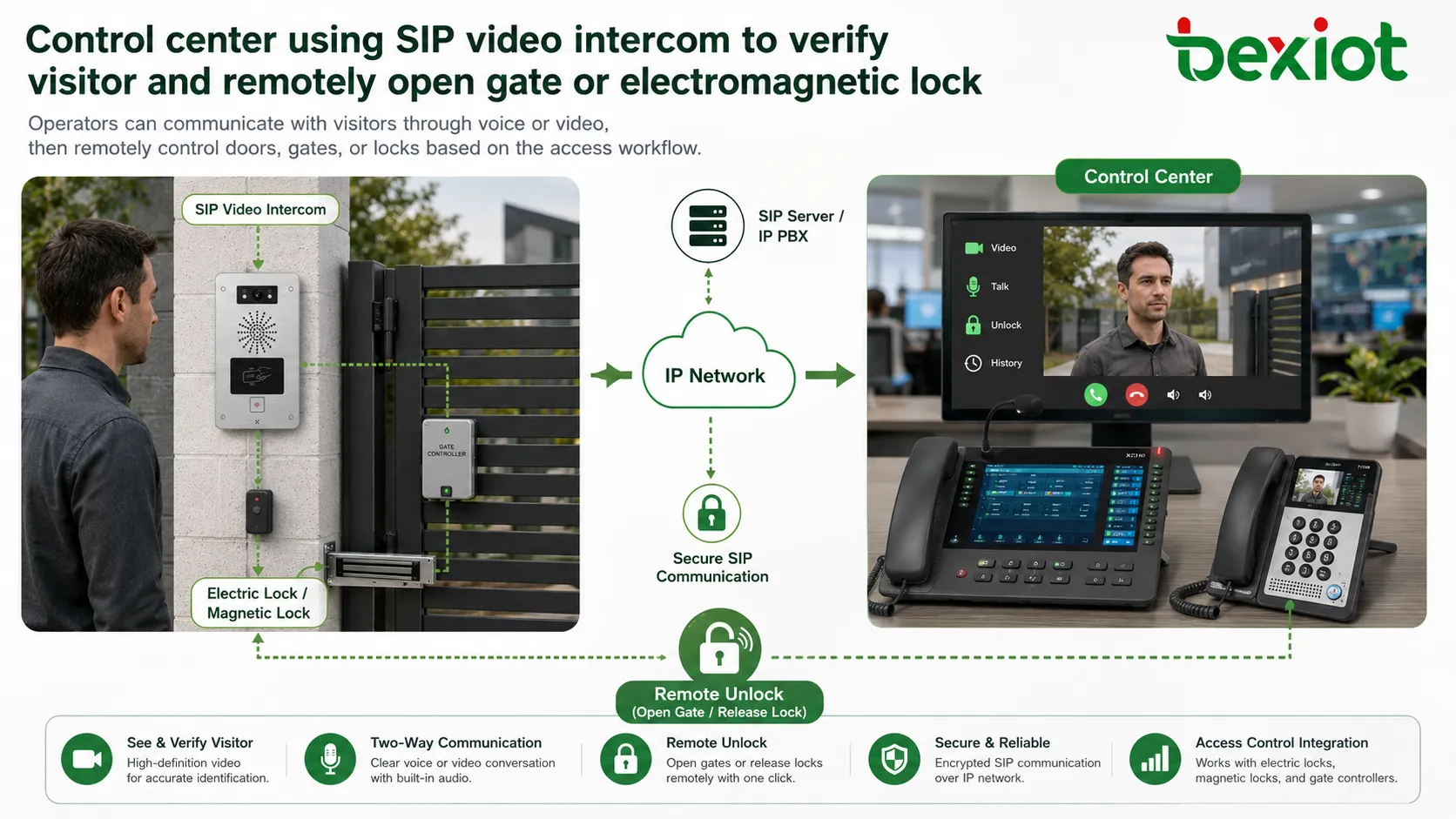
When a visitor requests entry, the SIP intercom calls the IP phone, reception phone, dispatch console, or control center terminal. The operator can talk with the visitor and then trigger remote door opening according to the permission workflow. This creates a simple and practical access process: call, verify, confirm, and open.
Compared with a standalone doorphone system, SIP intercom can be integrated into the broader communication network. A security office can receive calls on a SIP phone. A command center can handle intercom requests through a dispatch platform. A call center can receive help requests from different locations. This makes access control more manageable across multiple entrances and sites.
Useful for Unattended Sites and Remote Service Points
Many access control scenarios are moving toward unattended operation. Parking lots, self-service entrances, remote gates, logistics yards, community entrances, tourist areas, and public facilities may not have staff on site at all times. When users encounter problems, they still need a direct way to contact the back-end control center.
A SIP intercom terminal can provide that connection. A person at the site presses the help or call button, and the system establishes a voice or video call with the control center. If video linkage is configured, the operator can see the scene, speak with the user, confirm the issue, and remotely control a barrier gate, door lock, or access device.
This reduces the need for constant on-site staffing while maintaining service availability. It also improves the user experience because help can be reached through a visible terminal instead of relying only on phone numbers, QR codes, or manual patrols.
Emergency Help and Public Safety Applications
SIP door entry intercom terminals can also be used as emergency help points. They are suitable for parks, communities, transportation stations, venues, campuses, public service areas, underground passages, parking areas, industrial sites, and other environments where users may need quick assistance.
Using the existing IP network and SIP protocol, organizations can build an independent help alarm communication network. In a basic deployment, the command center only needs SIP phones or a SIP platform to receive calls from help terminals. In a larger deployment, the terminals can be connected directly to an existing dispatch center or call center system.
This is a key advantage of SIP. Many call centers and dispatch systems already use SIP as their communication protocol. By deploying SIP help terminals, users can expand emergency communication capability without building a completely separate system. The same platform can handle calls, events, video linkage, records, and response workflows.
Integration with Video Gateways and Surveillance Streams
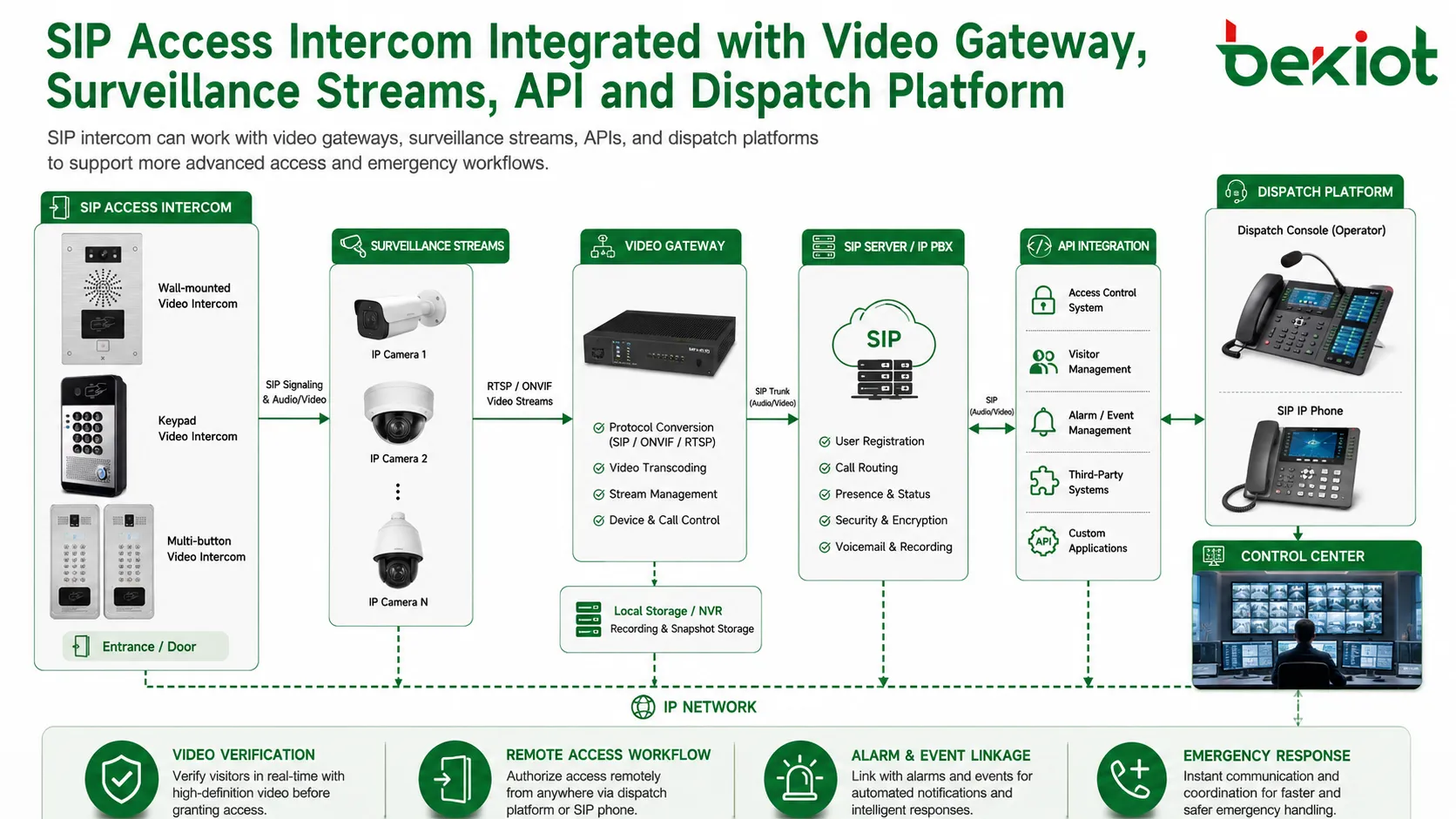
Access control is stronger when voice, video, and system events work together. SIP intercom can be integrated with video gateways to connect different surveillance video streams. This allows the control center to view entrance cameras, intercom cameras, nearby CCTV feeds, or other video resources during an access request or emergency call.
For example, when a visitor presses the intercom button, the platform can display the video from the intercom camera and nearby surveillance cameras. The operator can verify the situation more accurately before opening a door or dispatching staff. In public safety and industrial scenarios, this visual context can significantly improve response quality.
Through API interfaces, SIP access intercom can also be connected with business systems. These may include visitor management, parking platforms, building management systems, alarm systems, command platforms, security software, or access control databases. This opens the door for richer workflows such as event pop-ups, call records, video snapshots, remote unlocking logs, and automatic linkage actions.
Recommended Architecture for Project Deployment
A practical SIP door entry intercom solution can be planned in layers. The first layer is the access terminal layer, including one-button intercoms, dial-pad intercoms, audio intercoms, video intercoms, emergency help terminals, and gate-side devices. These terminals are installed at doors, gates, parking entrances, public areas, or service points.
The second layer is the communication platform layer. This may include IP PBX, SIP server, dispatch platform, call center system, or unified communication platform. It manages SIP registration, extension numbers, routing rules, call permissions, and communication workflows.
The third layer is the linkage and control layer. This includes electric locks, electromagnetic locks, turnstiles, gate controllers, video gateways, surveillance cameras, alarm systems, APIs, and management platforms. This layer turns the intercom from a simple calling device into a connected access control endpoint.
The fourth layer is the operator layer. Operators may use SIP phones, video phones, dispatch consoles, call center seats, mobile apps, or control room platforms to answer calls, verify visitors, check video, open doors, record events, and coordinate response actions.
A well-designed SIP access intercom system should not be limited to door calling. It should connect people, entrances, video, locks, alarms, and management platforms into one practical workflow.
Benefits for System Owners and Integrators
Better compatibility with communication systems
SIP protocol helps the intercom work with IP phones, IP PBX systems, SIP servers, call centers, dispatch platforms, and other VoIP-based systems. This makes integration easier than many closed private-protocol intercom solutions.
Lower deployment complexity
Because the system can use the existing IP network, deployment is more flexible. In many projects, users can connect intercom terminals to the current network and register them to the existing SIP platform instead of building a completely separate communication system.
More practical remote operation
Operators can answer calls, view video, confirm identity, communicate with visitors, and trigger remote unlocking from the control center. This is valuable for unattended parking lots, remote entrances, service points, and multi-site management.
Expandable emergency response capability
SIP help terminals can be added to parks, campuses, transportation stations, public buildings, and industrial sites. When connected to a dispatch center or call center, they provide a simple way to extend emergency communication coverage.
Stronger linkage with video and business systems
Through video gateway integration and API development, SIP intercom can work with surveillance, access control, alarm, visitor, parking, and command systems. This supports more complete business-level applications.
Planning Notes Before Installation
Before deploying SIP access intercom, the project team should confirm the number of entrances, required intercom type, whether video is needed, lock or gate control method, network availability, SIP registration method, operator terminals, and expected linkage functions.
For simple entrances, one-button audio intercom may be enough. For visitor verification and security control, video intercom is more suitable. For multi-tenant buildings or sites with multiple departments, dial-pad intercom may provide better routing flexibility.
The team should also plan permissions carefully. Remote unlocking should only be available to authorized users. Event records, call logs, door-opening logs, video linkage, and API control should be managed according to the site’s security policy.
Conclusion
SIP door entry intercom provides a practical way to combine access control, voice communication, video verification, remote unlocking, unattended service, and emergency help into one IP-based solution. Its main value comes from SIP compatibility, flexible deployment, and the ability to connect with IP phones, IP PBX systems, call centers, dispatch platforms, video gateways, surveillance systems, and API-based business applications.
For organizations that want to modernize entrance management without building isolated systems, SIP access intercom offers a scalable path. It can start from simple one-button calling and grow into a connected access control and emergency communication network for buildings, parks, campuses, transportation sites, industrial facilities, and public service environments.
FAQ
Can SIP door entry intercom work without an IP PBX?
Yes, some deployments can use point-to-point SIP calling between the intercom and an IP phone. However, an IP PBX or SIP server is recommended when the project needs extension management, routing rules, multi-terminal answering, call records, or platform integration.
Is video always required for access intercom?
No. Audio intercom is enough for many basic help and door communication scenarios. Video is recommended when visual verification, visitor confirmation, or security review is important.
Can SIP intercom be used for both access control and emergency help?
Yes. The same SIP communication logic can support door calling, visitor communication, remote unlocking, help calls, alarm linkage, and dispatch center connection. The final function depends on terminal design and platform integration.
What devices can receive calls from SIP intercom terminals?
Calls can be received by SIP phones, video phones, softphones, dispatch consoles, call center seats, or SIP-based communication platforms. The system design should match the operator workflow.
How can unauthorized remote unlocking be prevented?
Use account permissions, secure SIP configuration, platform-side access control, operation logs, restricted unlocking keys, role-based authorization, and regular system review. Critical doors should not rely only on simple call access.
Can existing surveillance cameras be linked with the intercom?
Yes. With a video gateway or platform integration, intercom events can be linked with nearby surveillance streams. This helps operators see more context before making an access decision.







