


Many organizations already have analog public address systems, amplifiers, speakers, and zone broadcasting equipment in place. Replacing the whole system is often unnecessary, especially when the existing amplifier and speaker network still works reliably. A more practical approach is to connect the legacy PA infrastructure to a SIP-based communication platform through a paging gateway, allowing phone extensions, dispatch consoles, and IP communication systems to trigger live announcements over the existing broadcast network.
This solution is especially useful for factories, campuses, industrial parks, transportation sites, warehouses, commercial buildings, public facilities, and emergency command environments. It helps users combine traditional analog audio equipment with modern IP dispatch, SIP calling, and unified communication functions without rebuilding the entire broadcasting system.
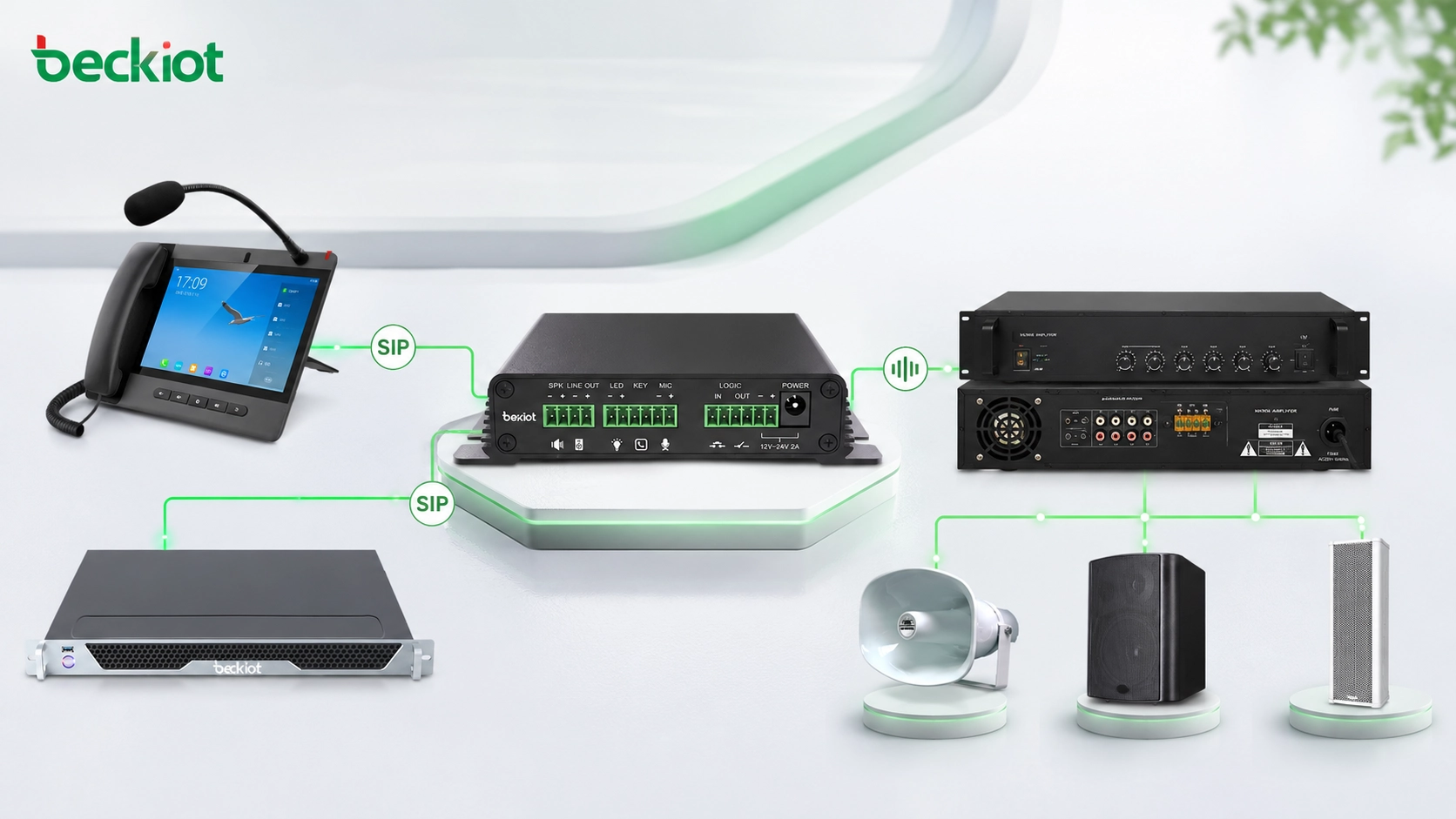
A Practical Upgrade Path for Existing Audio Infrastructure
In many communication projects, audio integration is a key requirement. The user may already have a traditional PA amplifier system, but they also need centralized dispatch, phone-based paging, emergency voice notification, or integration with an IP communication platform. A paging gateway provides a simple bridge between these two worlds.
The basic principle is straightforward. The SIP platform sends VoIP voice to the paging gateway. The gateway converts the SIP voice stream into an analog audio signal. After the call is connected, the audio can be played through the traditional amplifier just like ordinary broadcast audio or live microphone paging.
With this method, existing analog broadcasting equipment can be connected to an IP-based dispatch system, telephone system, or converged communication platform. Operators can use a dispatch console, SIP phone, IP PBX extension, or authorized communication terminal to call the assigned paging gateway number and start an announcement.
How the Gateway Fits into the Network
A paging gateway is usually connected to the network through an Ethernet port. Its configuration logic is similar to an IP phone. The system administrator assigns a SIP account or extension number to the gateway, then registers the gateway to the IP PBX, SIP server, dispatch platform, or unified communication system.
Once registration is completed, the gateway becomes a callable audio endpoint. When users need to access the existing PA system, they simply call the corresponding SIP number from a dispatch console, phone extension, or system interface. After the call is established, voice from the SIP side is output as analog audio to the amplifier input.
This approach makes traditional PA access easier for non-technical users. They do not need to understand amplifier wiring, audio routing, or network protocol details during daily operation. From their perspective, paging becomes as simple as calling an extension number.
The value of a paging gateway is not only protocol conversion. It also turns a traditional PA system into a manageable endpoint inside the communication workflow.
Connection Method Between Gateway and Amplifier
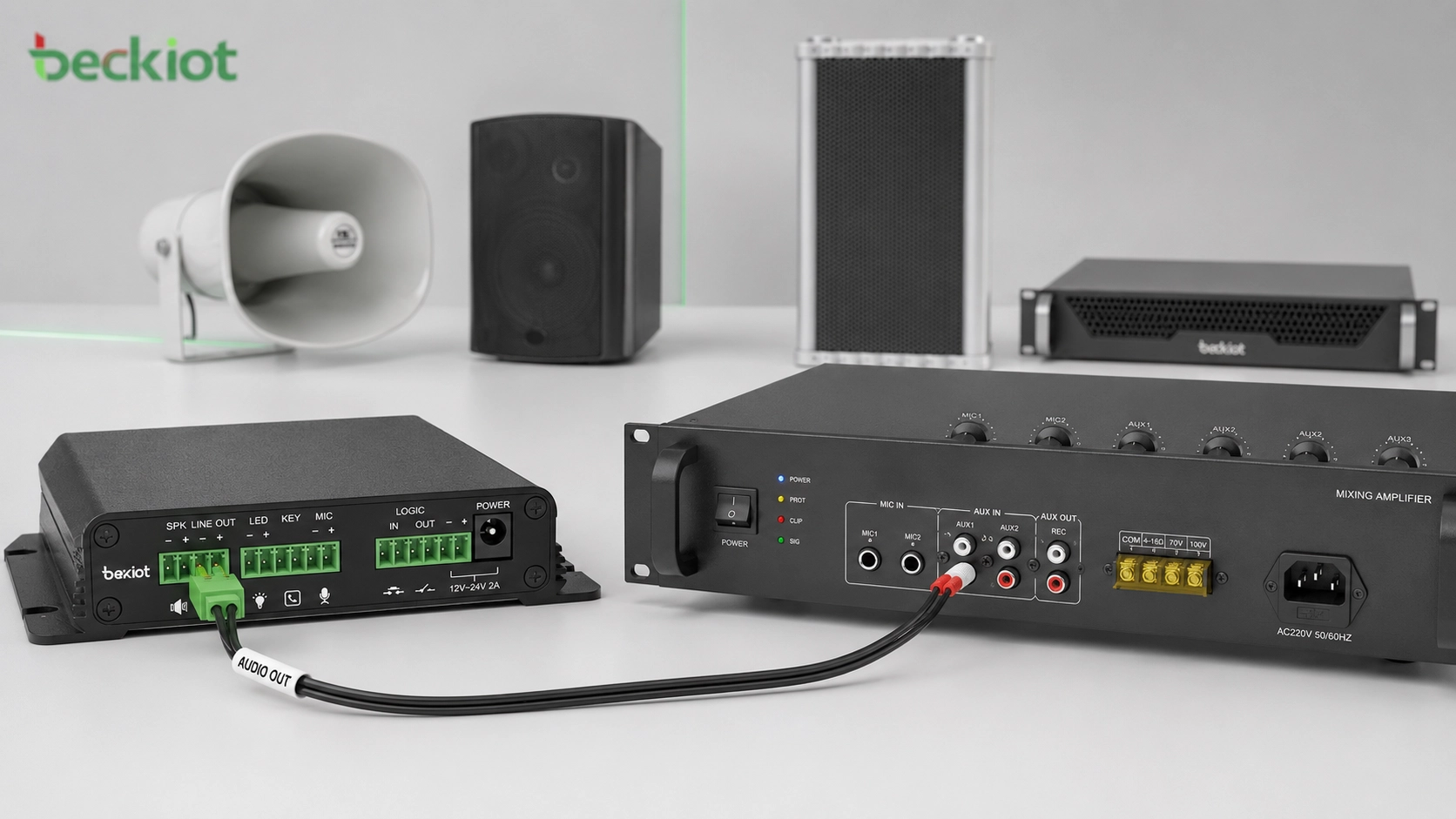
The wiring is usually simple. The paging gateway provides analog audio output, while the traditional amplifier provides an audio input interface. Many legacy PA amplifiers use RCA connectors, often called lotus connectors. Some gateways use Phoenix terminals for balanced or unbalanced audio output. A proper audio cable can be prepared according to the actual interface type on both sides.
After the cable is connected correctly, the SIP call audio can be transmitted from the gateway to the amplifier. The amplifier then drives the existing speaker lines or PA zones. This means the original speaker system can continue to be used, while the control method is upgraded from local analog operation to SIP-based calling and dispatch access.
During installation, the project team should check audio level matching, grounding, noise interference, cable quality, amplifier input mode, and whether the PA system uses zone controllers, priority inputs, or emergency override interfaces. These details help ensure clear audio and reliable paging performance.
Combining Analog PA with IP-Based Paging
Some modern communication platforms already support SIP paging, IP speakers, IP horns, multicast paging, or software-based broadcast control. However, many sites cannot replace all legacy speakers at once. In these cases, a paging gateway allows the analog PA system and the SIP paging system to work together.
For example, new buildings or priority areas can use IP speakers, while older areas continue using analog amplifier zones. Both systems can be managed from the same dispatch or communication platform when properly planned. This reduces duplicate construction, protects previous investment, and gives users a smoother migration path from traditional broadcasting to IP-based audio communication.
For projects involving SIP phones, paging gateways, IP PBX systems, industrial phones, dispatch consoles, and emergency broadcast linkage, Becke Telcom can be considered as a suitable product and solution reference. The focus should be on matching the existing audio system, site workflow, and long-term expansion plan rather than replacing everything at once.
Typical Application Scenarios
Factory and industrial park announcements
Factories often have existing analog amplifiers and speaker lines installed in workshops, warehouses, corridors, and outdoor areas. By adding a paging gateway, managers can use SIP phones or dispatch consoles to broadcast production notices, shift reminders, safety alerts, or emergency instructions.
This helps extend the existing PA system without changing the whole speaker network. When combined with a dispatch platform, paging can also be linked with alarms, duty rooms, maintenance teams, and emergency response workflows.
Campus and building communication
Schools, office buildings, hospitals, and public buildings may already have analog PA systems for daily announcements. A paging gateway allows these systems to receive voice from IP phones, SIP intercoms, operator consoles, or centralized communication platforms.
This is useful for daily notifications, visitor guidance, emergency reminders, security coordination, and multi-zone announcements. It also makes future upgrades easier, because IP paging endpoints can be added gradually while the traditional amplifier system remains in service.
Command and dispatch environments
In command centers, security rooms, and emergency response platforms, operators need quick access to multiple communication channels. A paging gateway makes legacy PA equipment part of the dispatch environment. Operators can initiate voice announcements from the same platform used for phone calls, intercom, radio gateway access, video linkage, and event handling.
This improves operational consistency. Instead of using a separate analog broadcast panel, the operator can trigger announcements through a unified communication interface, reducing switching time during urgent situations.
Key Advantages for Project Deployment
Lower upgrade cost
The existing amplifier and speaker infrastructure can continue to be used. The gateway adds SIP access without requiring full replacement of the traditional PA system. This is especially valuable for large sites with many installed speaker zones.
Simpler operation
Users can call a SIP extension to start paging. This is easier than operating separate analog broadcast devices, especially for staff who already use phone extensions or dispatch terminals every day.
Better system integration
The PA system can be connected with IP PBX, SIP dispatch, emergency communication, industrial intercom, alarm linkage, and unified communication platforms. This creates more flexible audio workflows than a standalone analog amplifier system.
Flexible migration to IP audio
Organizations do not need to complete the whole upgrade in one step. A hybrid system can support both analog PA and SIP-based IP paging, allowing gradual expansion based on budget, site priority, and operational needs.
Planning Notes Before Installation
Before deploying a paging gateway, the project team should confirm the current PA system structure. Important details include amplifier input type, available audio interface, speaker zone design, existing priority control, cable distance, grounding condition, and whether the amplifier supports external audio input.
On the SIP side, the team should prepare the extension number, SIP server address, authentication information, codec settings, call permission, and dialing rules. If the system is part of a larger emergency communication platform, paging priority and authorized user permissions should also be planned in advance.
Audio testing is also necessary. The installer should verify whether the announcement volume is suitable, whether there is background noise, whether the amplifier input level is correct, and whether the paging voice remains clear in the target areas. For industrial or outdoor projects, equipment protection, cabinet installation, power reliability, and network stability should be considered together.
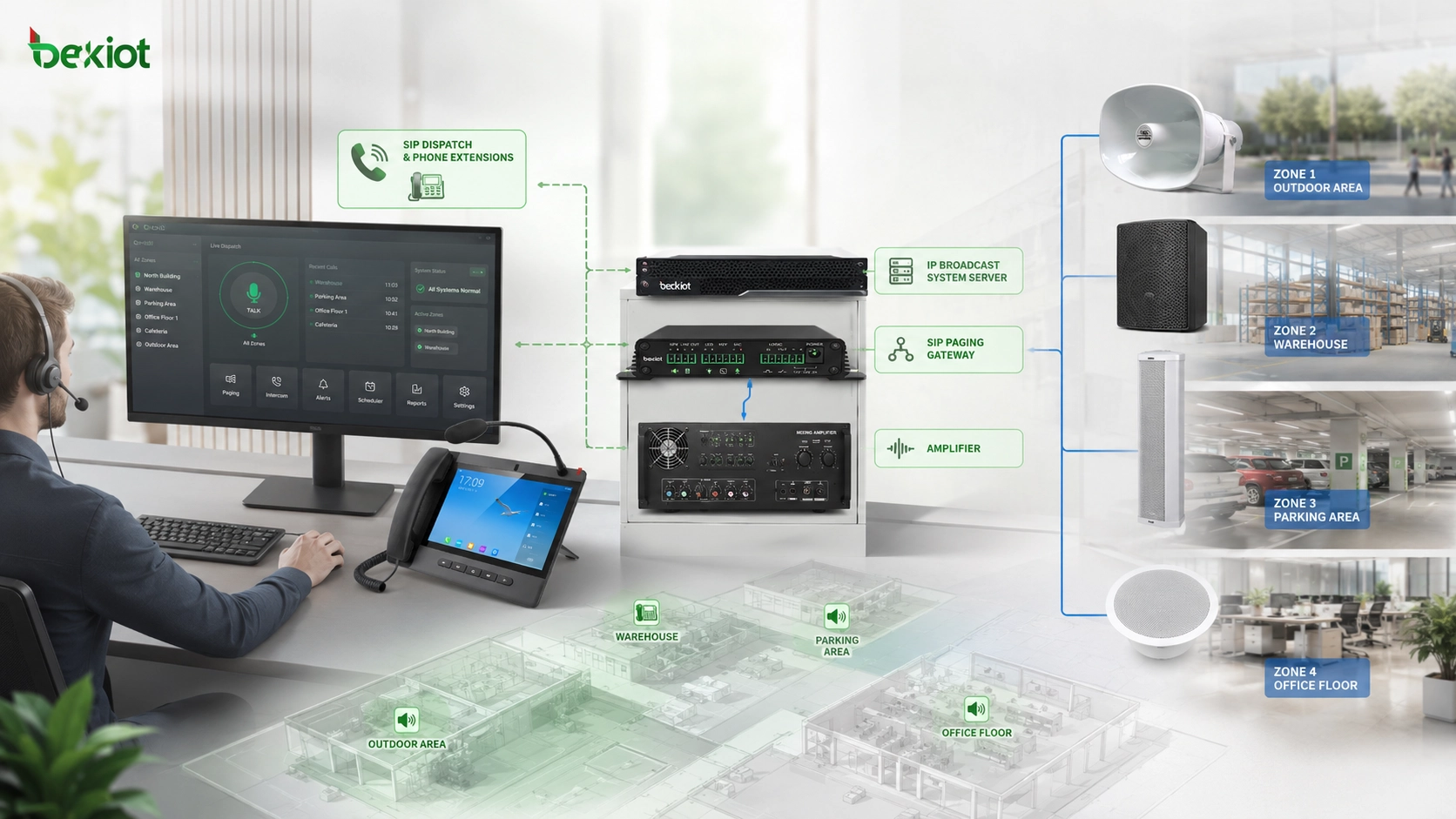
Recommended Solution Architecture
A practical deployment can be built around four layers. The first layer is the SIP communication platform, such as an IP PBX, dispatch server, or unified communication system. The second layer is the paging gateway, which registers as a SIP endpoint and converts VoIP voice into analog audio. The third layer is the existing PA amplifier and zone control equipment. The fourth layer is the speaker network already installed in the building or site.
In daily use, a phone extension or dispatch console calls the gateway number. The gateway receives the SIP voice, outputs analog audio to the amplifier, and the amplifier broadcasts the announcement through the existing speakers. If the system also includes IP speakers, SIP intercoms, emergency phones, or alarm inputs, the platform can be expanded into a broader communication and emergency notification solution.
For system integrators and project owners, this architecture is easy to explain, easy to test, and easy to maintain. It provides a clear path from analog broadcasting to IP-based communication without forcing a complete rebuild.
The best upgrade strategy is often not replacement, but integration. A paging gateway allows legacy audio assets to remain useful inside a modern SIP communication system.
Conclusion
A paging gateway provides a simple and effective way to integrate traditional PA systems into SIP-based communication platforms. By converting SIP voice into analog audio, it allows existing amplifiers and speakers to be controlled through phone extensions, dispatch consoles, IP PBX systems, or unified communication platforms.
This solution protects previous investment, avoids unnecessary reconstruction, simplifies daily paging, and creates a foundation for future IP audio expansion.
FAQ
Can a paging gateway work with any traditional amplifier?
It depends on the amplifier input interface and audio level requirements. Most projects can be handled if the amplifier has a usable line input, RCA input, or compatible audio input. The wiring method should be confirmed before installation.
Does the gateway need to register to an IP PBX?
In most deployments, yes. Registering the gateway to an IP PBX or SIP server allows users to call it like a normal extension. Some systems may also support direct SIP calling, depending on the platform design.
Can one gateway support multiple broadcast zones?
That depends on the gateway model and the existing PA zone controller. Some projects use one gateway for one amplifier input, while others use zone controllers or multiple gateways for different areas. The design should follow the site’s zone structure.
What should be checked if the broadcast audio is unclear?
Check the audio cable, grounding, amplifier input mode, volume level, codec setting, network quality, and whether there is electrical interference. In industrial sites, shielded cabling and proper grounding are especially important.
Is this approach suitable for emergency notification?
Yes, but emergency use requires additional planning. The system should define priority rules, backup power, authorized operation, alarm linkage, failover strategy, and regular testing procedures to ensure reliable performance during incidents.







