


An integrated command center needs more than a single communication device. It requires a complete architecture that can connect voice, video, radio, paging, telephony, GIS, mobile terminals, and dispatch operations into one coordinated workflow. For energy, chemical plants, scenic areas, emergency management, industrial parks, transportation, public safety, and enterprise operations, this type of system helps teams organize production, coordinate incidents, and respond faster with both audio and video communication.
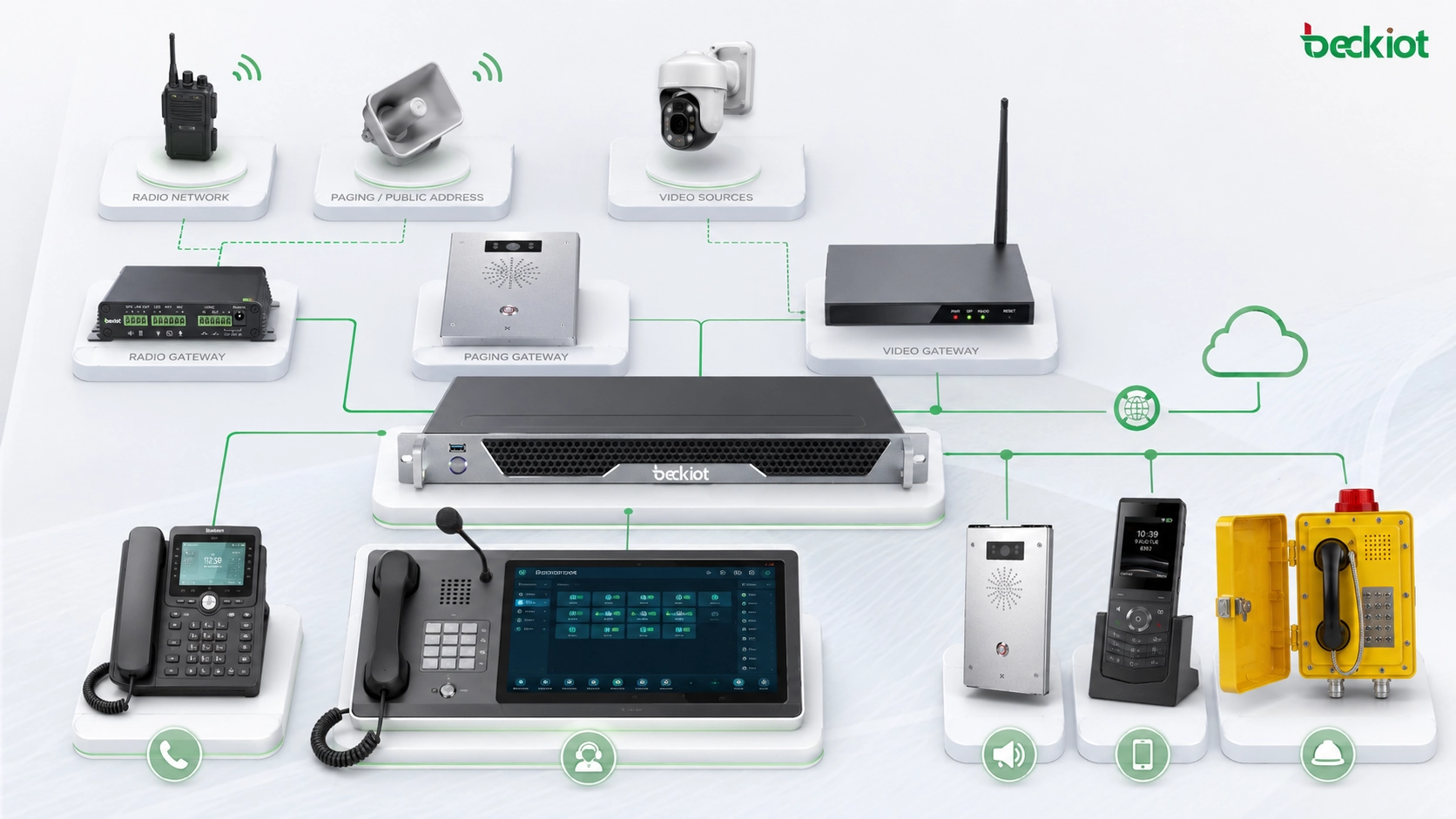
The key idea is to build the system around a central dispatch platform, then add the required gateways and terminals according to the actual project. Different sites may need different combinations of video access, video conference interconnection, radio gateway, paging gateway, telephone gateway, dispatch console, mobile APP, and SIP phone terminals. A flexible design avoids unnecessary equipment while keeping enough room for future expansion.
The Platform Layer as the Core of the System
The dispatch command platform is the core exchange and control unit of the whole solution. In many projects, this platform is built with a SIP server architecture. The built-in SIP server provides the foundation for terminal registration, user authentication, extension management, call routing, and communication service control.
Beyond basic communication access, the platform also provides business functions for command and dispatch. These may include voice dispatch, video dispatch, instruction dispatch, GIS-based coordination, call records, audio recording, video recording, and multimedia operation management. In practical projects, the platform works as the integration center rather than just a calling server.
Some systems can also support POC public network push-to-talk communication. With a matched smart APP, users can simulate private radio-style trunked communication over public networks and combine it with voice, video, messaging, and location services. This gives the command center more carriers for field coordination and mobile response.
Video Access for Multiple Media Sources
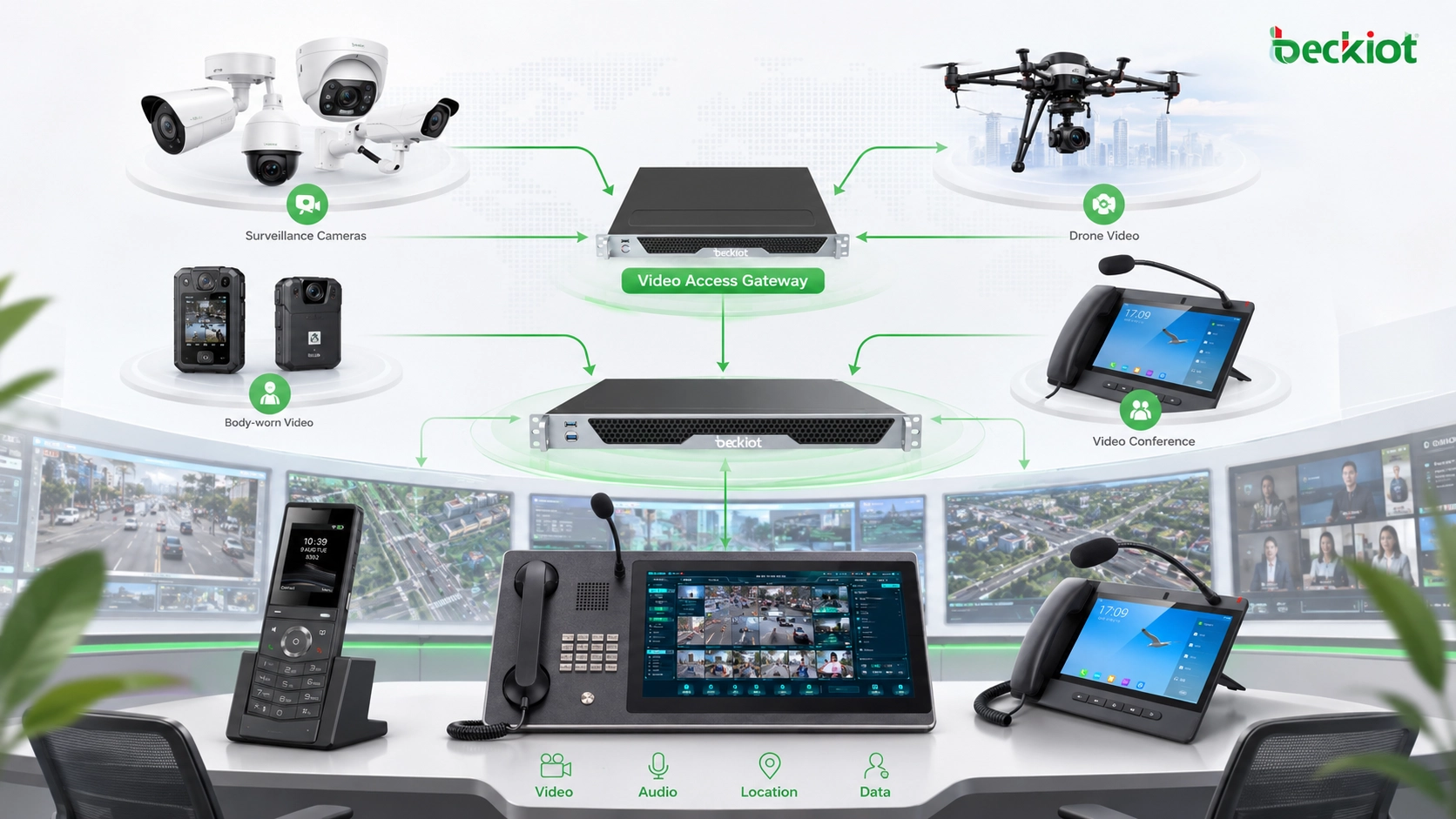
Modern dispatch work increasingly depends on video. Surveillance cameras, drones, body-worn recorders, vehicle cameras, mobile video terminals, and third-party platforms may all use different streaming protocols and encoding formats. A video access gateway helps bring these video sources into the command platform in a unified way.
A practical video gateway should support common access protocols and media formats such as GB/T28181, SIP, RTSP, RTMP, FLV, and HLS. With this capability, existing surveillance systems, drone video, recorders, and video platforms can be connected to the command center for unified management, unified viewing, and unified video distribution.
This is important for emergency response and operational supervision. Instead of switching between independent video systems, operators can view and distribute the required video resources from the dispatch platform. For projects involving industrial sites, security control rooms, emergency command, and multi-site operations, this greatly improves situational awareness.
Bridging Existing Video Conference Systems
Many organizations already have video conference systems installed before they build a dispatch command center. Replacing those systems may waste existing investment, especially when meeting rooms, conference terminals, and display systems are already in use. However, many video conference platforms use private protocols, and SIP interconnection may not always be simple.
A video conference gateway solves this interconnection challenge by using HDMI input and output to bridge the video conference system with the dispatch platform. No matter what brand or protocol the original conference system uses, the gateway can work through terminal-level video input and output, making deployment easier and reducing integration complexity.
This approach is especially useful when command centers need to connect remote meetings, emergency consultations, expert support, leadership briefings, or cross-department coordination. The existing conference system remains available, while the dispatch platform gains access to the required video resources.
Radio Interconnection for Field Teams
Radio communication remains important in many dispatch environments. Industrial users, public safety teams, transportation sites, emergency teams, and field maintenance groups may use different radio systems or digital trunking networks. A trunking radio gateway connects these radio resources to the command platform.
Through the radio gateway, different types of walkie-talkies, radio stations, and digital trunking systems can communicate with the dispatch system. In some scenarios, the gateway can also interconnect with public network POC communication. This allows a dispatcher to coordinate fixed phones, mobile APP users, radio users, and other field terminals from a unified platform.
For more practical operation, a radio gateway may support functions such as hotline calling, push-to-talk control, talk right acquisition, and talk right release. These functions help match the operating habits of radio communication while still allowing integration with SIP-based dispatch and multimedia communication.
Connecting the Existing Public Address System
Many sites already have a traditional public address system with amplifiers and speakers. A paging gateway allows this existing audio system to become part of the command center. The gateway converts SIP voice into analog audio and sends it to the audio input of the broadcast amplifier.
After the connection is completed, the command platform or SIP extension can trigger announcements through the existing PA equipment. This is a practical way to integrate emergency notification, daily paging, production notices, security reminders, and evacuation voice messages without replacing all installed speakers and amplifiers.
For industrial parks, factories, campuses, warehouses, and public buildings, this hybrid method protects previous investment and extends the value of legacy audio infrastructure. It also makes paging easier to manage from the same dispatch environment used for calls, video, radio, and event coordination.
Telephone Network Access Through Gateways
A telephone gateway connects the dispatch platform with the public telephone network or traditional telephone lines. In common project design, two gateway types are frequently used: FXO and E1. The choice depends on the number of concurrent calls and the required external telephone access.
FXO is used for analog telephone line access. If the project needs 8 concurrent telephone calls, an 8-port FXO gateway can be configured. E1 is more suitable for higher call capacity. A single-port E1 gateway can carry 30 concurrent calls, making it suitable for scenarios with more outbound or inbound telephone communication requirements.
This gateway layer is useful when the command center needs to call external numbers, connect to legacy telephony, receive hotline calls, or integrate phone communication with dispatch recording and event handling. It ensures that the new multimedia dispatch system does not become isolated from existing telephone resources.
Operator Workstations and Multi-Screen Control
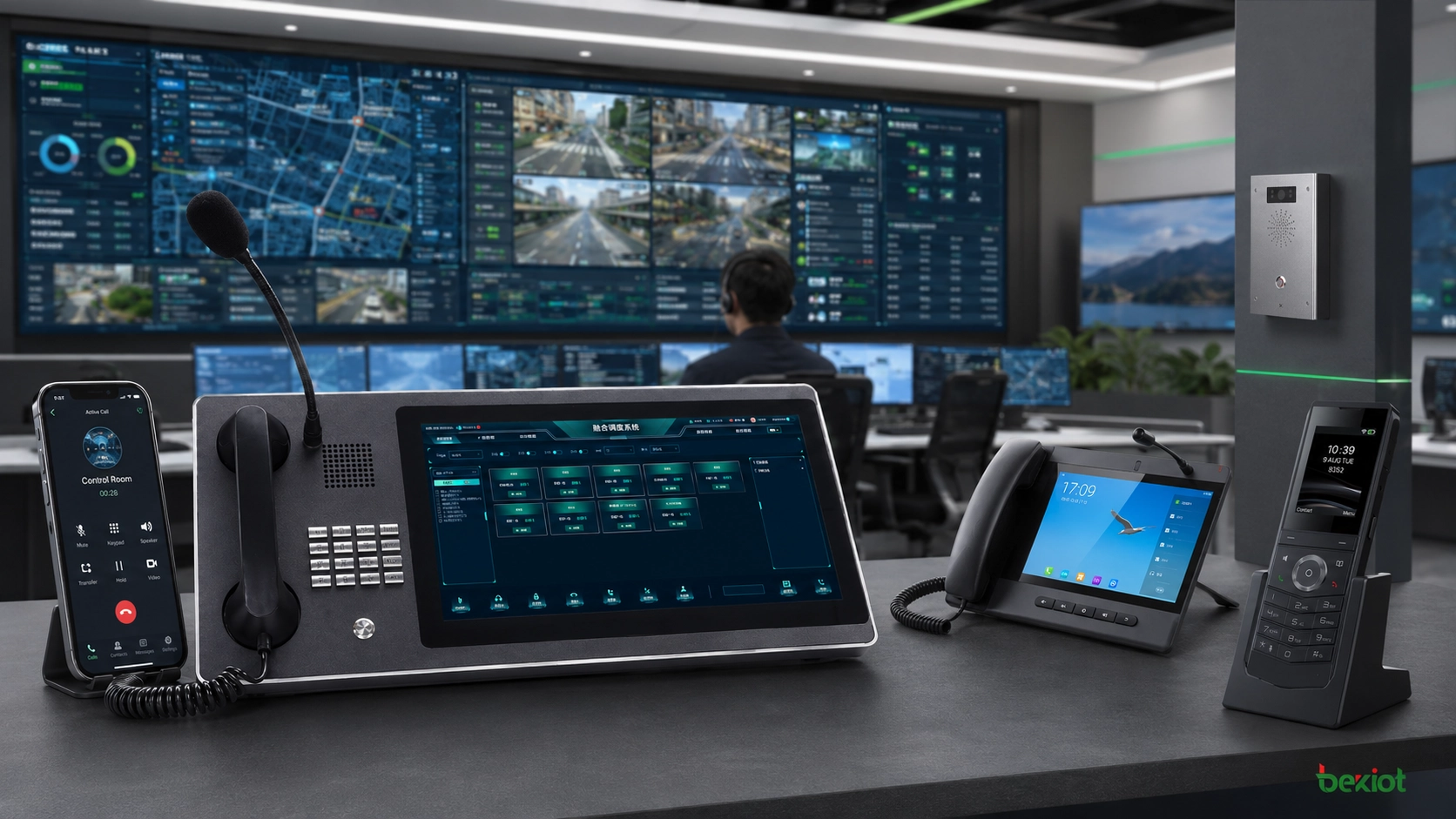
The dispatch console is the main operating position for dispatchers. In many deployments, the console can be a standard computer running dispatch control software. The important part is not the computer itself, but the software interface, audio device, display layout, and workflow design.
If the project needs multi-screen operation, the workstation can be configured with multiple displays. Audio communication, video monitoring, GIS maps, alarm information, and dispatch records can be presented on different screens. This makes the operator interface clearer and helps dispatchers respond without constantly switching windows.
Some integrated dispatch consoles place telephone handsets on both sides of the screen. This type of design is mainly used to improve telephone communication convenience, especially for operators who need frequent call handling, dispatch calling, and multi-party coordination.
Mobile Access for Field Operations
A command system needs terminals that can carry field operations. In many projects, rugged smart terminals or industrial smartphones are used together with a dedicated mobile APP. These mobile terminals can support push-to-talk, voice calls, video calls, live video streaming, instant messaging, and personnel positioning.
When integrated with other systems, mobile terminals become more valuable. For example, drone video can be pushed directly to the smart APP, allowing field users to view real-time video information while staying connected with the command center. This is useful for emergency response, inspection, patrol, maintenance, and outdoor operations.
Mobile access also improves the reach of the command platform. Dispatch is no longer limited to fixed control rooms. Field staff, supervisors, patrol teams, and emergency responders can participate in the same communication workflow through authorized mobile terminals.
Fixed SIP Phones and Video Terminals
Telephone terminals remain one of the most common VoIP communication devices. Most IP phones use open SIP protocol, which allows them to work with SIP-based dispatch platforms. As long as the phone supports SIP, it can usually be integrated as a fixed communication terminal in the command system.
SIP phones and video phones can be installed in duty rooms, gates, control points, workshops, offices, security posts, service desks, and emergency locations. They provide stable fixed-point access for voice communication, video calling, paging access, and dispatch coordination.
In projects where industrial reliability is required, Becke Telcom can be considered for SIP phones, industrial communication terminals, paging integration, gateways, and dispatch-related product adaptation. The selection should follow the actual site environment, protocol requirements, and operator workflow rather than using a one-size-fits-all configuration.
Recommended Deployment Logic
A complete audio and video command center can be planned in layers. The first layer is the dispatch platform with SIP server capability. The second layer includes gateways such as video access gateway, video conference gateway, radio gateway, paging gateway, and telephone gateway. The third layer includes dispatch consoles, mobile APPs, SIP phones, video phones, rugged terminals, and other endpoints.
This layered design makes the system easier to expand. If the site only needs voice dispatch and SIP phones at the beginning, the platform can start with a smaller configuration. If video integration, POC communication, external telephone access, public address linkage, or GIS dispatch is needed later, the corresponding gateway and terminal can be added step by step.
Project owners should decide the gateway types and terminal quantities according to real requirements. This avoids overconfiguration while still supporting long-term development. Today, deploying an integrated communication system is already mature and practical, and it can serve many industries with rich audio, video, and dispatch functions.
A strong command center is not built by adding more devices blindly. It is built by selecting the right platform, gateways, and terminals according to the communication tasks that must be completed on site.
Value for Industry Applications
Better coordination between fixed rooms and field teams
The system connects dispatch consoles, SIP phones, mobile APPs, radio users, and field video sources. This allows the command center to communicate with both indoor and outdoor teams through one coordinated platform.
Unified access to existing and new systems
Gateways protect previous investment by integrating legacy video conference systems, existing PA systems, telephone lines, radio networks, and surveillance resources. New SIP and IP terminals can be added without abandoning useful equipment.
More complete situational awareness
Voice calls, live video, GIS maps, records, recordings, and video recordings can work together. Operators can make decisions based on both communication content and visual information.
Flexible expansion for different project sizes
The architecture can be adjusted according to the industry, site size, number of users, number of video sources, telephone capacity, radio access needs, and emergency communication requirements.
Conclusion
An integrated audio and video dispatch command center is built from a central SIP-based dispatch platform, multiple gateway modules, and different terminal types. The platform provides registration, authentication, number management, voice dispatch, video dispatch, GIS coordination, records, recording, and multimedia communication support. Gateways connect video sources, conference systems, radios, PA amplifiers, and telephone networks. Terminals such as dispatch consoles, mobile APPs, rugged smartphones, SIP phones, and video phones bring the system to real users and field teams.
By selecting equipment according to the actual application, organizations can build a flexible command center that supports daily production coordination, emergency response, public safety, industrial operations, and multi-site communication.
FAQ
How should a project team decide which gateways are necessary?
Start by listing what needs to be connected. Cameras and drones require video access. Existing meeting rooms may require a video conference gateway. Radios need a radio gateway. PA amplifiers need a paging gateway. Telephone lines require FXO or E1 gateway access.
Is E1 always better than FXO for telephone access?
No. FXO is suitable when the number of analog telephone lines and concurrent calls is limited. E1 is more suitable when the project needs higher call capacity, because a single-port E1 gateway can support 30 concurrent calls.
Can the system work with third-party SIP phones?
Yes, in most cases. If the terminal supports standard SIP protocol and the dispatch platform allows registration or interconnection, it can usually be used as a communication endpoint after proper configuration and testing.
What should be considered for video integration quality?
The team should check protocol support, codec compatibility, bandwidth, latency, stream stability, video distribution requirements, and whether sources such as GB/T28181, RTSP, RTMP, FLV, HLS, drones, and body-worn recorders need unified access.
Does a command center need multi-screen workstations?
Not always. A single-screen workstation may be enough for small systems. Multi-screen operation is more useful when dispatchers need to view audio control, video monitoring, GIS maps, alarms, and records at the same time.
How can the system remain reliable during emergency use?
Reliability should be planned through stable network design, backup power, device redundancy where needed, clear user permissions, regular testing, recording storage planning, and defined emergency operating procedures.







