


In many system integration projects, servers and devices are deployed inside a private network, but external users, mobile terminals, drones, cameras, or remote platforms still need to access them through the internet. IP address port mapping solves this problem by forwarding traffic from a public IP address and port to a specific internal IP address and service port.
This approach is widely used for web servers, drone live streaming servers, video surveillance platforms, video conferencing systems, remote maintenance, and cross-network communication. Instead of exposing every internal device directly to the public network, the router or firewall becomes the forwarding point between the public internet and the private network.
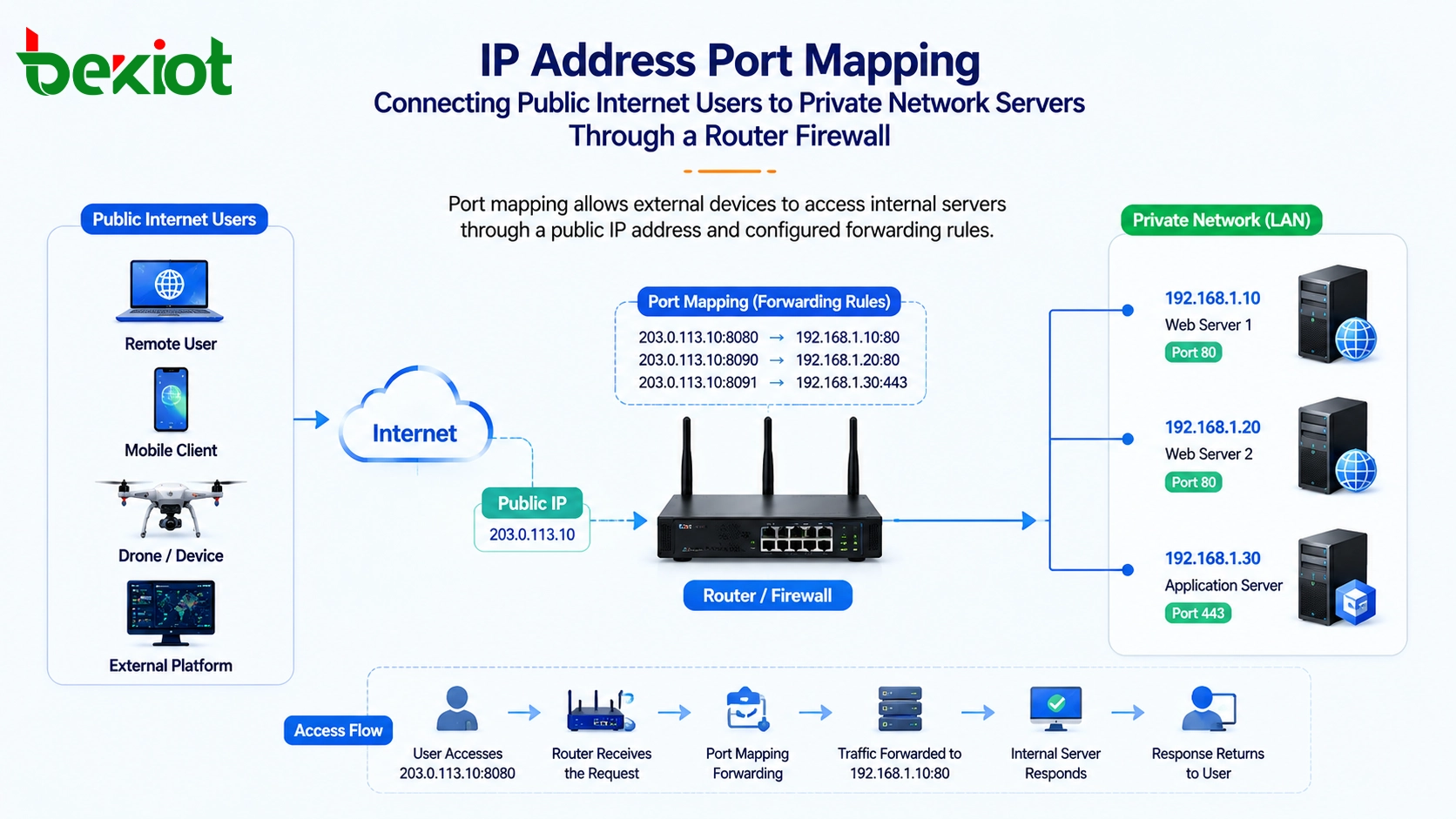
Why Public Access Is Needed in Private Network Projects
In many real deployments, audio and video servers, web platforms, monitoring systems, communication platforms, and service applications are installed inside an enterprise LAN. These servers usually use private IP addresses, such as addresses in internal network segments. Devices on the same LAN can access them directly, but devices on the public internet cannot reach them without a public access path.
This becomes a problem when external devices need to send data to an internal server. For example, a drone controller may need to push a live video stream to a server inside the enterprise network. Remote users may need to view video, access a web service, join a conference, or connect to a platform from outside the site. If the server only has a private IP address, those external devices cannot directly connect to it.
To solve this, the project team usually applies for a public IP address from the broadband carrier. Then the public IP address is configured on the router or firewall. Through port mapping rules, incoming public network traffic can be forwarded to the correct internal server.
The Basic Working Logic
Port mapping, also called port forwarding, works by matching an external public port with an internal private IP address and service port. When a user visits the public IP and port from the internet, the router checks the forwarding rule and sends the traffic to the corresponding server inside the LAN.
The internal server does not need to own a public IP address. It only needs to provide the required service on the internal network. The router or firewall handles the translation between the external request and the internal destination. This is why port mapping is often used together with NAT, firewall policies, and public IP access planning.
For system integrators, the key point is to understand what service needs to be exposed, which internal server provides that service, what port it uses, and which public port should be used outside the network. Once these details are clear, the mapping rule can be configured according to the actual project.
The purpose of port mapping is not simply to open a port. It is to create a controlled access path between public network users and selected internal services.
A Typical Drone Video Streaming Scenario
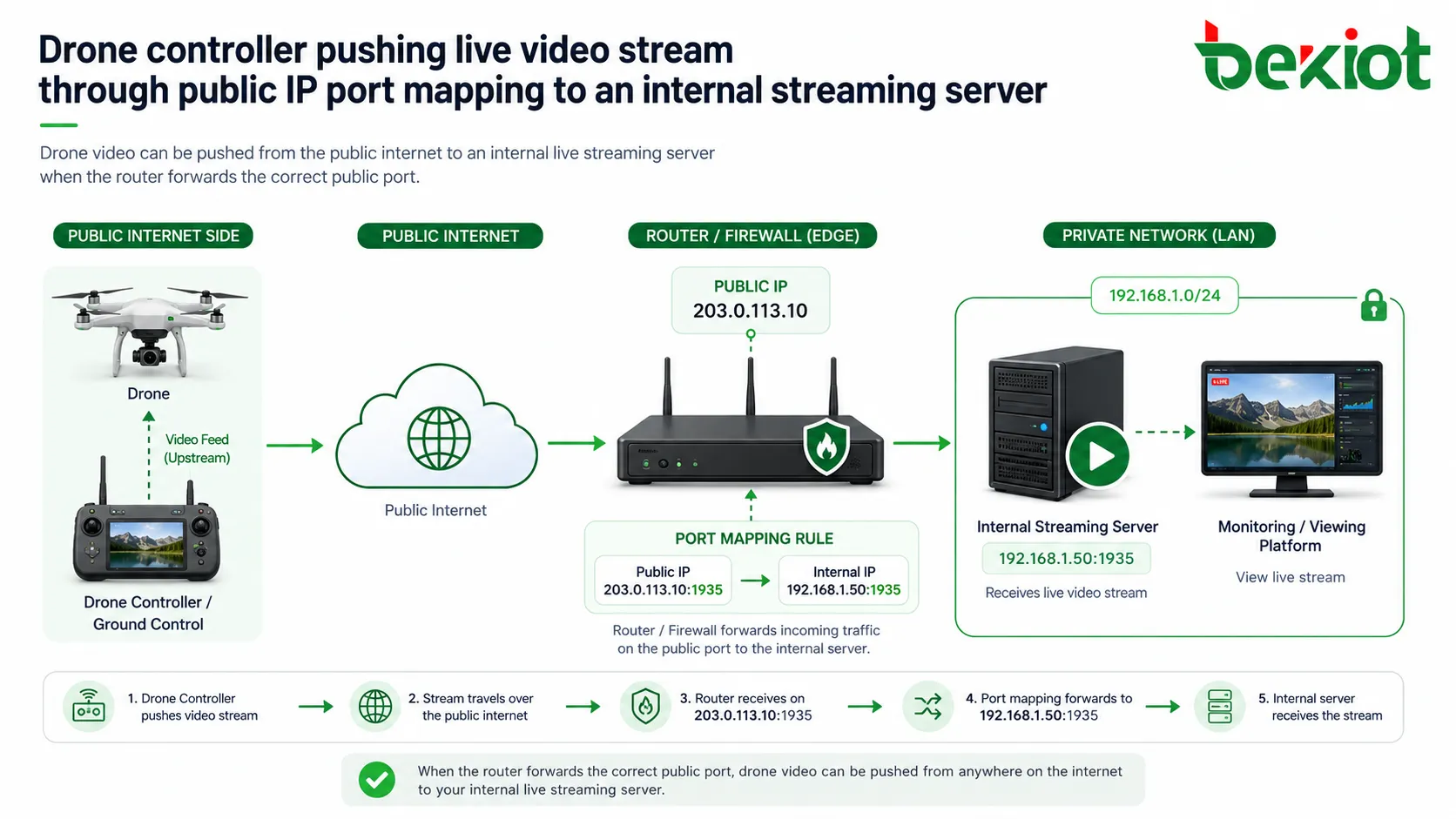
Drone live streaming is a common example. A live streaming server may be deployed inside a private network, while the drone controller is connected through the public internet. Because the server uses an internal IP address, the drone controller cannot push video to it directly.
In this case, the project team can apply for a public IP address and configure port mapping on the router or firewall. The drone controller then uses the public IP address and mapped port as the streaming destination. When the stream reaches the router, the router forwards it to the internal live streaming server.
After the stream reaches the server, users may view the drone video from the public network through the public address. Internal users can still view the video through the private network address. The server may also output different video streams for integration with internal platforms, monitoring systems, dispatch systems, or other audio and video devices.
Using One Public Address for Multiple Internal Servers
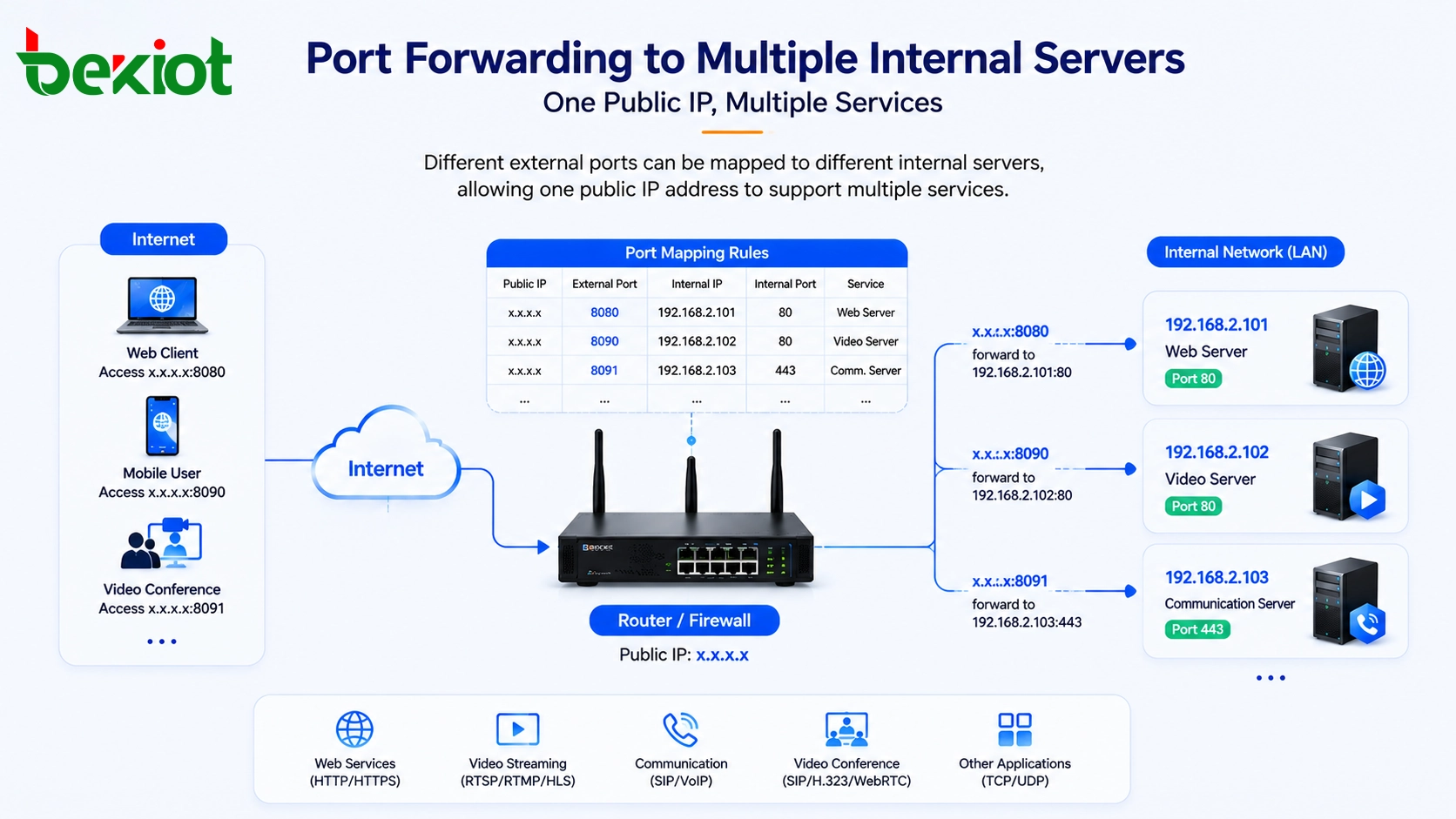
In many projects, there is only one available public IP address, but several internal servers need to provide services to external users. This is one of the most important reasons for port mapping. Different public ports can be used to identify different internal servers.
For example, assume there are three internal web servers with the following private addresses: 192.168.2.101, 192.168.2.102, and 192.168.2.103. The project has only one public IP address. The router can be configured with different external ports for each server.
A practical mapping design may look like this: 192.168.2.101 is mapped to public port 8080, 192.168.2.102 is mapped to public port 8090, and 192.168.2.103 is mapped to public port 8091. When an external user visits x.x.x.x:8080, the router forwards the request to 192.168.2.101. When the user visits x.x.x.x:8090, the request is forwarded to 192.168.2.102. When the user visits x.x.x.x:8091, the request is forwarded to 192.168.2.103.
With this method, one public IP address can provide access to multiple internal devices or services. This is especially useful for web services, video platforms, management systems, media servers, conference systems, and testing environments.
Service Planning Before Configuration
Before configuring port mapping, the project team should list all services that need external access. Each service should have a clear internal IP address, internal service port, protocol type, external public port, and access requirement. Without this planning, port conflicts and wrong forwarding rules can easily occur.
For example, if multiple internal servers use the same default web port, the public side should use different external ports to distinguish them. The external port does not always need to be the same as the internal service port. The router can receive traffic on one public port and forward it to a different internal port according to the rule.
The team should also confirm whether the service uses TCP, UDP, or both. Web services usually use TCP, while some audio, video, streaming, and real-time communication services may use UDP or mixed protocols. The protocol must match the actual service requirement, otherwise the mapping may appear correct but the application may still fail.
Security and Stability Considerations
Port mapping makes internal services reachable from the public internet, so security must be considered from the beginning. Only necessary ports should be opened. Management ports, database ports, and sensitive system interfaces should not be exposed unless there is a strong reason and proper protection.
Access control should be planned together with the router or firewall. If possible, limit allowed source IP addresses, use secure login methods, enable strong passwords, keep server software updated, and monitor access logs. For important systems, VPN access may be safer than direct public port exposure.
Stability is also important. If the public IP address changes frequently, external devices may no longer reach the service. Projects that require stable remote access should use a fixed public IP address or a reliable dynamic DNS solution. For high-availability systems, backup network lines, redundant routers, and monitoring mechanisms may also be required.
Recommended Deployment Workflow
A practical port mapping deployment can follow a clear workflow. First, confirm which internal servers need public access. Second, record their private IP addresses and service ports. Third, confirm whether the site has a fixed public IP address or dynamic public IP address. Fourth, define external port numbers that do not conflict with each other.
After that, create forwarding rules on the router or firewall. Each rule should include the public port, internal IP address, internal port, and protocol type. Then test the service from an external network, not only from inside the LAN. Internal testing alone may not prove that public access is working correctly.
Finally, document the mapping table. A clear record should include the service name, internal server IP, internal port, public port, protocol, purpose, and responsible person. This makes later maintenance easier, especially when the project includes many servers, video platforms, gateways, and remote terminals.
Where This Method Is Commonly Used
Web service publishing
Internal web servers can be published to external users through public ports. This is useful for management systems, project portals, service platforms, and temporary access pages.
Drone and video streaming
Drone controllers, video encoders, streaming platforms, and remote viewing clients can use mapped public ports to send or receive video streams across networks.
Video surveillance access
Monitoring platforms, NVR systems, camera gateways, and video management servers may need external access for viewing, integration, or remote operation.
Video conferencing and communication systems
Some conference platforms, media servers, SIP systems, or communication gateways require public access so that external users and internal platforms can exchange media and signaling data.
Remote maintenance and project delivery
During project implementation, port mapping can help engineers remotely access selected services for testing, configuration, troubleshooting, and system acceptance. The mapping should be closed or restricted after the work is completed if it is no longer needed.
Conclusion
IP address port mapping is a practical and widely used method for allowing external devices to access selected services inside a private network. It solves the problem that internal servers with private IP addresses cannot be reached directly from the public internet. By configuring forwarding rules on a router or firewall, public traffic can be directed to the correct internal server.
The method is especially useful when one public IP address needs to support multiple internal systems. By assigning different public ports such as 8080, 8090, and 8091 to different internal servers such as 192.168.2.101, 192.168.2.102, and 192.168.2.103, project teams can publish web services, drone live streaming, video surveillance, video conferencing, and other communication services with flexible control.
For real project delivery, the key is to understand the service port, define the mapping rule clearly, match the correct protocol, test from the public network, and apply proper security protection. With good planning, port mapping can help cross-network communication projects go online quickly and operate more reliably.
FAQ
Is port mapping the same as NAT?
No. NAT is a broader address translation mechanism. Port mapping is a specific forwarding configuration that sends traffic from a public IP and port to a selected internal IP and port.
Can port mapping work without a public IP address?
Usually not in the traditional way. If the router does not have a real public IP address and is behind carrier-grade NAT, external users may not be able to reach it directly. In that case, a fixed public IP, VPN, reverse proxy, or cloud relay solution may be required.
Why does a mapped service work inside the LAN but fail from the internet?
Possible reasons include incorrect public IP, blocked carrier port, wrong protocol selection, firewall filtering, server gateway configuration, service not listening on the expected port, or the router being behind another NAT device.
Should the public port be the same as the internal port?
Not necessarily. The public port can be different from the internal service port. For example, public port 8080 can be forwarded to an internal server running a web service on another port if the router supports that rule.
Is it safe to expose internal services through port mapping?
It can be safe only when properly controlled. Open only necessary ports, use strong authentication, restrict access sources where possible, update software regularly, and avoid exposing sensitive management interfaces directly to the internet.
What should be recorded after completing port mapping?
The project team should record the public IP, external port, internal IP, internal port, protocol, service name, purpose, and maintenance owner. This prevents confusion when multiple servers share one public address.







