


In a modern call center, every successful customer conversation depends on more than a simple phone call. Behind agent extensions, IVR menus, SIP trunks, IP PBX platforms, recording servers, CRM pop-ups, and transfer workflows, the Session Initiation Protocol, commonly known as SIP, controls how calls are created, routed, answered, maintained, and ended.
For engineers, integrators, and contact center operators, understanding SIP is not only a technical learning task. It directly affects call stability, routing accuracy, DTMF recognition, media negotiation, registration reliability, failover design, and troubleshooting efficiency. A well-designed SIP communication solution helps the call center turn complex signaling behavior into a manageable, scalable, and reliable voice service.
Why Signaling Knowledge Matters in Contact Centers
Call quality begins before the audio starts
Many call center issues are first noticed as voice problems: calls cannot be connected, agents hear silence, DTMF digits fail, recordings are missing, or transfers disconnect unexpectedly. However, the root cause is often not the audio stream itself, but the signaling process that happens before and during the call.
SIP defines the logic used by user agents, IP PBX systems, SIP trunks, media servers, gateways, and softphones to communicate with each other. If the signaling layer is poorly designed, even high-quality network bandwidth cannot guarantee stable customer conversations.
Modern deployments should follow RFC 3261 principles
The source article emphasizes that modern SIP implementation should focus on the SIP behavior defined by RFC 3261 instead of being distracted by outdated routing concepts. In practical call center projects, this means engineers should understand the current routing model, dialog handling, transaction behavior, and request-response logic used by mainstream SIP systems.
This is especially important when different vendors, trunks, gateways, softphones, and middleware platforms are interconnected. A solution that follows standard SIP behavior is easier to integrate, test, operate, and expand.
A Layered View of the Voice Stack
From basic request semantics to business-level call control
The original article explains SIP through four closely related concepts: Method, Transaction, Dialog, and Call. These concepts describe the same communication process from different layers. They are not isolated terms. Instead, they form a layered structure where the lower layer supports the upper layer.
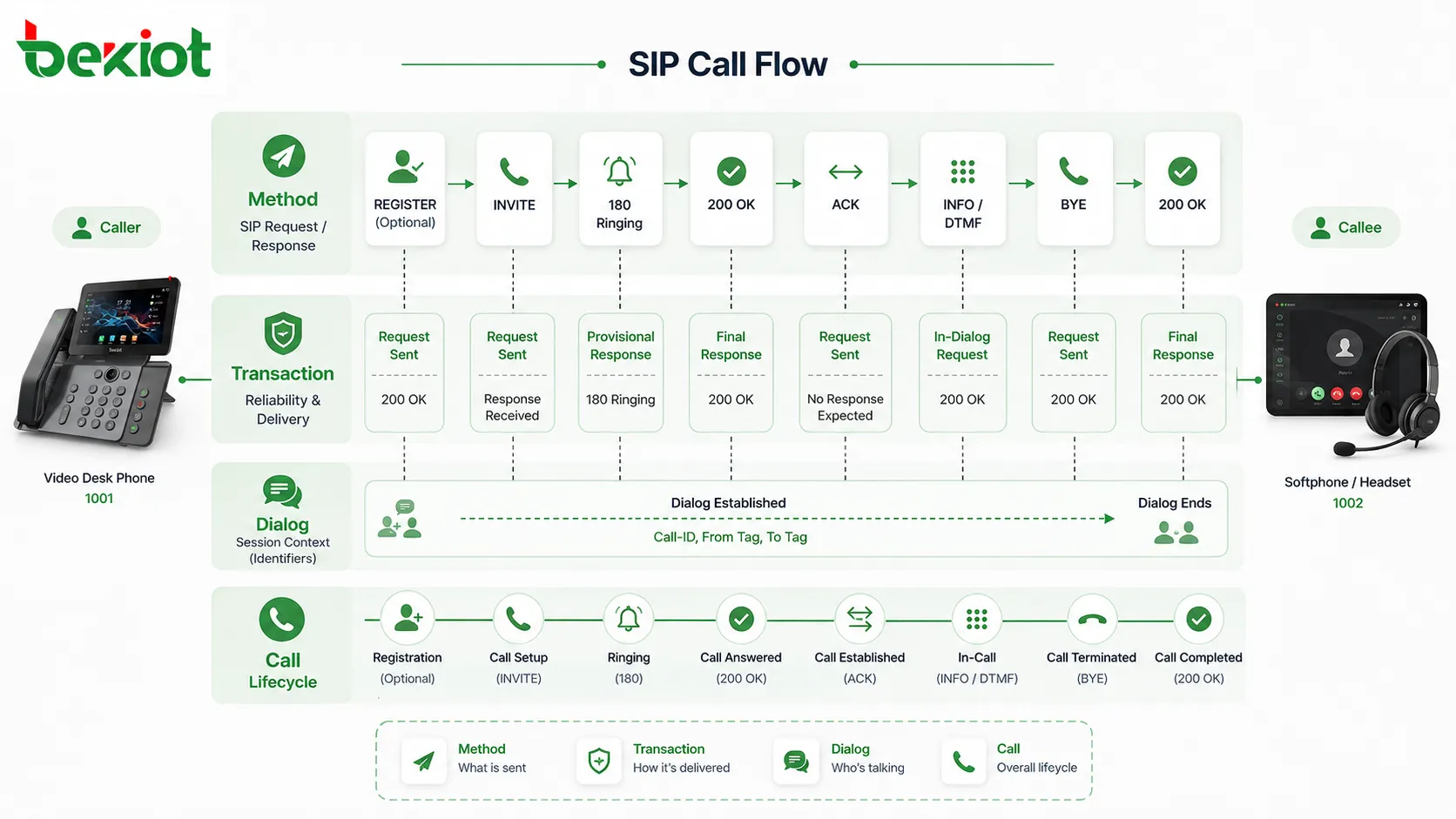
The relationship can be understood as: Method defines what the SIP request wants to do, Transaction manages the request-response exchange, Dialog maintains the session context between two user agents, and Call represents the business-level calling process seen by applications and users.
Method defines the purpose of each SIP action
A SIP Method is the smallest semantic unit in SIP communication. It tells the system what type of operation the request is performing. In call center platforms, these methods decide whether the system is starting a call, registering an endpoint, cancelling an unanswered call, sending in-call digits, or ending a conversation.
Common methods include INVITE for starting a media session, BYE for ending a call, ACK for confirming a successful INVITE response, CANCEL for cancelling an unfinished INVITE, INFO for sending in-dialog information such as DTMF, and REGISTER for registering a user location with a registration server.
Transaction provides reliability for request and response exchange
A Transaction manages one SIP request and its related responses. It is responsible for retransmission, timeout handling, and matching requests with responses through fields such as CSeq and Call-ID. This layer is critical because SIP signaling must remain predictable even when packets are delayed, lost, duplicated, or routed across multiple network devices.
In practical systems, there are client transactions and server transactions. A client transaction is created by the side that sends a request, such as an agent phone sending an INVITE. A server transaction is created by the side that receives the request, such as an IP PBX or call center platform receiving that INVITE. A transaction normally ends when a final response such as 2xx or 4xx is received, or when the request times out.
Dialog maintains the session context
A Dialog is the persistent session context between two user agents. It maintains important information across multiple transactions, including Call-ID, local tag, remote tag, route set, and dialog state. This allows later requests, such as INFO or BYE, to stay correctly associated with the same conversation.
A dialog may start as an early dialog when a provisional response such as 180 Ringing is received. It becomes a confirmed dialog after a successful 2xx response. Not every SIP method creates a dialog. For example, REGISTER and OPTIONS are usually independent of a call dialog.
Call is the application-level abstraction
Call is not a core concept defined as a SIP protocol element in the same way as a method or dialog. It is usually an application-level or SDK-level abstraction that simplifies the complete call lifecycle for developers and business systems. A normal voice call often corresponds to one dialog, while more complex scenarios such as call transfer or three-party calling may involve more than one dialog.
For call center platforms, this abstraction is valuable because business applications do not want to manage every signaling detail directly. They need practical operations such as make call, answer, hang up, hold, transfer, send DTMF, record, monitor, and report call status.
How a Customer Call Moves Through the System
Call setup starts with INVITE
When one party calls another, the calling user agent generates an INVITE request. The platform creates a client transaction to send the request and manage retransmission or timeout. When the called side receives the request, it creates a server transaction and may respond with a provisional message such as 180 Ringing.
At this stage, the call may enter an early dialog state. In a call center, this stage can involve routing decisions, queue treatment, ringing agent extensions, playing early media, or interacting with upstream SIP trunks.
Answering the call confirms the dialog
When the called side answers, it sends a 200 OK response. The caller then sends an ACK to confirm the successful response. After this exchange, the dialog becomes confirmed and the call enters an established state.
This stage is also where media information becomes important. SIP carries or negotiates media details through SDP, including codec selection, IP address, port information, and media direction. If SDP negotiation is incorrect, the call may connect at the signaling level while audio still fails.
In-call operations depend on the existing dialog
After the call is established, additional operations can occur inside the dialog. One common example is DTMF transmission. In many SIP systems, INFO can be used to send in-dialog information such as DTMF digits. The request is sent within the current dialog and uses the same dialog identifiers to ensure it belongs to the correct call.
This matters in call centers because DTMF is often used for IVR selection, identity verification, payment input, queue navigation, and service rating. If the DTMF method, gateway support, or dialog handling is inconsistent, customer self-service workflows may fail.
Call release is completed by BYE
When either party hangs up, a BYE request is sent within the dialog. The receiving side returns 200 OK, and the dialog is destroyed. At the business layer, the call state changes to disconnected.
This final stage affects call detail records, recording completion, agent status, billing, reporting, and CRM event synchronization. A call center solution should therefore handle call release cleanly, not only for the voice path but also for all connected business systems.
Designing the Architecture Around Real Operations
Registration and endpoint management
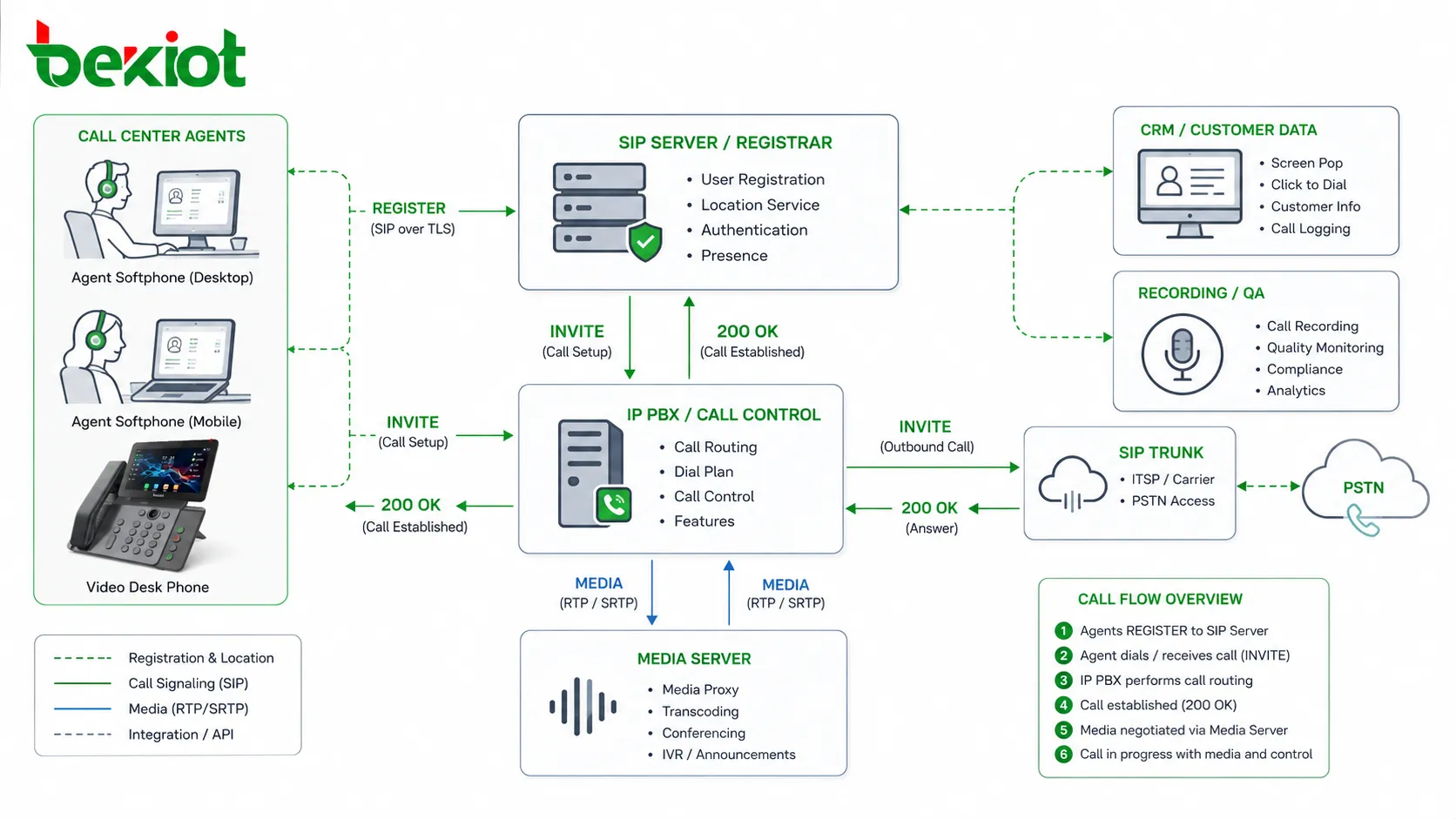
Agent phones, SIP softphones, remote extensions, gateways, and service terminals usually need to register with a SIP server. The REGISTER method allows the platform to know where each user or endpoint is currently reachable. Without reliable registration, the system may fail to route calls to the correct agent or department.
A solution should support registration monitoring, expiration control, authentication, NAT handling, endpoint grouping, and abnormal offline alerts. These capabilities help administrators quickly identify endpoint failures before they affect customer service.
Routing through IP PBX and SIP trunks
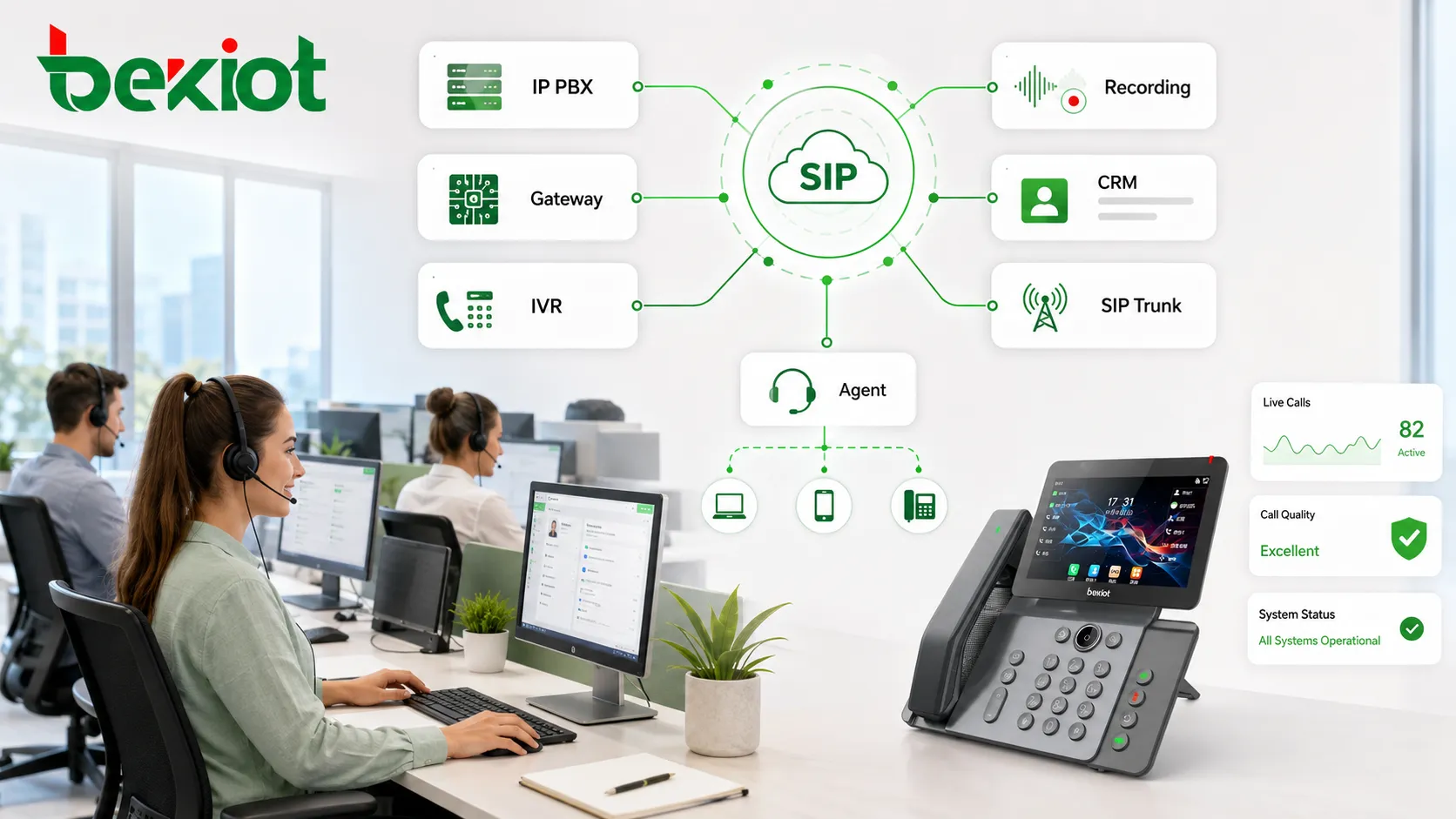
In a call center, SIP is rarely used by a single device alone. It usually connects the IP PBX, automatic call distributor, IVR server, SIP trunk, media gateway, recording server, CRM middleware, and agent endpoints. The routing strategy must ensure that inbound and outbound calls follow the correct path.
Routing should consider caller number, dialed number, skill group, time schedule, trunk availability, agent state, emergency route, failover route, and regional access policy. When routing is built on clear SIP logic, troubleshooting becomes faster and system expansion becomes safer.
Media negotiation and voice quality
SIP signaling and RTP media are different layers, but they are closely connected. SIP creates and controls the session, while RTP usually carries the actual voice stream. SDP inside SIP messages defines how the media should be exchanged.
For a production call center, codec strategy, packet loss tolerance, jitter buffer behavior, echo control, NAT traversal, firewall policy, and media anchoring should be designed together. A call that looks successful in signaling logs may still have one-way audio or poor quality if media negotiation is not handled correctly.
Integration Points for a Modern Contact Center
CRM and screen pop workflows
SIP call events can trigger CRM screen pop, customer record lookup, ticket creation, and service history display. To make this work reliably, the platform must map SIP call states to business states, such as ringing, answered, transferred, held, released, and failed.
A clean call lifecycle model helps the CRM system understand what is happening in real time. This improves agent efficiency and reduces the manual work required after every call.
Recording and compliance systems
Call recording depends on accurate signaling and media handling. The system needs to know when the call starts, when it is answered, when it is transferred, and when it ends. If dialog and call state tracking are unreliable, recordings may be incomplete, duplicated, or difficult to match with the correct customer interaction.
For regulated industries, SIP event accuracy also supports audit trails, quality inspection, dispute handling, and compliance reporting.
IVR, DTMF, and self-service flows
IVR systems depend on stable DTMF delivery. The call center must decide how DTMF is transmitted, whether through SIP INFO, RTP events, or another supported method. The selected method must be supported by endpoints, gateways, trunks, and application servers.
Testing DTMF across all call paths is essential. A flow that works on internal extensions may fail when calls come from a SIP trunk, mobile network, or gateway if the DTMF policy is inconsistent.
Implementation Guidance for Engineering Teams
Build logs around the four-layer model
When troubleshooting SIP problems, engineers should not only look at whether a call succeeded or failed. They should identify the method, transaction, dialog, and call state involved in the failure. This makes it easier to locate whether the issue is caused by request routing, response timeout, dialog mismatch, media negotiation, or application-level call handling.
For example, a failed REGISTER request usually points to authentication, network, or server reachability. A failed INVITE may involve routing, trunk rejection, codec negotiation, or timeout. A failed BYE may affect release logic and reporting. A DTMF failure may involve INFO, RTP event support, or IVR configuration.
Use standard states for monitoring
The system should expose meaningful call states to administrators and business applications. Useful states include calling, ringing, early media, confirmed, held, transferred, disconnected, failed, and timeout. These states should be mapped consistently to SIP dialog and transaction behavior.
Consistent state design helps supervisors monitor queue behavior, agents handle calls correctly, and developers integrate telephony functions into CRM or business software without relying on unclear custom logic.
Test both simple and complex scenarios
A basic call from Alice to Bob is only the beginning. A real call center must also test transfers, consultation calls, three-party calls, call forwarding, queue overflow, no-answer routing, trunk failover, remote extensions, NAT traversal, DTMF, recording, and abnormal hang-up behavior.
Because complex scenarios may involve multiple dialogs or changing media paths, they should be tested under realistic network and business conditions before the system goes live.
Business Value of a SIP-Centered Voice Design
Greater reliability for daily operations
When SIP signaling is designed correctly, the call center becomes easier to operate. Calls connect more predictably, registration status is clearer, transfers are more stable, DTMF handling is more consistent, and media negotiation problems are easier to isolate.
This directly improves customer service quality because agents spend less time dealing with call failures and more time solving customer problems.
Lower integration risk
Call centers often need to connect systems from different vendors. A SIP-centered design based on standard methods, transactions, dialogs, and call lifecycle logic reduces the risk of vendor lock-in and hidden compatibility problems.
It also makes future expansion easier. New SIP trunks, remote agents, softphones, recording servers, gateways, and IVR applications can be added with clearer integration rules.
Better support for long-term maintenance
For engineering teams, the biggest value of understanding SIP is not only initial deployment. It is long-term maintainability. When the team understands how INVITE, REGISTER, INFO, BYE, transactions, dialogs, and call states work together, it can diagnose faults faster and optimize the system with more confidence.
This turns SIP from a difficult protocol topic into a practical operating model for the entire call center voice platform.
Conclusion
A SIP-based call center solution is not just about connecting phones. It is about building a reliable signaling, routing, media, and application-control foundation for customer communication. The key is to understand how Method, Transaction, Dialog, and Call work together across the full lifecycle of a voice interaction.
Method defines the operation, Transaction manages the request-response exchange, Dialog maintains the session context, and Call simplifies the business-level operation. Together, they support registration, call setup, ringing, answering, media negotiation, DTMF, hang-up, transfer, recording, CRM integration, and reporting. For any organization building or upgrading a call center platform, this layered SIP understanding is essential for stability, scalability, and long-term service quality.
FAQ
What should be checked first when a SIP call cannot be established?
Start by checking registration status, routing rules, authentication, DNS or IP reachability, trunk availability, and the response code returned to the INVITE. These items usually reveal whether the failure is caused by endpoint access, server routing, trunk rejection, or network reachability.
Why can a SIP call connect but still have no audio?
This usually means the signaling layer succeeded but the media layer failed. Common causes include NAT problems, blocked RTP ports, incorrect SDP addresses, unsupported codecs, firewall restrictions, or media routing errors between gateways and endpoints.
Which DTMF mode is best for call center IVR systems?
There is no single best mode for all environments. The selected DTMF method should match the IP PBX, SIP trunk, gateway, IVR platform, and endpoint capabilities. It should be tested across inbound calls, outbound calls, transfers, and remote extensions before production use.
How can SIP logs help with call center troubleshooting?
SIP logs show the request method, response code, Call-ID, CSeq, tags, route information, SDP, and timing of each signaling step. These details help engineers determine whether the problem is related to registration, routing, transaction timeout, dialog mismatch, codec negotiation, or call release.
Should a call center use SIP softphones or hardware IP phones?
Both can be used. SIP softphones are flexible for remote agents and CRM integration, while hardware IP phones may provide stable audio, dedicated keys, and easier operation in fixed workstations. Many call centers use a hybrid model based on role, environment, and management requirements.







