


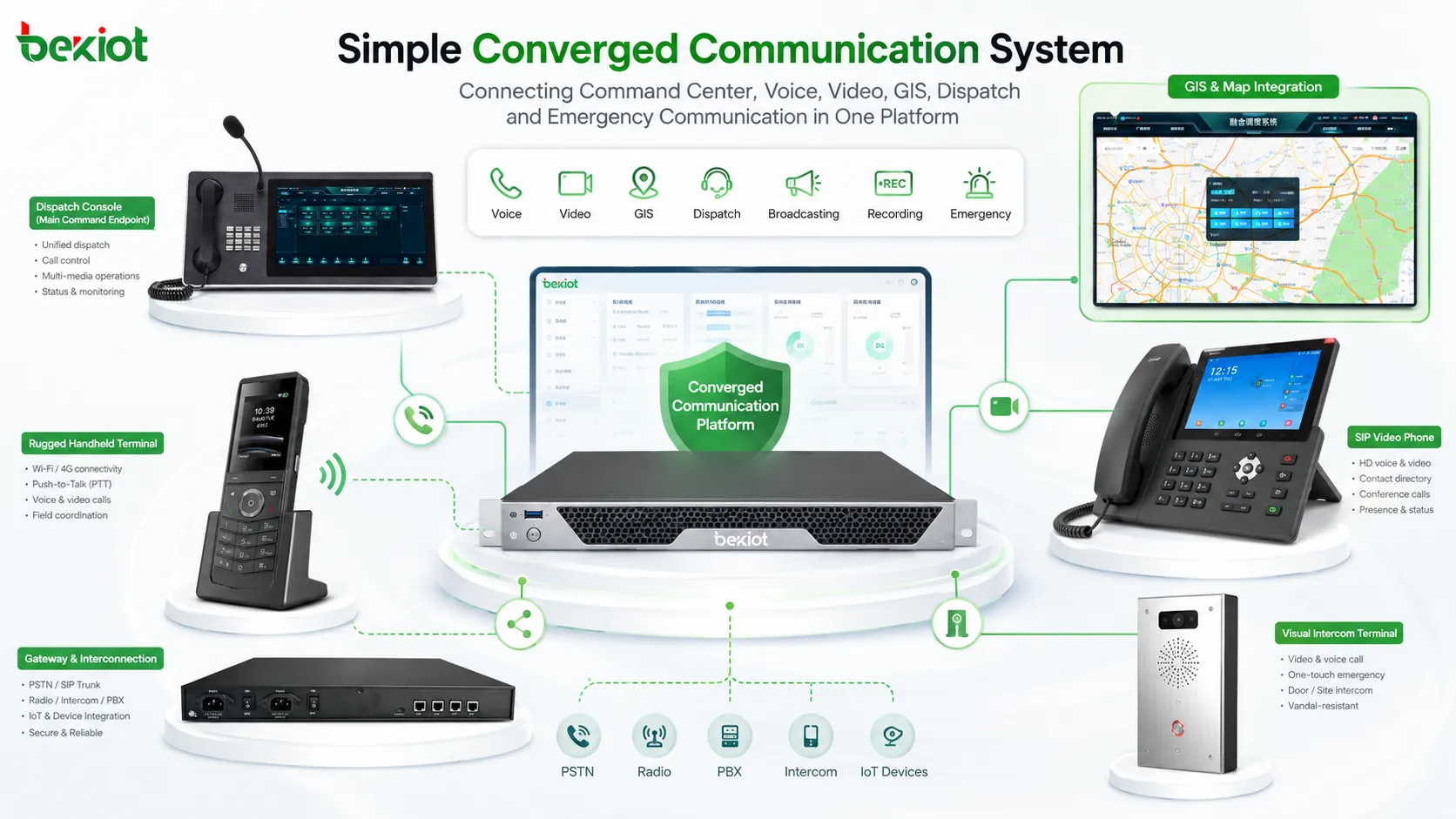
A simple converged communication system can do far more than basic voice calling. By using SIP, softswitching, IP networks, mobile push-to-talk, video dispatch, GIS positioning, broadcasting, recording, and gateway integration, it can connect people, devices, command centers, radio networks, monitoring systems, and emergency resources into one unified communication environment.
For organizations that operate across multiple sites, field teams, control rooms, industrial areas, campuses, transportation networks, energy facilities, ports, airports, or emergency response environments, this type of system helps solve a practical problem: different communication tools often work in separate networks, while real operations require fast, coordinated, and traceable communication.
Integrated Communication for Modern Operations
Traditional communication systems often depended on circuit switching, dedicated hardware, and isolated device networks. They were usually expensive to expand, difficult to integrate, and limited to a single communication function. A telephone system handled calls, a radio system handled field talk groups, a CCTV system handled monitoring, and a broadcasting system handled announcements. These systems worked, but they did not always work together.
With the development of VoIP, SIP, IP networks, and software-based switching, communication architecture has become more open. Many functions that once required dedicated switching equipment can now be handled by software. In a basic deployment, one server can support SIP registration, call control, media processing, dispatch management, recording, and integration with different terminals.
In cloud-based projects, the physical server may not even be visible to the end user. The platform can run on a cloud host or private data center, allowing organizations to reduce hardware investment, simplify maintenance, and expand users or sites more flexibly. The result is a lighter communication architecture that still supports complex operational workflows.
Related System: BK-RCS Unified Communications System
Open SIP and IP Network Architecture
A practical system is usually built around a softswitch or communication server. SIP accounts are assigned to IP phones, SIP intercoms, mobile apps, video terminals, dispatch consoles, radio gateways, paging gateways, and other communication nodes. Once these devices register to the platform, they can call each other, join groups, receive dispatch commands, participate in emergency workflows, or connect with other systems through gateways.
This SIP-based architecture makes the platform more scalable than a closed hardware system. New users can be added by creating accounts. New sites can be connected through LAN, WAN, VPN, private networks, 4G, 5G, or cloud access. Different departments can be organized by user roles, groups, permissions, and dispatch levels.
Gateways are especially important when the project must connect existing systems. A radio gateway can connect analog radio, DMR, TETRA, PDT, aviation radio, or other radio networks. A paging gateway can connect IP broadcasting and public address systems. A video gateway can bring monitoring video or drone video into the command platform. This allows the system to reuse existing resources instead of replacing everything at once.
Mobile Push-to-Talk for Field Teams
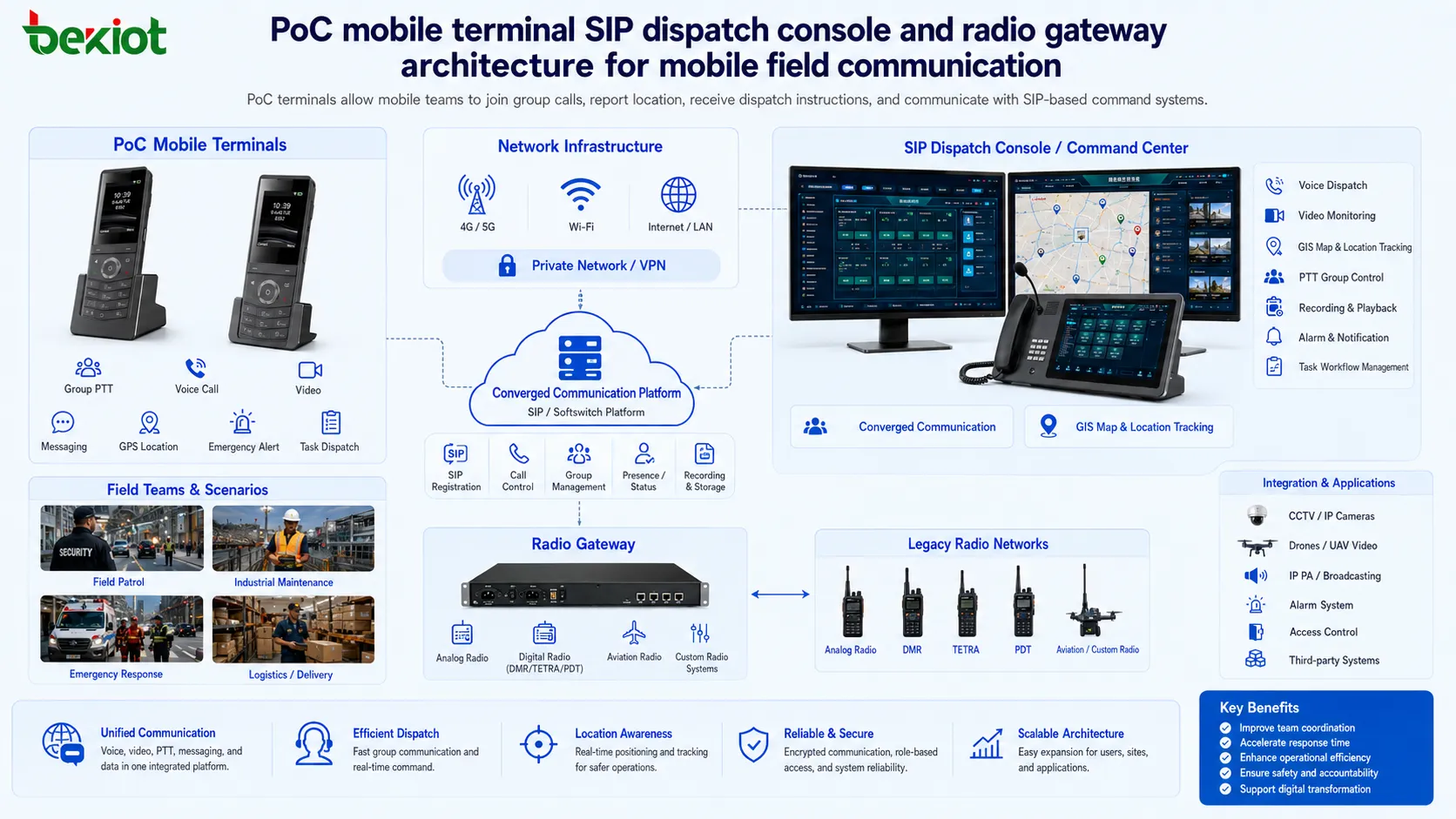
Push-to-talk over cellular, often called PoC, is one of the most useful functions for mobile operation. Traditional two-way radios are still widely used, but they may face coverage limits, frequency licensing requirements, private network construction costs, and distance restrictions. PoC uses mobile data networks and smart terminals to provide radio-like group communication over public or private wireless networks.
With rugged mobile terminals and PoC applications, field users can press to talk, join groups, receive dispatch calls, send messages, report location, and communicate with the command center. Modern industrial terminal supply chains are mature, covering entry-level, mid-range, and high-end devices. Data traffic costs are also relatively low in many IoT and industry scenarios, making PoC suitable for security patrols, maintenance teams, logistics, emergency response, and multi-site field operation.
For organizations that build their own PoC platform, the benefit is stronger control. They can manage users, groups, call permissions, recording rules, dispatch policies, emergency contacts, and integration with internal systems. This is different from relying only on a third-party public intercom service where management flexibility may be limited.
Unified Voice, Video, and Dispatch Workflows
Voice calling is the foundation. Users can communicate between mobile apps, SIP IP phones, IP intercoms, video phones, dispatch consoles, gateway-connected radios, and other registered terminals. This supports office communication, control room coordination, field reporting, emergency calling, and cross-department communication.
Video calling adds visual confirmation. A video phone, SIP video intercom, mobile app, or rugged smart terminal can provide real-time visual communication between the command center and on-site personnel. For mobile users, video communication can continue while they are moving, which helps dispatchers understand field conditions more clearly.
Audio dispatch is another core function. The dispatch console can display online users, terminal status, groups, departments, and device categories. Operators can select one user, multiple users, or an entire group to start a dispatch call. In transportation, industrial plants, public safety, utilities, campuses, and emergency management, this helps command instructions reach the right people quickly.
GIS-Based Coordination and Resource Visibility
GIS dispatch uses electronic maps and GPS positioning to show the real-time location of mobile terminals, vehicles, patrol staff, maintenance teams, and emergency responders. Dispatchers can view positions, movement tracks, nearby resources, and team distribution directly on the map.
This makes coordination more visual. Instead of only asking where a team is located, the dispatcher can see the location, select nearby users, create a temporary group, start a call from the map, or send instructions to users in a specific area. For emergency response and industrial safety, this can shorten reaction time and improve situational awareness.
Some projects also use electronic fences, area selection, historical track playback, and map-based resource management. These functions are valuable when organizations need to manage security patrols, vehicle fleets, field maintenance teams, emergency rescue teams, or temporary incident zones.
Rich-Media Instruction Delivery
A converged platform is not limited to voice calls. Dispatchers can send text, images, documents, videos, task instructions, safety notices, route guidance, emergency procedures, and other rich-media content to selected users or groups. This is useful when voice alone is not enough to explain a task.
For example, a maintenance team can receive a site photo, an emergency team can receive a route map, a security group can receive a suspect description, and an industrial operator can receive safety instructions before entering a restricted area. These rich-media instructions help reduce misunderstanding and provide clearer execution details.
When combined with recording and logs, instruction dispatch also improves traceability. Managers can check what was sent, who received it, when it was sent, and whether the related communication records support the incident timeline.
Broadcasting and Emergency Notification
IP broadcasting allows the platform to send live announcements, recorded messages, emergency warnings, or scheduled notices to selected terminals, zones, or public address systems. When connected with paging gateways, amplifiers, SIP speakers, industrial horns, alarm columns, or PA systems, the platform can extend from person-to-person communication to area-wide notification.
In daily operation, broadcasting can be used for shift notices, production reminders, visitor guidance, safety training, and routine announcements. During emergencies, it can deliver evacuation instructions, hazard warnings, emergency response commands, or multi-zone notification messages.
This is especially useful in industrial facilities, campuses, transportation hubs, energy sites, tunnels, ports, airports, and public buildings where both routine broadcasting and urgent alerts are required. A unified platform allows the operator to coordinate voice calls, dispatch groups, map users, and broadcast messages from one workspace.
Recording, Logging, and Operational Review
Recording and logging are important for command management. The system can keep call records, dispatch logs, audio recordings, video recordings, instruction records, broadcast records, and operation history. These records help organizations review communication quality, verify command execution, and reconstruct incident timelines.
For security, emergency management, industrial production, and public service environments, traceability is often as important as communication itself. After an incident, supervisors may need to know who called whom, what instruction was issued, when a broadcast was played, which users participated, and whether the response process followed the required procedure.
Recording also supports training and quality improvement. Teams can review typical cases, identify delayed responses, improve dispatch workflows, and refine emergency plans based on real communication data.
Private Radio Network Integration
Many organizations already use private radio systems, including analog radio, DMR, TETRA, PDT, aviation radio, shortwave radio, or other mission communication networks. These systems are valuable because they are reliable in field operation, but they are often isolated from IP phones, mobile apps, command software, and video systems.
Through a radio gateway, radio audio and signaling can be connected to the IP communication platform. In some deployments, gateways connect to analog radios through aviation connectors and convert radio communication into SIP-accessible resources. This allows dispatchers to talk with radio users from the same console used for SIP phones and mobile terminals.
This integration is useful when organizations want to preserve existing radio investment while adding IP dispatch, recording, mobile communication, and command-center management. It creates a bridge between traditional private radio and modern IP communication.
CCTV and Drone Video Access
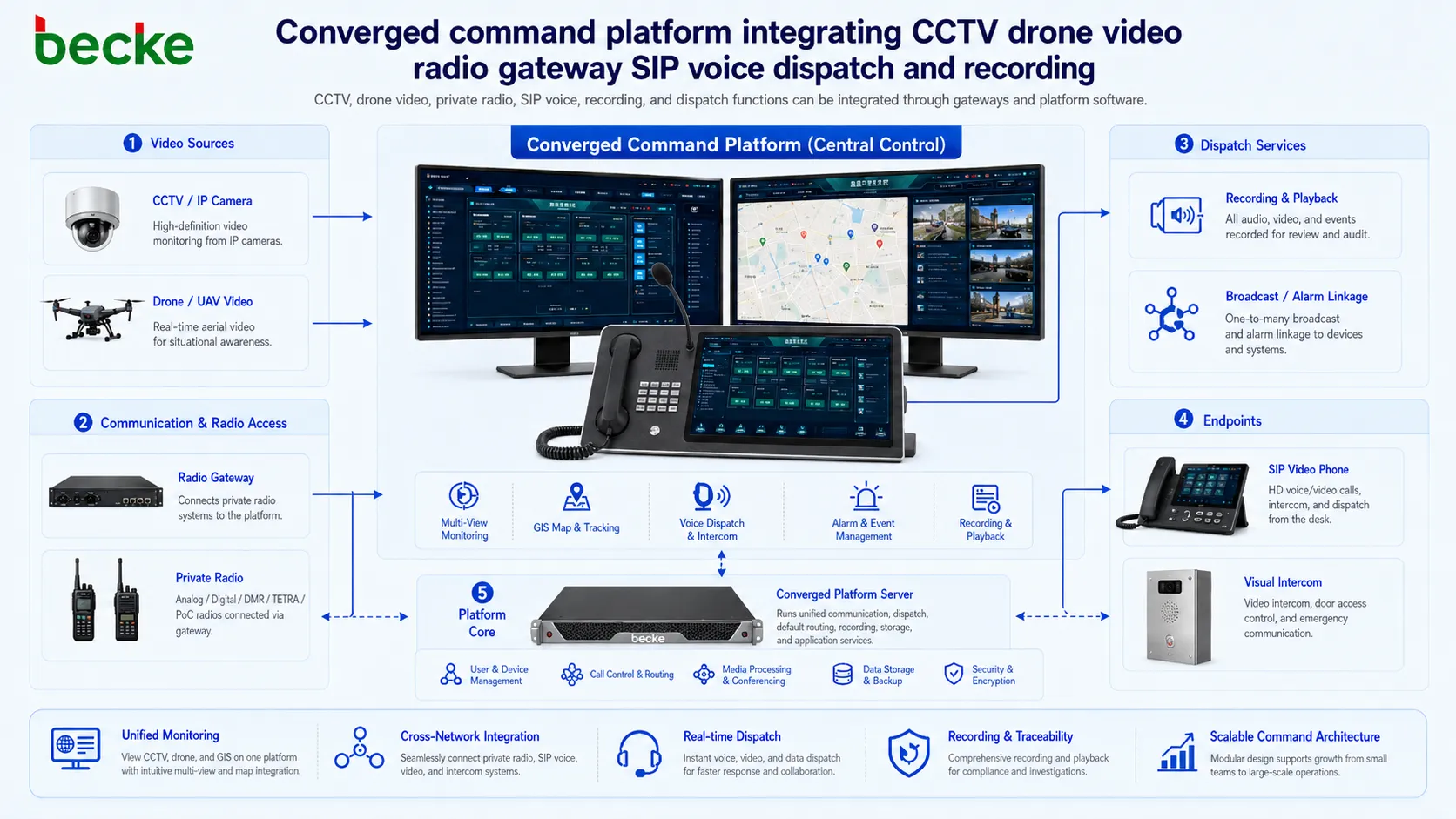
Video monitoring integration can bring CCTV camera streams into the command platform. Dispatchers and authorized users can view live monitoring images, combine voice dispatch with video verification, and share video resources when handling an event. This improves situational awareness compared with voice reports alone.
Drone video can also be integrated through dedicated video gateway devices. A drone video gateway can receive video through HDMI or Wi-Fi and register to the communication platform through SIP. The command center can then view drone images while maintaining two-way voice communication with the drone pilot or field team.
This is valuable in emergency rescue, fire response, flood control, large event security, industrial inspection, forest protection, traffic accidents, and disaster coordination. Drone video gives the command center a wider field view, while the communication platform keeps voice, video, recording, and dispatch together.
Typical Deployment Scenarios
A simple deployment may include one server, several SIP phones, a dispatch console, mobile PoC users, and basic recording. A larger deployment may include GIS dispatch, video calls, IP broadcasting, radio gateways, CCTV integration, drone video access, multi-site networking, and emergency workflow management.
Typical application scenarios include industrial parks, chemical plants, mines, power facilities, rail transit, highways, airports, ports, campuses, hospitals, government emergency departments, logistics centers, public safety teams, and large commercial complexes. These environments usually require both daily communication and emergency coordination.
The main value is flexibility. Organizations can start with the most urgent communication needs and expand step by step. Existing radios, cameras, PA systems, SIP terminals, mobile devices, and command applications can be integrated gradually through suitable interfaces and gateways.
Recommended System Components
Communication Server
The communication server provides SIP registration, call control, media processing, user management, group management, recording, dispatch control, and integration interfaces. It can be deployed on a local server, private cloud, or cloud host depending on project requirements.
Dispatch Console
The dispatch console is the main working interface for operators. It can support voice calls, group calls, video calls, GIS positioning, instruction dispatch, broadcasting, monitoring access, recording query, and incident coordination.
Terminal Devices
Terminal devices may include SIP phones, video phones, SIP intercoms, rugged PoC terminals, mobile apps, industrial telephones, emergency phones, operator workstations, speakers, alarm endpoints, and field communication devices.
Integration Gateways
Gateways connect the platform with radio systems, CCTV systems, public address systems, drones, PSTN lines, analog devices, and third-party platforms. They are often the key to building a practical system without replacing all existing infrastructure.
Deployment Planning Considerations
Before deployment, the project team should define user groups, communication hierarchy, dispatch permissions, emergency workflows, endpoint types, network conditions, recording requirements, and third-party integration boundaries. This helps avoid building a system that has many functions but does not match the actual operation process.
Network reliability should also be evaluated. For critical sites, the system should consider redundant network paths, backup power, server redundancy, secure remote access, recording storage, and failover strategy. For mobile users, 4G or 5G coverage, terminal battery life, data usage, and field signal quality should be tested in real working areas.
A well-planned converged communication system does not simply put many devices together. It creates a coordinated workflow where voice, video, location, broadcasting, recording, radio access, monitoring, and emergency command support each other.
FAQ
How should bandwidth be planned when video and dispatch are used together?
Bandwidth should be calculated according to concurrent video sessions, resolution, codec settings, recording needs, remote access requirements, and emergency peak usage. Command centers should reserve extra capacity for unexpected incidents.
Can different departments share the same system without interfering with each other?
Yes. Users can be separated by department, role, permission, region, group, or duty level. This allows security, maintenance, management, emergency response, and operation teams to use the same platform with different access rights.
What should be tested before project acceptance?
Testing should include SIP registration, call quality, group dispatch, PoC communication, video calling, GIS location accuracy, broadcast playback, recording review, gateway interoperability, permission control, failover behavior, and mobile network performance.
How can the system be expanded in the future?
The project should reserve SIP account capacity, server resources, storage space, network bandwidth, gateway interfaces, and API integration options. A modular architecture makes it easier to add new terminals, radio channels, camera resources, dispatch seats, or remote sites later.







