


Education authorities are responsible for managing many schools across different areas. As campus safety, student protection, teaching supervision, and standardized school management become more important, relying only on manual inspections is no longer efficient enough. On-site patrols take time, consume manpower, and cannot provide continuous visibility across every campus, building, entrance, playground, dormitory, corridor, and key public area.
An education bureau video networking and monitoring solution connects existing school surveillance resources into a centralized platform. It allows authorized management teams to conduct remote video patrols, view real-time campus conditions, identify potential safety risks, and coordinate follow-up actions more quickly. The goal is not to replace every existing camera system, but to integrate distributed school video resources into one manageable, scalable, and secure visual management system.
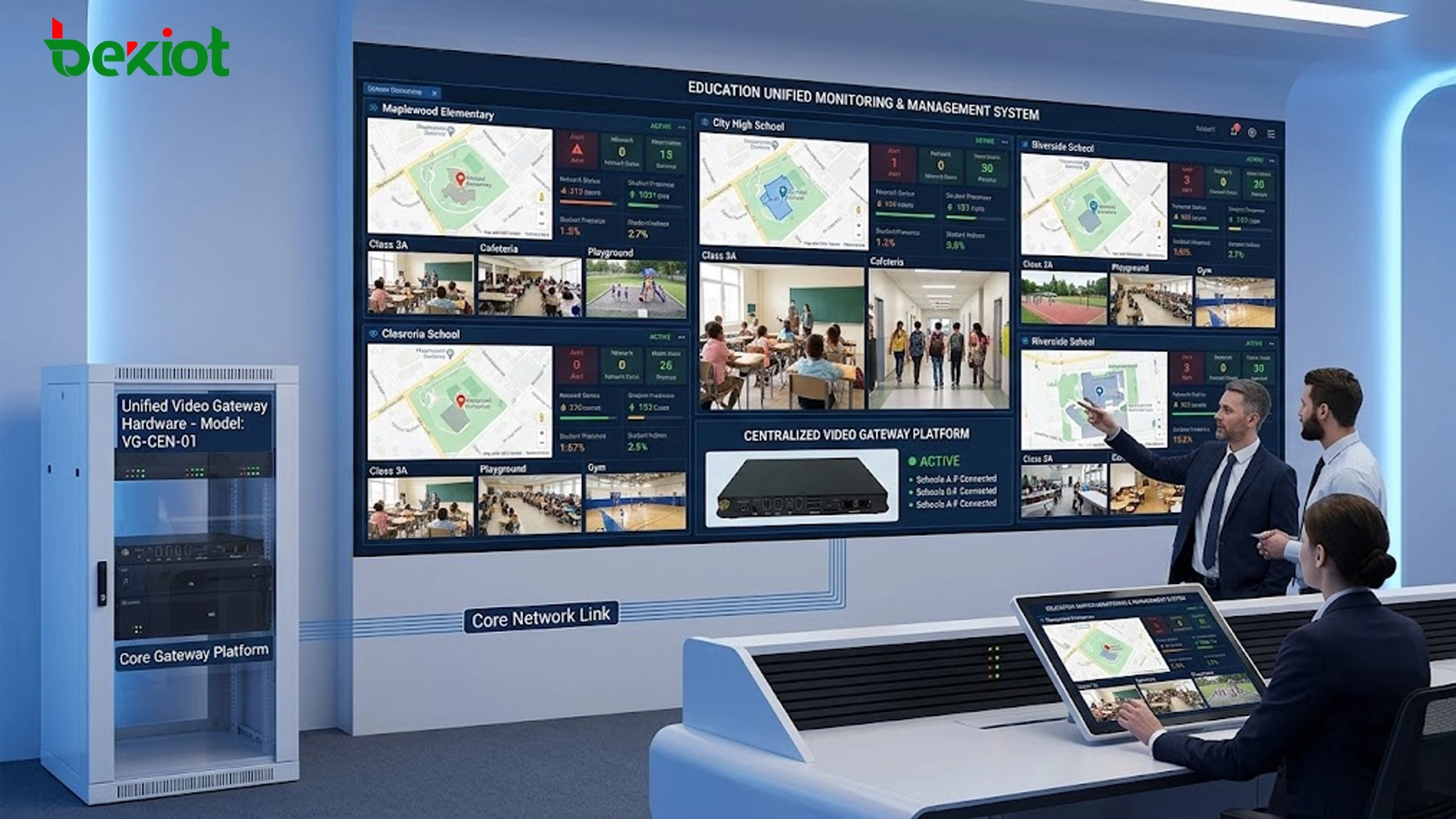
The Need for Centralized Campus Visibility
Many schools have already built their own video surveillance systems. However, these systems are often managed independently by each campus. For an education bureau, this creates several challenges: video resources are scattered, permissions are difficult to coordinate, remote inspection is inconvenient, and management teams cannot easily view campus conditions from a unified interface.
By networking school video systems, education authorities can move from passive reporting to active supervision. Remote video patrols make it possible to check key campus areas without sending staff to every site. When abnormal situations appear, managers can quickly verify the scene, contact the responsible school, and coordinate safety handling or emergency response.
This approach is especially useful for student safety protection, campus order management, teaching environment inspection, entrance and exit supervision, emergency handling, and routine education management. It helps improve daily governance while reducing the workload of repeated on-site inspections.
Reusing Existing School Surveillance Resources
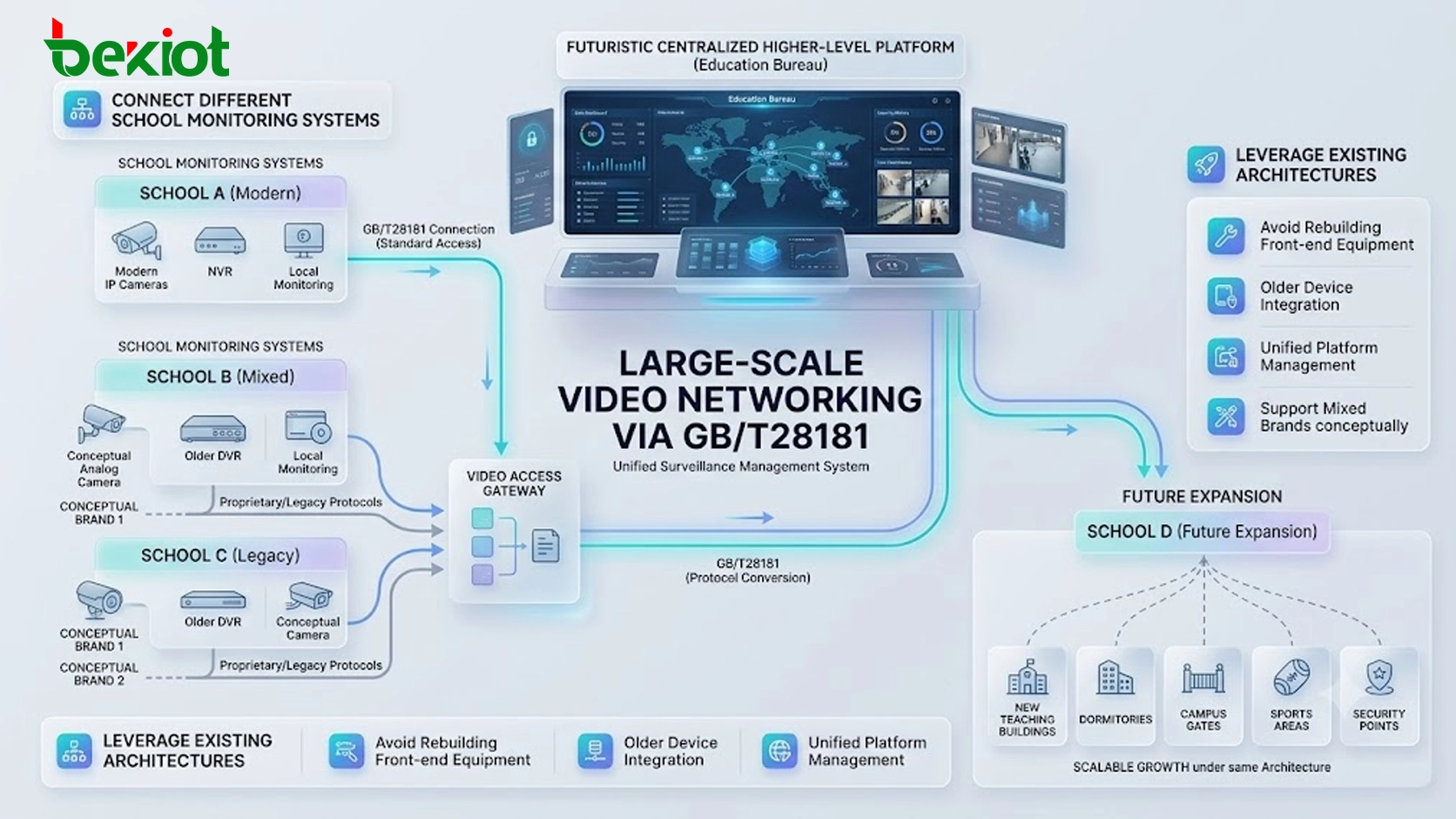
A practical solution should avoid unnecessary reconstruction. Most schools already have cameras, network video recorders, monitoring rooms, and local management systems. The video networking platform should connect these existing resources while keeping the original school-side surveillance architecture largely unchanged.
Through standard video access, the education bureau can aggregate school video streams into a central platform. This reduces repeated investment and allows each school to continue using its original monitoring system. The bureau gains remote viewing and unified management capability, while the school keeps its local recording, device management, and daily monitoring workflow.
In this model, video storage can remain inside the school’s existing recorder or local storage system. The central platform does not need to store all video continuously. It can pull live video or required recordings according to management needs. This helps reduce central storage pressure and lowers overall construction and operation costs.
Standard Access Through GB/T28181
To support large-scale video networking, the system should use standard protocol access. GB/T28181 is widely used for video surveillance networking and is suitable for connecting different school monitoring systems into one higher-level platform.
Most modern surveillance platforms and devices can support GB/T28181. For systems that do not support the standard directly, a video access gateway can be used to convert and integrate video resources. This ensures that older devices, different camera brands, and independent campus systems can still be connected without forcing schools to rebuild all front-end equipment.
Standardized access also supports future expansion. As more schools, campuses, teaching buildings, dormitories, gates, sports areas, and security points are added, the education bureau can continue to expand the system under the same networking architecture.
Unified Management for Schools and Authorities
After cameras are connected to the platform, the education bureau can manage video resources by school, campus, region, building, department, or responsibility area. Authorized users can view live video, search devices, open multiple camera windows through a web interface, and output important video feeds to a dispatch center screen or command display.
Permission management is a key part of the solution. Different users should only access the video resources they are authorized to view. For example, bureau-level administrators may view multiple schools, while school-level users may only manage their own campus cameras. This protects privacy, improves management order, and avoids uncontrolled video access.
The platform should also support device status monitoring, video resource grouping, alarm display, account management, operation logs, and basic maintenance functions. These capabilities help the education bureau build a long-term video governance mechanism instead of only creating a temporary viewing system.
Multi-Protocol Output for Smart Education Systems
Campus video resources are not only used for monitoring. They may also need to serve smart education platforms, smart campus systems, campus safety platforms, emergency command systems, large-screen displays, mobile applications, and third-party business systems.
For this reason, the video networking platform should support flexible stream output. Common output formats can include FLV, HLS, RTMP, RTSP, SIP, and WebRTC. These protocols make it easier to integrate video into web dashboards, mobile clients, command centers, dispatch systems, and real-time communication platforms.
Multi-protocol output reduces the pressure on each school to connect separately with different business systems. Instead, the education bureau can centrally allocate video resources, manage access permissions, and provide standardized video services to authorized applications. This improves both system control and campus data security.
Scalable Architecture for Large Camera Access
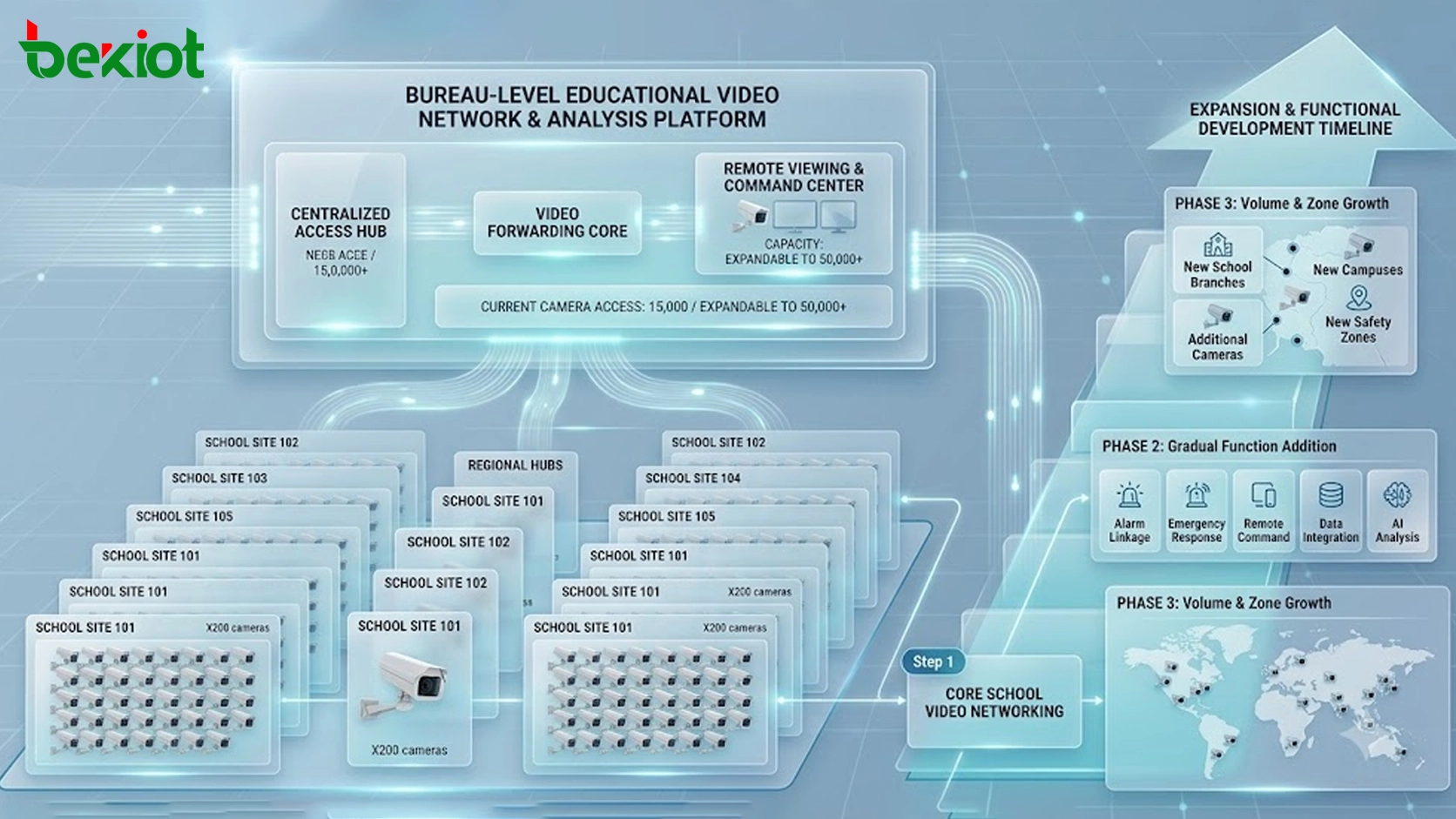
A bureau-level platform must be designed for scale. A single education authority may need to connect cameras from many schools, and the number of video points can continue to grow over time. Therefore, the system should support high-capacity access and smooth expansion.
In a typical large-scale design, the platform should be able to support tens of thousands of camera access points. This capacity is important because school video resources are often distributed across many campuses and locations. As the project develops, additional cameras, campuses, school branches, and new safety zones may need to be included.
Scalable deployment also means that the system can expand by capacity or function. Project teams can begin with core school video networking, then gradually add video forwarding, alarm linkage, emergency response, remote command, data integration, and intelligent analysis according to management needs.
Campus Safety and Emergency Linkage
A video networking platform can become more valuable when it is integrated with campus safety systems. In addition to surveillance cameras, the platform can be extended to connect emergency help systems, campus broadcasting, security intercom, fire alarms, intrusion alarms, and other safety-related systems.
When an emergency event occurs, video can provide immediate scene verification. For example, when an alarm is triggered, the platform can display related camera images, help staff understand the situation, and support faster decision-making. If the system is connected with broadcasting or intercom resources, safety reminders and emergency instructions can also be delivered to specific areas.
This kind of integration helps move campus safety management from separate systems to coordinated response. Video, alarms, communication, broadcasting, and emergency workflows can work together to improve response speed and reduce the risk of delayed handling.
Cost Control and Practical Deployment
One of the most important values of this solution is cost control. Since the platform can reuse existing school cameras, local recorders, and monitoring systems, schools do not need to rebuild their entire surveillance infrastructure. The education bureau can deploy the central video platform and connect school resources through available network links.
Keeping video storage at the school side can also reduce central storage investment. The bureau mainly performs remote viewing, inspection, resource allocation, and management. Centralized storage can be reserved for key cameras, important events, or special management requirements rather than being applied to every stream by default.
This deployment logic makes the solution more suitable for phased construction. The project can first connect priority schools or key safety areas, then gradually expand to more campuses and more application scenarios.
Long-Term Value for Education Management
A unified video networking solution gives education authorities a more direct way to understand campus operations. It improves visibility, reduces manual inspection pressure, supports safety supervision, and provides video support for emergency response.
For schools, the solution does not interrupt existing monitoring workflows. Local video systems can continue to operate, while the bureau gains the ability to supervise, coordinate, and support multiple campuses from a higher level. This creates a more efficient management structure between schools and education authorities.
For future smart campus development, the platform can serve as a video resource foundation. Once video access, permission control, stream output, and system integration are standardized, it becomes easier to connect with smart education, campus safety, emergency command, data visualization, and AI-based analysis systems.
Conclusion
An education bureau video networking and monitoring solution provides a practical way to connect distributed school surveillance systems into one centralized management platform. By reusing existing school video resources, supporting GB/T28181 access, enabling web-based remote viewing, providing multi-protocol stream output, and keeping local storage where appropriate, the solution balances management efficiency, system compatibility, and construction cost.
The core value is not only video access. It is the ability to build a unified visual management layer for campus safety, remote supervision, emergency response, and smart education integration. With scalable architecture and standardized protocols, the platform can support tens of thousands of camera access points and continue expanding as campus management needs evolve.
FAQ
Does the solution require every school to replace its cameras?
No. The preferred approach is to reuse existing school cameras and monitoring systems. Standard protocol access or video gateways can be used to connect different systems to the central platform.
Can the education bureau control which users can view specific cameras?
Yes. The platform should support role-based permissions, school-based resource grouping, account management, and operation logs so that each user only accesses authorized video resources.
Why should video storage remain at the school side in many projects?
Local storage helps reduce central storage pressure and construction cost. The bureau can still view live video or request recordings when needed, while schools continue using their existing recording equipment.
Can campus video be connected to web platforms or mobile applications?
Yes. With output formats such as FLV, HLS, RTMP, RTSP, SIP, and WebRTC, video streams can be integrated into web dashboards, mobile clients, command systems, and smart campus applications.
How can the system support future campus safety upgrades?
The platform can reserve interfaces for emergency help systems, broadcasting, intercom, fire alarms, intrusion alarms, AI analysis, and command platforms. This allows video resources to support broader safety and management applications over time.







