


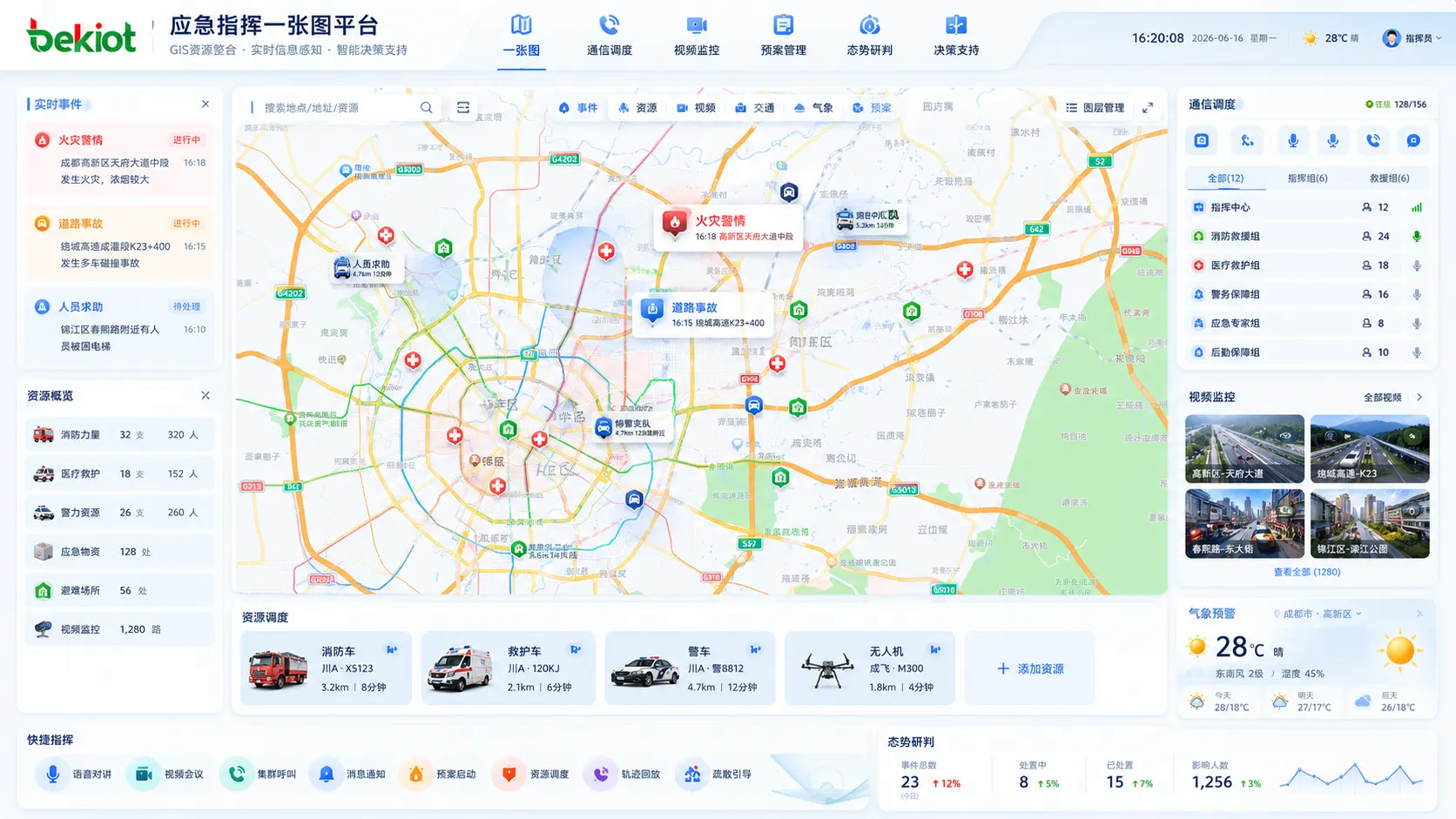
In many emergency command projects, the phrase one-map command platform is frequently used in system design, project requirements, and command center planning. It does not simply mean placing a map on a large screen. A real one-map solution should integrate GIS, real-time data, emergency resources, communication systems, video resources, emergency plans, and decision-support tools into one visual operating interface.
Emergency command is a complex system that needs to coordinate people, resources, events, communication, and decisions under time pressure. Therefore, the one-map platform should help commanders see what is happening, where it is happening, what resources are available, who can respond, which risks may expand, and how actions should be coordinated. Its core value is to make information visible, command faster, and collaboration easier.
A Visual Foundation for Emergency Operations
The foundation of a one-map solution is geographic information. In emergency command, location is always one of the most important elements. The platform should display administrative areas, mountains, rivers, lakes, buildings, roads, bridges, key facilities, and important surrounding environments. These geographic layers help commanders understand the physical relationship between an incident, nearby resources, and possible response routes.
Depending on the project requirements, the map can be built with public maps, high-precision maps, or 3D model-based maps. Public maps are suitable for general overview and wide-area display. High-precision maps are useful when the project needs more accurate road, building, and facility information. 3D maps can be used for complex environments such as industrial parks, urban command centers, large venues, campuses, airports, stations, and key infrastructure areas.
The map should not only be static. It should support dynamic display and real-time updates. When combined with IoT devices, video monitoring, communication systems, and event reporting, the map becomes a live command interface rather than a simple background image.
Key Facilities and Emergency Resources
A practical one-map platform must clearly display key facilities and emergency resources. These may include rescue team locations, medical facilities, shelters, supply warehouses, emergency material reserves, command points, duty stations, water sources, traffic checkpoints, and temporary assembly areas.
Important facilities should also be marked and classified. Schools, hospitals, government buildings, power stations, water plants, chemical plants, transportation hubs, reservoirs, tunnels, bridges, and industrial facilities may require different levels of protection and emergency handling. During an incident, these points help commanders evaluate evacuation needs, protection priorities, rescue feasibility, and resource allocation.
Resource visibility is one of the major advantages of a one-map system. Instead of checking several separate systems or spreadsheets, commanders can directly view resource locations and status on the map. This supports faster dispatching of rescue teams, equipment, vehicles, supplies, and communication personnel.
Real-Time Data for Situation Awareness
Real-time data is a key basis for emergency analysis and decision-making. A one-map platform should be able to display changing information that affects the incident and response strategy. Common data categories include weather information, event reports, traffic conditions, facility status, personnel location, video status, and alarm information.
Weather information may include wind speed, rainfall, temperature, and other live meteorological data. This is important for flood control, fire response, chemical leakage, outdoor rescue, and severe weather emergencies. Event reports may include accidents, natural disasters, public safety incidents, infrastructure failures, and other near-real-time incident information.
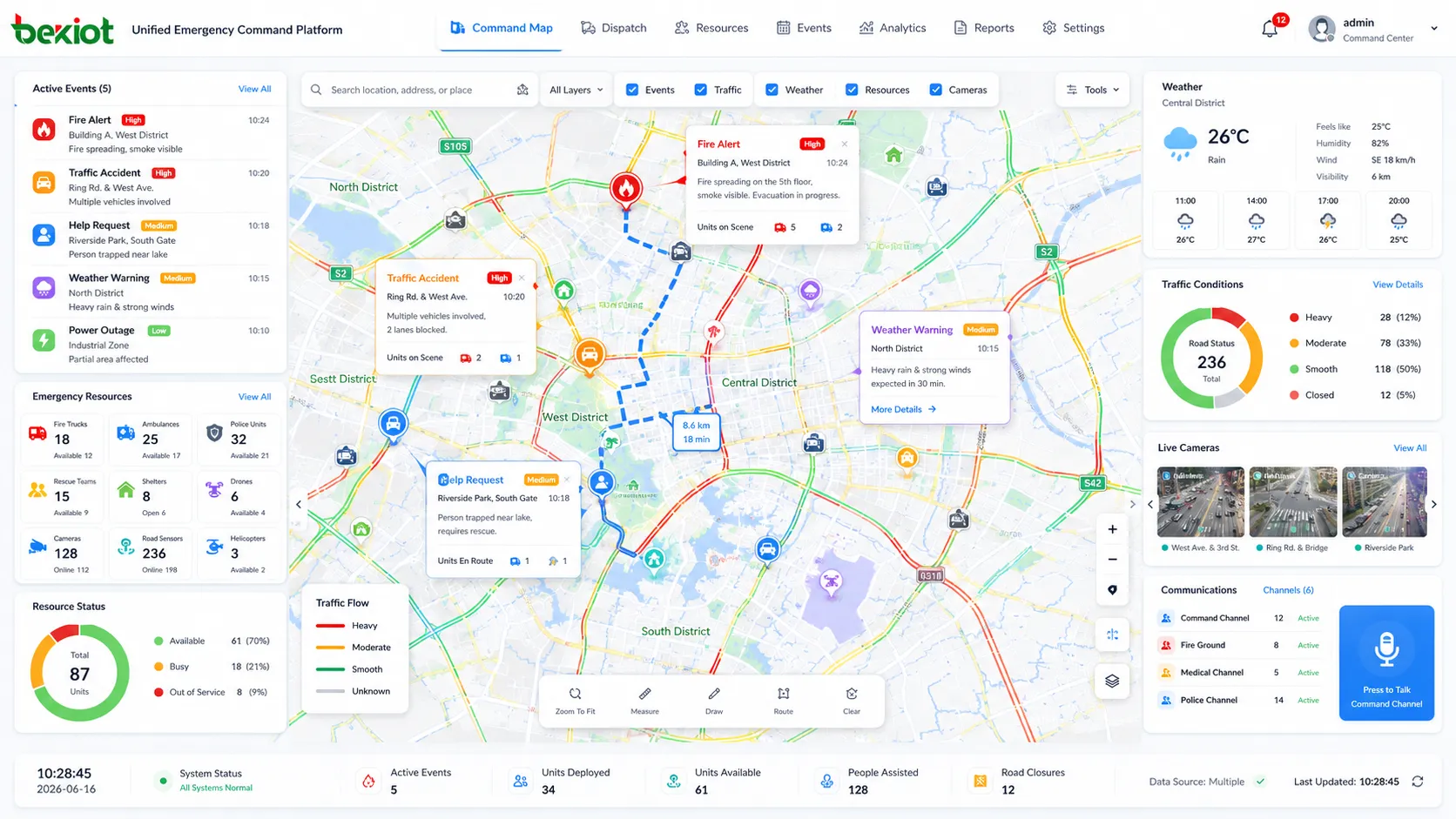
Traffic data is also important. Road congestion, accidents, road closures, bridge restrictions, and route availability may directly affect rescue efficiency. When traffic status is displayed on the map, commanders can choose better routes for rescue teams, evacuation vehicles, and emergency material delivery.
Plans, Dispatching, and Evacuation Guidance
Emergency response is not only about viewing information. The platform should also support action. A one-map solution should connect emergency plans, operating procedures, resource dispatching, personnel evacuation, and response workflows. Once an emergency plan is started, related resources, responsible teams, key areas, and response steps should be displayed clearly.
Emergency plans may include response procedures for different types of incidents, such as fire, flood, hazardous material leakage, public safety events, transportation accidents, power failures, and natural disasters. These plans provide commanders with operational guidance and reduce confusion during urgent situations.
Resource dispatching should show which rescue teams, vehicles, materials, and communication devices can be assigned to the event. Evacuation guidance should display safe routes, dangerous areas, temporary shelters, assembly points, and traffic control information. This allows the command center to coordinate rescue, evacuation, and protection measures more efficiently.
Communication and Collaboration on the Map
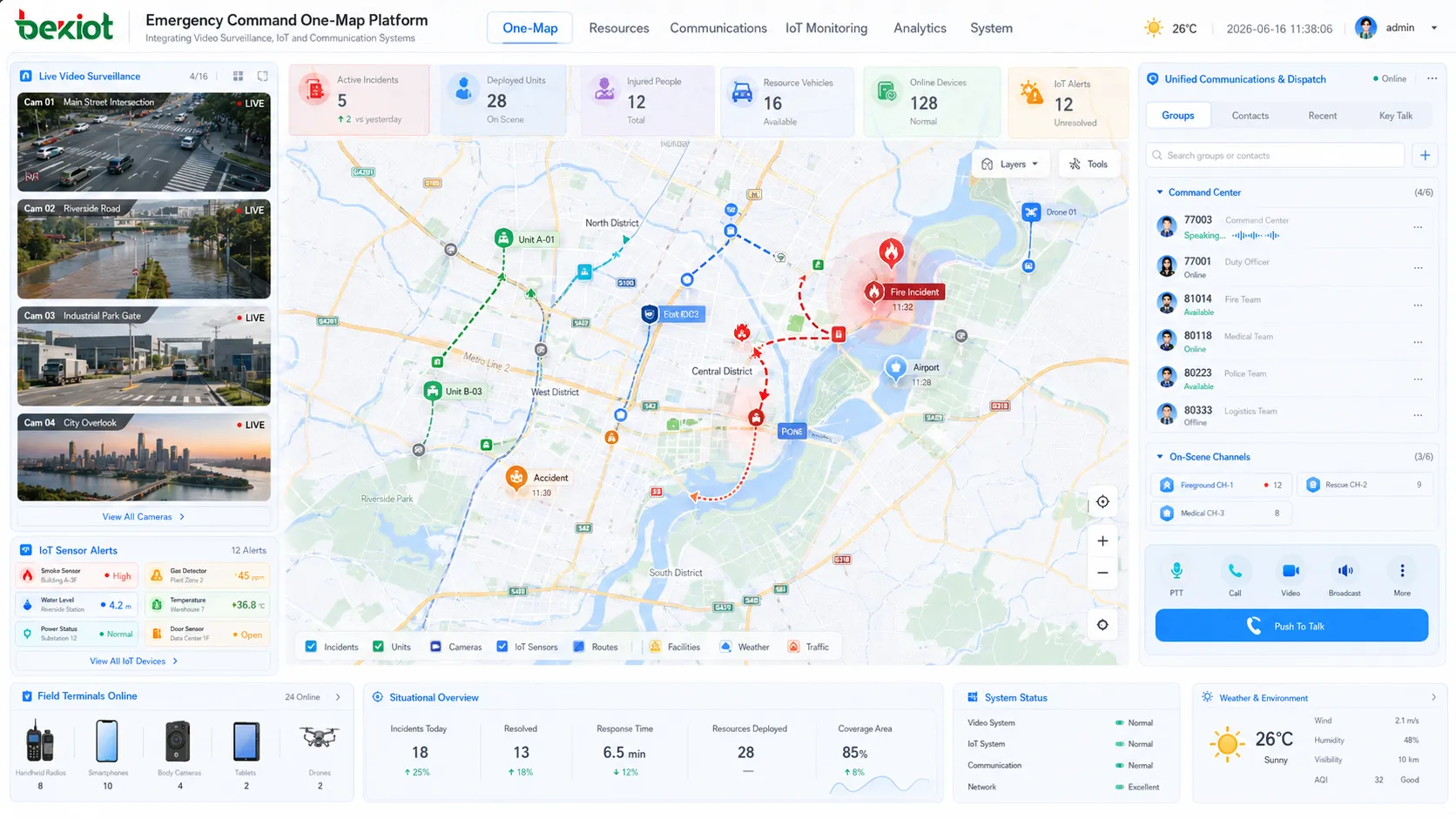
Communication is one of the most important capabilities behind a successful one-map platform. The system should not only display resources, but also help commanders contact people and coordinate actions. Communication resources may include dispatch consoles, telephones, radios, intercom systems, video conferencing, mobile terminals, video surveillance, body cameras, drones, and field communication devices.
The platform can show the communication equipment assigned to teams or personnel, allowing commanders to start voice dispatch, group calling, integrated intercom, phone conferencing, video conferencing, or video collaboration from the command interface. This helps reduce the gap between “seeing the event” and “taking action.”
In system integration, communication platforms, video gateways, radio gateways, conferencing systems, and video fusion services can be connected through standard interfaces and APIs. Web-based interaction technologies can also be used to embed voice, video, monitoring, and field resources into the map interface, making the one-map platform more practical for real command operations.
Video Resources and IoT Linkage
Video is a critical information source in emergency command. A one-map solution should be able to connect fixed cameras, mobile video terminals, body-worn cameras, vehicle-mounted cameras, drones, temporary monitoring devices, and third-party surveillance platforms. When an event occurs, operators should be able to open nearby video resources directly from the map.
Video linkage helps verify the scene, reduce uncertainty, and support faster decision-making. For example, when an alarm is triggered, the platform can display the related location and provide nearby camera access. When a rescue team arrives at the scene, mobile video can be displayed on the command map to provide live situational feedback.
IoT devices can further enrich the one-map system. Sensors for water level, gas, smoke, temperature, wind speed, rainfall, power status, equipment status, and access control can provide real-time operational data. When these data sources are combined with video and communication, the command platform becomes more complete and reliable.
Analysis and Decision Support
A one-map platform should also support analysis and decision-making. Risk assessment can be based on current data, predicted trends, affected areas, nearby facilities, weather conditions, traffic routes, and available resources. This helps commanders judge the possible impact of an event and choose a more suitable response strategy.
Scenario simulation can also be useful in some projects. By simulating different response strategies, the platform can help evaluate possible outcomes, such as evacuation route pressure, rescue coverage, resource shortage, affected population, or expansion risk. These tools help move emergency command from simple display to assisted decision-making.
The quality of decision support depends on data integration. If maps, resources, communication, video, plans, and real-time events are managed separately, commanders may still need to switch between systems. A one-map platform should reduce that fragmentation and present decision information in a more direct way.
Interface Design for Fast Operation
User interaction is an important part of a one-map project. The interface should be visually clear, easy to operate, and suitable for command center use. A beautiful screen alone is not enough. The system must help users quickly locate incidents, open video, contact teams, view resources, start plans, and track progress.
The map view should display different layers of information in a structured way. Users should be able to turn layers on or off according to the task, such as weather, traffic, shelters, rescue teams, cameras, alarms, key facilities, and evacuation routes. This prevents the map from becoming overloaded with too much information.
Data dashboards can show key indicators, statistics, resource status, event progress, and response performance. Together with the map, dashboards help commanders quickly understand the current situation and make operational decisions.
Practical Deployment Architecture
A complete one-map solution usually depends on several supporting systems. The front-end map interface is only the visible layer. Behind it, the system may include GIS services, video access services, communication services, IoT data platforms, emergency plan management, resource databases, alarm systems, user permission systems, and integration interfaces.
The platform should be designed with scalability in mind. In the first phase, the project can focus on basic GIS display, key resource marking, camera access, event reporting, and communication linkage. Later, it can expand to IoT integration, mobile command, drone access, intelligent analysis, multi-department coordination, and scenario simulation.
For long-term operation, the system should also support data maintenance. Resource locations, facility information, contact lists, emergency plans, and map layers must be updated regularly. A one-map platform is only useful when the displayed information reflects the real situation.
Conclusion
An emergency command one-map solution is a unified visual command platform built around GIS, real-time data, communication, video, resources, emergency plans, and decision support. Its purpose is to help command centers understand the situation faster, reach the right people more quickly, dispatch resources more accurately, and coordinate response actions more efficiently.
A practical solution should include geographic information, key facilities, rescue resources, weather data, event reports, traffic status, emergency plans, evacuation routes, communication tools, video resources, IoT data, analysis models, and clear user interaction. More importantly, these capabilities should not be isolated. They should be integrated into one operational workflow so that the command center can move from information display to real emergency response.
FAQ
How should data layers be planned in a one-map platform?
Data layers should be planned by business priority. Basic geography, key facilities, emergency resources, cameras, alarms, traffic, weather, and evacuation routes should be separated into controllable layers so operators can display only the information needed for each task.
What is the biggest risk in one-map project construction?
The biggest risk is building only a visual screen without reliable data and system integration behind it. A one-map platform must connect real systems, real resources, and real workflows to support command operations.
Can a one-map system support mobile command users?
Yes. With proper web or mobile application design, field commanders can view incidents, report information, upload video, check resources, and receive dispatch instructions from mobile terminals.
How often should emergency resource data be updated?
Resource data should be updated whenever personnel, vehicles, materials, facilities, contacts, or response plans change. For critical resources, regular verification should be included in daily management procedures.
Does the platform need 3D visualization from the beginning?
Not always. 3D visualization is useful for complex buildings, parks, airports, stations, and industrial sites, but many projects can start with 2D GIS and expand to 3D when the management scenario requires it.







