


Video transcoding can be divided into offline transcoding and real-time transcoding. Offline transcoding is mainly used to solve playback compatibility problems after a video file has already been recorded. A file is converted into a format that a player, platform, or terminal can support. Real-time transcoding is different. It works on live video sources such as live streaming, video conferencing, surveillance feeds, field cameras, and emergency command video, where the stream must be converted and delivered with low delay.
In practical projects, real-time transcoding adjusts codec format, resolution, frame rate, bitrate, and packaging format so that video can be viewed across different terminals, platforms, and network environments. It helps solve compatibility problems, reduce bandwidth pressure, improve playback stability, and make cross-system video integration easier.
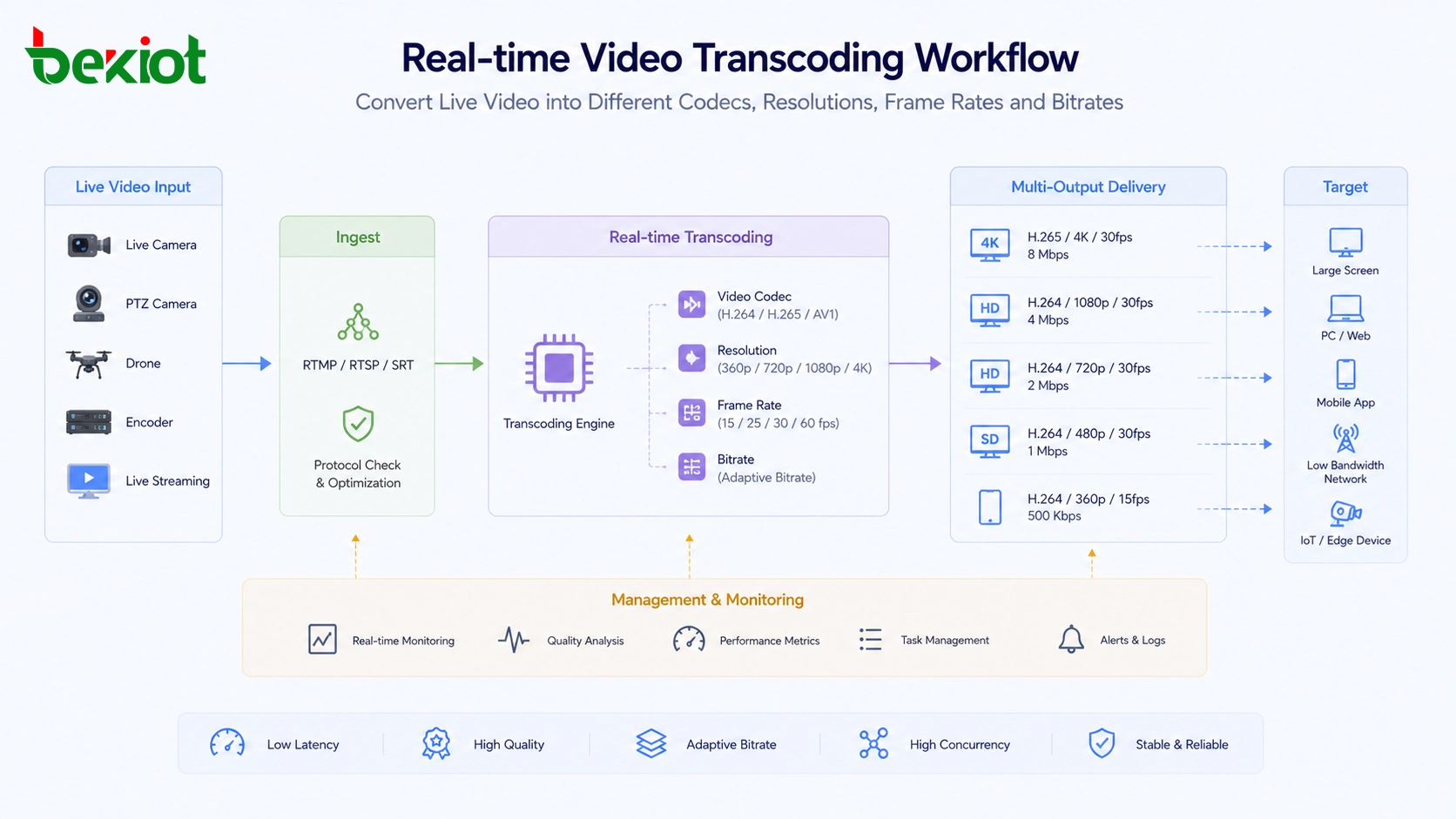
From file conversion to live stream adaptation
Offline transcoding focuses on recorded video files. For example, when a video cannot be played on a certain device or software player, it can be converted into another file format or codec. This process does not require strict real-time performance because the video has already been stored.
Real-time transcoding is used when the video is being generated and transmitted at the same time. Live streaming, video meetings, field command, remote consultation, drone video return, and surveillance platform integration all require video to be converted while the stream is still active. The system must process the incoming video quickly enough to keep playback continuous.
This is why real-time transcoding is more demanding than ordinary file conversion. It must consider codec compatibility, network bandwidth, terminal performance, delay control, stream stability, and integration with different platforms.
Live streaming depends on fast media processing
Live streaming is one of the most common application fields for real-time transcoding. A live platform may receive video from cameras, mobile devices, encoders, studios, or user-generated streams. These streams must often be converted into different resolutions and bitrates so that viewers on phones, tablets, computers, TVs, and web browsers can all play the content smoothly.
Behind a simple live viewing experience, the platform usually needs large-scale media processing resources. GPU-based transcoding is widely used because it can process many live streams efficiently and convert them into multiple output profiles. A high-resolution source stream may be converted into several versions for different network conditions, such as high-definition viewing, standard-definition viewing, and low-bitrate mobile viewing.
The main goal is to keep compatibility and user experience stable. Viewers may use different devices, browsers, operating systems, and network speeds. Real-time transcoding allows the platform to deliver a suitable stream instead of forcing all users to receive the same video format.
Field command needs more than video access
Emergency command is another important application area. In field response scenarios, video sources are often diverse and time-sensitive. A command center may need to access video conferences, body-worn terminals, portable surveillance units, drone footage, fixed cameras, vehicle-mounted cameras, and mobile field devices at the same time.
The return network is also complex. Emergency sites may use 4G/5G, broadband ad hoc networks, satellite networks, wired temporary links, private networks, or mixed transmission paths. These networks have different bandwidth, delay, stability, and coverage conditions. If all video streams are sent back in their original form, the command platform may face high bandwidth pressure, playback failure, delay, or codec incompatibility.
Real-time transcoding helps adapt video to the actual network and platform environment. It can adjust encoding format, frame rate, bitrate, and resolution, then select a more suitable video profile for command center return. For example, drone video can be converted into H.265 when bandwidth is limited, helping deliver better image quality under lower transmission capacity when the receiving system supports it.
Related solution: Becke Emergency Command and Dispatch System
Weak networks require flexible stream control
In emergency response, outdoor operations, remote inspection, mobile command, and temporary deployment, network conditions are rarely ideal. A video stream may pass through public mobile networks, mesh links, satellite channels, or temporary backhaul paths. The available bandwidth may change at any time.
Real-time transcoding gives the system a way to control video load. Instead of sending one fixed stream, the system can lower the bitrate, reduce the resolution, adjust the frame rate, or change the codec according to the network condition. This can help maintain a usable image even when the available bandwidth is limited.
The goal is not always to keep the highest possible resolution. In command scenarios, a stable and continuous image may be more valuable than a high-resolution stream that frequently freezes. Different video sources can also use different strategies. A drone overview may need higher clarity, while a secondary monitoring point may use a lower bitrate to save transmission resources.
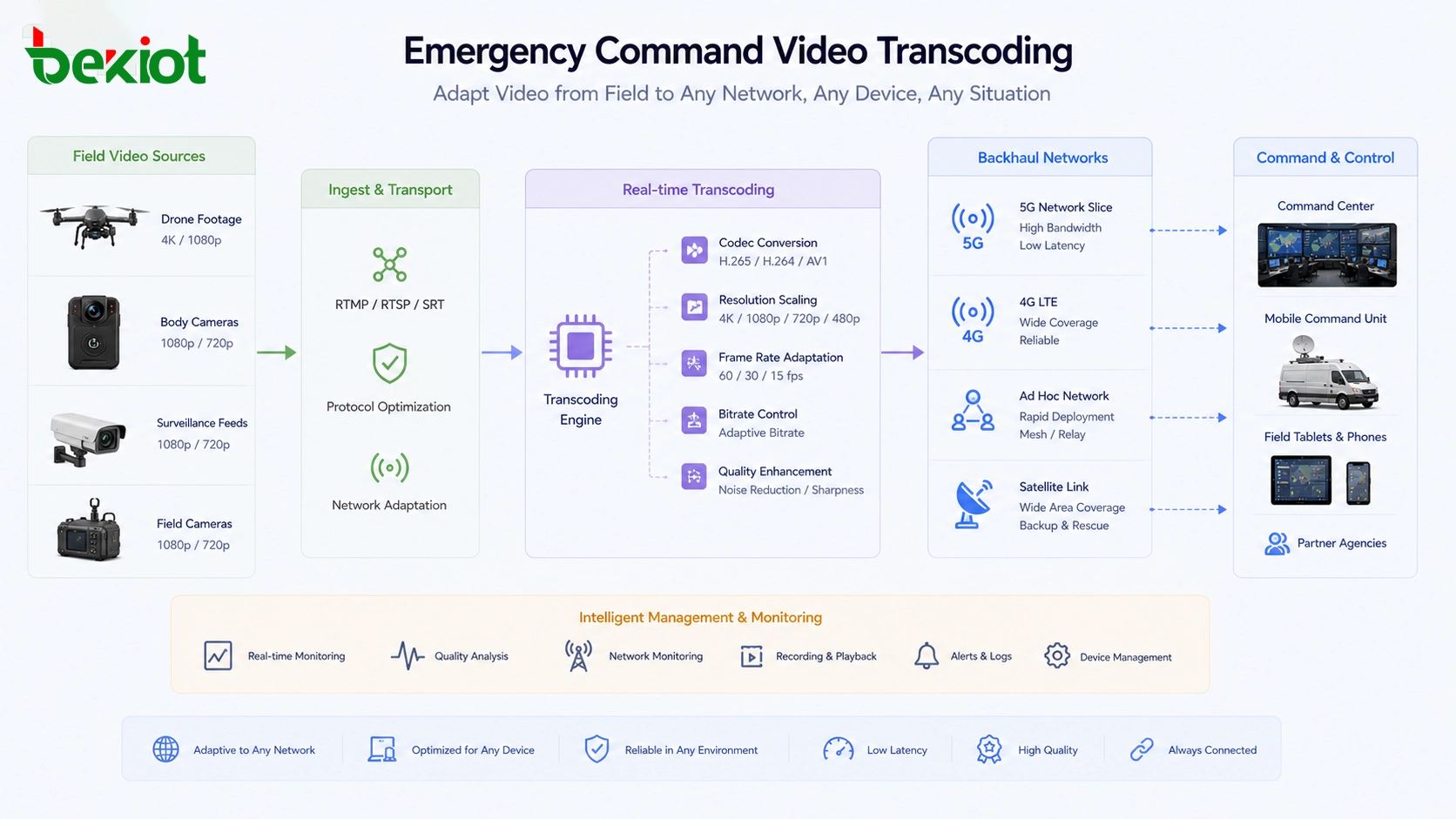
Application development often faces playback barriers
Many business platforms need to integrate video playback into their own software. These platforms may be used for command centers, monitoring dashboards, smart parks, industrial safety, property management, logistics, construction supervision, smart campuses, or city operation centers. The problem is that video sources are not always compatible with the application environment.
Common issues include H.265 video that cannot be played by a browser, oversized streams that exceed system receiving capacity, high-resolution video that cannot be decoded by some terminals, or media formats that do not match the target player. These problems can slow down software development and make video integration difficult.
Real-time transcoding solves these problems by turning different source streams into formats that the business application can use. It can convert H.265 to H.264, reduce stream size, adjust resolution, control frame rate, and provide output formats that are easier for web players, mobile apps, command screens, or third-party systems to display.
Codec conversion improves cross-platform compatibility
H.264 and H.265 are both widely used in video projects, but their compatibility is different. H.264 has broad support across many browsers, terminals, platforms, decoders, and media systems. H.265 can provide better compression efficiency, which means it can often deliver similar image quality at a lower bitrate, but support depends on the receiving device, browser, and platform.
A practical transcoding solution should not assume that one codec is always best. It should select H.264 or H.265 according to the real application scenario. For browser playback, H.264 may be more compatible. For limited-bandwidth field return, H.265 may reduce transmission pressure if the receiving side supports it.
Codec conversion is especially useful in cross-platform projects. Surveillance systems, video conferencing systems, emergency command platforms, web applications, mobile apps, and large-screen display systems may all have different media requirements. Transcoding creates a bridge between these systems.
CPU and GPU approaches fit different workloads
Software transcoding usually uses CPU resources. It is flexible and can be suitable for small-scale projects, development testing, file processing, or limited video conversion needs. However, CPU transcoding can become heavy when processing 4K video or many simultaneous live streams. It also requires engineers to understand transcoding software, media parameters, and performance tuning.
Hardware transcoding usually uses GPU resources or dedicated media acceleration. It can process live video more efficiently and is often used when many streams must be converted at the same time. This method is common in large live streaming platforms and high-performance media processing systems, but it may require higher hardware investment and stronger technical capability for deployment and software integration.
For many project-based scenarios such as emergency command, video platform integration, surveillance access, and business system development, an integrated transcoding appliance or packaged media gateway can reduce deployment complexity. It can combine hardware acceleration, protocol support, stream conversion, interface management, and visual configuration into a more project-friendly form.
A complete media gateway should handle protocols too
Transcoding is not only about changing H.264 and H.265. In real projects, video streams also need to move between different protocols and delivery formats. A surveillance system may use RTSP or GB28181. A live platform may use RTMP or HLS. A browser application may need WebRTC, FLV, or HLS. A command system may need SIP video, SRT, RTP, or other media transport methods.
If the system only changes the codec but cannot convert the access protocol, integration problems may still remain. A practical media gateway should support common streaming and communication protocols such as RTP, RTSP, RTMP, SIP, HLS, FLV, WebRTC, GB28181, and SRT according to project needs.
Protocol support makes real-time transcoding more valuable. It allows one system to receive video from multiple sources, convert media parameters, and output streams to different platforms without rebuilding the original video system.
Visual configuration reduces engineering workload
Traditional transcoding deployment may require command-line operation, software compilation, script configuration, media server tuning, GPU driver setup, and custom development. This can be acceptable for professional media teams, but it increases difficulty for integrators and project delivery teams.
In many engineering projects, fast deployment is more important than building a custom transcoding environment from the ground up. A visual management interface can help engineers configure input sources, output streams, codec type, bitrate, frame rate, resolution, protocol mapping, and access rules without writing large amounts of code.
API control is also useful when the transcoding system needs to work with a business platform. The application can adjust video parameters, start or stop streams, switch output formats, or manage channels according to user actions and project logic.
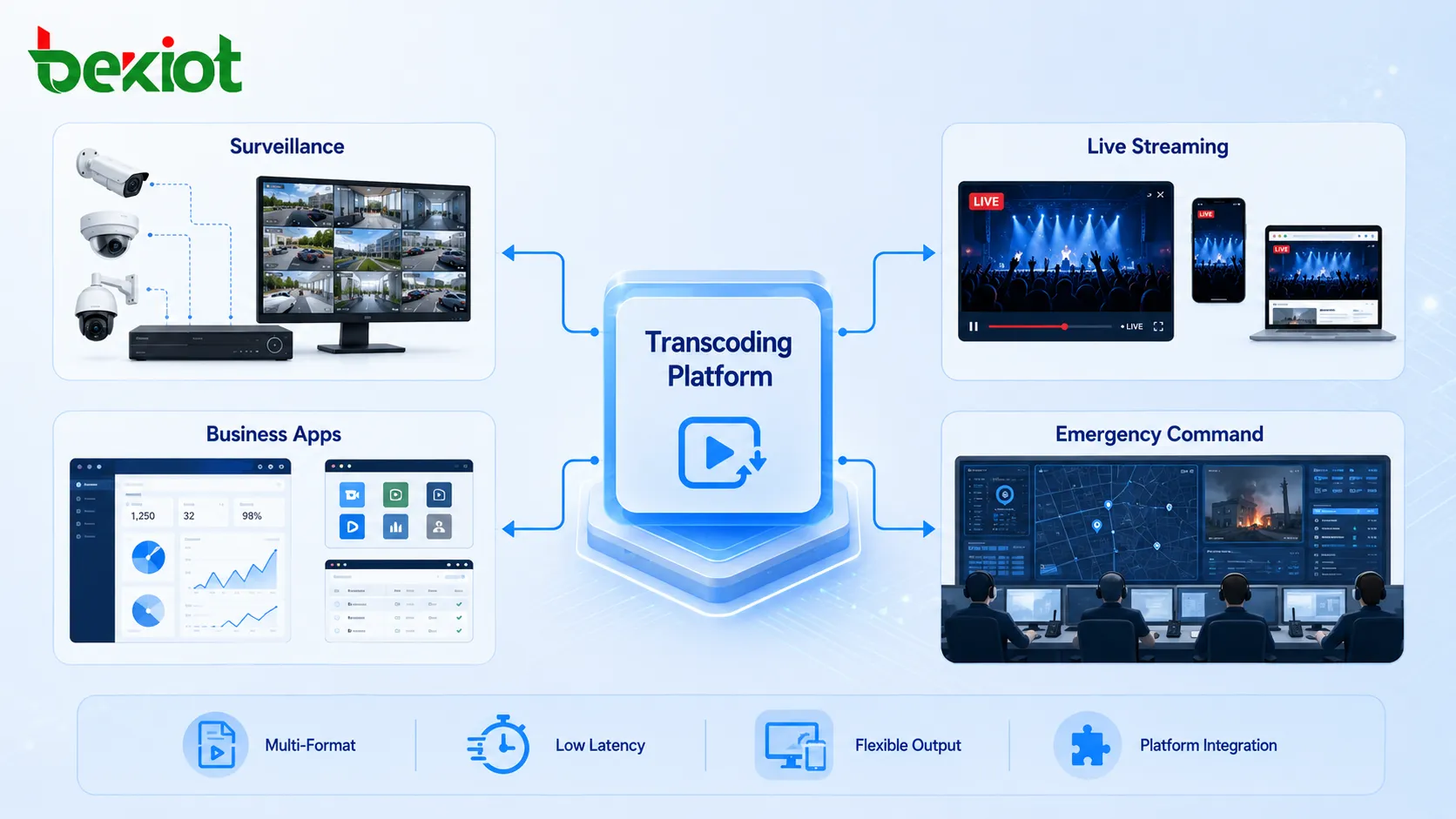
Where this solution creates the most value
Real-time video transcoding is valuable wherever live video needs to cross terminals, networks, systems, and platforms. In live streaming, it improves playback compatibility and user experience across different devices. In emergency command, it helps field video return through complex networks and improves command visibility.
In video business development, it reduces integration barriers caused by codec incompatibility, oversized streams, unsupported players, and different platform formats. In surveillance integration, it allows camera streams to be reused by web applications, command platforms, video conferencing systems, and large-screen display systems.
The wider the system boundary becomes, the more important transcoding becomes. Cross-platform, cross-network, and cross-system projects often need a media conversion layer to reduce technical friction and make the final solution easier to deliver.
Planning points before deployment
Before deploying a real-time transcoding solution, project teams should identify all video sources, source protocols, codecs, resolutions, frame rates, bitrates, target platforms, viewing terminals, and network conditions. This helps define whether the system needs codec conversion, protocol conversion, bitrate control, adaptive output, or multi-format distribution.
The team should also evaluate performance requirements. A small number of low-resolution streams may be handled differently from many high-definition or 4K streams. Delay sensitivity should be considered as well. Live streaming, command dispatch, and remote consultation usually require lower delay than ordinary recording or archive playback.
For emergency command and field response projects, special attention should be paid to unstable network links, satellite backhaul, mobile network congestion, platform compatibility, and command center viewing requirements. The transcoding layer should be tested under real network conditions before large-scale use.
Conclusion
Real-time video transcoding is an important media processing capability for modern video projects. It converts live video streams by adjusting codec format, resolution, frame rate, bitrate, and delivery protocol, allowing video to work across different terminals, platforms, and network environments.
In live streaming, it improves playback compatibility and viewer experience. In emergency command, it supports multi-source field video return over 4G/5G, ad hoc networks, and satellite links. In software development and system integration, it solves codec, protocol, and playback barriers. When combined with visual configuration, API control, and protocol adaptation, real-time transcoding can make video projects easier to deploy, easier to integrate, and more reliable in complex environments.
FAQ
Can real-time transcoding reduce video delay?
Transcoding itself adds processing time, but a well-designed workflow can reduce overall playback problems by matching the stream to the network and terminal. The final delay depends on codec, hardware performance, protocol, buffering strategy, and network quality.
Is H.265 always the best choice for weak-network video?
Not always. H.265 can reduce bandwidth under suitable conditions, but the receiving platform must support it. If compatibility is more important, H.264 may be safer for browser playback, older terminals, or mixed-system projects.
Why do video projects need protocol conversion as well as transcoding?
Codec conversion solves media format issues, while protocol conversion solves system access issues. A stream may have the right codec but still fail if the target platform does not support its delivery protocol.
When is CPU transcoding enough?
CPU transcoding may be enough for small-scale use, testing, limited channels, or lower-resolution streams. For many simultaneous streams, high-definition video, or 4K processing, GPU or dedicated hardware acceleration is usually more practical.
What should be tested before using transcoding in emergency command?
The project should test source access, target platform compatibility, codec support, bitrate settings, frame rate, resolution, network backhaul quality, delay, and stability under field conditions.







